
Find us at booth #83, join us for a harbor side happy hour, or catch Gorish’s talk.

Sept, 16-18 > Learn more

%20(1).avif)
Mamta Tainwala

March 5, 2026
What you'll learn:
Here is a quick scenario that will feel uncomfortably familiar: you just wrapped a 45-minute discovery call. The prospect dropped three golden nuggets about their budget timeline, a competitor they are actively unhappy with, and a hard deadline tied to a board meeting. You told yourself you would log it all later. Then "later" happened, and what made it into your CRM was: "Good call. Following up Thursday."
Sound familiar? You are not alone. The average sales rep spends 5.5 hours every week on manual CRM data entry, and yet most of those notes are either too vague to be useful or written so long after the call that half the context has evaporated. That is a brutal combination: maximum effort, minimum value.
This guide covers the best way to take notes in your CRM, practically, sustainably, and in a way that your future self (and your entire revenue team) will thank you for.
Most sales training obsesses over objection handling, cold email subject lines, and closing techniques. Almost none of it talks about what happens in the 15 minutes after a call, which is where deals are quietly won or lost.
Good CRM notes are not just a record of what was said. They are the connective tissue between every conversation you have ever had with a prospect and every conversation you are about to have. They are what allows a sales manager to coach without sitting in on every call. They are what lets customer success pick up a newly closed account without starting from scratch. They are what makes Deal Inspection actually tell you something useful instead of leaving you guessing.
When your CRM notes are solid, everything downstream gets easier: forecasting, handoffs, coaching, cross-sell, you name it. When they are not, every single one of those functions suffers.
Before getting into best practices, it is worth establishing a baseline. A genuinely useful CRM note answers five questions:
That last one is where most notes fall short. Capturing what a prospect said is easy. Capturing what they meant and how they felt is what separates a great note from a forgettable one.
Memory is not a hard drive. It is a sketch that starts fading the moment the call ends. Research consistently shows that recall degrades significantly within the first hour after an event. Waiting until "end of day" to log your notes is how blue widget preferences become pink widget preferences in your CRM.
Set a rule: if you cannot log your notes within 15 minutes of hanging up, at minimum capture a voice memo or bullet-point scratch pad that you can flesh out shortly after. Better yet, use a tool that captures notes during the call and updates your CRM automatically within minutes, so you never have to race the clock.
Ad-hoc notes are a personal record. Structured notes are a team resource.
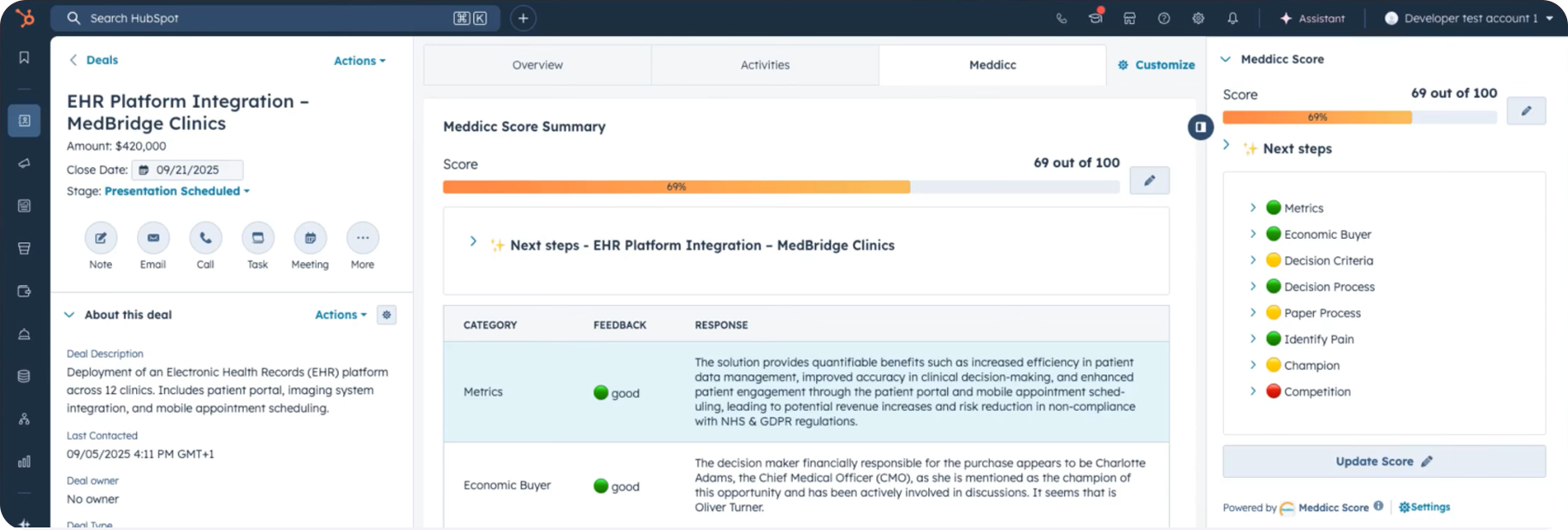
Frameworks like MEDDPICC, BANT, SPICED, or ANUM might look like alphabet soup, but they exist because unstructured CRM notes create ambiguity at exactly the wrong moments, like when your manager is reviewing your pipeline at 9 AM on a Monday.
Pick a framework that matches your sales motion and use it consistently. Your CRM notes should tell the same story to a rep who has never spoken to this prospect as they do to you. If they cannot, the notes need more structure.
This is the one most people skip. If your prospect said "we have budget but need sign-off from legal," that is content. If they said it with audible hesitation right after you mentioned your implementation timeline, that is context, and it is telling you something very different.
Sales call transcripts can capture what was said word for word. But the best reps layer in their own interpretation: what the body language suggested on video, what felt like a real blocker versus a polite deflection, what the buying committee dynamics looked like. That layer is what makes your notes actually useful in the next call.
A useful CRM note has two layers: the objective record and your read on it. Mixing them up creates noise.
Keep it clean by labeling your interpretation explicitly. Something like: [Rep observation: They seemed more interested in the ROI case than feature depth. Worth leaning into that in the demo.] That way, anyone reading the note knows what was said vs. what you inferred.
A CRM note that ends without a next step is a dead end. Every note should close with a concrete action: who is doing what, and by when.
This sounds obvious, but most reps treat the "next steps" section as optional. It is not. Detached notes and detached tasks create follow-up gaps, which create stalled deals. Use AI tasks to automatically capture and assign action items from your calls so nothing falls through the cracks after you hang up.
Nobody is reading your novel. Your manager skimming six deals before a pipeline review needs to understand the situation in 30 seconds. Your customer success counterpart picking up a newly closed account needs to find the key context immediately.
Write for the scanner, not the scholar. Short sentences. Bullet points for lists. Bold the most important details. If someone needs three paragraphs to understand where a deal stands, the note is too long.
The single biggest improvement most sales reps can make to their CRM notes has nothing to do with writing technique. It is removing the manual work entirely.
AI meeting recorders and notetakers have matured significantly. The best ones do not just transcribe your call. They summarize it, extract key deal signals, map them to your CRM fields, and push everything into Salesforce or HubSpot before you have finished your post-call coffee. If you are still typing notes by hand, you are solving a 2019 problem in 2025.
Beyond just "write good notes," there are a few specific formats that top-performing sales teams use consistently.
The TLDR + Detail structure: Open with a two-sentence summary of where the deal stands, then add the supporting details below. Anyone in a hurry reads the top. Anyone who needs more reads on.
The outcome-first format: Start with what was decided or what changes, then add context. This matches how busy people actually read.
Framework-mapped fields: Especially useful for complex or enterprise deals. Map your notes directly to your qualification framework so every field is accounted for. Sybill's CRM Autofill does this automatically, pushing structured data into the exact fields your CRM expects, including custom MEDDPICC or SPICED configurations.
You have just read the best practices. Here is the honest truth: even the most disciplined sales rep, with the best intentions, will eventually slip on manual note-taking. Calls run long. Back-to-back meetings happen. Life is real.
That is exactly why Sybill exists. It handles your CRM notes automatically, accurately, and without requiring you to type a single word after a call. Get started for free with Sybill and reclaim the 5+ hours a week you are currently spending on manual CRM updates.
A couple of years ago, AI note-taking meant getting a transcript and a slightly-better-than-nothing summary. Today, the gap between what a strong AI sales assistant does and what a human can reasonably do manually is enormous.
Here is what the current generation of AI notetakers does that manual note-taking simply cannot match:
Real-time context extraction. Rather than processing everything after the fact, modern AI captures deal signals during the call, flagging objections, competitor mentions, pricing sensitivity, and buying intent as they happen.
Framework alignment. Top AI tools map notes directly to your sales methodology. Whether your team runs MEDDPICC, BANT, or a custom qualification process, the right AI fills those fields from the call conversation without any manual mapping.
Cross-channel synthesis. The best tools do not just process calls in isolation. They combine call data with email threads, calendar context, and prior CRM history to give you a complete picture of where a deal actually stands. Ask Sybill does exactly this, letting you query across calls, emails, and CRM data in plain language to get instant answers about any deal.
Automatic task creation. When a rep says "I will send over the pricing deck by Friday," a smart AI captures that as a task, assigns it, and logs it in the CRM. No manual entry required.
The reps winning right now are not better note-takers. They are smarter about which tasks to delegate to machines.
Sybill is built specifically for sales teams that want to stop treating their CRM like a punishment and start treating it like the strategic asset it is supposed to be.
Here is what happens on a typical call with Sybill running:
During the call: Sybill joins as a meeting participant, capturing audio, processing buyer sentiment, and flagging key moments in real time.
Immediately after: You get a Magic Summary in your inbox and Slack. It contains the key takeaways, buyer intent signals, objections raised, and next steps, written in plain language, not a raw transcript.
In your CRM: Sybill pushes structured notes directly into Salesforce or HubSpot, populating standard and custom fields based on your framework. Your Deal Workspace updates automatically. Your Deal Pipeline reflects the latest deal health without anyone lifting a finger.
Follow-up: Sybill drafts a personalized follow-up email using context from the call. You review, tweak if needed, and hit send. That is it.
For account executives, this typically saves 14 hours per week that would otherwise go to post-call admin. For sales managers, it means coaching and performance reviews are grounded in actual deal data, not rep self-reporting.
No other tool on the market gets this close to closing the gap between "what happened on that call" and "what is actually in your CRM." (And if you are curious how that stacks up against standalone note-taking tools, the Sybill vs. Fireflies breakdown goes deep on exactly that.)
What is the best way to take notes in a CRM?
The best approach combines a consistent framework (like MEDDPICC or BANT), concise formatting, and automation. Writing notes immediately after a call captures the most accurate detail. Using an AI tool that automatically transcribes and structures notes into your CRM is the most effective and scalable method for sales teams.
How do I structure CRM notes?
Use a TLDR summary at the top, followed by structured fields: pain points, decision criteria, next steps, and timeline. Map these to your sales qualification framework for consistency across the team. Avoid writing long paragraphs - bullet points and bold labels make notes scannable.
Should I use a CRM note template?
Yes, especially if you manage multiple accounts or work in a team. Templates enforce consistency and make it much faster to log notes after a call. AI tools like Sybill can auto-populate these templates so you are not starting from a blank page after every call.
How much time do sales reps spend taking CRM notes?
Studies suggest the average sales rep spends 5.5 hours per week on manual CRM data entry. That translates to over 250 hours per year, time that could go toward actual selling. AI-powered note-taking tools can reduce this to near zero for routine call logging.
What is the difference between a CRM note and a call transcript?
A call transcript is a verbatim record of everything said. A CRM note is a curated summary of what matters: key takeaways, buyer context, deal status, and next steps. Transcripts are useful for reference, but CRM notes are what drive action. The best tools generate both and link them together.
Here is the bottom line: your CRM is only as useful as the notes inside it. Vague, stale, or missing notes do not just slow you down. They cost you deals, weaken your handoffs, and leave your manager coaching in the dark.
The best way to take notes in your CRM is to build a habit around structure and immediacy, and then use the right technology to take as much of that work off your plate as possible. The goal is a CRM that your whole revenue team actually trusts, because it reflects reality.
That is exactly what Sybill is built to do.
Get started for free with Sybill and let your AI sales assistant handle the notes while you handle the deals.
The best approach combines a consistent framework (like MEDDPICC or BANT), concise formatting, and automation. Writing notes immediately after a call captures the most accurate detail. Using an AI tool that automatically transcribes and structures notes into your CRM is the most effective and scalable method for sales teams.
Use a TLDR summary at the top, followed by structured fields: pain points, decision criteria, next steps, and timeline. Map these to your sales qualification framework for consistency across the team. Avoid writing long paragraphs - bullet points and bold labels make notes scannable.
Yes, especially if you manage multiple accounts or work in a team. Templates enforce consistency and make it much faster to log notes after a call. AI tools like Sybill can auto-populate these templates so you are not starting from a blank page after every call.








