
Find us at booth #83, join us for a harbor side happy hour, or catch Gorish’s talk.

Sept, 16-18 > Learn more


Tamanna Mishra

September 17, 2026
.png)
Sales call recording is often presented as an obvious good.
Record every conversation. Capture every detail. Coach every representative. Never miss another objection or next step.
The opposing argument is just as absolute.
Recording is invasive. Buyers hate it. Salespeople become defensive. Managers use it to monitor rather than help. Legal exposure outweighs the value.
Neither position is particularly useful.
Sales call recording is not inherently intrusive, compliant, accurate or valuable. Its effect depends on why calls are recorded, how participants are informed, who can access the recordings, how AI interprets them and what the organization does with the resulting information.
A responsibly recorded call can preserve the buyer’s language, reduce reliance on memory, improve follow-up and give managers concrete coaching evidence.
A badly designed system can collect unnecessary data, undermine employee trust, spread inaccurate AI interpretations into the CRM and create an archive that nobody uses.
The most persistent sales call recording myths are therefore dangerous in both directions. Some prevent teams from using valuable evidence. Others encourage teams to record everything without enough attention to consent, trust, accuracy or action.
This guide examines seven of those myths, the legitimate concern behind each one and what responsible revenue teams should do instead.
When a sales call is not recorded, the organization depends heavily on the salesperson’s memory and notes.
That creates predictable gaps. A rep may remember the headline objection but forget the specific wording. A proposed next step may be entered in the CRM as a buyer commitment. A stakeholder mentioned briefly may disappear from the account plan. A manager who did not attend the call must coach from a partial retelling.
Recording preserves a source that the team can revisit.
However, the same recording may contain personal information, commercially sensitive details, candid stakeholder opinions and statements that were never intended for unrestricted internal circulation. It may also capture the salesperson’s performance in a way that feels developmental under one manager and punitive under another.
AI adds another layer. It can turn a long recording into an accessible summary, identify relevant moments and move structured information into the CRM. It can also omit an objection, confuse speakers or overstate what the buyer agreed to.
The recording button is therefore not the real decision.
The real decision is whether the organization has an operating model that can turn recorded conversations into trustworthy, responsibly governed sales evidence.
If you need a broader introduction to the technology and its standard uses, start with Sybill’s complete guide to sales call recording. This article focuses specifically on the objections, tradeoffs and adoption risks.
Sales call recording creates a benefit and a corresponding responsibility at almost every stage.
The practical question is not whether sales call recording has benefits or disadvantages. It is whether the organization has controls that preserve the advantages while reducing the risks.
The two most common legal claims about sales call recording are equally unhelpful.
One says that recording sales calls is broadly prohibited.
The other says that recording is usually legal because at least one person on the call knows it is happening.
There is no universal answer that applies to every sales conversation.
Requirements can depend on:
The Federal Trade Commission advises businesses that state recording laws vary and recommends consulting an attorney. For organizations operating in the UK, the Information Commissioner’s Office says callers should be told that a call is being recorded and why.
A recording platform can support notification, consent, access and security workflows. It cannot determine the correct legal basis for every organization or guarantee that users configure and operate the system correctly.
For more detailed coverage, see Sybill’s guides to GDPR call recording best practices and phone recording laws.
This article provides general information, not legal advice.
Some buyers are perfectly comfortable with recording. Some are not. Others are comfortable only after they understand why the recording is useful and how it will be handled.
Declaring that buyers either love or hate recording ignores the conditions shaping their response.
A buyer is more likely to object when:
A visible meeting bot may also affect the experience before anyone speaks. For calls where that matters, teams can evaluate platform-native or bot-free approaches. Sybill’s guide to bot-free AI notetakers for sales calls explains the relevant tradeoffs.
A clear, human explanation is usually better than legalistic wording delivered at speed.
An approved script might sound like:
“Before we begin, I’d like to record this conversation so I can focus on our discussion and share an accurate recap afterward. The recording may also be used internally for follow-up and coaching. Is that okay with everyone?”
The exact wording should reflect the organization’s legal guidance and actual use of the recording.
Sybill’s recording consent management guidance recommends explaining that recording allows the salesperson to remain focused, creates an accurate account of the discussion and can provide participants with a useful record afterward.
Do not pressure the person or make the meeting feel conditional on being recorded.
Instead:
Respecting a refusal is part of building trust. It also shows that the stated commitment to transparency is real.
Call recording can become surveillance. Pretending otherwise will not make representatives trust it.
The distinction depends on how management introduces, accesses and uses the recordings.
The American Psychological Association’s 2023 Work in America survey found that 56% of workers who experienced workplace monitoring reported feeling tense or stressed during the workday, compared with 40% of workers who were not monitored.
That finding does not prove that all monitoring causes stress. It does show why leaders should not dismiss employee discomfort as irrational resistance.
The ICO’s guidance on worker monitoring puts the principle plainly:
“Building trust with your workers starts with transparency.”
Representatives have good reason to worry when:
A coaching-oriented system should:
For example, “You are not confident enough” is personal and vague.
A better coaching observation is:
“When the buyer challenged the pricing difference, you moved directly to feature explanation. The call shows an opportunity to ask how the buyer is evaluating the cost of the current problem before defending the price.”
The second version gives the representative a specific behavior to practice.
Jeffrey Galbraith, VP Sales at Smartcat, describes the operational value of having better call and CRM evidence: “I no longer spend 90% of 1:1s chasing CRM updates; now I coach.”
Read more about Sybill’s approach to AI-supported sales coaching.
Manual playback is one of the oldest objections to sales call recording, and it is partly justified.
A manager cannot listen to every minute of every call. A representative with six meetings in one day cannot replay six hours of audio before updating the CRM and sending follow-up.
Recording without retrieval creates a warehouse, not a useful sales system.
Modern tools can organize a recorded call into:
This allows a manager or representative to begin with the structured evidence and open only the relevant section of the recording.
A practical review process is:
The objective is not to eliminate the recording from the process. It is to stop treating end-to-end replay as the only way to use it.
Sybill’s guides to AI call summaries and call review in sales explore those workflows in greater depth.
A recording may be the source, but the AI output is still an interpretation of that source.
AI can produce a polished, plausible description that misrepresents what happened.
The NIST Generative Artificial Intelligence Profile identifies confabulation as a material risk. A generative AI system can confidently present false or erroneous information.
In a sales workflow, that could mean:
An inaccurate summary can affect:
The more automated the workflow becomes, the more quickly one incorrect interpretation can spread.
Look for:
Critical commitments, prices, dates and stakeholder roles should remain verifiable against the source.
Complete call coverage can improve organizational memory. It can also create unnecessary collection, storage and access.
The correct objective is not maximum recording. It is appropriate recording coverage.
Recording a high-volume prospecting call, an executive negotiation, a customer escalation and an internal performance conversation may require different decisions.
Teams recording face-to-face conversations should also account for device security, audio quality and participant notice. See Sybill’s guide to recording in-person sales meetings for a dedicated comparison.
Blanket recording can generate thousands of hours of duplicated, low-value or outdated material. Without classification and retention rules, teams may struggle to find the evidence worth keeping.
The recording policy should reflect a defined purpose. If the organization cannot explain why a category of conversations needs to be recorded, it should reconsider whether automatic capture is appropriate.
This may be the most expensive myth of all.
Recording preserves the conversation. It does not guarantee that anyone will use it.
A valuable buyer comment can remain buried in minute 37. A serious objection can appear in the summary but never reach the CRM. A manager can receive a coaching insight and never discuss it. A promised follow-up can become a task that nobody completes.
An unused recording is only stored audio.
A recorded conversation creates value through five stages:
A failure at any stage weakens the outcome.
Before rolling out recording, sales leaders should give buyers and sales representatives clear answers about how the system will operate.
The Sybill Sales Call Recording Trust Charter is a practical framework, not a legal standard. It covers seven decisions every team should document.
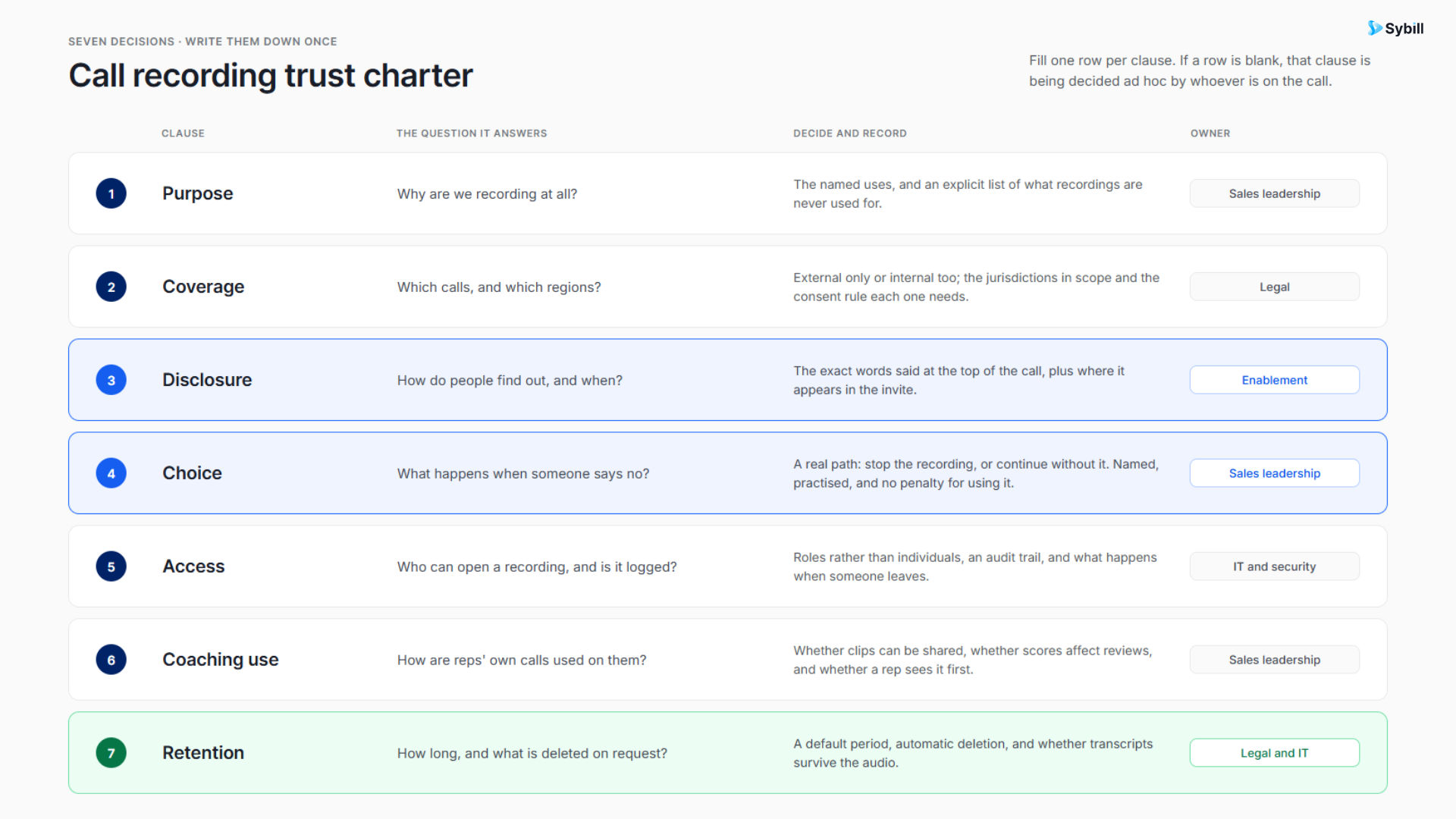
Why are calls recorded?
Possible purposes include accurate documentation, follow-up, coaching, onboarding, qualification and customer handoff. Avoid vague explanations such as “quality purposes” if they do not reflect the actual use.
Which conversations, channels and roles are included?
Define whether the policy covers video meetings, phone calls, dialer conversations, mobile calls, in-person meetings and internal discussions.
How will buyers and other participants be informed?
Use approved scripts, meeting notifications and documentation that accurately describe the recording’s purpose.
What happens if someone declines?
The process should explain how representatives stop the recording, continue the conversation and document the meeting another way.
Who can view, share, download or export recordings?
Access should reflect a person’s role and legitimate need. Recording availability should not mean organization-wide visibility.
How will recordings affect feedback and performance evaluation?
Explain whether AI scores are advisory, how representatives can correct the record and how coaching is separated from formal disciplinary processes.
How long will recordings be stored, and how are deletion requests handled?
Retention should follow the organization’s legal, operational and security requirements rather than an indefinite “keep everything” default.
A buyer evaluating sales call recording software should not dismiss concerns. The concerns should become product and implementation requirements.
Sybill is not valuable merely because it can preserve a sales conversation. Its role is to connect what happened in that conversation to what the sales team needs to know and do next.
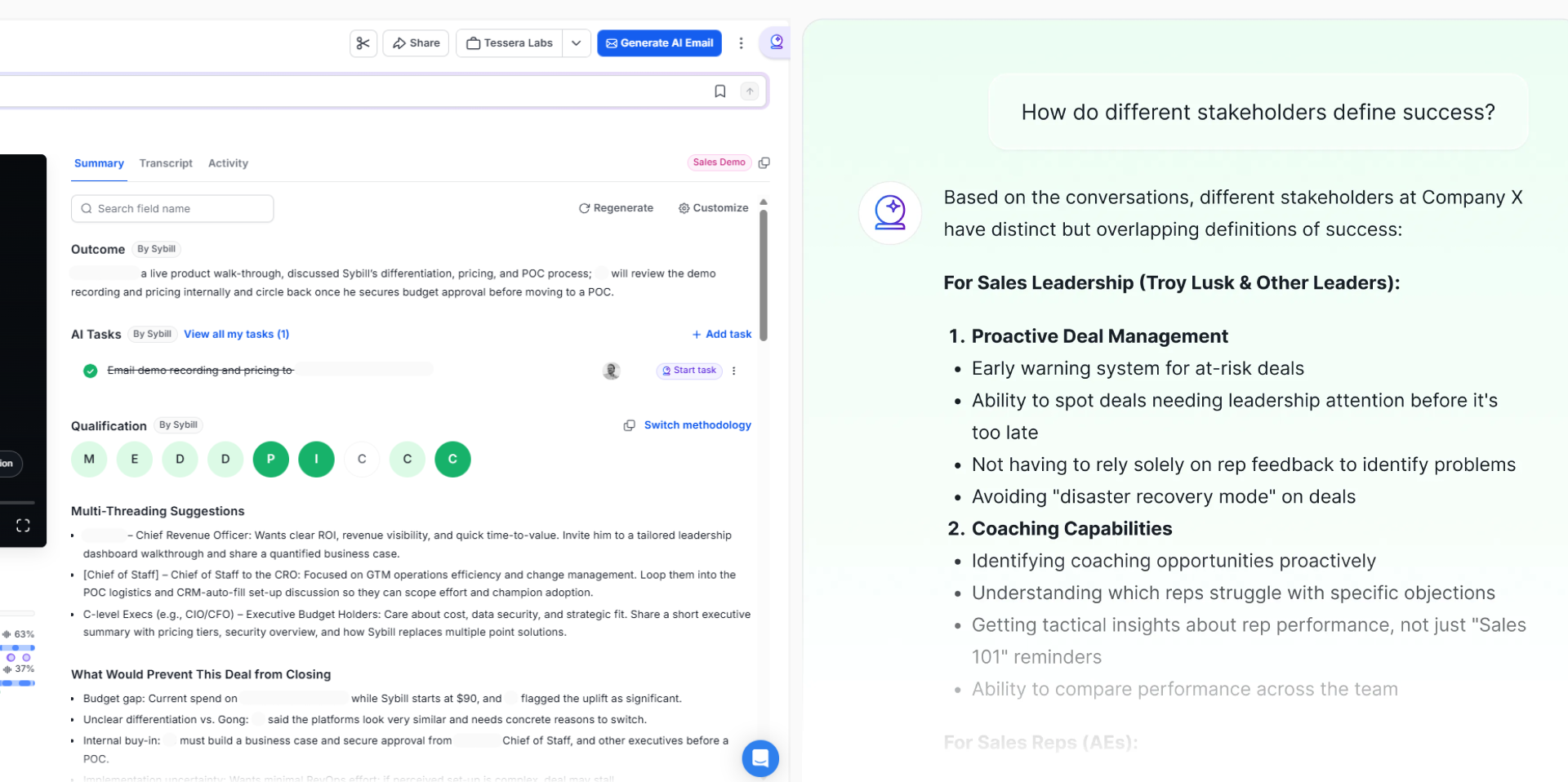
Magic Summary can structure a recorded conversation around information such as:
Different meeting types can require different structures. A discovery call should not produce the same summary as a product demonstration, negotiation or customer handoff.
A static summary can answer only the questions its template anticipated.
Ask Sybill lets representatives and managers investigate calls, emails, CRM records and other available deal context.
They could ask:
This turns the recording into a queryable sales memory rather than a file someone may never reopen.
CRM Autofill can use calls and emails to update standard or custom CRM fields.
The purpose is not to fill every field at any cost. It is to reduce manual administration while keeping deal records connected to what buyers actually said.
Teams should still define which fields can update automatically, which require review and how conflicting information is handled.
Sybill can identify What Went Well, Coaching Opportunities, Missed Opportunities and Recommended Next Call Focus.
Instead of telling a representative to “ask better questions,” a manager can examine the exact moment where discovery stopped too early or a buyer objection received an incomplete response.
That supports coaching based on behavior and evidence rather than memory or personality.
Personalized Emails can help draft a buyer follow-up based on the conversation. AI Tasks can help identify and prepare work created during the call. Pre-meeting Briefs and Deal Workspace carry the accumulated context into the next interaction.
The connected workflow is:
Recorded call → Structured summary → Verification → CRM update → Coaching → Follow-up → Next meeting
The product principle is simple:
Sales call recording preserves the evidence. Sybill helps the revenue team understand it, question it and act on it.
Sales call recording is neither inherently intrusive nor automatically valuable.
A well-run system can give representatives a more accurate memory, give managers better coaching evidence and give revenue teams a clearer account of what buyers need, question and commit to.
A badly run system can undermine trust, create unnecessary data exposure and convert imperfect AI interpretations into official CRM information.
That is why the most important sales call recording myths cannot be answered with a simple “true” or “false.”
The right questions are:
Recording preserves the conversation. Responsible governance protects the people in it. A connected sales workflow creates the value.
Explore Sybill to see how recorded conversations can become structured summaries, queryable deal evidence, CRM updates, coaching and completed sales actions.
Sales call recording preserves buyer evidence, reduces reliance on memory, supports coaching and onboarding, and can improve CRM documentation and follow-up. Its disadvantages include privacy risk, employee-monitoring concerns, storage and access requirements, possible buyer discomfort and inaccurate AI interpretation. The result depends on the organization’s recording policy, technology and management practices.
Sales calls should be recorded when the organization has a defined purpose, appropriate legal guidance, clear participant disclosure, secure access, a retention policy and a practical way to use the recordings. Recording should not be enabled simply because the technology makes it possible. Different call types may require different policies.
Sales calls can often be recorded lawfully, but no universal rule applies to every location, participant, channel or purpose. One-party and all-party consent requirements, data-protection obligations, worker-monitoring rules and industry regulations may apply. Organizations should obtain qualified legal advice and implement an approved disclosure and governance process.
That depends on the applicable law and organizational policy, but informing every participant is a strong operational default. Clear disclosure can support transparency and buyer trust. The explanation should accurately state why the call is being recorded and how the recording may be used.
It can, particularly when recording is unexpected, unexplained or treated as compulsory. Buyers may also have security or confidentiality restrictions. Explain the purpose in plain language, offer to share the recap and respect a request to stop recording. The way recording is introduced often shapes the buyer’s reaction.
Yes. Recordings can support specific coaching by showing how a representative handled discovery, objections, pricing and next steps. Organizations should explain how recordings will be used, give representatives access to their calls and focus feedback on observable behavior. Coaching should not rely blindly on AI-generated scores.
Accuracy varies by platform, audio quality, number of speakers, language and conversation complexity. AI may omit information, confuse speakers or overstate what was agreed. Important dates, prices, commitments, stakeholder roles and qualification conclusions should remain verifiable against the recording or transcript.
Stop or remove the recording tool and continue with manual notes if organizational policy permits. Confirm important points and next steps in writing afterward, and invite the buyer to correct the recap. Do not pressure someone to accept recording as a condition of continuing an ordinary sales conversation.
Sales call recording captures and stores the conversation. Conversation intelligence analyzes recorded calls to identify topics, objections, competitors, qualification evidence, coaching opportunities and deal risks. Recording creates the source evidence. Conversation intelligence helps the revenue team interpret and use it.
There is no single retention period appropriate for every organization. The period should reflect the recording’s purpose, applicable laws, customer commitments, security requirements and operational need. Organizations should document retention rules, automate deletion where possible and avoid keeping recordings indefinitely without a defined reason.
Sales call recording preserves buyer evidence, reduces reliance on memory, supports coaching and onboarding, and can improve CRM documentation and follow-up. Its disadvantages include privacy risk, employee-monitoring concerns, storage and access requirements, possible buyer discomfort and inaccurate AI interpretation. The result depends on the organization’s recording policy, technology and management practices.
Sales calls should be recorded when the organization has a defined purpose, appropriate legal guidance, clear participant disclosure, secure access, a retention policy and a practical way to use the recordings. Recording should not be enabled simply because the technology makes it possible. Different call types may require different policies.
Sales calls can often be recorded lawfully, but no universal rule applies to every location, participant, channel or purpose. One-party and all-party consent requirements, data-protection obligations, worker-monitoring rules and industry regulations may apply. Organizations should obtain qualified legal advice and implement an approved disclosure and governance process.








