
Find us at booth #83, join us for a harbor side happy hour, or catch Gorish’s talk.

Sept, 16-18 > Learn more

%20(1).avif)
Mamta Tainwala

April 17, 2026
Give me two minutes and your last meeting. I will show you the follow up you wish you always had. That is the standard for every tool in this guide. Can it see the context, write like a human, and keep you from fixing facts. If yes, it stays. If not, it is out. Simple.
If your inbox is where deals stall, customers drift, and good intentions die you don’t need a pep talk, you need a good AI tool. One that shortens drafting time without flattening your voice, pulls context from the places that matter, and turns meetings into follow ups that people actually answer. This is a no-fluff guide to the AI email generators that matter in 2025 and will continue to do so in 2026. How they really work, where they break, and how to get professional output you can send without shame, it’s all in here.
The best AI email generators in 2026 for sales teams are Sybill (generates context-rich follow-ups from actual meeting content with buyer-specific language), Lavender (provides real-time email scoring and optimization as you compose), Copy.ai (creates cold outreach sequences at scale), Smartwriter (auto-personalizes emails using prospect LinkedIn and web data), Flowrite (turns brief instructions into polished professional emails), Woodpecker (automates cold email campaigns with deliverability optimization), and Lemlist (combines AI personalization with email warm-up). The critical difference between AI email generators that improve reply rates and those that don't is context depth — tools like Sybill that draft from actual call transcripts, CRM history, and prior email threads produce emails that reference specific buyer concerns and next steps, while generic generators produce templated output that recipients immediately recognize as automated.
We focus on seven product lines that cover most real-world needs:
The evaluation below is blunt. We call out what each does best, where it falls short, who should use it, how to test it, and how to get production-quality drafts. You also get high-signal email examples you can adapt today.
A good AI email generator is not a thesaurus with autocomplete. It is a system that produces correct, useful, and on-voice email with minimal editing. To evaluate tools, use these criteria.
What it is
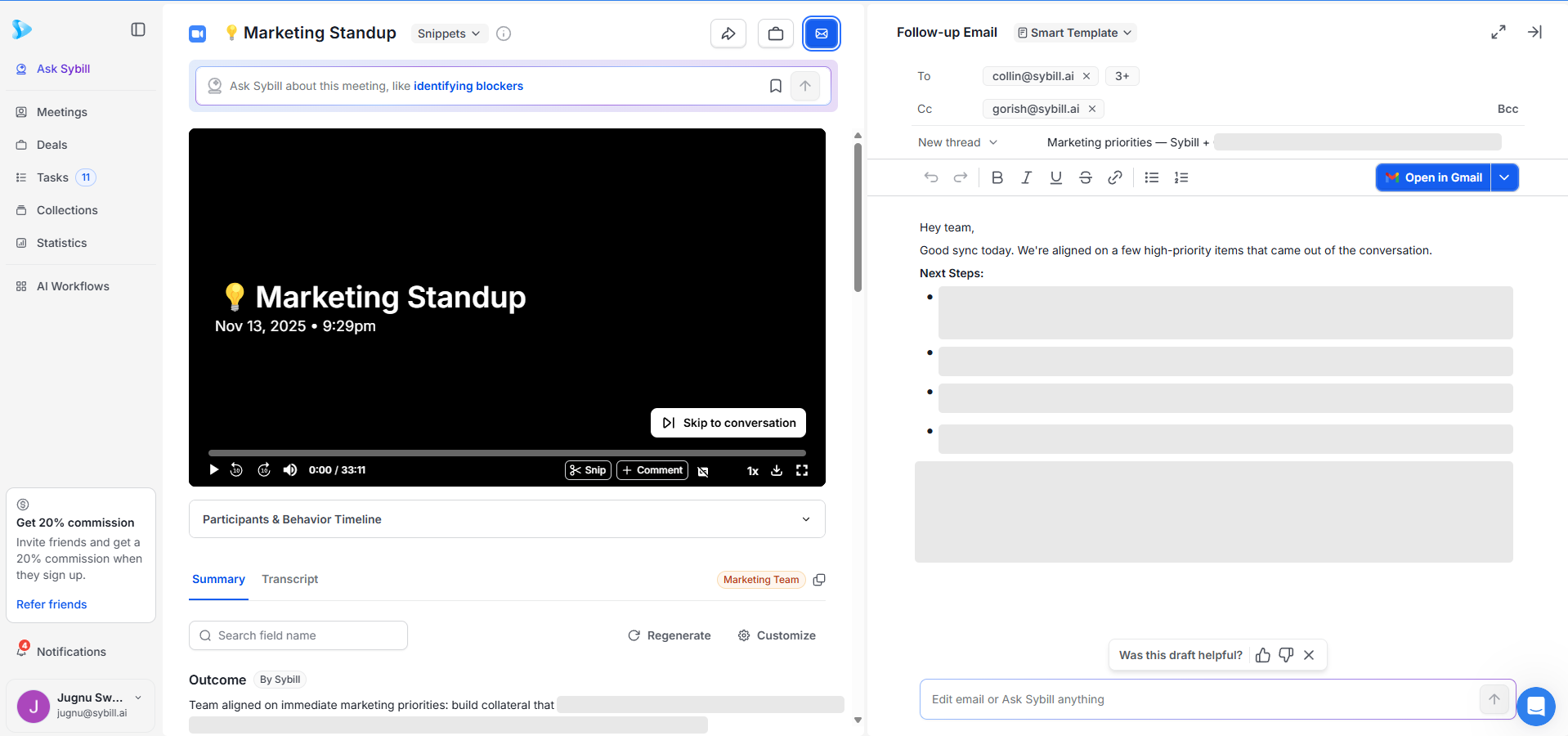
Sybill is a meeting intelligence assistant that turns conversations into a clean summary, ready-to-send follow ups, and automatically updated CRM fields. It is built for revenue and customer teams that live or die by what happens after calls. Sybill generates follow up drafts for each call and lets you review and customize before sending.
Where it excels
Where it is not the best fit
How to test
Email examples
Hi Ingrid, Chris and Sam
Thank you for the conversation today. Here is a concise recap to keep us aligned.
Problems discussed
• Manual handoffs from trial to paid are causing delays
• Reporting on usage by account is not available in your current stack
• Security review requires SSO and quarterly retention audits
Success criteria
• Provisioning within one hour of contract
• Weekly account usage reports for success managers
• SSO on day one and retention policy set to twelve months
Decisions and owners
• Trial to paid workflow to be modeled by Raj from RevOps
• Security review to start with vendor DPA and SSO checklist
• Pilot to include ten accounts across two regions
Next steps
• I will send a one page pilot plan and a short security packet today
• Raj will share the current workflow diagram by Wednesday
• Let us meet next Tuesday at 10:00 IST to finalize scope
If I missed anything, tell me and I will correct it. Thanks again for a productive session.
Best,
[Your Name]
Hi Marcus,
Here is what we showed and what you asked us to measure during the pilot.
What we showed
• One click follow ups that mirror the call summary
• Automatic CRM updates for next step and owner
• Behavior markers to guide coaching on the next demo
What to measure
• Time to send follow ups after each call
• CRM completeness on deals in pilot
• Conversion from demo to second meeting
Pilot plan
• Two weeks with three sellers
• We set up the integration tomorrow and train the team in thirty minutes
• We meet end of week one to review results
If this looks right, I will send the calendar invite and security checklist.
Thanks,
[Your Name]
Hi Ashley,
Ahead of renewal, here is a short view of what changed and what we propose.
Highlights
• Adoption increased from 41 active users to 63
• Median follow up time dropped from 26 hours to 3 hours
• Win rate on pilot-sourced deals improved from 21 percent to 29 percent
Open risks
• Two teams are not using follow ups consistently
• Five users have never logged in this quarter
Options
• Renew current plan as is
• Add ten seats for the CS team and include the CRM field mapping module
Who should make the decision and what date should we target. I can hold time this week to finalize.
Best,
[Your Name]
Why these work
Each draft references facts from the call, names owners, and sets a clear next action. That is the difference between a generic AI email and a professional follow up you can send without cringing.
What it is
Google has integrated Gemini into Gmail so you can summarize long threads, draft emails, and refine tone directly in the composer on web and mobile. The “Help me write” and Gemini options can formalize, elaborate, shorten, and use thread context to boost accuracy. This reduces tab switching and speeds cleanup on long threads.
Where it excels
Where it struggles
Email examples
Hi Elena,
Thanks for the detailed notes. I reviewed the thread and here is the simplest path forward.
What we changed
• We pushed a fix for the token refresh issue on Android 13 this morning
What to do
• Please update to version 3.21.4 from the Play Store
• If the issue persists, reply with the exact timestamp and device model
Once you confirm, I will close the ticket.
Best,
[Your Name]
Hi team,
Quick update on Q2 operations.
• Procurement cycle time improved to 6.2 days
• Contract turnaround is at 3.4 days
• Onboarding tasks are now tracked in one intake form
Next actions
• We will publish the intake link and archive the old request channel
• Please submit all new requests in the form starting Monday
Thanks,
[Your Name]
Why these work
You are using Gemini inside Gmail as a precision tool for clarity and polish. It is not adding content you did not verify. It is helping you answer faster with fewer errors.
What it is
Copilot in Outlook can summarize threads, draft messages, adjust tone, and integrate with the broader Microsoft 365 ecosystem. Microsoft also announced that Copilot on Windows can create Office documents from chat and link to Outlook and Gmail accounts for context, which is useful if you work across multiple inboxes.
Where it excels
Where it struggles
Email examples
Hi Jamie,
I cannot make the 3:00 slot on Thursday. The 4:30 to 5:00 window is open on both our calendars. Does that time work, or should we shift to Friday morning.
Thanks,
[Your Name]
Hi Luis,
Thanks for the detailed answers. Here is what I captured.
Agreed
• Discount holds with a three year term
• SSO included in base price
Open
• Data residency confirmation
• Support response time for P1 tickets
Please confirm data residency and P1 response time in writing. Once we have that, I will move to legal review.
Best,
[Your Name]
Why these work
Copilot’s value is time saved in Outlook for heavy thread management. You are not replacing judgment. You are compressing the busy work of summarizing and tone tuning.
What it is
Superhuman positions itself as an AI-native email client to write, reply, triage, search, and schedule faster, claiming users save hours weekly. Its selling point is speed and output that does not read like a robot, with a fast command system to drive drafting and edits.
Where it excels
Where it struggles
Email examples
Hi Dana,
We can deliver the report by Wednesday at 2:00. To keep us on track, please send the final data extract by noon today. If that timing slips, I will rebase the schedule by one business day.
Thanks,
[Your Name]
Hi Matteo,
Thanks for reaching out. We are not taking on new partners this quarter. If you want, send one paragraph on your differentiator and we will review for Q2 planning.
Best,
[Your Name]
Why these work
Superhuman is about speed with control. Short, direct, and human. The AI helps with phrasing and tone, not with inventing facts.
What it is
HubSpot offers AI-powered email generation in marketing and a free email generator you can try on the web. The system is aimed at creating personalized, high-converting campaign emails without heavy design work, integrated with HubSpot’s ecosystem for editing, scheduling, and analytics.
Where it excels
Where it struggles
Email examples
Hi [first.name],
You asked for better visibility into product usage. Today we are rolling out Usage Insights.
What you get
• Weekly account snapshots for your named customers
• Alerts when usage drops for two consecutive weeks
• CSV export for operations reviews
See the three minute overview and set alerts for your top ten accounts.
[Watch overview] [Create alert]
Thanks for your feedback,
[Your Name]
Hi [first.name],
Renewals are predictable when next steps are captured and followed. Join us for a 25 minute session on renewal playbooks that combine meeting follow ups and CRM hygiene.
Date and time
• Thursday, 10:00 Pacific
• Recording sent to all registrants
Register here. Bring questions and a real scenario if you want live guidance.
Best,
[Your Name]
Why these work
HubSpot shines when you use contact data and clear CTAs. Keep copy tight. Let the layout and tokens do the rest.
What it is
Klaviyo’s Email AI can generate draft content and even create layouts from prompts, returning multiple variants for selection. It is designed for ecommerce teams who need fast, on-brand campaigns and flows that pull from catalog and behavior events. You need a paid Klaviyo plan to use the feature.
Where it excels
Where it struggles
What it is
Mailmodo focuses on interactive AMP emails, letting recipients act inside their inbox with forms, polls, bookings, and purchases. The platform adds AI templates and an AI writer for faster buildout, plus automation flows for campaigns. It is a differentiated choice when interaction inside the email is the goal.
Where it excels
Where it struggles
Email examples
Hi [first name],
Pick the top two items you want next. Your vote updates our roadmap.
[AMP poll block]
Submit
Hi [first name],
Pick a time that works. The slot will hold automatically.
[AMP calendar block]
Confirm time
Why these work
You are using Mailmodo for what only Mailmodo can do. Keep the copy minimal and let the AMP block carry the experience.
Pick based on the job to be done, not hype.
These are not templates. They are finished examples that reflect real constraints, set a clear next action, and sound like a human wrote them.
Subject: Today’s decisions and next steps
Body:
Hi team,
Thanks for the discussion. Here is the short version.
Decisions
• We will ship the login change behind a feature flag next Wednesday
• Pricing test will run for two weeks on the US site only
Next steps
• Philip updates the rollout plan today
• I will send the draft FAQ and the updated deck in a separate note
Here are the links you asked for.
• Deck: [link]
• FAQ draft: [link]
• Recording: [link]
If anything above looks wrong, tell me and I will fix it now.
Best,
[Your Name]
Subject: Renewal plan that reduces risk and keeps options open
Body:
Hi Morgan,
Your team’s usage stayed strong, but adoption is uneven across two regions. Here is a plan that keeps the renewal simple and reduces risk.
What we keep
• Current terms for twelve months
• Same support tier and SSO scope
What we change
• Add five seats in Region A so managers can coach more effectively
• Set a usage floor to track ROI and review quarterly
I can send a one page order form today. If you prefer a call, tell me two times that work and I will hold one.
Best,
[Your Name]
Subject: Ticket 18421 resolved. One setting to keep it stable
Body:
Hi Shawn,
We fixed the webhook timeout for your account. If you rotate keys next quarter, please keep the timeout at 30 seconds. That will prevent the same issue.
I attached the change log and a one page guide. If you see any new errors, reply with a timestamp and we will check logs right away.
Thanks,
[Your Name]
Subject: A faster way to send follow ups your customers actually answer
Body:
Hi Noah,
I saw your note on call prep. The slow part is after the call. Teams spend hours writing follow ups and updating CRM. We remove that.
What changes
• Follow ups are drafted from the meeting and sound like your team
• CRM fields update without manual entry
• Managers see risks and next steps in one place
If you want a five minute proof, I can use your next call to show a draft follow up and the CRM update. Interested?
Thanks,
[Your Name]
Subject: New weekly usage insights for CS leaders
Body:
Hi [first name],
You can now see weekly account usage in one view, with alerts when activity drops. It takes five minutes to set up.
See the overview and set your first alert.
Thanks,
[Your Name]
Subject: Thank you. Here is what happens next
Body:
Hi [first name],
Thanks for your order. We will ship in two business days. You will receive a tracking link as soon as it leaves the warehouse. If you picked the larger size, watch for a second email with care tips.
If you have any questions, reply to this note and the team will help.
Thanks again,
[Brand]
Most teams do not need a hundred AI writing tricks. They need accuracy, speed, and fit.
The winner is the tool that lives closest to your source of truth and reduces editing to seconds. For many revenue and customer teams, that is Sybill, because it treats the meeting as the input and the outcome as the product.
Yes. Gmail’s built-in AI and HubSpot’s free generator let you create emails without paying or signing up. For meeting-based emails, Sybill’s free tier gives you accurate follow-ups generated directly from your call.
For everyday drafting, Gmail + Gemini is solid. For marketing emails, HubSpot and Mailmodo are strong. For accurate post-meeting follow-ups, Sybill is the best because it pulls context from your actual conversation and updates your CRM.
Yes. Several simple generators work in the browser with no login and are great for quick drafts. For anything that depends on meeting details or next steps, Sybill produces far better results because it uses real call context instead of guessing.








