
Find us at booth #83, join us for a harbor side happy hour, or catch Gorish’s talk.

Sept, 16-18 > Learn more

%20(1).avif)
Mamta Tainwala

June 10, 2026
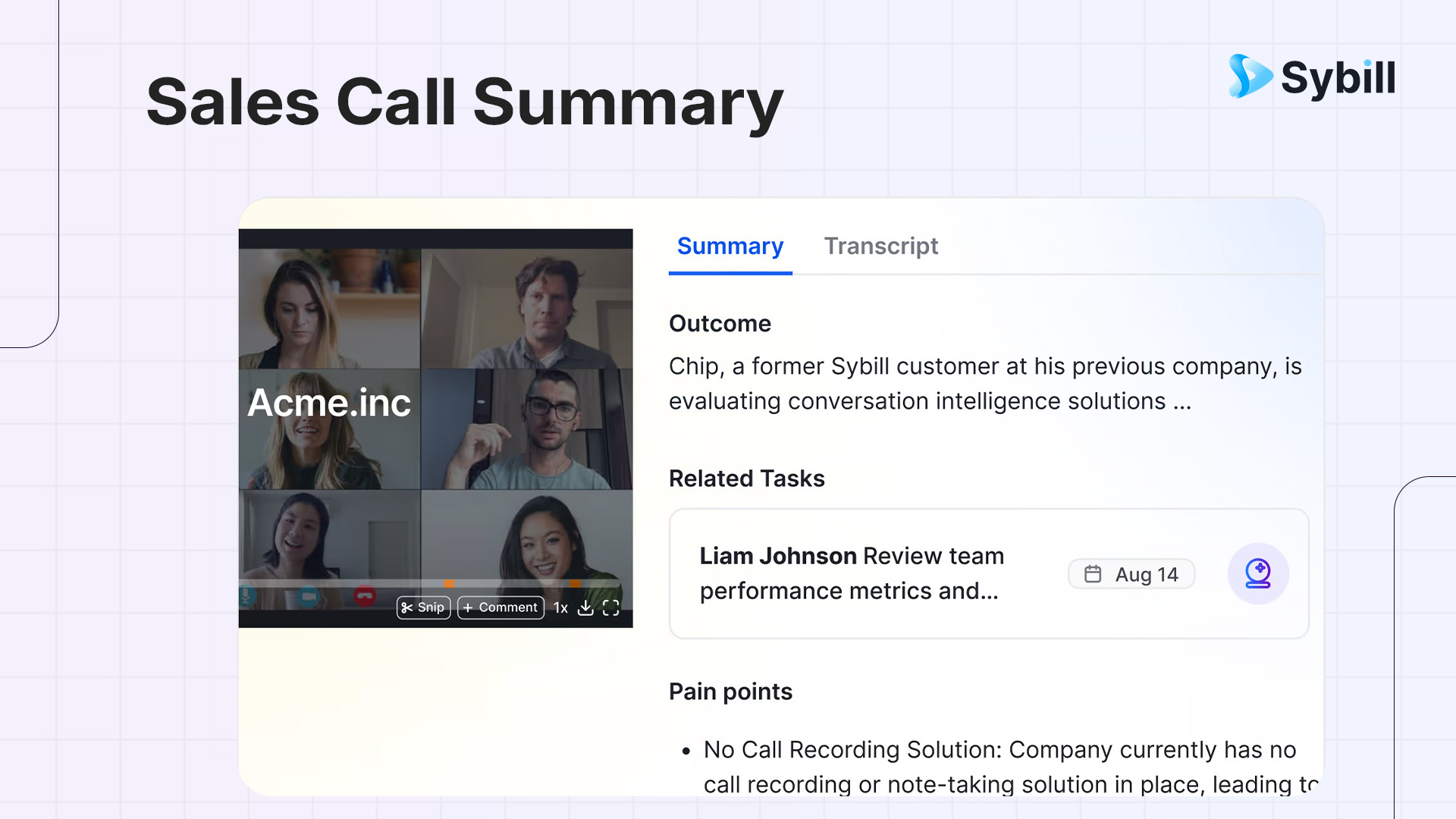
A sales call summary is a structured record of what mattered in a sales conversation, not a word-for-word replay of what was said. The best ones are built around deal outcomes rather than dialogue, and they answer four questions every rep and manager needs answered after a call:
Why most manual summaries fall short: Sales reps spend an average of 6 hours per week on post-call note-taking, yet 60% of critical call insights never make it into the CRM. Memory degrades fast. Notes are inconsistent across reps. And a summary written 3 hours after a call with no recording is not a summary. It is a reconstruction.
How Sybill fixes this: Sybill's Magic Summary generates a structured, deal-aware summary within minutes of every call ending, covering verbal content, non-verbal buyer signals, and engagement levels. It then pushes the relevant fields directly into your CRM without manual entry. The rep reviews and moves on. The whole post-call workflow takes under 10 minutes instead of 45.
A sales call summary is a structured document that captures the essential intelligence from a sales conversation in a format that is immediately actionable for the rep, the manager, and anyone else who needs to understand where a deal stands.
It is not a transcript. A transcript is a word-for-word record of what was said. A summary is a distillation of what mattered.
It is not meeting notes. Meeting notes are a running record of discussion points. A sales call summary is built around deal-specific information: where the buyer is in their decision process, what they care about most, what is in the way, and what needs to happen next.
The distinction matters because the purpose is different. Meeting notes help you remember what was discussed. A sales call summary helps you move a deal forward.
In 2026, with reps managing 15 to 30 open opportunities simultaneously, a good sales call summary is the connective tissue between conversations. It is what allows a rep to walk into a fourth call with the full context of the previous three, without spending 30 minutes reviewing recordings. It is what gives a sales manager visibility into deal health without sitting in on every call. It is what makes a CS handoff actually work because the context travels with the deal.
Sales reps currently spend only 28% of their time actually selling. The remaining 72% is administrative overhead, and post-call documentation is one of the largest buckets in that overhead. Teams using AI call summaries save an average of 2 hours and 15 minutes per day on post-call tasks alone. That time goes back into selling conversations.

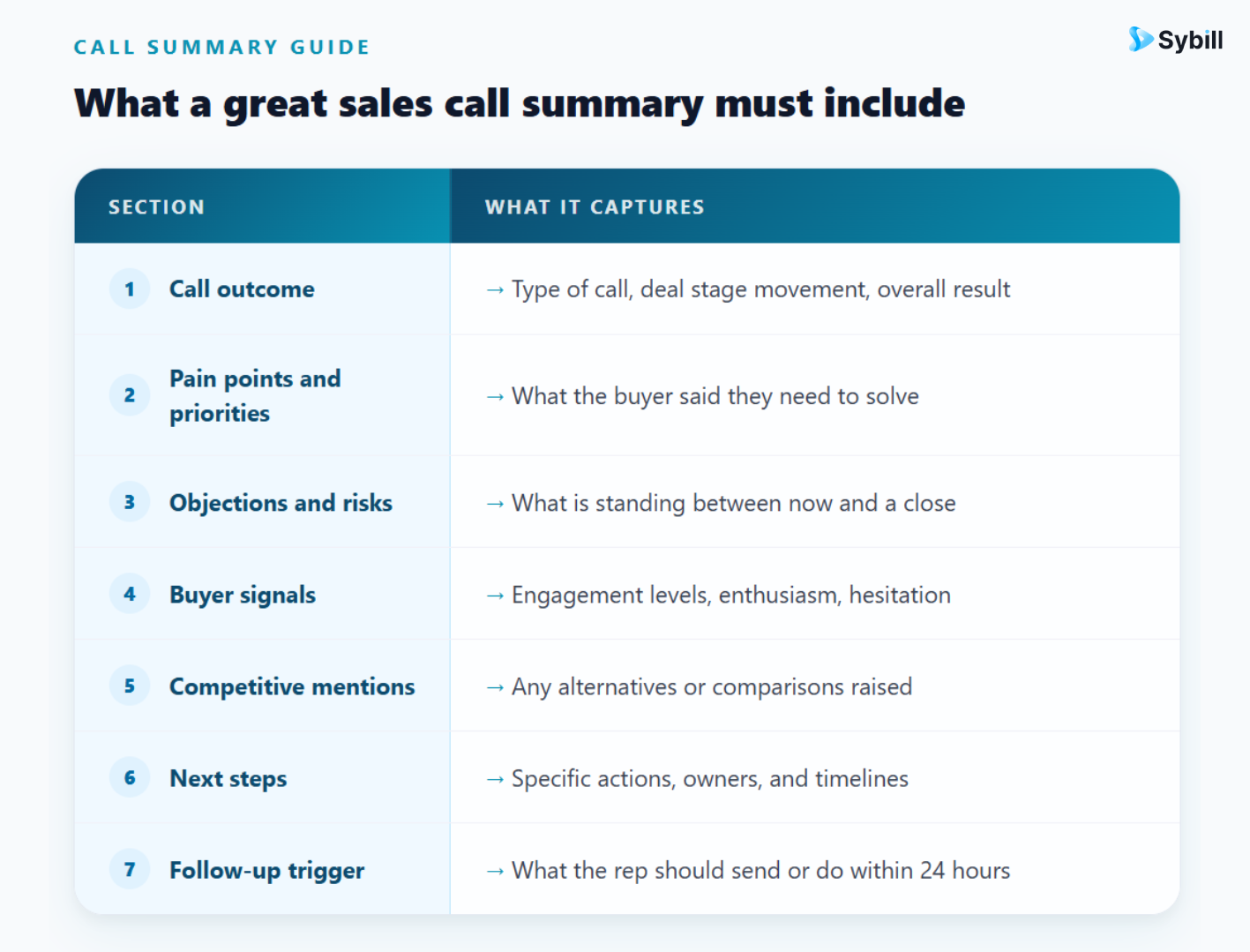
Not every call summary needs the same depth. A 15-minute first touch and a 60-minute late-stage negotiation warrant different levels of detail. But every summary, regardless of call type, should answer the same core questions. Here is what each section needs to do.
The first thing anyone reading a summary should be able to find in under 5 seconds: what type of call was this, and what was the result?
This section captures the call stage (discovery, demo, follow-up, negotiation, renewal), the deal stage movement if any, and a one-line verdict. "Strong discovery. Buyer confirmed active evaluation, budget exists, decision expected by end of Q3." That is a call outcome. "We discussed the product and the prospect had some questions" is not.
What problem is this buyer trying to solve? What is the cost of not solving it? What timeline are they working to?
This section should reflect the buyer's language where possible, not the rep's interpretation of it. If the VP of Sales said "we lose deals in the final stage because reps go dark after demos," write that, not "prospect has follow-up issues." The specificity is what makes this section useful for tailoring the next conversation.
Every call surfaces friction. This section captures it clearly: what objections came up, how they were handled, and whether they were resolved or remain open.
Active objections (budget concerns, timing misalignment, competing priorities, internal resistance) that are not resolved in the summary become land mines in the next conversation. A rep walking into a second call who cannot remember the pricing concern raised in the first call looks unprepared. A summary that captured and flagged it prevents that.
This is the section most manual note-takers skip entirely, but it is often the most valuable. Buyer signals are the qualitative indicators of where a prospect actually is psychologically, not just procedurally.
Did they ask detailed implementation questions (strong buying signal)? Did they go quiet when pricing came up (risk signal)? Did their energy shift when a specific use case was mentioned (engagement signal)? Did one stakeholder dominate while another checked out (champion vs. skeptic signal)?
Sybill captures these signals automatically by analyzing verbal tone, pacing, and non-verbal cues from video calls. For reps doing manual summaries, writing down even rough observations ("VP seemed distracted after we mentioned the timeline; may have internal deadline constraints we are not aware of") creates more useful context than a clean but signal-free recap.
Any reference to a competitor, alternative, or status quo solution belongs here. "They mentioned they are also evaluating Gong" is not a side note. It is a deal variable that should inform every subsequent touchpoint.
This section also captures mentions of internal tools, existing workflows, or vendors the buyer has used before. Pattern data across many calls showing when a specific competitor keeps coming up lets managers adjust positioning and arm reps with better battle cards.
The most common failure mode in sales call summaries is vague next steps. "Follow up next week" is not a next step. "Rep to send security documentation by Thursday. Prospect to loop in CISO before next call. Next call scheduled for June 19 at 2pm ET" is a next step.
Every next step needs an owner, a deliverable, and a date. Without those three elements, accountability evaporates between calls.
This is the bridge between the summary and the follow-up email. What is the most important thing the rep needs to reference or act on in the next 24 hours? It might be a specific question the prospect asked that needs a written answer. A piece of collateral they requested. An introduction they mentioned wanting to make internally.
Capturing this as a distinct item, rather than burying it in next steps, means reps do not have to re-read the full summary to know what to do first.
Understanding what good AI call summarization does under the hood helps explain why the output is structurally better than manual notes, not just faster.
Transcription is the starting point, not the end product. A transcript captures what was said. AI summarization starts there and then applies layers of analysis: which statements were made by the buyer versus the rep, which topics generated the most discussion time, which moments produced shifts in tone or energy, and which items were explicitly confirmed versus tentatively mentioned.
Natural language processing extracts deal-relevant entities. Good AI summarization for sales does not just condense dialogue. It identifies and classifies specific entities: pain points, pricing mentions, competitor names, timeline references, stakeholder roles, and buying signals. These get sorted into the structured sections of the summary rather than appearing in the order they were discussed.
Behavioral signals add a layer that transcription cannot. Sybill's multimodal intelligence engine analyzes not just what was said but how engaged participants were at each point in the conversation. A prospect who leaned forward and asked follow-up questions about implementation timelines is showing different signals than one who nodded politely and changed the subject. Both might produce similar transcripts. Only one produces the behavioral signal data that tells a rep where genuine interest lives.
The summary adapts to call type. A Sybill Magic Summary for a first discovery call looks different from one for a late-stage negotiation. The structure adjusts based on the context of the conversation, ensuring the output is formatted for the decisions that matter at that deal stage rather than applying a one-size template.
CRM fields populate automatically. Qualification criteria, deal stage, competitor names, budget signals, next steps: these push directly into the relevant CRM fields without manual entry. The CRM reflects what actually happened, not what the rep remembered to type.
This is the question the original URL on this blog was trying to answer, and it is worth addressing directly because the confusion is real and consequential.
A general meeting summary and a sales call summary both condense a conversation into something shorter. The similarity ends there.
A general meeting summary answers: what was discussed, what was decided, who needs to do what. It is useful for any meeting: a planning session, a team retrospective, a vendor check-in. The audience is typically everyone who was in the room. The format is a neutral record.
A sales call summary answers: where is this deal, what does the buyer care about, what is in the way, and what is the rep's best next move. It is built specifically for a sales context. The audience includes the rep, the sales manager, revenue operations, and potentially customer success. The format is structured around deal intelligence, not dialogue recap.
The practical consequence of using a general meeting summary tool for sales calls is that you get a clean record of what was discussed and essentially nothing that helps you decide what to do next. No buyer signals. No objection tracking. No deal stage context. No competitive intelligence. No structured next steps with owners.
This is why tools like Otter.ai, which produce excellent general meeting summaries, consistently fall short for sales teams. They were not built to answer sales questions. A sales call summary tool needs to understand that "we are looking at a few options" means something different from "we are ready to move forward," and surface that distinction in the output.
Sybill is purpose-built for this. Its Magic Summary does not just condense the call. It structures the conversation around deal outcomes, surfaces buyer signals that a transcript would bury, and produces a summary that immediately answers the questions a sales rep or manager needs answered.
Sybill joins your sales calls automatically, with no manual recording setup required. The workflow runs as follows.
During the call, Sybill records, transcribes, and analyzes the conversation in real time, tracking speaker turns, topic shifts, engagement levels, and behavioral signals from the video feed.
Within 5 minutes of the call ending, the Magic Summary is ready. It covers call outcome, pain points, objections, competitor mentions, buyer engagement signals, and next steps in a structured format designed for immediate use. It lands in your email, your Slack, and your CRM simultaneously.
CRM fields update automatically based on what was discussed. If the buyer mentioned a specific budget range, it goes into the budget field. If a competitor was named, it goes into competitive intel. If a next call was agreed upon, it creates the follow-up task. No manual entry required.
Follow-up email drafts in the rep's voice. Alongside the summary, Sybill drafts a post-call follow-up email that references what was actually discussed, confirms next steps, and mirrors the rep's writing style. The rep reviews, adds anything personal, and sends. The whole process takes 10 minutes instead of an hour.
Ask Sybill surfaces cross-deal patterns. Managers and reps can query across all summaries in natural language. "Which deals had pricing objections this month?" "What pain points are coming up most in enterprise discovery calls?" "Which reps are missing next steps in their summaries?" These questions used to require a BI analyst and a week. Now they take 10 seconds.
For teams managing large call volumes, the compounding effect is significant. Every call adds to an intelligence layer that makes every future call more informed. The rep who walks into a fourth conversation with a prospect has not just their memory of the last three calls. They have structured, searchable context from all of them.
What is a sales call summary?
A sales call summary is a structured document capturing the essential deal intelligence from a sales conversation: call outcome, buyer pain points, objections raised, competitive mentions, buyer engagement signals, and concrete next steps with owners and timelines. Unlike a transcript or general meeting notes, a sales call summary is built specifically to move a deal forward rather than simply record what was said.
What should a sales call summary include?
A complete sales call summary should include the call outcome and deal stage context, the buyer's stated pain points and priorities in their own language, any objections or risks raised and whether they were resolved, buyer engagement and behavioral signals, any competitor or alternative mentioned, specific next steps with owners and dates, and a follow-up trigger for immediate post-call action. The exact depth of each section scales with the deal stage and call type.
What is the difference between a sales call summary and a transcript?
A transcript is a word-for-word record of everything said on a call. A sales call summary is a structured distillation of what mattered for the deal. A transcript tells you what was said. A summary tells you what to do next. Both are useful but they serve different functions, and a transcript alone leaves most of the analytical work to the rep.
How long should a sales call summary be?
A well-structured sales call summary should be readable in under 2 minutes. The goal is not comprehensive documentation but immediately actionable intelligence. For a standard 30 to 45-minute discovery call, a summary of 200 to 400 words covering the seven core sections is typically sufficient. Longer calls with multiple stakeholders or late-stage complexity may warrant more depth in the buyer signals and objections sections.
How does AI generate a sales call summary?
AI sales call summary tools like Sybill transcribe the call, apply natural language processing to extract deal-relevant entities such as pain points, objections, and competitor names, analyze behavioral signals from tone and video engagement, and organize the output into a structured format adapted to the call type. The result is available within minutes of the call ending, pushed directly to email, Slack, and CRM, with no manual entry required.
Why do manual sales call summaries fail?
Manual summaries fail for three structural reasons: memory degrades faster than most reps realize, with accuracy dropping sharply within hours; they produce inconsistent formats across reps that make cross-deal analysis impossible; and they are written at the moment of highest post-call fatigue, which filters out nuance in favor of brevity. Research shows 60% of critical call insights never make it into CRM from manual notes.
How is a sales call summary different from a general meeting summary?
A general meeting summary captures what was discussed and decided in any meeting context. A sales call summary is structured specifically around deal intelligence: buyer signals, objection tracking, competitive mentions, qualification data, and deal-stage-appropriate next steps. General meeting summary tools produce useful records but lack the sales-specific structure and analysis that makes a summary actionable for pipeline management and coaching.
How does Sybill's Magic Summary work?
Sybill joins calls automatically, records and transcribes in real time, and generates a structured Magic Summary within 5 minutes of the call ending. The summary covers call outcome, pain points, objections, buyer engagement signals, competitive mentions, and next steps. It then populates CRM fields automatically, drafts a follow-up email in the rep's voice, and makes the full summary searchable through Ask Sybill for cross-deal queries.
Every sales call contains intelligence. The question is whether that intelligence gets captured, structured, and used, or whether it evaporates between the end of the call and the next one.
Manual summaries capture some of it, inconsistently, with significant effort from reps who would rather be selling. AI summaries capture all of it, consistently, with no effort from reps at all.
The downstream effects compound quickly. Better summaries mean better follow-ups, which mean higher reply rates and more deals that maintain momentum. Better summaries mean better CRM data, which means more accurate forecasting and less time spent chasing updates in pipeline reviews. Better summaries mean better coaching data for managers who can now identify rep-level patterns without reviewing call recordings manually.
A sales call summary is not a post-call formality. It is the mechanism that turns a conversation into a strategic asset.
Try Sybill free and see what happens to your pipeline when every call ends with a complete, structured summary in your CRM before you pour your next coffee.
A sales call summary is a structured document capturing the essential deal intelligence from a sales conversation: call outcome, buyer pain points, objections raised, competitive mentions, buyer engagement signals, and concrete next steps with owners and timelines. Unlike a transcript or general meeting notes, a sales call summary is built specifically to move a deal forward rather than simply record what was said.
A complete sales call summary should include the call outcome and deal stage context, the buyer's stated pain points and priorities in their own language, any objections or risks raised and whether they were resolved, buyer engagement and behavioral signals, any competitor or alternative mentioned, specific next steps with owners and dates, and a follow-up trigger for immediate post-call action. The exact depth of each section scales with the deal stage and call type.
A transcript is a word-for-word record of everything said on a call. A sales call summary is a structured distillation of what mattered for the deal. A transcript tells you what was said. A summary tells you what to do next. Both are useful but they serve different functions, and a transcript alone leaves most of the analytical work to the rep.








