AI & Automation

Which is better, Fathom or Otter AI?

If your calendar looks like a game of Tetris, you already know the truth. The meeting is only half the work. The follow through is where time leaks. That is why AI meeting assistants are everywhere right now. Fathom and Otter rank near the top for capturing conversations and turning them into shareable notes and action items. The question is not who records a call. The question is who helps you move work forward, with the least fuss, in the stack you already use.

Fathom is a focused AI meeting assistant that produces clean, structured summaries with action items and integrates with major CRMs, best for sales and customer-facing teams that want polished recaps with minimal setup. Otter AI is a real-time transcription platform with live captions, collaborative editing, and broad language support, best for teams that need verbatim searchable transcripts across meetings, lectures, and interviews. Fathom wins on summary quality and CRM integration; Otter wins on real-time collaboration and transcript search. For sales teams that want meeting capture plus automated follow-up emails, CRM autofill, deal intelligence, and pre-call briefs, Sybill goes beyond both by turning every conversation into pipeline momentum.

This guide breaks down Fathom vs Otter with real purchase criteria: reliability, transcription quality, languages, summaries you can trust, collaboration, admin controls, integrations, and pricing. Then we add the missing piece. Why Sybill is the better choice when your goal is more than notes, like faster follow ups, auto updated CRM, and revenue momentum.

Quick verdict

  • Choose Fathom if you want generous capture on day one, unlimited recordings and storage, strong highlights and playlists, and a team library you can mine over time.
  • Choose Otter if you need real time transcription everywhere, including mobile, plus concurrent meetings and a growing agent feature set that can participate during calls.
  • Choose Sybill if your metric is outcomes, not just notes. Sybill turns meetings into next steps, drafts follow ups that sound like you, and updates CRM automatically, which is why sales and CS teams standardize on it. 

Pricing and plans

Fathom

  • Free plan: unlimited recordings, unlimited storage, searchable archive, email summaries.
  • Premium (~$20/month): advanced summaries, AI-action items, auto follow-up emails, conversational assistant.
  • Team (~$18/user/month): all Premium + shared search across calls, team folders, comments, keyword alerts, SSO.
  • Business (~$28/user/month): CRM field sync, deal-views across calls, coaching metrics, custom retention.

Key point: unlimited recordings + storage and advanced features start modestly high up in plan.

Otter

  • Basic (free): limited minutes (e.g., 300/month), some lifetime file imports, live transcription.
  • Pro (~$16.99/month): bigger minute pool (~1,200/month), templates, advanced search, unlimited storage, Zapier.
  • Business (~$19.99/month on annual billing or ~30/month): ~6,000 minutes, longer meetings, concurrent meeting support, custom AI workflows, admin analytics.
  • Enterprise: custom pricing, SSO, optional HIPAA compliance.

Key point: minute limits + concurrent meeting support are major differentiators.

Buyer tip
Annual billing is often discounted. Always validate exact minutes, concurrent meeting limits, and meeting length caps on the live pricing page before purchase.

Recording reliability and join behavior

Both assistants cover the big three platforms: Zoom, Google Meet, and Microsoft Teams. Fathom documents setup for Teams and other platforms in its help center and integrations pages. Otter supports the same surfaces and has increasingly focused on live participation through its agent.

What to test during a pilot:

  • External calls that require host permissions
  • Large group meetings, webinars, and recordings started late
  • Auto join reliability across recurring meetings

Pro move
Publish a short “bot etiquette” note for customers that explains recording consent and assistant presence.

Transcription accuracy and languages

Quality depends on microphones, crosstalk, accents, and domain jargon. You should measure on your own calls, not just a demo.

  • Fathom lists transcription support for about 25 languages, and documents translation behavior for summaries across popular European languages. Team vocabulary customization helps with product names and acronyms.
  • Otter continues to expand language coverage and recently announced real time Japanese for its AI Meeting Agent, signaling broader multilingual ambitions.

What to verify:

  • Speaker labeling accuracy on noisy calls
  • Recognition of product terms with custom vocabulary
  • Multilingual meetings where speakers switch languages mid call

Summaries, action items, and follow ups

Fathom

  • Advanced summaries synthesize takeaways, decisions, and next steps.
  • AI action items and auto follow up emails help reduce post-meeting lag.
  • Ask Fathom lets you query meetings in natural language.

Otter

  • Automated summaries and action items on paid tiers.
  • Templates for repeated meeting types.
  • Otter Meeting Agent can participate in real time, answer questions from your meeting knowledge, and draft content like emails. This is powerful but requires governance.

How to judge quality in one week

  • Did summaries call out owners and deadlines, or were they generic
  • Were follow up drafts usable with minimal edits
  • Could a manager ask “what did we promise Acme about pricing” and get the exact snippet within a minute

Collaboration, search, and knowledge reuse

Fathom for team learning

  • Team search across recordings
  • Highlights and playlists for show-and-tell and coaching
  • Comments and mentions for async review
  • Coaching metrics on higher tiers for pattern spotting across calls

Otter for documentation and exports

  • Organized workspaces with speaker tags and team vocabulary
  • Multi-format exports such as txt, pdf, docx, mp3, and srt
  • Admin analytics for usage and adoption trends

Choose the model that matches how your teams share knowledge. If you send short clips to stakeholders, highlights and playlists matter. If your system of record is a document repository, exports matter.

Integrations and workflow fit

Fathom

  • Connects to Zoom, Google Meet, Microsoft Teams
  • Offers Slack, CRM syncs such as Salesforce and HubSpot, Zapier, and an API
  • Upper tiers add CRM field sync and deal views that aggregate insights across calls

Otter

  • Broad capture coverage, Zapier automations, and a growing agent and API strategy for pushing data into downstream systems like project management and CRM.

Map your workflow from meeting to action:

  • Meeting recorded
  • Summary and action items generated
  • Follow up email drafted
  • CRM fields updated
  • Tasks created in PM tool

If that chain must end in CRM with minimal manual effort, note the Sybill section below.

Security, privacy, and governance

Before rollout at scale, confirm the basics:

  • SSO and domain capture
  • Retention controls by team and region
  • Data deletion timelines and backup windows
  • SOC 2 attestations, GDPR posture, and HIPAA scope if applicable

Fathom’s materials cite SOC 2 and GDPR, and mention custom retention and deletion timelines. Otter promotes SOC 2, Enterprise SSO, and HIPAA availability at Enterprise. Always review the current DPA and admin controls in your own environment.

Mobile and field use

Otter has long invested in mobile capture, which makes it strong for journalists, educators, and field interviews. Fathom is optimized for notetaking in virtual meetings, especially Zoom, Meet, and Teams, and documents Teams usage in its help center. If a big share of your meetings happen on the go, weight mobile higher.

Use cases and recommendations

Startup with five sellers and back to back calls

  • Pick Fathom for a shared call library, highlights, and unlimited recordings that you do not have to ration.
  • Pick Otter if you often run overlapping meetings or capture outside standard platforms.
  • If your metric is time to send follow ups and CRM completeness, trial Sybill for two weeks with a rep and a manager.

Product and UX research teams

  • Fathom playlists are great for show-and-tell during synthesis.
  • Otter exports fit well when your repository is doc-centric and you run content analysis elsewhere.

Compliance heavy organizations

  • Start with SSO, retention, and DPA review.
  • Otter Enterprise includes HIPAA options, Fathom lists SOC 2 and GDPR posture with retention controls. Choose the vendor whose controls map cleanly to your requirements.

Why Sybill joins the conversation: from notes to revenue

If you’ve made it this far, you’re likely not just looking for meeting notes—you’re looking for meeting impact.
What Sybill brings

  • Clean, sales-grade summaries: Not just what was said, but what was decided, who owns next steps, when.
  • Instant follow-up emails: Drafts are ready to send, lowering lag between meeting and action.
  • CRM-level integration & auto-fill: Auto-populates Salesforce or HubSpot with fields like MEDDPICC or SPICED, updates next-steps, maps call outcome → pipeline.
  • Behavioral insight: Tracks engagement shifts, surfaces objections, spots patterns across calls, all valuable for coaching.
  • Broad language support: Covers 100+ languages for global teams with roll-up summaries in English for ops.
  • Designed for revenue teams: Not just capturing meetings, but driving them into deals, shortening cycle time, improving pipeline hygiene.

When Sybill makes sense

  • Your main metric isn’t minutes recorded. Instead, it’s time to follow up, CRM completeness, forecast accuracy.
  • Your team struggles with manual note transcription, inconsistent follow-ups, or forgotten next steps.
  • You need behavior-driven coaching: “why did that demo stall?”, “what objection keeps showing up across deals?”.
  • You are global: different languages, different offices, but one unified pipeline.

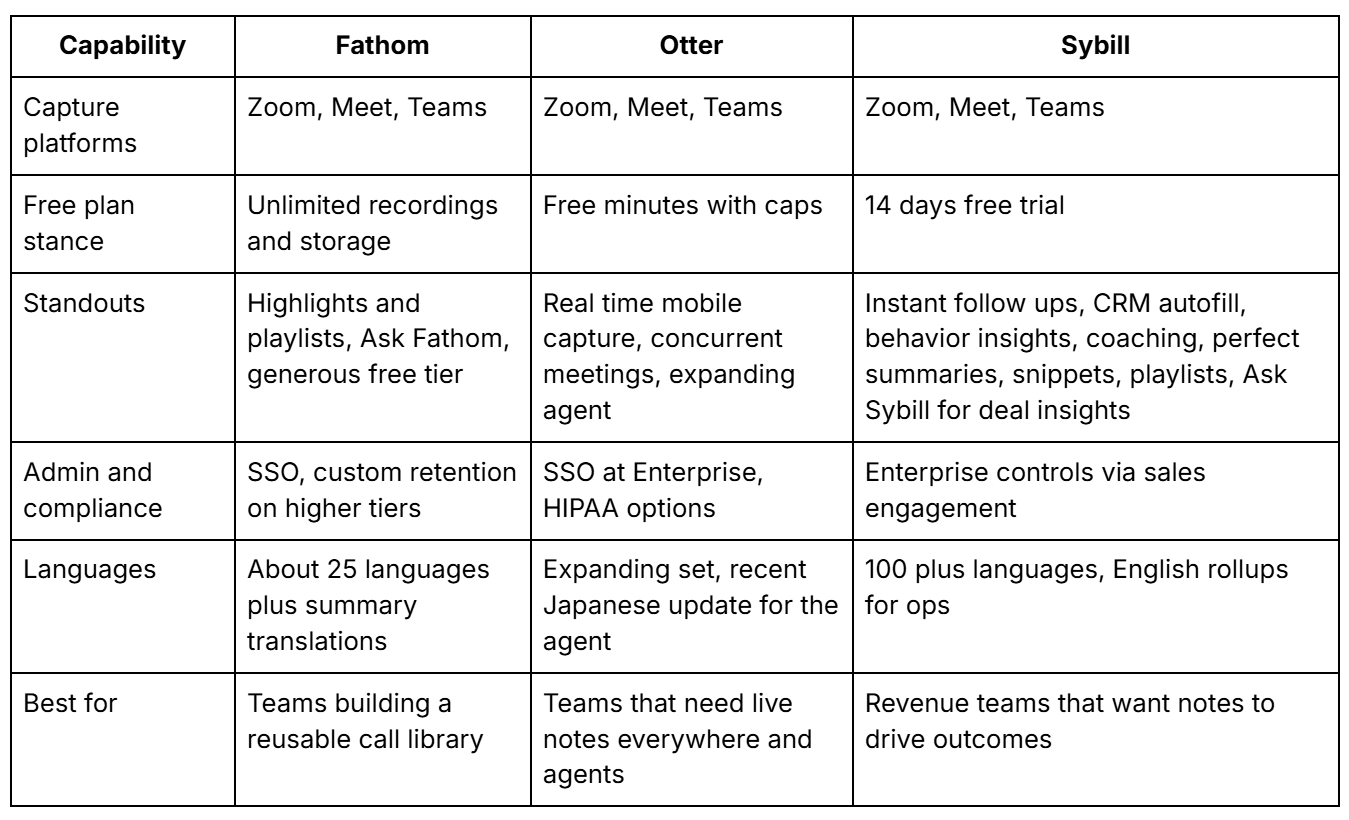
Fathom vs Otter vs Sybill, side by side

__wf_reserved_inherit

Final thoughts, why Sybill wins

When you compare Fathom and Otter, both succeed at turning conversations into transcripts and summaries. They reduce the friction of remembering what happened. Sybill goes further. It writes ready-to-send follow ups that sound like you, fills in your CRM fields correctly, and surfaces behavior signals that help managers coach and reps close. It turns meetings into motion, not just memory. If your north star is revenue momentum, Sybill is the clear winner.

‍

Get started with Sybill

Accelerate your sales with your personal assistant

Get Started Free

Frequently Asked Questions

Is Fathom a good note taker?

Fathom is a capable AI notetaker with unlimited recordings and storage on its free plan, plus advanced summaries and collaboration features on paid tiers. But, if you need a reliable capture tool with highlight clips and playlists, along with further capabilities, like drafting follow ups and updating CRM automatically, look at Sybill for end-to-end outcomes.

What is the difference between Fathom and Fireflies?

Both tools record and transcribe meetings. Fathom focuses on simple capture, highlights, and team search with generous usage on the free tier. Fireflies leans into searchable knowledge and broad integrations. If your goal is organized notes that become actions without manual effort, Sybill adds instant follow ups, CRM autofill, and behavior insights so your meetings lead to progress.

What is similar to Fathom?

Similar tools include Otter, Fireflies, Avoma, and Grain. They all offer recording, transcription, and summaries. Otter differentiates with mobile capture and an expanding meeting agent that can participate during calls. Sybill stands apart by translating conversations into next steps, coachable insights, and CRM updates so your pipeline stays accurate.

Get started with Sybill

Once you try it, you’ll never go back.