
Find us at booth #83, join us for a harbor side happy hour, or catch Gorish’s talk.

Sept, 16-18 > Learn more


Tamanna Mishra

September 19, 2025
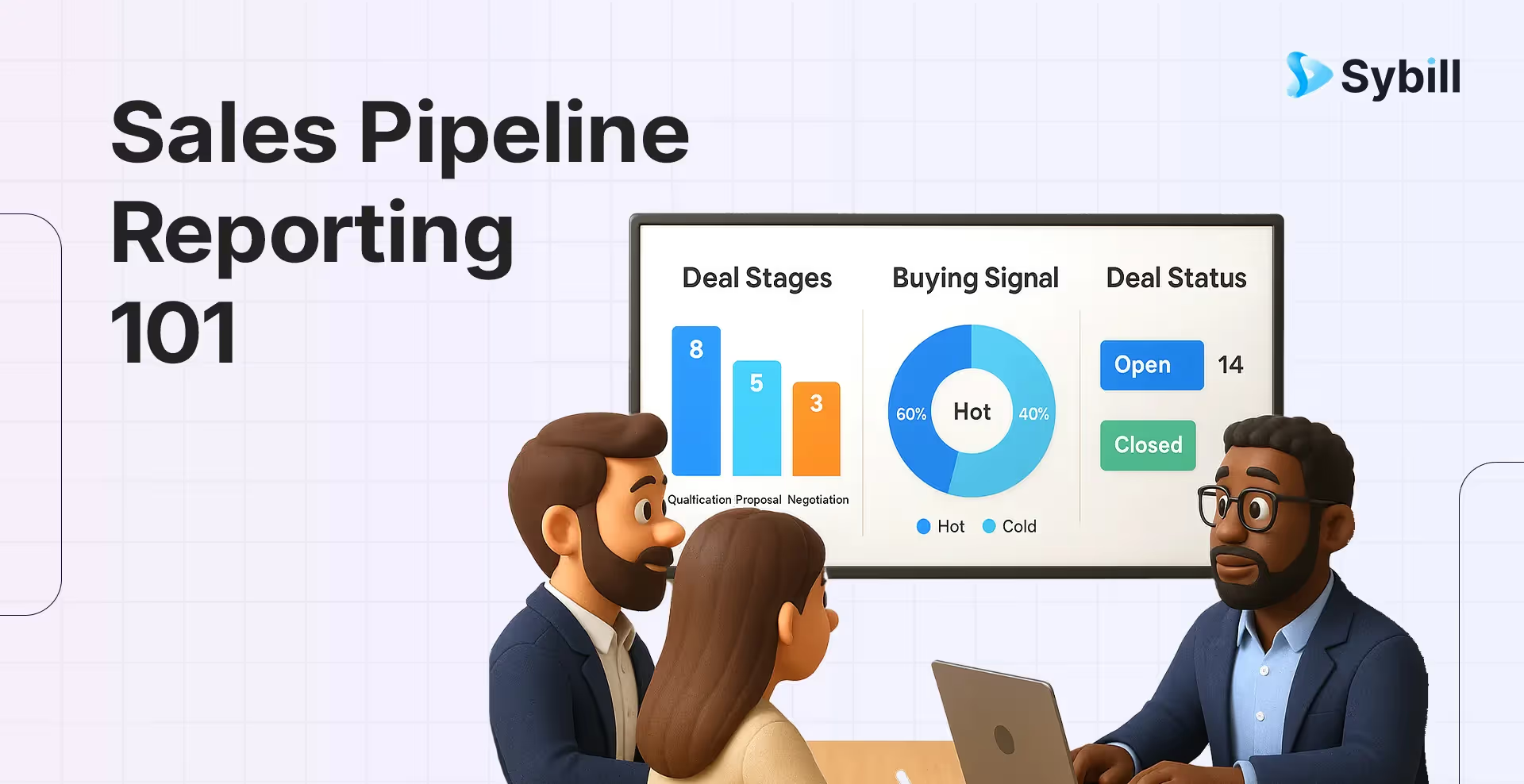
Your deals aren’t slipping through the cracks.
You’re probably flying blind because your sales pipeline report is either a glorified spreadsheet or a Monday morning guessing game.
If your idea of a sales pipeline report is a static CRM export that nobody reads until EOD Friday, you’re not doing sales pipeline reporting right. You’re simply postmortem-ing the consequences.
And sales pipeline reporting is how top teams stay proactive, not reactive. It’s how they coach, course-correct, and crush quotas.
Because when deals stall, stakeholders ghost, and sales cycles zigzag all over the place, clarity is the competitive edge every superseller has.
This blog is your 101 to making sales pipeline reporting actually work. Not a dashboard collecting dust but a living document that knows where your revenue is headed.
Sales pipeline reporting is the structured process of tracking, analyzing, and presenting data about your active deals. It helps sales leaders understand where each opportunity sits within the pipeline, how fast it’s moving, and what’s at risk.
More than just a tally of open deals, it’s a reporting system that gives visibility into the full sales pipeline stages - from prospecting all the way to closed-won. And that visibility enables accurate forecasting, focused coaching, and better decision-making at every level.
While a sales funnel represents the customer’s journey (think awareness to conversion), the sales pipeline maps the sales team’s process - your internal actions and milestones.
That makes sales pipeline reporting a vital tool not just for revenue planning, but for performance management, too.
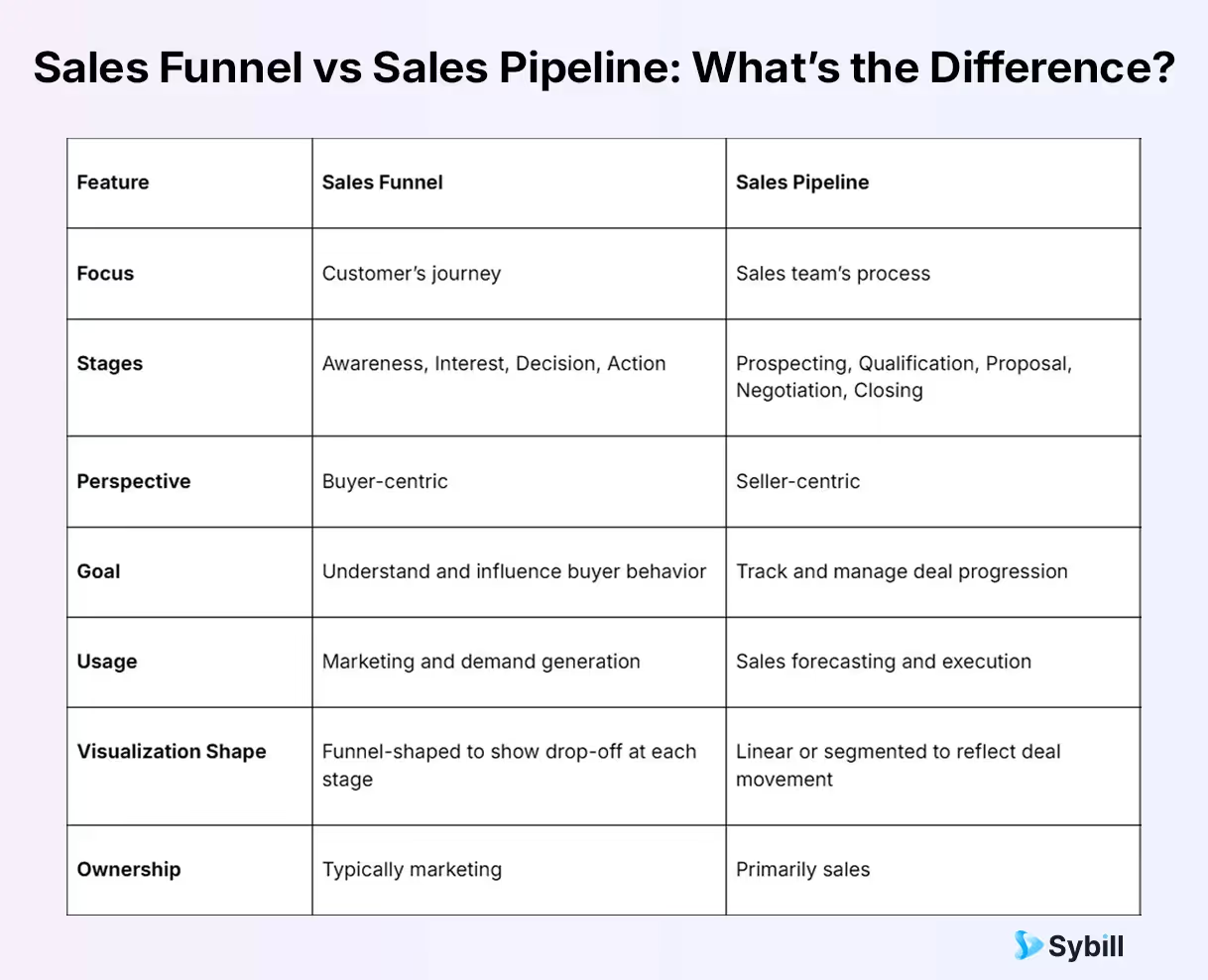
With clear sales process visualization, pipeline reports help you:
A sales pipeline report is the command center of your revenue engine. If your CRM is where deals live, this report is how you monitor their vital signs.
Let’s break down the key components of an effective pipeline report and how each contributes to smarter selling:
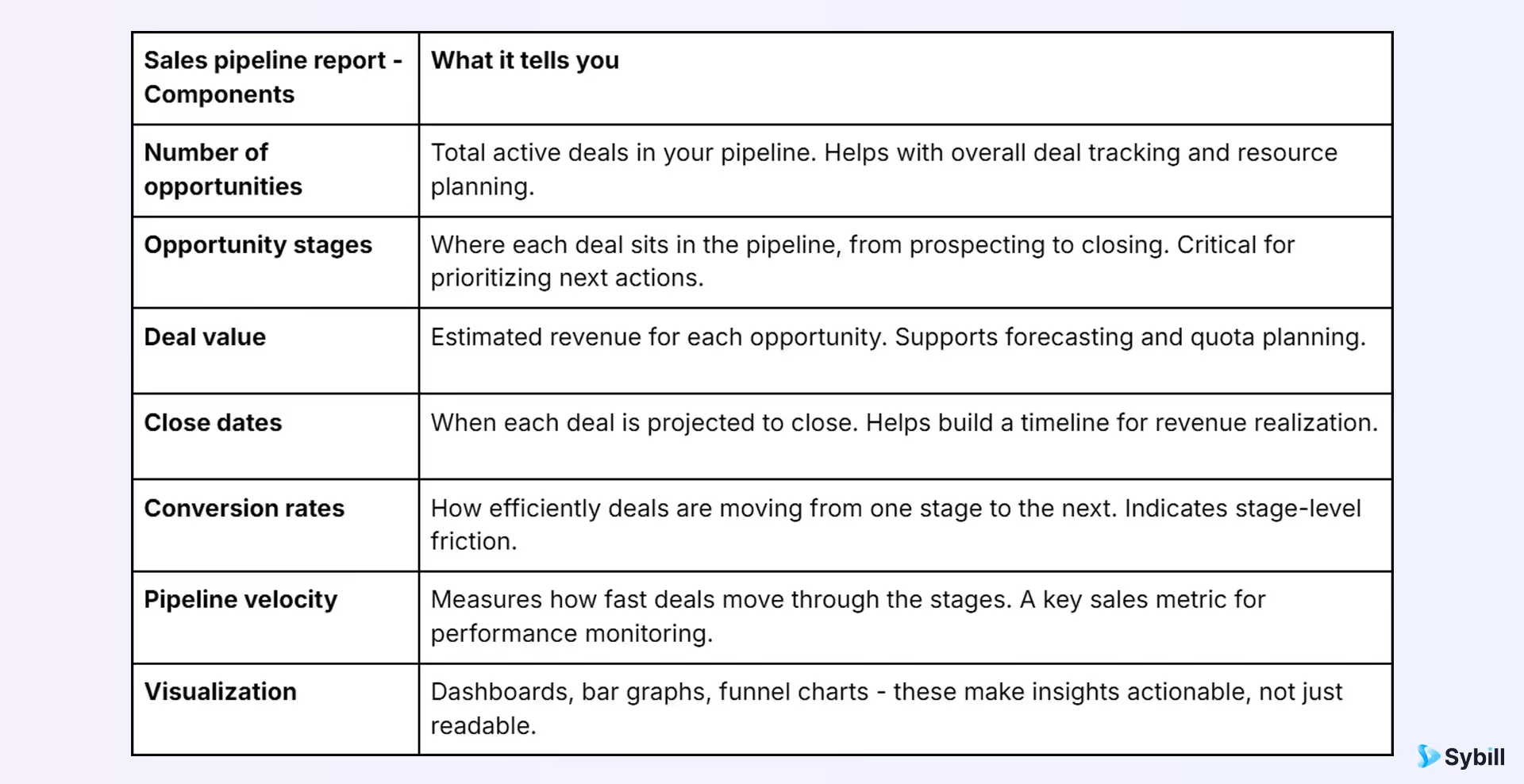
A well-structured sales pipeline report enables revenue leaders to:
A good sales pipeline report will tell you more than what deals are in the pipeline. It also tells you what to do next.
Building a sales pipeline report shouldn’t feel like a chore. Done right, it gives your team the clarity, focus, and forecasting power they need to drive revenue, not just activity.
Here’s how to build one that actually works.
This is where most reporting chaos begins - disconnected platforms, incomplete notes, outdated fields. But this is also where solid CRM data analysis begins.
With Sybill’s Deal Pipeline, your CRM and reporting workspace stay synced in real-time. That means clean, reliable inputs for your reports - no need to chase reps or wrangle spreadsheets.
Who is the report for, and what decisions should it drive?
Sales leaders need different views than reps or execs. Clarity here ensures your reporting format, KPIs, and layout align with business outcomes.
Segment the pipeline using clear sales pipeline stages: Prospecting, Qualification, Proposal, Negotiation, and Closing. Then layer in relevant metrics like deal value, activity score, and close probability.
Sybill lets you filter and organize deals by every meaningful field - from stage and need to buying signal and budget. All, so your data is always actionable.
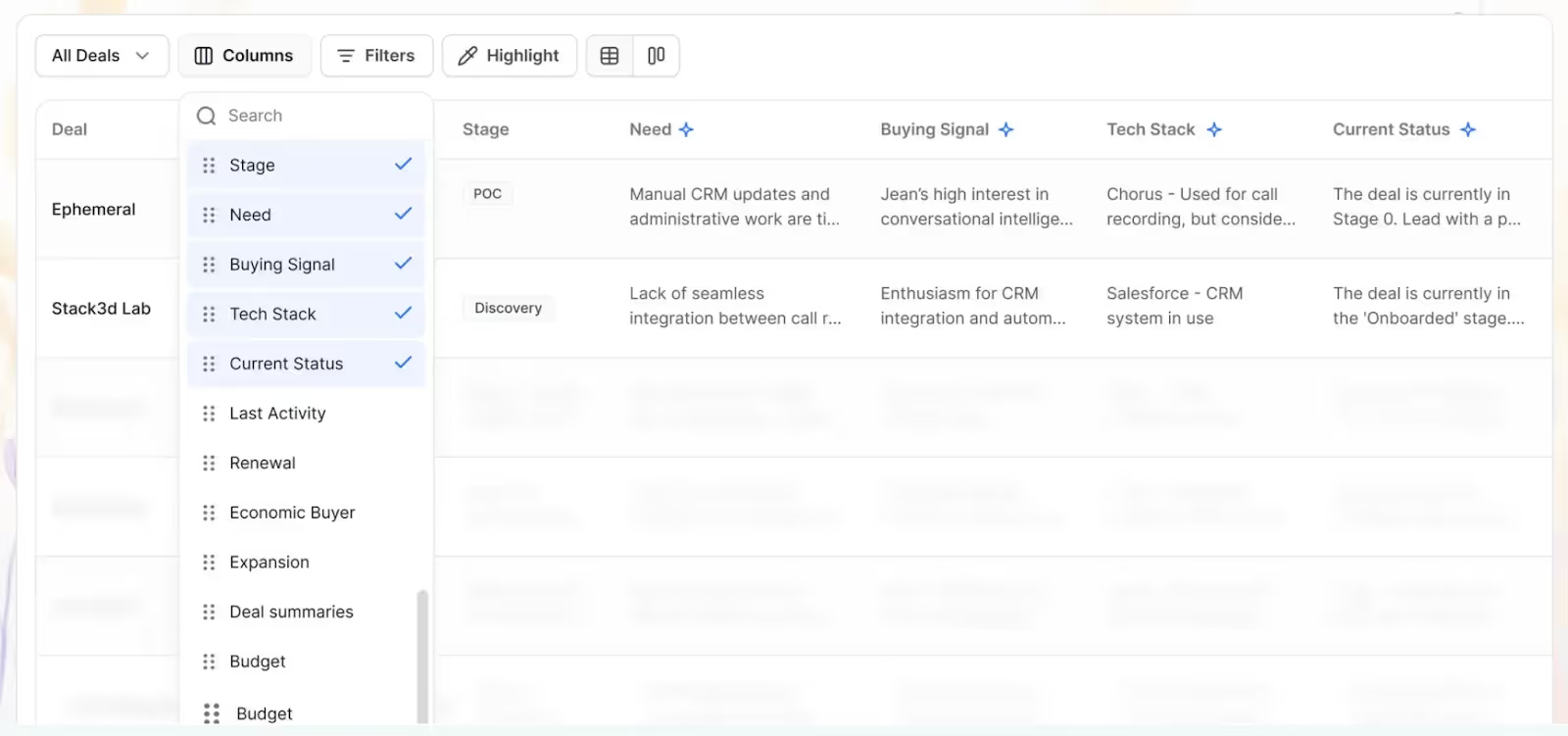
This is where powerful sales reporting tools come into play. A good pipeline report helps you pinpoint:
Sybill does the heavy lifting - all you have to do is Ask (Sybill).
A sales pipeline report means nothing if it doesn’t drive action. The goal isn’t to know what’s happening - it’s to know what to do about it.
Great sales pipeline reports surface:
But surfacing those tasks is only half the job.
Sybill’s AI Tasks closes the loop by turning insights into execution. It auto-captures every action item from your sales calls and emails - assigning owners, due dates, and follow-ups without you lifting a finger. You can manage every to-do in a single view, even across deals and teams.
No tabs. No reminders. Just real movement.
Even the best sales pipeline report can fall flat if it’s bloated, outdated, or misaligned with what the business actually needs. Here are four best practices to keep your reporting sharp, actionable, and worth your team’s time.
Stale data kills trust. If your pipeline report doesn’t reflect today’s reality, it won’t drive tomorrow’s decisions. Build in a rhythm of regular updates - daily, weekly, or even real-time depending on deal volume - to ensure what you’re seeing is what’s actually happening.
Your CRO doesn’t need the same level of detail as your frontline manager. Customize sales pipeline reporting views based on who’s reading them. Executives need summaries and trends. Reps need clarity on next steps. Enablement needs insights into objections, velocity, and coaching gaps. Tailored reports improve reporting efficiency and relevance.
Not every metric deserves a chart. Choose the 5-7 sales KPIs that actually reflect pipeline health: conversion rate by stage, average deal value, win rate, pipeline coverage, sales velocity. Eliminate vanity metrics. Highlight what’s changing, not just what’s sitting there.
Treat your report like a product - review it regularly. Are people using it? Are decisions being made from it? Which filters are being ignored? Which insights are driving action? Continuous refinement is how your sales pipeline reporting stays lean, useful, and future-proof.
Even the most beautiful dashboard can fail if the foundation is shaky. Here are the top sales reporting challenges that derail teams - and how to sidestep them.
Garbage in, garbage out. If your report is built on incomplete or outdated inputs, it becomes more misleading than helpful.
How to fix it: Build routines to audit your pipeline data weekly. Whether it’s updating deal stages or cleaning up old opps, maintaining data quality is non-negotiable.
More data doesn’t mean more clarity. Reports overloaded with metrics, filters, and tabs only confuse the team.
How to fix it: Focus on what moves the needle - your core KPIs and insights. A clear, simple report gets used. A dense one gets ignored.
Insights mean nothing if they don’t trigger action. A report that highlights risk but doesn’t lead to next steps is just decoration.
How to fix it: Turn analysis into accountability. Use tools like Sybill’s AI Tasks to ensure follow-ups are captured, assigned, and executed - on auto pilot. So your reps can focus on what truly matters.
If leaders or managers aren’t engaging with the report, it’s probably because the report isn’t serving them.
How to fix it: Ask your team what’s useful in your sales pipeline reports, what’s noise, and what’s missing. Then iterate. Great sales pipeline reporting evolves with those who use them.
When done right, sales pipeline reporting isn’t just a tracking exercise. It’s a revenue strategy.
It helps you spot risks early, prioritize the right deals, and coach reps with real context.
It turns static data into dynamic action.
But building a report that actually works? That takes more than dashboards.
It takes clean data, deal visibility, team-wide alignment - and execution baked in.
Sybill’s Deal Pipeline gives you:
Ready to stop at just reporting on your pipeline and start moving it forward? Try Sybill for free.
Because the best sales teams aren’t just tracking deals. They’re closing them. Faster, smarter, and with zero guesswork.
The five most common sales pipeline stages are:
These stages may vary by company, but the core progression remains consistent.
2. What is the sales pipeline concept?
The sales pipeline is a visual framework that represents where each opportunity stands in your sales process. It helps teams track deals, forecast revenue, and allocate resources more effectively. Unlike a sales funnel (which is buyer-focused), the pipeline focuses on seller actions and progress across defined stages.
To create a high-impact sales pipeline report, follow these steps:
Bonus tip: Use tools like Sybill’s Deal Pipeline to automate data capture, visualization, and next-step tracking.








