
Find us at booth #83, join us for a harbor side happy hour, or catch Gorish’s talk.

Sept, 16-18 > Learn more

%20(1).avif)
Mamta Tainwala

June 8, 2026
.png)
The most common mistake people make when building their first AI agent is trying to automate everything at once.
They want the agent to handle emails, manage the calendar, update the CRM, run pipeline reviews, coach reps, and monitor the market. They build a complex system. It produces mediocre output across every dimension. And then they give up and conclude that AI agents don't work.
Gorish Aggarwal, CEO of Sybill AI, who built one of the most documented personal agent setups from scratch over three weeks, is direct about this: "There should be just one single task that you try to automate end to end with your agent. People skip on this step. They want the agent to do everything and end up doing nothing."
His current setup includes six agents handling dozens of workflows. But it started with one task, done well, and expanded from there.
This guide gives you the framework to build that first agent correctly: what it needs to work, how to structure it, and where to start if you're on a GTM or sales team.
Building an agent without understanding its components is like hiring someone without giving them a job description, any context about the company, or any tools to do their work. You'll get output, but it won't be good.
Every functional AI agent has four components. Understanding these before you write a single line of anything is what separates agents that work from agents that disappoint.
Identity (the soul file) The agent needs to know who it is, what it's responsible for, how it should communicate, what it can do autonomously, and what it should escalate. This is the behavioral and operational definition of your agent.
Memory The agent needs to know what has happened before. Without memory, every interaction starts from scratch and produces generic output. With memory, the agent improves continuously because it's accumulating context about the people, deals, and situations it's managing.
Skills For repeatable, complex tasks, the agent needs explicit instruction sets. A scheduling skill tells the agent exactly how to propose meeting times. A deal review skill tells it exactly what signals to look for and in what order. Skills make consistent behavior possible without re-prompting.
Heartbeat The agent needs to know when to activate. Is it always-on and triggered by new inputs? Does it run a daily morning sweep? Does it fire only when you ask? The heartbeat defines the agent's operational rhythm.
Now let's walk through how to build each one.
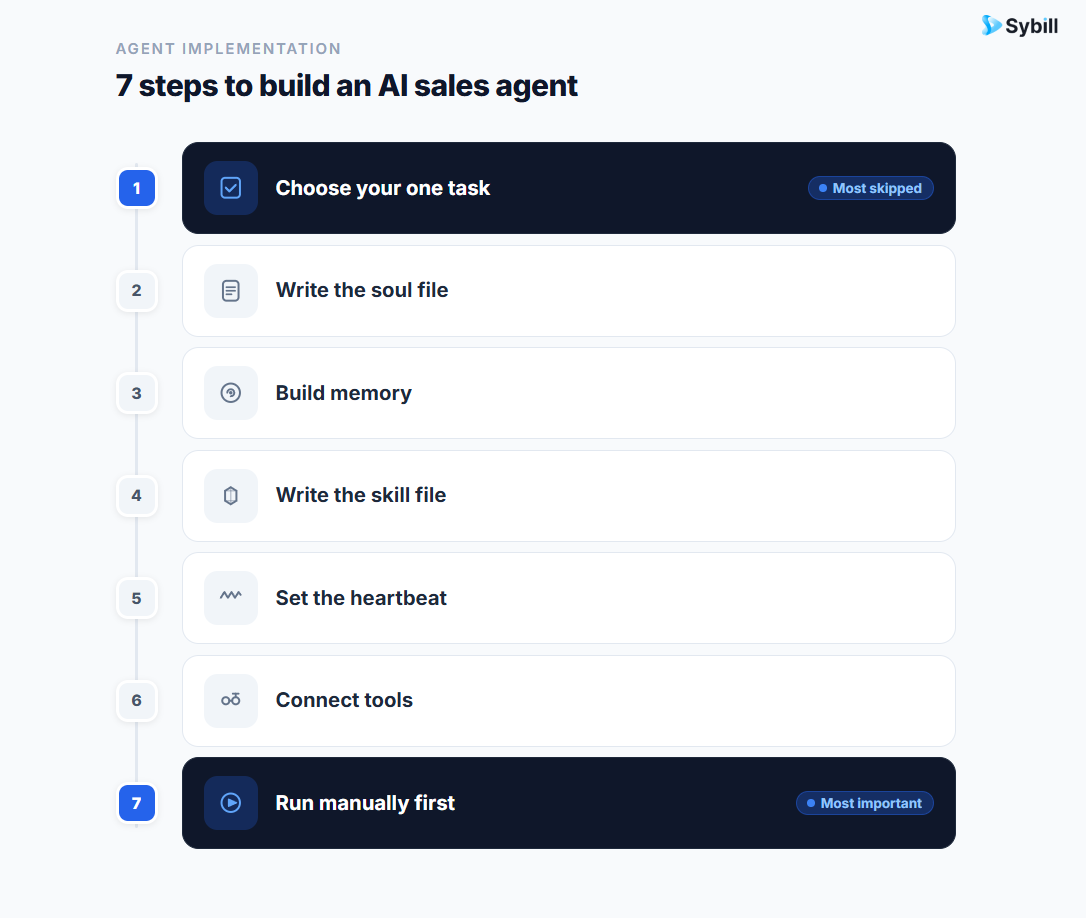
This is the most important decision you'll make, and most people rush past it.
The task you choose should have three characteristics:
It is high volume or high frequency. If it only happens once a month, the agent's memory won't compound meaningfully and the ROI won't be obvious. The best first tasks are things you do every day or every week.
It is annoying or time-consuming to do manually. The friction you're removing needs to be real. Administrative tasks, repetitive lookups, and time-sensitive responses are all good candidates.
It has a clear, testable output. You need to know what "good" looks like so you can curate and improve the agent's work. "Schedule a 30-minute call with two proposed slots by end of day" is testable. "Help me with communications" is not.
For sales and GTM teams, the highest-value starting points are:
Gorish's recommendation for sellers specifically: "If you have high volume, calendaring and scheduling is really a great one. You can add skills over there and you can do it with the web app." For those already using Sybill, the on-ramp is even simpler: post-call follow-ups and CRM autofill are already automated as part of the platform, meaning your first "agent behavior" may already be running.
The soul file (typically a text or markdown file called soul.md) is the foundational document for your agent. It defines the agent's identity, responsibilities, communication style, and permission boundaries.
You do not need to write this from scratch. Give Claude or ChatGPT a description of the role and ask it to generate a soul file. Then curate it. The AI will write a solid first draft; your job is to add the specifics that make it accurate to your actual situation.
A well-structured soul file covers six areas:
Role definition: What is this agent's job? Be specific. "Chief of staff responsible for scheduling, task capture, and follow-through" is better than "helpful assistant."
Communication style: How should it communicate with you? Direct and brief? Formal? Does it use bullet points or prose? Should it push back when you're avoiding something, or just execute?
Strengths and weaknesses to account for: What do you need the agent to compensate for? If you tend to defer difficult conversations, the agent should surface and track those. If you over-schedule, it should protect focus blocks. The agent works better when it knows your patterns.
Domain scope: What is this agent responsible for? What is explicitly out of scope? A scheduling agent should not be opining on your hiring decisions. Boundaries prevent scope creep and keep the agent focused.
Permission tiers: This is the most critical section from a safety and quality standpoint. Define three tiers:
Gorish's agents require his explicit approval before sending any external email and are hard-blocked from executing payments. These tiers are not optional; they are how you maintain control while still getting the value of autonomous operation.
What it should never do? Separate from the permission tiers, this is a categorical list of behaviors. Never send an email without approval. Never share customer data externally. Never book time in a focus block.
The soul file gets read every time the agent takes an action. It is the most-read document in your entire agent setup.

Memory is what makes an agent get smarter over time rather than staying static. Building it well from the start is what separates agents that compound from agents that plateau.
There are two formats memory takes:
Text files (markdown) work well when the agent needs to remember fewer than ten things about a given topic. Your meeting preferences. A person's background and how you know them. The context around a specific project. These are fast to read, easy to update, and sufficient for most personal and small-scale use cases.
Structured databases are better when the agent needs to choose from or reference many records. A list of every prospect and their deal stage. A full directory of team members and their roles. A log of every competitor objection and how it was handled. When the volume of records exceeds ten or becomes query-intensive, a database is the right format.
For a first agent, start simple. Create a user context file that tells the agent about you: your role, your priorities, your communication preferences, your key relationships. Create a contacts file with the people the agent will interact with on your behalf. These two files alone will meaningfully improve the output quality versus a blank-context agent.
For sales teams, Sybill's entire platform is functionally a memory layer for your GTM motion. Every call gets summarized and tied to the deal and the account. Every buyer signal gets captured. When a rep or manager needs context to act, it's assembled automatically rather than reconstructed from memory and scattered notes. That is the organizational equivalent of the memory layer Gorish built for himself.
A skill file is a detailed instruction set for a specific, repeatable task. It tells the agent exactly how to do something, so it doesn't have to infer it from scratch each time.
For a scheduling skill, the file would include:
For a deal qualification skill, the file would include:
The principle, as Gorish describes it: "The harder, the more specific, the more likely you will make it a skill." If the agent can figure it out from general context, you don't need a skill. If it requires specific rules or preferences to do well, write the skill.
For Sybill users, the deal qualification workflow is already built in. Deal inspection surfaces qualification gaps and risk signals automatically, using call and CRM data without requiring a skill file. If you want to extend that with your own rubric or scoring criteria, Ask Sybill lets you query across your deal data using natural language.
The heartbeat is your agent's operational rhythm. It defines when the agent activates and what it does on each trigger.
There are two types of heartbeat triggers:
Schedule-based: The agent runs at a fixed time regardless of what has happened. Daily morning briefing at 8am. Weekly pipeline review every Monday morning. End-of-week task summary every Friday at 4pm.
Event-based: The agent fires when something happens. New email arrives. New LinkedIn message received. Call ends and recording is available. Deal stage changes in the CRM.
The best agent setups use both. A schedule-based morning briefing gives the rep a daily orientation: what meetings are ahead, what tasks are outstanding, what deals need attention. Event-based triggers handle the real-time layer: the moment a call ends, the follow-up drafting starts; the moment a deal shows a risk signal, the manager gets alerted.
For a first agent, start with one scheduled trigger. A daily morning briefing is an excellent choice: high value, easy to evaluate output quality, and creates an immediate habit of interacting with the agent daily.
Gorish's morning briefing includes competitive news for companies in his pipeline, the day's meetings, carried-over task items, and a follow-up task list. All of it assembled automatically before he starts his day.
Sybill's pre-meeting briefs are a commercial version of exactly this heartbeat: before each call, the rep gets assembled context on the account, the deal, and the people on the call, delivered automatically without any manual setup.
An agent without tool access can only draft text. An agent with tool access can actually do things: read your calendar, check your CRM, send a message, create a task, look up a contact.
The tools you connect directly determine what your agent can do autonomously. Start with the tools most relevant to your chosen task:
Tools connect to agents via MCP (Model Context Protocol), an emerging standard that lets AI systems interface with external services. Most major tools now have MCP connectors. Claude's web interface supports connecting calendar, Gmail, and CRM directly through the settings panel, no terminal required.
If you're using Sybill, your calls, CRM data, and follow-up workflows are already connected as a unified system. The integrations page shows every platform Sybill connects to out of the box.
This is the step most people skip, and it's why many agents produce embarrassing output in their first few weeks.
Before you let the agent send anything autonomously, run it manually. Review every output. Correct what's wrong. Add that correction to the memory or skill file so the agent doesn't make the same mistake twice. Repeat until the output is consistently good enough to send or act on without changes.
Gorish spent three weeks building his setup before it was at a level he considered reasonable. He did not write a single line of code. The investment was in curation: reviewing output, identifying what was wrong, and adding that context to the right file.
The curation loop is: run the agent, review the output, identify what's missing or wrong, update the soul/skill/memory file, run again. Each cycle makes the agent better. After five to ten cycles on a single task, most agents are producing output that requires minimal human correction.
Only then should you turn on autonomous execution, and even then, only for Tier 1 actions (the lowest-risk category from your permission tier definition).

If you're on a sales team and want the fastest path to a working agent, here is the recommended starting point, adapted from Gorish's framework:
Task: Post-call CRM update and follow-up email draft
Why this task: It happens after every call. It is currently done manually (or not at all). It has a clear, testable output. And it directly impacts pipeline hygiene and deal velocity.
What you need:
If you're already a Sybill user, Magic Summary, CRM Autofill, and personalized email follow-ups already handle this workflow end to end. You don't need to build this agent from scratch; you can connect Sybill as the intelligence source for an extended agent setup that handles what comes after the call.
For teams managing complex deals and multiple reps, AI Tasks handles the action item layer: capturing tasks from calls, assigning them, and tracking them to completion automatically.
Starting with too broad a scope. One task. Master it. Then expand.
Skipping the soul file. Without identity and permission tiers, the agent will behave inconsistently and potentially do things you don't want it to do.
Not building memory. An agent with no memory is an agent that resets to zero every time. Build memory files from day one, even simple ones.
Automating before the output is good. Autonomous execution with poor-quality output damages relationships and creates more cleanup work than doing things manually. Curate first.
Treating the model as the hard part. The model is the most commoditized component. The hard parts are context, memory, and skill definition. That is where the quality difference lives.
How long does it take to build a first AI agent?
A basic single-task agent with a soul file, one skill, and tool connections can be functional in a few hours. Getting it to consistently good output quality typically takes one to two weeks of curation cycles. Gorish's full six-agent setup took three weeks to reach a level he considered reasonable.
Do I need to write code to build an AI agent?
Not for most use cases. Claude's web interface supports skill files, calendar and CRM connections, and basic agent behavior through settings, no terminal or coding required. More advanced setups (custom memory files, event-based triggers, multiple agents) benefit from tools like Claude Code or OpenCLAW but are still manageable without traditional coding experience.
What's the best first AI agent use case for a sales rep?
Scheduling and calendar management or post-call CRM updates and follow-up drafting. Both are high-frequency, have clear output criteria, and deliver immediate time savings.
How do I make my AI agent smarter over time?
Build and maintain memory files. After every interaction, the agent should write what it learned to memory: preferences, corrections, new context about people and deals. The more context accumulates, the better the output.
Can I use Sybill as the intelligence source for an AI agent?
Yes. Sybill's MCP connector makes call intelligence, deal context, and CRM data available to external agents and workflows. It acts as the context layer that makes agent actions more accurate and personalized.
What is a soul.md file?
A soul.md file is a text or markdown document that defines an AI agent's identity, responsibilities, communication style, and permission boundaries. It gets read every time the agent takes an action and is the single most important file in any agent setup.
The agents that work are not the ones built with the most ambition. They are the ones built with the most focus: one task, done well, with clear memory, clear permissions, and a short curation loop before automation.
Once that first agent is running reliably, the path to a second and third agent is much shorter. The soul file templates exist. The memory patterns are established. The tool connections are already in place.
The compounding starts with the first task done right.
If your team is ready to start with the post-call layer already handled, see how Sybill automates the sales admin workflow or book a demo to see it in action.
A basic single-task agent with a soul file, one skill, and tool connections can be functional in a few hours. Getting it to consistently good output quality typically takes one to two weeks of curation cycles. Gorish's full six-agent setup took three weeks to reach a level he considered reasonable.
Not for most use cases. Claude's web interface supports skill files, calendar and CRM connections, and basic agent behavior through settings, no terminal or coding required. More advanced setups (custom memory files, event-based triggers, multiple agents) benefit from tools like Claude Code or OpenCLAW but are still manageable without traditional coding experience.
Scheduling and calendar management or post-call CRM updates and follow-up drafting. Both are high-frequency, have clear output criteria, and deliver immediate time savings.








