
Find us at booth #83, join us for a harbor side happy hour, or catch Gorish’s talk.

Sept, 16-18 > Learn more


Tamanna Mishra

April 17, 2026
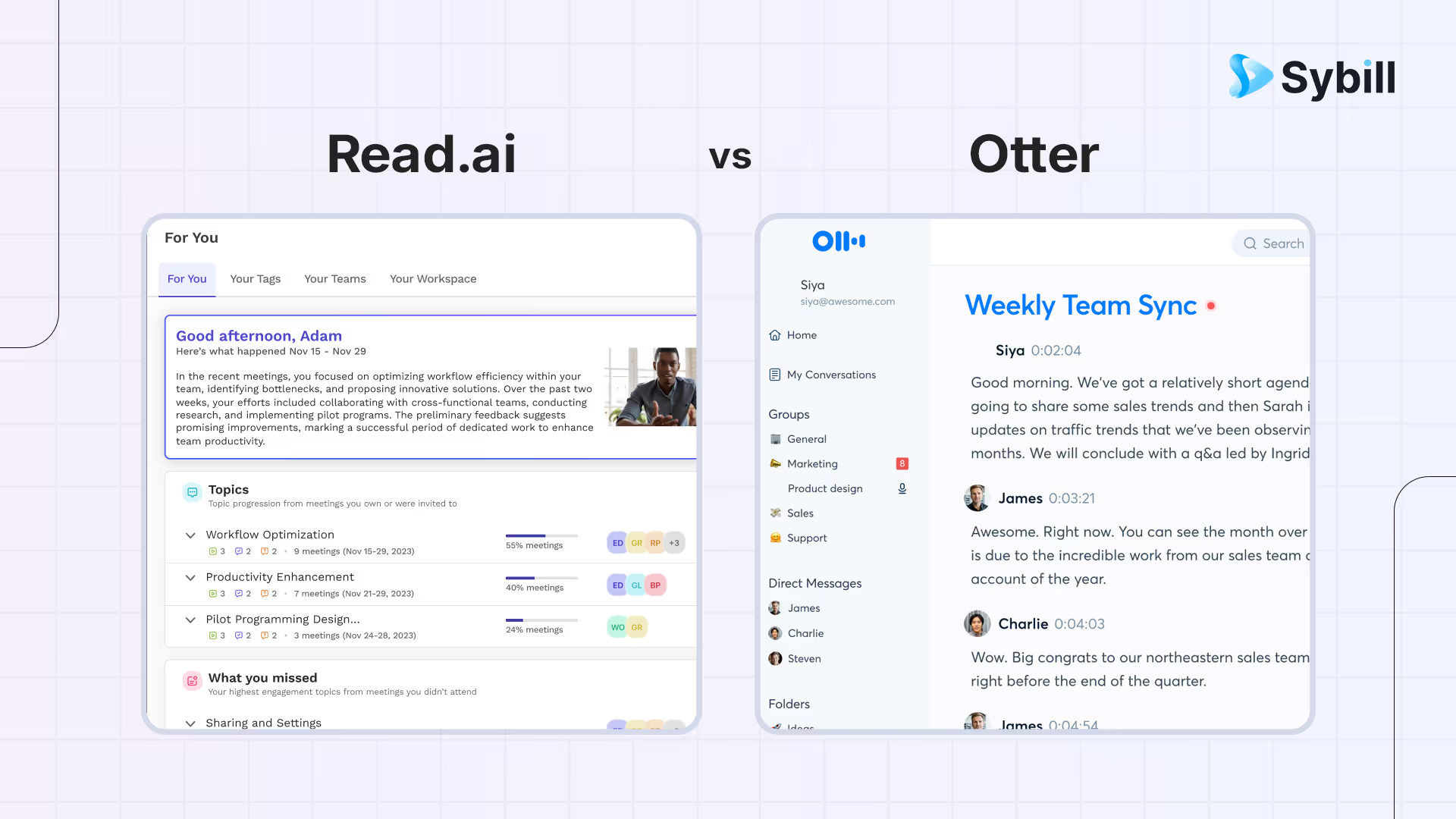
Remember when meetings meant frantic typing, half-baked notes, and the occasional “Wait, who said that?”
Welcome to 2026, where AI meeting assistants are multiplying faster than unread Slack messages. At the heart of this race sit Read.ai vs Otter.ai - two popular tools promising to record and transcribe meetings seamlessly.
Both claim to be the smartest AI recorder note taker in the room. And while they battle it out, a quiet contender - Sybill, the most accurate AI note taker built for revenue teams - is quietly rewriting what “smart meetings” actually mean. Stay with us to know why.
Read.ai is an AI meeting assistant focused on meeting analytics including engagement scoring, talk-time tracking, and sentiment analysis across Zoom, Teams, and Google Meet, best for managers who want quantitative meeting performance data. Otter.ai is a real-time transcription platform with live captions, collaborative note editing, and searchable meeting archives, best for teams that need verbatim transcripts and cross-meeting search. Read.ai wins on meeting analytics and participant engagement metrics; Otter.ai wins on transcription accuracy, real-time collaboration, and search across meeting history. For sales teams that want meeting capture plus automated follow-up emails, CRM autofill, deal intelligence, and pre-call briefs in a single platform, Sybill delivers execution-focused features that advance deals beyond what either analytics or transcription tool offers alone.
If you’ve ever compared Otter vs Read AI, you already know they’re chasing the same dream - a world where meetings run themselves and you never have to say, “Can someone send the notes?” again. But they’re built on two very different philosophies.
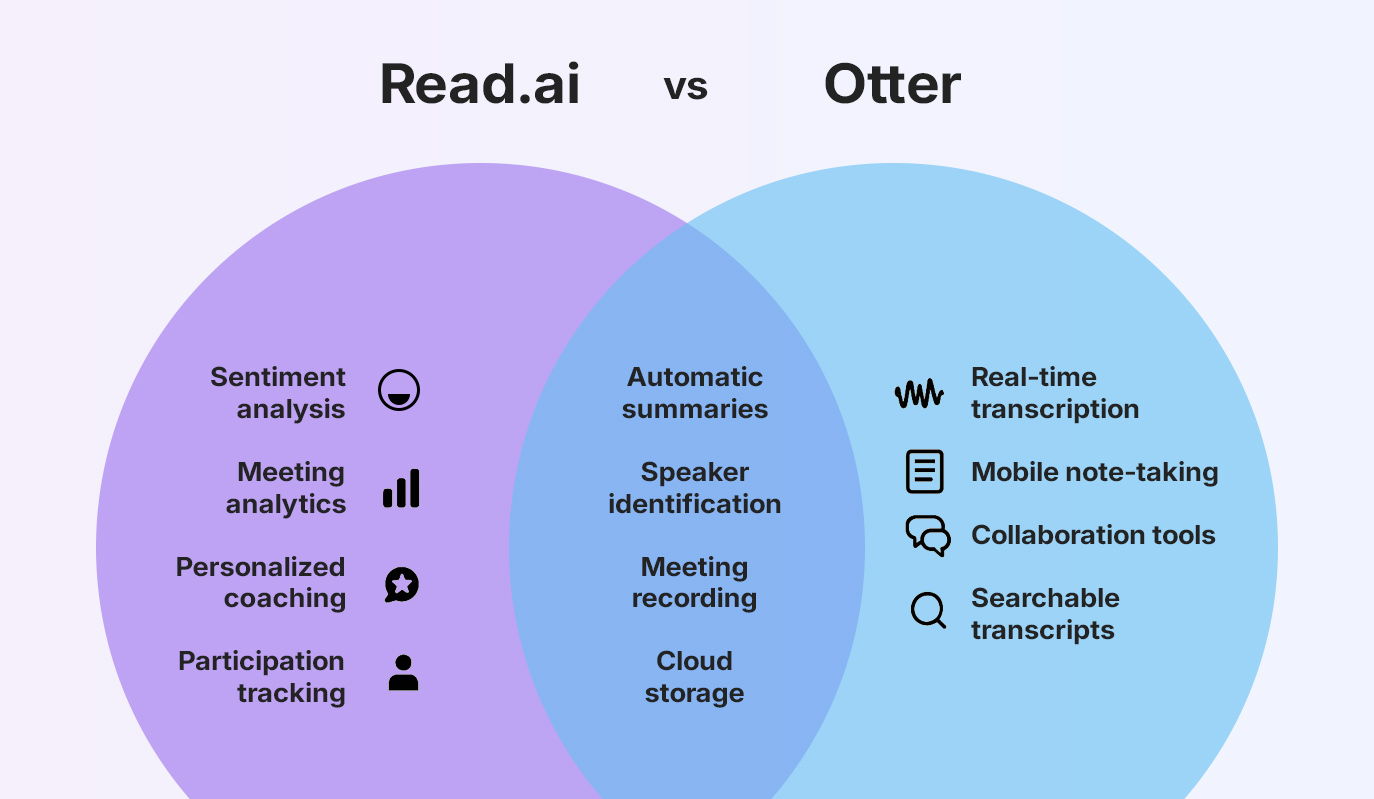
Read.ai takes the data-driven route to smarter meetings. It’s an AI audio note taker and a meeting analytics engine. Read captures engagement, sentiment, and participation levels in real time, generating a “meeting score” that tells you who spoke too much, who didn’t speak enough, and whether your meeting vibes were more “Monday meltdown” or “Friday flow.” Read.ai.’s personalized coaching feature even nudges users to improve tone, pacing, and collaboration style over time.
Otter.ai stays rooted in simplicity. It focuses on real-time transcription and collaboration. Whether you’re in a Zoom call, a classroom, or a press interview, Otter captures every word as it’s spoken - complete with timestamps and speaker identification. You can search, share, comment, and highlight right inside the transcript, making it a productivity favorite for students, journalists, and fast-moving teams. Its mobile note-taking capability gives it a serious edge for on-the-go users.
So, while both record and transcribe meetings, Read.ai grades your performance, and Otter.ai hands you clean, searchable notes. One dives deep into analytics; the other focuses on effortless accessibility.
Both Read.ai and Otter.ai are top contenders in the race to become the go-to AI meeting assistant of 2025. They promise effortless documentation, automated insights, and productivity superpowers, but the experience feels very different depending on which side you’re on.
Let’s break down how Read ai vs Otter ai perform across some critical areas.
For any AI recorder note taker, transcription accuracy is the foundation.
Read.ai delivers real-time transcription, capturing the flow of the meeting as it happens. It identifies speakers and timestamps dialogue efficiently. But there’s a catch. Accuracy fluctuates across accents and noisy environments, and since Read.ai relies heavily on stable internet, a weak connection can send your transcript into chaos.
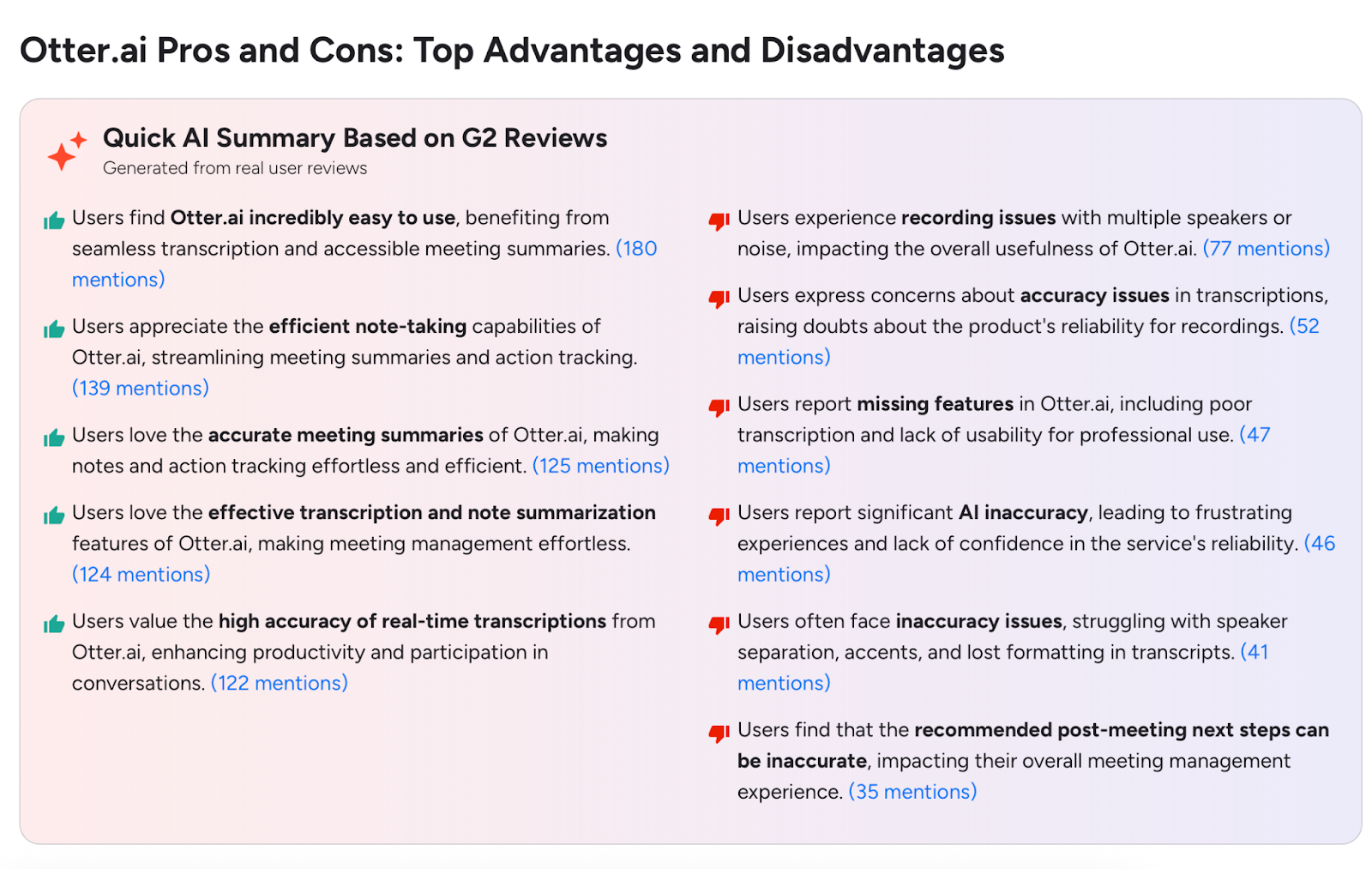
Otter.ai is known for its snappy, live transcription engine that feels effortless in action. However, G2 reviewers frequently point out accuracy issues, particularly when several participants speak at once or when background noise creeps in. The result? Clean transcripts still need a human eye for polishing.
Verdict: Neither is bulletproof. For high-stakes meetings - think sales negotiations or executive calls - both tools may leave you re-editing instead of relaxing.
Here’s where Read.ai tries to stand out. Beyond words, it listens for tone. Its sentiment analysis measures engagement levels, participation equality, and even collective mood shifts. You get metrics like “Meeting Score” and “Participation Ratio,” which can help managers coach teams and identify communication gaps.
But there’s a fine line between helpful feedback and feeling watched. For smaller teams or sensitive discussions, always-on analytics can feel invasive, like an algorithm judging your empathy in real time.
Otter.ai, meanwhile, skips the judgment. It sticks to its lane: fast, reliable transcription. There’s no sentiment tracking, no performance grading - just words on a page.
Verdict: Read.ai shines for data-driven teams who want to measure meeting quality. Otter.ai wins for anyone who prefers less surveillance and more simplicity.
If teamwork is your top priority, Otter.ai takes the lead. Its collaboration features are smooth and intuitive: participants can highlight key points, add comments, and assign action items directly in the live transcript. Everything updates in real time, making it a favorite among journalists, educators, and cross-functional teams.
Read.ai brings its own flavor of post-meeting productivity. The “For You” dashboard curates personalized meeting insights, while the “Daily Read” audio recap serves up key moments for those who skip the replay. Still, the interface feels busier, and both apps share a limitation: they depend on a constant internet connection. No Wi-Fi, no notes.
Verdict: Otter wins for everyday usability; Read.ai caters to leaders who crave analytics over collaboration.
Integrations can make or break an AI meeting assistant, and this is where philosophies diverge.
Read.ai plays well with enterprise-grade tools - Salesforce, HubSpot, Notion, and Slack - making it appealing for data-oriented teams that live in CRMs and project management platforms.
Otter.ai goes broader and more flexible. It adds Asana, Dropbox, Amazon S3, and even Android app support, filling the gaps for users who need lightweight, mobile-friendly workflows.
Verdict: Read.ai wins in analytics-driven ecosystems; Otter.ai wins in accessibility and variety.
In a world where every word of a meeting might include confidential details, security isn’t optional. It’s a core lever.
Otter.ai clearly publishes its encryption protocols, compliance standards, and data storage practices. Users know where their data goes and how it’s protected.
Read.ai, however, is less forthcoming. There’s limited documentation on encryption methods or privacy certifications. This could raise concerns for regulated industries like finance or healthcare.
Verdict: Otter’s transparency gives it the edge here.
In short: Read.ai is the ambitious analyst that wants to quantify your communication. Otter.ai is the pragmatic notetaker that just wants to make sure nothing gets lost. The right choice depends on whether you want data about your meetings - or just clean notes from them.
When comparing Read AI pricing and Otter AI pricing, the differences go beyond dollars to reflect two distinct philosophies. Otter focuses on accessible transcription for everyone, while Read aims to become your all-in-one productivity and meeting intelligence system.
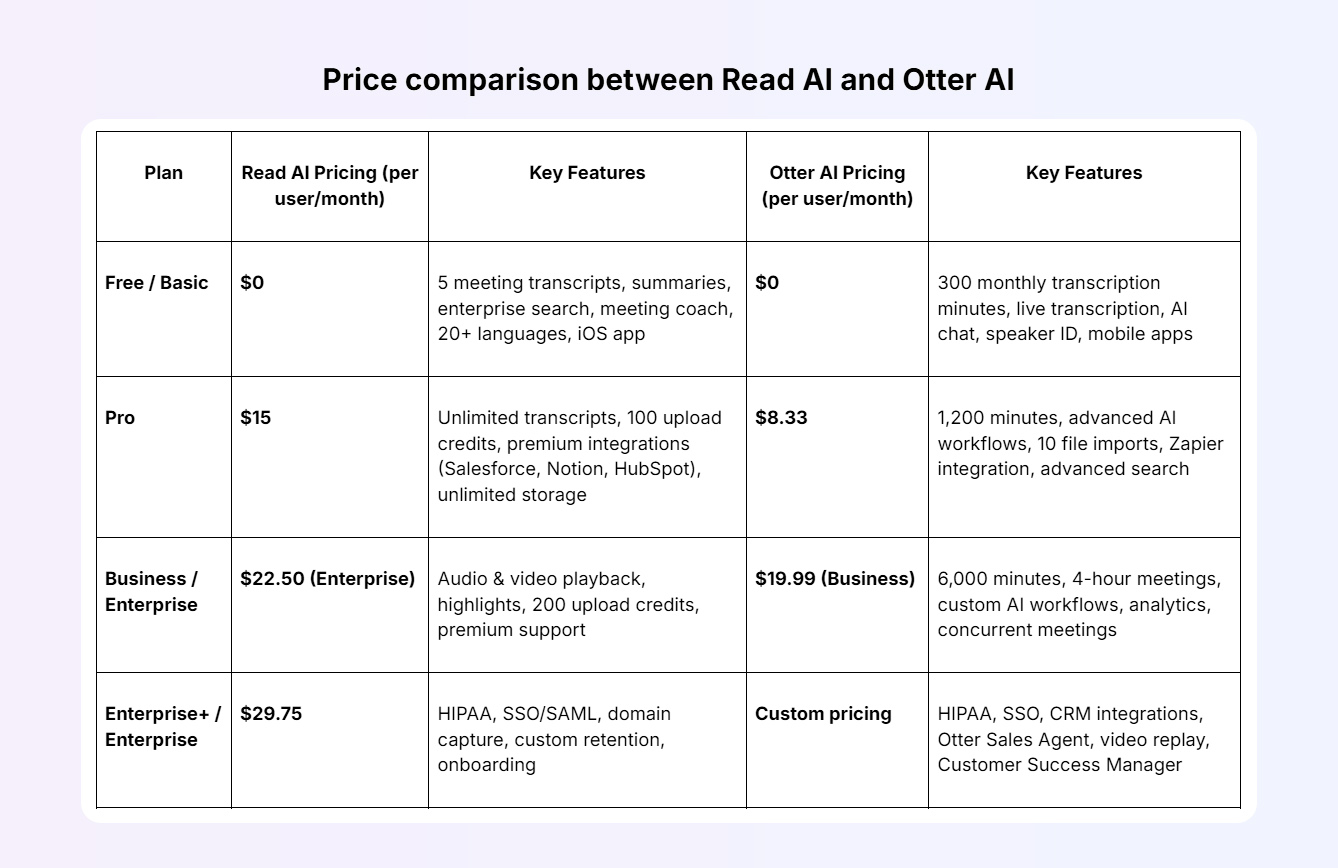
Verdict: If affordability and quick deployment matter, Otter AI pricing wins. But for teams who crave deeper analytics, cross-platform integrations, and enterprise-grade features, Read AI pricing earns its premium.
Both tools offer free tiers. Read AI’s Free plan includes up to five meetings per month, complete with summaries, transcription, topic readouts, and even a personalized meeting coach. You also get unlimited enterprise search and support for 20+ languages. Otter’s Basic plan also starts free, with 300 monthly transcription minutes, speaker identification, AI chat, and live transcription across Zoom, Teams, and Google Meet.
From there, pricing and purpose diverge. Read AI’s Pro plan ($15/user/month) unlocks unlimited meetings, premium integrations (Salesforce, HubSpot, Notion, Jira, Confluence), and 100 file uploads per month. The Enterprise plan ($22.50/user/month) adds playback, video highlights, and premium support. Enterprise+ ($29.75/user/month) brings HIPAA compliance, SSO/SAML, and data retention controls, making it suitable for larger, compliance-driven teams.
Otter’s Pro plan ($8.33/user/month) undercuts Read on price, offering 1,200 monthly transcription minutes, advanced AI workflows, Zapier integration, and unlimited storage. Its Business plan ($19.99/user/month) supports up to four-hour meetings, team analytics, concurrent sessions, and priority support, while the Enterprise tier (custom pricing) adds HIPAA compliance, CRM integrations, and an Otter Sales Agent for AI-driven sales notes.
In short: Otter remains the cost-effective choice for individual users and smaller teams seeking smooth, simple transcription. Read AI costs more but delivers a richer layer of analytics, coaching, and organizational control.
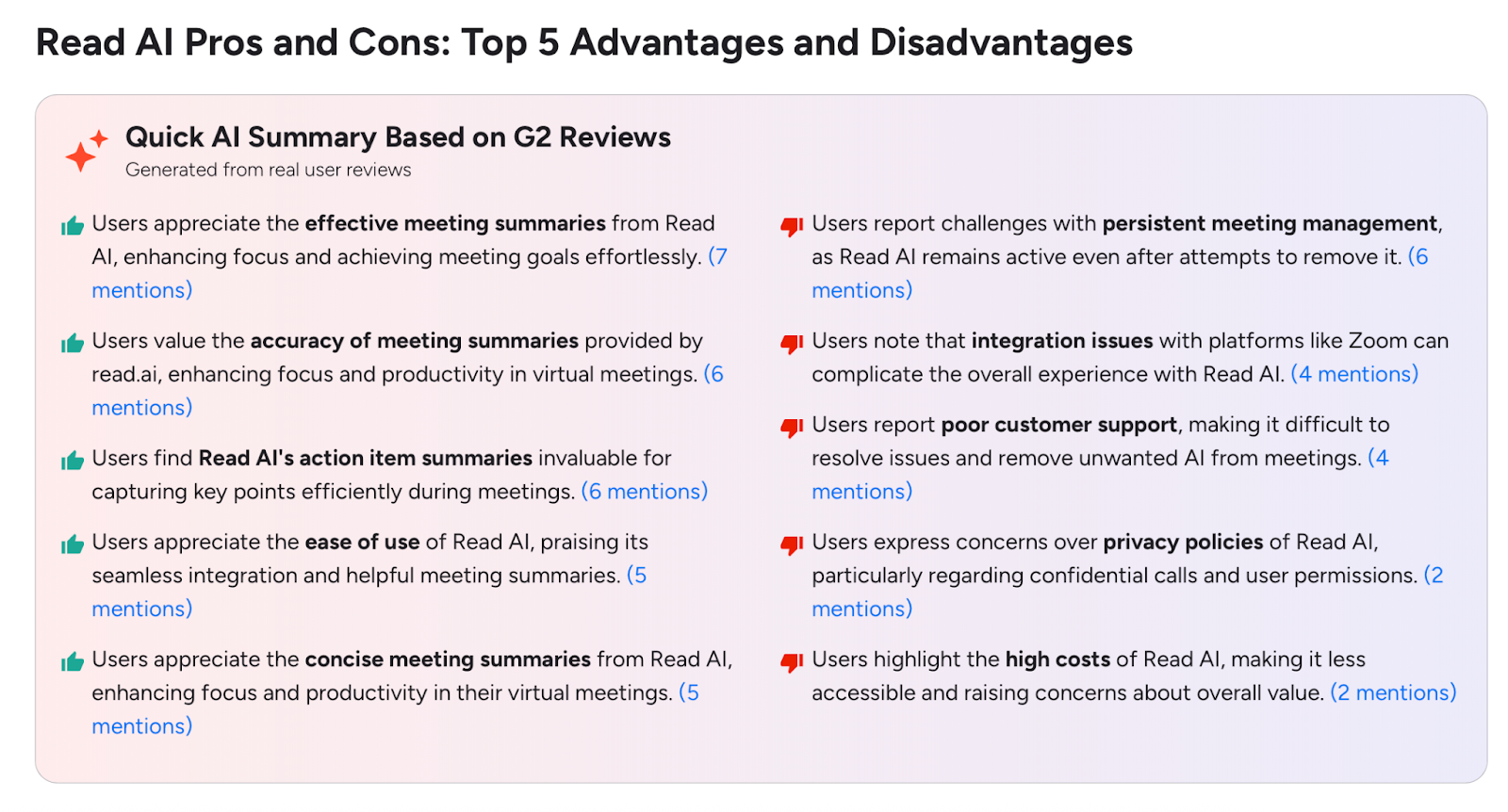
When it comes to user sentiment, the Read.ai vs Otter.ai reviews reveal two very different personalities. On G2, Read.ai averages 4/5 stars, praised for its meeting analytics and coaching insights but criticized for its persistent meeting presence. Its AI bot is hard to remove once it joins. Users also mention integration issues, slow or unhelpful support, and expensive tiers compared to competitors. Many love its ambition but describe the overall experience as “powerful yet clunky.”
Otter.ai, with an average of 4.4/5 stars, gets applause for its clean interface, mobile accessibility, and ease of use. It’s seen as the more approachable tool, perfect for quick, frictionless note-taking. However, even loyal users acknowledge recurring accuracy issues and occasional mislabeling of speakers, especially in multi-person meetings.
In tone, Otter feels friendly and reliable, like a dependable coworker who quietly takes notes in the background. Read, by contrast, feels more corporate - polished but occasionally overwhelming. Neither tool is perfect, but users agree: Otter.ai delivers lighter, faster usability, while Read.ai offers richer analytics for teams willing to trade simplicity for depth.
So, is Read AI or Otter AI better? The answer depends entirely on who you are and what you need from your AI meeting assistant.
If you’re part of a sales or leadership team that values metrics, analytics, and coaching-driven insights, Read.ai fits the bill. It’s the choice for managers who want to measure participation, engagement, and tone, not just capture words. But its analytical depth can feel heavy for smaller teams that simply need quick, clean notes or task automation.
That’s where Otter.ai shines. For students, journalists, and small teams, it’s intuitive, affordable, and fast. You hit record, and Otter handles the rest. No dashboards, no data science, no friction.
But here’s the catch: both tools stop at transcription. They record what’s said but can’t understand why it matters. Neither connects meeting insights to real outcomes. For sales teams, specifically, neither tool pushes deals forward or makes lives easier in any way.
And that’s where Sybill steps in, bridging the gap between recording and real intelligence.
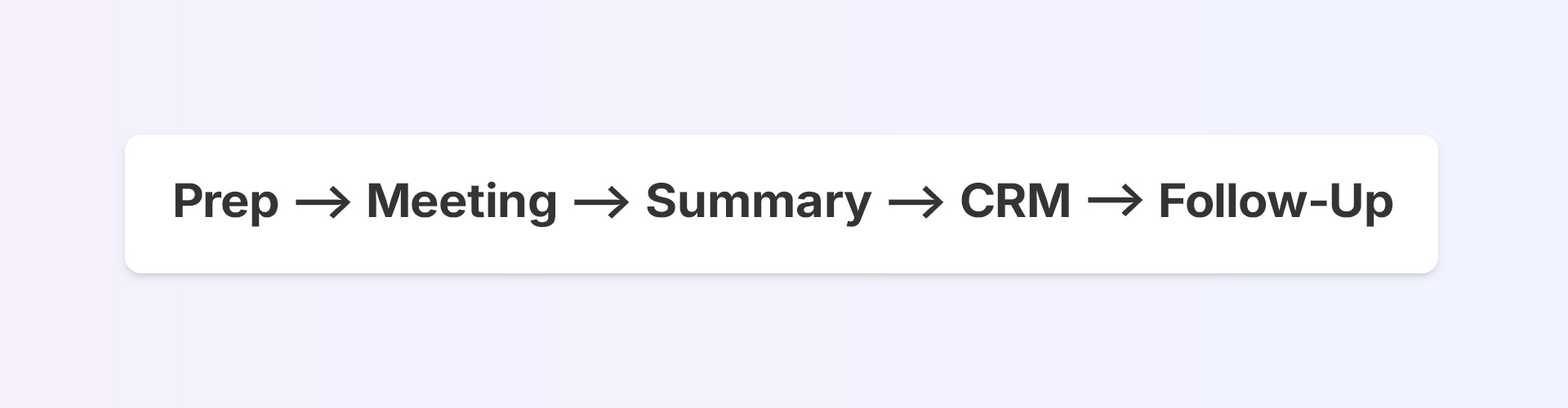
Meet Sybill, the AI note taker (and so much more) that records, interprets, executes. It’s the only tool that turns every meeting into a momentum machine.
See how Sybill redefines the AI note taker and meeting assistance space. Try it for free.
Both Read.ai and Otter.ai solve parts of the note-taking puzzle. They record and transcribe meetings well enough.
But modern teams need more than meeting notes. They need meeting intelligence.
That’s where Sybill, the next-gen AI meeting assistant, changes the game. It combines accurate transcription with emotion analysis and next-step automation, transforming every conversation into clear, actionable outcomes. Why settle for static notes when you can have a system that actually moves deals forward?
Turn your conversations into conversions. Explore Sybill today.
The Read.ai vs Otter.ai debate comes down to priorities. Read AI is ideal for analytics-driven teams that want deeper meeting insights - engagement scores, sentiment tracking, and personalized coaching. Otter AI, on the other hand, suits students, journalists, and small teams who just want quick, reliable transcriptions and searchable notes. Both tools help you record and transcribe meetings, but while Read aims to optimize how you communicate, Otter focuses on making note-taking fast and accessible.
If you’re looking for the best tool to record and transcribe meetings, both Read.ai and Otter.ai perform well, but neither goes beyond transcription. Sybill stands out as the next-generation AI note taker, offering context-aware intelligence that captures tone, emotion, and buyer intent. Unlike traditional AI recorder note takers, Sybill not only ensures transcription accuracy but also delivers actionable insights, from automated follow-ups to CRM updates, making it a much smarter alternative to Otter AI vs Read AI.
Yes, if you’re a data-focused leader who values detailed analytics. Read AI delivers real-time engagement metrics, sentiment tracking, and coaching insights that help improve communication quality. However, its constant monitoring can feel intrusive in smaller teams, and its pricing makes it less appealing for casual users. For most professionals comparing Read.ai vs Otter.ai, Read is worth it for structured analytics, while Otter remains better for everyday usability and affordability.








