Find us at booth #83, join us for a harbor side happy hour, or catch Gorish’s talk.

Sept, 16-18 > Learn more


Tamanna Mishra

May 15, 2026
TLDR: Synchronous vs asynchronous communication
Synchronous communication happens in real time — meetings, phone calls, live chat, video calls — and is best for complex discussions, relationship building, negotiations, and decisions requiring immediate input. Asynchronous communication happens on each person's own schedule — email, recorded video, shared documents, project comments — and is best for detailed updates, cross-timezone collaboration, deep work protection, and creating searchable records. The most productive remote teams in 2026 use synchronous meetings for high-stakes conversations and async tools for everything else, with AI bridges like Sybill that convert synchronous meetings into async-friendly outputs: structured summaries, follow-up emails, CRM updates, and action item lists that keep distributed teams aligned without requiring everyone to attend every call.
Synchronous communication works for speed. Asynchronous communication works for clarity. Remote teams need both.
The real win is using AI tools that turn collaboration into action. This guide shows how synchronous vs asynchronous communication impacts productivity and how tools like Sybill keep teams aligned across time and channels.
Remote work is not breaking because teams picked Slack instead of Zoom. It is breaking because people switch between synchronous and asynchronous communication without intention. The real productivity drain is not the tool. It is the timing.
And that timing is becoming a business-critical issue. A recent survey showed a clear shift. Companies are slowly pulling back pandemic-era freedoms and tightening their stance on remote work. By 2026, almost a third of employers expect staff to return to the office full time. Another group plans to push teams toward four-day office weeks. Only a tiny fraction is committed to staying fully remote.
If flexibility is shrinking at the organizational level, clarity and efficiency must expand inside the team. This blog breaks down exactly when synchronous communication helps and when asynchronous communication protects your team’s momentum. You will also see which AI collaboration tools elevate both modes so your team stays aligned whether they meet live or work across time zones.
Synchronous communication is real-time communication. Everyone is present. Everyone responds instantly. Think Zoom calls, Slack huddles, quick phone chats, or those in-office conversations that derail your entire afternoon.
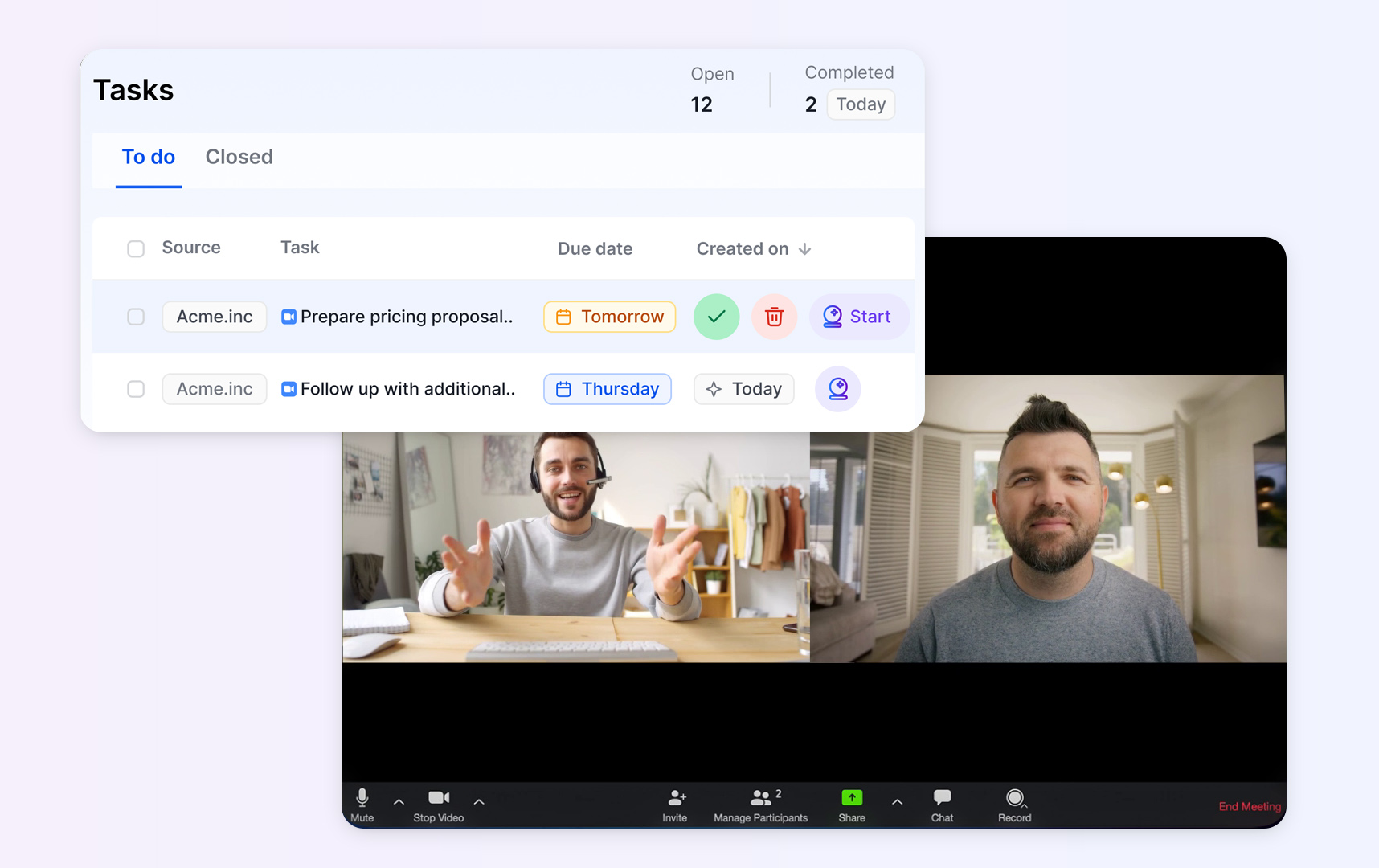
In a remote team communication setup, sync moments shine when the stakes are high. Urgent blockers. Fast alignment. Cross-functional decisions. Creative brainstorming that actually feels like momentum.
But there’s a catch. Synchronous communication becomes expensive the moment teams forget to document. Miss one key decision, and the same group lands in another meeting next week to “revisit” what they already agreed on. Lost context also means lost hours and lost revenue.
This is exactly why many teams pair synchronous communication with AI collaboration tools. Capture the discussion. Capture the decisions. Capture the action items. No repeat meetings. No confusion. No productivity drain.
Asynchronous communication is communication that does not require everyone to be present at the same time. You send a message. Someone replies later. Think email, Loom recordings, task comments, shared documents, or the long Slack thread you promise yourself you will read someday.

Async communication works beautifully for remote teams spread across time zones. It gives people the freedom to think, write, revise, and contribute without racing the clock. It encourages deeper thinking and fewer knee-jerk decisions.
It also has a downside. Delays. Misinterpretation. Long waits for key information. Decisions that stretch across days instead of hours.
And here is the commercial reality. Asynchronous communication is often scattered across ten different apps. A little in email. A little in Slack. A little in Notion. A little in Docs. That fragmentation kills productivity.
This is where AI collaboration tools stand apart. They connect the dots. They organise context. They turn scattered async updates into structured, actionable information that teams can use without hunting through five platforms.
Remote team communication breaks down when teams pick a mode out of habit instead of intention. This side-by-side comparison makes the differences clear.
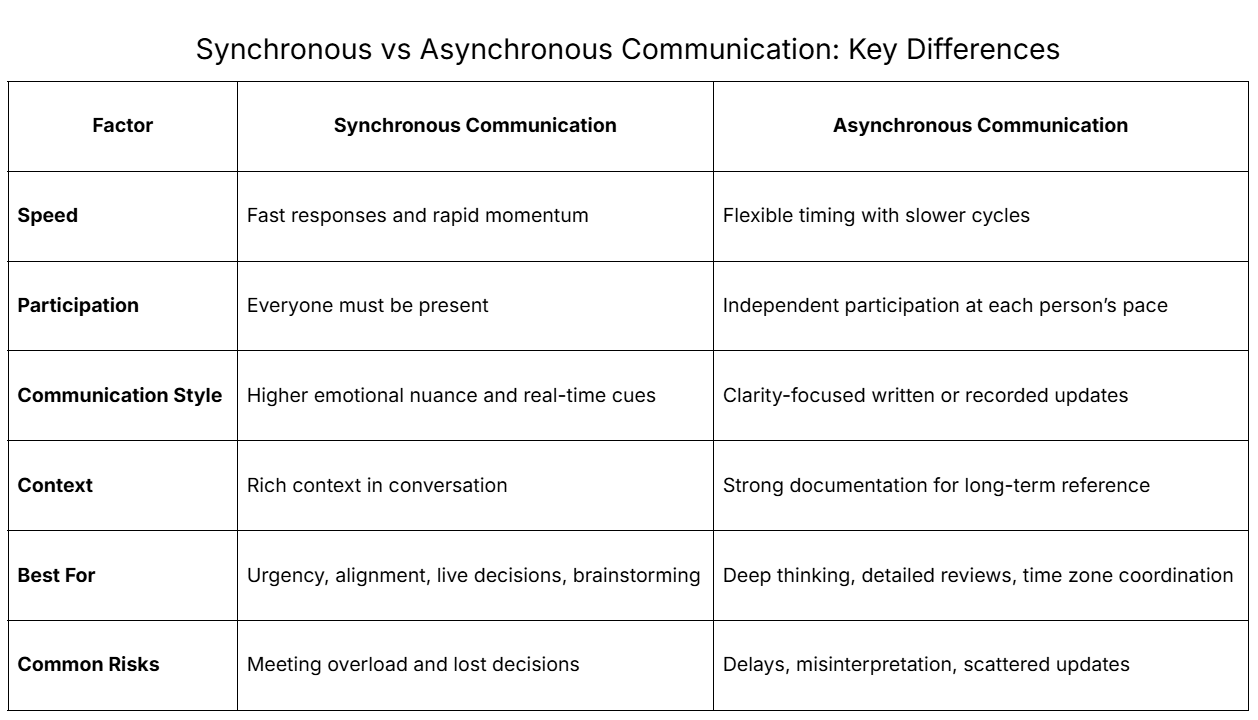
The real productivity issue is not choosing synchronous vs asynchronous communication. It is choosing the wrong mode for the moment. AI collaboration tools help teams decide intentionally and execute consistently.
Remote team communication falls apart when teams lean too hard on only one mode. Real productivity comes from using both.
Picture this. A globally distributed product team is preparing for a major launch.
The winning model is simple. Discuss. Document. Execute.
Why this hybrid approach works:
Results teams typically see:
And AI tools like Sybill make both synchronous and asynchronous communication more productive with:
Sybill turns every live meeting into clear async output. You’ll know more about this later in the blog.
Synchronous communication shines when teams need shared understanding, fast decisions, or emotional nuance. These are the moments where a live conversation prevents days of back-and-forth.
These examples show one pattern. Sync helps teams move faster when the cost of delay is high.
Synchronous conversations often lose value when details go undocumented. This is where Sybill steps in.
Sybill ensures every live meeting becomes structured asynchronous output without extra work.
Click here to try Sybill free.
Asynchronous communication is the better choice when work needs reflection, documentation, or input from people across different schedules. It keeps momentum steady without forcing everyone into the same meeting window.
These examples point to one truth. Async helps teams think deeply, document clearly, and collaborate across time zones without slowing the workflow.
Async flows depend on clean context. This is where Sybill’s AI collaboration capabilities matter.
Sybill ensures that every piece of synchronous communication converts into high quality, actionable async work.
Click here to try Sybill free.
Most remote team communication problems are not about synchronous vs asynchronous communication. The real tension is between talking and doing. Teams move quickly in conversation but slowly in execution. Decisions get made in live meetings and then dissolve in scattered messages, half-finished notes, and forgotten follow ups.
This gap is costly. Work stalls. Timelines slip. People repeat themselves. Teams lose trust in their own process.
AI closes this gap.
It captures decisions instantly.
It structures next steps.
It distributes context without manual effort.
It bridges the speed of synchronous communication with the clarity of asynchronous communication.
AI collaboration tools like Sybill make this shift real. Your team moves from fast conversation to fast execution with no extra work.
Synchronous communication benefits most from tools that capture context, identify next steps, and prevent repeat meetings. These AI collaboration tools support fast, aligned, real-time workflows.
Sybill is the most complete AI collaboration tool for synchronous communication because it eliminates the single largest sinkhole in remote meetings: lost context.
Why Sybill wins for live collaboration
Instant clarity in every meeting
Magic Summary turns complex discussions into accurate, structured summaries without manual note taking. Teams walk out knowing what was decided and what happens next.
Real-time intelligence that drives execution
Ask Sybill lets you query any detail from the call. Next steps, objections, risks, commitments, deal signals. No scrolling through recordings or guessing what someone said.
Stronger preparation for high stakes calls
Pre Meeting Brief gives reps the context they need before joining a client or internal meeting. No more “Wait, what is this call about again.”
Follow up that actually moves work forward
Personalized Emails draft tailored follow ups for sales, CS, or internal teams. No rewriting notes into messages. No forgetting deadlines.
Action items that never slip
AI Tasks convert everything discussed into clear tasks automatically. Each task carries context so teams can execute asynchronously without confusion.
Seamless data flow into your systems
CRM Autofill updates fields, personas, next steps, risks, and deal context. Remote sales and marketing as well as CS teams save hours every week and keep CRMs clean without extra effort.
Sybill connects the speed of synchronous communication with the clarity needed for asynchronous work. You move from conversation to execution in minutes, not days. Click here to try for free.
Krisp AI improves synchronous communication without interfering with workflows or duplicating note taking tools.
Krisp supports smoother live conversations, making synchronous communication less painful and more effective. Imagine “we can’t hear you” never being uttered in another Zoom call!
Microsoft Teams AI adds lightweight intelligence inside Teams meetings.
Its limitation is cross-tool context. Teams AI stays inside the Microsoft ecosystem, making it harder for companies that work across Slack, Zoom, Gmail, HubSpot, or Salesforce.
Asynchronous communication thrives when context is clear, updates are structured, and teams can work without waiting for live discussions. These AI collaboration tools help remote teams collaborate effectively across time zones.
Sybill is a powerful async collaborator because it delivers what most async tools cannot: clean context from synchronous meetings. Async work only moves fast when everyone knows what was decided, what is expected, and what happens next. Sybill handles all of that automatically.
Why Sybill is a top async tool
Sybill reduces friction in every async workflow by ensuring the work begins with clarity, not confusion. Click here to try for free.
Loom is great for asynchronous video updates.
Its limitation is cross functional coordination. Loom captures information, but it does not structure next steps or support complex decision making.
Notion AI is a documentation powerhouse.
It is less helpful for real time sales or customer teams who need precise meeting context and automated follow through.
Asana supports async execution.
Its limitation is meeting context. If teams rely only on written updates, tasks can miss nuance or detail.
Choosing between synchronous vs asynchronous communication should never be guesswork. Use a simple decision framework to pick the right mode for every situation.
Ask these questions before deciding.
1. How urgent is the decision?
2. How complex is the topic?
3. How many people are involved?
4. How spread out are the time zones?
The volume of communication grows with every new hire. If you rely only on manual notes or memory, context transfers start to break. AI collaboration tools prevent this breakdown by automating summaries, tasks, follow ups, and documentation.
Remote teams do not need more apps. They need communication that actually goes somewhere. Synchronous communication creates connection. Asynchronous communication keeps work moving.
But the real magic happens when both modes are supported by smarter AI. Sybill turns every meeting into actionable async output so your team never starts from zero again.
Asynchronous communication is anything that does not require people to respond at the same time. A clear example is email. You send a message, and the recipient replies later when it fits their schedule. Other async examples include project management comments, Loom recordings, shared documents, and knowledge base updates. Async communication works well for remote team communication because it supports flexible collaboration across time zones.
A phone call is synchronous communication. Both participants need to be present in real time for the conversation to work. The communication is fast, interactive, and relies on immediate responses. Phone calls are useful for clarifying ambiguity, solving urgent issues, or handling sensitive topics. For distributed teams, phone calls sit in the synchronous category alongside Zoom meetings and Slack huddles. Async tools support the follow through after the call.
Synchronous work requires people to collaborate at the same time. It includes live meetings, real time discussions, and fast decision making. Asynchronous work happens independently. Team members contribute on their own schedules through email, documents, task updates, or recorded videos. The key difference is timing. Sync work drives speed, while async work drives clarity. Remote team communication improves when teams intentionally mix both modes with support from ai collaboration tools.