
Find us at booth #83, join us for a harbor side happy hour, or catch Gorish’s talk.

Sept, 16-18 > Learn more


Tamanna Mishra

May 15, 2026

Since COVID hit and virtual calls became the go-to, I have whispered “You’re on mute” at least 900 times. That makes me perfectly qualified to judge the Zoom vs Google Meet saga.
Zoom is better for teams that need advanced meeting features like breakout rooms, whiteboarding, large webinars up to 10,000 attendees, and extensive third-party app integrations, while Google Meet is better for organizations already using Google Workspace that want a simpler, browser-based video tool with no downloads, built-in calendar integration, and lower cost. Zoom wins on feature depth, recording quality, and large-event capabilities; Google Meet wins on simplicity, accessibility, and value for Google Workspace subscribers. For sales teams using either platform, the meeting tool matters less than what happens after the call — AI assistants like Sybill work with both Zoom and Google Meet to auto-generate summaries, draft follow-up emails, and update CRM fields from every conversation.
Think of it as Marvel vs DC. Both have fans. Both have critics. Neither is perfect. And with more than 300 million people using each platform every month, the stakes are high.
Truth is, in 2026, you can’t choose a meeting platform just because “that’s what we’ve always used.” You need smarter AI, stronger security, cleaner UX, and host controls that don’t make you cry.
So this guide gives you the truth about Zoom vs Google Meet. Pros, cons, pricing, security, tables, and FAQs. Let’s go!
Google Meet is the definition of “simple done right.” It’s a browser-first video platform that lets you start or join a call with zero downloads and zero drama. That clean, minimal UI is exactly why many teams still search for Google Meet vs Zoom comparisons every year, 5 years since Zoom hit our lives. What can we say about Google Meet? It just works.
Because it’s built directly into Google Calendar, Gmail, and the full Workspace stack, Meet becomes an instant upgrade for teams already living in Docs, Sheets, and Slides. Scheduling is effortless. Joining is one click. Sharing files feels natural.
For budget-conscious teams, educators, and small businesses looking for a Google Meet alternative that isn’t overkill, Meet’s free plan is a strong starting point: 100 participants, 60-minute group calls, and surprisingly accurate captions.
But it has limits. No persistent chat logs. No free recording. Collaboration tools stay basic unless you jump to higher tiers. If your meetings need interactive whiteboards, advanced host controls, or workshop-style features, Meet won’t keep up with Zoom.
Zoom is the heavyweight champion of video meetings. When the world went remote in 2020, Zoom became the enterprise default overnight, thanks to its feature-rich, scalable, and remarkably stable experience. Unlike Google Meet’s browser-first approach, Zoom has always been an app-first platform, and that app delivers power: smoother calls, better control, and deeper collaboration.
This is why Zoom still wins big for webinars, large meetings, global teams, training sessions, and anything that needs structure. You get whiteboards, polls, breakout rooms, persistent chat, and an AI Companion that summarizes, translates, and tracks action items across meetings. (But is it enough for enterprise workflows? Not so much. Click here to read why.)
Of course, all that muscle comes with trade-offs. Zoom is pricier, heavier on devices, occasionally cluttered, and still carries memories of early Zoombombing incidents. But with tightened security and enterprise-grade controls, it remains the go-to when you need more than “just a meeting.”
Before we dig into the details, here’s the truth: the Zoom vs Google Meet debate isn’t about preference anymore. It’s about which platform actually fits the way teams work in 2026. AI, security, collaboration, and pricing all matter more than they did even a year ago.
Google Meet
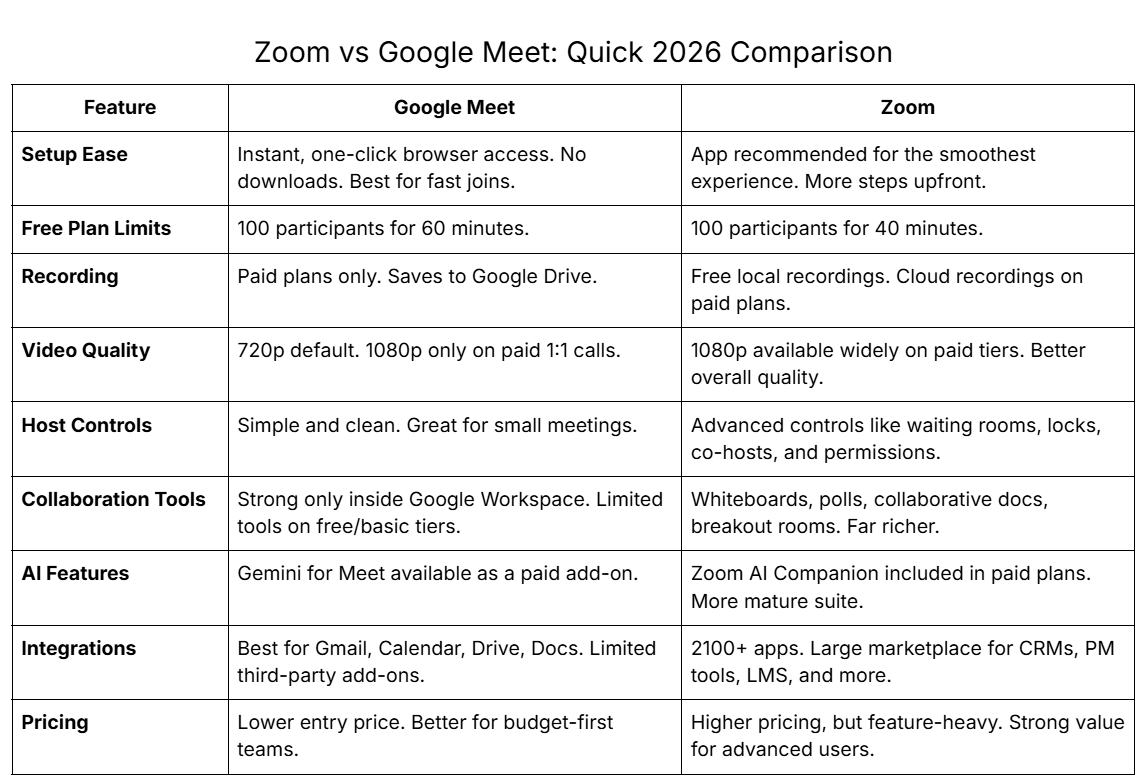
Google Meet is built for frictionless joining. You click a link, the browser opens, and you’re in. No downloads, no setup, and no onboarding for guests. It’s the fastest path to a meeting when your team values simplicity.
Zoom
Zoom requires an app install for the best experience, which adds a few extra steps. But once installed, the interface feels stable, predictable, and more powerful. Heavy users often appreciate the deeper controls and smoother performance that come from an app-first environment.
If speed, simplicity, and zero-setup joining matter, Google Meet is the winner. But if your team prefers the control and consistency of a dedicated client, Zoom’s app-first design is worth the upfront steps.
Google Meet
Google Meet defaults to 720p for group calls, which is good enough for everyday collaboration. It supports 1080p, but only for paid 1:1 meetings, so most users never see full HD in regular team sessions.
Zoom
Zoom offers higher-quality video across more tiers, including 1080p for groups and even 4K for enterprise setups. This makes Zoom more reliable for demos, webinars, client presentations, and meetings where detail matters.
Zoom clearly wins the quality battle. If visual clarity is essential in your Google Meet vs Zoom comparison, Zoom provides sharper, more consistent video across the board.
Zoom
Zoom is stacked with collaboration tools that support real-time engagement. Whiteboards, annotations, breakout rooms, polls, and Q&A make it ideal for workshops, training, complex projects, and classrooms. It’s built for participation, not just communication.
Google Meet
Google Meet shines inside the Workspace universe. Teams can co-edit Docs, Sheets, or Slides directly while on a call. But beyond Workspace tools, Meet has fewer interactive features on lower tiers and lacks the advanced in-call collaboration depth you see in Zoom.
For collaboration-heavy teams, Zoom is miles ahead. Google Meet works beautifully if your team already relies on Workspace, but Zoom ultimately dominates the google meet vs zoom collaboration comparison with a far more complete toolkit.
Zoom
Zoom AI Companion is included in paid plans, giving teams automatic meeting summaries, action items, recaps, live translations, and real-time search. It’s integrated deeply across the platform and requires no add-on purchase.
Google Meet
Meet uses Gemini AI, but it’s a paid add-on and not bundled into basic plans. Gemini can take notes, summarize conversations, translate in 18 languages, and generate custom AI backgrounds, but access varies by Workspace edition.
Zoom delivers more AI value without added cost, making it the stronger option for teams prioritizing automation. In the Zoom vs Google Meet AI comparison, Zoom provides deeper and more accessible intelligence across the meeting workflow.
Zoom
Zoom gives hosts deeply granular control. You can customize waiting rooms, lock meetings, manage rename permissions, set screen-sharing rules, assign co-hosts, and toggle dozens of participant capabilities. It’s built for structured and secure sessions.
Google Meet
Meet offers clean, simple host controls: mute, remove, permissions, and basic attendee management. It’s perfect for smaller or internal meetings but lacks the precision needed for complex or multi-layered sessions.
Zoom wins decisively. For high-stakes meetings where moderation, discipline, or security matter, host-control strongly favors Zoom’s more advanced management suite.
Zoom
Zoom integrates with over 3000 tools across categories like project management, CRMs, LMS platforms, communication tools, and productivity suites. It fits into almost any tech stack without friction and works well across mixed environments.
Google Meet
Meet is unbeatable inside Google Workspace. Calendar, Gmail, Drive, Docs, and Slides all work seamlessly. But outside the Workspace bubble, its third-party ecosystem is smaller and less flexible than Zoom’s.
If your entire workflow runs on Workspace, Google Meet is the natural choice. But in any hybrid or multi-tool environment, Zoom wins the integration comparison with its massive marketplace.
Zoom
Zoom is purpose-built for large events. Its Webinars, Sessions, and Events add-ons offer branding, registration flows, presenter controls, analytics, and scalable audience support. It’s the industry standard for virtual events.
Google Meet
Meet can host events, but only through its Brandlive integration. While functional, it lacks the native polish, customization, and scalability of Zoom’s event suite.
Zoom easily takes this category. For anyone hosting webinars, town halls, workshops, or large-scale virtual events, Zoom is the only serious option.
Security is a make-or-break factor for most teams today, which is why the Google Meet vs Zoom security debate gets so much attention. Both platforms have matured significantly since 2020, but they still take very different approaches to protecting meetings.
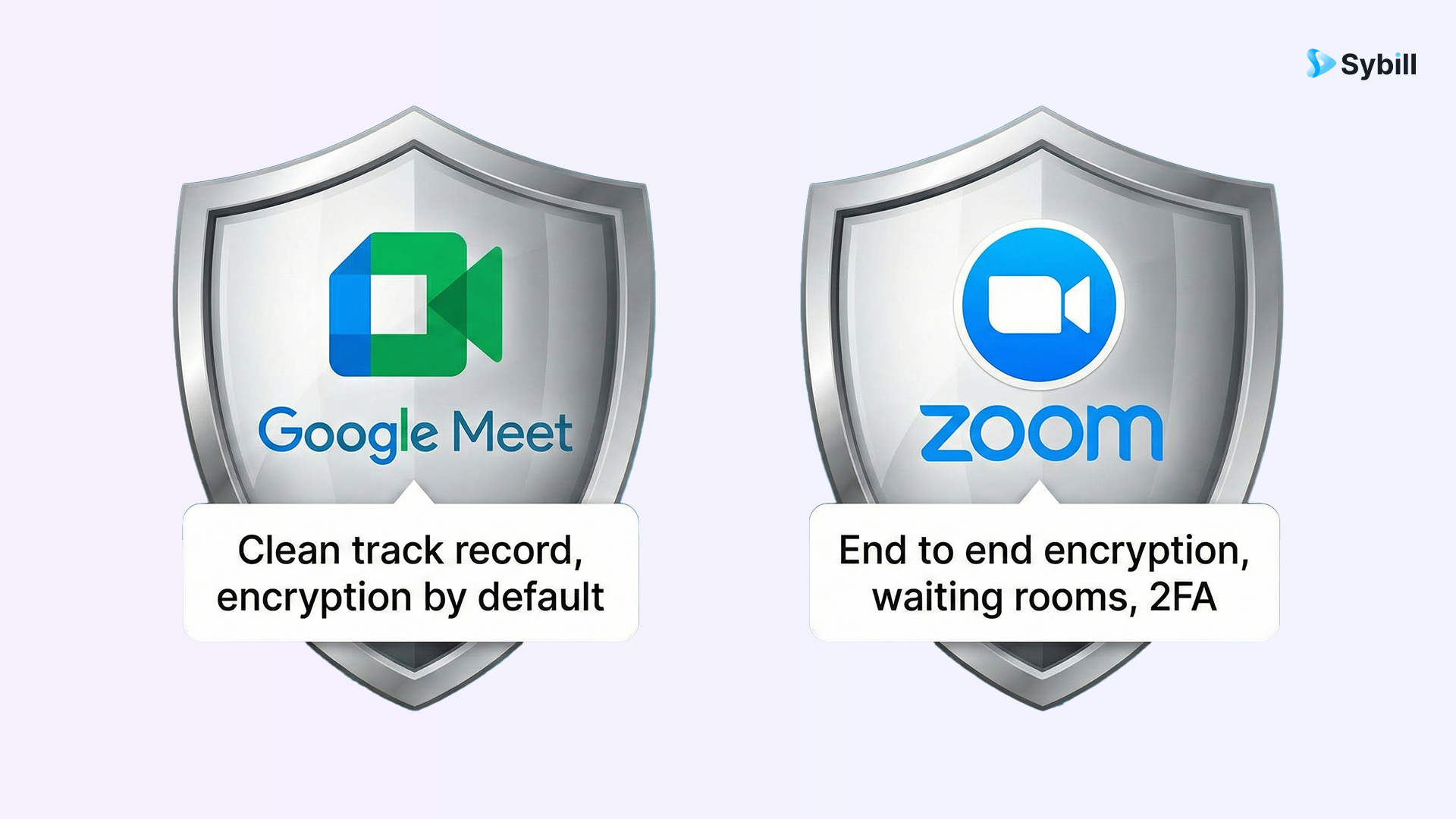
If you want a platform with a clean security history and minimal configuration, Google Meet is the safer, simpler option. If you need tight, customizable security controls for large or public-facing sessions, Zoom gives you more power. Your choice depends on whether you prefer Google’s quiet reliability or Zoom’s hands-on protection.
The price conversation is where things get interesting. Both platforms claim to be affordable, but they structure their pricing very differently. Here’s the clearest breakdown of Google Meet vs Zoom pricing for 2026.
Google Meet (Free)
Google Meet’s free plan is solid for everyday internal calls. You get up to 100 participants, a 60-minute limit on group meetings, and reliable video with real-time captions. The catch: there’s no free meeting recording, and advanced collaboration features stay locked behind paid Workspace tiers.
Zoom (Free)
Zoom’s free plan also supports 100 participants, but caps calls at 40 minutes. The upside is big: you can still record meetings locally at no cost, which Meet doesn’t allow. Zoom also offers whiteboards and more collaboration tools even on its free tier, though the time limit forces you to move fast or restart calls.
Google Meet wins on time. Zoom wins on features. Your pick depends on whether you need duration or capability.
Here’s the clean breakdown of pricing:
What you unlock: 24-hour meetings, recordings to Drive, more storage, better security, breakout rooms, and additional collaboration features depending on tier.
What you unlock: 30-hour meetings, advanced host controls, full whiteboard access, AI Companion, cloud recording, webinars, breakout room enhancements, and thousands of integrations.
Google Meet is cheaper across every comparable tier. If pricing is your deciding factor, Meet wins on sheer affordability, especially for teams already invested in Workspace.
Zoom becomes worth the higher price only when your team relies heavily on collaboration tools, webinars, and AI workflows. Zoom offers more power per dollar at the upper tiers, but Google Meet gives you the lowest entry cost for reliable, everyday video meetings.
Choosing between Google Meet and Zoom boils down to how your team actually works: fast, simple calls versus structured, feature-heavy collaboration. Here’s a breakdown of what each platform gets right and where each one falls short.
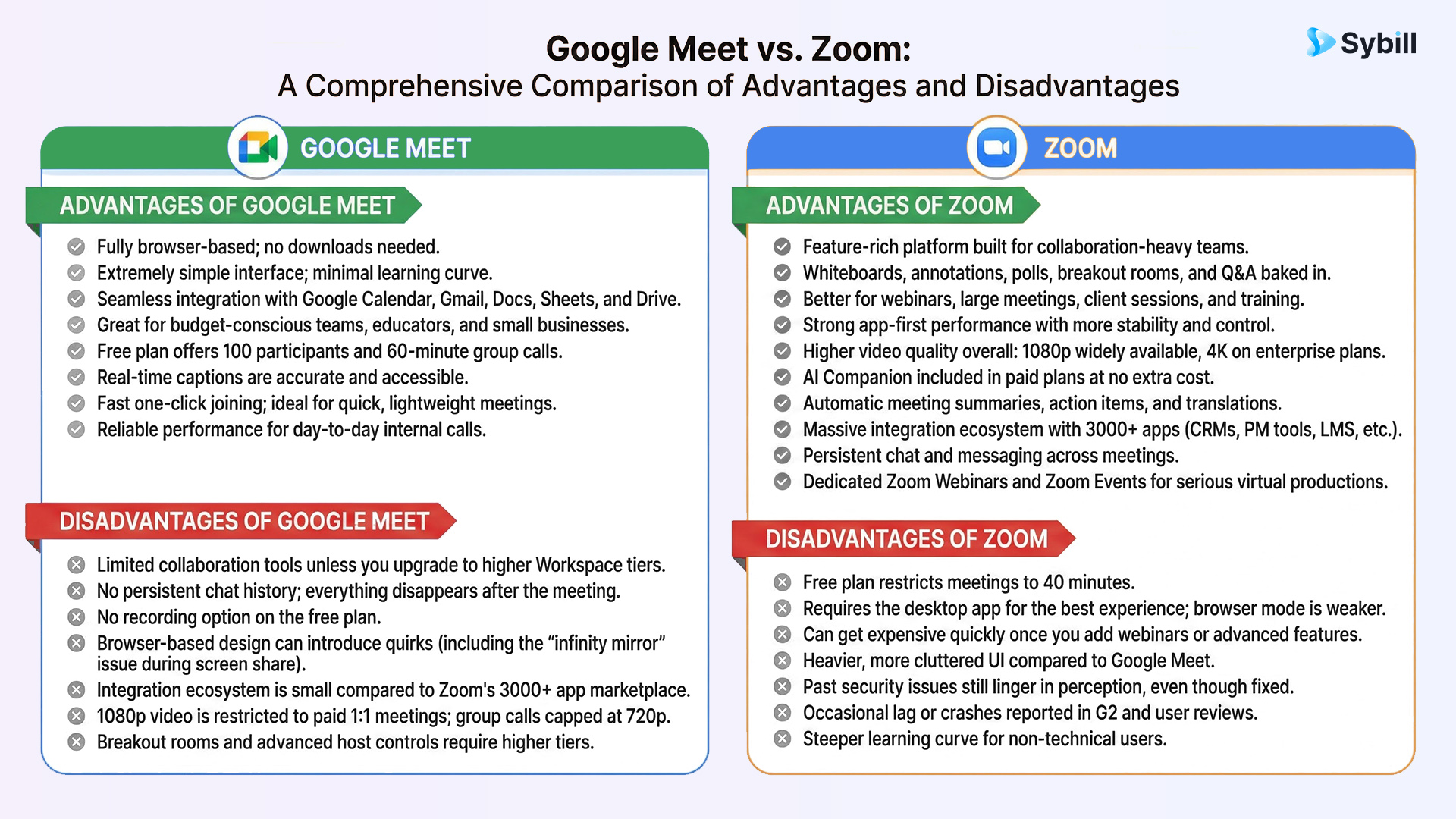
Google Meet keeps things simple. Zoom gives you everything. Your final decision comes down to whether your meetings need speed and ease or depth and control.
The honest answer: it depends entirely on how your team works. The Google Meet vs Zoom debate isn’t about which platform is universally better. It is about which one solves your meetings with the least friction and the most value.
Both platforms excel in different scenarios, and picking the wrong one means paying for features you never use or struggling with features you actually need.
Here’s a clean recommendation matrix to settle it:
In short:
Choose Google Meet for simplicity. Choose Zoom for capability.
Your best option depends on whether your meetings need speed or depth.
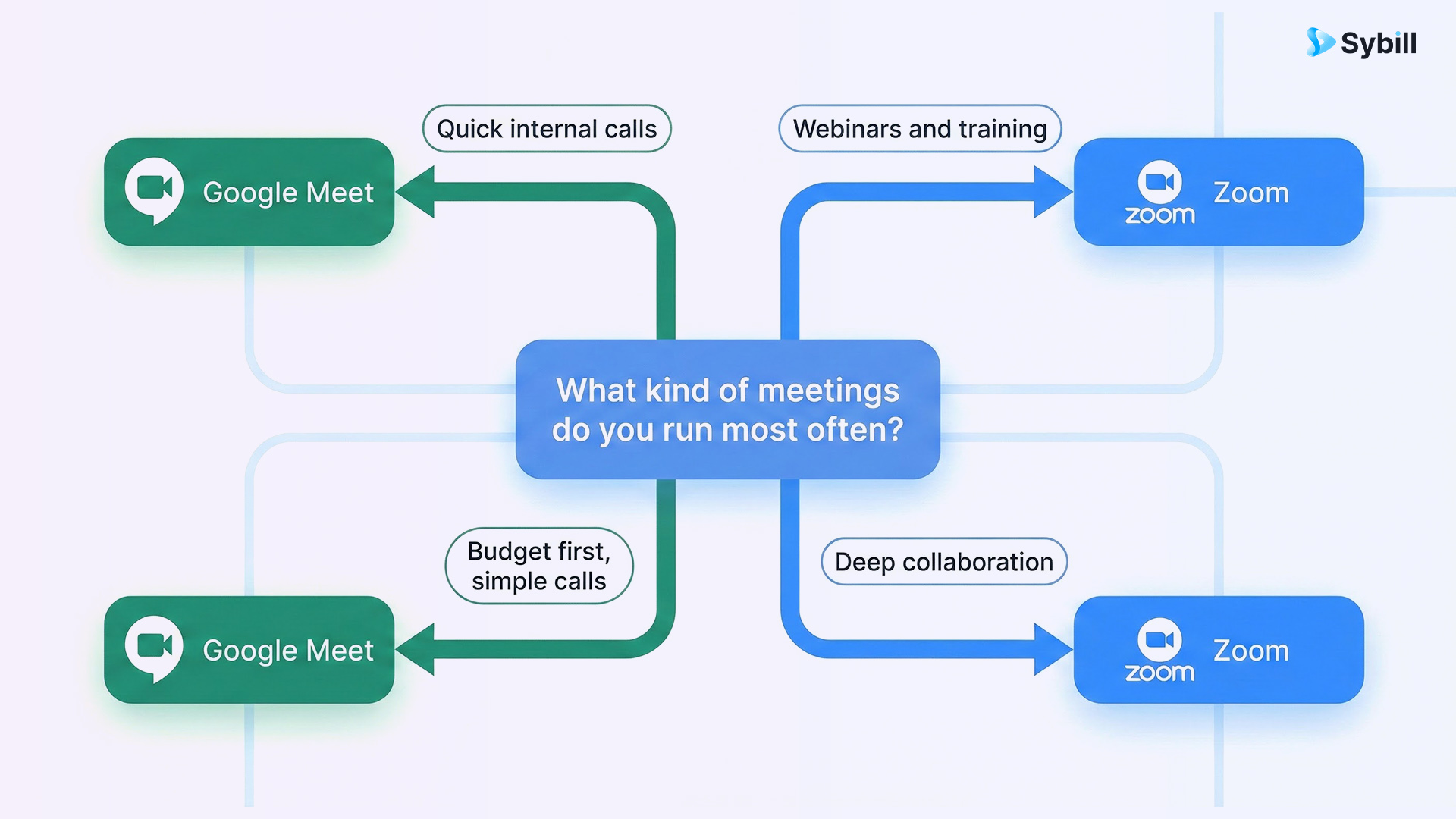
Choosing between Zoom and Google Meet isn’t a battle of good vs bad. It’s a battle of what your team actually needs. Zoom is unbeatable for collaboration-heavy sessions, webinars, and deep control. Google Meet is perfect for simple, everyday calls that start quickly and stay stable. You already know the answer for your team: pick the platform that matches your workflow, not the one that’s trending.
But… And it’s a big one: Neither Zoom nor Google Meet solves the real meeting problem - the work that happens before and after the call.
It doesn’t matter whether you use Google Meet or Zoom. The real burden on teams is the messy, manual meeting workflow around them. Notes scattered. Action items forgotten. CRM updates delayed. Follow-ups inconsistent. Deals slipping because context gets lost. Every meeting drains time, and both platforms leave you to handle the aftermath manually.
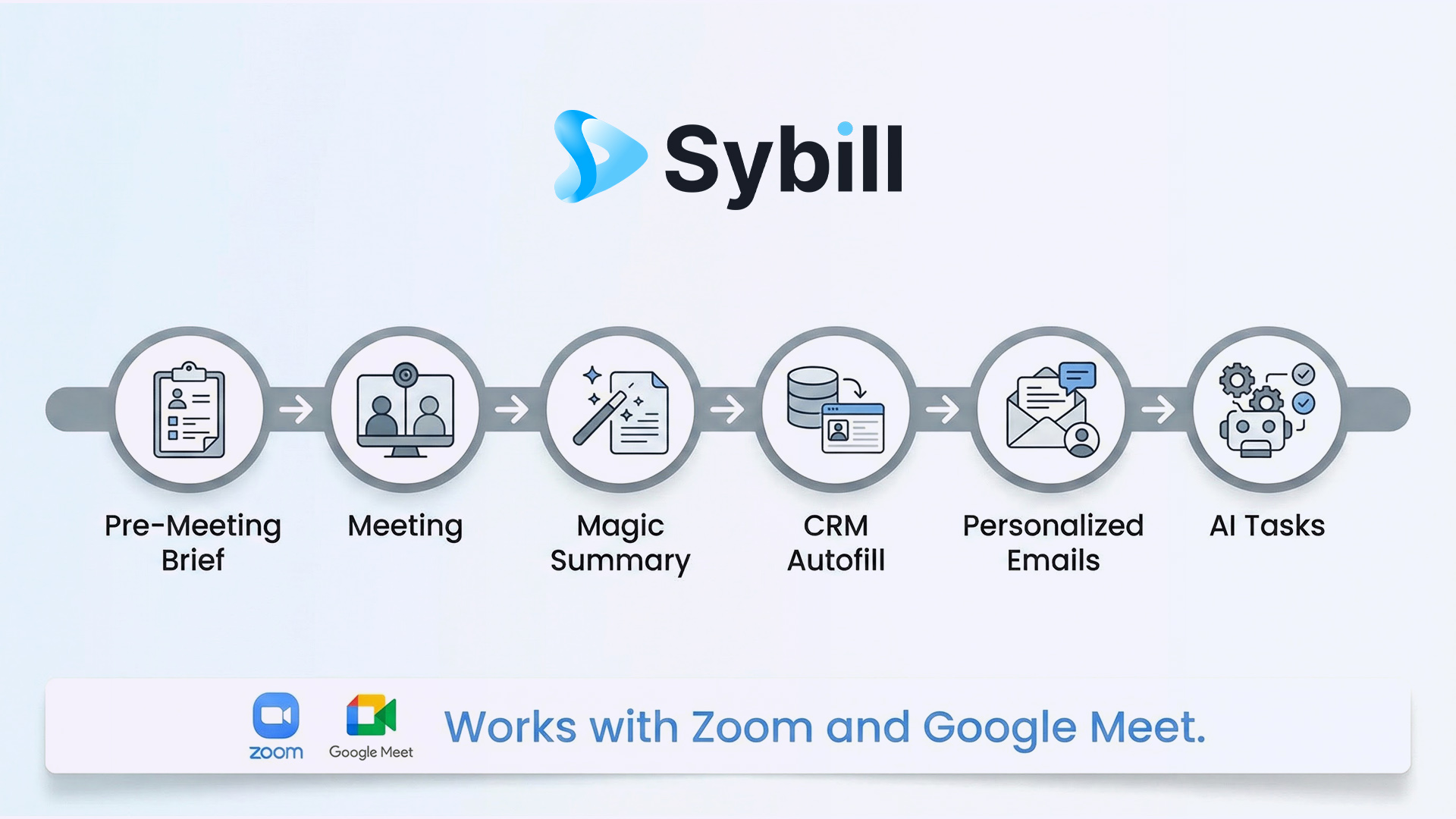
This is exactly why teams pair their video tool with Sybill, the AI meeting assistant that transforms your meeting workflow end to end.
Sybill works across your meetings to:
Google Meet handles the video. Zoom, too, handles the video. Sybill handles the actual work.
People choose Zoom over Google Meet because Zoom offers deeper collaboration tools and stronger meeting controls. Features like breakout rooms, annotation, whiteboards, polls, and Q&A make Zoom ideal for workshops, webinars, and sales or training sessions. Many teams also prefer Zoom’s higher video quality and its massive integrations marketplace. While Google Meet is simpler and faster to join, Zoom delivers a richer, more structured meeting environment, which is why large teams, educators, and event hosts still lean toward it.
Yes. In almost every google meet vs zoom pricing comparison, Google Meet comes out cheaper. Because Meet is bundled with Google Workspace, you get video meetings plus email, storage, and collaboration tools under one plan. Zoom’s standalone pricing is higher, especially once you add webinars, cloud recording, or advanced collaboration features. For teams that want reliable video meetings without the premium cost, Google Meet offers strong value. Zoom becomes worth the price only if your meetings rely heavily on interactive or large-scale features.
Google Meet is better than Zoom if your team prioritizes simplicity, affordability, and seamless integration with Gmail, Calendar, and Docs. It excels for everyday internal calls, quick meetings, and budget-conscious teams. However, Zoom is better when you need advanced collaboration, host controls, breakout rooms, whiteboards, or webinars. So the answer depends on your use case. In most Google Meet vs Zoom comparisons, Meet wins for ease and cost, while Zoom wins for power and depth.








