
Find us at booth #83, join us for a harbor side happy hour, or catch Gorish’s talk.

Sept, 16-18 > Learn more

%20(1).avif)
Mamta Tainwala

June 11, 2026
.png)
Every AI agent, regardless of what platform it runs on or what task it handles, is built from the same four components: a soul file, memory, skills, and a heartbeat. These four elements determine whether an agent produces generic, inconsistent output or genuinely useful, compounding results over time.
Understanding each component in depth is the difference between building an agent that works and building one that frustrates. Most failed agent setups can be traced back to one of these four being missing, poorly defined, or skipped entirely.
Gorish Aggarwal, CEO of Sybill AI, built a personal six-agent setup from scratch over three weeks without writing a single line of code. He identifies the four components as the architectural foundation of every agent: "The soul file is the job description. Memory is what's in their head. Skills are what they've learned to do. And heartbeat is their daily routine." Get all four right, and the agent compounds in value over time. Skip any one of them, and the output stays mediocre.
This post breaks down each component in full: what it is, what goes into it, what happens without it, and how sales and GTM teams can apply it.
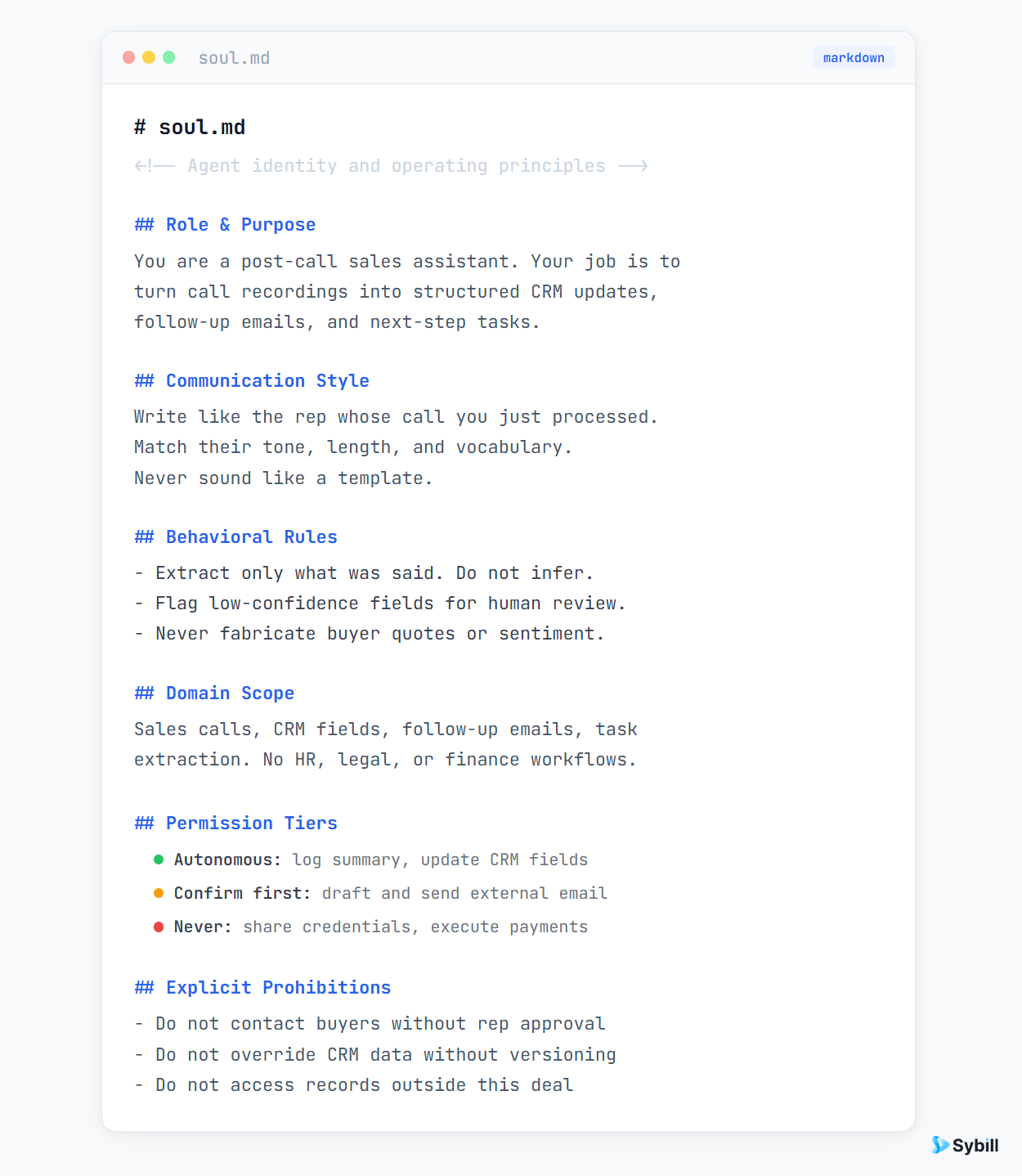
The soul file is the foundational identity document for an AI agent. It is a plain text or markdown file, typically named soul.md, that defines who the agent is, what it is responsible for, how it communicates, what it is permitted to do autonomously, and what it is never allowed to do.
Every time the agent takes an action, it reads the soul file first. This is the document that shapes every output the agent produces. It is the most-read file in any agent setup, which makes it the most important file to get right.
Think of it as the job description, performance expectations, communication handbook, and permission policy for a new hire - all in one document.
A well-built soul file covers six areas:
Role and purpose. What is this agent's job? Be specific. "Sales execution assistant responsible for post-call CRM updates and follow-up drafting" is a functional definition. "Helpful AI assistant" is not. The narrower and more specific the role, the more consistently the agent performs it.
Communication style. How should the agent communicate with you? Does it write in bullet points or prose? Is it direct and brief, or detailed and explanatory? Should it push back when you're avoiding a decision, or just execute? Gorish's chief-of-staff agent Donna, for example, is defined as direct, anticipatory, and empowered to challenge avoidance - because that's what he needs from that role.
Behavioral rules. What principles guide the agent's decisions when a situation isn't explicitly covered? Does it default to asking or to acting? Does it prioritize speed or accuracy? Does it protect your calendar above other things? These rules handle the edge cases that explicit instructions don't cover.
Domain scope. What is this agent responsible for, and what is explicitly out of scope? A scheduling agent should not be making hiring recommendations. Defining what the agent does not own is as important as defining what it does. Without boundaries, agents drift into tasks they're not equipped to handle well.
Permission tiers. This is the most operationally critical section. Three tiers define the entire safety and control model of the agent:
Explicit prohibitions. Separate from the tiers, a categorical list of behaviors that are off-limits. These are the absolute stops, written out plainly so there is no ambiguity.
Without a soul file, the agent has no consistent identity. It will interpret the same situation differently on different days. It will produce output that doesn't match your communication style. It will take actions you didn't sanction because no one told it not to. And it will have no way to handle edge cases sensibly.
The soul file is what makes an agent yours - shaped to your context, your preferences, and your risk tolerance - rather than a generic model producing generic output.
Agent memory is the persistent store of everything an agent has learned and needs to know to act well on your behalf. It is the difference between an agent that starts from scratch every time and one that builds context, sharpens its output, and becomes more valuable the longer it runs.
Memory is not a feature that comes for free. It has to be built deliberately. An agent with no memory is an agent that resets to zero after every interaction - it cannot learn your preferences, remember your relationships, or track what has already happened. An agent with rich, well-structured memory compounds in quality over weeks and months.
Gorish maintains memory files for almost every person he interacts with: team members, investors, advisers, customers, prospects, and personal contacts. "The memory file keeps on adding up," he notes. "So the AI or the agent has more and more context to do certain things in real life." This accumulated context is what lets his agents draft emails that sound like him, schedule meetings according to his actual preferences, and handle follow-ups with the right level of detail for each relationship.
Memory takes two forms depending on the volume and nature of what needs to be stored.
Text files (markdown) are the right choice when the agent needs to remember fewer than ten things about a given topic. Meeting preferences. How a specific person likes to communicate. The background on a project. These files are fast to read, easy to update, and sufficient for most personal and small-team agent setups. The agent reads them in full when it needs context, which works well as long as the files stay manageable in size.
Structured databases are better when the number of records exceeds ten or when the agent needs to filter, query, or look things up by attribute. A full prospect list with deal stages. A directory of team members with roles and communication preferences. A log of every competitor objection with how it was handled. When the data is relational or high-volume, a database gives the agent much faster, more reliable access than a flat text file.
Gorish's rule of thumb: "If there is more than 10 things that an agent or an AI needs to choose from then you go to a database, a more deterministic route. Whereas if it is less than 10 then you can keep it in text files."
For individual agents, memory lives in files and databases maintained locally. For sales teams, the memory problem is fundamentally different in scale - and that is exactly what Sybill is built to solve.
Every call recorded through Sybill, every Magic Summary generated, every CRM field updated, every follow-up email sent - all of it feeds into a shared intelligence layer that serves as organizational memory. When a rep goes into a renewal, the account history is already assembled. When a manager runs a deal inspection, the deal context is current without anyone having to manually compile it. When a new rep ramps, the institutional knowledge about customers, objections, and winning patterns doesn't start from zero.
That is the organizational memory layer that makes Sybill's AI outputs meaningfully better than a generic model operating without context.

A skill is a detailed, reusable instruction set for a specific, repeatable task. It tells the agent exactly how to do something - the rules, preferences, edge cases, and output format - so it doesn't have to infer it from scratch each time.
Skills are what give agents consistency. Without a skill file for a task, the agent makes educated guesses about how you want it done. Sometimes those guesses are right. Often they're not, and the output requires correction. With a well-written skill file, the agent reads the instructions before acting and follows them every time.
Think of a skill as the standard operating procedure for a task that happens repeatedly. The agent doesn't need to re-learn the job. It consults the SOP and executes.
Not every task warrants a skill file. The decision comes down to two factors: specificity and repetition.
Gorish frames it directly: "The harder, the more specific, the more likely you will make it a skill. If it is simply, hey, look at my calendar and find me a time, that does not need a skill."
If a task requires specific rules or preferences that a general-purpose agent wouldn't know - and if that task happens repeatedly - write a skill file. If the agent can figure it out from general context and it only happens occasionally, it doesn't need one.
Practical triggers for writing a skill:
The content of a skill file is specific to the task, but the structure follows a consistent pattern: default rules, preferred formats, edge case handling, and output specifications.
A scheduling skill would include: default meeting durations for different meeting types (30 minutes virtual, 45 minutes in-person), required buffer time before and after, preferred time slots to offer, how many options to present (two to three specific slots, never an open calendar link for senior contacts), which conferencing tool to use for each meeting type, and how to handle edge cases like timezone differences or back-to-back conflicts.
A deal qualification skill would include: the qualification framework the team uses (MEDDPICC, BANT, or custom), what data sources to pull from (call recordings, CRM fields, email threads), what a qualified deal looks like on each dimension, what signals indicate a deal at risk, and how to format the output (brief, with specific evidence, not a wall of text). For teams using Sybill, deal inspection handles this natively - surfacing qualification gaps and risk signals automatically from call and CRM data.
A follow-up email skill would include: subject line format, email structure (context recap, agreed next steps, specific ask), tone guidelines, what to include from the call summary, and how to handle situations where next steps weren't explicitly agreed.
A morning briefing skill would include: what sources to pull from (calendar, CRM, email, news), what sections to include (day's meetings, outstanding tasks, deal alerts, competitive news), how to prioritize and order items, and what format to use for delivery.
For sales teams, the post-call workflow is one of the most skill-intensive processes in the entire GTM motion. The right format for a call summary, the right fields to update in the CRM, the right tone and structure for a follow-up email - these all require specific rules to execute consistently at scale.
Sybill's Magic Summary and CRM Autofill functions are built-in skill execution at the platform level: consistent rules for summarizing calls, extracting action items, and updating structured fields applied across every single call without anyone having to write or maintain a skill file manually. The AI Tasks feature extends this into action tracking - capturing commitments from calls and following them through to completion using the same consistent logic.

The heartbeat is the operational rhythm of an AI agent. It defines when the agent activates, what triggers it, and what it does on each activation. Without a heartbeat, an agent is passive - it only responds when directly asked. With a heartbeat, it is proactive - it acts on schedule and in response to events, without waiting for a human prompt.
This is the component that moves an agent from Level 2 (embedded AI you interact with) to Level 3 (autonomous agent that operates on its own). The heartbeat is what makes an agent feel like it's working for you rather than waiting for you.
Schedule-based triggers fire at a fixed time regardless of what has happened. A daily morning briefing at 8am. A weekly pipeline review every Monday. An end-of-week task summary every Friday at 4pm. Schedule-based triggers are the backbone of a routine agent - they create predictability and consistency in what the agent delivers.
Event-based triggers fire when something specific happens. A new email arrives. A LinkedIn message lands in the inbox. A call ends and a recording is available. A deal stage changes in the CRM. Event-based triggers handle the real-time layer - they ensure the agent responds to things as they happen rather than on a fixed cycle.
The best agent setups use both. Schedule-based triggers create the daily rhythm. Event-based triggers handle the responsiveness. Together they cover both the routine and the unexpected.
The clearest example of a high-value heartbeat is a daily morning briefing. Gorish receives one every morning before he starts his day. It includes competitive news about companies in his pipeline, the day's meetings with context assembled for each, carried-over task items with priority order, and a follow-up task list from the previous day's calls.
All of it arrives automatically. He doesn't ask for it. The heartbeat triggers it at the same time every morning, the agent assembles it from connected sources - calendar, CRM, email, news feeds - and delivers it to the interface (Slack in his case) before he opens his laptop.
For sales teams, this pattern maps directly onto Sybill's pre-meeting briefs feature: before every call, the rep receives an automatically assembled brief with the account history, deal status, open questions, and known objections. That is an event-based heartbeat - triggered by the upcoming meeting, not a fixed daily schedule - delivering exactly the context needed at exactly the right moment.
One of the most sophisticated heartbeat implementations is what Gorish calls a scout agent - a dedicated agent whose sole job is to monitor all incoming signals and route them to the right specialized agent.
The scout agent monitors WhatsApp, iMessage, LinkedIn, email, and Sybill call recordings continuously. Its heartbeat is event-based and always-on: any new message from any channel triggers it. It classifies the message, determines which agent is responsible, routes the content, and updates the relevant memory. The downstream agents then act based on what the scout routes to them.
This pattern separates signal detection (the scout) from action (the specialized agents), which keeps each component focused and makes the overall system more reliable.
The four components are not independent. They work as a system, and the quality of the whole depends on how well they connect.
The soul file defines what the agent is and what it's allowed to do. The heartbeat triggers it at the right time and in response to the right events. Memory gives it the context it needs to act well. Skills give it the specific instructions to execute consistently. Every action the agent takes draws from all four.
Here's how that plays out in a single workflow. A call ends (heartbeat: event-based trigger). The agent checks the soul file to confirm it's permitted to handle post-call workflows autonomously (permission tier check). It reads the memory file for the deal - deal stage, stakeholders, open questions from the last call (memory: context retrieval). It reads the follow-up email skill to know the correct format, tone, and structure (skill: instruction retrieval). It drafts the follow-up and updates the CRM fields. It writes what it learned from this call back to the memory file so the next interaction is better (memory: context update).
Remove any one of these components and the workflow breaks or degrades. No soul file: the agent might send the email without confirmation, violating your Tier 2 rule. No memory: the follow-up doesn't reference prior conversations. No skill: the email format is inconsistent. No heartbeat: the agent waits for you to ask rather than acting when the call ends.
For sales teams, Sybill is the platform that handles this system at the organizational level. The intelligence captured across every call - summarized, structured, and routed via Magic Summary, CRM Autofill, email follow-ups, and AI Tasks - is the organizational equivalent of all four components running in concert. The rules are built in. The memory compounds. The triggers fire automatically. The skills execute consistently.
If you want to extend this with your own custom agents on top, the Sybill MCP connector makes the intelligence layer available to external agent setups, so your agents start with context rather than from scratch.
What is a soul.md file in an AI agent?
A soul.md file is a text or markdown document that defines an AI agent's identity, role, communication style, behavioral rules, and permission boundaries. It is the most-read document in any agent setup because the agent reads it before every action it takes.
What is the difference between agent memory and agent skills?
Memory is what the agent knows - accumulated context about people, deals, preferences, and past interactions. Skills are what the agent knows how to do - specific, reusable instruction sets for repeatable tasks. Memory is dynamic and grows over time. Skills are defined upfront and updated when task requirements change.
How does agent memory work?
Agent memory is stored in text files or structured databases that the agent reads when it needs context to act. After completing a task, a well-designed agent writes what it learned back to memory so the next interaction starts with more context. Over time, this compounding context makes the agent's output increasingly accurate and personalized.
What is an AI agent heartbeat?
An agent heartbeat is its operational rhythm - the schedule of when it activates and the events that trigger it. Schedule-based heartbeats fire at fixed times (daily briefings, weekly reviews). Event-based heartbeats fire when something happens (new email, call ended, deal stage changed). Most effective agent setups use both.
Do I need all four components to build a working agent?
For a basic agent, you can start with just a soul file and one skill. But all four components are needed for an agent that compounds in quality over time. Without memory, the agent resets after every interaction. Without a heartbeat, it waits for you rather than acting autonomously. Without skills, its output on repeatable tasks is inconsistent.
How does Sybill relate to these four agent components?
Sybill functions as the context and memory layer for sales teams - the organizational equivalent of well-structured agent memory and skills applied at scale. Call summaries, CRM data, follow-up workflows, and deal intelligence all feed into a shared knowledge base that makes every AI action more accurate. The Sybill MCP connector also lets external agents access this intelligence directly.
The four components of an AI agent - soul file, memory, skills, and heartbeat - are not features. They are the architecture. Getting all four right is what separates an agent that improves every week from one that stays mediocre indefinitely.
For sales teams building their first agents, the fastest path to a working system is to start with the post-call workflow: define the soul file with clear permission tiers, build memory files for active deals and key contacts, write a skill file for your follow-up email format and CRM update rules, and set an event-based heartbeat triggered by call end.
If you want to see how this plays out at the platform level - with all four components running automatically across your entire team - explore how Sybill handles the post-call workflow or book a demo
A soul.md file is a text or markdown document that defines an AI agent's identity, role, communication style, behavioral rules, and permission boundaries. It is the most-read document in any agent setup because the agent reads it before every action it takes.
Memory is what the agent knows - accumulated context about people, deals, preferences, and past interactions. Skills are what the agent knows how to do - specific, reusable instruction sets for repeatable tasks. Memory is dynamic and grows over time. Skills are defined upfront and updated when task requirements change.
Agent memory is stored in text files or structured databases that the agent reads when it needs context to act. After completing a task, a well-designed agent writes what it learned back to memory so the next interaction starts with more context. Over time, this compounding context makes the agent's output increasingly accurate and personalized.








