
Find us at booth #83, join us for a harbor side happy hour, or catch Gorish’s talk.

Sept, 16-18 > Learn more


Tamanna Mishra

April 17, 2026
I once had a productivity system so complicated it needed its own onboarding call. Between Notion dashboards, half-synced Google Calendars, and a “weekly review” I never actually did, I felt less like a professional and more like the intern from The Office trying to juggle Michael Scott’s sticky notes.
Sound familiar? Welcome to the age of productivity overload.
The ultimate productivity stack for 2026 combines a task manager like Todoist or Asana for what needs doing, a calendar tool like Reclaim.ai for when to do it, a knowledge base like Notion for reference, and an AI note-taker like Sybill for capturing meetings and turning conversations into action items, follow-ups, and CRM updates automatically. The shift from old-school productivity planners to AI-powered tools eliminates the manual overhead of context switching across 13+ apps per day, with AI note-takers handling transcription, summarization, and follow-through so professionals reclaim hours previously lost to post-meeting admin work.
Here’s the truth no app wants you to hear: you’re not disorganized; your tool stack is. The average professional toggles between 13+ tools a day, and 68% say context switching kills focus.
We’ve all been there, hopping from Asana to Notion to Slack to Zoom, only to realize your “to-do list” is scattered across five tabs and three devices. What you thought was productivity is actually a digital whack-a-mole.
You feel “busy,” but your actual output looks suspiciously like buffering.
That’s the paradox. The more tools you add, the less flow you get. The smartest stacks in 2026 aren’t bigger, they’re tighter: one hub that captures, plans, executes, and learns.
That’s exactly what Sybill nails - merging the capture → insight → action cycle for revenue teams so you can stop app-hopping and actually get work done.
And that’s why whether you’re a solo creator or a team lead, you’ve got to choose a stack that works for you, not against you.
This is what it could look like:

The first step in any productivity system? Capture. Every thought, meeting, and decision starts here. In 2026 and beyond, that means picking the right balance between digital note takers and AI note taking devices that don’t just store words but understand intent.
Part database, part notebook, part assistant. Notion AI lets you brainstorm, tag, and summarize ideas in seconds. Ideal if you want one workspace that doubles as your smart note taker and task manager. It’s one of the best note taking apps for anyone building connected workflows.
For those who love hierarchy and structure, Evernote and Joplin still deliver. They remain solid digital note takers with offline access, tagging, and quick search - perfect if you prefer a classic folder-based system over AI layers.
But… Traditional note takers like Evernote don’t automate anything. You make a list. You do everything. It’s all mostly manual. In 2026, that shouldn’t be the case, which is why Sybill is fast replacing them as (more than a) note-taker.
If you think best with a pen, AI note taking devices like reMarkable 2, Boox Tab Ultra, and Supernote bridge analog and digital beautifully. They convert handwriting to text, sync to the cloud, and make sure your pages never get lost in piles of paper.
While others capture what was said, Sybill captures why it matters. Using Magic Summary, Ask Sybill, and AI Tasks, it transforms meetings into insights, follow-ups, and next steps automatically. That’s the true power of an AI note taker for meetings - zero manual effort, zero context loss.
Once you’ve captured everything, it’s time to plan like you mean it. Because even the best ideas drown in chaos without structure. The planning layer turns goals into calendars, lists, and priorities - the bridge between “I should” and “I did.”
The best productivity planners today aren’t just digital notebooks; they’re dynamic systems that sync with your tasks, automate scheduling, and adapt to your energy curve. Here’s what’s shaping 2026:
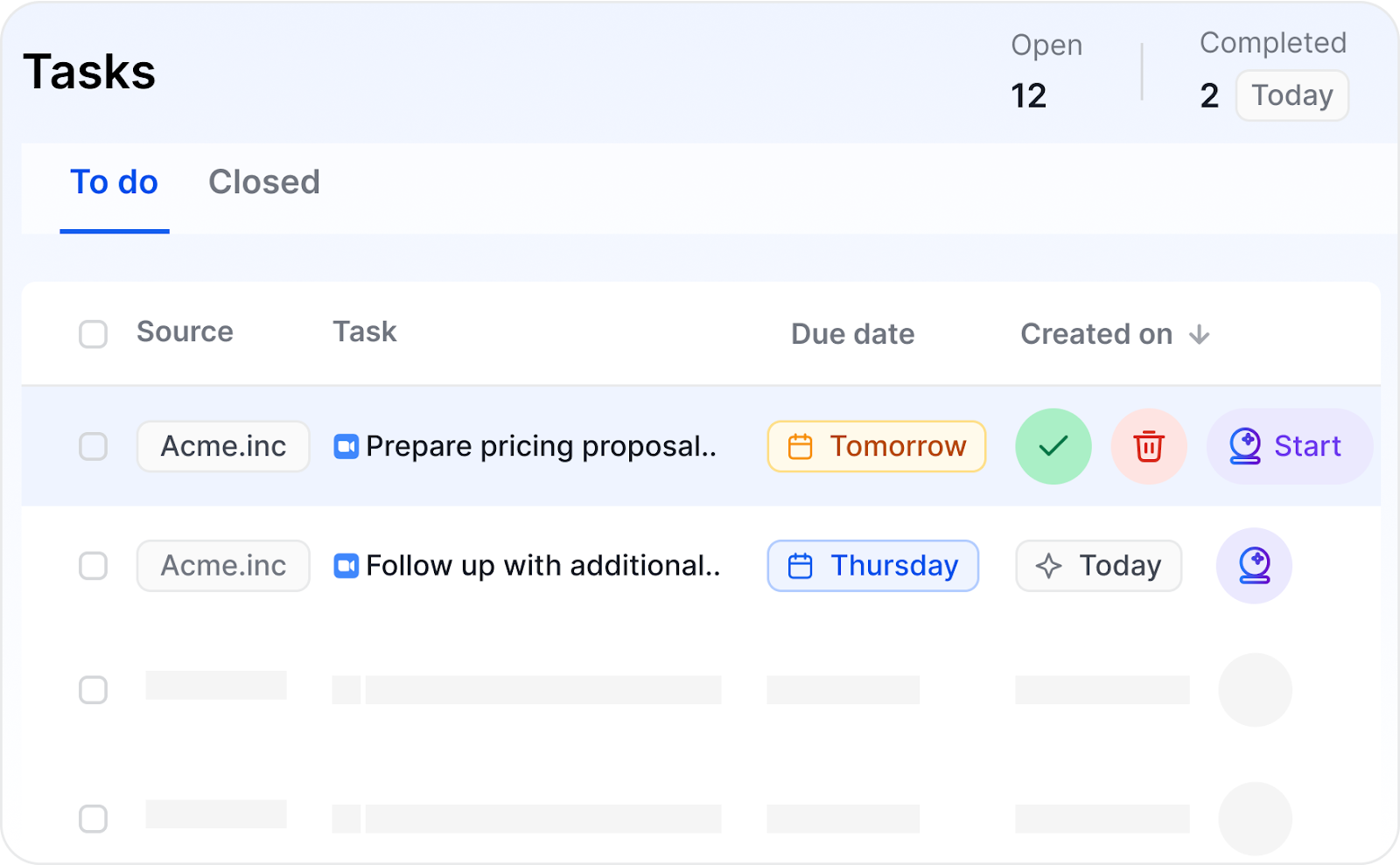
More than a digital planner, Sybill creates and even executes your plan. It automatically builds your task list from meetings and emails, suggests when to call next, and even helps plan your deal strategy - from which collateral to send to identifying the right follow-up window and person.
Ask Sybill anything — “What’s my next high-priority deal?” or “Who’s gone cold this week?” - and it answers in seconds. For sales teams, AI Tasks remove manual planning altogether, turning meetings into momentum.
A favorite among founders and creators, Sunsama pulls tasks from multiple tools and organizes them into a realistic daily planner app. It’s time-blocking done decently - a calm interface for chaotic schedules.
Think of Motion as a time blocking app with AI. It automatically schedules your tasks in the calendar, reshuffling priorities when new meetings appear.
If you constantly lose focus blocks to random invites, Reclaim.ai saves you. It acts as a goal planner for your time - auto-blocking deep work, lunch, and breaks so your energy and availability stay in sync.
Ideas and plans are nice, but productivity only counts when things ship. The execution layer is where your task manager and project management apps earn their keep, helping you juggle projects, track dependencies, and hit deadlines without drowning in admin.
The best task manager in 2026 will be an intelligent command center that prioritizes, automates, and syncs your entire workflow.
Clean, reliable, and cross-platform, Todoist remains a favorite among professionals who want structure without bloat. It’s perfect for daily goals, recurring reminders, and solo projects that need lightweight planning.
For collaborative work, ClickUp acts as a full project management app, offering Gantt charts, dashboards, and kanban software views. It’s powerful but flexible enough to scale from individuals to entire organizations.
In Sybill, tasks don’t live in isolation. AI Tasks automatically capture to-dos from your meetings and emails, link them to deals or opportunities, and even suggest next steps based on conversation context. Think of it as your AI task manager that actually understands your work, and actually does them!
If your stack feels fragmented, Zapier is the glue. It connects your apps for task automation, from moving notes to project boards to logging new deals from calls. But it still feels a whole lot manual!
Half of modern “collaboration” is just notification roulette. Between Slack pings, email threads, and “quick syncs,” your calendar fills up faster than your to-do list empties. The communication layer of your productivity stack decides whether your team is aligned or just loud.
The best communication apps for professionals now blend AI productivity tools, async communication, and smarter email productivity so you can stay informed without drowning in chatter.
Still the heartbeat of team communication, Slack makes quick alignment easy. But the trick is restraint — use channels for decisions, not endless debates. Pair it with summaries and automations to avoid message fatigue.
Built for speed and clarity, Superhuman turns email into a productivity engine. AI-powered triage, reminders, and tone suggestions help reclaim your inbox from chaos.
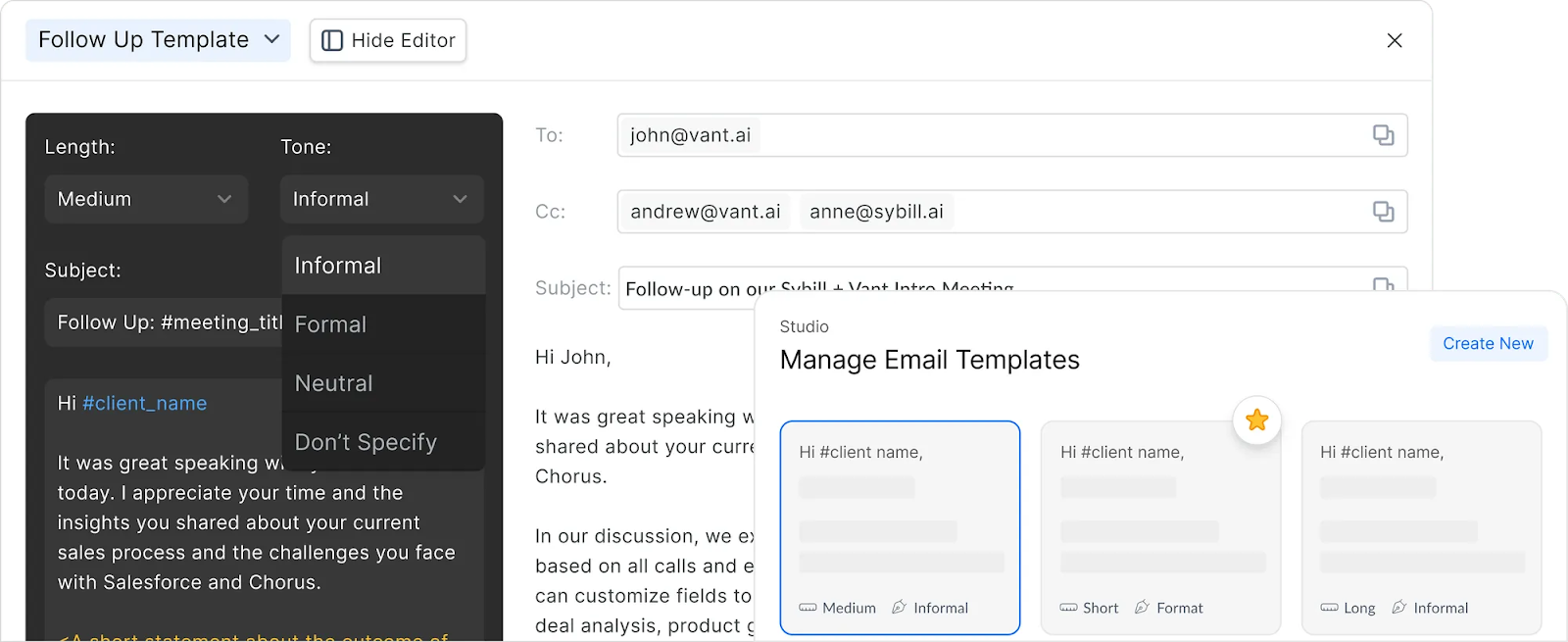
After every call, Sybill generates perfectly personalized emails so you never waste time summarizing. They’re contextual, on-brand, and ready to send. Paired with Magic Summary, Sybill pushes post-meeting recaps straight into your preferred channels - Slack, CRM, or email - keeping communication crisp and automatic.
For updates that don’t deserve another Zoom slot, Loom keeps things human without hijacking your day. Perfect for async communication and protecting meeting hygiene.
But 16 tools later, we’re still asking. What if your “productivity stack” isn’t a stack. It’s a Frankenstein of good intentions: one app for notes, another for planning, two more for tasks, plus a calendar, CRM, and automation you barely remember connecting. Every time you switch tabs, a little bit of your focus evaporates into the cloud.
Welcome to app hopping - the hidden productivity tax no one budgets for. You spend your mornings hunting for where that decision lives, your afternoons updating a tool you don’t actually use, and your evenings wondering why you’re exhausted but somehow still behind.
Every “integration” you add? Another potential failure point. One API glitch and your carefully crafted automation stops syncing. Notes drift from tasks, tasks drift from context, and soon, your fragmented productivity stack becomes a digital graveyard of good ideas that never went anywhere.
This is where Sybill flips the script. Instead of adding yet another link in the chain, it becomes the chain — a unified productivity platform that connects everything automatically.
No lost context, no duplicate work, no tab fatigue.
.png)
Sybill doesn’t replace your tools. It unites their purpose. It’s the AI productivity tool for teams that ends app hopping once and for all, reducing context switching and giving you a single source of truth from capture to close.
Because real productivity isn’t adding more apps. It’s removing friction.
The problem with modern productivity really is your tool debt. Every new app promises clarity but adds another tab, another login, another tiny distraction that fractures your focus.
Productivity in 2026 will be about having fewer productivity tools, all of which think together.
The most powerful professionals in 2026 won’t be the ones using the most software. They’ll be the ones whose systems talk to each other, automatically.
That’s exactly what Sybill does — it captures your meetings, creates your tasks, drafts your follow-ups, and keeps your CRM spotless. No manual data entry. No context switching.
The best productivity planners in 2026 blend structure with automation. Sunsama, Motion, and Reclaim.ai top the list for digital planning, time blocking, and task synchronization. Each doubles as a digital planner and daily planner app, helping you plan realistic workdays and protect focus time. For sales teams, Sybill automates planning through AI Tasks, turning meetings and emails into actionable schedules.
Among the most popular AI note taking devices are Boox Tab Ultra, reMarkable 2, and Supernote - perfect for professionals who prefer handwriting but want digital searchability. If you’re looking for the best note taking apps that analyze context and intent, Sybill leads the way. It transforms every meeting into summaries, tasks, and follow-ups automatically - outperforming traditional digital note takers that only capture text.
Not yet, but they’re getting close. AI productivity tools like Motion, Reclaim.ai, and Sybill enhance your existing productivity planners by automating scheduling, prioritizing tasks, and syncing data across systems. Tools like Sybill go a step further, connecting meeting intelligence with goal planners and AI task managers, creating an integrated workflow from idea to execution.








