
Find us at booth #83, join us for a harbor side happy hour, or catch Gorish’s talk.

Sept, 16-18 > Learn more

%20(1).avif)
Mamta Tainwala

July 10, 2026
Digital note-taking (Notion, Evernote, OneNote) gives you manual control over organizing notes, while AI note-taking (Sybill, Otter, Fireflies) automatically captures, transcribes, and summarizes meetings across Zoom, Microsoft Teams, and Google Meet. AI note-taking wins for sales and meeting-heavy roles because it eliminates the trade-off between being present and capturing details. Digital note-taking remains better for brainstorming, journaling, and tasks needing editorial judgment.
I have experienced note-taking when it looked like a battlefield. Have you? Laptops clattered, styluses tapped, and someone in every meeting said, "Wait, can you repeat that?" We obsessed over capturing everything: every bullet, every brainstorm, every barely coherent idea scrawled at 9:27 a.m. on a Monday. Then AI showed up, quietly took the pen from our hands, and said, "Relax. I've got this."
But there was a catch. There always is. Just because you record everything doesn't mean you remember anything. Digital note takers helped us type faster and organize better, but are we really getting smarter, or just better at collecting chaos?
That's the question this blog tackles: do digital note takers that simply store really help? Or do AI note takers that help you think, act, and decide work out better in the long term? We'll unpack how each works, who they're best for, the bot-free vs bot-based question everyone is asking in 2026, and the note-taking tools that make your workday lighter, not louder.
A digital note taker is an app like Evernote, Notion, or OneNote that lets you manually type, organize, and store notes in the cloud. It replaces paper notebooks with searchable, synced, structured documentation, but it depends entirely on you to do the capturing.
Before AI could listen, transcribe, and summarize, these tools were our productivity heroes. They gave us searchability, sync across devices, and customizable templates that made even the most cluttered minds feel organized. You could tag ideas, link projects, and make your notes look prettier than your actual life. For years, this was enough.
But somewhere along the way, the cracks began to show. These tools still depend on your typing speed, your consistency, your discipline. They don't remind you of what's important or connect the dots between ideas. They store your knowledge; they don't interpret it.
Think of digital note takers like the early iPods. Sleek, handy, beautifully designed, but ultimately manual. You still have to choose every track, hit every button, and build your own playlist of insights.
Digital note takers still win for people who thrive on structure, visuals, and control: designers mapping creative projects, researchers compiling references, or planners who love a clean digital canvas. When you need your notes to look as polished as your ideas, digital note takers deliver.
But if your goal is to turn conversations into actions, to go from "what was said" to "what needs doing," you'll want to meet their smarter cousin: the AI note taker.
An AI note taker is software that automatically records, transcribes, and summarizes your meetings across platforms like Zoom, Microsoft Teams, and Google Meet, then extracts action items, follow-ups, and insights without you typing a word. The best ones don't just listen. They understand.
Unlike digital note takers that wait for you to type, AI note takers like Sybill detect tone, intent, emotion, and context. When your prospect hesitates, your AI catches it. When your manager outlines next steps, it tags them for you. When action items are buried in a 60-minute call, AI brings them straight to the surface.
Digital note takers are input systems. You feed them information. AI note takers are intelligence layers. They process information, understand meaning, and produce outcomes.
With Sybill's AI note taker, sales and customer-facing teams get much more than transcripts. They get deal context, buyer emotion, and next steps, auto-filled into their CRM. You have an AI deal analyst sitting in every meeting, taking perfect notes, highlighting risks, and prepping your follow-up email before you even hang up.
This shift from capture to comprehension is redefining workplace productivity. If digital notes are a diary, AI notes are your personal assistant with a PhD in recall. The diary remembers what happened. The assistant reminds you why it mattered, and what you should do about it next.
Because the real productivity killer isn't missed notes. It's missed meaning.
Digital note takers organize information you feed them, while AI note takers capture, interpret, and act on conversations automatically. One is your reliable planner; the other is your strategist.
Here's how the two compare:
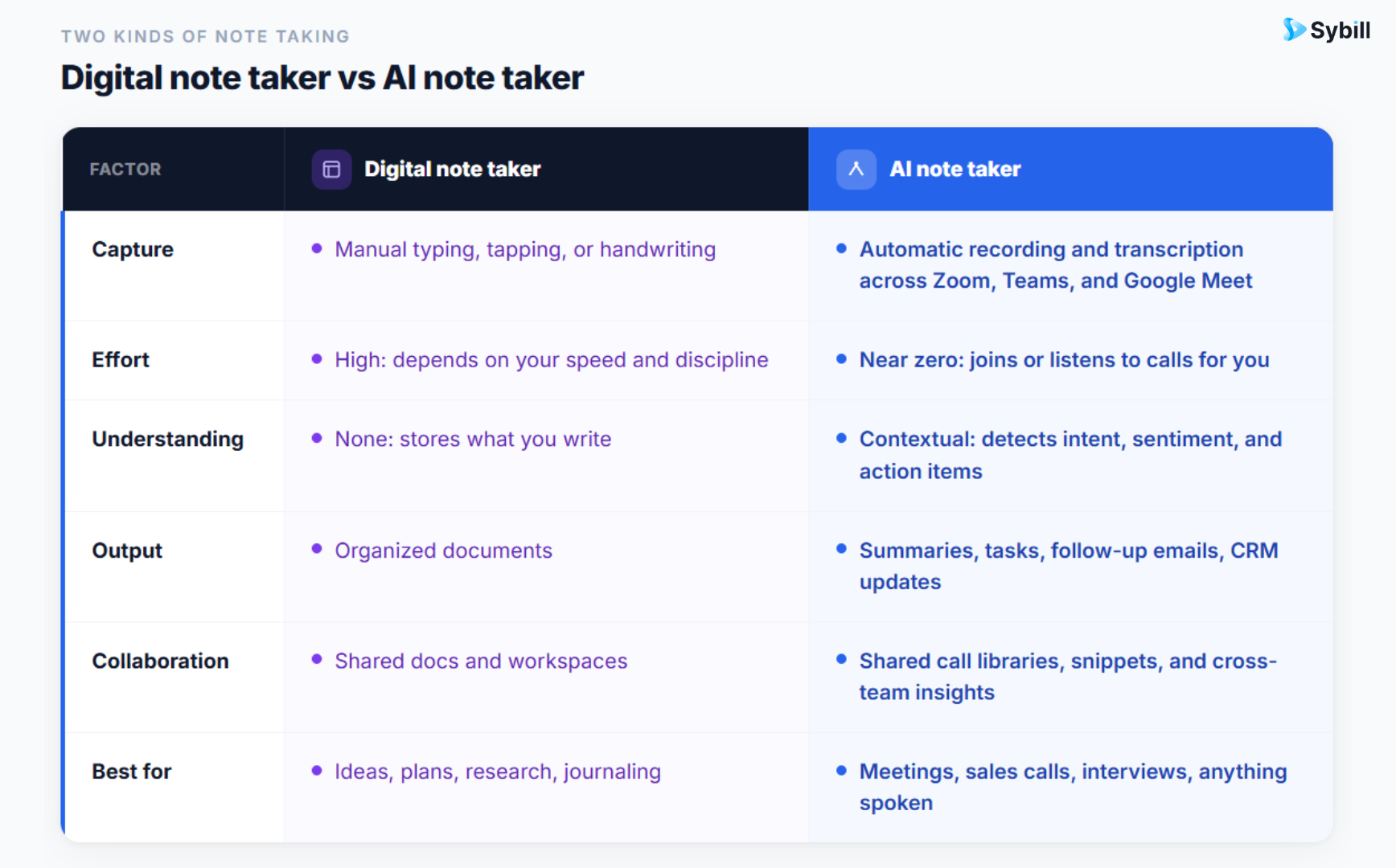
Digital note takers excel at creating order out of chaos. They're ideal when you want to control every detail: formatting, structure, and hierarchy. But they stop at documentation. AI note takers take you from documentation to decision.
Tools like Sybill go further, pulling emotional cues, buyer intent, and next-step actions directly into your CRM through CRM Autofill. You're not just getting notes; you're getting the story behind the notes.
Still, this isn't an either-or world. Some of the most productive teams blend the two, using Notion or OneNote for structured documentation and an AI note taker like Sybill for meeting intelligence.
So, what's the real difference between digital and AI note taking? Digital note taking helps you remember. AI note taking helps you move forward.
Bot-based AI note takers join your Zoom, Microsoft Teams, or Google Meet call as a visible participant, while bot-free tools capture audio silently from your device. Bot-based tools like Sybill, Fireflies, and Otter deliver higher-fidelity capture and transparent consent. Bot-free tools like Granola prioritize discretion for internal conversations.
This distinction only exists on the AI side of the digital vs AI divide, and it matters more in 2026 than ever:
There's a third path worth knowing: Sybill's mobile & desktop app records in-person meetings, which is the one setting where no bot could exist anyway. Field reps get the same Magic Summary from a coffee-shop meeting as from a Zoom demo.
If you're weighing specific tools on this axis, our full guide to the best AI note takers for sales teams in 2026 compares bot-free and bot-based options across Zoom, Teams, and Google Meet with a pricing table and feature matrix.
The three best digital note takers in 2026 are Evernote for structured capture and search, Notion for flexible all-in-one workspaces, and Microsoft OneNote for teams inside the Microsoft 365 ecosystem. All three organize what you type; none capture conversations for you.
Before we hand the mic to AI, let's give credit where it's due. Digital note takers paved the way for everything we now take for granted: searchable notes, synced devices, and organized workspaces.
Still the OG of digital note-taking, Evernote made capturing ideas cool long before AI joined the chat. It lets you jot, clip, and tag everything from meeting notes to random mid-flight ideas, and then actually find them later. Its structured notebooks, templates, and sync features make it a go-to for researchers, writers, and planners who live and breathe organization.
Half note-taker, half life OS. Notion is where documentation meets design. It combines notes, wikis, databases, and project boards in one interface that's as flexible as your creativity. It's perfect for teams that love visual structure, whether you're building campaign briefs or content calendars. One 2026 caveat: Notion's AI meeting notes now require the Business plan at $20/user/month, so its AI layer is no longer a cheap add-on.
If your team already lives inside the Microsoft 365 ecosystem, OneNote is the no-brainer choice. It's free, intuitive, and integrates with Outlook, Teams, and the rest of your stack. OneNote shines in enterprise setups where collaboration and easy sharing matter more than aesthetics. Think of it as the workhorse of digital note-taking: quietly reliable, always ready.
Each of these tools transformed note-taking from a passive chore into a digital habit. But they help you store knowledge, not use it. And in 2026, storing isn't enough. The real power lies in tools that can think with you, which is exactly where AI note takers step in.
The three best AI note takers in 2026 are Sybill for sales teams that need CRM automation and buyer intelligence, Otter for real-time collaborative transcription, and Fireflies for multilingual teams on a budget. All three work across Zoom, Microsoft Teams, and Google Meet.
Let's start with the one built for real business impact: Sybill, the hyper-accurate AI note taker designed for sales, customer success, and revenue teams that live and breathe conversations.
What makes Sybill different isn't just transcription accuracy. It's emotional intelligence. Sybill's AI understands not just what your buyers say, but how they say it. It captures tone, sentiment, and intent, turning every conversation into a playbook of what drives your deals forward.
Sybill works across Zoom, Microsoft Teams, and Google Meet, and its mobile app extends the same AI note taking to in-person meetings, so every conversation gets the same treatment regardless of where it happens.
After every meeting, Sybill generates a Magic Summary: an accurate, context-aware recap of key discussion points, objections, and next steps. But that's just the beginning. It automatically creates AI Tasks and follow-up emails, helping reps respond instantly with perfectly contextual communication. Before your next call, pre-meeting briefs hand you the deal history and attendee context so you walk in prepared.
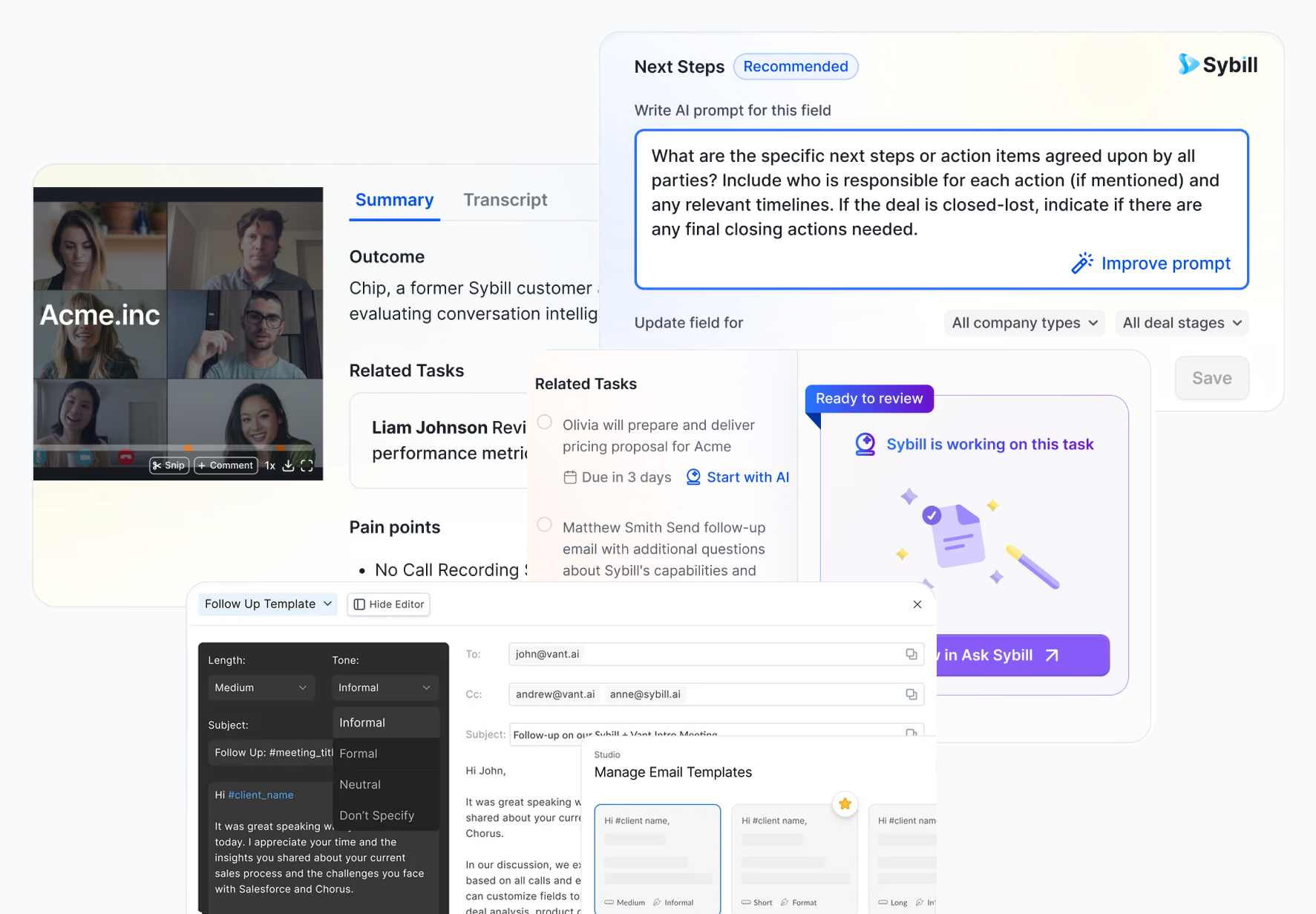
Sybill's CRM integration is seamless. Instead of copy-pasting notes into Salesforce or HubSpot, CRM Autofill updates deal context, buyer roles, and action items automatically. Every insight lands exactly where your team needs it: inside your workflow, not in another forgotten doc.
And because it's built for sales productivity, Sybill doubles as your AI meeting assistant and deal coach. Reps can ask it questions like "Which deals are at risk?" or "What's blocking this renewal?" and get instant, data-backed answers. It even supports 100+ languages for global teams.
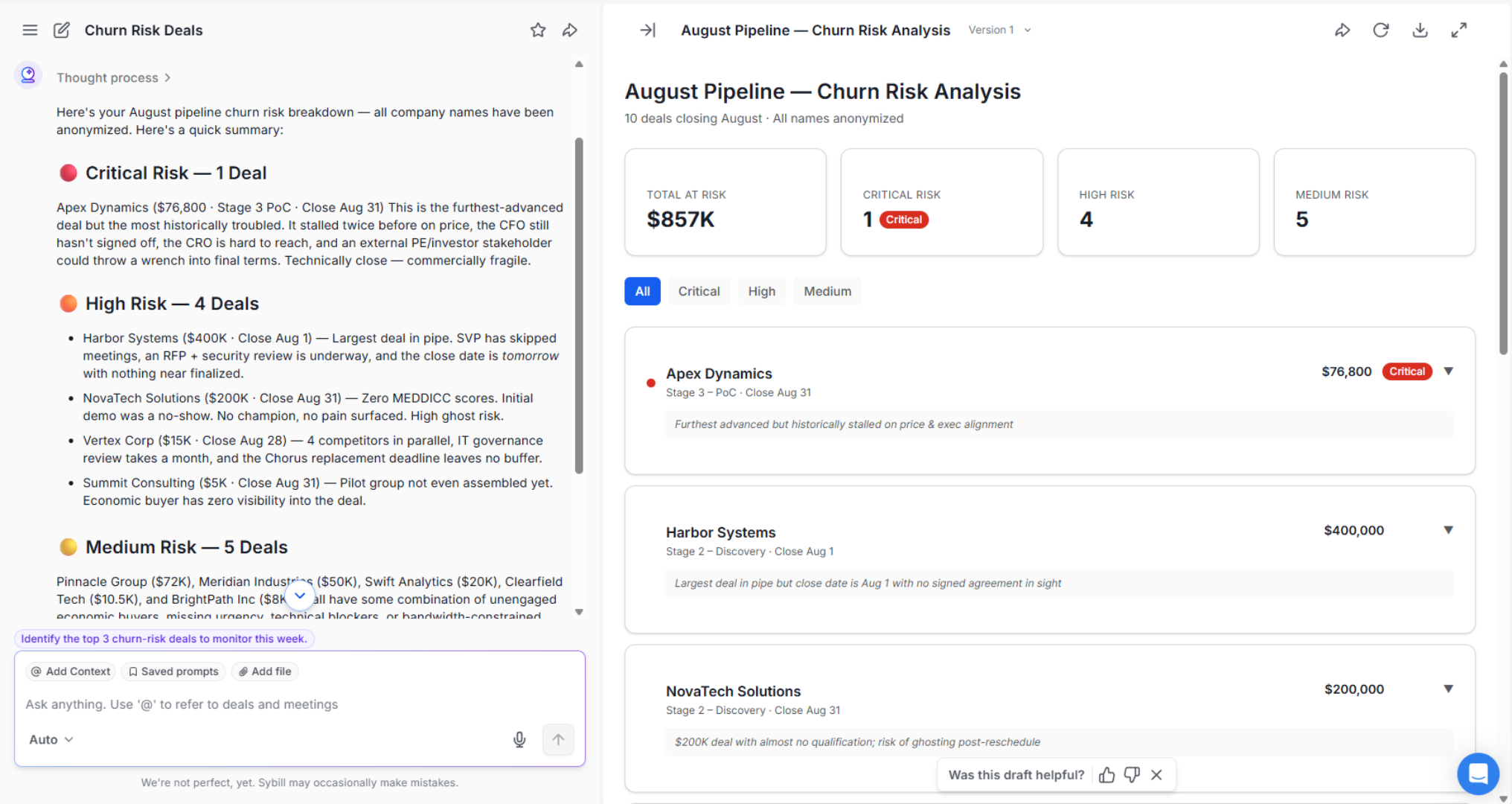
Ask Sybill... anything. We mean it.
Get started for free with Sybill. The AI note taker built for real conversations.
An early mover in AI transcription, Otter.ai remains a solid choice for general meeting notes and real-time collaboration. It integrates with Zoom, Google Meet, and Microsoft Teams, and its live captions are the best in the category, letting multiple participants view and annotate the transcript as the call happens. But it summarizes what was said without understanding context or emotion, transcribes in only three languages (English, French, and Spanish), and caps its Pro plan at 1,200 minutes a month, which heavy users burn through in about two weeks. That makes it less suited for high-stakes revenue conversations.
Fireflies.ai is a reliable budget pick for teams that need multi-speaker transcription across Zoom, Teams, and Google Meet, with support for 100+ languages. Its Pro plan starts at $10/user/month on annual billing, one of the lowest entry points in the category. It's efficient for internal syncs and large calls, though an AI credits system meters key features even on paid plans, CRM sync requires the Business tier, and accuracy can dip in noisy or overlapping conversations. Here's how Sybill vs Fireflies compare head to head.
AI note takers like Sybill don't just take notes. They think with you. They move beyond memory and into meaning, turning raw conversation data into next steps, emotional insight, and business intelligence.
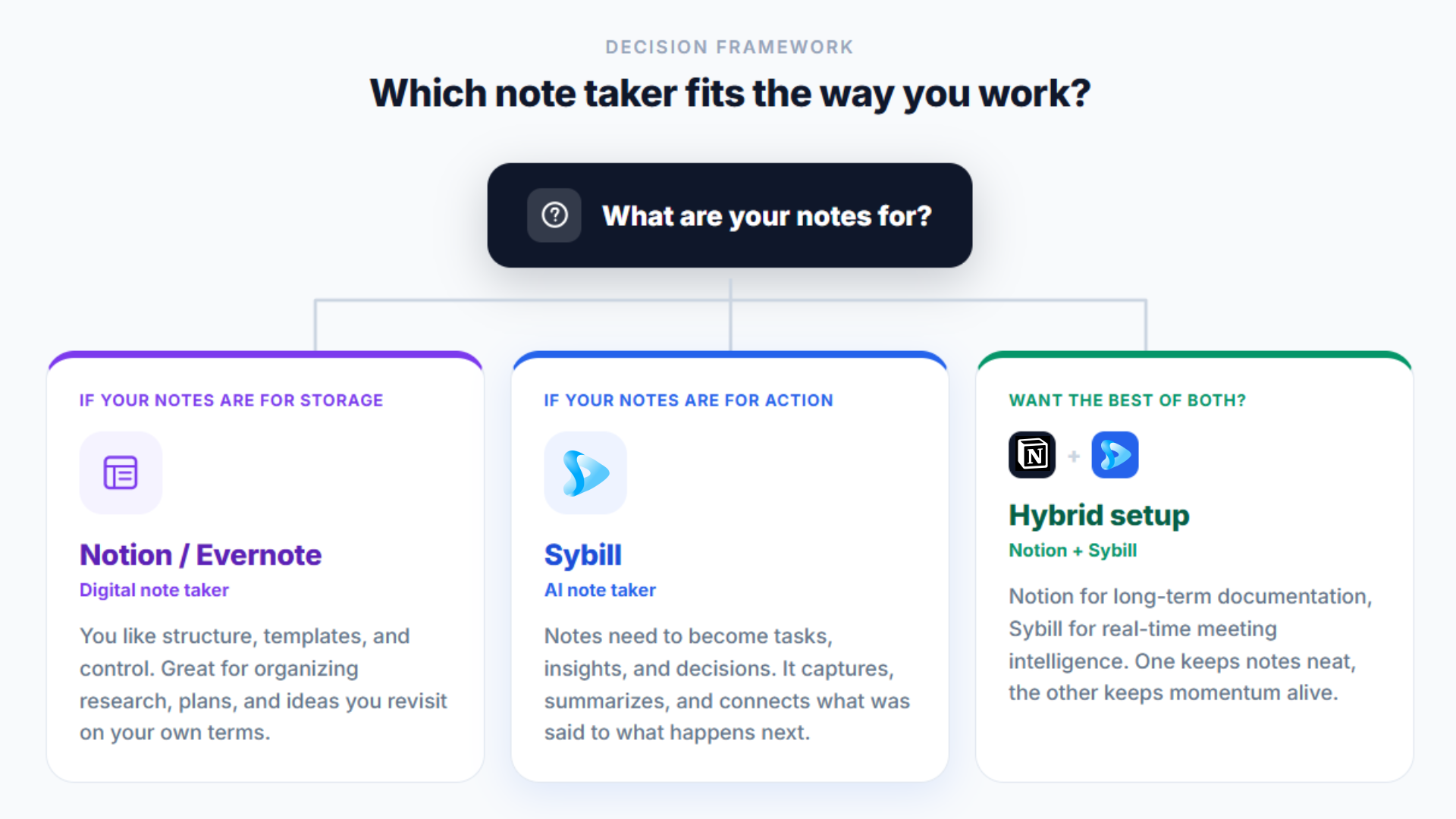
Choose a digital note taker if your notes are for storage, and an AI note taker if your notes need to become actions, tasks, or decisions. The best setups often combine both.
Start by asking yourself one simple question: are my notes for storage or for action?
If your notes are for storage, you like structure, templates, and control, a digital note taker like Notion or Evernote will serve you well. They're great for organizing research, plans, and ideas you want to revisit on your own terms.
If your notes are for action, meaning they need to translate into tasks, insights, or decisions, go with an AI note taker like Sybill. It automatically captures, summarizes, and connects the dots between what was said and what needs to happen next.
Want the best of both worlds? Build a hybrid setup: use Notion for long-term documentation and Sybill for real-time meeting intelligence. One keeps your notes neat, the other keeps your momentum alive.
Whatever you choose, prioritize tools that integrate across your stack, from CRM to calendar to video conferencing, and check pricing against what you'll actually use. If a bot joining your calls is a dealbreaker, weigh the bot-free trade-offs covered above, or see how Sybill vs Granola compare on exactly that question.
The future of note taking is AI that moves from recording meetings to anticipating what happens next. AI note takers are evolving into full conversation intelligence systems: context-aware, predictive, and emotionally smart.
They won't just summarize what happened in a meeting; they'll flag the deal risk before your pipeline review, draft the follow-up before you ask, and surface the objection pattern across your last 50 calls.
The real win? Humans get their mental bandwidth back. When AI takes care of recall and context, account executives can focus on creative thinking, empathy, and decision-making, the things machines can't replace.
Take Sybill. As AI note taking matures, it's becoming more than a meeting assistant. It's your sales second brain, mapping every deal, cue, and buyer intent in one unified space.
In 2026, productivity is about capturing less and understanding more. A digital note taker helps you store and organize ideas neatly. An AI note taker listens, learns, and helps you act, turning every conversation into next steps and insights.
If you're exploring the best note taking apps for your workflow, it's time to go beyond storage. Let your AI note taker do the listening, summarizing, and thinking for you.
Ready to turn your meeting notes into deal-closing insights? Get started for free with Sybill, the AI note taker that understands every word and every emotion.
A digital note taker like Evernote, Notion, or OneNote helps you manually type, organize, and store information. An AI note taker goes further: it records, transcribes, and summarizes meetings automatically, often detecting tone, emotion, and action items. Tools like Sybill understand not just what was said, but what mattered most, so you can act on key insights without lifting a finger.
The best AI note taking app in 2026 depends on your use case, but Sybill stands out for sales and revenue teams. Unlike general-purpose transcription tools, Sybill captures conversations across Zoom, Teams, and Google Meet, analyzes buyer intent and emotion, and generates follow-up emails and CRM entries automatically. For teams that care about accuracy, context, and productivity, it's hard to beat.
Yes, every major AI note taker supports Zoom, Microsoft Teams, and Google Meet. Bot-based tools like Sybill, Fireflies, and Otter join calls automatically from your calendar, while bot-free tools like Granola capture device audio on any platform. Sybill also records in-person meetings through its mobile app.
Choose a bot-based AI note taker like Sybill for sales and external calls, where transparent consent and full-fidelity capture matter. Choose a bot-free tool like Granola for internal conversations where a visible bot feels intrusive. Bot-based capture also enables video-level insights that audio-only tools cannot produce.
Absolutely. For students, an AI note taker saves hours of manual note-taking during lectures and helps them focus on comprehension instead of typing. For professionals, it eliminates post-meeting chaos: no more rewinding recordings or missing key decisions. Whether you're managing clients, projects, or coursework, an AI note taker like Sybill ensures your notes are complete, clear, and actionable.
A digital note taker like Evernote, Notion, or OneNote helps you manually type, organize, and store information. An AI note taker goes further: it records, transcribes, and summarizes meetings automatically, often detecting tone, emotion, and action items. Tools like Sybill understand not just what was said, but what mattered most, so you can act on key insights without lifting a finger.
The best AI note taking app in 2026 depends on your use case, but Sybill stands out for sales and revenue teams. Unlike general-purpose transcription tools, Sybill captures conversations across Zoom, Teams, and Google Meet, analyzes buyer intent and emotion, and generates follow-up emails and CRM entries automatically. For teams that care about accuracy, context, and productivity, it's hard to beat.
Yes, every major AI note taker supports Zoom, Microsoft Teams, and Google Meet. Bot-based tools like Sybill, Fireflies, and Otter join calls automatically from your calendar, while bot-free tools like Granola capture device audio on any platform. Sybill also records in-person meetings through its mobile app.








