
Find us at booth #83, join us for a harbor side happy hour, or catch Gorish’s talk.

Sept, 16-18 > Learn more

%20(1).avif)
Mamta Tainwala

March 12, 2026
If your sales reps are spending 30-40 minutes building a single quote in a spreadsheet, stitching together pricing from three different documents, and then waiting two days for manager approval, you have a CPQ problem. You just might not have called it that yet.
CPQ software exists to fix exactly that. It is one of those tools that lives in the middle of every serious sales stack and yet somehow stays under-discussed, especially among sales ops and RevOps professionals who spend the most time dealing with the fallout when quoting goes wrong.
This guide is the complete picture: what CPQ is, how it works, why it matters, and what a good CPQ implementation actually looks like in practice.
In this guide, we will cover:
CPQ stands for Configure, Price, Quote. Each word refers to a distinct phase of the sales quoting process:
Configure is the process of determining exactly what a customer wants to buy, selecting the right product options, bundles, and configurations based on their requirements.
Price is the calculation of the correct cost for that configuration, factoring in volume discounts, contract terms, regional pricing rules, margin guardrails, and promotional rates.
Quote is the generation of a formal, branded, error-free proposal delivered to the buyer, typically with e-signature capability and approval routing built in.
Together, these three steps describe the entire journey from "a customer says yes in principle" to "they have a signed quote in hand." CPQ software automates and systematizes that journey.
CPQ software is a sales tool that automates product configuration, pricing calculations, and quote generation. It replaces the combination of spreadsheets, tribal pricing knowledge, back-and-forth with finance, and manual document assembly that slows down most sales teams.
In practical terms, CPQ sits between your CRM and your ERP. When a rep identifies an opportunity and starts building a proposal, CPQ pulls the relevant product catalog, applies the correct pricing rules, validates that the configuration is technically accurate, and outputs a professional quote, all without the rep needing to know every pricing rule by heart or wait for a deal desk review on a straightforward deal.
The global CPQ market is projected to reach $7.3 billion by 2030, up from $2.5 billion in 2023, which gives you a sense of how seriously B2B sales organizations are taking the quoting problem right now.
Understanding the CPQ process helps you evaluate whether a given tool is actually solving the right problem for your team. Here is how a well-implemented CPQ workflow runs:
The CPQ process typically begins once an opportunity has been qualified in your CRM. The rep or sales ops professional enters or confirms the customer's requirements, pulling from account data already stored in the system.
This is where clean, up-to-date CRM data matters enormously. A CPQ tool is only as accurate as the information it is fed. If your CRM notes are sparse or stale, the configuration process starts with gaps, and those gaps become errors in the quote.
The CPQ engine guides the rep through selecting product options, checking compatibility rules, and building a valid configuration. This is where guided selling features earn their value. Rather than requiring reps to memorize a complex product catalog, the software asks the right questions and surfaces the right options based on the customer's answers.
Newer reps can produce accurate quotes as quickly as veterans. That alone has a measurable impact on sales cycle length.
Once the configuration is set, the CPQ engine applies your pricing rules automatically. This includes volume discounts, multi-year contract pricing, promotional rates, regional adjustments, and margin guardrails that prevent reps from discounting below acceptable thresholds.
Pricing errors in manual quoting processes are both common and costly. Studies indicate CPQ adoption reduces pricing errors by approximately 45%, which, at the deal level, translates directly to protected margin and faster approvals.
CPQ generates a branded, error-free proposal document. For non-standard deals, it routes the quote through the appropriate approval chain automatically, based on discount level, deal size, or custom rules. Once approved, many CPQ systems include e-signature integration so the buyer can sign directly from the document.
A well-integrated CPQ system syncs the final quote data back to your CRM for pipeline tracking and to your ERP for order management and billing. This closes the loop between sales and finance and is essential for clean sales pipeline management.
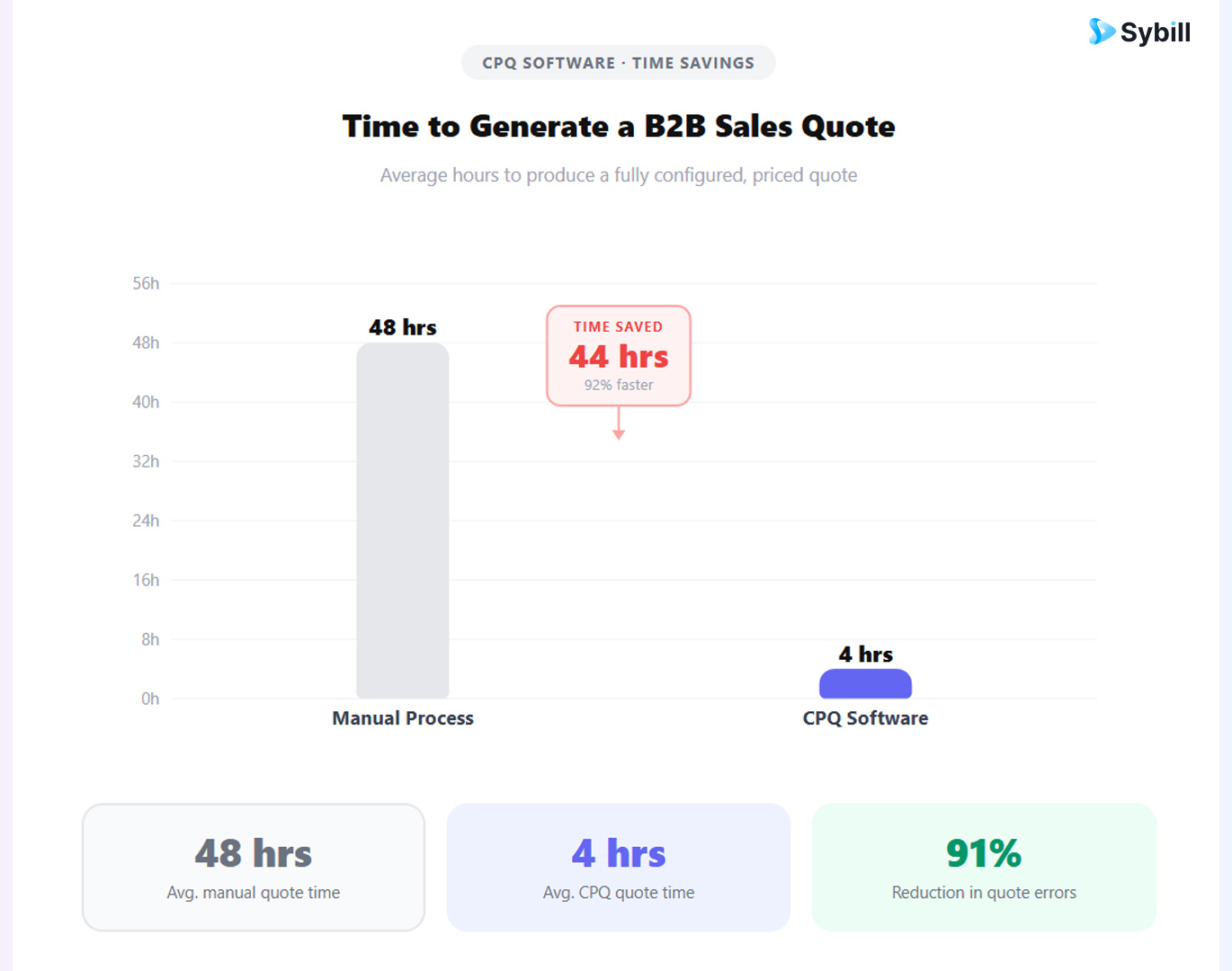
CPQ is not just a quoting tool. When implemented well, it has downstream effects across your entire revenue operation.
The most obvious benefit is speed. Quotes that previously took days now take minutes. In competitive B2B sales, the first accurate quote often wins. Speed is not just a productivity metric; it is a competitive differentiator.
Manual quoting processes introduce pricing errors, invalid configurations, and discount inconsistencies. CPQ eliminates most of these by enforcing rules at the point of quote creation rather than catching mistakes after the fact in finance review.
When reps are not building quotes in spreadsheets or chasing approvals through email chains, they are talking to buyers. That reallocation of time is one of the most direct ways CPQ improves sales efficiency.
CPQ data gives RevOps a window into quoting activity, discount patterns, win rates by product configuration, and where deals stall in the approval process. That visibility is foundational for pipeline generation and revenue forecasting.
For subscription businesses, CPQ handles renewal quoting and mid-term contract amendments systematically. This is directly relevant to customer retention: a mishandled renewal quote is one of the most avoidable reasons customers choose not to renew.
A common point of confusion is the relationship between CPQ and CRM. They are not substitutes. They are partners.
Your CRM manages the customer relationship: contacts, deal history, communication records, and pipeline stages. Your CPQ manages the quoting process: product configuration, pricing rules, and proposal generation.
The integration between the two is where the real value lives. CPQ pulls customer and deal data from your CRM to personalize and contextualize each quote. Approved quotes sync back to update deal records, forecast values, and pipeline stages.
The implication for RevOps is that the quality of your CRM data directly determines the quality of your CPQ output. If call notes are missing, if contact roles are wrong, if deal values are stale, the quote that comes out of CPQ will reflect those gaps.
This is why AI-driven call summaries and automatic CRM updates have become foundational to sales ops stacks that include CPQ. When your CRM is continuously enriched with accurate, structured data from every sales conversation, your CPQ process starts from a much stronger position.
Most CPQ implementations underdeliver not because the technology is wrong, but because the deployment gets cut short.
Importing messy product data: If your product catalog has inconsistencies, pricing rules are unclear, or bundle logic is undocumented, CPQ will automate the chaos rather than fix it. Data hygiene before implementation is non-negotiable.
Skipping rep training: Adoption failures in CPQ almost always trace back to inadequate training. Reps who do not understand how to use the configuration engine revert to spreadsheets. The tool collects dust.
Weak CRM integration: A CPQ system that cannot pull clean, current data from your CRM and push approved quotes back is a standalone quoting tool, not a revenue system. The integration is not a nice-to-have; it is the point.
Building too much complexity upfront: The most effective CPQ implementations start simple, nail the core workflow, and add complexity in subsequent phases. Trying to account for every edge case on day one leads to bloated configurations that confuse reps and slow approvals.
Ignoring the buyer experience: A fast, accurate quote still loses if the document is hard to navigate or the signing experience is clunky. The front-end experience matters.
CPQ handles the mechanics of quoting. What it cannot do is capture what actually happened in the sales conversation that led to the quote.
Which product features did the buyer keep circling back to? What pricing concerns came up on the discovery call? Who else on the buying committee needs to be addressed in the proposal? These are the details that separate a generic quote from one that feels tailored, and they live in your sales calls and emails, not in your CPQ configuration rules.
Sybill's Magic Summaries capture those details automatically from every sales call and push them into your CRM in structured form. Your CPQ process then starts with a CRM that reflects the real conversation, not a partial recollection someone typed at the end of a long day.
Deal summaries give AEs and sales ops a comprehensive account of every buyer interaction across the deal lifecycle, so the proposal that comes out of CPQ is informed by full context rather than whatever made it into the notes.
For sales workflow automation that connects CPQ mechanics to buyer intelligence, Sybill and a well-integrated CPQ tool form a natural pairing. One captures what the buyer cares about. The other translates that into an accurate, professional quote.
Want your CRM to be CPQ-ready before every quote? Get started for free with Sybill and make sure the context behind every deal is captured before it becomes a proposal.
CPQ stands for Configure, Price, Quote. In a business context, it refers to both the process of generating accurate sales quotes for configurable products and the software that automates that process. CPQ software is commonly used in B2B sales environments where products have multiple options, pricing tiers, or configuration rules that make manual quoting slow and error-prone.
CRM software manages customer relationships: contacts, communications, deal stages, and pipeline data. CPQ software manages the quoting process: product configuration, pricing calculations, and proposal generation. They work together, with CPQ pulling customer data from the CRM and syncing approved quotes back. A CPQ tool without CRM integration is significantly less powerful.
CPQ is most commonly used by B2B sales teams selling complex, configurable products or services, including SaaS companies with tiered pricing, manufacturers with custom product options, and enterprise software vendors with multi-year contract structures. Sales reps, sales ops professionals, RevOps teams, and deal desk managers are the primary users.
The CPQ process runs through five stages: qualifying the opportunity in your CRM, configuring the correct product using guided selling tools, calculating the accurate price based on predefined rules, generating and routing the quote for approval, and syncing the final deal data back to your CRM and ERP.
CPQ reduces the sales cycle by eliminating the manual steps that create delays: spreadsheet-based quote building, back-and-forth approval chains, pricing errors that need correction, and slow document generation. Quotes that took days now take minutes, which keeps deal momentum going and reduces the risk of losing competitive deals to a faster-moving seller.
Not exactly. CPQ covers the configure, price, and quote phase, which is the front end of the revenue process. Quote-to-cash is a broader term that encompasses CPQ plus contract management, order management, billing, and revenue recognition. CPQ is typically one component of a larger quote-to-cash architecture.
CPQ needs accurate product and pricing configuration data in its own system, but it also pulls heavily from CRM data: customer account details, deal stage, contract terms, and contact roles. The richer and more current your CRM data, the more accurate and personalized your CPQ output will be.
CPQ is not glamorous. Nobody goes to a conference and leads with "we finally fixed our quoting process." But behind every high-performing sales team with consistently fast deal cycles and clean revenue forecasts, there is usually a well-configured CPQ system doing the unsexy work.
Understanding what CPQ is and how it fits into your broader sales stack is the first step to deciding whether it is the right investment for your team, and more importantly, what needs to be true in the rest of your stack for CPQ to actually deliver on its promise.
Get started for free with Sybill and make sure your CRM is delivering the clean, structured data your CPQ process depends on.
CPQ stands for Configure, Price, Quote. In a business context, it refers to both the process of generating accurate sales quotes for configurable products and the software that automates that process. CPQ software is commonly used in B2B sales environments where products have multiple options, pricing tiers, or configuration rules that make manual quoting slow and error-prone.
CRM software manages customer relationships: contacts, communications, deal stages, and pipeline data. CPQ software manages the quoting process: product configuration, pricing calculations, and proposal generation. They work together, with CPQ pulling customer data from the CRM and syncing approved quotes back. A CPQ tool without CRM integration is significantly less powerful.
CPQ is most commonly used by B2B sales teams selling complex, configurable products or services, including SaaS companies with tiered pricing, manufacturers with custom product options, and enterprise software vendors with multi-year contract structures. Sales reps, sales ops professionals, RevOps teams, and deal desk managers are the primary users.








