
Find us at booth #83, join us for a harbor side happy hour, or catch Gorish’s talk.

Sept, 16-18 > Learn more

%20(1).avif)
Mamta Tainwala

February 27, 2026
Here's a number that should bother you: sales reps spend roughly 70% of their time on work that isn't selling. Emails, CRM updates, meeting notes, follow-up drafts, prep work, scheduling. All of it necessary. None of it revenue-generating on its own.
Sales workflow automation exists to fix that ratio. Not by replacing reps, but by handling the mechanical, repeatable parts of the job so reps can spend more time doing what actually moves deals: talking to buyers, building trust, and closing.
This guide covers what sales workflow automation actually means in 2026, which stages and tasks are worth automating, how to set it up, and what to look for in a tool before you commit.
Here's what you'll learn:
Let's start with the basics.
Sales workflow automation uses software to handle the repetitive, rule-based parts of your sales process automatically. Lead routing, CRM updates, follow-up emails, meeting scheduling, call summaries, and deal alerts can all run without a rep lifting a finger.
The key distinction is this: task automation handles individual actions. A confirmation email after a form fill is task automation. Sales workflow automation connects those actions across stages, so each step triggers the next at the right time, in the right sequence, based on what's actually happening in the deal.
Think of it as turning your sales playbook from a document someone has to remember to follow into a system that runs itself.
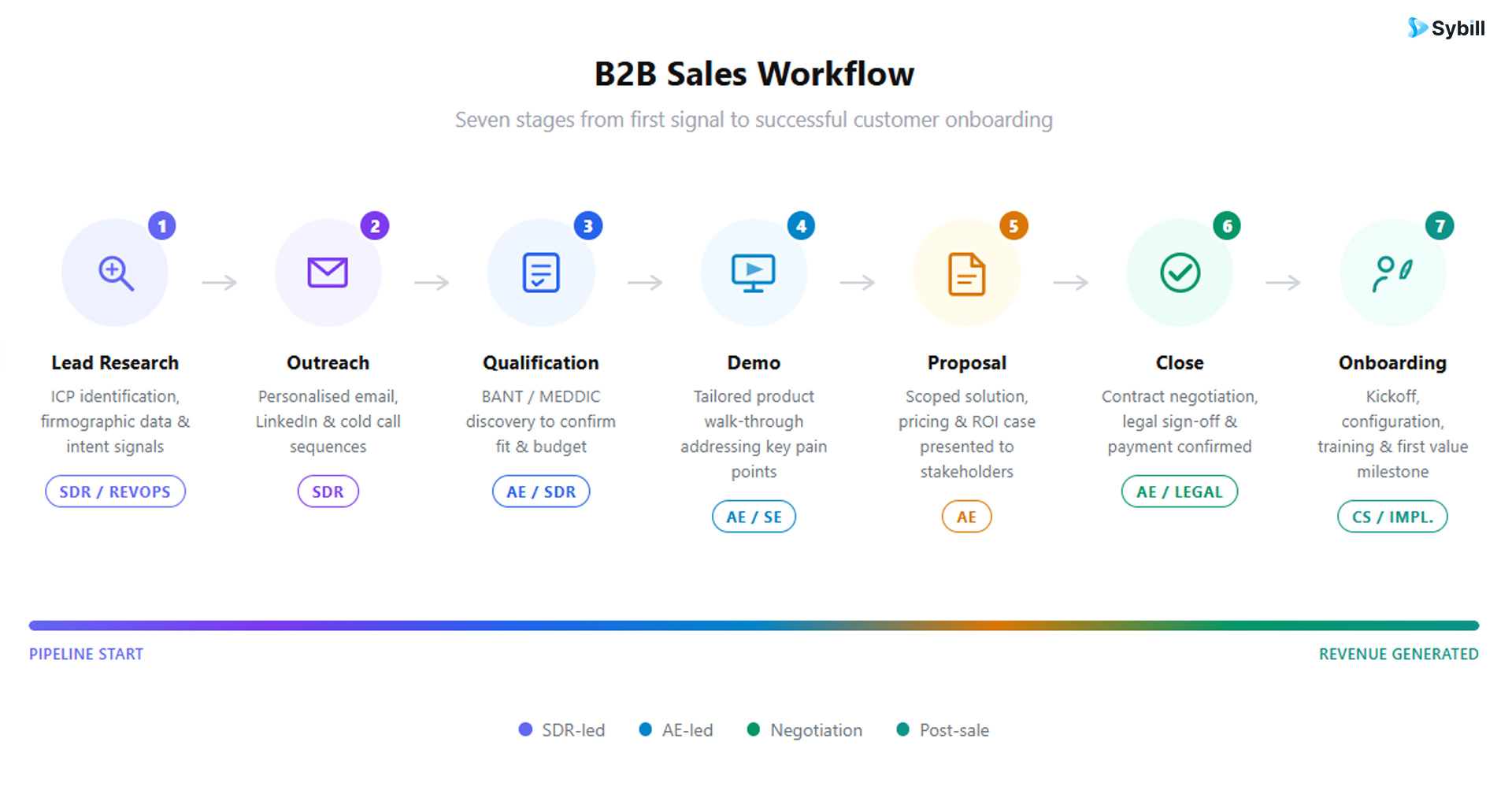
Before you automate anything, it helps to know what you're actually automating. A typical B2B sales workflow runs through these stages:
Reps build a list of accounts and contacts that match the ideal customer profile. They check industry, company size, location, and job title. They also look for buying signals like new funding, recent hiring, product launches, or intent data from web behavior.
This stage is often the most time-consuming and the easiest to automate.
Reps reach out through email, cold calls, LinkedIn, or inbound channels like demo request forms. Most teams run a short sequence with a few touches over several days. The goal is to get a response and move to a conversation.
When a lead responds, the rep checks fit and urgency. They ask about the problem, who else is involved, the timeline, the budget range, and what the prospect is using today. This is where frameworks like BANT and MEDDPICC come in.
For a deeper look at how to structure this stage, the AI-powered sales qualification guide from Sybill's blog covers how AI can now capture and score qualification signals automatically across every call.
The rep tailors the demo to the buyer's specific use case, showing the parts of the product that solve their problem. If the deal is technical, a solutions engineer may join. This stage is inherently human, but the prep work before it doesn't have to be.
The rep shares pricing, packaging, and contract terms. Buyers often request changes, from seat counts to billing terms to legal edits. Internal approvals for discounts may be required. Delays here kill momentum, which is why automating the routing and review process matters.
The rep marks the deal closed won or closed lost. If won, next steps, billing, onboarding kickoff, and stakeholder introductions get locked in. If lost, the reason is captured and the account moves to a nurture track. Most teams do this manually and inconsistently.
After the deal closes, the account moves to customer success or onboarding. A kickoff call runs, success goals are set, and the first setup steps are planned. Poor handoffs here are one of the most common causes of early churn.
Here's where the conversation gets practical. AI in 2026 is not just triggering pre-set rules. It's making decisions based on context from calls, emails, CRM data, and buyer behavior.
These are the tasks AI handles reliably today:
Lead enrichment and research. AI pulls company size, industry, tech stack, funding history, and key contacts automatically. It fills missing CRM fields before a rep even opens the record, so no one starts from zero.
Lead scoring and prioritization. AI scores leads based on fit and intent signals, boosting a lead that visited your pricing page or booked a demo, and deprioritizing one that looks like a poor match. Reps see who to call first without guessing.
Follow-up email drafting. AI generates follow-up emails using context from the last call or email thread, written in the rep's voice. Not a template. An email that sounds like the rep wrote it at their best, ready to send in one click.
Meeting scheduling. AI shares available time slots, sends calendar invites, handles rescheduling, and sends reminders. Back-and-forth scheduling gets eliminated entirely.
CRM updates and data entry. After every call and email interaction, AI logs the activity, updates the deal stage, and populates key fields like next steps, stakeholder names, and qualification data. This is the most time-consuming manual task in sales, and AI handles it completely.
Call summaries and notes. AI listens to the call, summarizes what the buyer said, notes key needs and objections, highlights action items, and saves everything to the opportunity record. Reps walk out of calls with structured debrief in their inbox.
Deal risk detection and pipeline alerts. AI spots deals that are stuck, like no activity for 10 days or a missing decision-maker, and alerts reps and managers before it becomes a problem.
What AI shouldn't fully automate: Pricing negotiations, final contract approvals, complex objection handling, and relationship-building moments. Automation handles the system; humans handle the judgment calls.
Starting with the right approach matters more than picking the right tool. Here are the principles that separate automations that scale from ones that create new problems.
Start with one or two high-friction stages. The highest-ROI automations are usually CRM data entry and follow-up emails, because they eat the most rep time and have clear inputs and outputs. Get those working reliably before expanding.
Automate handoffs, not just individual tasks. Deals stall most at transitions: inbound lead to assigned rep, qualified lead to demo, closed won to onboarding. Automate the routing, stage updates, and internal notifications so nothing gets delayed between humans.
Trigger workflows from buyer behavior, not just rep actions. When a prospect fills out a form, replies to an email, or visits your pricing page, that's the moment to act. Behavior-triggered automations are more timely and more relevant than scheduled ones.
Use AI for decisions, not just actions. Rule-based automation follows preset conditions: if a form is submitted, send an email. AI goes further: it scores the lead, decides on the best follow-up approach, and adjusts based on what's in the deal history. That's a different category of value.
Keep humans in the loop for high-stakes steps. Automate setup and routing. Require approval for discounts, contract changes, and anything that affects margins. Automation should accelerate deals, not bypass the judgment that protects them.
Refine based on what the data shows. Track where deals stall, where follow-ups drop off, and which stages lose the most opportunities. Then adjust timing, routing, and triggers accordingly. Your automation is a first draft, not a final answer.
Get started for free with Sybill and put your post-call workflow on autopilot from day one.
Not all automation tools are built the same. Here's the feature set that separates tools that save time from tools that create a new admin layer.
One thing worth emphasizing: the best tools in 2026 don't just record what happened. They complete the work that comes after. If your automation tool hands you a list of next steps but doesn't execute them, you've replaced one kind of admin with another.
Here's what a fully automated B2B sales workflow looks like in practice, from first touch to CRM update, without a rep manually touching anything between the steps.
Step 1: A lead fills out your demo form. The moment someone submits the form, the workflow triggers. No one needs to check submissions, monitor a shared inbox, or manually assign anything.
Step 2: The lead is enriched and scored. The system pulls company size, industry, job title, tech stack, and intent signals automatically. The lead is scored against your ICP criteria. High-fit leads surface at the top of the rep's queue. Poor fits get routed to a nurture sequence.
Step 3: The lead is routed to the right rep. Based on rules you've set, the lead is assigned automatically: by region, company size, industry vertical, or round-robin. The assigned rep gets a Slack notification and a pre-built brief on who the lead is and what they did before submitting.
Step 4: A personalized follow-up goes out immediately. The system sends a first-touch email using the lead's details, the page they came from, and any relevant context. If the lead replies, the workflow updates the deal stage and queues the next task without manual input.
Step 5: Scheduling happens without back-and-forth. The lead picks a time from the rep's live calendar. The invite is sent, the CRM is updated, and reminder emails go out automatically before the meeting.
Step 6: The call runs, and the CRM updates itself. The AI joins the call, records it, generates a structured summary with buyer pain points, next steps, and key objections, and pushes it to the CRM. The rep comes out of the meeting with a drafted follow-up email and a fully updated deal record waiting in their inbox.
Step 7: Risk alerts fire if a deal goes quiet. If there's no activity on a deal for a set number of days, the system flags it. The manager gets an alert. The rep gets a prompt to re-engage. Deals don't quietly die because no one noticed.
This is what good CRM automation looks like when it's connected to the actual sales workflow rather than bolted on as a separate process.
Sales teams typically stack several tools that each handle part of the workflow. Here's how the categories break down:
CRM software stores accounts, contacts, deal stages, and activity history. It's the system of record. Most CRMs support basic workflow rules, but they rely on reps to keep the data accurate. Salesforce and HubSpot are the most common.
Sales engagement platforms run outbound sequences, email automation, and task queues. They keep reps organized across high volumes of outreach. Outreach and Salesloft are the category leaders, though they still require significant manual input.
AI sales assistants sit above the stack and handle the intelligence layer: call summaries, CRM autofill, follow-up drafts, pre-meeting briefs, and cross-deal querying. This is the category that's seen the most growth in 2026, because it solves the problem the other tools leave open: getting the post-call work done without rep effort.
Meeting and scheduling tools handle calendar coordination. Calendly and similar tools reduce back-and-forth on scheduling, though they don't capture or act on what happens in the meetings themselves.
Analytics dashboards pull pipeline data for forecasting and performance reviews. They give leaders visibility but don't take action.
The most effective stacks in 2026 combine a solid CRM as the system of record with an AI layer that handles the work that happens around every interaction. For a broader look at the best AI sales tools available today, that guide covers the full landscape by use case.
Most sales automation tools handle one part of the workflow. Sybill is built to automate the full post-call layer: the part that happens after every single sales conversation, every single day, across every rep on your team.
Here's what that looks like in practice:
Automated call summaries. Sybill's Magic Summary captures buyer pain points, objections, next steps, and key decisions from every call. No note-taking, no post-call documentation. The summary lands in your inbox and Slack before you've closed your laptop.
CRM autofill across every field. Sybill populates custom CRM fields automatically after every call and email, including structured frameworks like MEDDPICC and BANT. Fields that used to stay blank because reps didn't have time get filled accurately every time. Read more about how this works on the CRM Autofill product page.
One-click follow-up emails. Sybill drafts a personalized follow-up in your tone immediately after each call. It references what was actually discussed, mirrors your writing style, and is ready to send with one click. Reps report sending follow-ups 80% faster.
Automated pre-meeting briefs. Before every call, Sybill pulls together deal history, previous meeting highlights, open action items, prospect company news, and suggested talking points. Reps walk in prepared without spending a minute on manual research.
Ask Sybill for cross-deal intelligence. Reps and managers can query their entire pipeline in plain English: "Which deals have gone quiet this week?" or "What objections are coming up most in late-stage conversations?" Answers come back in seconds. No RevOps analyst required.
Deal risk alerts. Sybill flags stalled deals, missing stakeholders, and incomplete qualification data proactively. Managers get visibility into what's at risk without having to ask for pipeline updates.
For sales managers specifically, Sybill's agentic AI means pipeline reviews become forward-looking coaching conversations instead of status check-ins. The data is already there.
Sales workflow automation is not about building a complex tech stack or running a months-long implementation project. It's about identifying the tasks your reps do after every call, every day, and asking whether those tasks actually require a human.
Updating the CRM? Drafting the follow-up? Prepping for the next meeting? These are things a well-built AI can do faster, more consistently, and without burning rep energy that's better spent on the buyer sitting across from them.
The teams winning right now have figured out that automation isn't the enemy of the human sale. It's what makes the human parts of selling possible more often.
Get started for free with Sybill and let your next call be the last one where you do the admin yourself.
Sales workflow automation uses software to run repeatable sales tasks automatically, including lead routing, CRM updates, follow-up emails, meeting scheduling, and deal alerts. The goal is to reduce manual admin work so reps can spend more time in actual selling conversations. It goes beyond single-step task automation by connecting actions across the whole funnel, so each step triggers the next at the right time.
The highest-ROI automations for most sales teams are CRM data entry and post-call follow-up emails, because they happen after every single interaction and consume the most rep time. Once those are running reliably, add pre-meeting prep, lead enrichment, meeting scheduling, and deal risk alerts. Start narrow, prove the value, then expand.
A sales process defines the steps your team follows from first contact to close. Sales workflow automation uses software to run those steps automatically. The process is the plan; the automation is what executes it consistently, without relying on individual reps to remember every step every time.
No. Automation handles the repetitive, rule-based parts of the workflow. Sales reps handle the parts that require judgment, relationship-building, and negotiation. The goal is to remove the admin work that currently prevents reps from spending more time on the work only humans can do. The best sales email automation tools make this distinction clearly: automate the mechanics, preserve the human conversation.
If your reps are spending more than 30 minutes per day on CRM updates, follow-up drafts, or post-call documentation, that's a clear signal. If deals are going quiet because follow-ups aren't happening consistently, that's another. And if your CRM data is unreliable because reps don't have time to fill it in, automation is the fix, not another training session on CRM hygiene.
Prioritize tools that offer two-way CRM sync, AI-generated call summaries, automated CRM field population (including custom frameworks), follow-up email drafting, and event-based triggers. Beyond features, ask one question during any demo: does this tool complete work after the call ends, or does it just tell me what to do? The answer reveals whether you're getting automation or a smarter to-do list.
Sales workflow automation uses software to run repeatable sales tasks automatically, including lead routing, CRM updates, follow-up emails, meeting scheduling, and deal alerts. The goal is to reduce manual admin work so reps can spend more time in actual selling conversations. It goes beyond single-step task automation by connecting actions across the whole funnel, so each step triggers the next at the right time.
The highest-ROI automations for most sales teams are CRM data entry and post-call follow-up emails, because they happen after every single interaction and consume the most rep time. Once those are running reliably, add pre-meeting prep, lead enrichment, meeting scheduling, and deal risk alerts. Start narrow, prove the value, then expand.
A sales process defines the steps your team follows from first contact to close. Sales workflow automation uses software to run those steps automatically. The process is the plan; the automation is what executes it consistently, without relying on individual reps to remember every step every time.








