
Find us at booth #83, join us for a harbor side happy hour, or catch Gorish’s talk.

Sept, 16-18 > Learn more

%20(1).avif)
Mamta Tainwala

January 26, 2026
TL;DR: Salesforce (SFDC) is the world's leading cloud-based Customer Relationship Management platform that helps sales teams track leads, manage opportunities, automate workflows, and close deals faster. This guide covers everything from Salesforce's core features to practical tips for sales reps and managers looking to maximize their CRM investment.
Well, Salesforce did something revolutionary for sales teams back in 1999, which unlocked all data insights that helped companies find undervalued opportunities hiding in spreadsheets, sticky notes, and the black hole of someone's email inbox.
Fast forward to 2026, and Salesforce has become so ubiquitous in the sales world that saying "update it in Salesforce" is like saying "Google it." The platform has evolved from a simple contact database into a sophisticated revenue operations ecosystem that powers everything from your morning pipeline review to your end-of-quarter forecasting panic session.
But most sales reps use about 10% of Salesforce's actual capabilities. It's like owning a smartphone and only using it to make calls. You're technically getting the job done, but you're missing out on features that could genuinely make your life easier.
Whether you're a new sales rep trying to understand why your manager keeps nagging you about data hygiene, or a seasoned AE wondering if there's a better way to manage your deals than the chaos you've been living with, this guide will walk you through everything Salesforce is, what it does, and how to actually use it without wanting to throw your laptop out the window.
Let's clear this up right away. SFDC stands for Salesforce Dot Com, which is the stock ticker symbol (CRM, ironically) and shorthand that sales professionals use when they don't want to type out "Salesforce" for the hundredth time in a day.
The company was founded by Marc Benioff, a former Oracle executive who had a radical idea: what if instead of installing clunky CRM software on every computer, companies could access their customer data through a web browser? Revolutionary stuff for 1999, but now it's just called "the cloud."
Salesforce was the pioneer of Software-as-a-Service (SaaS) before we even called it that. While competitors were shipping CDs and requiring IT teams to spend weeks on installation, Salesforce customers could sign up and start tracking deals the same day. This cloud-first approach is why you'll hear people refer to it as "SFDC" or simply "Salesforce CRM" interchangeably.
At its core, Salesforce is a cloud-based Customer Relationship Management (CRM) platform that centralizes all your customer interactions, sales activities, and deal data in one accessible location. Think of it as the single source of truth for everything related to your customers and prospects.
But that definition barely scratches the surface. Salesforce has expanded far beyond basic CRM functionality into what they call a "Customer 360" platform. Here's what that actually means:
The Foundation:
The Expansion:
The platform runs entirely in the cloud, which means you access it through a web browser or mobile app rather than installing software. Your data is stored on Salesforce's servers, automatically backed up, and accessible from anywhere with an internet connection.
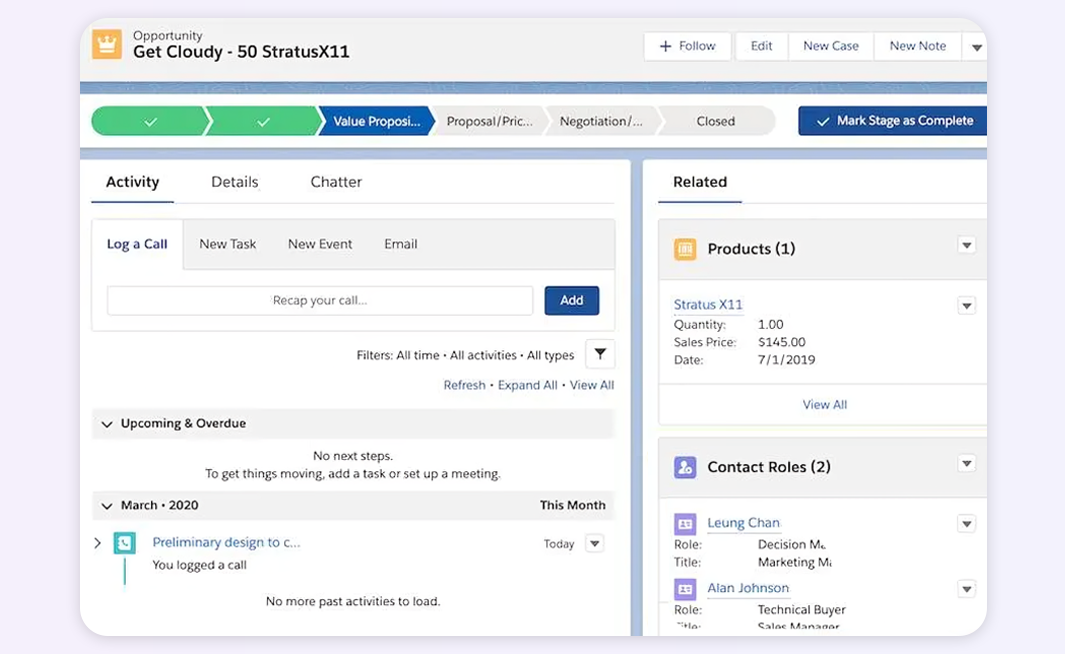
This is Salesforce's bread and butter. Every opportunity gets its own record where you track:
Instead of keeping your pipeline in your head or a scattered Excel file, everything lives in Salesforce. Your manager can see what you're working on. You can pull up a deal's complete history before a call. Finance can forecast revenue based on actual pipeline data instead of guessing.
Salesforce can automate repetitive tasks that eat up your selling time:
The goal is simple: let Salesforce handle the administrative overhead so you can focus on actual selling.
Here's where things get interesting. Salesforce becomes the memory bank for your entire relationship with each customer:
This is invaluable when you're taking over accounts from another rep, preparing for a meeting with someone you haven't talked to in months, or trying to understand why a deal stalled.
And here's where modern tools like Sybill's CRM autofill capabilities come into play. Instead of manually logging every call and typing out meeting notes, AI-powered tools can automatically capture conversation details and push them directly into Salesforce. This means your CRM actually stays updated without you treating data entry like a second job.
Sales leaders use Salesforce to:
For reps, this means you can see exactly where you stand against quota, which deals need attention, and how your performance compares to past quarters.
Salesforce isn't just for sales. Marketing uses it to track campaign performance and pass qualified leads. Customer success teams use it to monitor account health and expansion opportunities. Finance uses it for revenue recognition. Leadership uses it for strategic planning.
When everyone works in the same system, you avoid the classic problem of sales saying "we closed the deal" while customer success says "wait, what deal?" and finance says "nobody told us about this."
Salesforce doesn't require installation, updates, or IT maintenance. You log in through a browser, and you're working with the latest version. Updates happen automatically (usually three times a year), and new features just appear. No downtime, no migration projects, no "we're still running the 2018 version" excuses.
One of Salesforce's superpowers is its flexibility. You can customize almost everything using point-and-click tools:
For more complex needs, developers can write custom code using Apex (Salesforce's programming language) and build entirely custom applications on the platform.
Salesforce's app marketplace (AppExchange) has thousands of pre-built integrations and apps. Need to connect Salesforce to your accounting software? There's an app. Want advanced analytics? There's an app. Looking to enhance your sales intelligence? There's an app (and yes, Sybill integrates seamlessly to bring conversation intelligence directly into your Salesforce workflow).
This ecosystem means Salesforce rarely exists in isolation. It becomes the hub that connects all your other tools.
Salesforce works whether you're a 5-person startup or a 50,000-employee enterprise. You can start with basic Sales Cloud and add capabilities as you grow:
You're not locked into a single tier. As your needs evolve, Salesforce evolves with you.
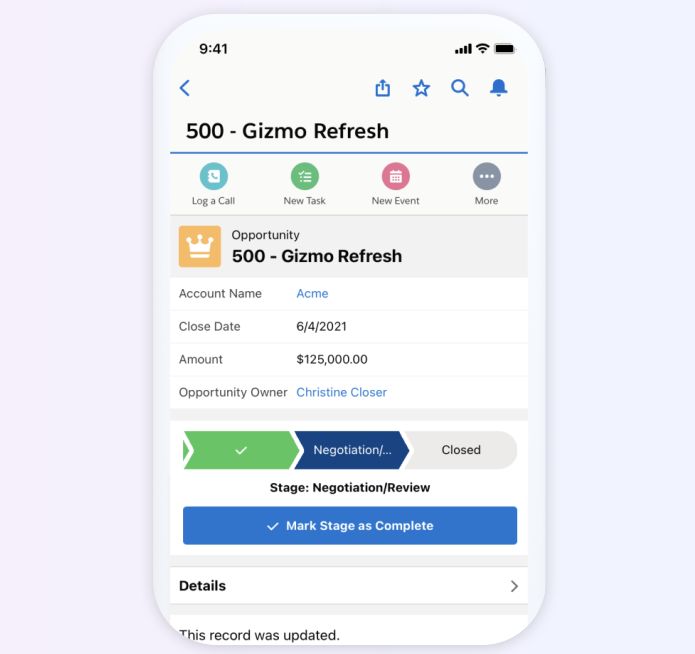
The Salesforce mobile app isn't an afterthought. It's a fully functional version of the platform optimized for phones and tablets. Update deals from an Uber on the way to a meeting. Log call notes while the conversation is fresh. Check your pipeline while waiting for your flight. Pull up account history 30 seconds before a prospect calls.
Modern selling happens everywhere, and Salesforce keeps your data synchronized across all devices in real-time.
For enterprises, this matters tremendously. Salesforce offers:
Your customer data is arguably your most valuable asset. Salesforce treats it that way.
Get started for free with Sybill and automatically sync your meeting insights, call summaries, and follow-up tasks directly into Salesforce. NO MORE manual data entry.
Most sales reps start their day in Salesforce:
This morning check-in ensures nothing falls through the cracks and you're working on the right priorities.
Smart reps keep Salesforce open during calls:
The alternative is trying to remember everything hours later, which inevitably means missing important details. Tools like Sybill take this even further by automatically capturing what was discussed, who said what, and what action items emerged.
Throughout the week, reps should:
Your pipeline is a living, breathing thing. Stale data leads to inaccurate forecasts and missed opportunities.
Friday (or your chosen day) is for:
Think of it as CRM hygiene. A little maintenance prevents major headaches down the road.
When the quarter is closing:
Salesforce transforms from a helpful tool into mission control during these high-pressure periods.
The Problem: Sales reps didn't sign up to be data entry clerks, yet Salesforce only works if data gets entered. Many reps fall behind on logging activities, updating deals, or adding notes.
The Solution: Automate what you can. Use Salesforce's email integration to auto-log emails. Leverage mobile for quick updates immediately after calls. And seriously consider conversation intelligence tools that handle data entry for you. When your CRM updates itself based on actual conversations, suddenly data hygiene stops being a chore.
The Problem: Salesforce can do approximately 10,000 things, which means your company has probably customized it to track 9,000 fields you don't understand or use.
The Solution: Work with your admin to simplify your page layouts. Hide fields you never use. Create custom views that show only what matters to you. Remember: just because Salesforce can track something doesn't mean you should track it.
The Problem: If half your team doesn't use Salesforce properly, your reports are garbage, your forecast is wrong, and leadership makes bad decisions based on incomplete data.
The Solution: This is a management and training issue, not a technology issue. Leaders need to model good CRM hygiene, reward accurate data entry, and make it clear that "it's not in Salesforce" means "it didn't happen." Also, make Salesforce actually useful for reps, not just management reports.
The Problem: You're using 15 different tools, and they all need to talk to Salesforce, but nothing syncs properly, and data is scattered everywhere.
The Solution: Audit your tech stack ruthlessly. Pick integrations that offer two-way sync. Establish clear rules for which system is the source of truth for different data types. And consider consolidating where possible.
The Problem: You need a specific report, but creating it requires understanding objects, relationships, filters, and formulas that feel like learning a new language.
The Solution: Start with standard reports and modify them. Ask your admin for help (that's literally their job). Use report templates. And remember that Salesforce Einstein Analytics can generate insights automatically without you building complex reports.
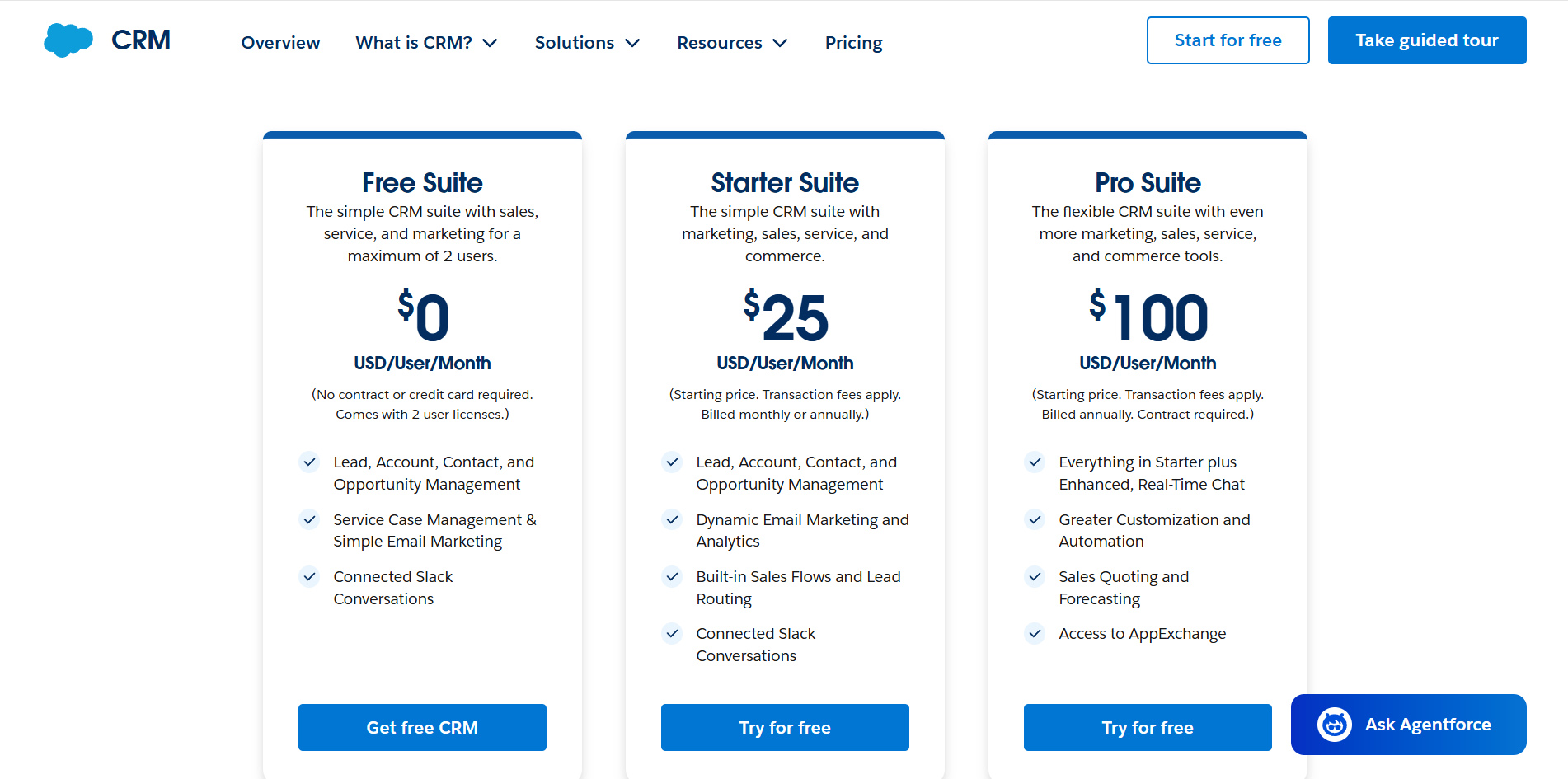
Salesforce comes in multiple editions with different price points and capabilities. Here's the breakdown:
Limited to 2 users maximum. Includes basic sales, service, and marketing features with lead, account, contact, and opportunity management. This is genuinely free, no credit card required and works well for solo founders or very small teams just getting started. You get connected Slack conversations and simple email marketing, but you're capped at 2 user licenses.
The entry point for growing small businesses, billed monthly or annually. This all-in-one CRM brings sales, service, marketing, and commerce tools together. You get unlimited users (unlike the Free Suite), built-in sales flows and lead routing, AI that automatically syncs emails and events, and dynamic email marketing with analytics. Maximum of 325 users, so it's designed for small to mid-size teams. For a 10-person team, you're looking at $250/month or $3,000/year.
This is where most growing businesses land. Billed annually, it includes everything in Starter Suite plus greater customization and automation capabilities. You get sales quoting and forecasting, access to AppExchange for integrations, and the ability to add Premier Support. The customization options here let you actually tailor Salesforce to your specific sales process rather than forcing your team to adapt to generic workflows. For a 20-person sales team, expect $24,000/year in licensing costs.
The professional-grade option for established sales teams. Billed annually, it includes everything in Pro Suite plus advanced pipeline management, deal insights, conversation intelligence capabilities, and access to Agentforce (Salesforce's AI platform). You also get web API access included (Pro Suite charges extra for this). This tier is where Salesforce really shines for teams that need sophisticated automation, deep customization, and robust integrations. A 50-person team would pay $105,000/year.
As the name suggests, you get everything. Billed annually, this includes all Enterprise features plus predictive AI, advanced conversation intelligence, sales engagement tools, Premier Success Plan (included, not an add-on), and a full sandbox environment for testing changes before deploying them. This is for large enterprises with complex sales processes, dedicated Salesforce admins, and developers who need maximum flexibility. For a 100-person sales org, that's $420,000/year in licenses alone.
The top-tier edition that includes literally everything Salesforce offers for sales. Billed annually, you get all Unlimited features plus unmetered Agentforce usage for employees, Salesforce Spiff, Sales Planning, Sales Programs, Salesforce Maps, Tableau Next, Slack Enterprise+, and substantial Flex Credits and Data Cloud Credits. This is designed for enterprise organizations going all-in on Salesforce's complete ecosystem. At $550/user/month, a 100-person team is looking at $660,000/year.
Real talk: Most sales teams don't need Unlimited or Agentforce 1. Enterprise covers the vast majority of sophisticated use cases. Pro Suite handles most SMB requirements perfectly well. Starter Suite is genuinely competitive for small businesses and a massive improvement over the $25/month options from just a few years ago. Choose based on your actual current needs, not hypothetical future requirements that may never materialize. You can always upgrade later, that's the whole point of SaaS pricing.
Hidden costs to consider:
A realistic budget for a 20-person team on Pro Suite might be $24,000/year in licenses, $25,000-50,000 for initial implementation, and another $5,000-15,000/year for add-ons and support. Plan accordingly.
Garbage in, garbage out. If your data is messy, your insights are worthless:
Salesforce generates incredible insights if you ask the right questions:
These insights should drive your sales strategy, not collect dust in unused dashboards.
Connect Salesforce to your:
The right integrations transform Salesforce from a database into a command center.
Most companies buy Salesforce, give reps a 30-minute demo, and wonder why adoption is terrible. Proper training includes:
Yes, you can customize almost everything in Salesforce. But should you? Ask yourself:
Over-customization creates maintenance nightmares and makes the platform harder to use.
Salesforce isn't standing still. Recent developments point to where the platform is heading:
Salesforce's AI layer is getting smarter:
The goal is making Salesforce proactive rather than just reactive - telling you what to do, not just showing you what happened.
Modern Salesforce implementations automate:
The less time reps spend on admin work, the more time they spend selling.
The line between "Salesforce" and "other tools" is blurring. APIs and integration platforms mean data flows seamlessly between systems. You might start a conversation in Zoom, have it automatically transcribed and analyzed, pushed to Salesforce with action items, and trigger a follow-up email sequence, all without touching a keyboard.
This is where tools like Sybill shine. Instead of Salesforce being a separate data entry exercise, it becomes the automatic repository of everything happening in your sales conversations.
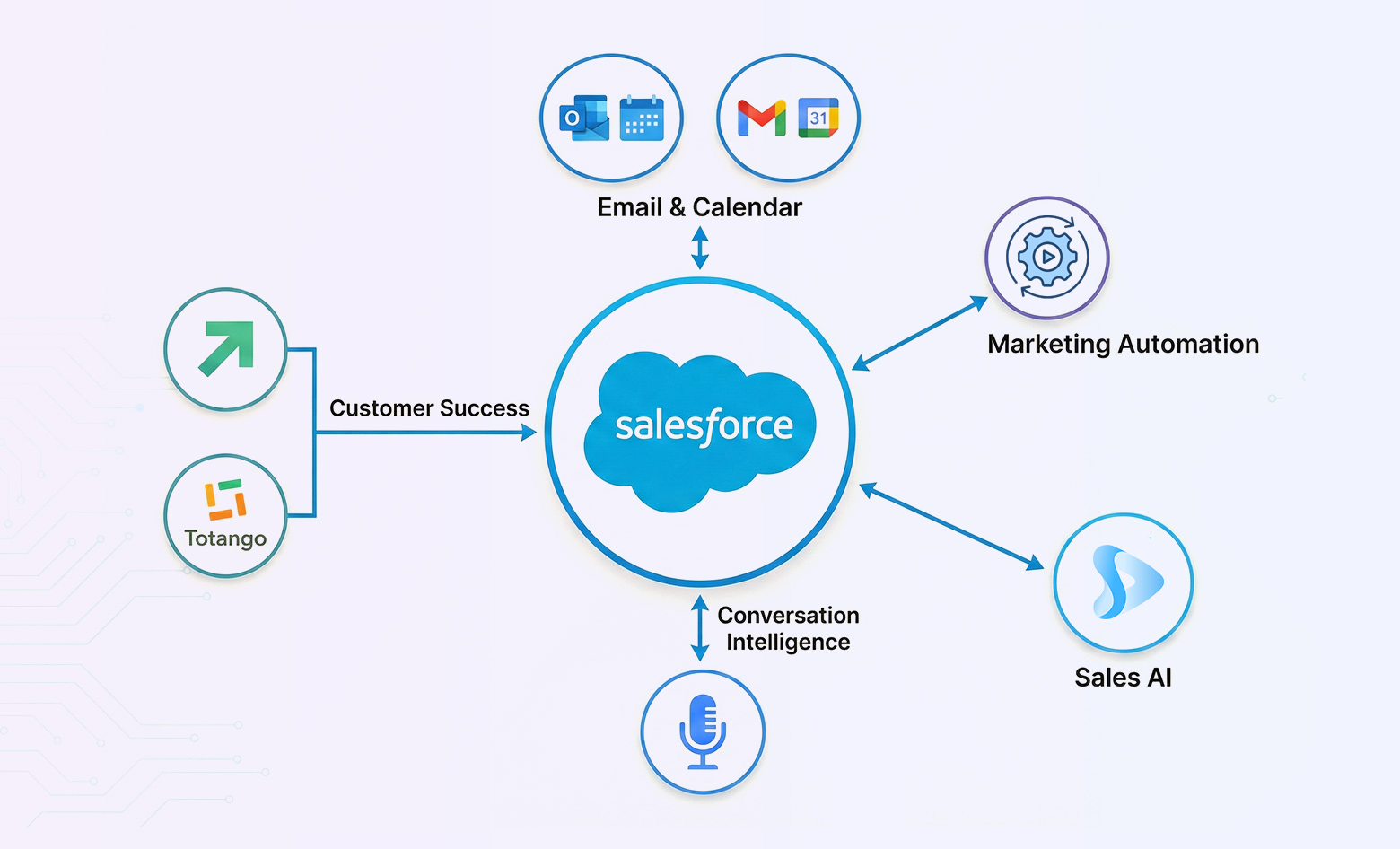
Here's the honest answer: if you're selling anything to anyone in a B2B context, you probably need a CRM, and Salesforce is the safe choice. It's not necessarily the only choice, but it's the one that:
Consider Salesforce if:
Consider alternatives if:
But here's the thing: most companies that "consider alternatives" end up with Salesforce eventually. Starting with a simpler CRM and migrating later is expensive and painful. If you can afford it and you're serious about sales, Salesforce is worth the investment.
Get started for free with Sybill to experience how conversation intelligence and automatic CRM updates should work effortlessly.
Salesforce is a tool. A powerful, flexible, sometimes frustrating tool, but a tool nonetheless. It doesn't magically fix a broken sales process. It doesn't turn bad reps into good ones. It doesn't close deals for you.
What it does is give you visibility, structure, and scalability. It makes sure nothing falls through the cracks. It helps managers coach more effectively. It gives leadership the data they need to make smart decisions.
But only if you actually use it.
The best Salesforce implementations share common traits:
If you're a sales rep reading this, your relationship with Salesforce will largely be determined by how your company implements and supports it. Push for the training you need. Advocate for integrations that reduce your busy work. Give feedback when something doesn't work.
If you're a sales leader, remember that your team's Salesforce adoption is a reflection of how useful you've made it for them. If reps see Salesforce as a management surveillance tool rather than something that helps them sell, you've already lost.
And if you're evaluating Salesforce for your company, know that the platform itself is incredibly capable. Your success will depend on thoughtful implementation, ongoing support, and a commitment to making it work for your specific business.
Salesforce has been the dominant CRM for two decades for good reason. It's not perfect, but it's proven. And when combined with modern tools that automate the tedious parts (like conversation intelligence platforms that handle your data entry), it becomes exactly what it was always meant to be: a system that helps salespeople sell more, not one that buries them in administrative tasks.
The question isn't really "should we use Salesforce?" It's "how do we use Salesforce effectively?" Answer that question right, and you've got a platform that can scale with your business for years to come.
Salesforce distinguishes itself through three main factors: its cloud-native architecture (meaning it's always up-to-date and accessible anywhere), its massive ecosystem of integrations and AppExchange apps, and its scalability from small businesses to global enterprises. While other CRMs might match Salesforce in specific features, few offer the same combination of flexibility, customization options, and market maturity. Salesforce also has the largest talent pool of certified admins and developers, making it easier to find support and expertise. The trade-off is complexity and cost - Salesforce can do almost anything, but that power comes with a learning curve and price tag that might be overkill for very small teams with simple needs.
Salesforce pricing starts at around $25 per user per month for the Essentials edition (limited to 10 users) and goes up to $300+ per user per month for Unlimited edition. Most growing sales teams land on Professional ($75/user/month) or Enterprise ($150/user/month) editions. However, the licensing cost is just the beginning. Factor in implementation costs (anywhere from a few thousand to hundreds of thousands depending on complexity), ongoing admin support (either internal staff or consultants), training, and integrations with other tools. A realistic budget for a 20-person sales team might be $3,000-$5,000 per month for licenses plus $10,000-$50,000 for initial setup and configuration. The ROI comes from better pipeline visibility, more closed deals, and reduced time spent on administrative tasks, but only if you implement it thoughtfully.
Salesforce requires manual updates - you need to log calls, write notes, and update deal information yourself. However, Salesforce does offer Einstein Activity Capture, which can automatically log emails and calendar events. For truly automatic call summaries, meeting notes, and CRM updates based on actual conversations, you need conversation intelligence tools that integrate with Salesforce. These AI-powered platforms (like Sybill) join your calls, transcribe conversations, extract key points and action items, and automatically push structured updates to the relevant Salesforce records. This is the difference between spending 15-20 minutes after every call typing notes versus having your CRM update itself while you move on to the next prospect. The technology exists to make Salesforce truly automatic; you just need to layer the right integrations on top of it.








