
Find us at booth #83, join us for a harbor side happy hour, or catch Gorish’s talk.

Sept, 16-18 > Learn more


Tamanna Mishra

April 27, 2026
.png)
Most teams do not suffer from a lack of software. They suffer from software that does not talk to each other.
The 5 best Zapier integrations for sales productivity in 2026 are Sybill + CRM (auto-syncs meeting summaries, follow-ups, and deal intelligence to Salesforce or HubSpot), Slack + CRM (routes deal alerts and pipeline updates to team channels), Google Sheets + CRM (creates live pipeline dashboards and commission trackers), Gmail/Outlook + project tools (auto-creates tasks from email threads), and calendar + sequencing tools (triggers follow-up sequences based on meeting outcomes). Zapier's strength is connecting apps that don't natively integrate, but the highest-impact automations pair Zapier with AI-native tools like Sybill that generate structured meeting outputs — summaries, action items, CRM field updates — giving Zapier richer data to route across your entire sales stack.
Sales lives in one tool. Marketing works in another. Support tracks issues elsewhere. Operations stitches reports together manually. Each app is powerful on its own, but productivity breaks the moment work needs to move across systems. That is where Zapier changes the equation.
Zapier is a workflow automation tool that acts as connective tissue between the tools you already use. A well-designed Zapier integration removes handoffs, eliminates repetitive work, and ensures information flows automatically to the right place at the right time.
What makes Zapier powerful is not the number of apps it supports. It is how it enables non-technical teams to build reliable workflows without engineering support. Sales teams automate follow-ups and CRM updates. Marketing teams sync leads and campaign data. Support teams trigger alerts and escalations. Ops teams keep systems clean and aligned. Everyone wins, differently.
For example, Sybill connects with Zapier to automate what happens after meetings. Not just notes or transcripts, but structured insights, action items, and CRM-ready data that move deals forward.
In this blog, we break down the Zapier integrations that actually matter.
But first, some basics.
A Zapier integration is a way to make different apps work together automatically without custom code or engineering effort. In simple terms, Zapier integrations allow one tool to react the moment something happens in another tool.
This is where many people ask: how does Zapier integration work?
At its core, Zapier works on a trigger-and-action model. A trigger is an event that starts a workflow. An action is what happens next in another app. When you connect these together, you create a Zap.
Modern Zapier integrations go far beyond single-step automation. You can build:
Together, these capabilities turn Zapier into a flexible workflow automation tool rather than a simple connector.
The difference becomes obvious when you compare manual workflows to automated ones. In a manual workflow, a meeting ends, someone writes notes, someone else updates the CRM, another person sends a follow-up, and a Slack message may or may not be posted. Each step depends on human memory and availability. In an automated workflow powered by a Zapier integration, those steps happen automatically and consistently every single time.
Native integrations are built directly between two tools and usually support a limited set of use cases. Zapier-powered integrations act as a universal layer, allowing you to connect thousands of apps and design workflows that match how your team actually works.
Here is a simple example of a Zapier integration in action:
This ability to move information across tools automatically is what makes Zapier so powerful. With this foundation in place, the rest of this blog will explore the best Zapier integrations and how they unlock real productivity across teams.
Zapier works best when it automates outcomes, not just individual tasks. As a workflow automation tool, its real value shows up in repeatable processes that quietly eat up time across teams. These are the five areas where a Zapier integration delivers the biggest impact.
Meetings generate decisions, context, and next steps. What usually gets lost is execution. With a Zapier integration, meeting follow-ups no longer depend on memory or manual effort.
You can automatically send meeting summaries to the right tools, create tasks for owners the moment a meeting ends, and notify stakeholders without them chasing. This ensures every meeting leads to visible action instead of disappearing into inboxes or note-taking apps.
Sales workflows break when CRM updates lag behind real conversations. Zapier helps close that gap.
By pushing insights from sales conversations directly into the CRM, teams reduce manual data entry and improve data accuracy. Deal stages, key objections, buyer needs and intent, and next steps can all be updated automatically. The result is a pipeline that reflects reality, not guesswork.
Speed matters most at the top of the funnel. Zapier integrations make sure no lead slips through the cracks.
You can automatically assign leads based on rules, enrich records with data from other tools, and notify the right sales rep instantly. This keeps response times low and ensures every lead reaches the right owner with the right context.
More notifications do not equal better communication. Zapier helps teams be intentional about what deserves attention.
With filtered alerts, you can keep Slack and Teams meaningful by surfacing only high-priority events. Whether it is a hot lead, an escalated support issue, or a critical deal update, the right message reaches the right channel without overwhelming everyone else.
Reporting often fails because activity is scattered across tools. Zapier integrations bring structure back.
You can auto-log activities, maintain clean audit trails, and create centralized visibility across systems. Instead of chasing updates at the end of the week or month, data is captured as work happens.
These outcomes set the foundation for choosing the best Zapier integrations. Next, we will break down the specific tools and workflows that make these automations possible in real-world teams.

Most sales teams have a follow-through problem.
Calls happen. Demos run. Objections surface. Buyer intent shows up clearly in conversation. Then everything fractures. Notes live in one place. CRM updates happen later, if at all. Follow-ups depend on rep discipline. Leadership sees an incomplete picture of deal health. This is where sales workflows quietly break.
Sybill changes that by treating meetings as inputs to revenue workflows. When paired with a Zapier integration, Sybill moves beyond note-taking into end-to-end sales workflow automation.
Unlike generic meeting tools that focus on transcripts, Sybill captures structured context. Who said what. What mattered. What blocked the deal. What needs to happen next. Zapier becomes the automation layer that ensures this context flows instantly into the rest of the sales stack.
.png)
Sybill connects to Zapier using webhooks, which means workflows trigger the moment meaningful meeting data is generated. From there, sales teams can automate the actions that usually fall through the cracks.
You can automatically send meeting summaries to your CRM the moment a call ends, ensuring deal records stay current without manual effort. Participant-level insights such as pain points, interests, and objections can be pushed directly into mapped CRM fields, improving data quality and usability. Note that this natively happens for Hubspot, Salesforce, and Pipedrive but if you're looking to automate updates for any other CRM, Sybill's Zapier integration comes in handy.
For high-intent conversations, Sybill can trigger Slack alerts so managers or account teams know when a deal needs attention. Follow-up tasks can be created instantly in task management tools, removing delays between conversation and action. Deal insights can also be routed to RevOps or leadership tools, giving visibility into what is actually happening in the pipeline.
Sybill uses webhooks that trigger on specific meeting events, such as when a meeting summary is created. Zapier receives this webhook and acts as the automation layer that connects Sybill to other tools in your stack.
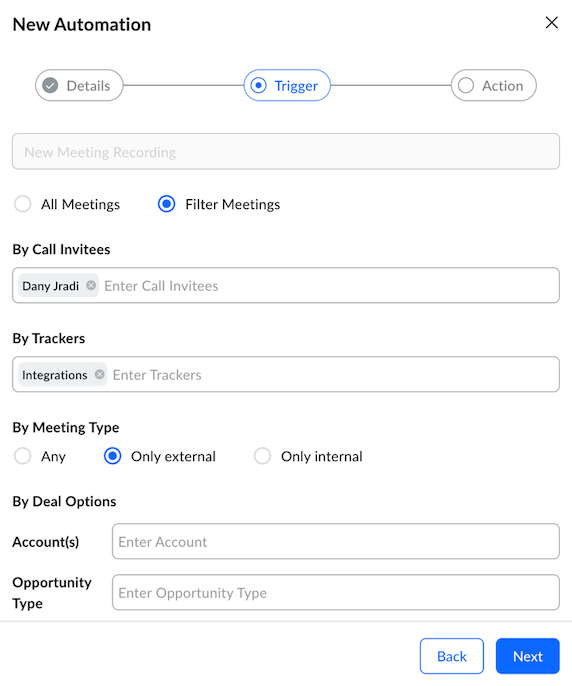
Filters ensure that only relevant meetings trigger workflows. For example, you can restrict automations to specific participants, deal stages, or meeting types. Loops allow participant-level updates, so insights tied to each attendee can be mapped correctly into your CRM or other systems.
Sybill also supports private meeting lists, which prevent sensitive or internal conversations from being shared through automations. This ensures sales teams get the benefits of automation without compromising data control.
Click here to learn more about setting up Sybill's Zapier integration.
Most meeting tool integrations stop at transcripts or surface-level summaries. That is not enough for sales. Here's how Sybill stands out from other meeting tool Zapier integrations.

Slack is only useful when the right messages reach the right people. For most teams, it quickly becomes noisy. Every tool posts updates. Every integration sends alerts. Important signals get buried under status messages and bot chatter.
This is where a Zapier integration turns Slack into a productivity automation layer instead of a distraction. Zapier lets teams control exactly what deserves attention and when.
With the right workflows in place, Slack alerts become intentional. A new deal creation can notify the account owner or manager instantly. An escalated support ticket can alert the right channel without flooding the entire team. A meeting summary can be posted only when it meets specific criteria, such as high intent or a late-stage deal.
The key is filtering. Use Zapier filters to trigger notifications only for priority events, specific stages, or selected owners. Avoid broadcasting everything. Design Slack alerts as signals, not streams. When done right, Slack becomes a real-time coordination tool rather than a constant interruption.
Despite the explosion of analytics tools, Google Sheets remains the default reporting layer for many teams. It is flexible, familiar, and fast to share. As a workflow automation tool, Zapier makes Sheets far more powerful without adding complexity.
With a Zapier integration, teams can automatically collect data from multiple tools into a single spreadsheet. Sales activity can be logged in real time, marketing campaign results can be tracked without manual updates, and operations teams can maintain simple dashboards that stay current as work happens.
This approach works best for lightweight reporting and early-stage visibility. However, it breaks down at scale. As data volume grows, spreadsheets become harder to manage, slower to load, and risk turning into version-control chaos. At that point, Sheets should act as a temporary reporting layer, not the system of record.
HubSpot is strongest when it reflects what is actually happening across the funnel. That is where a Zapier integration adds leverage.
Zapier acts as the glue between HubSpot and the rest of your stack, automating lifecycle stage updates and keeping data in sync across forms, emails, meetings, and external tools. Instead of relying on manual updates, workflows trigger automatically as real activity occurs.
Common automations include instant notifications when a new lead is created, automatic deal stage changes based on defined events, and task creation for follow-ups or handoffs. These workflows reduce lag, improve response times, and keep teams aligned.
The key distinction is that Zapier does not replace your CRM. It ensures HubSpot stays accurate, current, and connected to the tools where work actually happens.
Notion has become the system of record for many modern teams. The challenge is keeping it updated without manual effort. This is where one of the best Zapier integrations delivers real value.
With Zapier, teams can automatically create or update Notion pages based on events in other tools. Meeting insights, project updates, key decisions, and action items can be synced into shared workspaces as work happens. Nothing relies on someone remembering to document it later.
For async teams, this matters deeply. When knowledge flows into Notion automatically, everyone stays aligned regardless of time zone or schedule. Zapier turns Notion from a static wiki into a living source of truth.
The best Zapier integrations do not replace the tools you already use. They make those tools usable together. Zapier works quietly in the background, removing friction where work usually slows down or breaks.
Automation is often framed as a way to move faster. In practice, the best Zapier integrations help teams focus. They eliminate handoffs, reduce mental load, and ensure important context is not lost between systems. They do not just save clicks. They protect momentum.
High-performing teams design workflows where insights, decisions, and signals flow automatically to the tools where action happens. That is the difference between surface-level automation and workflows that drive real outcomes.
This is especially clear in sales workflows. When paired with Zapier, Sybill becomes a high-impact sales automation layer that turns conversations into structured, CRM-ready insights. Sales teams stop chasing updates and start focusing on closing deals.
Click here to try Sybill for free to see what that looks like in practice.
Zapier is best used as a workflow automation tool that connects apps and automates work across systems. It excels at cross-tool automation, eliminating repetitive manual tasks, and keeping data in sync without human intervention. Teams use Zapier to scale operations without adding headcount, especially when processes repeat daily. Because workflows can be built without code, Zapier is ideal for non-technical teams that want automation without engineering support.
Yes, Zapier can connect with ChatGPT through OpenAI integrations. This Zapier integration allows teams to automate tasks such as drafting responses, summarizing inputs from forms or meetings, and classifying incoming data. Common use cases include customer support replies, content summaries, and internal documentation. Teams should be cautious when handling sensitive data and apply filters and permissions to ensure information is shared securely.
To understand how Zapier integration works, think in terms of triggers and actions. A trigger starts a workflow when an event occurs, and actions define what happens next in connected apps. Zapier supports multi-step workflows with filters and conditions that control when automations run. Basic error handling ensures workflows fail gracefully and can be reviewed or retried when issues occur.








