
Find us at booth #83, join us for a harbor side happy hour, or catch Gorish’s talk.

Sept, 16-18 > Learn more

%20(1).avif)
Mamta Tainwala

June 12, 2026
.png)
If you're new to building AI agents and want to start with something that delivers immediate, tangible value without requiring a complex setup, scheduling is the place to start.
Gorish Aggarwal, CEO of Sybill AI, who runs a fully automated personal agent stack handling everything from deal reviews to competitive intelligence, recommends this directly: "If you have high volume, calendaring and scheduling is really a great one. You can add skills over there and you can do it with the web app. That's one thing which I would take away."
The reason scheduling works so well as a starting point is structural. It has high frequency - for anyone running five or more meetings a day, the coordination overhead is constant. It has clear, definable rules - your preferences for meeting duration, buffer time, and preferred slots can be written down precisely. And it has a clear, testable output - either the invite has the right details and a sensible slot, or it doesn't. There is no ambiguity about whether the agent did its job.
For sales teams specifically, the time tax is significant. Coordinating with prospects, managing back-and-forth, handling reschedules, adding the right conferencing link, sending reminders - at high meeting volume, this consumes hours every week that could go toward actual selling. An AI scheduling agent handles all of it automatically, with rules defined once and applied consistently to every meeting, every time.
This post covers exactly how to build one: what rules to define, how the skill file works, how to connect it to your calendar, and how to avoid the common mistakes that cause scheduling agents to produce output you have to fix.
Before getting into the setup, it is worth being precise about what a scheduling agent is and is not.
A scheduling agent is not just a Calendly link. A Calendly link shows your availability and lets the other person pick a slot. That removes one coordination step but does not handle the logic, the context, or the back-and-forth that surrounds most real scheduling situations.
A scheduling agent handles the full scheduling workflow:
The difference from a simple calendar tool is the rules layer and the context layer. The agent applies your specific preferences to every scheduling decision - not just "is this time available" but "is this time right given who this is, what kind of meeting it is, and what my week looks like."
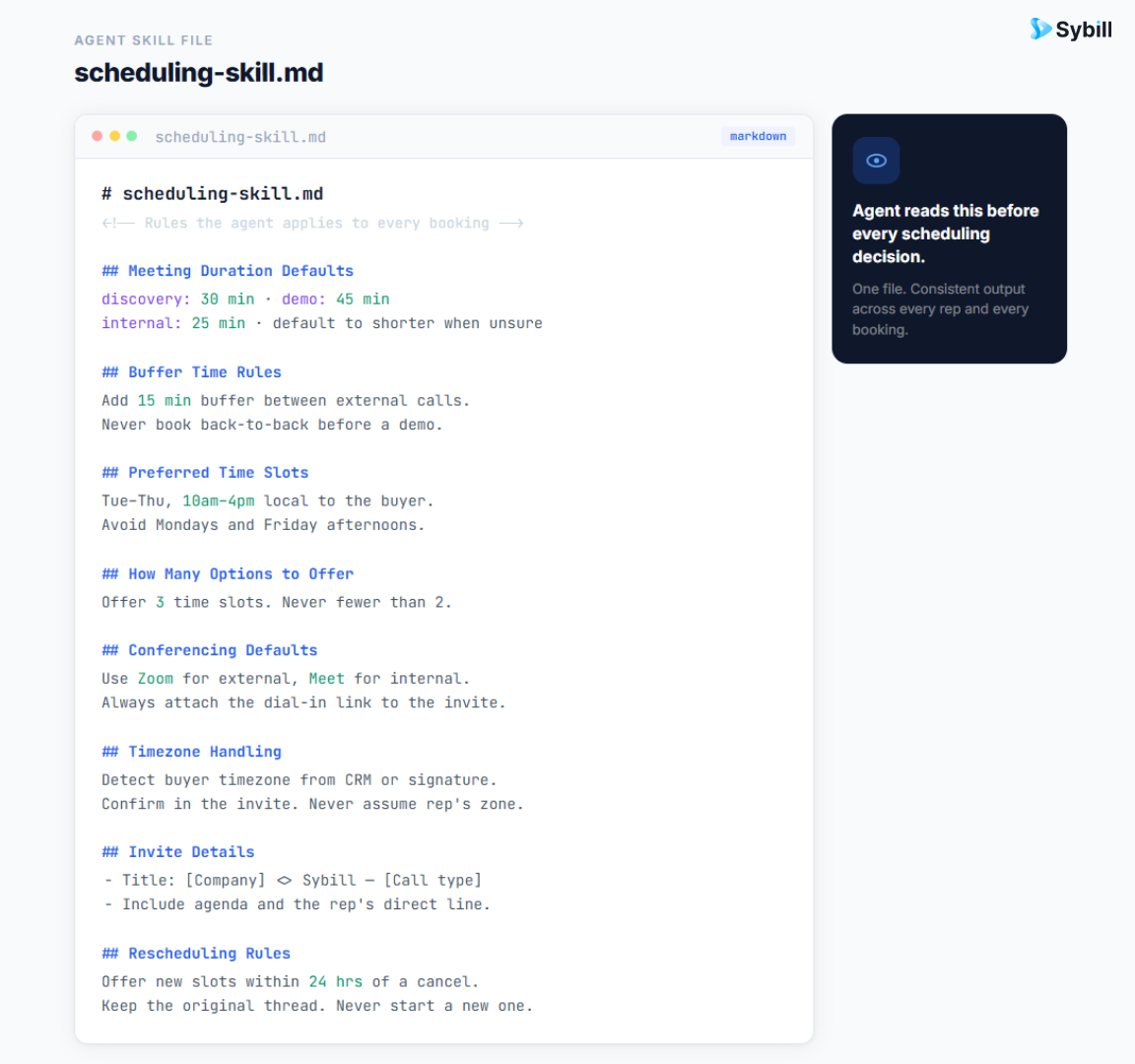
The scheduling skill file is the single most important document for this agent. It is the set of rules the agent reads before every scheduling decision. Without it, the agent guesses. With it, the agent executes your preferences consistently.
Here is the full set of rules to define, drawn from Gorish's actual scheduling skill:
Meeting duration defaults by type
Buffer time requirements
Preferred time slots
How many options to offer
Conferencing defaults
Timezone handling
Agenda and invite details
Rescheduling rules
These rules cover most scheduling situations cleanly. As you run the agent through real scheduling requests, you will discover edge cases that aren't covered. Each one is an update to the skill file.
A scheduling agent without calendar access can only draft text. With calendar access, it can check real availability, propose slots that are actually free, and queue invites for sending.
The tools to connect for a functional scheduling agent:
Calendar (Google Calendar or Outlook) - this is the core connection. The agent needs read access to check availability and write access to create draft invites for your approval. Claude's web interface supports Google Calendar connection directly through the settings panel, no terminal or coding required.
Email - needed to read incoming scheduling requests, parse them for meeting type and urgency, and send the proposed slots. Gmail and Outlook both connect via MCP in Claude's interface.
CRM - useful but optional for the initial setup. If connected, the agent can pull context about the contact (deal stage, relationship history, last interaction) and use it to prioritize and contextualize scheduling requests. For Sybill users, the deal workspace already surfaces the account context the agent needs.
Slack or messaging interface - needed if scheduling requests come in via internal channels, or if you want the agent to notify you about queued invites via Slack rather than email.
Gorish's full scheduling setup goes beyond calendar and email - his scout agent monitors LinkedIn messages, WhatsApp, and iMessage in addition to email, and routes any scheduling request from any channel to the scheduling-responsible agent. For a first setup, email and calendar are sufficient. Add channels as needed.
The soul file tells the scheduling agent who it is, what it owns, and most importantly, what it is and is not permitted to do autonomously. This is where you define the permission model that keeps the agent useful without letting it do things you haven't sanctioned.
For a scheduling agent, the permission tiers typically look like this:
Tier 1 (act autonomously):
Tier 2 (draft and confirm before executing):
Tier 3 (never do):
The Tier 2 controls are important. Even for a task as low-stakes as scheduling, you want to review the invite before it goes out - especially early in the agent's operation, when the skill file is still being refined. As the output quality improves and corrections become rare, you can graduate specific action types from Tier 2 to Tier 1.
For more on building the full soul file, see the AI agent components breakdown or the step-by-step guide to building your first agent.
The most important step in any agent setup, and the most commonly skipped: run the agent manually for at least one to two weeks before enabling autonomous execution.
This means: let the agent draft the scheduling email and the invite, review it yourself, identify what's wrong, update the skill file, and run it again. Repeat until the output is consistently correct without edits.
What you are looking for in the curation loop:
Each thing that's wrong is an edit to the skill file. Add the missing rule, clarify the ambiguous one, and run the next scheduling request through the updated version.
Gorish spent three weeks in this curation loop before his full agent stack was at a level he considered reliable. The scheduling agent, being simpler than most, typically reaches reliable output in five to ten scheduling requests - faster than any other use case precisely because the rules are clear and the feedback is immediate.

Once the basic scheduling agent is running reliably, there are several extensions that deliver additional value for sales-specific workflows.
Pre-call context injection When the scheduling agent queues a meeting invite for a prospect or customer, it can pull context from the CRM or call history and include it in the internal invite notes: deal stage, last conversation summary, open questions. By the time the meeting reminder fires, the context is already there. No separate research step needed before the call. Sybill's pre-meeting briefs automate this at the platform level - delivering assembled context before every scheduled call without any additional agent configuration.
Priority-based scheduling Not all scheduling requests are equal. A request from a decision-maker at an account that is two weeks from close should be treated differently from a request for an initial discovery call with a cold inbound. A more advanced scheduling skill file can define priority tiers for contacts - based on deal stage, account size, or relationship status - and apply different rules to each tier. Decision-makers in late-stage deals get same-day responses with priority slot offers. Cold inbound requests get a standard template with three available slots in the following week.
Reschedule pattern detection Contacts who reschedule repeatedly are a signal worth capturing. An advanced scheduling agent writes every reschedule event to the contact's memory file. After two reschedules, it flags the pattern for human review rather than automatically proposing again. This surfaces a relationship or engagement signal that might otherwise go unnoticed in the noise of calendar management. For teams tracking deal risk, this kind of signal connects directly to at-risk deal detection.
Cross-channel scheduling inbox For high-volume sales roles, scheduling requests come from multiple channels - email, LinkedIn, Slack, WhatsApp, and sometimes all four simultaneously. A scout agent that monitors all channels and routes scheduling requests to the scheduling agent creates a unified inbox for the agent, so no request gets missed regardless of which channel it came through. This is how Gorish handles it: one routing agent that watches everything and delegates to the right specialist.
Post-meeting follow-up handoff When a meeting ends, the scheduling agent can hand off to the post-call workflow agent: here's who the meeting was with, here's the duration, here's the calendar context. This triggers the follow-up agent to start assembling the summary and draft. The two agents working in sequence - scheduling on the front end, post-call on the back end - cover the entire meeting lifecycle with minimal human input. For a full breakdown of the post-call side, see how to write a sales call recap email that moves the deal forward.
Too few rules in the skill file. The agent can only follow rules that are written down. If your preferences for a specific meeting type, contact tier, or channel are not in the skill file, the agent will guess. The output will be inconsistent until the rule is added. Every correction is information - write it into the skill file immediately.
Sending without review too early. Moving a scheduling action from Tier 2 to Tier 1 before the output is reliably correct means your contacts receive scheduling emails with errors in them. This damages your professionalism and creates more cleanup work than doing it manually. Stay on Tier 2 until you have seen at least twenty clean outputs in a row.
Not protecting focus blocks. Calendar availability is not the same as scheduling appropriateness. An open slot during a deep work block is available but should not be offered. The skill file must explicitly define which blocks are protected and instruct the agent to treat them as unavailable when proposing times.
Ignoring the memory write-back. When a scheduling request arrives and the agent handles it, it should write to the contact's memory file: what was requested, what was proposed, whether the contact accepted. Over time, this builds a pattern of how each contact behaves in scheduling contexts - response time, tendency to reschedule, preferred formats - that makes the agent smarter about that relationship. Skipping this step means the agent never compounds.
One skill file for all meeting types. Different meeting types have fundamentally different requirements. A discovery call with a new prospect needs different rules than an internal team sync or an in-person client dinner. If the skill file does not differentiate, the agent applies the same defaults to everything. Create sub-rules or separate files for meeting types that have genuinely different requirements.
What is an AI scheduling agent?
An AI scheduling agent is software that handles meeting coordination automatically - reading incoming requests, checking calendar availability against defined rules, proposing specific time slots, and managing reschedules - without requiring manual effort for each interaction. Unlike a simple calendar link, it applies context-aware rules and handles back-and-forth across multiple channels.
How do I set up an AI agent for scheduling?
Start with a skill file that defines your scheduling preferences: meeting duration defaults, buffer time requirements, preferred slots, conferencing rules, and timezone handling. Connect your calendar and email via MCP in Claude's interface. Define a soul file with permission tiers that put invite sending at Tier 2 (requires your approval) until output quality is reliable. Run manually for at least ten scheduling interactions before enabling any autonomous sending.
Can an AI agent manage my calendar without sending anything I haven't approved?
Yes. The permission tier system in the soul file is precisely what controls this. By placing all calendar writes and email sends in Tier 2 - requiring your confirmation before execution - the agent handles all the drafting and checking work while you retain approval authority on everything that goes out. Autonomy is graduated based on output quality.
What is the difference between an AI scheduling agent and Calendly?
Calendly shows your availability and lets contacts pick a slot. An AI scheduling agent applies context-aware rules to decide which slots to offer, handles incoming requests from multiple channels, manages reschedules, injects context into invites, and logs interactions to memory. Calendly is passive. An agent is active.
How long does it take to set up a working AI scheduling agent?
A basic scheduling agent with a skill file and calendar connection can be set up in a few hours. Getting it to reliably correct output without edits typically takes five to ten scheduling interactions in the curation loop - faster than most other agent use cases because the feedback is immediate and the rules are concrete.
Can a scheduling agent work across multiple channels (email, LinkedIn, Slack)?
Yes, with a routing setup. A scout or routing agent monitors all channels and passes scheduling requests to the scheduling agent regardless of which channel they came from. The scheduling agent then handles them with the same skill file and rules. This requires connecting each channel via its respective MCP or API integration.
Scheduling is the entry point into agent-driven automation that most people underestimate. It looks simple - calendar management, surely there are easier wins - but the combination of high frequency, clear rules, and immediate feedback makes it the fastest path to understanding how agent skill files, permission tiers, and memory write-backs work in practice.
Once the scheduling agent is running reliably, the patterns transfer directly to the next use case: post-call CRM updates, pre-meeting briefings, deal qualification. The same skill file structure, the same permission tier model, the same curation loop. The investment in getting scheduling right is an investment in understanding the full agent architecture.
For sales teams that want the post-call and pre-meeting layers handled from day one without building from scratch, Sybill's pre-meeting briefs and post-call automation cover those workflows out of the box - leaving the scheduling layer as the natural first place to build a custom agent on top.
Get started for free with Sybill or book a demo to see how the full stack works together.
An AI scheduling agent is software that handles meeting coordination automatically - reading incoming requests, checking calendar availability against defined rules, proposing specific time slots, and managing reschedules - without requiring manual effort for each interaction. Unlike a simple calendar link, it applies context-aware rules and handles back-and-forth across multiple channels.
Start with a skill file that defines your scheduling preferences: meeting duration defaults, buffer time requirements, preferred slots, conferencing rules, and timezone handling. Connect your calendar and email via MCP in Claude's interface. Define a soul file with permission tiers that put invite sending at Tier 2 (requires your approval) until output quality is reliable. Run manually for at least ten scheduling interactions before enabling any autonomous sending.
Yes. The permission tier system in the soul file is precisely what controls this. By placing all calendar writes and email sends in Tier 2 - requiring your confirmation before execution - the agent handles all the drafting and checking work while you retain approval authority on everything that goes out. Autonomy is graduated based on output quality.








