
Find us at booth #83, join us for a harbor side happy hour, or catch Gorish’s talk.

Sept, 16-18 > Learn more

%20(1).avif)
Mamta Tainwala

February 23, 2026
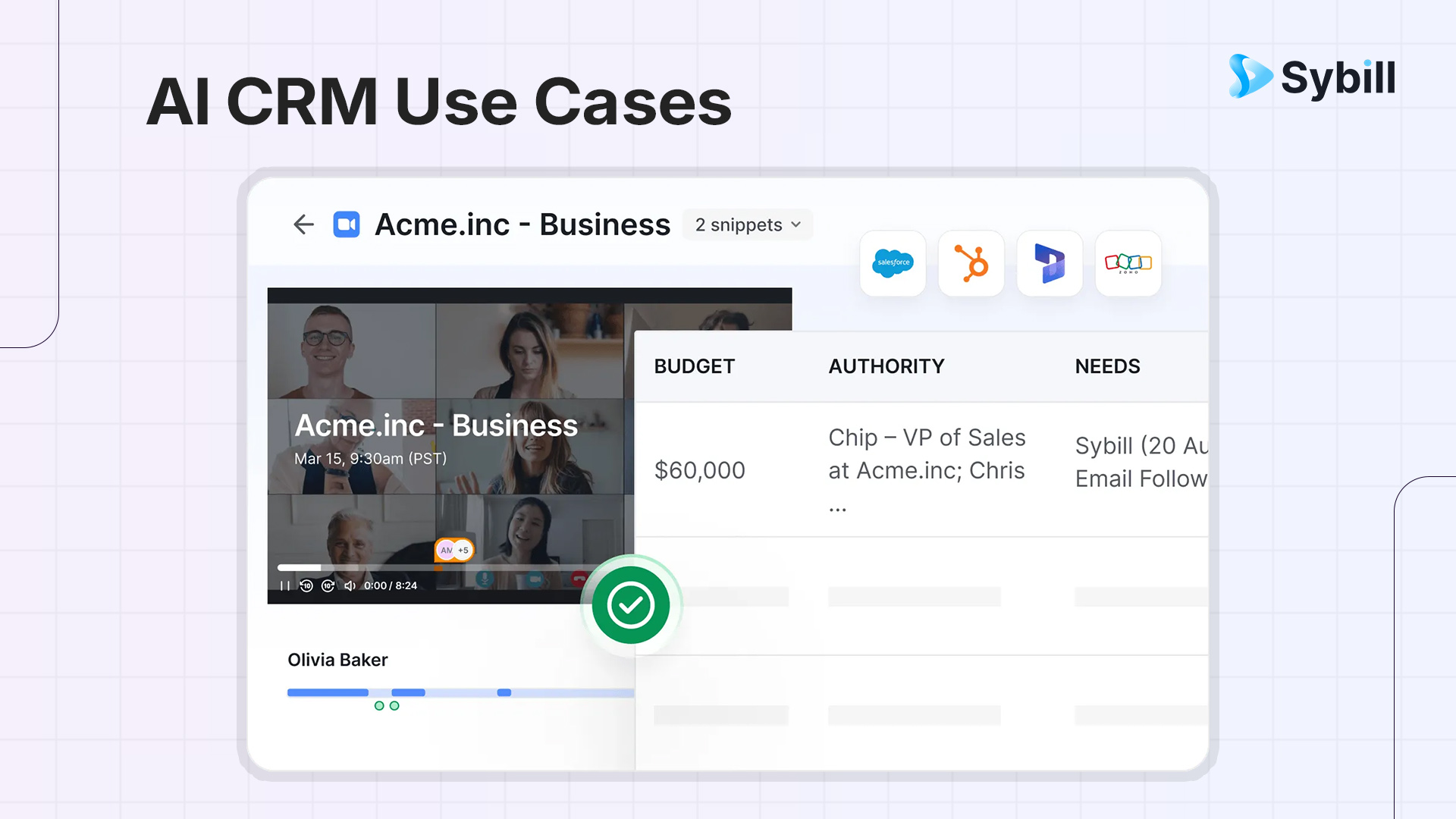
Here's what AI actually does inside a CRM that a traditional one cannot:
The use cases in this guide are grouped by function: lead management, customer support, data hygiene, and marketing. Every one of them is a CRM problem that AI solves natively.
Your CRM knows everything that happened last quarter. It just doesn't know anything that happened in the last hour. And that's the problem.
Traditional CRMs are passive systems. They store what you tell them, surface what you ask for, and sit quietly while your reps spend hours every week feeding them information that AI could collect automatically. The data entry, the note-logging, the follow-up reminders, none of that is selling. All of it is costing you.
The good news is that AI has a strong opinion about repetitive manual work: it should not exist. This guide covers ten AI CRM use cases that are already saving sales teams hours every week, cleaning pipeline data automatically, and giving reps the one thing they've always wanted from their CRM: a system that actually helps them.
Before we get into use cases, a quick grounding. AI in CRM refers to layering machine learning, natural language processing, and generative AI on top of your existing customer data to make your CRM smarter, faster, and self-updating.
The shift is simple but significant: traditional CRMs are reactive. They do what you tell them. AI-powered CRMs are proactive. They surface what you need to know before you think to ask.
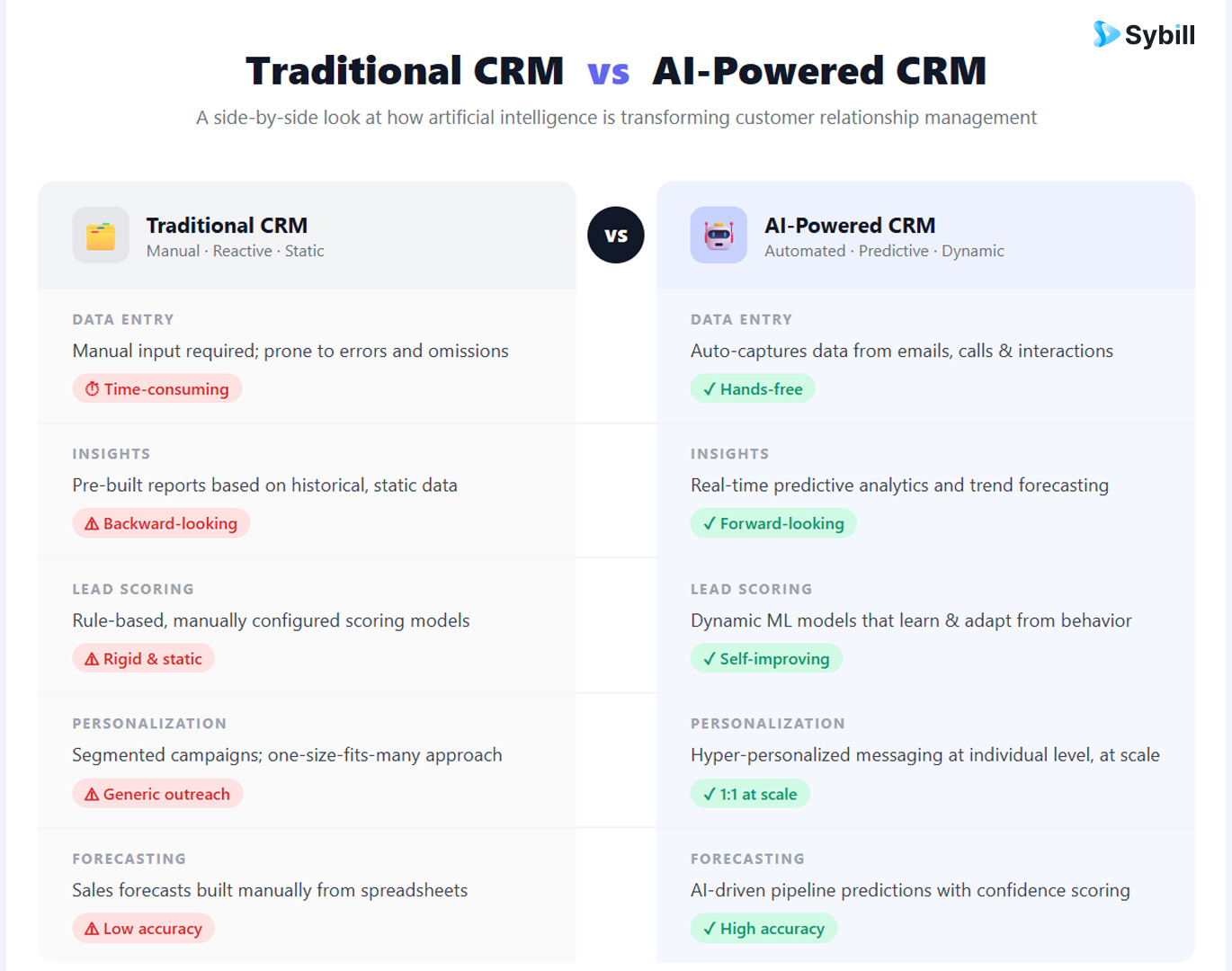
The practical impact shows up in three ways:
These are the use cases that most directly affect pipeline velocity, deal quality, and rep efficiency.
Static lead scoring is built on rules someone wrote months ago. A contact fills out a form, matches a job title and company size, gets a score of 75, and lands in an SDR's queue. Whether they actually read three blog posts, watched a product demo, and visited the pricing page twice this week - that context is lost.
AI lead scoring models assess fit and intent together, and update scores continuously as new signals arrive. A lead who went cold last month but just attended a webinar gets re-scored automatically. A high-fit lead who hasn't engaged in 30 days gets deprioritized. Reps work the list that reflects today's reality, not last quarter's assumptions.
The practical output is a ranked pipeline where the top of the list is genuinely worth calling first, and that ordering updates itself as your prospects' behavior changes.
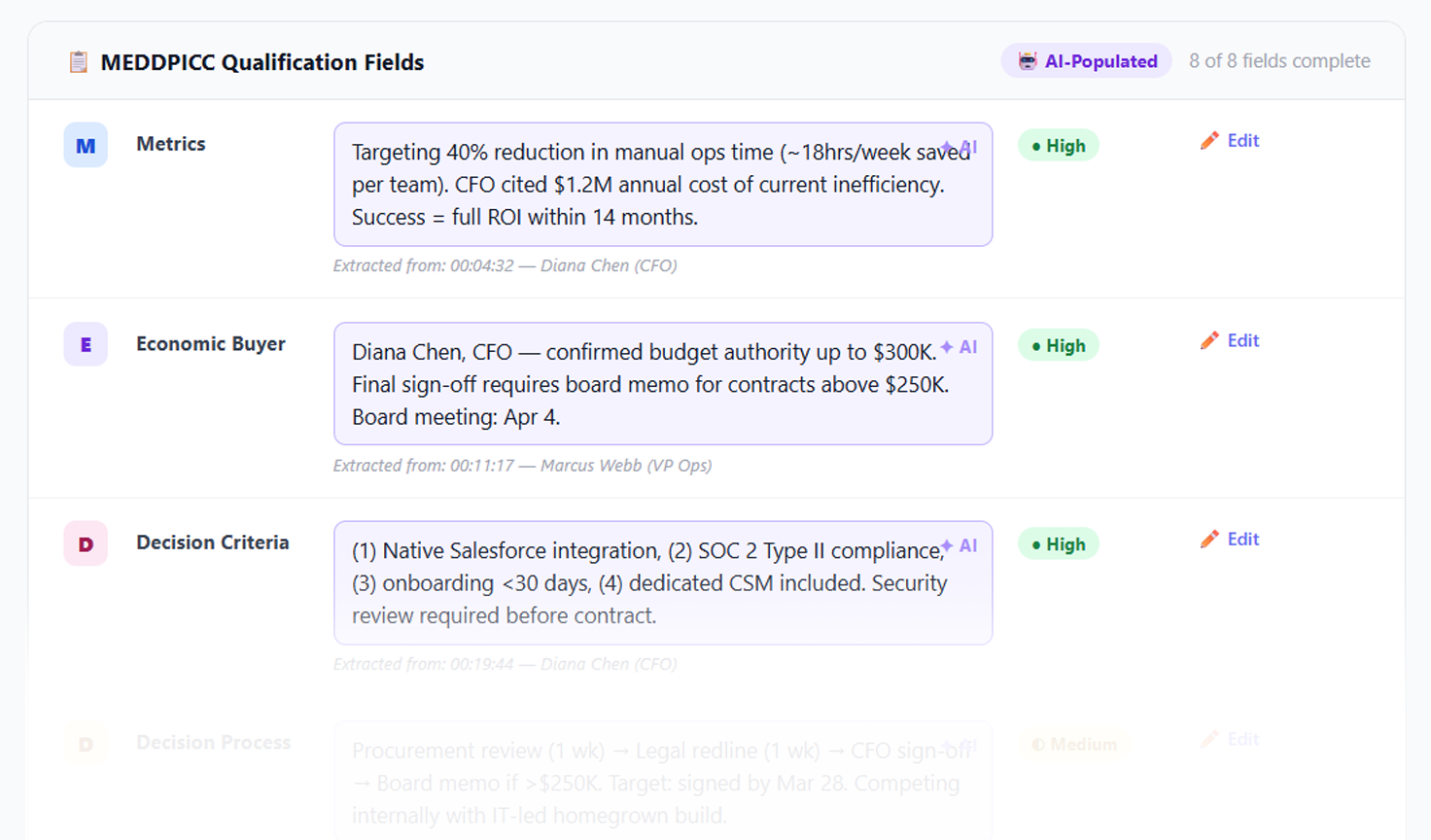
This is the use case with the clearest, most immediate ROI. After every sales call, a rep typically spends 15 to 30 minutes logging notes, updating opportunity fields, and recording next steps. AI eliminates that entirely.
Sybill's CRM Autofill reads call transcripts and email threads, extracts deal-relevant information: budget signals, decision-maker identity, stated pain points, agreed next steps, qualification criteria and maps it directly to the right CRM fields. No copy-pasting. No summarizing from memory. No "I'll update it later" that becomes never.
The accuracy matters here as much as the automation. When fields are populated from what was actually said rather than what a rep chose to write down, the data is more complete and more honest. Forecasts built on that data are more reliable.
Sales forecasts are traditionally based on rep intuition dressed up as pipeline data. The rep says a deal is 80% likely to close, so it goes into the forecast. What the rep isn't accounting for: the deal has been in the same stage for 45 days, the champion hasn't replied in two weeks, and no next steps were logged from the last call.
AI forecasting models read all of that. They analyze historical win patterns, deal velocity, stakeholder engagement, and activity signals to produce probability scores that reflect actual deal health rather than rep optimism. They also flag anomalies: a deal that was moving smoothly and has suddenly stalled, or a late-stage opportunity where key decision-makers have gone quiet.
The output is a forecast your revenue team can actually trust going into a board meeting.
"Which deals are missing a clear economic buyer?" "What objections came up most in Q3?" "Which reps have the strongest discovery calls?"
These are questions that normally require a RevOps analyst and a few hours of spreadsheet work. With AI, they're answered in seconds by querying across all your calls, emails, and CRM fields in plain language.
Sybill's Ask Sybill feature works like a ChatGPT interface for your entire deal history. Sales leaders and reps alike can surface patterns, risks, and competitive intel without digging through dashboards. This is exactly the kind of conversational intelligence that turns data into decisions.
Round-robin lead routing is operationally simple and strategically dumb. It distributes leads evenly, not intelligently. A high-intent enterprise lead ends up with a rep who specializes in SMB. A lead from a specific vertical goes to someone with no experience in that space.
AI routing matches leads to reps based on deal type, rep specialization, current workload, and historical performance with similar opportunities. Priority leads get to the right rep faster. No-shows and reassignments drop. And when a rep doesn't follow up within a defined window, the lead is automatically reassigned rather than quietly staling.
A call recording is only useful if someone watches it. A raw transcript is only useful if someone reads it. An AI-generated structured summary that automatically lands in the right CRM record within minutes of a call ending is actually used by everyone on the team.
Sybill's Magic Summaries capture the outcome of the call, key pain points raised by the prospect, objections surfaced, competitive mentions, and next steps, then push them into the CRM and into Slack without requiring any rep action. The record is complete, searchable, and available to everyone with access to the account, including the CS team at handoff.
Support teams sit on enormous amounts of customer interaction data. Most of it never makes it into the CRM in any useful form. AI changes that.
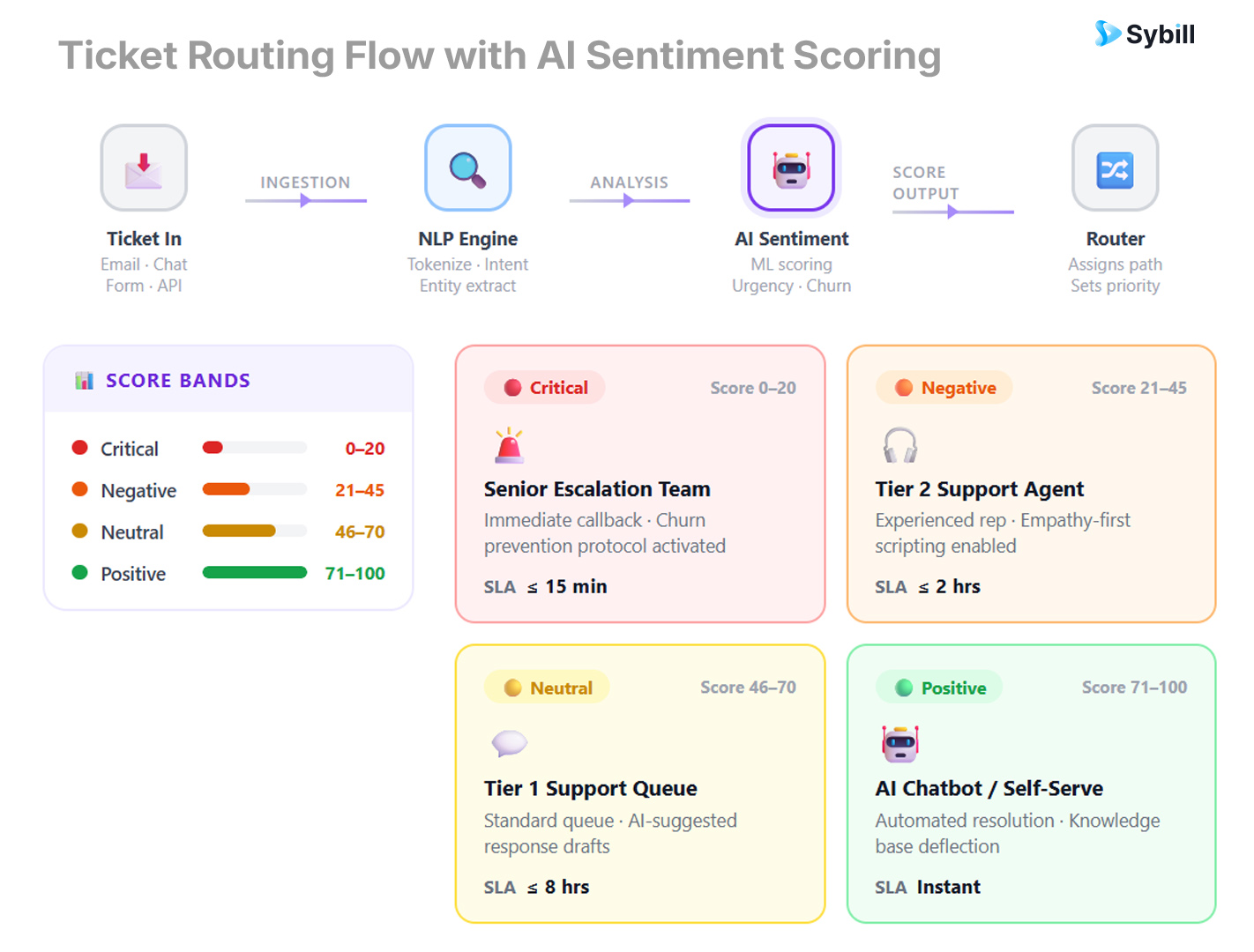
A support ticket that says "this still isn't working" reads very differently from one that says "this still isn't working and we're going live next Monday." The words are similar. The urgency and risk are completely different.
AI sentiment analysis reads the emotional signal in support tickets, live chat messages, and email threads, and routes or escalates based on that signal rather than just keywords or ticket category. A frustrated customer with an unresolved issue gets to a senior agent faster. A neutral inquiry about a feature stays with automation. Escalation is governed by context, not category.
Every support call, chat thread, and email exchange contains information that's relevant to the customer's record: what they're struggling with, what they've tried, what they were promised, how their sentiment is trending. Almost none of it makes it into the CRM without someone manually writing it up.
AI reads support interactions and updates the customer's CRM record automatically. When a sales rep or CS manager pulls up an account before a renewal conversation, they have the full picture of what the customer has experienced since they signed, not just the sales history.
Basic chatbots ask you to rephrase the question. AI-powered support chatbots pull from your internal knowledge base, understand natural language, remember prior interactions in the session, and resolve the issue or hand off to a human with full context when they can't.
The CRM integration matters here: a chatbot that can read the customer's account history, see what they've purchased, and understand what issues they've had before can skip the authentication theater and get to resolution faster. Ticket volume drops. Handle time drops. And the interactions that do require a human arrive with full context attached.
When a support agent is mid-ticket, AI can surface relevant knowledge base articles, suggest response templates based on similar resolved tickets, recommend escalation paths based on customer tier, and flag if the issue pattern suggests a product bug affecting multiple accounts.
This doesn't replace the agent's judgment. It removes the lookup time. The agent spends less time searching and more time resolving, and the CRM captures what was recommended and what was used, improving the suggestions over time.
Clean CRM data is the foundation of every other use case on this list. AI is what makes maintaining it at scale realistic.
Duplicates are the most universal CRM problem. "Jon Smith at Acme" and "Jonathan Smith, Acme Corp." are the same person. A traditional deduplication rule misses it. AI fuzzy-matching catches it, flags it, and merges the records, preserving the full interaction history from both.
This matters beyond tidiness. Duplicate records distort reporting, create confusion for reps working the same account, and cause embarrassing double-outreach that signals disorganization to prospects. AI deduplication run continuously keeps the database honest without a quarterly cleanup project.
Static lists are outdated before they're used. You build a segment of "enterprise SaaS companies that visited the pricing page in the last 30 days," export it on Monday, and by Thursday half the records have changed status.
AI-powered dynamic segmentation updates in real time based on behavioral triggers, deal stage changes, product usage signals, and firmographic updates. The segment always reflects the current state of your database. Marketing campaigns reach the right people. Sales sequences trigger at the right time.
Contacts leave companies. Phone numbers change. Job titles evolve. A CRM that isn't actively maintained accumulates inaccurate records at roughly the rate of 30% per year by most industry estimates.
AI continuously monitors your CRM for stale signals: bounced emails, outdated titles, contacts who haven't engaged in 12 months, and either triggers re-enrichment from third-party sources or flags records for review. The database stays current without a quarterly ops sprint.
Most SaaS teams only notice churn when it's too late to prevent it. By the time a customer declines renewal or sends the cancellation email, the relationship has been deteriorating for months, usually visibly in the data.
AI churn prediction models monitor engagement patterns, product usage signals, support ticket frequency, and communication trends, and surface at-risk accounts before the human team would notice. An account where feature adoption has dropped 40% over 60 days and the champion hasn't opened an email in three weeks is flagged automatically, not after the next QBR.
The churn analysis that follows can then feed back into how you qualify and onboard future customers.
Personalization at scale has always been the unsolved problem in outbound sales and marketing. Mail merge fields produce technically personalized emails that feel completely generic. Writing genuinely personalized outreach manually doesn't scale beyond a few contacts per day.
AI outreach generation reads the full CRM record: company news, recent interactions, deal stage, stated pain points, industry; and writes outreach that references specific, relevant context for each contact. Not "I noticed you're in the SaaS space." More like: "Your team recently expanded into enterprise accounts. Most companies at that stage find that their qualification process hasn't caught up with their deal complexity."
That's the difference between personalization as a concept and personalization as a result.
Not every platform that says "AI" delivers the same thing. When evaluating tools, the questions that actually matter are:
Does it write to your CRM fields or just append notes? There's a significant difference between AI that attaches a summary paragraph to a record and AI that populates specific structured fields like deal stage, decision-maker, budget range, and close date. The latter is what makes forecasting and reporting accurate.
Is the enrichment native or does it require another tool? Many CRMs position third-party enrichment tools as integrations you need to manage separately. Native enrichment that runs automatically is simpler and more reliable.
Can it read unstructured data? Call transcripts, email threads, support tickets, chat logs - these are where most customer insight actually lives. AI that can only process structured fields is limited. AI that reads and extracts from unstructured sources is a different category of capability.
Does it get smarter over time? AI models that learn from your specific win patterns, your customer profiles, your language and criteria improve their outputs over time. Generic models applied to your data don't. This is the difference between a model trained on sales data broadly and one trained on your deals specifically.
Ready to see what a CRM that actually keeps itself updated looks like? Get started for free with Sybill and see how much manual work disappears from your team's day.
Sybill isn't a CRM replacement. It's the intelligence layer that makes your existing CRM work the way it was supposed to.
It integrates natively with Salesforce, HubSpot, Zoho, and Dynamics 365, and connects with Slack, Gmail, Outlook, Zoom, Google Meet, and Microsoft Teams. The setup is measured in minutes, not months. Teams typically see value from the first call.
What makes it different from tools that also claim CRM automation is the combination of multimodal call analysis (verbal + non-verbal), cross-deal querying, and zero-touch field population. Most tools do one or two of these. Sybill does all three, and connects them into a single workflow that requires nothing from the rep after the call ends.
For a broader comparison of how this stacks up against other tools in the market, the best AI sales tools guide is worth a read.
What is an AI CRM use case?
An AI CRM use case is any workflow where artificial intelligence automates or enhances a CRM function: lead scoring, field population, data enrichment, churn prediction, outreach generation. The common thread is that AI replaces work that previously required a human to initiate or complete.
How does AI improve CRM data quality?
AI improves CRM data quality by filling fields from calls and emails automatically, detecting and merging duplicate records, enriching contacts with third-party firmographic data, flagging stale or outdated records, and monitoring for changes that need updating. The result is a database that stays current without manual maintenance.
Can AI replace manual CRM data entry entirely?
For most structured fields: deal stage, contact info, qualification criteria, next steps - yes, AI can handle population automatically from calls and emails. For highly customized or qualitative fields that require human judgment, AI can draft and the rep confirms. The goal is not to eliminate human oversight but to eliminate the mechanical work of data entry.
What's the difference between AI lead scoring and traditional lead scoring?
Traditional lead scoring uses static rules: if job title matches X and company size is Y, score is Z. AI lead scoring uses machine learning to identify which combinations of signals actually predict conversion in your specific pipeline, and updates scores dynamically as prospect behavior changes. It tends to be more accurate, especially in markets where buying signals are non-linear.
Do AI CRM tools work with Salesforce and HubSpot?
Yes. Most AI CRM tools, including Sybill, integrate natively with major platforms like Salesforce, HubSpot, Zoho, and Dynamics 365. The AI reads from and writes back to your existing CRM fields rather than creating a parallel record system.
Is AI CRM only for large sales teams?
No. AI CRM automation is arguably more valuable for smaller teams where every rep's time is precious. A five-person team using AI to eliminate admin has the data hygiene and pipeline visibility of a team twice its size. Sybill offers a free tier for teams getting started.
How do I measure the ROI of AI in my CRM?
Track three things: time saved on manual data entry per rep per week, improvement in forecast accuracy quarter over quarter, and pipeline data completeness (percentage of key fields populated across open opportunities). These three metrics capture the operational, strategic, and foundational value of AI CRM respectively.
Your CRM should be a source of truth, not a project. Try Sybill for free and see what happens when the data takes care of itself.
An AI CRM use case is any workflow where artificial intelligence automates or enhances a CRM function: lead scoring, field population, data enrichment, churn prediction, outreach generation. The common thread is that AI replaces work that previously required a human to initiate or complete.
AI improves CRM data quality by filling fields from calls and emails automatically, detecting and merging duplicate records, enriching contacts with third-party firmographic data, flagging stale or outdated records, and monitoring for changes that need updating. The result is a database that stays current without manual maintenance.
For most structured fields: deal stage, contact info, qualification criteria, next steps - yes, AI can handle population automatically from calls and emails. For highly customized or qualitative fields that require human judgment, AI can draft and the rep confirms. The goal is not to eliminate human oversight but to eliminate the mechanical work of data entry.








