
Find us at booth #83, join us for a harbor side happy hour, or catch Gorish’s talk.

Sept, 16-18 > Learn more

%20(1).avif)
Mamta Tainwala

March 12, 2026
Your sales reps spend 30% of their time actually selling. The rest disappears into quote building, approval chasing, spreadsheet wrestling, and back-and-forth with finance. If that ratio sounds familiar, CPQ software is one of the clearest ways to shift it.
But choosing a CPQ solution is not a five-minute decision. The market ranges from lightweight proposal tools dressed up as CPQ to full enterprise revenue platforms that take six months to implement. The right answer depends heavily on your pricing complexity, your existing tech stack, your team size, and how much you are willing to invest upfront to get the long-term payoff.
This guide cuts through the noise for Sales Ops, RevOps, and B2B sales leaders who need to make a well-informed decision, not just a shortlist from a G2 category page.
In this guide, we will cover:
Most CPQ buying decisions go sideways because teams evaluate features before they have diagnosed the actual problem. Here is the evaluation framework that actually holds up:
Pricing complexity: Do you sell fixed-price products, tiered SaaS plans, usage-based pricing, or fully configurable hardware? The more complex your pricing model, the more robust your CPQ rules engine needs to be.
CRM integration depth: A CPQ tool that does not have a tight, bidirectional integration with your CRM is a standalone quoting tool. For RevOps teams, "native CRM integration" is not a feature checkbox; it is the core requirement. Sales pipeline management only benefits from CPQ when quote data flows back to update deal stages and forecast values in real time.
Adoption by reps: The best CPQ system in the world delivers zero value if reps route around it and go back to spreadsheets. Ease of use for non-technical sellers is not a secondary concern.
Implementation timeline: Enterprise CPQ implementations can take three to six months and require dedicated admin resources. If your team needs something running in weeks, that narrows the field significantly.
Quote-to-cash scope: Are you looking for CPQ only, or do you need contract lifecycle management, billing, and subscription management in the same platform? The scope of your requirement shapes which category of tool is right.
With that lens in place, here are the CPQ solutions worth evaluating in 2025.
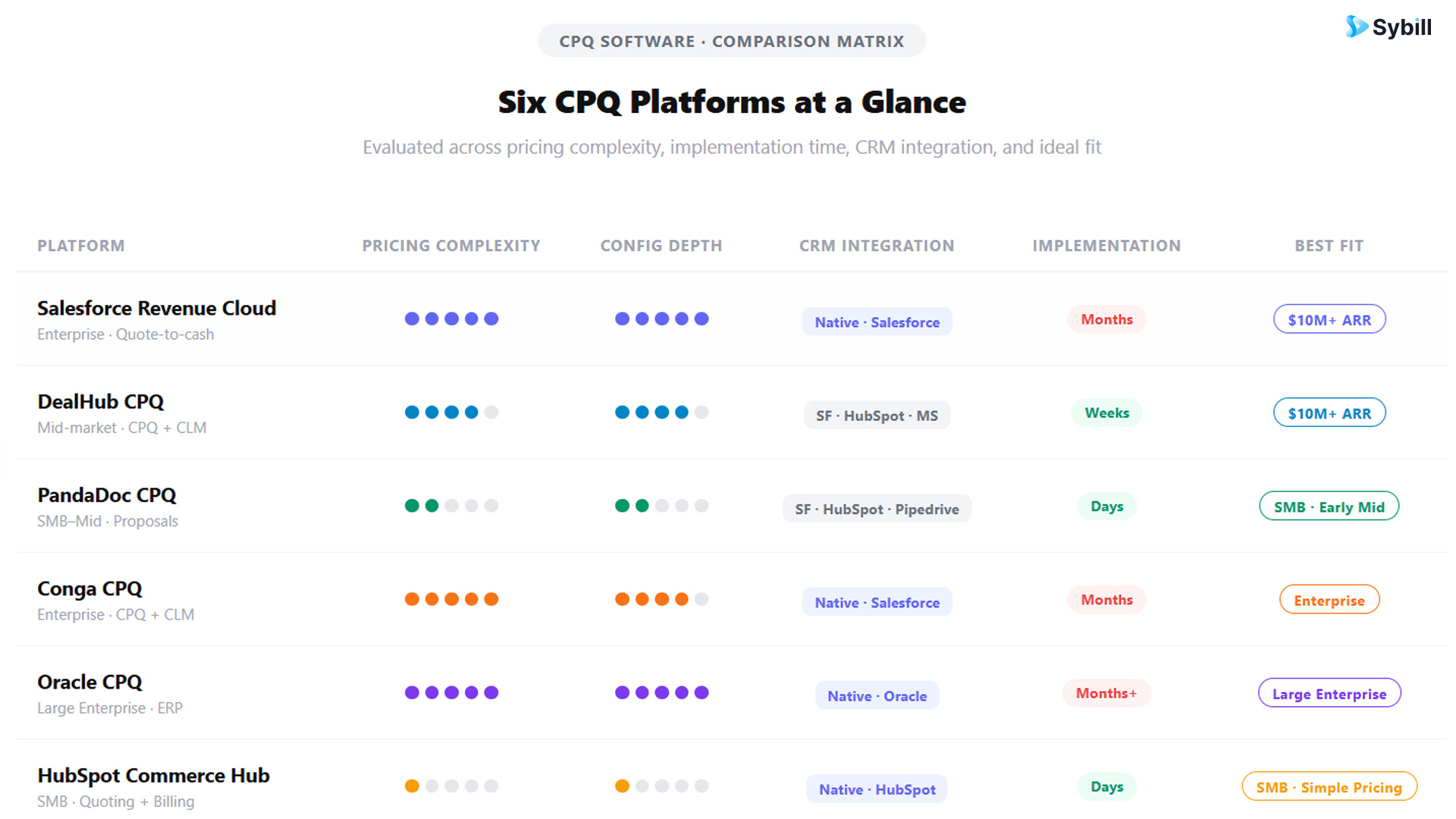
Best for: Enterprise teams already running on Salesforce who want CPQ, billing, and contract management in a single native platform.
Salesforce Revenue Cloud is the most complete quote-to-cash solution available for Salesforce shops. It handles complex product configurations, tiered and usage-based pricing, advanced approval workflows, and automated renewal quoting. Because it lives natively in Salesforce, deal data flows between CPQ and CRM without middleware or sync errors.
The trade-off is real: implementation typically requires months of configuration and dedicated Salesforce admin support. It is built for scale and complexity, which means smaller teams often find it over-engineered for their current needs. If you are under $10M ARR, the cost-to-value ratio rarely works in your favor yet.
For teams that are already running on Salesforce and need to handle enterprise-grade quoting complexity, it remains the benchmark.
Best for: Mid-market B2B SaaS and tech companies that want CPQ plus contract lifecycle management without a six-month implementation.
DealHub occupies the sweet spot between enterprise CPQ complexity and lightweight proposal tools. It is a no-code platform, which means sales ops can build and modify configuration rules, pricing logic, and approval workflows without involving developers. The Digital DealRoom feature creates a shared buyer-seller workspace where all deal activity, proposals, contract markups, and approvals, lives in one place.
For RevOps teams scaling from mid-market to enterprise, DealHub's combination of CPQ, CLM, and guided selling in one platform is genuinely compelling. Implementation is measured in weeks rather than months for most deployments.
The caveat: DealHub is better suited for teams above $10M ARR. Below that threshold, the sophistication can outpace the need.
Best for: Small to mid-sized B2B teams that need fast, professional quote-and-proposal generation without deep configuration complexity.
PandaDoc sits at the lighter end of the CPQ spectrum. It is primarily a document automation and proposal tool with CPQ capabilities layered in, which makes it significantly easier to deploy than enterprise CPQ platforms. If your quoting process does not involve complex product bundles or deeply nested pricing rules, PandaDoc can handle the workflow with a fraction of the implementation overhead.
For teams where the bottleneck is "getting a polished proposal out the door quickly" rather than "managing 500 configurable product SKUs," PandaDoc is often the pragmatic choice. Its e-signature integration and document analytics also give reps visibility into how buyers are engaging with proposals, which informs follow-up timing and messaging.
Best for: Salesforce-native teams that need advanced contract lifecycle management alongside CPQ.
Conga is a well-established player in the CPQ and contract management space with deep Salesforce integration. Its strength is in handling complex approval chains, contract amendments, and subscription renewals at scale. Sales ops teams that spend significant time managing contract redlines and renewal workflows tend to get strong value from Conga's CLM capabilities alongside CPQ.
It is a heavyweight implementation, similar to Salesforce Revenue Cloud, and typically requires dedicated admin support to maintain. For teams with mature Salesforce environments and complex contract needs, it earns its seat at the table.
Best for: Large enterprises with complex product catalogs, global operations, and existing Oracle infrastructure.
Oracle CPQ is built for scale and complexity at a level that most B2B SaaS companies will never need. It handles thousands of product line items, multi-tier pricing across global markets, and deep ERP integration with Oracle's broader ecosystem. For manufacturing companies and large enterprise software vendors with highly configurable products, it remains one of the most capable tools available.
The implementation reality is significant: Oracle CPQ typically requires months of setup, substantial consulting investment, and dedicated admin resources. For most SaaS companies, this is more firepower than the problem warrants.
Best for: Growing teams already on HubSpot that want basic quoting and billing without adding a dedicated CPQ system.
HubSpot Commerce Hub is not a full CPQ platform. It is a quoting, billing, and payments layer built natively into HubSpot CRM. For teams with relatively straightforward pricing models, it removes the need for a separate CPQ tool entirely by handling quotes directly within the CRM workflow.
The limitations become apparent when pricing complexity increases. It does not support advanced configuration rules, complex approval chains, or deep ERP integration in the way dedicated CPQ platforms do. But for SMB and early mid-market teams with simple pricing, it is a practical choice that avoids the integration overhead of a standalone CPQ tool.
CPQ does not operate in isolation. Its value is directly proportional to how well it is integrated with the rest of your sales and revenue tech stack.
CPQ plus CRM: The core integration. CPQ pulls customer and opportunity data from your CRM to pre-populate quotes and push approved deals back to update pipeline. The quality of your CRM data determines the quality of your CPQ output. Deal management becomes significantly cleaner when quote data flows into your CRM automatically rather than being entered manually.
CPQ plus ERP: Connects approved quotes to order management, inventory, and billing. Essential for companies where the sales process does not end at the signed proposal.
CPQ plus e-signature: Most modern CPQ platforms include e-signature capability or integrate with DocuSign, Adobe Sign, or equivalent tools, enabling buyers to sign directly from the proposal document.
CPQ plus AI call intelligence: This is the integration that most CPQ evaluations overlook, and it is the one that has the highest impact on CPQ output quality.
Get started for free with Sybill today and make sure every quote your CPQ generates starts with the richest possible buyer context. Get started for free with Sybill
Here is the problem CPQ alone cannot solve: it knows your pricing rules and your product catalog, but it does not know what the buyer actually cares about from your last three conversations. Which feature set matters most to them. What pricing sensitivity came up on the discovery call. Who on the buying committee has reservations about the contract term.
That intelligence lives in your sales calls and emails. Sybill's Magic Summaries capture it automatically from every call, structure it, and push it into your CRM without any rep data entry. When your account executive opens CPQ to build a quote, the CRM record underneath it reflects the full, current picture of the deal rather than whatever fragments made it into the notes.
AI call summaries that feed structured buyer intelligence into CRM fields are, in practice, the quality layer that determines whether a CPQ-generated quote lands as relevant or generic. The tool that builds the proposal and the tool that captures the conversation context are separate in architecture but deeply connected in outcome.
Sales ops teams that connect both layers, a well-configured CPQ and an AI-driven conversation intelligence tool that keeps the CRM current, consistently outperform teams that treat CPQ as a standalone quoting system.
The CPQ tools that underdeliver usually fail at the implementation stage, not the feature stage. Here is what to get right before and during deployment:
Audit your product catalog first. CPQ automates your quoting process. If your product data is messy, inconsistent, or undocumented, CPQ will produce wrong quotes faster. Cleaning product data before implementation is the highest-leverage pre-work you can do.
Define your pricing rules explicitly. Every discount type, volume tier, regional adjustment, and margin floor needs to be documented before it can be configured. If pricing rules live in the heads of three senior reps and the CFO's memory, extract and document them before implementation starts.
Start with your most common quote type. Resist the urge to configure every edge case on day one. Nail the 80% use case first. Add complexity in subsequent phases once rep adoption is proven.
Integrate with your CRM from day one, not as a phase two project. The CRM integration is not optional. Pipeline management depends on quote data flowing back automatically. If you defer the integration, you will build workarounds that are hard to undo.
Measure the right things post-launch. Time to quote, quote accuracy rate, approval cycle time, and win rate on CPQ-generated proposals versus manual ones are the metrics that tell you whether your CPQ investment is working. Track them from week one.
For enterprise SaaS teams on Salesforce, Salesforce Revenue Cloud or Conga CPQ offer the deepest integration. For mid-market SaaS teams, DealHub balances CPQ power with manageable implementation. For early-stage or SMB teams with simple pricing, HubSpot Commerce Hub or PandaDoc can handle quoting without the overhead of a full CPQ platform.
CPQ pricing varies significantly by vendor and complexity. Enterprise platforms like Salesforce Revenue Cloud start around $200 per user per month and scale up. Mid-market platforms like DealHub typically price in the range of $50 to $150 per user per month depending on features and contract length. Lighter tools like PandaDoc offer plans starting significantly lower. Implementation costs, which can include consulting, data migration, and admin time, often exceed the license cost for enterprise deployments.
No. CPQ and CRM serve different functions and work best together. CRM manages the customer relationship and pipeline. CPQ manages the quoting process. The integration between the two is where the real value is generated. Treating CPQ as a CRM replacement is a common misunderstanding that leads to poor implementation outcomes.
It depends on the platform and your organization's complexity. Lightweight tools like PandaDoc can be deployed in days. Mid-market platforms like DealHub typically take two to eight weeks with proper product data. Enterprise platforms like Salesforce Revenue Cloud or Oracle CPQ commonly require three to six months and significant consulting support.
CPQ covers configuration, pricing, and quote generation. Quote-to-cash is a broader process that includes CPQ plus contract management, order processing, billing, and revenue recognition. CPQ is one phase of the quote-to-cash lifecycle. Some platforms, like Salesforce Revenue Cloud and DealHub, cover more of that lifecycle than pure CPQ tools.
CPQ improves sales performance by reducing the time reps spend building and revising quotes, eliminating pricing errors that require correction late in the sales process, enabling reps with limited product knowledge to generate accurate quotes, and shortening approval cycles through automated routing. The net effect is more time selling and faster quote-to-close cycles. For a deeper view of how this connects to overall sales efficiency, the compounding impact across a team of even 10 reps is significant.
RevOps teams should prioritize CRM integration depth, bidirectional data sync, pricing rule flexibility, approval workflow configurability, reporting on quoting activity and deal desk performance, and adoption design for non-technical sales reps. The ability to modify configuration rules without developer support is a significant operational advantage. For RevOps teams tracking sales workflow automation across the stack, CPQ should be evaluated as part of a connected system, not a point solution.
The best CPQ software is the one your reps actually use, that integrates cleanly with your CRM, and that produces accurate, personalized quotes without creating new admin overhead.
That last word, personalized, is where most CPQ evaluations stop asking the right questions. A quote built on accurate pricing rules but thin buyer context is still a generic proposal. The conversation intelligence that tells you what the buyer actually cares about, what concerns came up on the last call, and who on the buying committee needs to be addressed does not live in CPQ. It lives in your sales conversations, and getting that data into your CRM before every quote matters more than most teams realize.
Get started for free with Sybill and make sure the buyer intelligence behind every deal is captured, structured, and ready before your team opens CPQ to build the proposal.
For enterprise SaaS teams on Salesforce, Salesforce Revenue Cloud or Conga CPQ offer the deepest integration. For mid-market SaaS teams, DealHub balances CPQ power with manageable implementation. For early-stage or SMB teams with simple pricing, HubSpot Commerce Hub or PandaDoc can handle quoting without the overhead of a full CPQ platform.
CPQ pricing varies significantly by vendor and complexity. Enterprise platforms like Salesforce Revenue Cloud start around $200 per user per month and scale up. Mid-market platforms like DealHub typically price in the range of $50 to $150 per user per month depending on features and contract length. Lighter tools like PandaDoc offer plans starting significantly lower. Implementation costs, which can include consulting, data migration, and admin time, often exceed the license cost for enterprise deployments.
No. CPQ and CRM serve different functions and work best together. CRM manages the customer relationship and pipeline. CPQ manages the quoting process. The integration between the two is where the real value is generated. Treating CPQ as a CRM replacement is a common misunderstanding that leads to poor implementation outcomes.








