
Find us at booth #83, join us for a harbor side happy hour, or catch Gorish’s talk.

Sept, 16-18 > Learn more

%20(1).avif)
Mamta Tainwala

September 21, 2026
Setting up a HubSpot sequence takes about twenty minutes. Setting one up that stops at the right moment is the part this guide is actually about, because the most expensive sequence failure isn't a weak subject line: it's the automated cold follow-up that lands after the prospect already booked a demo, because the sequence didn't know. The mechanics below cover prerequisites, the five build steps, and the three enrollment paths, and then spend real time where setup guides usually wave: the unenrollment triggers, their documented blind spots, and how to close them.
Strategy first, if you need it: whether your motion belongs in Sequences or Workflows at all is the companion question, answered in our HubSpot email automation guide. This post assumes Sequences won and walks the setup.
Three prerequisites, checked in order (verify specifics against HubSpot's documentation, since tiers move):
One structural constraint to confirm before designing your motion: sending on behalf of another rep is not native at Professional. Each rep connects their own inbox and enrolls their own contacts; Enterprise adds a workflow enrollment action that sends from the contact owner's inbox. Teams where SDRs enroll for AEs should confirm tier before building that assumption into the process.
The build itself is five steps inside Sales, then Sequences:
Set every personalization token's fallback value before the first enrollment, because a token with no value and no fallback renders blank, and "Hi ," announces automation louder than any footer. Better still, fill the properties the tokens pull from, which is where this post reconnects with the data hygiene layer later.
Three paths, each with its own rules:
The enrollment architecture is also where volume discipline lives: set a custom account-level daily limit below the cap so one rep's campaign spike doesn't queue the whole team's follow-ups into tomorrow, shifting every cadence by a day.
This is the section that separates a sequence program from a deliverability incident. HubSpot's automatic unenrollment covers two events cleanly: a genuine reply (with the reply switch enabled in sequence settings, from the enrolled address) and a meeting booked through a HubSpot scheduling link. Everything else is a documented blind spot:
That third gap is the structural one, and it is where the conversation layer stops being adjacent to sequence setup and becomes part of it. Sybill has analyzed around 33 million sales conversations, and its HubSpot integration closes the timing hole: when the call ends, the CRM fields update themselves from what was actually said, the mirrored property changes, and the unenrollment workflow fires before the next step is queued, not after the rep's backlog clears.
The same capture produces the summary, the captured commitments, and, for the re-engagement months later, the answer to "what did we actually discuss": Ask Sybill queries the original conversation so the new opener references something real, drafted in the rep's voice.
A sequence is only as smart as the CRM it watches. Sybill updates HubSpot from every call automatically, so your enrollment and unenrollment triggers fire on what was said, not on what got typed later. Get started for free with Sybill.
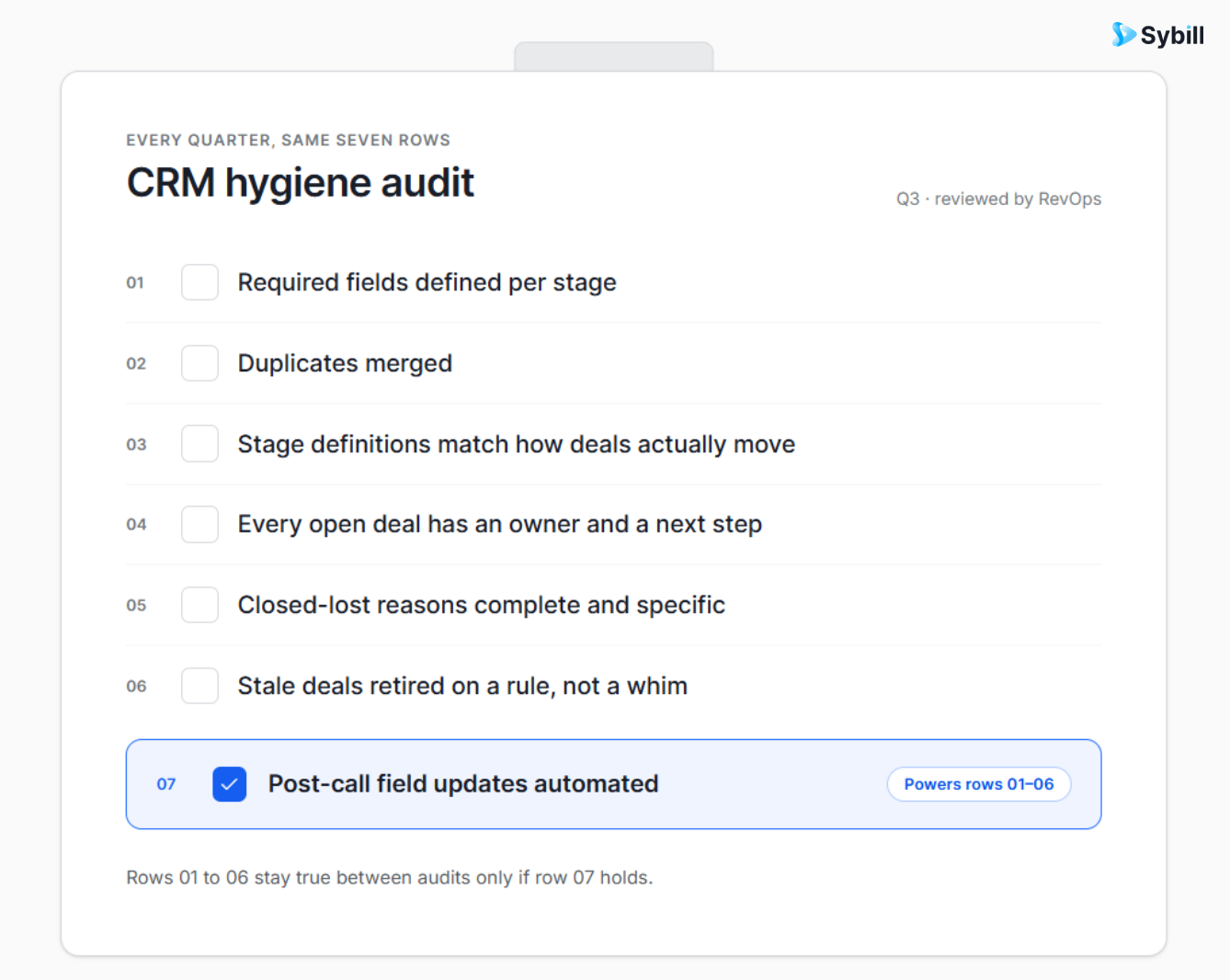
Run this audit quarterly across active sequences:
One editing caution that catches teams mid-flight: changes to a live sequence don't apply retroactively to steps already queued for active enrollees; future steps and new enrollments inherit the edits. Make substantive changes between cohorts, or you're A/B testing by accident with no control group.
HubSpot's sequence setup is genuinely well-designed and takes an afternoon to do properly: tiers and permissions checked, authentication in place, five build steps, guardrail enrollment criteria, and the two-workflow toggle on anything automated. What the setup screens never mention is that every trigger you just configured watches CRM properties, and the properties update at the speed of rep discipline, which means the difference between a pipeline machine and a domain-burning embarrassment is whether call outcomes reach HubSpot before the next step fires. Wire the conversation layer in, and the sequence you built this afternoon stays smart at 5pm on your reps' busiest Friday, which is exactly when it matters.
Build it in an afternoon. Keep it honest automatically.
Get started for free with Sybill or book a demo and make every sequence fire on the truth.
Sales Hub Professional or Enterprise (or the Service Hub equivalents) with a paid seat for each sending rep, sequence permissions assigned at the role level, and domain authentication (SPF, DKIM, DMARC) in order. Sequences send through each rep's connected personal inbox, and behavioral thresholds police deliverability: bounce rates under 3% and spam complaints under 0.3%.
Three paths: manually from a contact record for high-touch moments, in bulk from lists or views (up to 50 at a time, rate-limited, within the 500 or 1,000 daily per-user caps), or via workflows triggered by contact property changes. Deal-stage changes can't trigger enrollment directly, so teams mirror the stage into a contact property and trigger on that, with a two-workflow toggle preventing circular loops.
On a genuine reply from the enrolled address (with the reply switch enabled) or a meeting booked through a HubSpot scheduling link. The documented blind spots: replies from alternate email addresses, meetings booked through external calendar tools, and deal changes that happened on a call but reached the CRM late. Each needs a supplementary workflow trigger, and the last one needs post-call field updates automated.
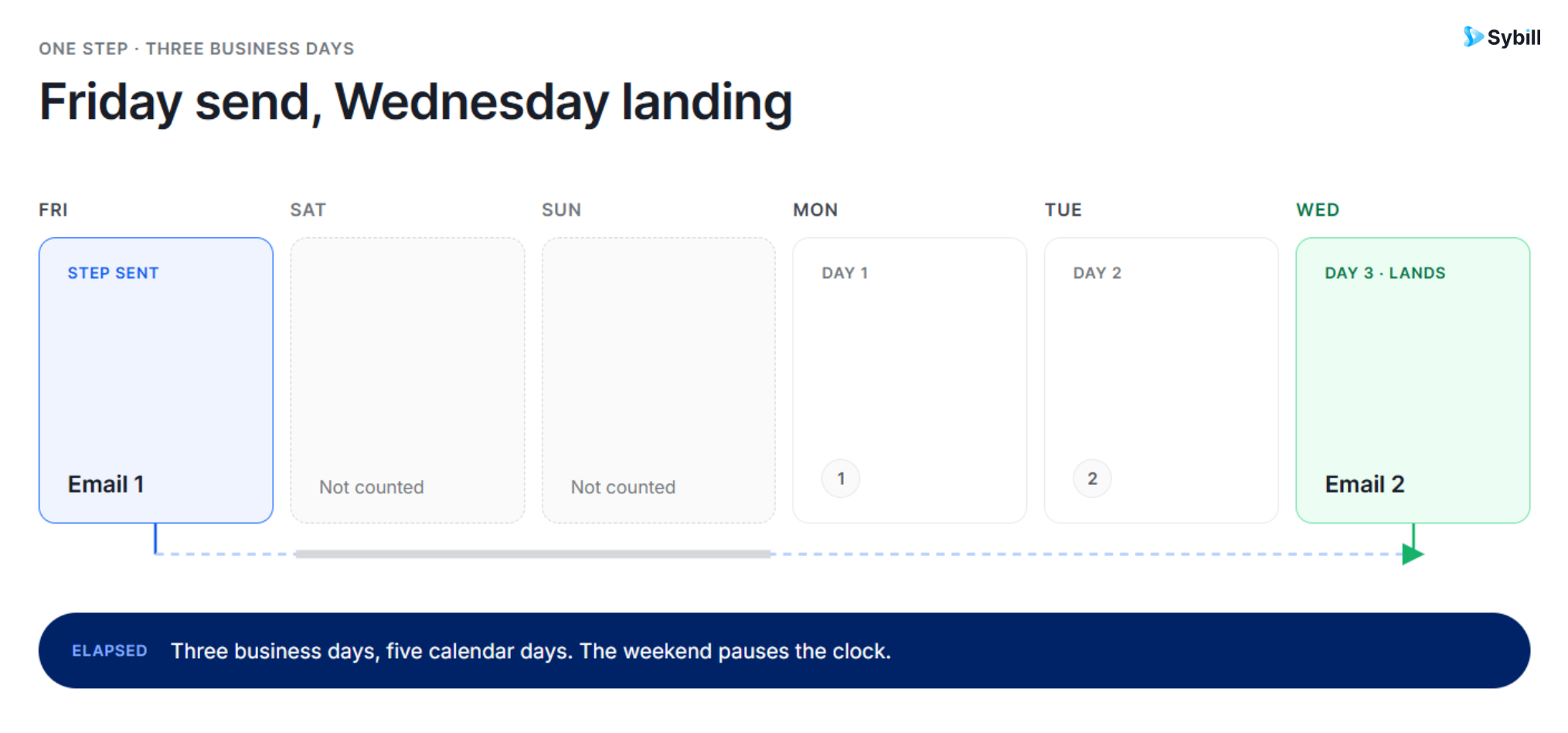
Ninety business days, with business-day delays skipping weekends, so a three-day delay after a Friday send fires on Wednesday. Re-engagement beyond the 90-day window means a second sequence, enrolled manually or by workflow when the time comes.
Yes, but edits don't apply retroactively to steps already queued for active enrollees; future steps and new enrollments inherit the changes. Make substantive edits between enrollment cohorts rather than mid-flight, or the sequence's results become an accidental unstructured A/B test.
Sybill updates HubSpot fields automatically from every call the moment it ends, so the properties your enrollment and unenrollment workflows watch reflect the conversation rather than delayed manual logging. The unenrollment fires before the next step queues, and when re-engagement comes months later, Ask Sybill retrieves what the original conversation covered so the new opener is drafted, in the rep's voice, from something real.
Sales Hub Professional or Enterprise (or the Service Hub equivalents) with a paid seat for each sending rep, sequence permissions assigned at the role level, and domain authentication (SPF, DKIM, DMARC) in order. Sequences send through each rep's connected personal inbox, and behavioral thresholds police deliverability: bounce rates under 3% and spam complaints under 0.3%.
Three paths: manually from a contact record for high-touch moments, in bulk from lists or views (up to 50 at a time, rate-limited, within the 500 or 1,000 daily per-user caps), or via workflows triggered by contact property changes. Deal-stage changes can't trigger enrollment directly, so teams mirror the stage into a contact property and trigger on that, with a two-workflow toggle preventing circular loops.
On a genuine reply from the enrolled address (with the reply switch enabled) or a meeting booked through a HubSpot scheduling link. The documented blind spots: replies from alternate email addresses, meetings booked through external calendar tools, and deal changes that happened on a call but reached the CRM late. Each needs a supplementary workflow trigger, and the last one needs post-call field updates automated.








