
Find us at booth #83, join us for a harbor side happy hour, or catch Gorish’s talk.

Sept, 16-18 > Learn more

%20(1).avif)
Mamta Tainwala

September 16, 2026
.avif)
HubSpot gives revenue teams two different email automation machines, and most configuration pain comes from running the wrong one. Sequences, in Sales Hub, send one-to-one outreach from a rep's own inbox to prospects that rep chose. Workflows, the shared engine across Hubs, send one-to-many email triggered by behavior: form fills, property changes, page visits. Get the split right and both machines hum. Get it wrong and you either blast personal-looking email from a system address or ask reps to hand-manage what a trigger should have done.
This guide covers the split, the tier limits that bite mid-campaign, the sequence structures that actually earn replies, the workflow layer underneath, and the part HubSpot's machinery deliberately leaves to you: what happens after the reply lands. Along the way it connects to the rest of our HubSpot series, from workflow examples to deal stages.
The fastest test is three questions, asked in order:
The architecture for teams running both, which is most teams: Workflows own top-of-funnel nurture and flag when a contact turns sales-ready; Sequences own the rep-led conversation from that point. One direction of handoff, no overlap, and each machine doing the job it was designed for.
The limits are tier facts worth knowing before a campaign launch discovers them (verify current numbers against HubSpot's documentation, since they change):
The practical translation for a 10-rep Professional team: 5,000 sequence sends a day sounds enormous until a campaign spike enrolls a fresh list and the follow-up steps for last week's enrollments start competing with this week's for the same cap. Plan enrollment pacing, not just list size.
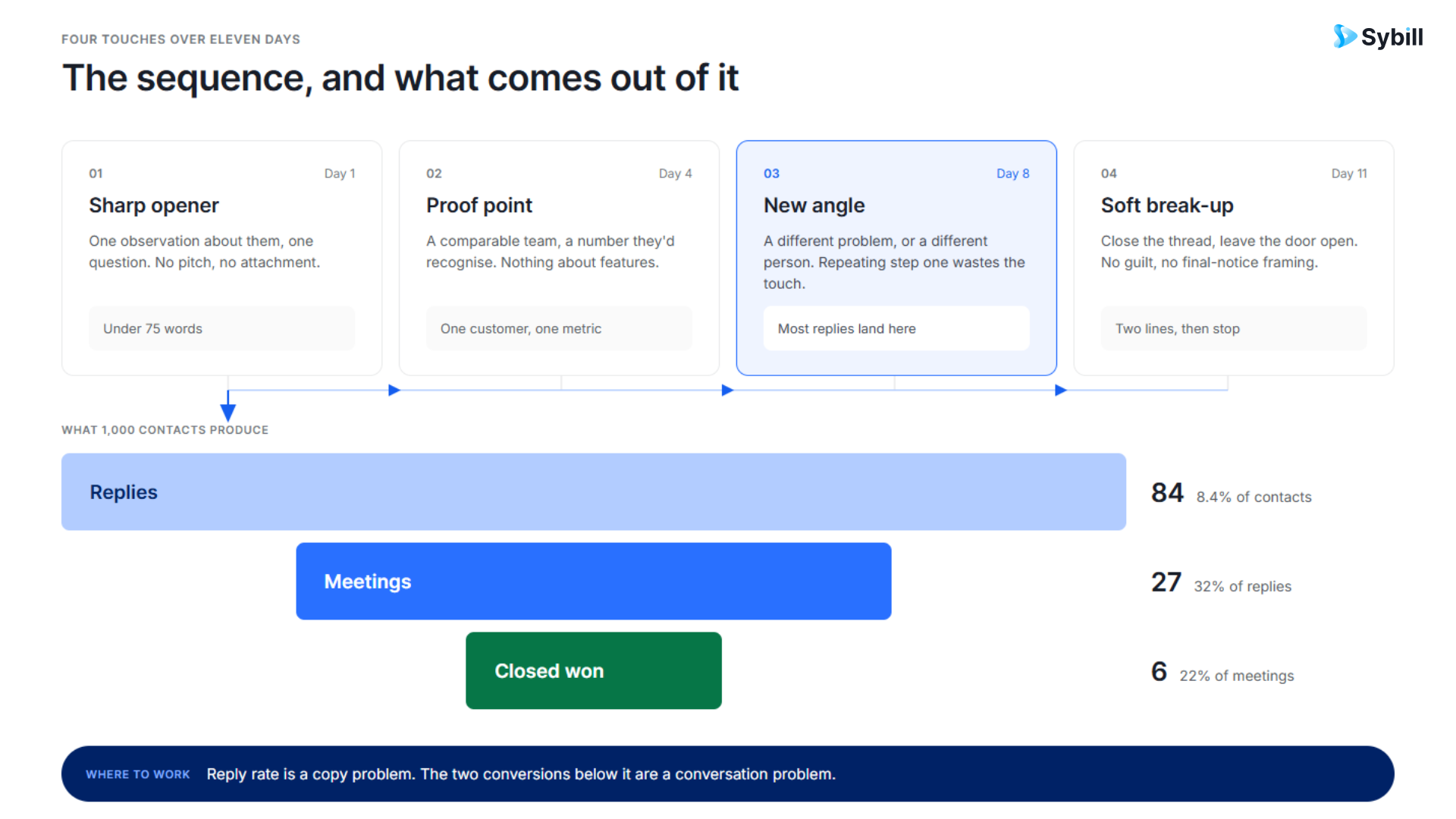
The mechanics are settings; the conversion is craft. The structure that consistently earns replies:
And measure by the metric that pays: replies flatter a sequence, meetings booked per hundred enrollments and closed-won revenue by sequence tell you which cadences generate pipeline rather than politeness. Build the report that ties enrollment to deal outcome before you build the third sequence.
Everything repeatable that isn't a rep's personal outreach:
The quiet dependency under all four: every workflow triggers off properties, and properties are only as accurate as whatever fills them. Which brings us to the gap.
One enrollment discipline worth adopting before any of this scales: audit who is actually in your sequences. Run a weekly view of enrollments by rep next to pipeline coverage, because a rep with thin coverage and near-zero enrollments is improvising outreach outside the system, producing neither the touches nor the data. And audit the reverse too: contacts who completed a full sequence without replying belong in a long-cycle nurture workflow, not re-enrolled in another sequence, since re-blasting completed non-responders is how domains earn their spam reputation, the deliverability cousin of the number-health discipline in our outbound playbook.
Here is the structural honesty missing from most guides to this topic. Sequences and Workflows are excellent at putting email into the world. The moment something comes back (a reply with a budget hint, a call where a competitor got named, a meeting where the timeline moved) HubSpot's automation hands the work to a human: read it, interpret it, open the deal record, update the fields. Native tooling logs that a reply happened; it does not turn what was said into the properties your workflows trigger on. Even HubSpot's own Breeze AI suggestions wait on a rep's approval before a field updates.
So the more outreach you automate, the more manual interpretation you generate, and the pipeline drifts exactly as fast as reps are busy. Every blank qualification field is a workflow that didn't fire, a stalled-deal alert that never triggered, and a forecast line someone defends from memory, the compounding problem our data hygiene post treats in depth.
This is the seam where Sybill sits, and on this topic it is the subject rather than a footnote. Sybill has analyzed around 33 million sales conversations, and its HubSpot integration closes the loop the sending machinery opens: every call and meeting becomes a summary and HubSpot fields that fill themselves, the follow-up email drafts itself in the rep's voice from what was actually discussed, commitments become tasks, and deal inspection reads the signals across the whole motion.
Your Sequences start conversations; the conversation layer makes sure HubSpot learns what they said, which is also what makes every workflow in the operational layer fire on truth instead of on whatever survived a rep's memory. The reply-side half of this story, routing, logging, and acting on inbound, is its companion piece: our HubSpot inbox automation guide.
Automate the sending and the learning. Sybill turns every call, meeting, and email in your HubSpot motion into filled fields, drafted follow-ups, and deal signals, automatically. Get started for free with Sybill.
HubSpot's email automation is genuinely good at its half of the job: pick the right machine with the three-question test, respect the tier limits, build sequences four to six steps deep with fallbacks on every token, and let Workflows run the operational layer in Slack rather than internal email. Then be honest about the other half: nothing native turns what buyers say back into the fields everything else triggers on, and teams that leave that loop manual are automating their outreach and hand-cranking their pipeline data. Close the loop with a conversation layer, and both machines finally run on inputs that match reality.
Send automatically. Learn automatically. The second one is the differentiator now.
Get started for free with Sybill or book a demo and make every HubSpot email count.
Sequences, in Sales Hub, send one-to-one outreach from an individual rep's connected inbox to prospects the rep enrolls, and they unenroll contacts on a genuine reply or booked meeting. Workflows are the shared automation engine that sends one-to-many email and executes actions on behavioral triggers such as form fills and property changes. Rep-led conversations belong in Sequences; operational and nurture automation belongs in Workflows.
HubSpot caps sequence sends at 500 emails per user per day on Professional and 1,000 on Enterprise, applied over a rolling 24-hour window rather than a midnight reset. Team ceilings are per-rep sums, and enrollment spikes compete with scheduled follow-up steps for the same cap, so pace enrollments rather than batch-loading lists. Verify current limits in HubSpot's documentation, as tiers change.
In a tier-gated way. Professional supports auto-enrollment scoped to one specific sequence through that sequence's own Automate tab, while enrolling contacts from any workflow into any sequence requires Enterprise. Teams on Professional typically combine single-sequence auto-enrollment with manual enrollment from filtered contact views.
Yes: a genuine reply, a booked meeting, or unenrollment conditions you configure will end a contact's sequence, and out-of-office auto-replies generally do not trigger unenrollment. What HubSpot does not do natively is interpret the reply's content, so classifying a pricing question versus an objection versus a timing constraint, and updating deal fields accordingly, remains manual without a conversation-intelligence layer.
Four to six steps: a sharp, problem-focused opener, a proof point, a genuinely different angle written like a first email, and a soft break-up, with several days between mid-funnel touches and call tasks mixed in. Set fallback values on every personalization token, make step one a manual review step on high-value sequences, and measure by meetings and closed-won revenue per sequence rather than opens and replies.
Sybill closes the loop HubSpot's sending machinery leaves open: it captures every call, meeting, and email in the motion, writes structured updates to HubSpot fields automatically, drafts follow-up emails in the rep's voice from actual deal context, and surfaces deal signals across the whole history. Sequences and Workflows handle the outbound; Sybill makes HubSpot learn from what comes back.
Sequences, in Sales Hub, send one-to-one outreach from an individual rep's connected inbox to prospects the rep enrolls, and they unenroll contacts on a genuine reply or booked meeting. Workflows are the shared automation engine that sends one-to-many email and executes actions on behavioral triggers such as form fills and property changes. Rep-led conversations belong in Sequences; operational and nurture automation belongs in Workflows.
HubSpot caps sequence sends at 500 emails per user per day on Professional and 1,000 on Enterprise, applied over a rolling 24-hour window rather than a midnight reset. Team ceilings are per-rep sums, and enrollment spikes compete with scheduled follow-up steps for the same cap, so pace enrollments rather than batch-loading lists. Verify current limits in HubSpot's documentation, as tiers change.
In a tier-gated way. Professional supports auto-enrollment scoped to one specific sequence through that sequence's own Automate tab, while enrolling contacts from any workflow into any sequence requires Enterprise. Teams on Professional typically combine single-sequence auto-enrollment with manual enrollment from filtered contact views.








