
Find us at booth #83, join us for a harbor side happy hour, or catch Gorish’s talk.

Sept, 16-18 > Learn more

%20(1).avif)
Mamta Tainwala

July 15, 2026
%20(38).png)
Real-time sales analytics is the continuous capture and analysis of sales data (calls, emails, CRM activity, pipeline movement) as it happens, so decisions run on current information instead of last month's report. The catch: different decisions need different speeds. In-call prompts, post-call intelligence, and same-day pipeline alerts are all "real time," and knowing which one you actually need is what separates useful analytics from an expensive dashboard.
Let us unpack that, because "real-time" has become one of those words vendors say the way restaurants say "artisanal."
Real-time sales analytics means capturing and processing sales signals as they occur: conversation data from calls, engagement data from emails, activity and stage changes in the CRM, and pipeline movement. The output is intelligence available within minutes rather than at month-end, so reps, managers, and RevOps act on what is happening, not what already happened.
The contrast is the old operating model, which every sales leader over 35 remembers vividly: performance reviewed monthly, forecasts assembled from rep self-reporting, coaching based on the two calls a manager happened to join. By the time the report said discovery was weak, a quarter of discovery calls had already gone badly.
Real-time analytics collapses that lag. A deal that stalls signals today. A rep who stopped asking qualifying questions gets flagged this week, not at the QBR. A competitor showing up in deals gets noticed the week they start showing up, because competitor intelligence is tracking mentions across every call, not waiting for a rep to volunteer it.
But here is the question the vendor category conveniently skips, and the one that determines whether you buy the right thing.
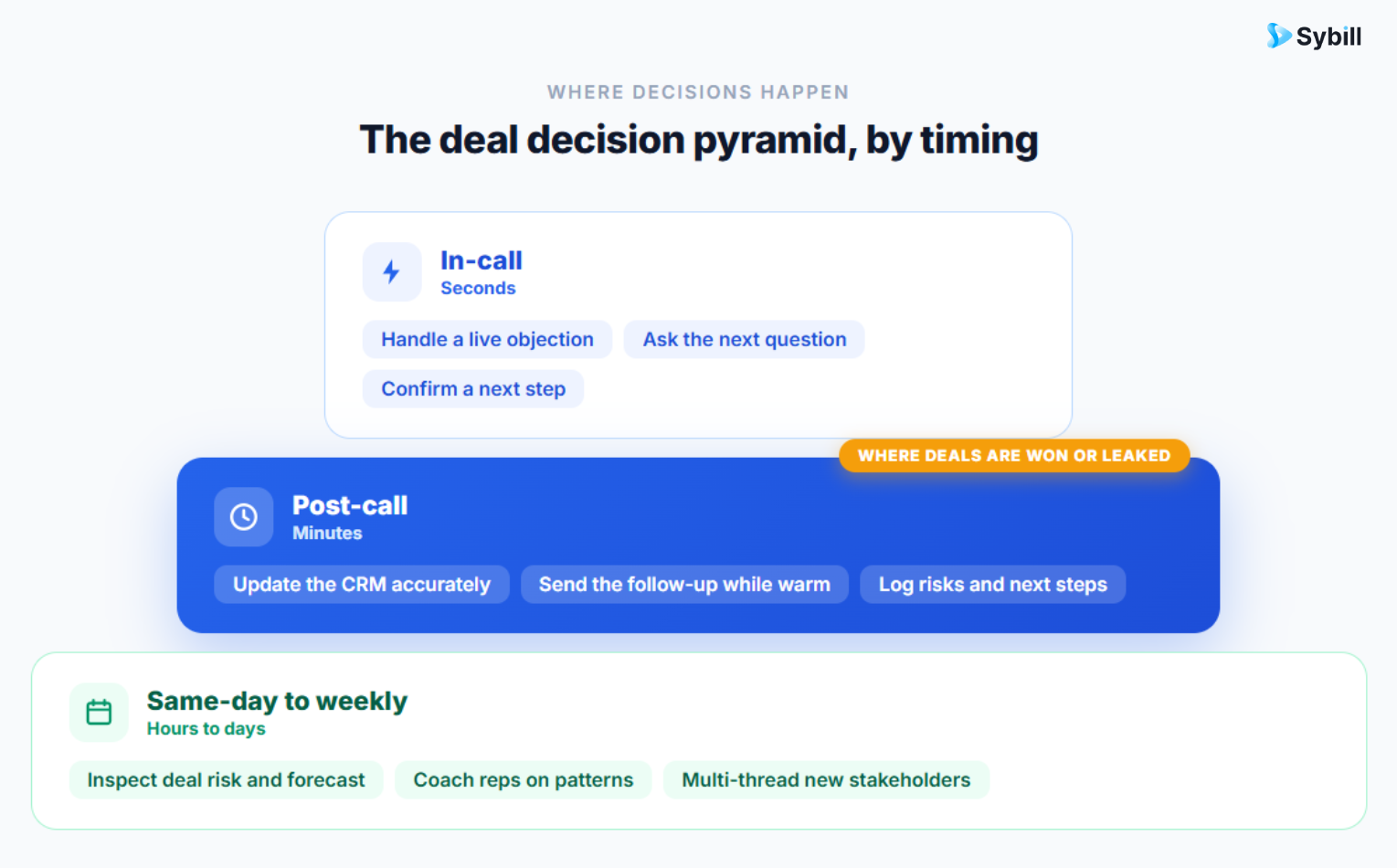
Match the data speed to the decision speed. In-call decisions (handling a live objection) need in-call data. Deal decisions (follow-up content, next steps, risk response) need post-call intelligence within minutes. Coaching and resource decisions need same-day to weekly data. Buying "live" analytics for decisions you make weekly is paying for latency you will never use.
This is the framework the category's marketing does not want you to think about, so let us think about it.
Tier 1: In-call (seconds). The only decisions that live here are mid-conversation moves: responding to an objection, answering a pricing question, countering a competitor mention. Live-prompt tools serve this tier with on-screen battle cards.
Tier 2: Post-call (minutes to hours). What actually happened, what the buyer committed to, what risks surfaced, what the follow-up must say, what the CRM should now reflect. This tier decides whether deals advance. It is also where most revenue leaks, because it has historically depended on rep memory and rep discipline at 6 PM on a Thursday.
Tier 3: Same-day to weekly (pipeline and coaching). Deal risk patterns, rep skill trends, forecast confidence, territory allocation. Sales leaders and RevOps live here. The data must be current, but nobody reallocates territories at 2:14 PM because a dashboard blinked.
Now picture this: a team buys a live in-call prompt tool, feels very futuristic for a month, and meanwhile their follow-ups still go out a day late, their CRM is still fiction, and their forecast is still built on vibes. They optimized Tier 1 while Tiers 2 and 3 bled out. That is the most common real-time analytics purchasing mistake in B2B sales, and it is worth naming plainly.
For most teams, no. In-call prompts help with scripted, high-volume motions like SDR cold calling, but in consultative B2B selling a rep reading pop-ups mid-conversation is a rep not listening. The higher-leverage window is the minutes after the call, when analytics can drive the follow-up, CRM update, and risk flags with zero distraction cost.
Credit where it is due: live conversation prompts have real use cases. High-velocity SDR teams running hundreds of near-identical calls benefit from on-screen objection responses, and new reps get a safety net during ramp. If that is your motion, tools built for live prompting serve it well.
But be honest about the physics of a consultative sale. Your buyer is describing a nuanced problem. Your rep is either fully present, reading the room, asking the next great question, or they are scanning a sidebar widget for a suggested response. You cannot deeply listen and read pop-ups at the same time. Buyers notice. There is a reason the best sellers you know take almost no notes on live calls: attention is the product.
Which is exactly why the post-call window is the honest sweet spot for most B2B teams:
The rep stays fully human during the call. The machine takes over the moment it ends. That is the division of labor that actually respects how selling works.
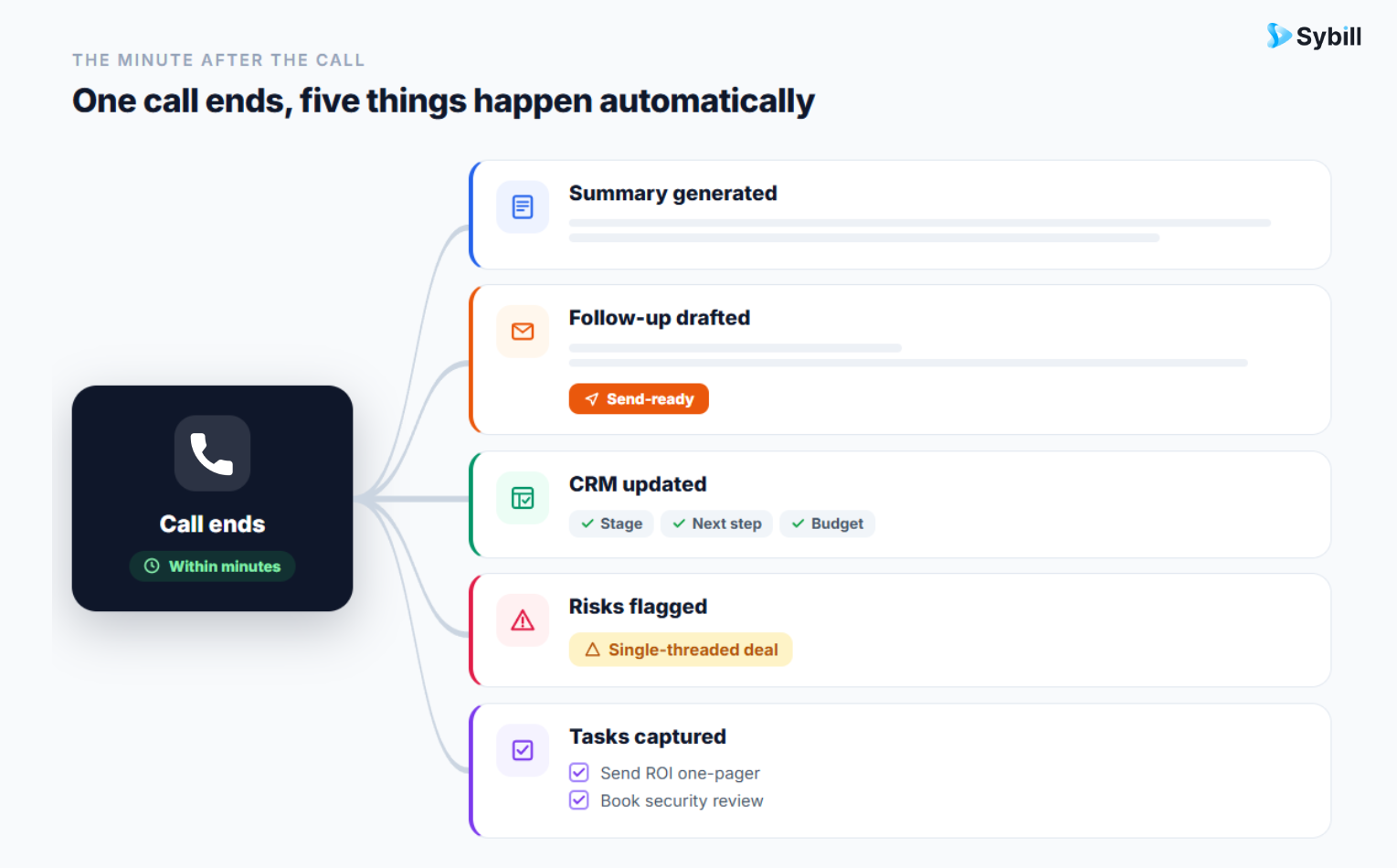
Every call becomes intelligence the moment it ends. Summaries, follow-ups, CRM updates, and deal risk flags, automatically, without a bot in your meeting. Try Sybill for free.
Real-time analytics improves sales decisions in three ways: managers coach from complete current data instead of anecdote, reps execute follow-ups and next steps while deals are hot, and leaders reallocate attention to at-risk deals and high-intent accounts before outcomes are locked in. The common thread is shrinking the gap between signal and action.
Coaching stops being archaeology. Traditional call review meant a manager sampling two or three recordings per rep per month, which is a biased sliver of reality. With every conversation analyzed, coaching and performance analytics show this week's talk ratios, question quality, and objection handling across the whole team. The manager coaches Tuesday's gap on Wednesday. We covered the full playbook in our guide to AI-powered sales coaching.
Buyer understanding compounds across the team. When buyer needs and intent are extracted from every conversation, patterns emerge that no individual rep can see: which pain points are rising this quarter, which objections cluster in which segment, what your champions actually say when they sell you internally. Sybill has analyzed thousands of sales conversations, and the teams that mine this systematically stop rediscovering their own market every quarter.
Attention goes where the revenue is. Real-time deal pipeline views mean the Monday pipeline meeting starts from current reality: which deals moved, which stalled, which need executive air cover this week. Pair that with lead scoring that runs on live signals and reps spend their hours on the accounts most likely to close, not the ones alphabetically first.
Implement in three steps: instrument your conversations first (they are the richest and least-captured data source), pick tools that write into your existing CRM and Slack rather than adding another dashboard to check, and build the operating rhythm (daily standups, weekly pipeline reviews) around the new data so it drives decisions instead of decorating them.
Step 1: Instrument conversations before anything else. Your CRM already has activity data. Your email tool already has engagement data. The data you are almost certainly not capturing is conversational: what buyers say, ask, object to, and commit to. That is where deal truth lives, and capturing it is table stakes for everything else in this post. If your team resents meeting bots, note that bot-free recording exists and adoption goes up when nothing joins the call as a participant.
Step 2: Choose tools that push, not dashboards that wait. A dashboard nobody opens is a monthly report with better fonts. The test for any real-time analytics tool: does the insight arrive where work happens? Summaries in Slack, updates in the CRM, tasks captured and executed without a human remembering. Run a two-week pilot with a pod of reps and measure one thing: did behavior change without anyone being nagged?
Step 3: Wire it into the rhythm. Data changes decisions only if a decision-making moment consumes it. Put conversation insights into deal reviews. Put coaching analytics into 1:1s. Put forecast-relevant signals into the forecast call. And keep every deal's full history in one place so the analytics and the narrative never live in separate tabs.
Notice what is not in this list: a six-month data warehouse project. For a sales team, real-time analytics is a workflow change, not an infrastructure program. Teams that treat it as the latter ship a beautiful pipeline of nothing.
Measure ROI against four movements: speed-to-follow-up (should drop to same-day or faster), CRM data completeness (fields filled without rep effort), sales cycle length, and win rate on coached behaviors. Add the recovered admin hours per rep per week, which is the most immediate and most measurable return.
Practical measurement, in the order the returns show up:
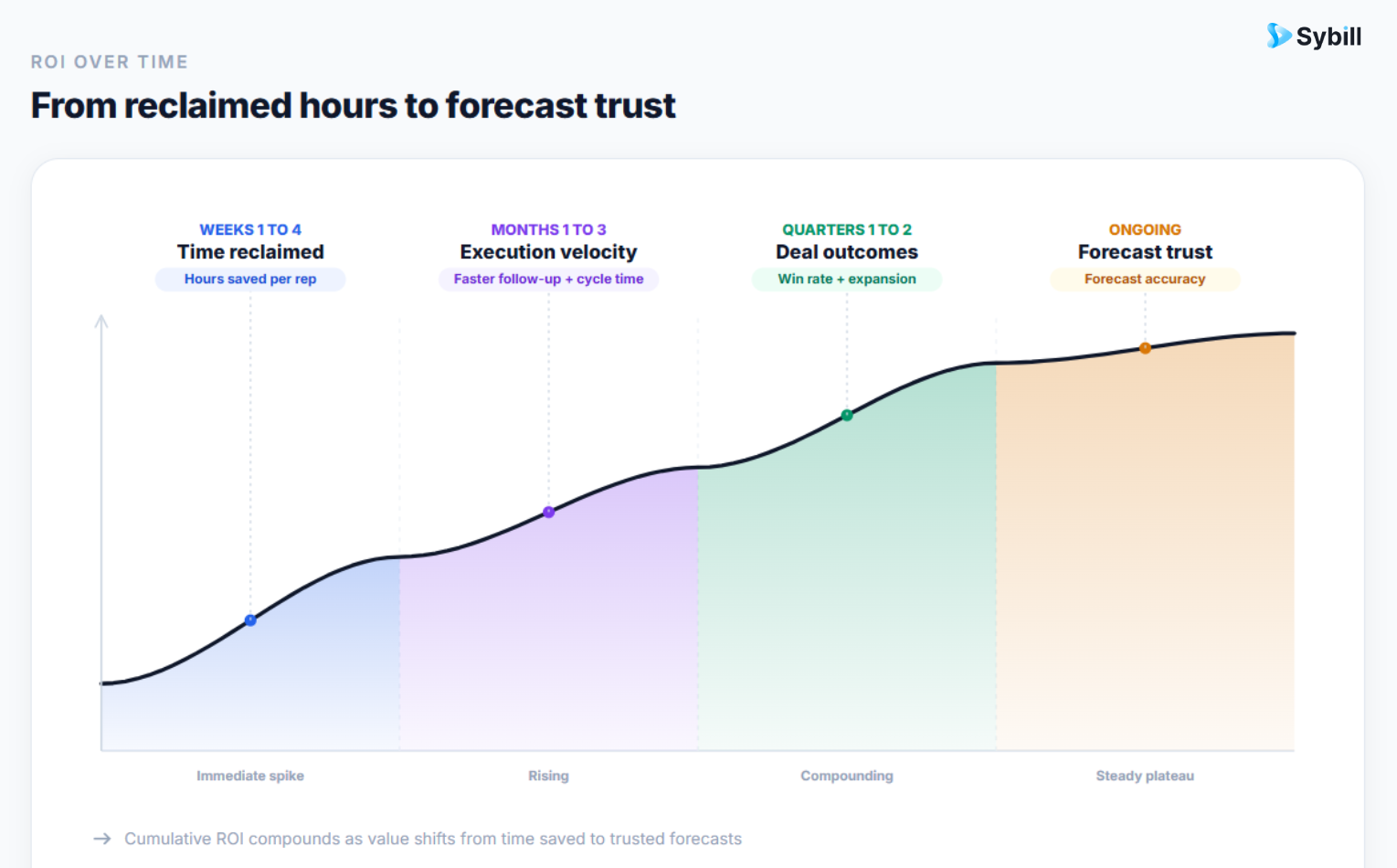
Weeks 1 to 4: Time reclaimed. Reps stop writing notes, follow-ups, and CRM updates by hand. Account executives using Sybill get hours back weekly. This is the fastest, least arguable ROI line, and you can survey it directly.
Months 1 to 3: Execution velocity. Median time from call to follow-up sent. Percentage of deals with documented next steps. CRM field completeness. All should move sharply, and all are queryable.
Quarters 1 to 2: Deal outcomes. Cycle length, stage conversion, win rate. Attribute honestly: run a before/after on the pilot pod versus the rest of the team before rolling out, and you will have a clean internal case study instead of a hunch.
Ongoing: Forecast trust. The quiet compounding return. When pipeline data reflects actual conversations, forecast calls stop being negotiation theater. Ask your VP what that is worth. Then watch their face.
The old version of this post compared real-time analytics to a basketball scoreboard, and there is something to that. But a scoreboard only tells you that you are losing. It does not pass the ball.
That is the real division in this category. Analytics that inform versus analytics that act. A number on a screen versus a follow-up already drafted, a CRM already updated, a risk already flagged to the right owner. The first kind gives your team more things to look at. The second kind gives them their evenings back and their deals forward motion.
Real-time analytics tells you what is happening. Sybill does something about it, the moment the call ends.
Start free or book a demo and turn every conversation into your fastest analyst.
Real-time analytics is the broad practice of acting on current sales data from any source: CRM, email, calls, pipeline. Conversation intelligence is the subset focused on analyzing sales calls and meetings. In practice conversation intelligence is the highest-value input, because conversations contain the deal truth that CRM fields summarize secondhand.
Usually not. Live prompts suit high-volume scripted motions like SDR cold calling and early rep ramp. In consultative B2B selling, mid-call pop-ups compete with listening, and the higher-leverage automation window is immediately after the call: follow-ups, CRM updates, and risk detection with no distraction cost.
Four main sources: conversation data from calls and meetings, engagement data from email and content, activity and stage data from the CRM, and intent signals from product usage or website behavior. Conversation data is typically the richest and least captured, which is why most teams start there.
Recovered admin time shows up in the first month and is the easiest return to measure. Execution metrics like speed-to-follow-up and CRM completeness move within one quarter. Deal outcomes such as cycle length and win rate need one to two quarters and a pilot-versus-control comparison for honest attribution.
No. Small teams arguably benefit more, because they lack the manager bandwidth to manually review calls and chase CRM hygiene. Modern conversation intelligence tools price per seat and set up in days, so a five-rep team gets the same analytical coverage as an enterprise team, minus the data warehouse project.
Real-time analytics is the broad practice of acting on current sales data from any source: CRM, email, calls, pipeline. Conversation intelligence is the subset focused on analyzing sales calls and meetings. In practice conversation intelligence is the highest-value input, because conversations contain the deal truth that CRM fields summarize secondhand.
Usually not. Live prompts suit high-volume scripted motions like SDR cold calling and early rep ramp. In consultative B2B selling, mid-call pop-ups compete with listening, and the higher-leverage automation window is immediately after the call: follow-ups, CRM updates, and risk detection with no distraction cost.
Four main sources: conversation data from calls and meetings, engagement data from email and content, activity and stage data from the CRM, and intent signals from product usage or website behavior. Conversation data is typically the richest and least captured, which is why most teams start there.








