
Find us at booth #83, join us for a harbor side happy hour, or catch Gorish’s talk.

Sept, 16-18 > Learn more


Tamanna Mishra

May 15, 2026
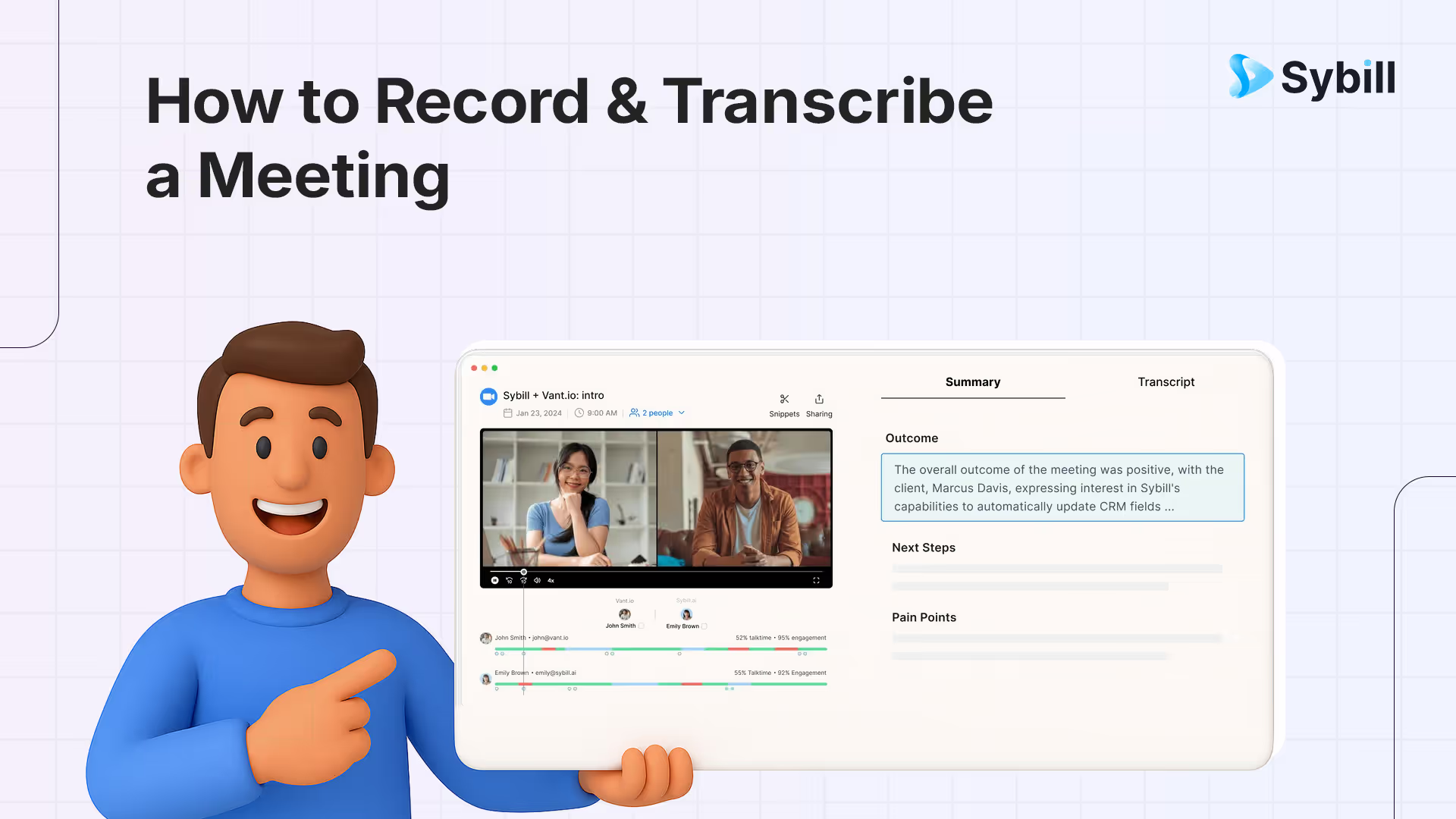
Recording meetings is easy. Getting usable insights is not.
Zoom and Teams give you files. AI gives you clarity.
Manual notes are chaos. AI meeting recorders are order.
If you want more than transcripts, Sybill is the only tool that turns conversations into decisions, follow-ups, and revenue.
Ever noticed how the same meeting can produce five wildly different memories? It’s basically the workplace version of the Mandela Effect. One person swears the client said yes. Another insists they said maybe. A third is convinced the deal is dead.
To record and transcribe a meeting, use a dedicated AI meeting recorder like Sybill that joins your Zoom, Google Meet, or Teams call automatically, captures audio and video, generates an accurate transcript with speaker labels, and then goes beyond transcription to produce structured summaries, extract action items, draft follow-up emails, and update CRM fields from the conversation. Built-in recording features in Zoom, Teams, and Google Meet provide basic recordings and transcripts, but they stop at raw text — AI-powered tools like Sybill, Otter AI, and Fireflies transform recordings into actionable outputs that eliminate the manual work of turning meeting content into next steps.
That’s exactly why knowing how to record and transcribe a meeting is no longer optional. In a world full of overlapping Zooms and rapid-fire Teams calls, note-taking has become a losing game.
Native recording features help, but they don’t solve the real problem: turning conversations into clarity. A two-hour recording without transcription is just homework disguised as a file.
Choosing between native tools and an AI meeting recorder now shapes more than convenience. It determines accuracy, compliance, and how fast your team moves from “What did we decide?” to “Let’s execute.”
Before AI tools existed, most teams learned how to record and transcribe a meeting the hard way: manual notes and basic audio utilities. Both still work, but both cost you focus.
Manual note-taking is the default baseline, but it’s slow, distracting, and guaranteed to miss context. It forces you to constantly choose between participating and documenting. Great for doodles, terrible for accuracy.
The next option is using a simple audio recorder and transcriber workflow powered by built-in OS tools like QuickTime (Mac) or Windows Voice Recorder. They’re stable, familiar, and technically free, which is why many people still use them when looking for how to record and transcribe meeting minutes free. But the trade-offs are steep: no speaker identification, no automatic summaries, no searchable output, and hours of replay-and-type admin work.
So when does this old-school approach make sense?
Small internal syncs, offline conversations, or compliance-heavy environments where external apps aren’t allowed.
For anything involving clients, strategy, revenue, or decisions, this method reaches its limits faster than the meeting concludes.
If you're trying to figure out how to record and transcribe a Teams meeting, Microsoft gives you reliable built-in options. They’re designed for security, internal collaboration, and compliance, which makes them perfect for straightforward documentation.
First, who’s actually allowed to record? Organizers, co-hosts, and participants from the same organization, assuming the admin hasn’t restricted recording. External guests usually can’t record, which often surprises people mid-call.
Here’s the step-by-step for how to record and transcribe a meeting in Teams:
Pros:
Secure, enterprise-ready, and tightly integrated with the Microsoft ecosystem. Great for internal calls where you just need a clean record.
Cons:
Transcription accuracy varies. There are no smart notes, no action items, no insights, no CRM sync, and very limited access for external participants. It’s documentation, not intelligence.
If your team lives on Zoom, learning how to record and transcribe a Zoom meeting is straightforward. Zoom’s native tools are built for simplicity, and anyone who’s a host or co-host can record. Participants can record only if the host explicitly grants permission, which is important if you’re handling cross-org or client calls.
Here’s the step-by-step for how to record and transcribe a meeting in Zoom:
Pros:
Clean interface, reliable recording, and quick access to captions. Great for teams already using Zoom day-to-day.
Cons:
Transcription accuracy can be hit-or-miss. No advanced insights, no automatic summaries, no action items, no CRM sync, and no deeper intelligence beyond a flat transcript. It’s a classic voice recorder and transcriber experience, not a modern AI workflow.
If your organization runs on Google Workspace, learning how to record and transcribe a meeting inside Google Meet is simple but only if you have the correct permissions. Google Meet restricts recording to Workspace plans (Business Standard, Business Plus, Enterprise) and to users within the same organization. External attendees cannot record.
Here’s exactly how to record and transcribe a Google Meet meeting using native tools:
Pros:
Secure, simple, and fully native to Google Workspace. Great for internal calls, training sessions, and documentation.
Cons:
Native transcription is limited. Accuracy varies, transcripts aren’t always auto-generated, and there are no summaries, no insights, no action items, and no CRM sync. Like Zoom and Teams, Meet offers recording, not intelligence.
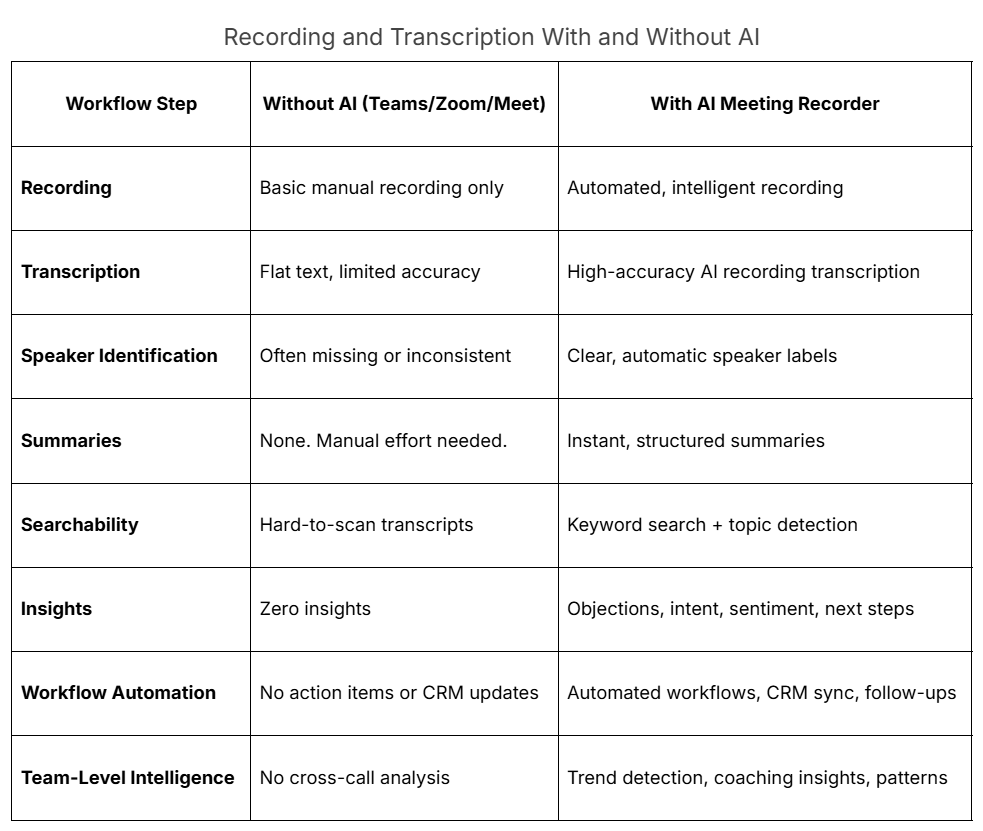
Teams, Zoom, and Google Meet all let you hit “Record,” but that’s where their usefulness peaks. Native tools give you a file, not understanding. And that gap is exactly why businesses are moving beyond basic audio recorder and transcriber workflows.
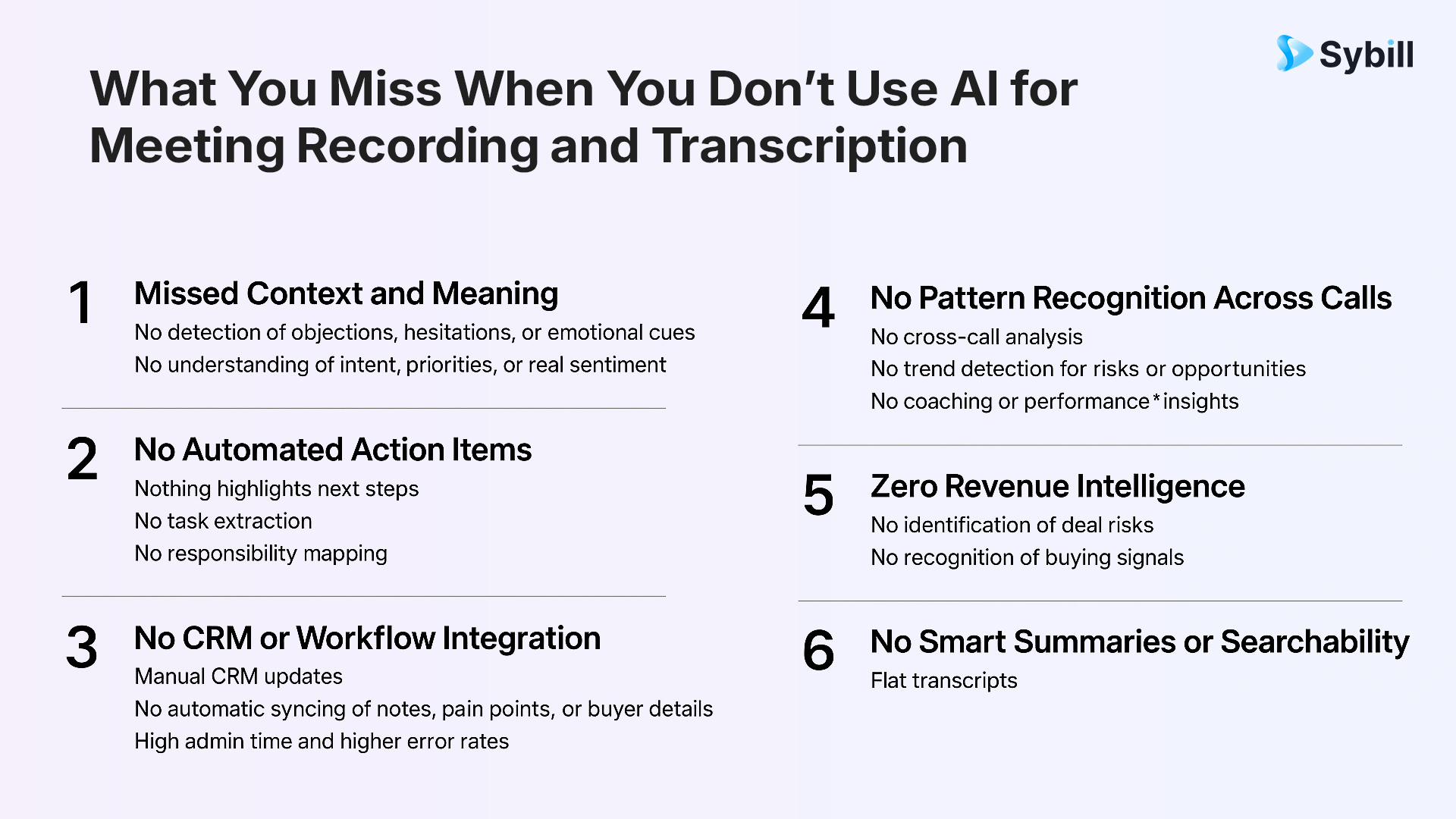
Native transcription - whether in Teams, Zoom, or Meet - captures words, but not the meaning behind them. There’s no context, no intelligence, no identification of objections, emotional cues, buying intent, or hesitations. You get raw text, not insight.
There’s also no post-meeting workflow. No automatic follow-ups. No CRM updates. No pipeline context. Everything still depends on manual effort, which slows teams down and introduces errors that compound across multiple calls.
Most importantly, native tools operate in isolation. There’s no cross-call analysis, no pattern detection, no coaching insights, no trend reporting, and no ability to connect one conversation to another. In 2026, businesses need far more than a flat transcript. They need AI recording transcription that turns meetings into execution.
AI completely changes how teams handle meeting documentation. Instead of juggling half-baked notes, fragmented recordings, and manual summaries, an AI meeting recorder captures everything in real time and transforms it into usable intelligence.
Most tools help you figure out how to record and transcribe a meeting. Sybill helps you win the meeting.
Sybill isn’t just another AI meeting recorder or a smarter voice recorder and transcriber. It’s a full meeting intelligence system that understands conversations, extracts intent, surfaces risks, and moves deals forward - automatically.
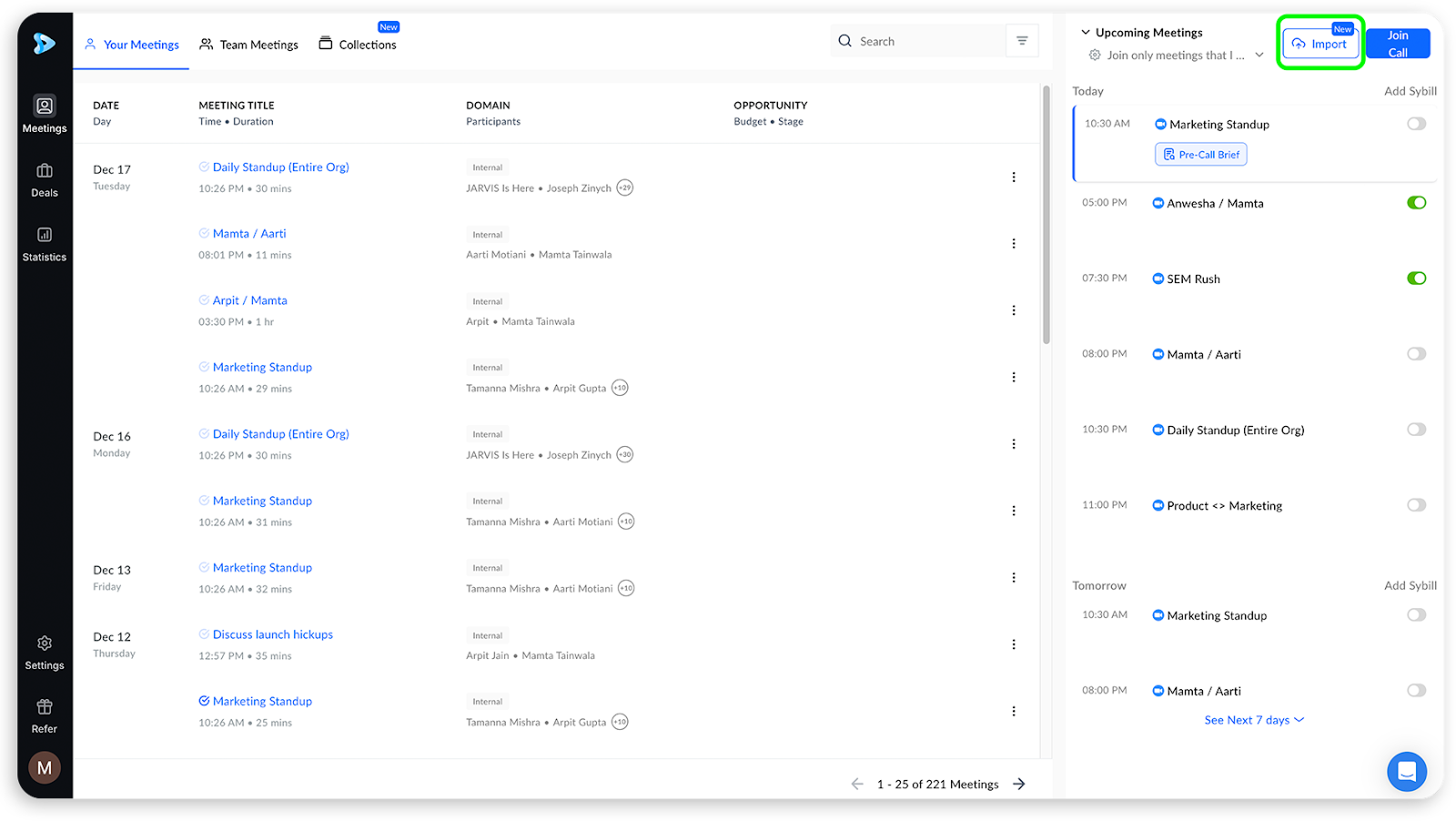
Click here to try Sybill free.
Related reads:
Sybill goes beyond just capturing your meetings. It interprets them, organizes them, and converts them into revenue-driving actions. Every call becomes a strategic asset, not a forgotten recording.
If you’re looking for how to record and transcribe meeting minutes free, you technically have several options. They work for basic documentation - but they come with significant limitations.
Free tools work for casual internal syncs or low-stakes meetings.
They fail when you need accuracy, follow-ups, CRM updates, or anything more than a flat transcript.
Miss one objection or deadline, and the “free” option becomes expensive very quickly.
Related read: 10 best AI note taking apps and devices
Not every meeting needs the same level of documentation. The right method depends on what you’re trying to achieve.
If you need real sales, CS, and revenue intelligence:
Choose Sybill. It’s the only tool that goes beyond recording and acts as a deal, coaching, and workflow engine
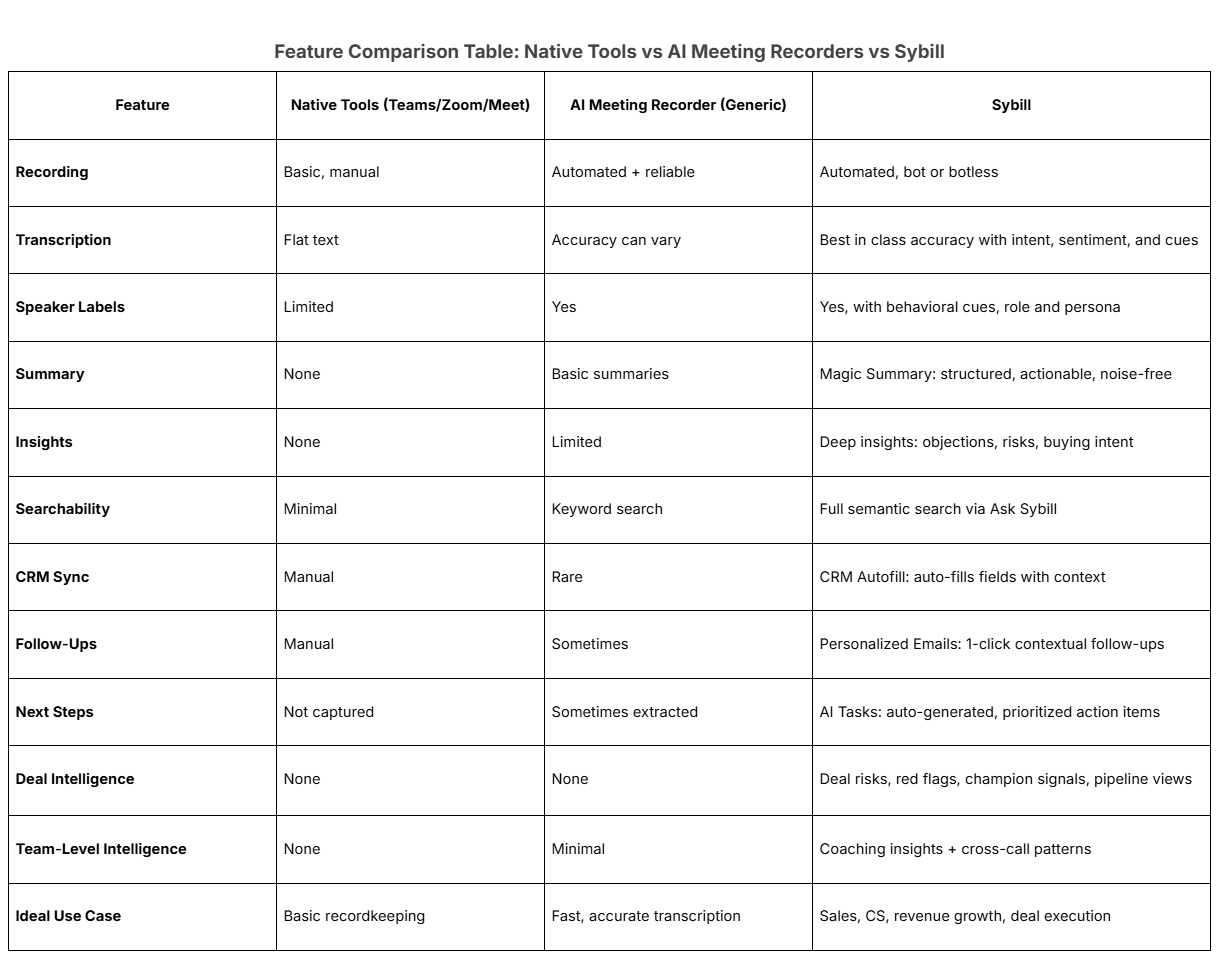
When it comes to how to record and transcribe a meeting, the method you choose matters more than ever. Native tools like Zoom, Teams, and Google Meet are perfectly fine for basic documentation. They give you a recording and, if you’re lucky, a passable transcript.
But the smartest teams don’t just record calls. They learn from them.
AI tools take you further with accuracy, searchable transcripts, speaker labels, and faster workflows. Still, even most AI solutions stop at transcription.
Sybill steps in where everything else stops. It captures the conversation, interprets it, and turns it into action. You get clean summaries, CRM automation, behavioral insights and intent signals, next steps, and deal intelligence - all without adding work to your day.
Smarter meetings start here.
Yes. If you’re looking for how to record and transcribe a meeting for free, tools like Zoom, Microsoft Teams, and Google Meet offer built-in recording and basic captions. They work well for internal syncs where you only need simple documentation. But their limitations show up fast: inconsistent transcription accuracy, no speaker labels, no insights, and no automated follow-ups. Free tools are not ideal for sales, customer conversations, or decisions that require detailed context. For those, an AI meeting recorder like Sybill delivers far better results.
To learn how to record a Teams meeting and transcribe, join your call, open More options, select Start recording, and enable Live transcription. Teams will save your recording to OneDrive or SharePoint once the meeting ends. While this gives you basic documentation, it’s limited: transcription accuracy varies, there are no insights, no summaries, no CRM sync, and no action items. Teams is useful for simple recordkeeping, but not enough when you need more than a flat transcript.
ChatGPT can transcribe audio files you upload, but it cannot automatically join or record your live meetings. That’s why an AI meeting recorder is more suitable for real-time capture. Dedicated tools provide AI recording transcription, speaker labels, topic segmentation, summaries, and insights. Platforms like Sybill go even further by extracting next steps, generating follow-ups, and filling your CRM automatically - far beyond what a manual audio recorder and transcriber workflow can offer.








