
Find us at booth #83, join us for a harbor side happy hour, or catch Gorish’s talk.

Sept, 16-18 > Learn more


Tamanna Mishra

January 24, 2026
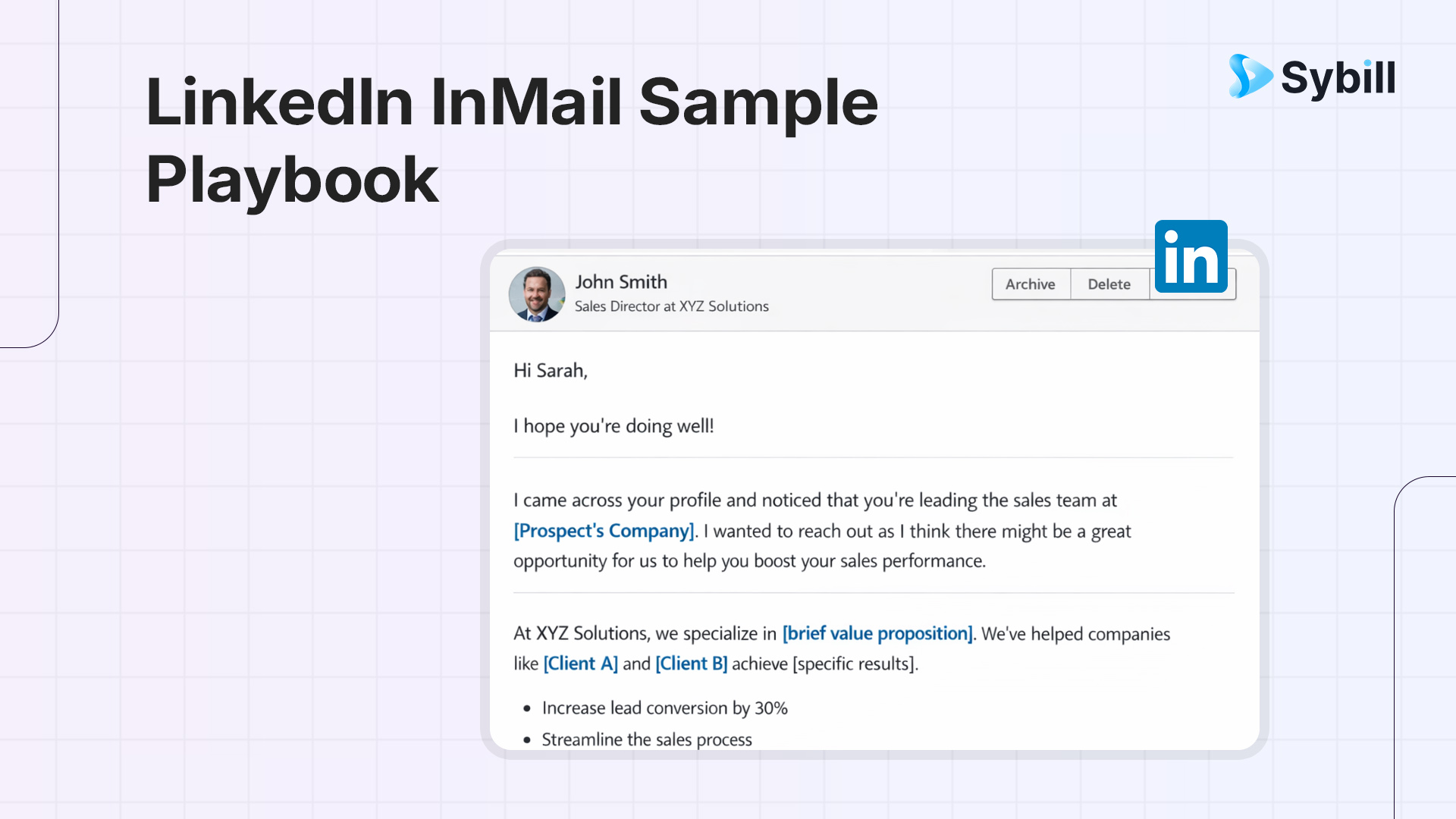
We’ll state the obvious pain all of us suffer - Most LinkedIn InMail (and not to mention, hot takes) is painful to read.
Because sellers forget one brutal fact.
InMail is a paid message.
You are renting attention from someone who did not ask to hear from you.
And attention on LinkedIn is scarce. Unlike hot takes.
That is why spray-and-pray fails so spectacularly. Generic openers. Vague compliments. Feature dumps disguised as curiosity. Messages that sound like a CRM checkbox came to life.
Buyers can smell that from the subject line.
Most InMails fall short because they read like a vendor trying to be polite, not a human with a specific reason to talk.
It earns the open with relevance. It earns the read with context. It earns the reply with a small, respectful ask.
No hype. No “circle back.” No fake personalization.
This blog is a practical playbook. You will get clear frameworks, sample LinkedIn InMail messages, and best InMail subject lines you can actually deploy without sounding like everyone else in their inbox.
If your current InMail strategy feels like shouting into the void, this is where it changes.
LinkedIn InMail is not “a message you send to someone you are not connected to.”
It is a paid interruption.
InMail is a premium LinkedIn feature that lets you message people outside your network. Which means every send costs you credits and every open comes with higher expectations. When someone sees an InMail, they know you chose to spend money to reach them. That changes the bar instantly.
This is why an effective InMail LinkedIn sample reads very differently from a regular LinkedIn DM.
You are operating under three hard constraints that shape how you write.
First, attention is limited. Executives and buyers scan InMail on mobile, between meetings, or while clearing notifications. You get seconds, not minutes.
Second, credits are limited. You cannot afford to waste sends on vague outreach. Every LinkedIn InMail sample has to justify its existence.
Third, expectations are higher. A paid message signals intent. If your InMail sounds generic, you are insulting the recipient’s intelligence.
There are also literal rules that matter. LinkedIn enforces strict character limits for InMail subject lines and message bodies. These limits force clarity. Long-winded openers, bloated context, and feature dumps simply do not survive.
The takeaway is simple. InMail is not a place to introduce yourself. It is a place to earn a response. Everything else in this guide builds on that reality.
LinkedIn messages are for people you are already connected to. They live inside an existing relationship, even if it is weak. That is why most LinkedIn message examples sound conversational and informal.
LinkedIn InMail is different. It lets you message people outside your network and it is a paid feature. That changes buyer psychology. An InMail feels transactional by default unless you earn trust fast.
Use LinkedIn messages when you have a connection path and shared context. Use an InMail LinkedIn sample only when you need access and have a clear, relevant reason to interrupt.
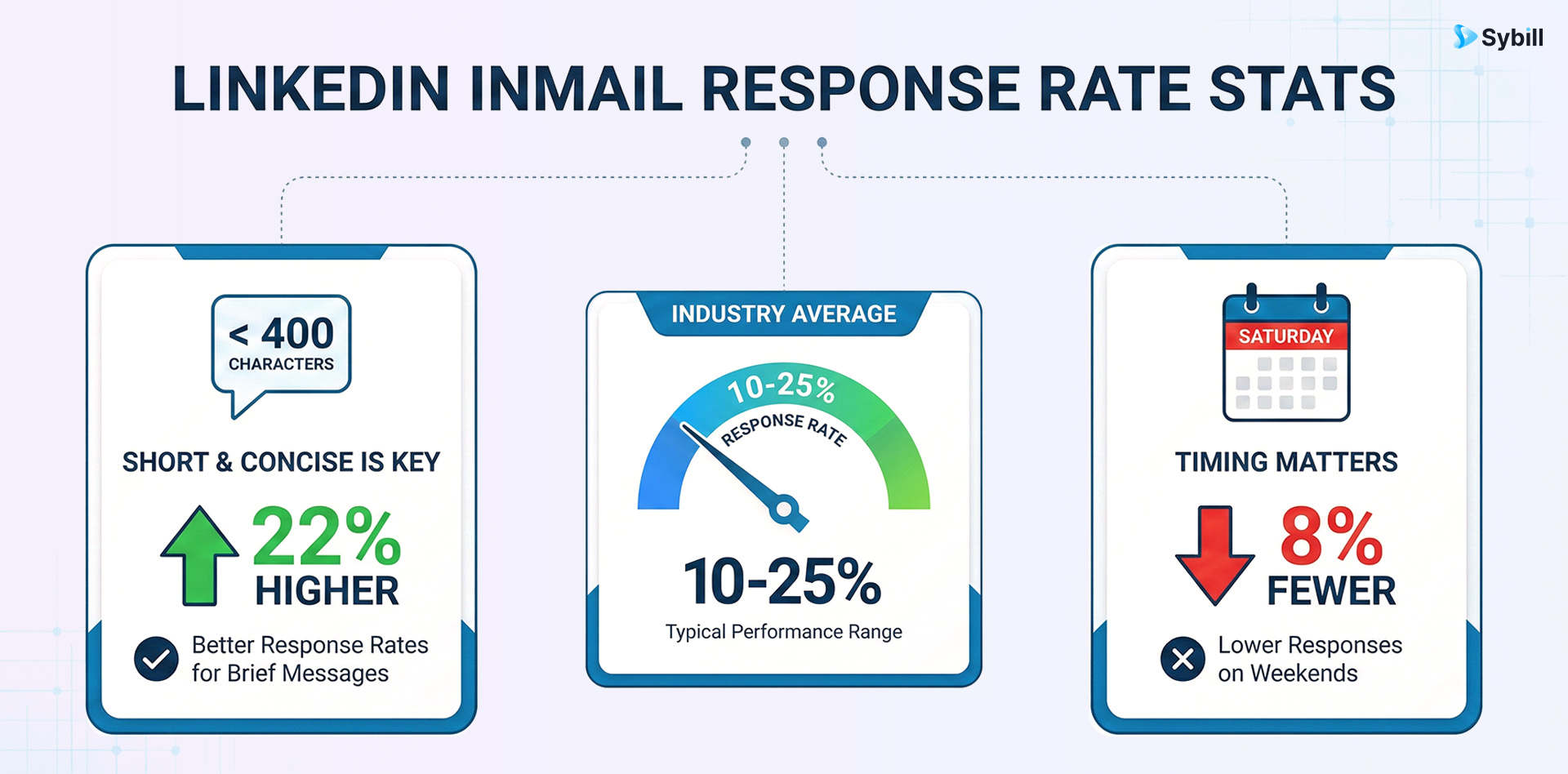
So, how can you improve your LinkedIn InMail response rates? You’re at the right place.
This framework turns any sample LinkedIn InMail into something you can actually customize and scale without losing relevance.
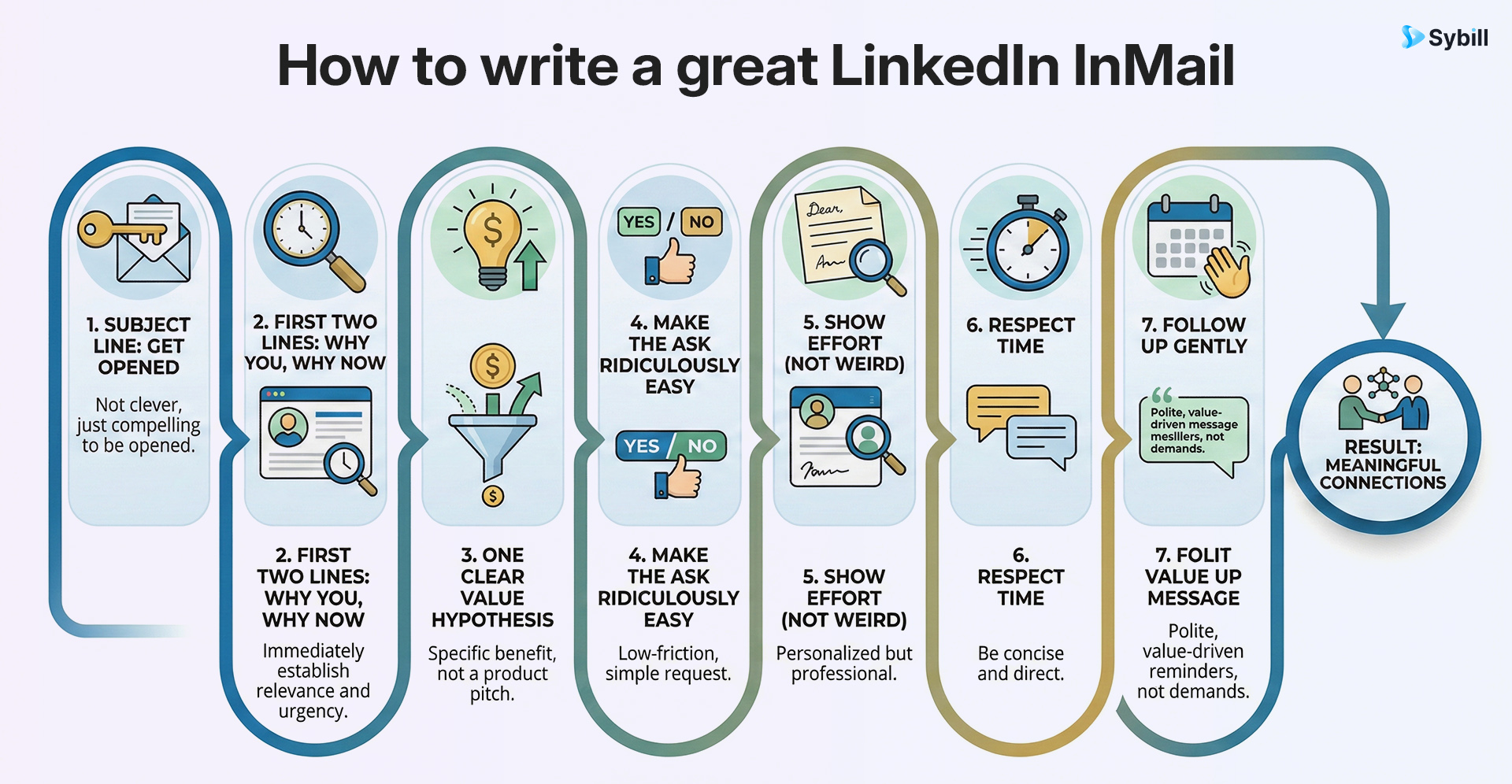
Your subject line has one job. Signal relevance in under a second.
The best InMail subject lines usually follow simple patterns:
If it sounds cute or vague, it will be ignored. The best subject lines for LinkedIn InMail make it obvious why this message exists.
Open with proof of context. A recent post. A pain signal. A funding update. A role change.
Skip throat-clearing. “Hope you’re well” is a tax on attention you cannot afford.
Your value is not your feature. It is the outcome they care about.
Frame it as a hypothesis. “I might be wrong, but…” beats false certainty every time.
One message. One CTA.
Low-friction works best: “Worth a 10-minute sanity check?” or “Open to a quick idea?”
Demonstrate homework in one clean line.
No over-personalization. No forced compliments. Relevance beats flattery.
Short sentences. Tight scannability.
One idea per line. If it looks dense, it will not be read.
Follow-up timing should reflect how fast people reply on LinkedIn.
Nudge with new context. Never with “just bumping this.”
Master this structure and how to write a good InMail on LinkedIn stops being guesswork.
Here is the simplest way to stop overthinking InMail and start getting replies.
Step 1: Pick the right reason to reach out
Trigger-based always beats generic. Hiring, funding, a role change, a product shift, a public POV. If there is no real reason, do not send the message.
Step 2: Choose one pain, one outcome, one next step
Not three pains. Not five benefits. One clear problem. One outcome they care about. One ask.
Step 3: Draft three subject lines, keep the most specific
Specificity wins opens. The best subject line usually feels slightly uncomfortable because it is that direct.
Step 4: Personalize with proof, not compliments
Reference something verifiable. A post. A quote. A decision. “Great profile” is not personalization.
Step 5: Make the ask smaller than your normal sales ask
You are earning a reply, not closing a deal. Think curiosity, not commitment.
Step 6: Send, then follow up once with new relevance
No reminders. No guilt. Add context or walk away.
Follow this and your sample LinkedIn InMail messages will finally sound like intentional outreach. This is the foundation of a strong introduction message LinkedIn buyers actually respond to.
Shorter than you think.
LinkedIn allows up to 200 characters for subject lines and 2,000 characters for the message body. That does not mean you should use them.
For cold outreach, aim for:
The rule of thumb is simple. If your LinkedIn InMail sample does not fit comfortably on one phone screen, it is too long.
Recipients scan. They do not read. Your job is to earn a reply, not deliver a brochure. The best subject lines for LinkedIn InMail and tight, focused bodies respect that reality.
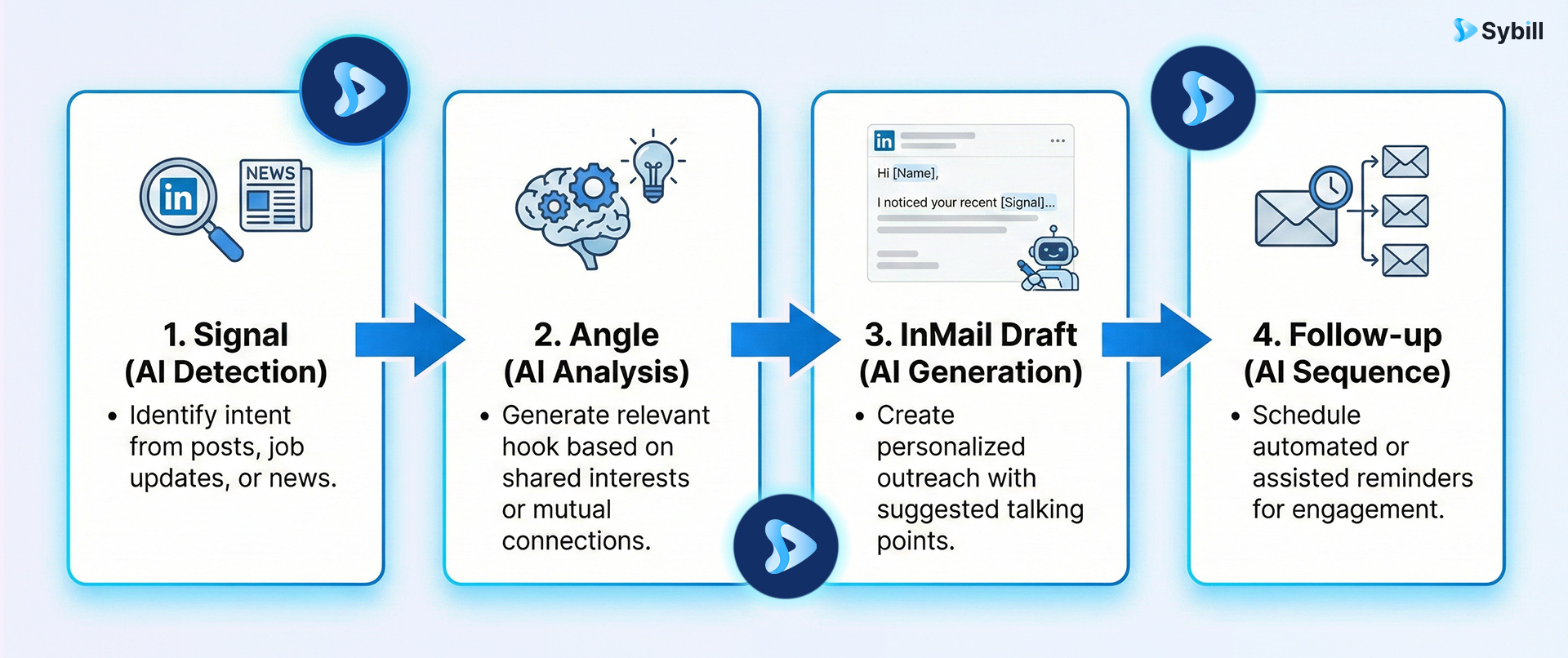
Most InMail fails before it is written. Not because of bad copy, but because reps guess. Guess the angle. Guess the pain. Guess what might matter.
This is where Sybill helps.
And once they respond and the conversation moves forward, CRM Autofill and Email Follow Up keep your deal context and hence, follow-ups, tight, consistent, and context-rich without manual effort.
Sybill does not write spam faster. It helps you send fewer messages that make more sense.
The fastest way to improve LinkedIn InMail response rate is to stop using one generic subject line for everything. The best InMail subject lines are intent-driven. Pick the bucket first. Then pick the line.
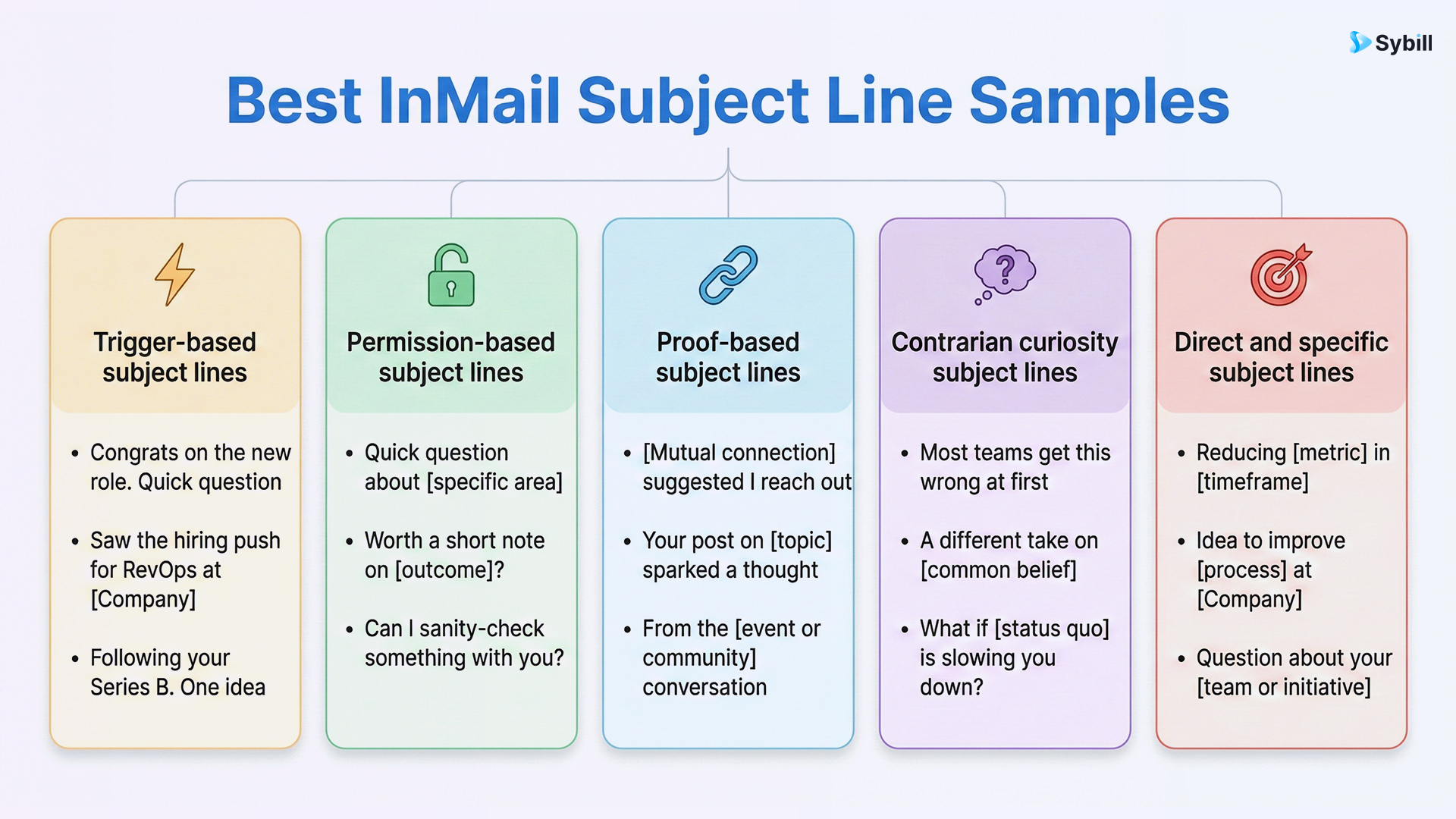
Use when there is a clear reason to reach out now like funding, hiring, expansion, or a role change. Best for warm relevance without prior connection.
Avoid: vague celebration with no follow-up value.
Use when you want to lower resistance and invite a yes or no. Works well for first-touch outreach.
Avoid: empty permission asks with no context.
Use when you have shared context like a mutual connection, community, or public POV. Best for credibility-led outreach.
Avoid: name-dropping without relevance.
Use sparingly. Best for senior buyers who see the same messages every day.
Avoid: clickbait or exaggerated claims.
Use for executives who value clarity over cleverness. These best subject lines for LinkedIn InMail trade charm for precision.
Avoid: sounding transactional without relevance.
If you want to scale the quality of your subject lines without guessing, use Sybill to generate angles based on real buyer signals, objections, and timing. That is how good LinkedIn InMails stop being lucky and start being repeatable.
Each LinkedIn InMail sample below follows the same structure so you can copy, customize, and deploy without guessing.
Best-fit scenario: Company just raised, is hiring fast, or expanding teams
Subject lines (A/B):
LinkedIn InMail sample (body):
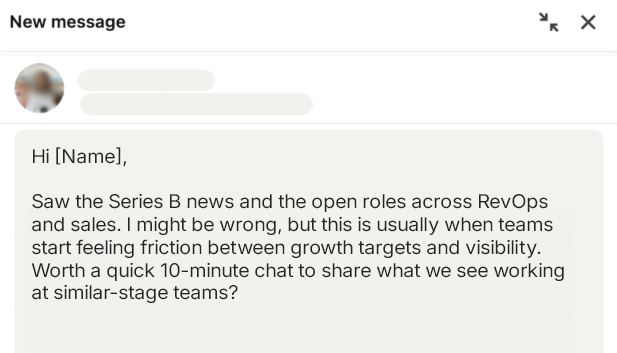
Why it works: Clear trigger. Timely relevance. Small ask.
Fast personalization checklist:
How Sybill helps:
Best-fit scenario: Prospect shared a thoughtful LinkedIn post
Subject lines (A/B):
LinkedIn InMail sample:
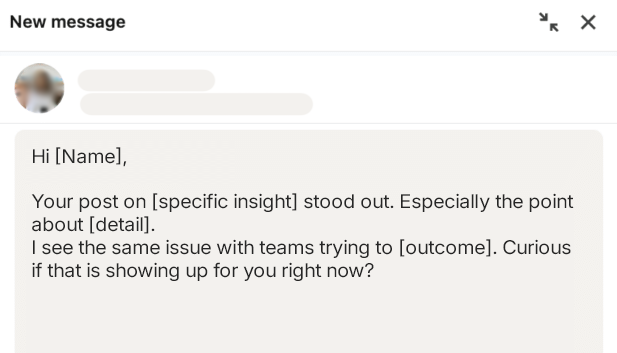
Why it works: Proof of attention without flattery.
Fast personalization checklist:
How Sybill helps:
Best-fit scenario: Shared connection who actually makes sense
Subject lines (A/B):
InMail LinkedIn sample:
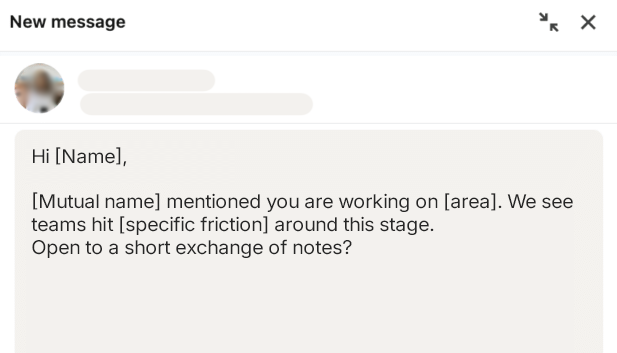
Why it works: Credibility without over-selling.
Fast personalization checklist:
How Sybill helps:
Best-fit scenario: You are unsure who owns the problem
Subject lines (A/B):
LinkedIn InMail sample:
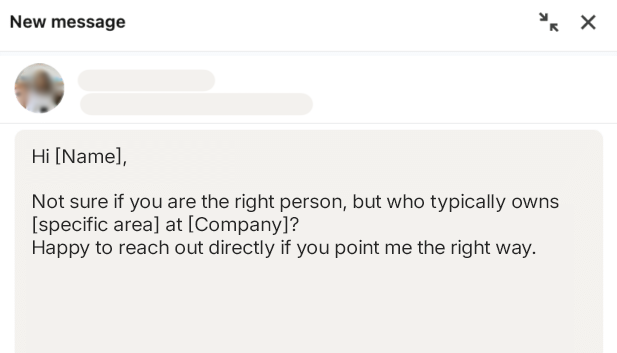
Why it works: Removes sales pressure completely.
Fast personalization checklist:
How Sybill helps:
Best-fit scenario: Cold outreach with unclear ownership
Subject lines (A/B):
Sample LinkedIn InMail:
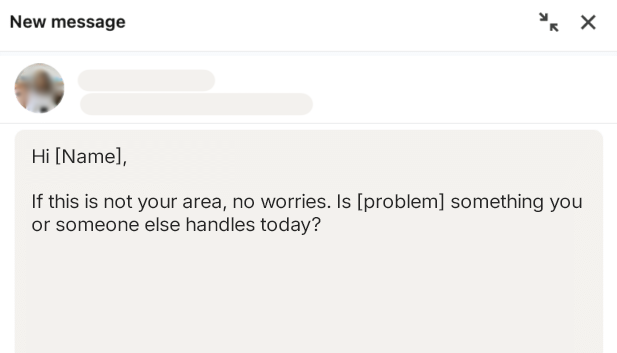
Why it works: Permission plus easy exit.
Fast personalization checklist:
How Sybill helps:
Best-fit scenario: High intent, competitive context
Subject lines (A/B):
Sample LinkedIn InMail:
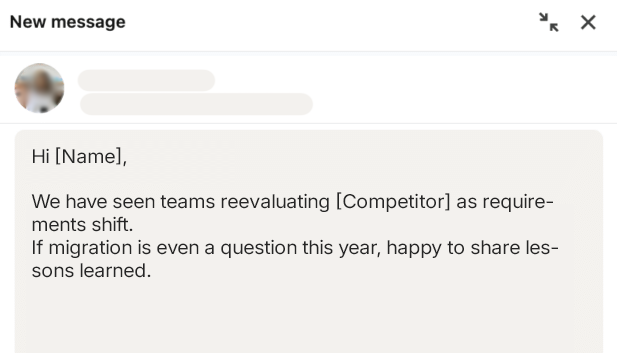
Why it works: Acknowledges risk without pitching.
Fast personalization checklist:
How Sybill helps:
Best-fit scenario: Webinar, conference, roundtable
Subject lines (A/B):
LinkedIn message example:
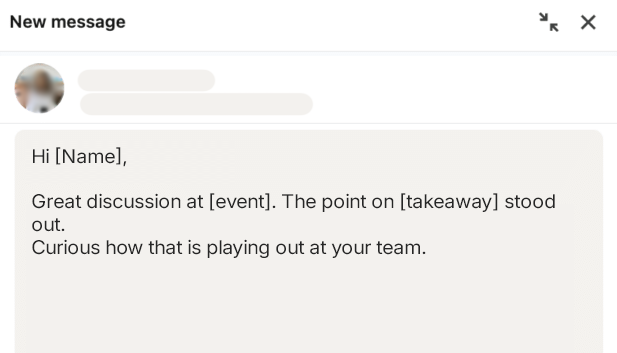
Why it works: Shared moment, not forced continuity.
Fast personalization checklist:
How Sybill helps:
Best-fit scenario: Early relationship building
Subject lines (A/B):
Introduction message LinkedIn InMail sample:
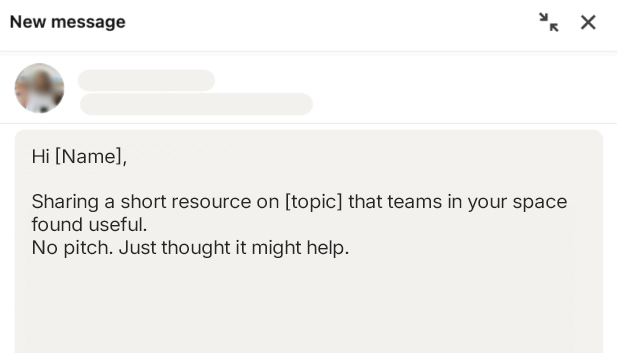
Why it works: Value before ask.
Fast personalization checklist:
How Sybill helps:
Best-fit scenario: Strategic accounts with multiple stakeholders
Subject lines (A/B):
LinkedIn InMail sample:
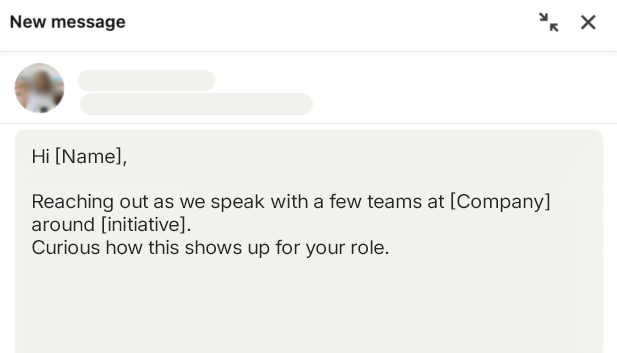
Why it works: Signals coordinated intent.
Fast personalization checklist:
How Sybill helps:
Best-fit scenario: Senior buyers tired of generic outreach
Subject lines (A/B):
LinkedIn InMail sample:
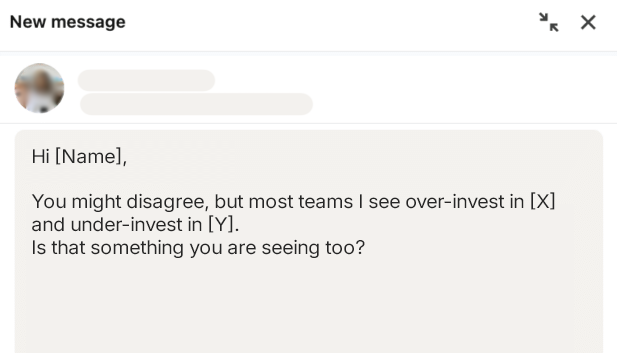
Why it works: Invites thought, not defense.
Fast personalization checklist:
How Sybill helps:
Best-fit scenario: Ghosted after one follow-up
Subject lines (A/B):
Sample LinkedIn InMail:
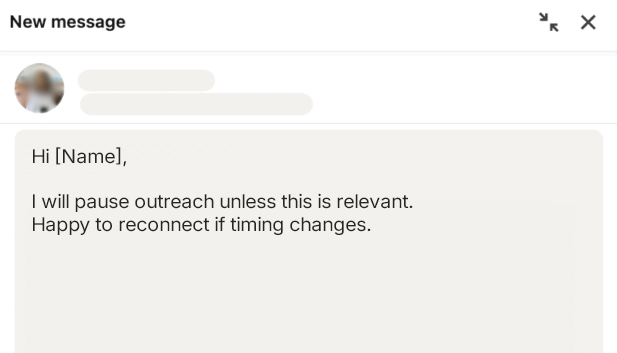
Why it works: Respectful exit invites honesty.
Fast personalization checklist:
How Sybill helps:
Best-fit scenario: Old thread, new signal
Subject lines (A/B):
Sample LinkedIn InMail:
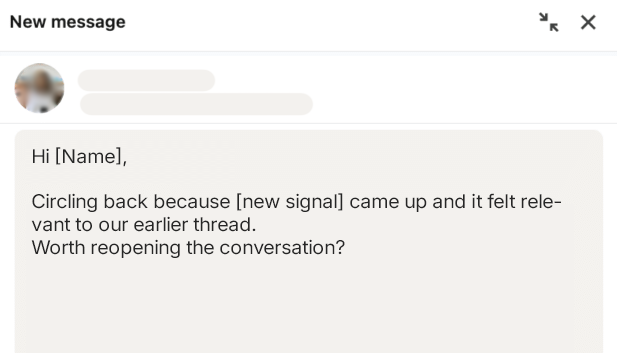
Why it works: New relevance justifies the ping.
Fast personalization checklist:
How Sybill helps:
Ask Sybill:
“Write 3 InMails to a [role] in [industry] at [company type] dealing with [pain]. Include likely objections from similar buyers and a low-friction CTA.”
Pre-Call Brief:
“Summarize recent news, strategic initiatives, and POV content from this company and this buyer persona so I can tailor the first line.”
If your sample LinkedIn InMail is not getting replies, it is usually because of one of these mistakes.
Generic personalization: Using only a name and company is not personalization. It signals automation, not effort.
Too many asks: A demo request, a calendar link, a referral, and a call in one message is not ambitious. It is overwhelming.
Feature-first positioning: Buyers do not care what your product does yet. They care what problem it solves for them.
Long paragraphs with no scannability: Dense blocks of text get skipped. Break lines. Make it skimmable or it will not be read.
No clear “why now”: Without timing or context, your InMail feels random. Random messages get ignored.
No clean follow-up plan: Silence is not a signal to keep nudging.
Strong LinkedIn message examples plan one relevant follow-up and then stop.
You do not need complex experiments to improve a LinkedIn InMail sample. You need discipline.
What to test: One variable at a time. Subject line. First line. CTA size. Trigger-based versus non-trigger outreach. Never all at once.
How to track: Watch three numbers only. Reply rate. Positive reply rate. Meeting rate. Everything else is noise.
Timing: Most replies come fast. If there is no response, wait intentionally before following up. Do not hover.
Quality control: At scale, low LinkedIn InMail response rates hurt more than ego. Poor-performing InMail can drag overall delivery and performance norms down.
Strong best InMail subject lines and relevance protect you from that.
LinkedIn InMail is a relevance test.
When you respect that, everything changes. You stop over-explaining. You stop pitching. You focus on timing, context, and a clear reason to talk.
Use the framework. Pick two or three templates that fit your audience. Run small, intentional tests instead of blasting your entire list.
And stop guessing.
With Sybill, you can Ask Sybill for InMail angles grounded in real buyer cohort objections. Use Pre-Call Brief to anchor your first line in signals, not vibes.
Want better first-touch messages without sounding like everyone else? Click here to try Sybill free.
Yes, LinkedIn InMail works when relevance is real and the ask is small. Buyers respond when the message clearly answers why you are reaching out now and what is in it for them. Most replies, if they happen, come quickly. That is why fast, thoughtful follow-up matters. Wait too long and the context fades. Push too hard and you lose trust. Strong LinkedIn InMail samples balance timing with restraint.
A good first message on LinkedIn starts with context. Reference a trigger, a POV, or a clear business signal. Then give one reason for reaching out and ask one easy question. The best LinkedIn introduction message feels intentional, short, and respectful of time. If it sounds like a pitch, it is already too late.
Sometimes. LinkedIn offers read indicators for InMail, but visibility depends on account type, user settings, and recipient preferences. A read does not guarantee interest. Treat it as a signal, not a verdict. Focus on message quality and relevance, not read receipts.








