
Find us at booth #83, join us for a harbor side happy hour, or catch Gorish’s talk.

Sept, 16-18 > Learn more

%20(1).avif)
Mamta Tainwala

March 19, 2026
The CRM market is on track to hit $262.74 billion by 2032, growing at a CAGR of 12.6%. That is not a niche software category anymore. That is infrastructure. And yet, sales teams everywhere are still wrestling with the same question: which one do I actually buy?
Salesforce, HubSpot, and Zoho CRM have been going head-to-head for years. They all promise better pipeline visibility, cleaner data, and faster deal cycles. They all look great in a demo. They all have glowing reviews on G2 right next to equally frustrated ones.
The difference is not what they say they do. It is what they actually do for your specific team size, workflow, and budget.
This guide cuts through the noise with a no-fluff feature-by-feature comparison of all three CRMs, covers pricing honestly (including what they do not advertise), and answers the question no one else is asking: what happens to your CRM data after the call ends?
Founded in 1999 in California, Salesforce is the world's largest CRM by market share, controlling roughly 23.8% of the global CRM market. It started by bringing on-premise CRM databases to the cloud for small businesses and has since evolved into an enterprise operating system that spans sales, marketing, customer service, analytics, commerce, and more.
Salesforce is designed to do almost anything, which is both its greatest strength and its most common complaint. The platform is extraordinarily customizable. Most implementations require a certified consultant to configure it properly, and the learning curve is steep even after go-live. For large enterprises with complex workflows, dedicated admin support, and multi-department data needs, Salesforce pays off handsomely. For a 10-person sales team trying to just track deals, it can feel like renting a stadium to play pickup basketball.
Best for: Mid-market and enterprise companies with complex, multi-stage sales processes and dedicated technical resources.
HubSpot launched in 2006 out of Boston as a marketing automation company. It added its free CRM to the lineup in 2014, and today the platform covers sales, marketing, customer service, and content management through a suite of interconnected "Hubs."
The free CRM is genuinely useful. You get unlimited contacts, deal pipelines, contact management, email tracking, a meeting scheduler, and basic reporting at zero cost. The catch is that HubSpot's free tier is a floor, not a ceiling. Automation, sequences, and AI features unlock only at paid tiers that scale up quickly and can get expensive. Still, for teams moving off spreadsheets or early-stage businesses looking for a clean starting point, HubSpot offers the most accessible entry point of the three.
HubSpot also wins on user experience. Its interface is clean, onboarding is guided, and users typically do not need extensive training to start getting value. If your team's adoption rate is a concern, that matters a lot.
Best for: Small to mid-sized businesses, marketing-led growth teams, and companies prioritizing a fast, intuitive setup.
Zoho Corporation was founded in 1996 and has been building business software ever since. Zoho CRM launched in 2005 and sits inside a broader suite of 45+ applications covering everything from accounting and HR to project management and email. It is a massive ecosystem at a price point that makes competitors look overpriced.
Zoho CRM is recognized as a Visionary in Gartner's Magic Quadrant, and its AI assistant, Zia, handles lead and deal predictions, anomaly detection, and best-time-to-contact recommendations. The platform is highly customizable, especially for teams with non-standard sales processes, and it bends where most entry-level CRMs do not.
The tradeoff is interface complexity. Zoho's navigation has more tabs than most users know what to do with, and some advanced features require digging. That said, for the price, Zoho delivers a genuinely robust CRM that does not punish small teams for growing.
Best for: Budget-conscious SMBs and teams already in the Zoho ecosystem that want deep customization without enterprise pricing.
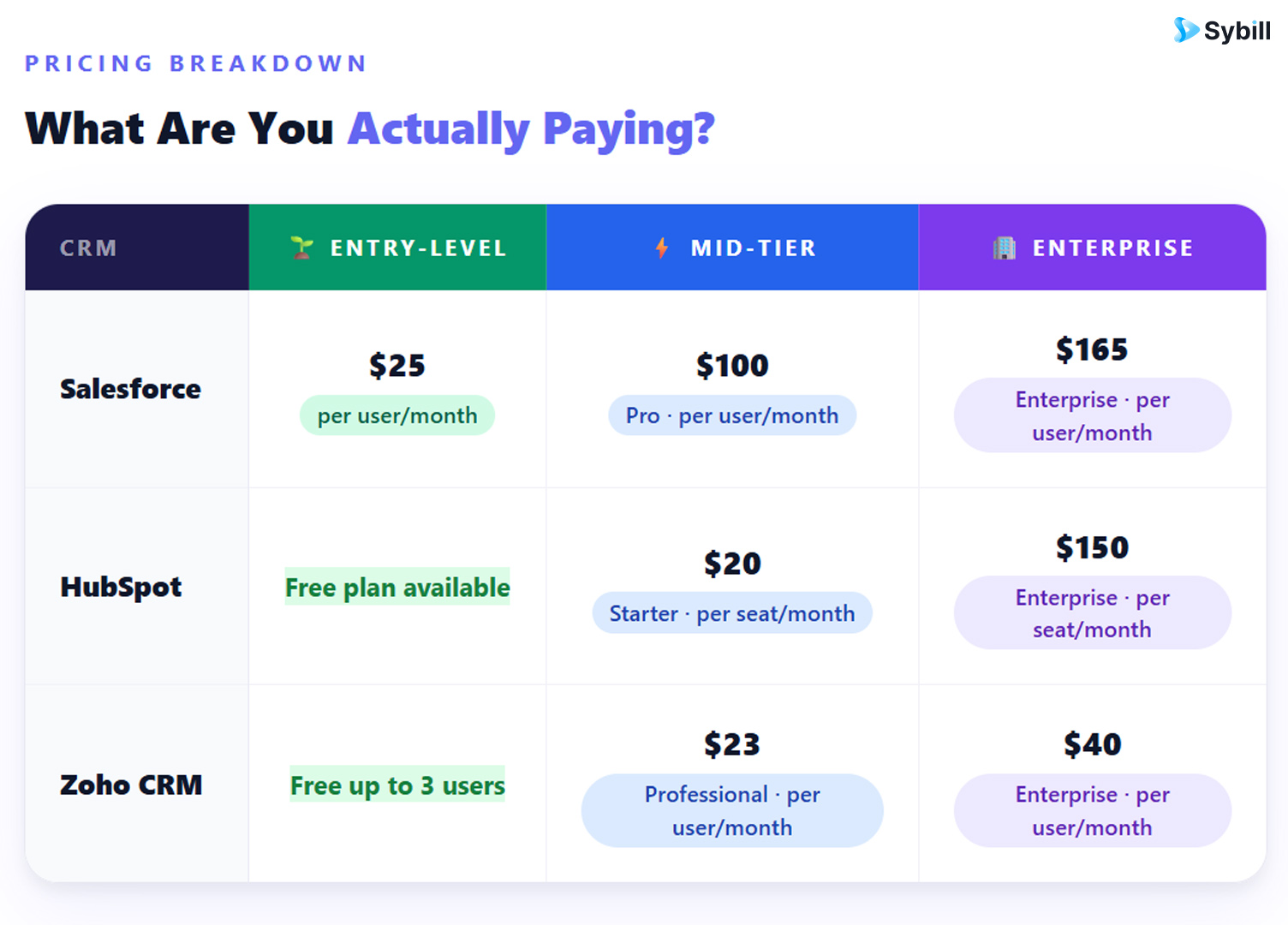
The CRM market is on track to hit $262.74 billion by 2032, growing at a CAGR of 12.6%. That is not a niche software category anymore. That is infrastructure. And yet, sales teams everywhere are still wrestling with the same question: which one do I actually buy?
Salesforce, HubSpot, and Zoho CRM have been going head-to-head for years. They all promise better pipeline visibility, cleaner data, and faster deal cycles. They all look great in a demo. They all have glowing reviews on G2 right next to equally frustrated ones.
The difference is not what they say they do. It is what they actually do for your specific team size, workflow, and budget.
This guide cuts through the noise with a no-fluff feature-by-feature comparison of all three CRMs, covers pricing honestly (including what they do not advertise), and answers the question no one else is asking: what happens to your CRM data after the call ends?
Founded in 1999 in California, Salesforce is the world's largest CRM by market share, controlling roughly 23.8% of the global CRM market. It started by bringing on-premise CRM databases to the cloud for small businesses and has since evolved into an enterprise operating system that spans sales, marketing, customer service, analytics, commerce, and more.
Salesforce is designed to do almost anything, which is both its greatest strength and its most common complaint. The platform is extraordinarily customizable. Most implementations require a certified consultant to configure it properly, and the learning curve is steep even after go-live. For large enterprises with complex workflows, dedicated admin support, and multi-department data needs, Salesforce pays off handsomely. For a 10-person sales team trying to just track deals, it can feel like renting a stadium to play pickup basketball.
Best for: Mid-market and enterprise companies with complex, multi-stage sales processes and dedicated technical resources.
HubSpot launched in 2006 out of Boston as a marketing automation company. It added its free CRM to the lineup in 2014, and today the platform covers sales, marketing, customer service, and content management through a suite of interconnected "Hubs."
The free CRM is genuinely useful. You get unlimited contacts, deal pipelines, contact management, email tracking, a meeting scheduler, and basic reporting at zero cost. The catch is that HubSpot's free tier is a floor, not a ceiling. Automation, sequences, and AI features unlock only at paid tiers that scale up quickly and can get expensive. Still, for teams moving off spreadsheets or early-stage businesses looking for a clean starting point, HubSpot offers the most accessible entry point of the three.
HubSpot also wins on user experience. Its interface is clean, onboarding is guided, and users typically do not need extensive training to start getting value. If your team's adoption rate is a concern, that matters a lot.
Best for: Small to mid-sized businesses, marketing-led growth teams, and companies prioritizing a fast, intuitive setup.
Zoho Corporation was founded in 1996 and has been building business software ever since. Zoho CRM launched in 2005 and sits inside a broader suite of 45+ applications covering everything from accounting and HR to project management and email. It is a massive ecosystem at a price point that makes competitors look overpriced.
Zoho CRM is recognized as a Visionary in Gartner's Magic Quadrant, and its AI assistant, Zia, handles lead and deal predictions, anomaly detection, and best-time-to-contact recommendations. The platform is highly customizable, especially for teams with non-standard sales processes, and it bends where most entry-level CRMs do not.
The tradeoff is interface complexity. Zoho's navigation has more tabs than most users know what to do with, and some advanced features require digging. That said, for the price, Zoho delivers a genuinely robust CRM that does not punish small teams for growing.
Best for: Budget-conscious SMBs and teams already in the Zoho ecosystem that want deep customization without enterprise pricing.
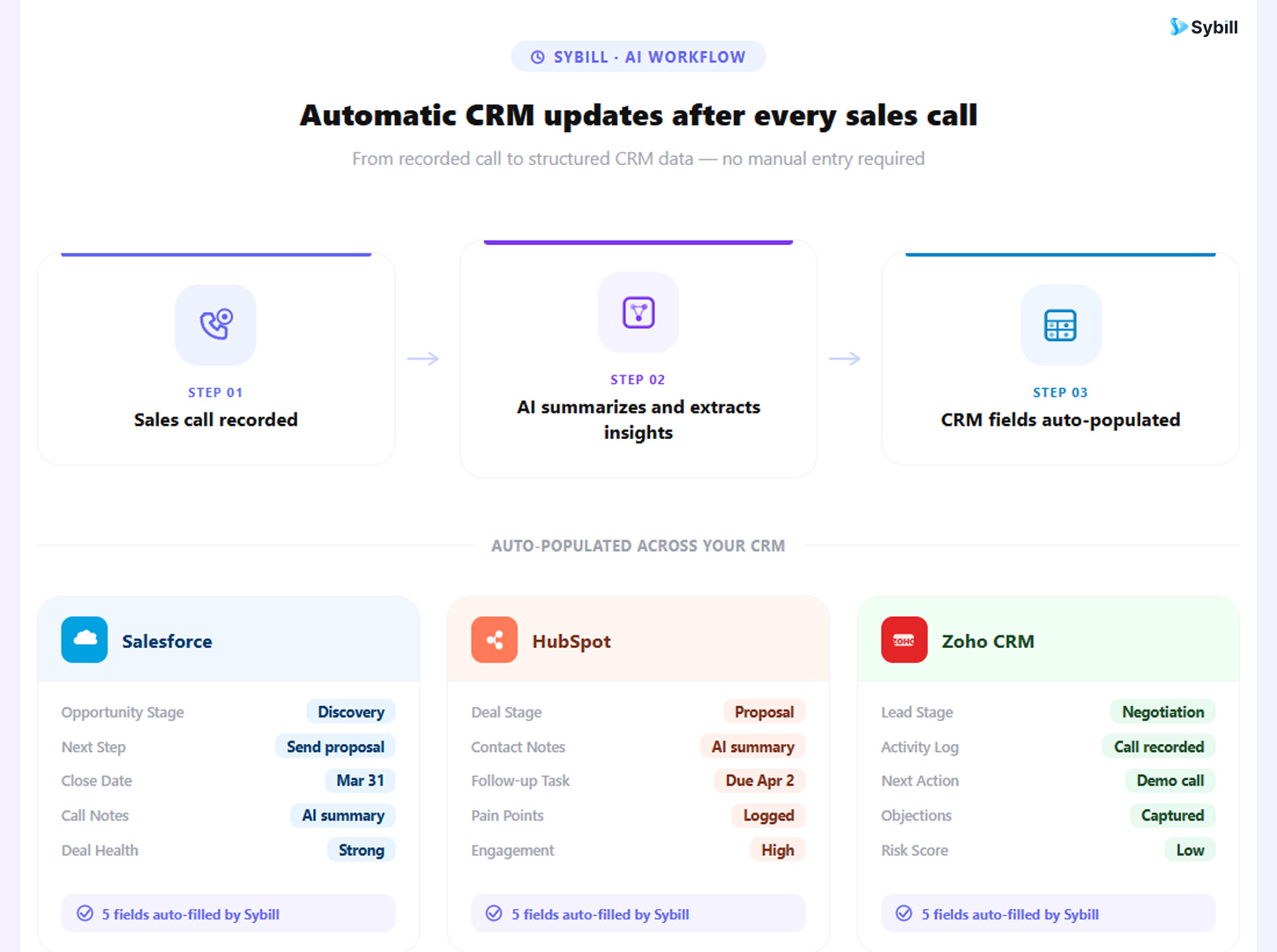
After every call, Sybill's AI analyzes the conversation and extracts the signals that actually move deals forward: pain points, objections, budget signals, decision-maker identification, agreed next steps, MEDDPICC and BANT criteria, and more. It then writes clean, human-sounding updates directly into your CRM fields. No copy-pasting. No end-of-week data dumps. No CRM graveyard.
Sybill integrates natively with Salesforce, HubSpot, and Zoho, which means it works with whichever platform you choose from this comparison. The same CRM you just spent an hour analyzing becomes significantly more useful the moment Sybill starts keeping it accurate automatically.
Key capabilities include:
CRM Autofill: After every call and email, Sybill auto-populates CRM fields including pipeline stage, close date, next steps, champion identification, competitor mentions, and qualification criteria. The entries read like a well-trained AE wrote them, because the AI uses tailored prompts per field type rather than generic summaries.
Magic Summary: Within minutes of a call ending, reps get a structured output covering the call outcome, prospect pain points, objections raised, key takeaways, and buyer engagement signals. Sales call transcripts become action plans, not archives.
Ask Sybill: A natural-language querying layer that lets reps and managers ask questions across all deals, calls, emails, and CRM data in plain English. Want to know which deals have gone quiet after the second call? Which accounts raised pricing objections in the last 30 days? Ask Sybill delivers answers in seconds. This is the kind of cross-deal conversation intelligence that used to require a BI analyst and a few hours of spreadsheet work.
Non-Verbal AI Analysis: Sybill analyzes video calls for non-verbal cues, tracking prospect engagement, identifying who in a multi-stakeholder call is paying close attention and who has checked out. This matters for multi-threaded enterprise deals where reading the room determines your follow-up strategy.
Pre-Meeting Briefs: Auto-generated prep notes before every call, pulling from the full deal history. Reps walk in prepared without spending 20 minutes digging through CRM records, emails, and notes before each conversation.
AI Follow-Up Emails: One-click follow-up drafts written in the rep's own tone based on the specific call just finished. Not generic templates. Contextual emails that reference what was actually discussed.
For sales managers, Sybill generates coaching briefs per rep, deal health snapshots, and pipeline reviews automatically. The AI agents for sales managers use case is particularly strong for teams running MEDDPICC or BANT qualification, because Sybill enforces completeness without managers having to chase anyone.
This directly addresses one of the most common frustrations with all three CRMs in this comparison: RevOps teams consistently cite incomplete CRM data and unreliable forecasting as their top challenges. Sybill closes both gaps at the source, which is the sales conversation itself.
For teams already using the best AI sales tools in their stack, Sybill works as a standalone layer or alongside existing tools to handle the post-call execution work that most platforms still leave to the rep.
And for teams who want better sales forecasting accuracy, Sybill's deal summaries capture buyer sentiment, engagement levels, and conversation signals that transform forecasting from gut feeling to evidence-backed precision.
Get started for free with Sybill and see how much time comes back when the admin runs itself.
What is the main difference between Salesforce, HubSpot, and Zoho CRM?
Salesforce is the most powerful and customizable CRM, built for enterprise teams with complex sales processes and dedicated admin support. HubSpot is the most user-friendly and accessible option, ideal for small to mid-sized teams prioritizing fast setup and marketing alignment. Zoho CRM is the most cost-effective choice, offering deep customization and a broad feature set at pricing that does not punish small teams.
Which CRM is best for small businesses?
HubSpot and Zoho CRM are both strong choices for small businesses. HubSpot's free plan and intuitive interface make it the easiest to get started with. Zoho's pricing and customization capabilities make it more powerful per dollar once your team's needs grow beyond basic contact and pipeline management.
Is Salesforce worth the cost for mid-sized companies?
For mid-sized companies with complex, multi-team sales processes and the internal resources to configure and maintain the platform, Salesforce delivers strong ROI. For teams without a dedicated Salesforce admin, the cost and complexity often outweigh the benefits. HubSpot or a well-configured Zoho CRM will frequently cover 80% of the same functionality at a fraction of the price.
What is the biggest problem with CRM tools like Salesforce, HubSpot, and Zoho?
The biggest problem shared across all three is data quality. All three CRMs depend on reps manually updating fields, logging call notes, and recording next steps accurately and consistently. In practice, this rarely happens. Important deal signals captured in sales conversations never make it into the CRM, which leads to inaccurate pipelines, unreliable forecasts, and missed follow-ups. Tools that automate CRM updates directly from sales conversations address this at the source.
Does Sybill work with Salesforce, HubSpot, and Zoho?
Yes. Sybill integrates natively with Salesforce, HubSpot, and Zoho CRM, as well as Microsoft Dynamics 365. It automatically populates CRM fields after every call and email, writes deal summaries, drafts follow-up emails, and surfaces buyer intent signals directly into your existing CRM workflow. No migration required. Check out how Sybill improves CRM data quality for the full breakdown.
How does AI change the way sales teams use CRM?
AI is shifting CRM from a passive recording system to an active intelligence layer. Rather than waiting for reps to update fields, AI-powered tools extract signals from sales calls and emails, populate CRM records automatically, surface deal risks proactively, and generate follow-ups without manual input. Explore AI CRM use cases that modern sales teams are already using to save five-plus hours per week.
What should I look for when choosing between Salesforce, HubSpot, and Zoho?
Focus on five factors: ease of use (will your reps actually use it?), automation depth (how much admin does it reduce?), pricing transparency (what does it actually cost at your user count?), integration fit (does it connect to the tools already in your stack?), and scalability (does it grow with you without surprise bills?). The best CRM software for small businesses guide is a useful resource for teams at the evaluation stage.
Salesforce is the most powerful and customizable CRM, built for enterprise teams with complex sales processes and dedicated admin support. HubSpot is the most user-friendly and accessible option, ideal for small to mid-sized teams prioritizing fast setup and marketing alignment. Zoho CRM is the most cost-effective choice, offering deep customization and a broad feature set at pricing that does not punish small teams.
HubSpot and Zoho CRM are both strong choices for small businesses. HubSpot's free plan and intuitive interface make it the easiest to get started with. Zoho's pricing and customization capabilities make it more powerful per dollar once your team's needs grow beyond basic contact and pipeline management.
For mid-sized companies with complex, multi-team sales processes and the internal resources to configure and maintain the platform, Salesforce delivers strong ROI. For teams without a dedicated Salesforce admin, the cost and complexity often outweigh the benefits. HubSpot or a well-configured Zoho CRM will frequently cover 80% of the same functionality at a fraction of the price.








