
Find us at booth #83, join us for a harbor side happy hour, or catch Gorish’s talk.

Sept, 16-18 > Learn more

%20(1).avif)
Mamta Tainwala

August 12, 2026
AI chat apps used to be easy to compare.
You typed something into a box.
The AI answered.
Then every major product started adding search, files, memory, voice, coding, apps, agents, company data, and the ability to take actions.
So in 2026, I do not think the most useful question is:
"Which AI chatbot gives the best answers?"
A better question is:
"What can this AI know before it answers me?"
That distinction matters.
ChatGPT is excellent when I need a general-purpose thinking partner.
Claude is particularly strong when I want to work through substantial documents and complex written material.
Perplexity is built around finding current information and showing me where it came from.
Microsoft Copilot becomes more useful when the information I need already lives in Microsoft's ecosystem.
Poe is useful when I want to access and compare several AI models without maintaining a separate subscription for each.
And Sybill is built for a much narrower question:
What if the AI chat already understood my deals, buyers, calls, emails, CRM, Slack conversations, and how my company sells?
That is why my top pick depends heavily on the job.
For general-purpose AI chat, ChatGPT is the obvious starting point.
For B2B sales and revenue work, Sybill is my pick because the chat starts with the sales context a generic assistant would otherwise need you to explain.
If you are researching AI for sales rather than AI chat more broadly, you may also want our guide to the best AI sales tools or our comparison of the best AI sales assistants.
Sybill currently offers a free tier, Pro at $30 per user per month, Business at $90 per user per month, and Enterprise pricing. Business adds full deal and organization context across calls, email, CRM, and Slack, as well as CRM Autofill, API and MCP access, and Deal Workspace.
ChatGPT Plus is currently $20 per month. Claude Pro is $20 monthly or $200 annually. Grok's SuperGrok plan is $30 per month. Poe's current annual subscription options start at the equivalent of $4.17 per month. Lindy Plus is $29.99 per user per month. Mistral Vibe Pro is $14.99 per month.
An AI chat app is a conversational interface powered by artificial intelligence that lets users ask questions, give instructions, work with information, and refine outputs through back-and-forth conversation.
That definition sounds simple.
The products are not.
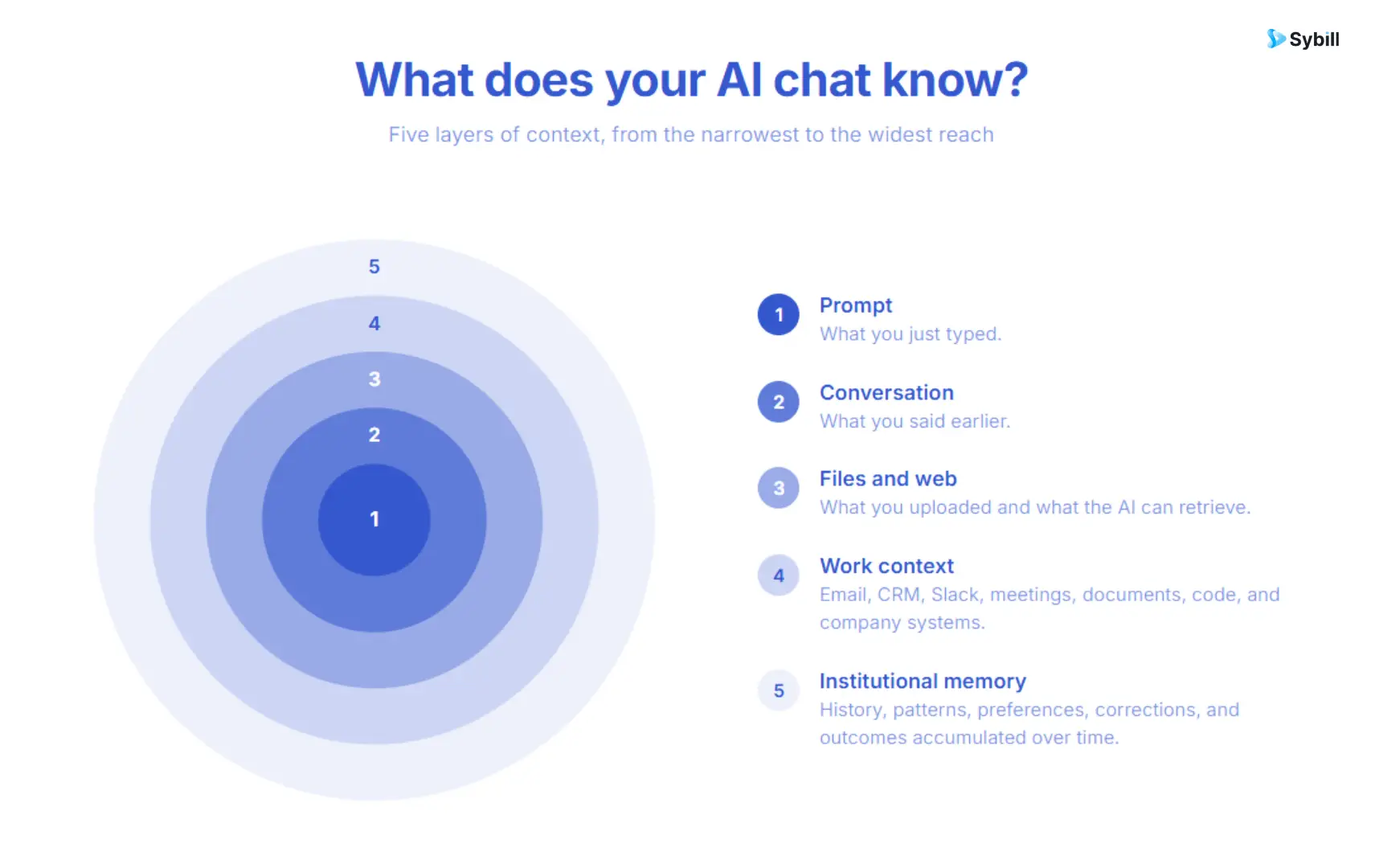
Modern AI chat apps can now combine several types of context:
The AI remembers what you said earlier in the thread.
The AI remembers useful information from previous conversations.
The AI can work with PDFs, spreadsheets, presentations, images, documents, or code you provide.
The AI can retrieve current information rather than relying only on what its underlying model learned during training.
The AI can connect to systems where your actual work lives.
That might mean Slack, email, CRM, documents, calendars, code repositories, meetings, or company knowledge.
The AI does not merely understand what needs to happen. It can use tools to do something about it.
This last distinction is changing the category fastest.
A chat box used to be the product.
Increasingly, the chat box is becoming the interface to a much larger system.
If you want to understand the last layer more deeply, our guide to AI agent memory explains why persistent context changes how useful an assistant becomes over time.
I work at Sybill, so I have much deeper first-hand knowledge of Sybill than of the other products here.
Rather than manufacture a "personally tested for four weeks" badge, I compared the products using current first-party product information, documentation, pricing, and the workflows each product is explicitly designed to support.
I evaluated them across six dimensions.
Can the app reason through more than an obvious question?
Does the conversation hold together as the request becomes more complicated?
What information can it bring into the conversation without forcing the user to explain everything manually?
Does useful context disappear when the conversation ends, or can the assistant build on previous work?
Can the chat search the live web or other current information sources when necessary?
Can the AI do anything beyond returning text?
This matters more than a benchmark score.
A brilliant general-purpose AI is not automatically the best choice for sales, coding, research, or another specialized workflow.
With that framework, here are the 10 AI chat apps I would consider.
Best for: Account executives, sales managers, sales leaders, RevOps, and other people who need to ask questions about buyers, deals, and pipeline
What makes it different: The conversation begins with revenue context rather than an empty prompt.
Pricing: Free; Pro $30/user/month; Business $90/user/month
Most AI chat apps are designed to answer almost anything.
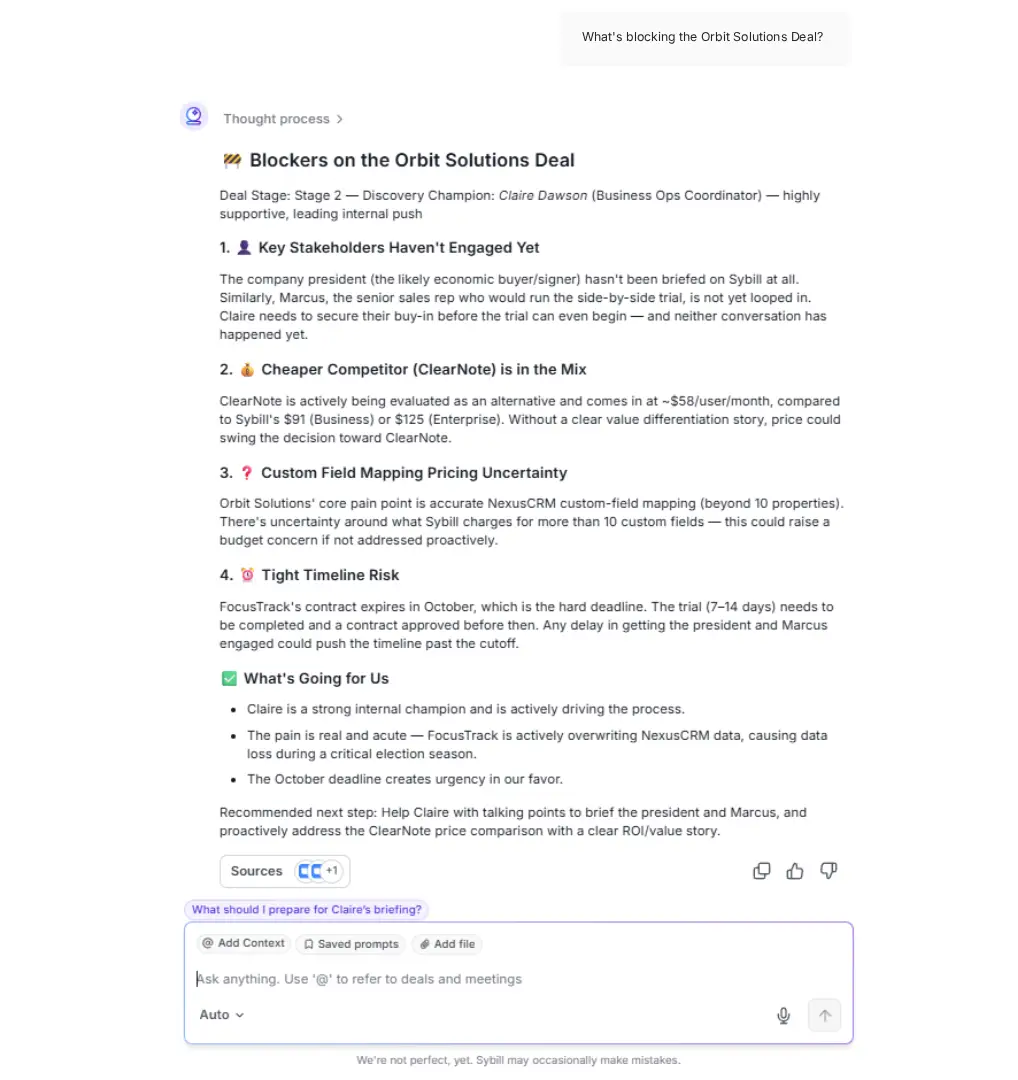
Ask Sybill is designed to answer a much narrower set of questions unusually well:
What is actually happening in my sales world?
You can ask things such as:
The important part is not that Sybill has a chat interface.
Plenty of products have chat.
The important part is what sits behind that chat.
Sybill learns deal context from CRM, internal and external calls, email, calendar, and Slack. Ask Sybill can then combine those sources with historical context, previous chats, sales knowledge, and frameworks such as BANT and MEDDPICC before responding.
That means a salesperson does not have to begin every interaction with:
"Here is the transcript from the call. Here is the account background. Here is the CRM record. Here are the emails. Here are the stakeholders. Here is what happened two months ago."
The context already exists.
That is particularly valuable in long sales cycles where the useful answer might depend on information spread across several interactions.
Sybill can also move beyond the answer.
Ask Sybill can create sales-ready assets such as mutual action plans, battlecards, positioning documents, pipeline reports, and sales slides.
For individual opportunities, Deal Inspection lets sellers and managers ask questions about qualification, buyer intent, risk, momentum, and deal progression.
Competitor Intelligence can identify competitor mentions and analyze win and loss patterns.
And the context does not stay trapped in chat.
Sybill can produce Pre-Meeting Briefs, Magic Summaries, Personalized Emails, CRM Autofill, and AI Tasks.
The Deal Workspace also puts Ask Sybill beside the opportunity's current state and activity history.
Sybill is not trying to be your AI for everything.
I would not open Sybill to debug Python or plan a vacation.
The specialization is exactly why it belongs here.
A seller asking "What should I do next?" usually does not need the AI with the largest possible universe of knowledge.
They need the AI with the right knowledge about that particular deal.
For a broader look at this category, see our guides to AI sales assistants, conversation intelligence, and revenue intelligence.
Sybill's free tier includes Ask Sybill context across meetings, dialer calls, and emails, along with meeting recordings, summaries, briefs, follow-up emails, task execution, and other core capabilities. Pro is $30 per user per month. Business is $90 and adds broader deal and organization context across CRM and Slack, CRM Autofill, API and MCP access, and Deal Workspace.
Best for: People who want one conversational AI for a very broad range of everyday work
If Sybill is deliberately narrow, ChatGPT is the opposite.
Its biggest advantage is range.
ChatGPT can help with:
Current ChatGPT plans also support features such as Projects, memory, search, deep research, file uploads, data analysis, apps connecting to external tools, and broader work capabilities depending on subscription level.
That breadth makes ChatGPT the easiest general recommendation on this list.
If someone tells me nothing about their job and asks what AI chat app they should try, ChatGPT is an obvious place to begin.
General-purpose context and domain-specific context are not the same thing.
I might use ChatGPT to think through sales strategy.
But if I ask:
"Why is the Cyberdyne deal slipping?"
a useful answer depends on whether the AI actually knows what happened in Cyberdyne.
That is why general and specialized AI chat apps can coexist.
ChatGPT has a free tier. ChatGPT Plus currently costs $20 per month and includes broader model and tool access, voice, image generation, file analysis, deep research, and other expanded capabilities.
Best for: Writing, document analysis, research, and work where nuance matters
Claude is particularly compelling when the conversation starts with a lot of information.
Anthropic currently offers web search, memory across conversations, files and code execution, connectors, extended thinking, projects, and several connected work experiences through Claude's plans.
Claude Projects create self-contained workspaces with their own chat histories and knowledge bases, letting users keep documents and related conversations together.
That makes Claude useful when you are not asking one isolated question.
You are working through a body of material.
Claude can access increasingly broad tool and work context, but it is still a general-purpose assistant.
If the quality of the answer depends on a specialized system that Claude is not connected to, someone still needs to supply or connect that context.
Claude has a free plan. Pro costs $20 per month or $200 annually, which works out to roughly $17 per month.
Best for: Research, fact-checking, vendor comparisons, market analysis, and questions where sources matter
Perplexity starts from a fundamentally different assumption:
The answer should be traceable.
That makes it especially useful when the task depends on current public information.
Rather than returning an answer and leaving you to figure out where it came from, Perplexity is organized around web retrieval and citations.
Its paid offering adds more advanced research capabilities and higher usage. Pro currently costs $20 per month or $200 per year.
Research is the product's center of gravity.
That is different from being an assistant that owns a persistent operational workflow.
If you need to find the answer, Perplexity is strong.
If the next requirement is "now update six business systems based on the answer," another kind of platform may be a better fit.
Perplexity has a free offering. Pro currently starts at $20 per month.
Best for: People whose documents, spreadsheets, email, and work already live in Microsoft's ecosystem
Microsoft Copilot exists in several forms, which can make the product naming confusing.
The consumer version of Microsoft Copilot is available for free and is intended for general AI questions and web-based work.
Microsoft 365 Copilot Chat is available to users with eligible Microsoft 365 subscriptions and provides secure, web-grounded AI chat, file uploads, enterprise controls, and access to agents.
With the appropriate Microsoft 365 Copilot licensing, the assistant can draw on work information such as files, emails, chats, people, and other Microsoft data.
That is where Copilot becomes much more interesting.
The advantage is not necessarily that another AI model cannot summarize a Word document.
It is that the AI can sit inside the work environment where the document already lives.
The product becomes substantially more valuable if Microsoft 365 is already central to how you work.
If it is not, the ecosystem advantage shrinks.
The basic consumer Microsoft Copilot experience is free. Microsoft also bundles AI capabilities into Microsoft 365 subscriptions and sells additional Copilot products for business users.
Best for: Current events, trends, social discussion, and questions where recent information matters
Grok leans heavily into real-time information.
The current Grok experience combines web search with live X integration, alongside reasoning, code generation, image and video generation, voice, PDF analysis, vision, and memory across chats.
For some questions, direct access to what people are saying right now is genuinely useful.
Imagine researching:
That is a different research problem from synthesizing a set of stable web documents.
Real-time social information is noisy.
Current does not automatically mean accurate or representative.
When the consequence of being wrong is high, verify the original source rather than treating social consensus as evidence.
SuperGrok currently costs $30 per month and includes higher limits, frontier models, connectors, Expert mode, and image and video generation.
Best for: Users who want capable reasoning, coding, and long-context chat without a consumer subscription
DeepSeek's consumer app is free, with web search, a reasoning-oriented mode, file upload, and synchronized chat history among its available capabilities.
DeepSeek's V4 Preview is currently available on web, app, and API. Its official documentation lists a 1 million token context length for the current V4 models.
That makes DeepSeek noteworthy for technically oriented users who care about reasoning and long context but do not necessarily want another monthly subscription.
For company-confidential or regulated work, do not choose any consumer AI chat app based only on model quality.
Your organization should evaluate the vendor's current privacy terms, data processing, deployment requirements, and internal security policy before sending sensitive information.
The DeepSeek consumer chat is currently free. API access is usage-based. Current DeepSeek V4 API pricing varies between its Flash and Pro models.
Best for: People who want to switch between AI models without maintaining a separate app and subscription for every provider
Poe solves a different problem.
Instead of asking you to pick one AI company, Poe gives you access to many AI models and bots through one interface.
Its current subscription page includes access to models from several major AI providers, with higher tiers increasing the pool of compute points available.
That is useful when you care about the differences between models.
Maybe you prefer one model for writing.
Another for reasoning.
Another for code.
Another for image creation.
Poe lets you move between those experiences without rebuilding your entire AI stack around each provider.
The interface solves access fragmentation, but it does not magically give every model the same memory, connected data, or work context.
The quality and capabilities of each conversation still depend on the underlying model and bot you select.
Poe has free usage with daily points. Current paid annual plans begin at $49.99 per year, equivalent to about $4.17 per month, with larger compute pools available at higher tiers.
Best for: Teams that want to ask questions across internal information and delegate work from the same interface
Lindy deserves a place on this list because it pushes the chat interface beyond question answering.
The current Lindy product includes persistent workspace context, Slack interaction, meeting history, inbox management, scheduled routines, integrations, MCP support, computer use, and approval-controlled actions.
That creates a useful pattern:
Ask the company a question.
Then ask the assistant to do something with the answer.
For teams whose information is scattered across several work tools, that can be more valuable than another general-purpose chatbot.
Broad company context is useful, but it is different from deep domain-specific context.
A team knowledge assistant may know what your company discussed.
A specialized sales assistant additionally needs to understand concepts such as qualification, deal progression, buyer roles, pipeline risk, and what those signals mean in a revenue workflow.
Lindy Plus currently costs $29.99 per user per month with 3,000 credits per user. Pro is $99.99 and Max is $199.99.
Best for: Users who want a general AI chat, work agent, document context, and coding capabilities from Mistral
If you remember Mistral's chat app as Le Chat, the product has evolved.
Mistral now calls the product Vibe, combining its AI chat assistant and work agent with a broader coding experience.
The current free plan includes chat, web search, image generation, limited coding, more than 100 connectors, and API credits.
Paid Vibe expands messages, web search, longer tasks, coding, project folders, document uploads, and other agent capabilities.
Mistral also supports scheduled tasks, skills, document libraries, project folders, connectors, workflows, and private enterprise deployment at different plan levels.
The product is changing quickly.
That makes Vibe interesting, but it also means buyers should evaluate the current product rather than relying on older reviews of "Le Chat."
Mistral Vibe has a free plan. Pro currently costs $14.99 per month, while Team costs $24.99 per user per month.
Start with the information the AI needs to know.
Calling everything an "AI chatbot" hides an increasingly important distinction.
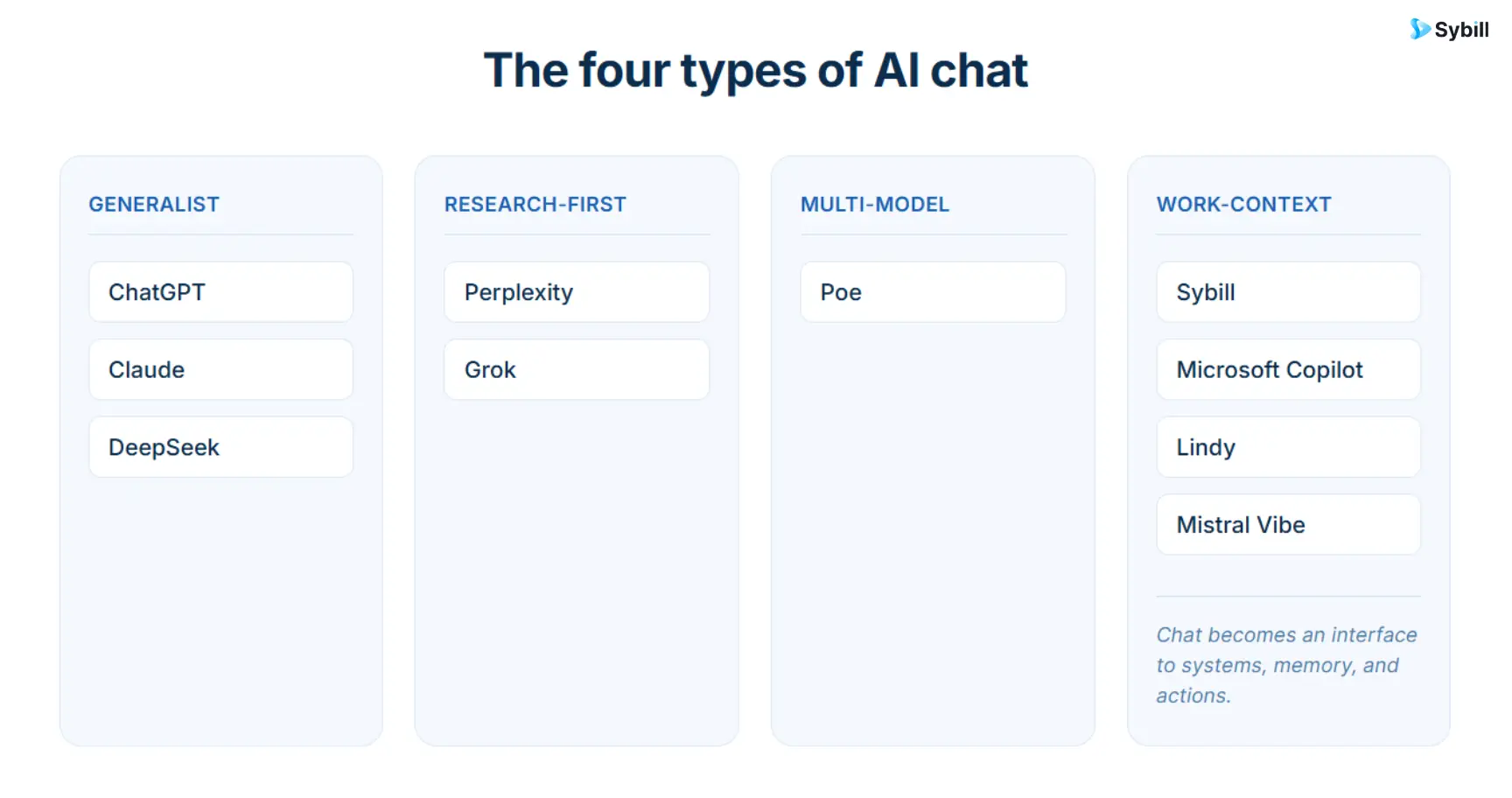
I see four categories emerging.
Examples: ChatGPT, Claude, DeepSeek
These are excellent when you want a capable mind on demand.
The user defines the problem.
The assistant helps solve it.
Memory, projects, and connectors are making these systems less blank over time, but their basic advantage remains flexibility.
Examples: Perplexity, Grok
These products become especially useful when the answer depends on information outside the current conversation.
Perplexity emphasizes source-backed web research.
Grok emphasizes currency and live social information.
Example: Poe
These products treat model choice itself as part of the user experience.
Instead of choosing one provider, you choose which model makes sense for the current task.
Examples: Sybill, Lindy, Microsoft Copilot, Mistral Vibe
This is the category I think becomes increasingly important inside companies.
The value comes from the information around the language model.
What systems can it see?
What history does it retain?
What permissions does it have?
What business objects does it understand?
What actions can it safely execute?
And importantly:
Does it understand the meaning of that information inside your specific workflow?
Imagine asking an AI:
"What should I do next?"
That question is almost meaningless without context.
A generic assistant might ask:
Next on what?
A project?
A trip?
A coding problem?
A customer issue?
A sales opportunity?
Now imagine the same question inside a specific work system.
For a salesperson, "What should I do next?" might require understanding:
The model did not necessarily become smarter.
The question became answerable because the context improved.
This applies everywhere.
Copilot gets better when it can use your Microsoft work data.
Claude gets better when a Project contains the right documents.
Perplexity gets better when the answer can be grounded in current sources.
Lindy gets better when the company's tools are connected.
Sybill gets better when the deal history, buyer interactions, CRM, Slack context, and previous outcomes are already part of the system.
That is why memory is not just a convenience feature.
It changes what questions become possible.
Our guide to how AI agent memory works explains this in more depth. For a more technical view of how memory fits alongside instructions and reusable capabilities, see AI agent components explained.
There is another dividing line worth paying attention to.
Some AI chat apps primarily answer.
Others can act.
Suppose I ask:
"What are the next steps from this meeting?"
An answer-only assistant might produce:
Useful.
Now consider:
"Handle the next steps from this meeting."
That is a different product requirement.
The AI may need to:
The chat interface looks almost identical.
The system underneath it is completely different.
This distinction becomes especially important as AI agents for sales teams and other business agents become more common.
An agent needs more than conversational fluency.
It needs memory, tools, permissions, instructions, and some understanding of when to act and when to ask a human.
A salesperson can use ChatGPT.
I do.
But there is an inherent limitation if the AI does not know the deal.
Consider asking:
"Help me prepare for tomorrow's meeting with Acme."
A generic chat can give you an excellent meeting-prep framework.
But an informed sales assistant should already know:
Who is attending?
What roles do they play?
What happened in the last meeting?
What has happened over email since?
Which pain points matter most?
Which objection is still unresolved?
What commitments did we make?
What qualification criteria are missing?
Did a competitor enter the conversation?
What does the CRM say?
Which tasks are overdue?
What should we accomplish in this particular meeting?
That is why Pre-Meeting Briefs pull together attendee research with prior calls, emails, CRM context, and open deal work.
The same difference appears after the meeting.
A generic AI can summarize a transcript.
Magic Summary captures the sales context in a structure designed around the conversation.
A generic AI can draft an email.
Personalized Emails use call context and the rep's style to create the follow-up.
A generic AI can tell you what should be entered into CRM.
CRM Autofill is designed to move conversation information into structured CRM fields.
A generic AI can list next steps.
AI Tasks captures the actions and helps move them toward completion.
And a generic AI can discuss sales theory.
Ask Sybill can answer questions against the actual sales context.
This is the larger evolution from conversation intelligence to revenue intelligence.
The first question was:
"What did the buyer say?"
The next question became:
"What does that mean for the deal?"
Now the question is increasingly:
"Given everything we know, what should happen next?"
That is a much more interesting use for chat.
There is no single best AI chat app because "chat" is no longer one product category.
If I want one flexible AI for general work, I would start with ChatGPT.
If I am working through long documents or written analysis, Claude deserves a serious look.
If I need current public research with sources, Perplexity is built around that job.
If I live in Microsoft's ecosystem, Microsoft Copilot benefits from being close to the tools and data I already use.
If I want real-time web and X information, Grok has a distinct advantage.
If I want free reasoning and long-context access, DeepSeek is compelling.
If I want several AI model families behind one interface, Poe solves that cleanly.
If I want a company assistant that can retrieve internal knowledge and execute work, Lindy is designed around that model.
If I want Mistral's combination of chat, work, and coding, Vibe has become a much broader product than the old Le Chat.
And if my job is selling B2B, I would choose Sybill.
Not because Sybill should replace every other AI assistant.
It should not.
I would choose it because a sales question is only as good as the deal context behind the answer.
The best sales AI chat should not make the rep rebuild that context every time.
It should already know.
The best AI chat app depends on the task. For B2B sales and revenue work, Sybill is built around persistent deal and buyer context. ChatGPT is one of the strongest general-purpose choices. Claude is particularly well suited to long documents and complex written work. Perplexity is designed for web research with sources. Microsoft Copilot is a natural choice for Microsoft 365 users. Grok is strong for current web and X information. DeepSeek offers a capable free reasoning-focused chat. Poe is useful for accessing several different AI models. Lindy combines internal company context with task execution. Mistral Vibe combines AI chat with broader work and coding capabilities.
For B2B sales, Sybill is designed specifically around revenue context.
Ask Sybill can answer questions about buyers, deals, competitors, qualification, pipeline, and sales performance using context from calls, emails, CRM, Slack, and other sales information.
Sybill can then use that context for workflows including Deal Inspection, Pre-Meeting Briefs, Personalized Emails, CRM Autofill, and AI Tasks.
For a broader category comparison, see our guide to the best AI sales tools.
Several strong AI chat apps offer free access.
ChatGPT, Claude, Perplexity, Microsoft Copilot, DeepSeek, Poe, Mistral Vibe, and Sybill all currently provide some form of free access. The meaningful difference is what is included, how quickly limits appear, and whether the free tier supports the specific context and tools you need.
For reasoning-heavy use without a consumer subscription, DeepSeek is particularly notable because its official consumer chat remains free.
ChatGPT is one of the strongest general-purpose AI chat apps because it combines reasoning, files, search, deep research, voice, images, coding, memory, projects, and other tools inside one interface.
It is not automatically the best option for every specialized workflow.
A research-heavy user may prefer Perplexity.
A Microsoft 365 user may prefer Copilot for certain work.
A B2B seller may get more value from Sybill because the relevant deal context is already connected.
The terms overlap.
"Chatbot" has historically also referred to scripted systems that respond to predefined questions or flows.
Modern AI chat apps use large language models to interpret open-ended requests, maintain conversational context, work with files or tools, and increasingly access external information and take actions.
There is no single form of "best memory." Different products remember different things. ChatGPT and Claude can retain conversational and user context. Projects can preserve documents and related work. Work-context assistants can retrieve information from connected company systems. Sybill's memory is specialized around buyers, deals, conversations, revenue history, and sales outcomes.
For more on the distinction, read How AI Agent Memory Works.
Perplexity is one of the clearest research-first choices because live web retrieval and citations are fundamental to the product.
ChatGPT, Claude, Grok, Microsoft Copilot, and Mistral Vibe also support web-connected workflows, but their broader product focus differs.
It depends on where your work context lives.
Use Microsoft Copilot when Microsoft 365 is the center of your work.
Use Lindy when you want broad company knowledge plus delegated tasks.
Use Sybill when the work is B2B sales and revenue execution.
Use ChatGPT or Claude when the work is varied and benefits from a general-purpose assistant.
Do not assume that a consumer AI chat product is appropriate for sensitive company information simply because the product is well known.
Evaluate the specific plan you intend to use, its data-use terms, access controls, retention, compliance, administrative features, and your organization's security policy.
Business and enterprise plans can have materially different protections from consumer plans.
Evaluate:
Most importantly, ask how much context you will need to reconstruct manually every time you start a conversation.
The best AI chat app depends on the task. For B2B sales and revenue work, Sybill is built around persistent deal and buyer context. ChatGPT is one of the strongest general-purpose choices. Claude is particularly well suited to long documents and complex written work. Perplexity is designed for web research with sources. Microsoft Copilot is a natural choice for Microsoft 365 users. Grok is strong for current web and X information. DeepSeek offers a capable free reasoning-focused chat. Poe is useful for accessing several different AI models. Lindy combines internal company context with task execution. Mistral Vibe combines AI chat with broader work and coding capabilities.
For B2B sales, Sybill is designed specifically around revenue context. Ask Sybill can answer questions about buyers, deals, competitors, qualification, pipeline, and sales performance using context from calls, emails, CRM, Slack, and other sales information. Sybill can then use that context for workflows including Deal Inspection, Pre-Meeting Briefs, Personalized Emails, CRM Autofill, and AI Tasks. For a broader category comparison, see our guide to the best AI sales tools.
Several strong AI chat apps offer free access. ChatGPT, Claude, Perplexity, Microsoft Copilot, DeepSeek, Poe, Mistral Vibe, and Sybill all currently provide some form of free access. The meaningful difference is what is included, how quickly limits appear, and whether the free tier supports the specific context and tools you need. For reasoning-heavy use without a consumer subscription, DeepSeek is particularly notable because its official consumer chat remains free.








