
Find us at booth #83, join us for a harbor side happy hour, or catch Gorish’s talk.

Sept, 16-18 > Learn more


Tamanna Mishra

May 8, 2026
.png)
Claude is useful for GTM research, messaging, strategy, and content. Claude Code is useful for technical GTM teams building scripts, integrations, and internal workflows. OpenClaw is useful for always-on automation across apps and messages. But GTM teams do not just need generic intelligence or random automation. They need deal-aware execution. Sybill is built for that. It captures call context, buyer signals, CRM updates, follow-ups, risks, and next steps so revenue teams can act on what actually happened with prospects and customers.
Every few months, GTM teams get a shiny new AI object to chase.
First, everyone wanted a chatbot. Then a writing assistant. Then a coding copilot. Now it is autonomous agents that promise to clear your inbox, monitor Slack, update tasks, summarize calls, draft emails, water your plants, and maybe launch your Q4 pipeline if you ask nicely.
So naturally, the question comes up:
Claude Code vs Claude vs OpenClaw for GTM teams: which one should revenue teams actually use?
It depends on what you want the AI to do.
Claude can help GTM teams think, write, research, and plan. Claude Code can help technical RevOps or GTM engineering teams build workflows. OpenClaw can automate tasks across apps if someone technical sets it up properly.
But here is the catch. GTM work is not just writing and automation.
It is buyer context. Deal context. Call context. CRM context. Follow-up context. Pipeline context. The tiny details that decide whether a deal moves forward or dies a slow, polite death in “checking internally.”
GTM teams are tired.
Tired of manual CRM updates.
Tired of call notes that read like ransom letters.
Tired of follow-ups that sound like they were written by a toaster in a blazer.
Tired of pipeline reviews where everyone pretends the CRM reflects reality.
So when tools like Claude, Claude Code, and OpenClaw show up, the appeal is obvious. Maybe AI can finally take some of the operational nonsense off everyone’s plate.
And to be fair, each tool can help.
Claude can write better messaging, summarize research, and help with account planning. Claude Code can help technical operators build scripts, internal tools, and workflow automations. OpenClaw can act like an always-on assistant across apps and messages.
But GTM work does not happen in clean, isolated workflows.
It happens inside a tornado of:
The hard part is not generating words. AI has been doing that for a while.
The hard part is knowing what matters in the deal and what should happen next.
That is the GTM context problem. And it is exactly where generic AI assistants start to wobble.
.png)
Here is the simplest way to think about it.
Claude helps GTM teams think and write.
Claude Code helps technical GTM teams build and connect.
OpenClaw helps power users automate across tools.
Sybill helps revenue teams execute from real deal context.
That last part is the money.
A generic AI assistant can help you draft a follow-up email. But Sybill knows the actual call. It knows the pain points, objections, next steps, stakeholders, and risks discussed. That means the output is not just polished. It is relevant.
And in GTM, relevance beats polish every single time.
Claude is genuinely useful for GTM teams. Let’s not pretend otherwise.
If you are in marketing, sales, customer success, RevOps, or founder-led sales, Claude can help you move faster through a lot of thinking and drafting work.
Claude is strong when the task is language-heavy or strategy-heavy.
GTM teams can use Claude for:
For example, a marketer can use Claude to turn raw persona notes into campaign angles. A founder can use it to sharpen positioning. A sales leader can use it to draft coaching frameworks. A customer success leader can use it to summarize renewal risks from notes they manually provide.
Claude is excellent when you want a thinking partner.
The problem starts when you expect it to become a revenue execution system.
Claude does not automatically know what happened in your last customer call.
It does not know that the CFO asked about implementation risk. It does not know that the champion sounded excited but avoided timeline questions. It does not know that procurement was mentioned twice. It does not know that your rep promised a custom ROI deck by Friday.
Unless someone manually feeds Claude the context, it is operating from a blank slate.
That is fine for general drafting. It is dangerous for GTM execution.
Because a follow-up email without call context is just a nicely dressed guess.
Claude can help write. But GTM teams need more than writing. They need accurate context, captured from the source, turned into action without making reps play part-time data entry clerk.
That is where Sybill becomes a better fit.
Claude Code is not a sales assistant. It is not a rep productivity tool. It is not built for pipeline reviews or call follow-ups.
But it can be useful for technical GTM teams.
Claude Code can support RevOps, marketing ops, GTM engineers, and technical founders when the problem involves code or internal tooling.
It can help with:
For example, a RevOps team could use Claude Code to prototype a script that cleans duplicate accounts. A GTM engineer could use it to build a small internal tool that pulls campaign performance data into a dashboard. A founder could use it to wire together early-stage reporting.
That is real value.
But it is not the same as helping reps move deals.
Claude Code can help build the machine. It will not tell you why your enterprise deal is stuck with legal while your champion has gone suspiciously quiet.
It does not natively solve:
The problem for most GTM teams is not “Can we build another workflow?”
It is “Can we understand what is happening across deals and act before it is too late?”
That intelligence is not sitting in code. It is sitting inside calls, emails, CRM notes, buyer questions, stakeholder reactions, and next steps.
Claude Code can help technical GTM teams build useful infrastructure. Sybill helps revenue teams execute from the messy, human reality of the deal.
OpenClaw is the most interesting tool in this comparison if you are obsessed with autonomy.
It is open-source. It can be configured across tools. It can work through messaging apps. It is designed to be persistent and always-on.
For technical operators, that is catnip.
OpenClaw can be useful for automation-heavy GTM workflows, especially if the team has technical capacity.
Possible GTM use cases include:
In theory, a technical GTM operator could configure OpenClaw to monitor account news, summarize certain updates, remind reps about follow-ups, or trigger workflows based on messages.
That sounds powerful because it is.
But power without GTM-specific context is where things get weird.
OpenClaw’s strength is autonomy. But GTM teams need autonomy plus revenue context.
Without that context, automation can become shallow, noisy, or risky.
It may remind a rep to follow up, but not know the objection that needs to be addressed. It may summarize emails, but not understand deal health. It may automate research, but not connect the insight to a sales methodology. It may create tasks, but not know which buyer actually matters.
OpenClaw can move fast. But in GTM, moving fast without deal context is how you send the right-looking email to the wrong stakeholder at the worst possible moment.
That is why generic automation is not enough.
GTM teams need automation that understands the deal.
GTM work looks simple from the outside.
Take meetings. Send emails. Update CRM. Follow up. Review pipeline. Close deals.
Cute.
Inside a real revenue team, every one of those steps is full of nuance. The buyer says one thing but means another. The champion is excited but powerless. The economic buyer appears late. Legal slows down. Procurement asks for concessions. A competitor suddenly enters the conversation. The CRM says “next step scheduled,” but the calendar says otherwise.
This is why generic AI assistants struggle with GTM work.
They can generate.
They can summarize.
They can automate.
But they do not automatically understand what is happening in the revenue motion.
The GTM context gap happens when AI tools are smart, but disconnected from the actual customer journey.
They can help create:
But they do not automatically understand:
And that is the difference between generic AI and GTM-native AI.
A GTM-native AI assistant should not wait for a rep to paste in six call transcripts and beg for insight. It should already understand the conversation trail, capture the right details, update the right systems, and guide the next action.
That is the role Sybill plays.
Sybill belongs in this conversation because GTM teams do not need another generic AI assistant.
They need a revenue execution layer.
Claude starts with a prompt. Sybill starts with the customer conversation.
That difference changes everything.
Instead of asking a blank AI tool, “Write a follow-up email,” Sybill already knows:
That means Sybill is not just helping reps produce more output. It is helping them produce better action.
And frankly, GTM teams do not need more output. They need fewer things falling through the cracks.
Sybill is built around actual GTM workflows, not generic AI use cases.
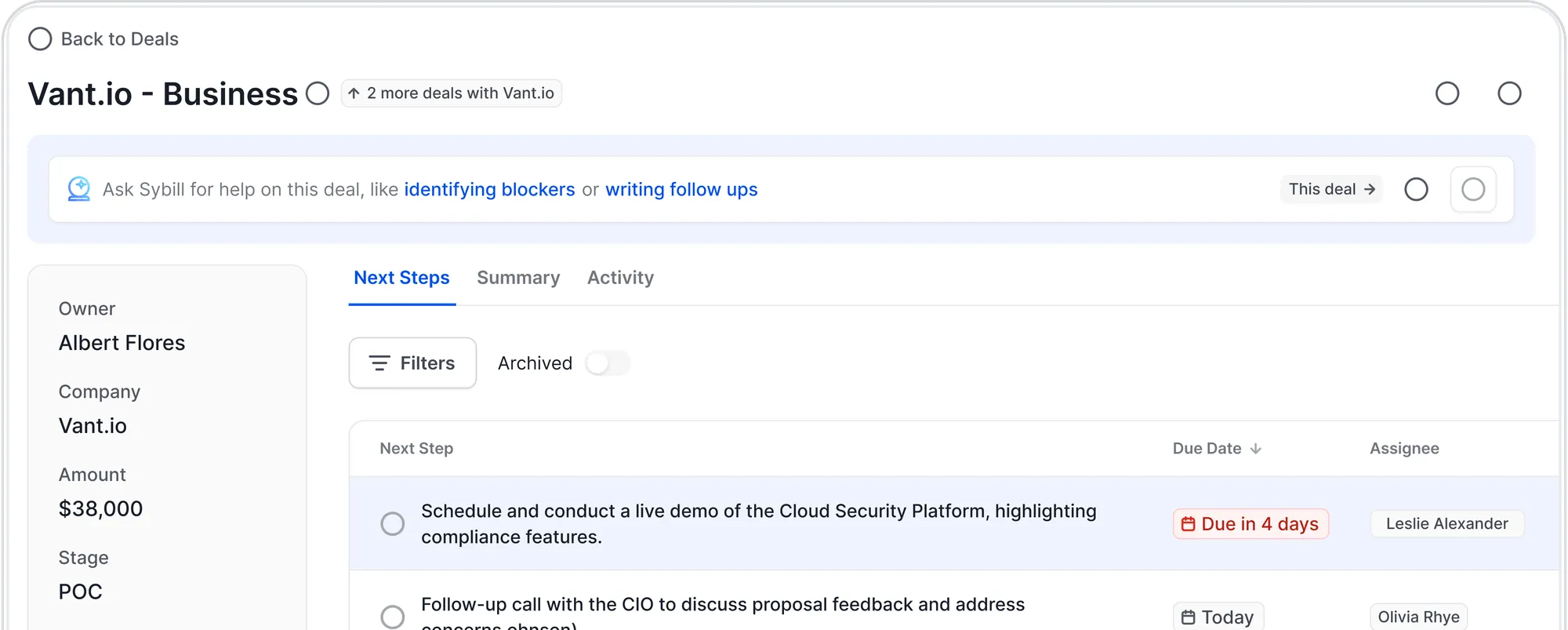
Magic Summary turns sales meetings into clear, accurate summaries with key discussion points, objections, pain points, decisions, and next steps. No more “I think the buyer said something about budget?” chaos.
Ask Sybill lets GTM teams ask questions across deal and call context. Instead of hunting through transcripts, notes, and CRM fields, teams can ask things like:
That is not generic AI. That is deal-aware intelligence.
CRM Autofill reduces manual CRM work by updating fields using call and deal context. This matters because CRM hygiene is one of the most boring problems in sales and one of the most expensive. If your CRM is wrong, your forecast is cosplay.
Personalized Emails creates follow-ups grounded in the actual conversation. Not generic “great connecting today” sludge. Real follow-ups that reference buyer priorities, objections, next steps, and agreed actions.
AI Tasks captures next steps and action items so follow-ups do not disappear into someone’s “I’ll circle back after lunch” black hole.
Pre-Meeting Brief prepares reps before calls with relevant buyer, account, and deal context. Better prep means better questions, sharper conversations, and fewer awkward “remind me what you do again?” moments.
Deal Pipeline and Deal Workspace help teams see risks, opportunities, and deal movement from actual conversation data.
That is the difference.
Claude can help with words. Claude Code can help with workflows. OpenClaw can help with automation. Sybill helps GTM teams execute from the truth of the deal.
Claude is useful for GTM thinking. Sybill is better for GTM execution.
Here is the practical difference.
.png)
Claude is great when you know what to ask.
Sybill is better when the answer is hiding in three calls, four emails, and a CRM field nobody updated.
That matters because revenue teams do not always have time to build perfect prompts. Reps are moving from one call to another. Managers are reviewing deals. RevOps is trying to keep the system clean. CS is trying to prevent churn. Leadership wants a forecast that is more than expensive astrology.
Sybill fits because it starts where GTM work actually happens: customer conversations.
Claude Code and Sybill serve very different GTM roles.
Claude Code is useful when the problem is technical. Sybill is useful when the problem is revenue execution.
.png)
A technical RevOps team may absolutely use Claude Code to build useful internal tools. But most GTM teams are not blocked because they cannot write enough scripts.
They are blocked because customer context is scattered.
The rep remembers one thing. The CRM says another. The call recording has the truth, but nobody has time to watch it. The manager hears about the risk two weeks too late. The follow-up goes out with the personality of wet cardboard.
Claude Code can help build GTM infrastructure. Sybill helps run the GTM motion.
OpenClaw is compelling if your team wants broad automation. Sybill is compelling if your team wants revenue-contextual automation.
There is a difference.
.png)
OpenClaw can help automate tasks. Sybill helps automate the right GTM actions based on real buyer signals.
That is a much more valuable layer for revenue teams.
A reminder to follow up is nice. A follow-up generated from the actual conversation, with the right pain point, objection, stakeholder, and next step, is better.
A daily summary is nice. A deal workspace that shows what changed, what matters, and where risk is forming is better.
A generic agent that can touch many apps is nice. A GTM-native assistant that understands the account, the call, the CRM, and the buyer journey is better for revenue work.
If you are evaluating Claude Code vs Claude vs OpenClaw for GTM teams, do not get dazzled by generic AI power.
Use GTM-specific buying criteria.
.png)
This is the first question.
Can the AI understand what happened across calls? Can it identify buyer pain? Can it detect objections? Can it answer questions across past conversations? Can it connect deal history to next steps?
If not, you are still doing the real work manually.
This is where Sybill stands out because it is built around customer conversations and deal context.
Manual CRM updates are one of the most hated tasks in sales. Also one of the most important. Fun little workplace paradox.
Generic AI tools may help draft field updates if you feed them the right context. But GTM teams need something that can capture and update based on actual deal activity.
That is what CRM Autofill is for.
Cleaner CRM data means better handoffs, better coaching, better forecasting, and fewer pipeline reviews where everyone quietly wonders if the data is fiction.
A generic AI follow-up can be grammatically correct and strategically useless.
Good GTM follow-ups are specific. They reflect what the buyer said, what they care about, what they objected to, and what happens next.
Sybill’s Personalized Emails are grounded in the actual conversation. That is the difference between “thanks for your time” and “here is the exact point you asked us to clarify for your finance team.”
One is polite. The other moves the deal.
Managers do not need more dashboards for the sake of dashboards. They need visibility into what is actually happening in calls and deals.
Are reps asking strong discovery questions? Are they multi-threading? Are they handling objections well? Are next steps clear? Are risky deals being flagged early?
Sybill gives managers a better view into real buyer interactions, so coaching can be based on evidence, not vibes.
And vibes are not a coaching strategy. They are what people say when they have no notes.
This is where many AI tools die.
If the tool asks reps to change everything, maintain workflows, paste context manually, configure automations, and babysit outputs, adoption will collapse.
Reps will not do 11 extra steps for “AI productivity.” They will go back to whatever helps them survive the day.
Sybill fits because it removes admin work from the GTM workflow. It captures context, summarizes meetings, updates CRM, drafts follow-ups, and creates tasks where reps already work.
The best GTM AI does not add another tab to the graveyard. It kills a few.
There is no need to make this a fake winner-takes-all fight. Each tool has a place.
Use Claude when your GTM team needs thinking, writing, or research support.
It is useful for:
Claude is a strong general assistant. Just do not expect it to magically know your deals.
Use Claude Code when the GTM problem is technical.
It is useful for:
Claude Code is valuable for technical operators. It is not a substitute for a GTM execution platform.
Use OpenClaw when you want always-on automation and have the technical confidence to manage it.
It is useful for:
OpenClaw is flexible, but it requires setup and governance. It is not the lowest-friction choice for a revenue team that just wants clean follow-ups and better deal visibility.
Use Sybill when the workflow depends on customer conversations and deal movement.
It is useful for:
For GTM teams, Sybill should be the default when the work depends on what prospects and customers actually said.

Claude, Claude Code, and OpenClaw all have a role.
Claude helps GTM teams think and write.
Claude Code helps technical GTM teams build.
OpenClaw helps power users automate.
But GTM teams do not win because they adopted the most flexible AI toy in the room.
They win because they understand buyers faster, follow up better, update CRM accurately, coach reps intelligently, and move deals with context.
That is where Sybill belongs.
If your GTM team is tired of scattered call notes, half-updated CRM fields, generic follow-ups, and pipeline reviews built on guesswork, Sybill gives you the deal-aware AI layer your revenue team actually needs.
Because the best AI assistant for GTM teams is not the one that can do the most things. It is the one that knows what matters in the deal.
Claude helps with writing, thinking, and research. Claude Code helps technical GTM teams build scripts, integrations, and internal workflows. OpenClaw helps with always-on automation across apps. Sybill is purpose-built for GTM teams because it uses customer conversations, deal context, CRM data, and buyer signals to support revenue execution.
Yes. Claude is useful for messaging drafts, research, campaign ideas, sales enablement content, persona research, and strategy work. But Claude does not automatically know your call context, deal history, buyer objections, or CRM details unless someone manually provides that information.
Claude Code can be useful for technical RevOps teams that need help building scripts, workflows, integrations, or internal tools. But it is not a GTM execution platform. It does not natively capture call context, update CRM fields, create deal-aware follow-ups, or surface pipeline risks from buyer conversations.
OpenClaw can help with automation-heavy workflows, such as reminders, recurring research, messaging-based commands, and app-to-app workflows. But it requires setup and does not natively understand deal context unless heavily configured. GTM teams still need accurate call, CRM, and buyer context to make automation useful.
Sybill is better for GTM teams because it is built around customer conversations and deal context. It helps with Magic Summary, CRM Autofill, Personalized Emails, AI Tasks, Pre-Meeting Brief, Ask Sybill, Deal Pipeline, and Deal Workspace, so teams can act on what buyers actually said.
Use Claude for general thinking, writing, and research. Use Sybill for GTM execution: call summaries, follow-ups, CRM updates, deal intelligence, pipeline risk, and buyer-context-driven next steps. They can work together, but Sybill should own the revenue workflow layer.
Claude helps with writing, thinking, and research. Claude Code helps technical GTM teams build scripts, integrations, and internal workflows. OpenClaw helps with always-on automation across apps. Sybill is purpose-built for GTM teams because it uses customer conversations, deal context, CRM data, and buyer signals to support revenue execution.
Yes. Claude is useful for messaging drafts, research, campaign ideas, sales enablement content, persona research, and strategy work. But Claude does not automatically know your call context, deal history, buyer objections, or CRM details unless someone manually provides that information.
Claude Code can be useful for technical RevOps teams that need help building scripts, workflows, integrations, or internal tools. But it is not a GTM execution platform. It does not natively capture call context, update CRM fields, create deal-aware follow-ups, or surface pipeline risks from buyer conversations.








