
Find us at booth #83, join us for a harbor side happy hour, or catch Gorish’s talk.

Sept, 16-18 > Learn more


Tamanna Mishra

June 24, 2026
%20(14).png)
Claude can make sales research faster by helping reps understand accounts, map personas, spot triggers, build hypotheses, prepare discovery questions, and draft outreach. But Claude only works with the context it has. It does not automatically know deal history, buyer objections, CRM notes, emails, or past calls. Sybill fills that gap by capturing sales context across conversations and pipeline activity. With Sybill’s Claude integration, reps can turn research into deal-ready next steps, faster, smarter sales actions with confidence.
Sales research used to mean opening 14 tabs, skimming the company website, checking LinkedIn, pretending the CRM notes were useful, and walking into the call with a half-formed opinion and a fully formed caffeine dependency.
Now reps have Claude.
It can help you research accounts, understand personas, summarize public information, build discovery questions, draft outreach, and turn messy inputs into something that looks like a strategy. Used well, it can make sales research faster, sharper, and less soul-crushing.
It does not automatically know what happened on your last three calls. It does not remember that the CFO cared about forecast accuracy, while the RevOps lead only wanted cleaner CRM data. It does not know that your champion went quiet after procurement joined. It does not know the deal history, buyer priorities, objections, email threads, stakeholder dynamics, or pipeline movement unless that context is connected or manually pasted in.
That is where the real sales research conversation begins.
Claude is useful when you need a thinking partner. Sybill is useful when that thinking partner needs your actual sales context.
And with Sybill’s Claude integration, sales teams no longer have to choose between a powerful general AI assistant and a revenue-native deal intelligence layer. They can use Claude to reason, while Sybill brings the sales memory.
Let’s break down how to use Claude for sales research, where it helps, where it falls short, and how Sybill turns research into deal-ready action.
Claude is not a sales tool by default. It is a general-purpose AI assistant that can reason over information, analyze patterns, summarize content, and generate structured outputs.
That makes it very useful for sales research, especially when reps treat it less like a search bar and more like a research analyst.
The mistake many reps make is asking Claude broad questions like:
“Research this company.”
That gives you a generic company summary. Fine, but not exactly “I am about to win President’s Club” material.
A better way to use Claude is to give it a clear sales context:
Claude can then help you move from basic information to useful sales hypotheses.
That is the difference between research and prep. Research tells you what the company does. Prep tells you what to ask, what to listen for, what to avoid, and what the next move should be.
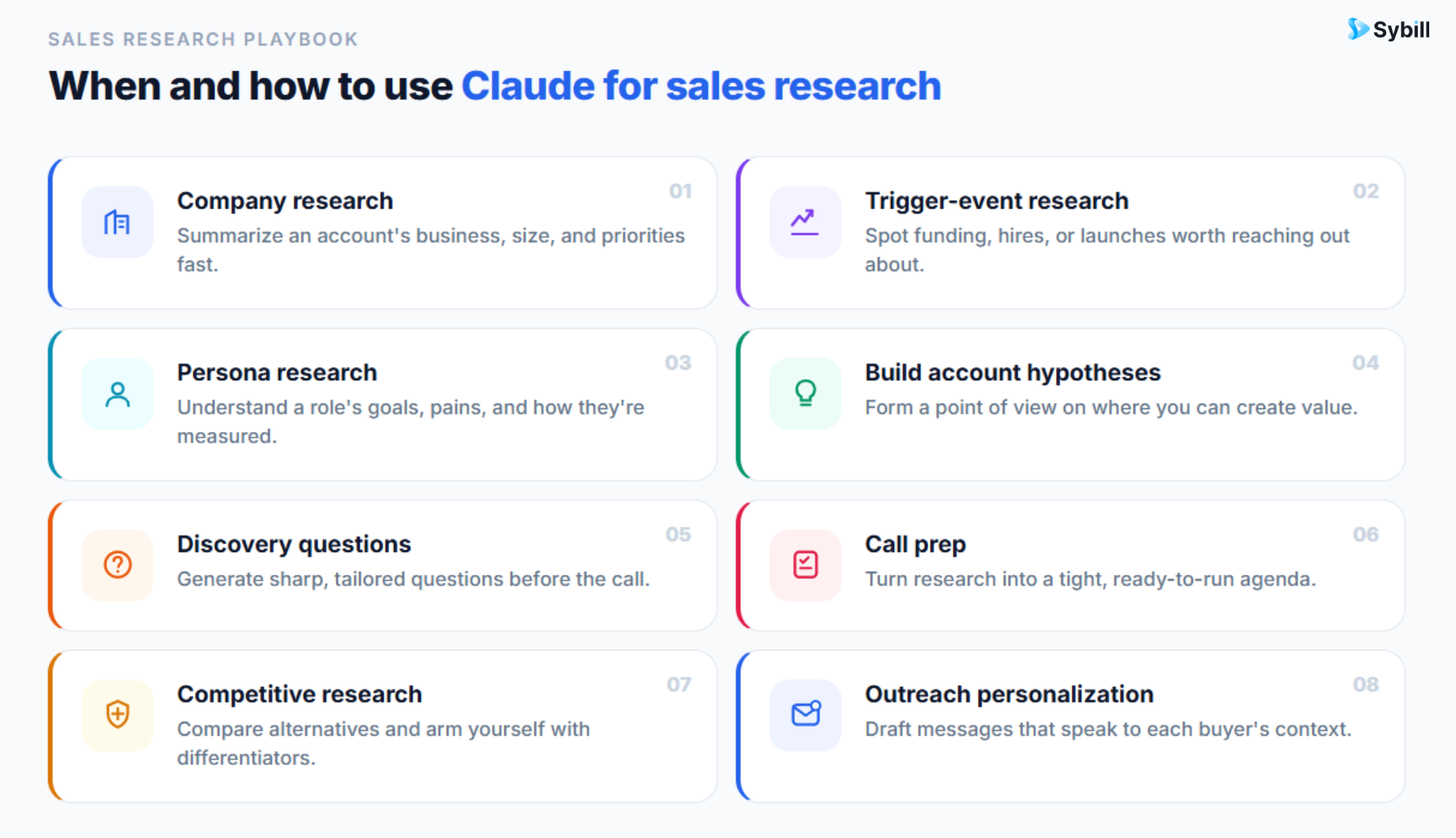
Company research is the most obvious use case.
Claude can help you understand a prospect’s business model, target customers, recent announcements, product lines, hiring patterns, market positioning, and possible strategic priorities. If web search is enabled, it can also help with more current research and cite the sources it uses.
But you need to guide the output.
Do not ask for a Wikipedia-style summary. Ask for a sales brief.
Claude prompt for company research for sales
“Research [Company] for a sales rep selling [solution category]. Focus on business model, target customers, recent strategic priorities, growth signals, hiring trends, leadership changes, and possible business challenges. Separate verified facts from assumptions. For each possible challenge, explain how confident you are and what I should validate on a discovery call.”
This gets you closer to what a rep actually needs.
You are not trying to become an expert on the company’s entire corporate history. You are trying to understand what may be happening inside the business that makes your solution relevant right now.
That “right now” matters. A prospect may technically fit your ICP, but that does not mean they have urgency. Sales research should help you find signals of timing, pain, and priority.
A trigger event is a change that gives you a reason to reach out.
Funding. Expansion. Layoffs. Hiring. New leadership. New product lines. Regulatory pressure. A technology migration. A competitor launch. A public complaint from customers. A market shift. A new strategic initiative.
The trigger does not have to be dramatic. It just needs to create a relevant opening.
Claude can help you identify possible trigger events and connect them to a sales conversation.
Claude prompt for trigger event research for sales
“Find recent trigger events for [Company]. For each one, explain why it may matter to [persona], how it could connect to [solution category], and what a sales rep should not overclaim. Create three outreach angles based on the strongest triggers.”
That last line matters.
Sales reps can get dangerously excited about weak triggers. “Congrats on hiring a VP of Operations” is not a strategy. It is barely a sentence. A better sales angle connects the trigger to a plausible business pressure.
For example:
“Your team is hiring aggressively across revenue operations. When teams scale this fast, one common challenge is keeping CRM data, handoffs, and pipeline visibility consistent across reps. Curious if that is already showing up for your team?”
That is not creepy. It is not fake intimacy. It is a business hypothesis.
Claude can help you get there, but only if you ask for the bridge between event and relevance.
Most sales advice treats personas like cardboard cutouts.
The CFO cares about cost. The CRO cares about revenue. RevOps cares about process. The VP Sales cares about performance.
Great. Groundbreaking. Alert the media.
Claude can do better if you give it more context.
A CFO at a 200-person Series B SaaS company is not thinking exactly like a CFO at a 10,000-person enterprise. A RevOps leader at a company with messy Salesforce hygiene is not thinking like one who has already standardized the entire revenue tech stack. A founder-led startup does not buy like a procurement-heavy enterprise.
So ask Claude to account for context.
Claude prompt for sales persona research
“I am selling [solution] to a [persona] at a [company size, industry, stage]. Create a persona research brief. Include likely priorities, KPIs, internal pressures, fears, objections, decision criteria, and proof points this person may need. Avoid generic persona assumptions. Tell me what I should validate before pitching.”
This is where Claude becomes useful.
Not because it knows the buyer personally, but because it can help you prepare better questions.
The best sales research does not give reps fake certainty. It gives them better hypotheses.
This is one of the most valuable sales research workflows.
After you have gathered company research, ask Claude to turn it into account hypotheses.
An account hypothesis is a reasoned guess about what may be happening inside the account.
For example:
None of these are facts. They are starting points for discovery.
And that is exactly what makes them useful.
Claude prompt to build sales account hypotheses
“Based on this company research, create five account hypotheses for why [Company] may care about [solution category]. For each hypothesis, include the evidence, confidence level, discovery questions, possible objections, and what would disprove the hypothesis.”
That last part is important. Sales research should not just help reps confirm what they already want to believe. It should help them avoid happy ears.
If your research cannot be disproven, it is probably just a pitch wearing a fake mustache.
Discovery questions are where research becomes useful in live selling.
Claude can help you turn research into questions that are specific, relevant, and tied to business pain. The key is to avoid generic prompts like “Give me discovery questions for a CRO.”
You will get questions like:
“What are your current revenue goals?”
Technically fine. Spiritually dead.
A better prompt gives Claude the account hypothesis, persona, and sales goal.
Claude prompt for sales discovery questions
“I am speaking with [persona] at [Company]. My current hypothesis is that they may be struggling with [business problem] because of [trigger or evidence]. Create 10 discovery questions that help me validate or reject this hypothesis. Make the questions specific, open-ended, and natural for a first sales conversation.”
Better.
Now the rep has questions that feel connected to the account, not pulled from a laminated sales training binder in 2014.
Before a sales call, Claude can turn your inputs into a structured pre-call brief.
This is especially useful when you have done the research but need to organize it fast. Nobody wants to walk into a call with seven scattered notes, three screenshots, and one vague sense that “they are probably growing.”
Claude prompt for sales call prep
“Create a one-page pre-call brief for my meeting with [persona] at [Company]. Use the research below. Include account context, likely priorities, relevant triggers, discovery questions, possible objections, recommended opening point of view, and the best next step to aim for. Keep it concise enough to review in five minutes.”
This kind of brief helps reps show up prepared without sounding rehearsed.
The goal is not to script the call. The goal is to reduce the blank-page panic before the call begins.
Claude can help reps understand public competitor positioning, summarize review themes, and build comparison points. This is useful for battlecards, objection prep, and positioning.
But there is a limit.
Claude can analyze public information. It cannot automatically know which competitors are actually showing up in your live deals, what buyers are saying about them, where your team is winning, or why you are losing unless that data is provided.
Use Claude for the outside view.
Claude prompt for sales competitive research
“Compare [Our Product] and [Competitor] for a buyer evaluating [solution category]. Use public information only. Create a sales battlecard with likely competitor strengths, weaknesses, buyer objections, traps to avoid, and discovery questions that reveal fit.”
Then add your internal reality.
The strongest battlecards are not built from competitor websites. They are built from actual buyer conversations.
What did prospects ask? What confused them? What made them switch? What objections kept appearing? What proof finally moved the deal forward?
That is where Sybill becomes much more powerful, but we will get there in a minute.
Claude can help turn research into outbound emails, LinkedIn messages, call openers, and follow-up notes.
But please, for the collective dignity of everyone’s inbox, do not use it to manufacture fake warmth.
Bad personalization says:
“Saw your company is growing. Exciting times!”
Good personalization says:
“I noticed your team is hiring across RevOps and enterprise sales. When teams scale both functions at once, handoffs and deal visibility can get messy fast. Curious how your team is handling that today.”
The difference is specificity.
Claude prompt for sales personalization
“Write three outbound email openings for [persona] at [Company] based on the research below. Each opening should connect a real business trigger to a plausible business problem. Avoid flattery, buzzwords, fake familiarity, and generic claims.”
You can also ask Claude to create versions for different personas.
Bonus prompt
“Create three versions of this outreach angle: one for a CRO, one for RevOps, and one for a VP Sales. Keep the core message consistent, but adapt the pain point, language, and proof point for each persona.”
That is a good use of Claude. It helps reps adapt without starting from scratch every time.
If you want to use Claude well, do not start with a prompt.
Start with inputs.
Claude becomes more useful when you feed it the right context in the right order. Here is a practical workflow sales reps can use before a prospecting sequence, discovery call, demo, or follow-up.
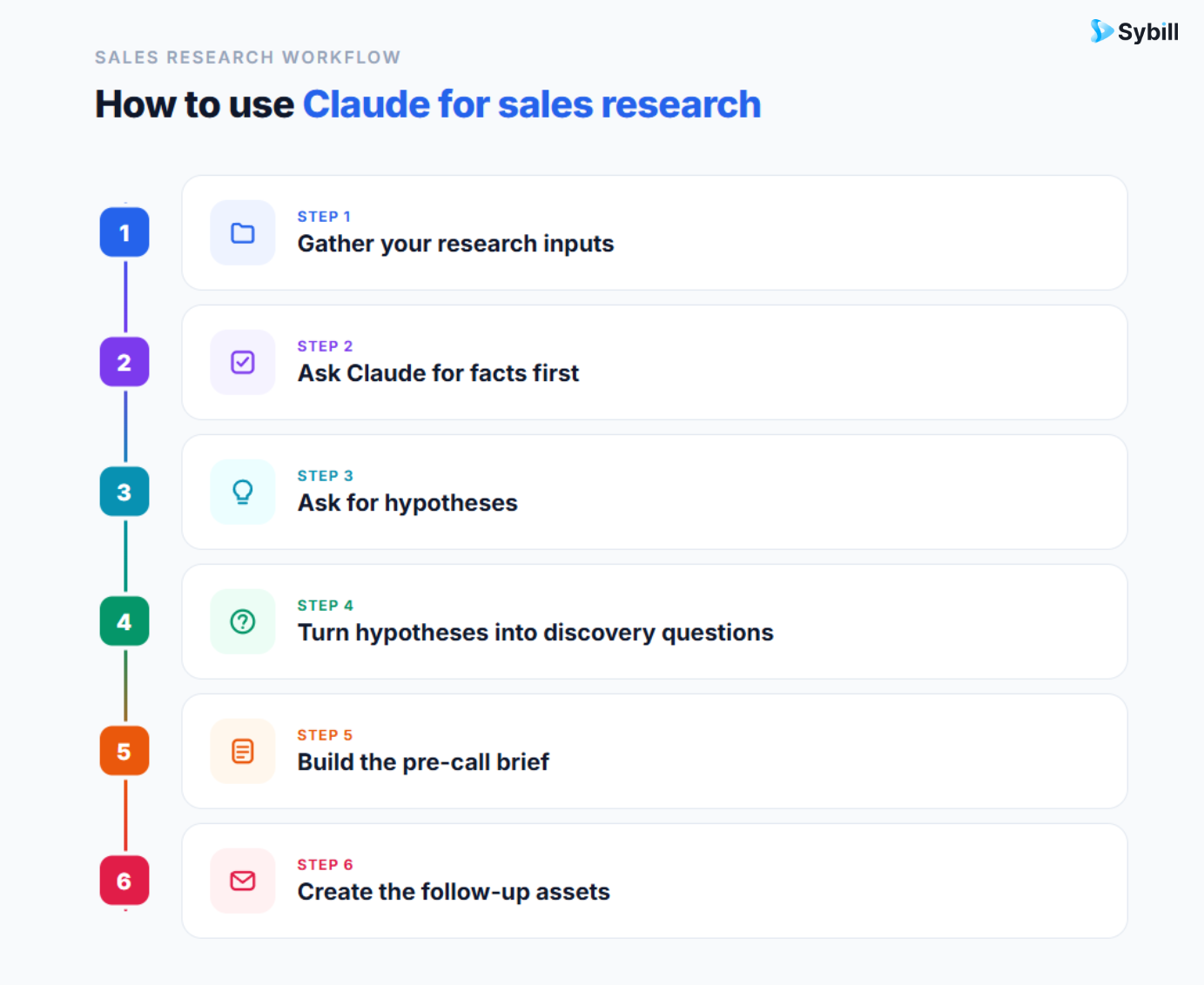
Start with external research:
Then gather internal sales context:
This is where many Claude workflows become painful.
The external research is usually easy enough. The internal context is scattered across CRM fields, call notes, transcripts, emails, Slack threads, and someone’s memory.
That is not Claude’s fault. That is the sales stack being the sales stack.
Before you ask Claude for strategy, ask it to organize the facts.
Prompt:
“Summarize the verified facts from these inputs. Separate company facts, buyer facts, recent triggers, deal facts, and unknowns. Do not recommend a sales strategy yet.”
This prevents the model from jumping too quickly into advice.
And honestly, reps do not need more advice. They need better situational awareness.
Once the facts are organized, ask Claude to reason over them.
Prompt:
“Based on these facts, what are the most plausible business problems this account may be facing? Rank them by confidence. For each one, explain the evidence, the weak spots in the hypothesis, and what I should ask to validate it.”
This gives you a cleaner starting point for discovery.
Not a pitch. A hypothesis.
Now convert those hypotheses into questions.
Prompt:
“Turn these hypotheses into discovery questions. Each question should help uncover business pain, urgency, decision process, current workflow, stakeholder alignment, or success criteria. Keep the questions natural and specific to this account.”
At this stage, Claude is not just summarizing research. It is helping you prepare for the sales conversation.
Now ask for the usable output.
Prompt:
“Create a pre-call brief for this account. Include: account context, buyer priorities, likely pain points, discovery questions, possible objections, recommended opening point of view, and ideal next step. Make it concise enough for a sales rep to review before a call.”
This is the rep-ready asset.
The one you can actually use.
After the call, Claude can help draft follow-ups, internal notes, and next-step messaging.
Prompt:
“Based on this call context and research, create a follow-up email to [buyer]. Reference their priorities, summarize what we discussed, answer open concerns, and suggest a clear next step. Then create a short internal deal note for CRM.”
This is a strong workflow.
But it is also a lot of work.
You still had to gather the research. You still had to pull the CRM notes. You still had to find the transcript. You still had to paste the context. You still had to tell Claude what happened.
That is where Claude starts to hit its limit for sales research.
[Image recommendation: Flowchart showing the manual Claude workflow: gather public research, collect CRM notes, paste call summaries, prompt Claude, edit output, update CRM.
Alt text: Manual sales research workflow showing the steps a sales rep takes to prepare Claude with account and deal context.]
Claude can reason over the information it has. The problem is that your most valuable sales information is rarely sitting in one neat place.
It is hidden in call recordings. Buried in CRM notes. Mentioned in email threads. Half-captured in Slack. Remembered by the AE, forgotten by the manager, and not logged anywhere useful.
A general AI assistant cannot magically know that.
For active deals, the most important research is usually not public information.
It is deal history.
What did the buyer say last time? Which objection came up twice? Who asked about security? Did the champion share business urgency or just polite interest? Which stakeholder has not joined yet? What did the buyer say before the deal stalled? Did the rep commit to a follow-up that never happened?
Claude will not know any of this unless the data is connected or manually provided.
That makes standalone Claude useful for account research, but incomplete for deal research.
To get a strong answer from Claude, reps often have to paste:
At some point, preparing Claude becomes its own job.
And the whole point of AI in sales is that reps should not have to become part-time data janitors just to sound prepared.
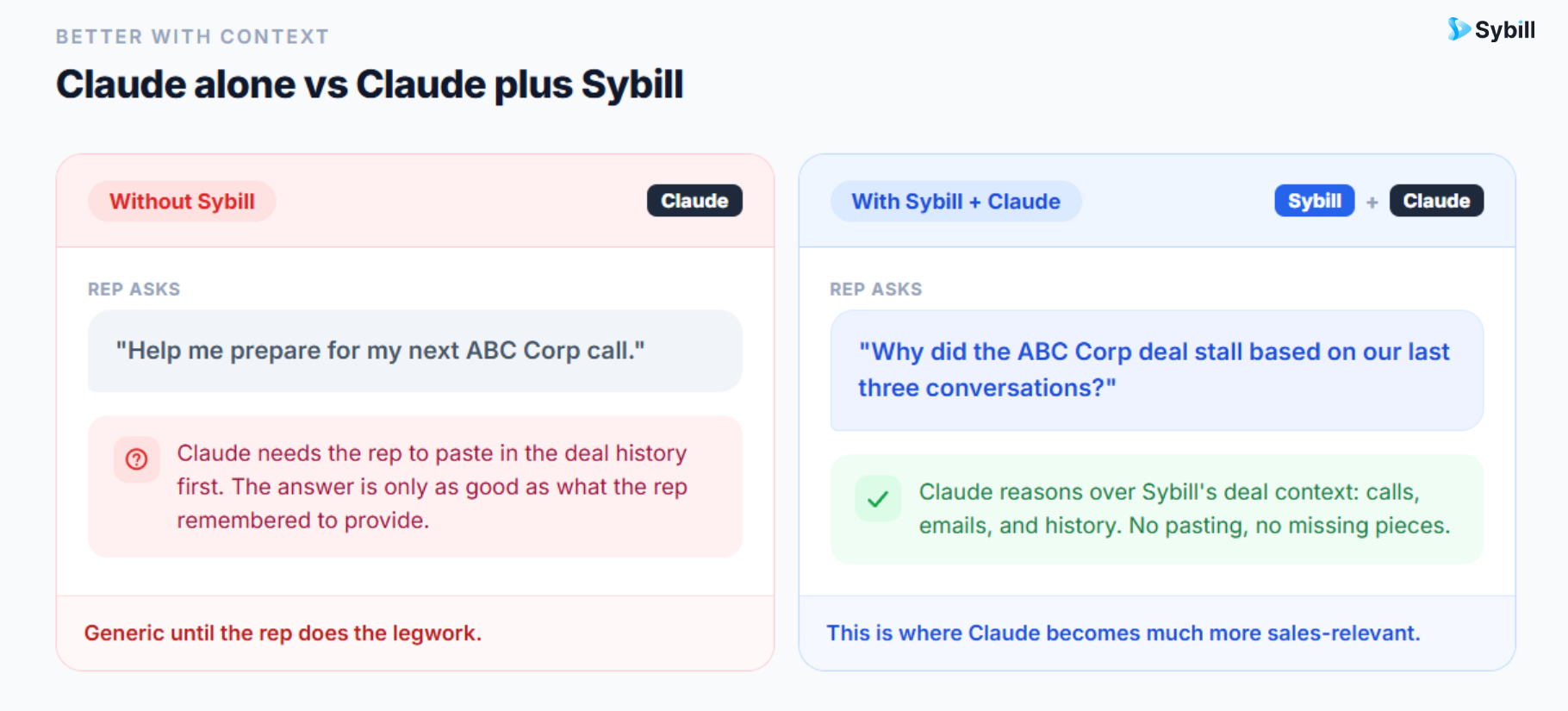
If you ask Claude, “Help me prepare for a call with a CFO,” it will give you standard CFO concerns: cost, ROI, risk, forecast accuracy, efficiency.
That is not wrong.
It is just not enough.
The useful question is:
“What does this CFO at this company care about at this moment, based on what they have already said, what the account is going through, and where this deal stands?”
That is a very different question.
And it requires sales context.
Claude is a powerful AI assistant. Sybill is an AI sales assistant.
Claude helps you think through information. Sybill captures, structures, and activates the information your sales team creates every day.
Claude can help you research a company. Sybill helps you understand the deal.
Claude can help draft a follow-up. Sybill knows what the buyer actually said on the call.
Claude can help prepare discovery questions. Sybill can surface the buyer’s real pain points, open objections, stakeholder dynamics, and next steps from your sales conversations.
Here is the practical difference.
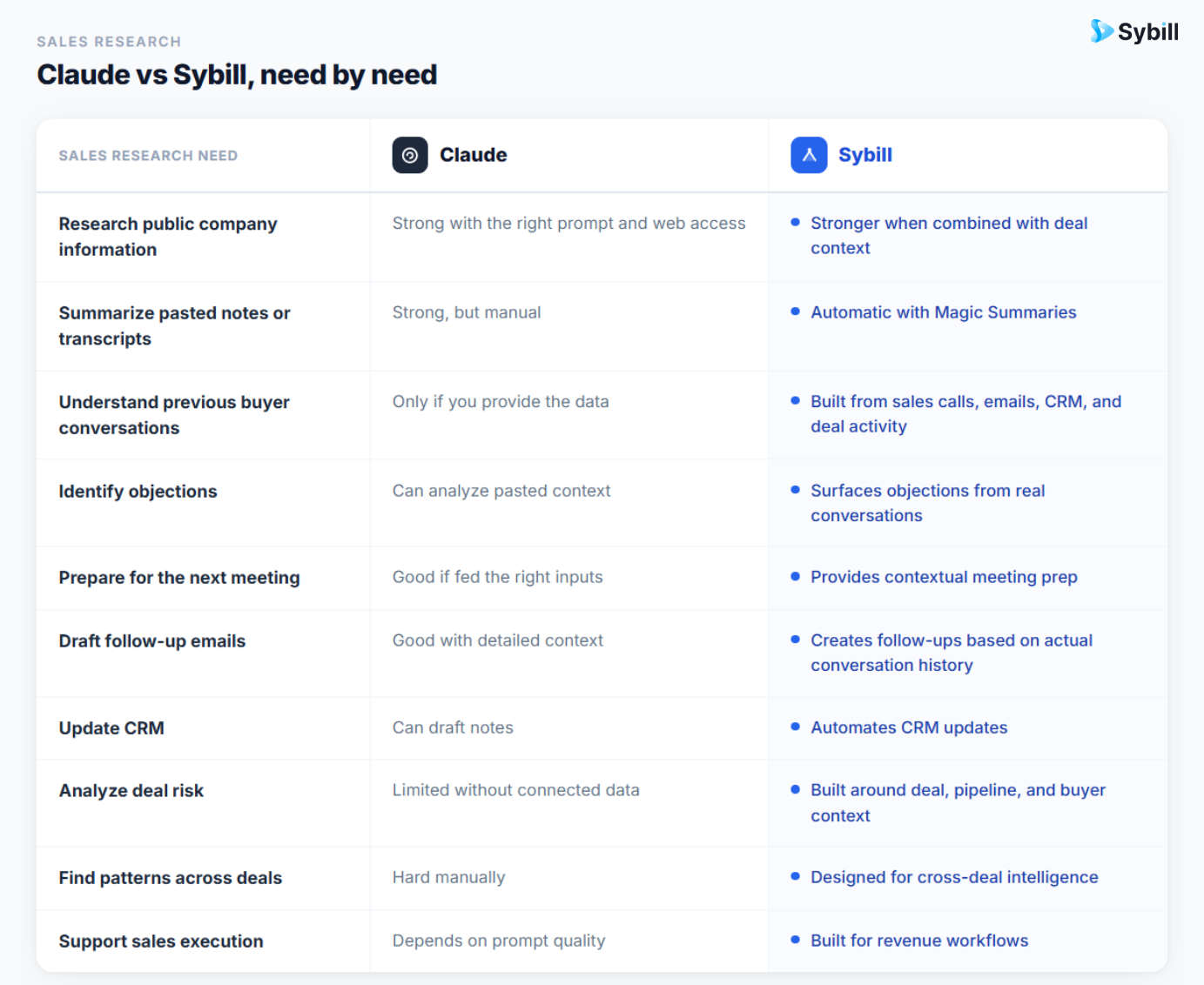
Claude is excellent at reasoning. Sybill gives that reasoning the sales context it needs.
The hardest part of sales research is not finding information. It is knowing which information matters.
A prospect’s website may tell you what they sell. LinkedIn may tell you who works there. News may tell you what changed. But your sales conversations tell you what the buyer actually cares about.
That is the layer Sybill brings in.
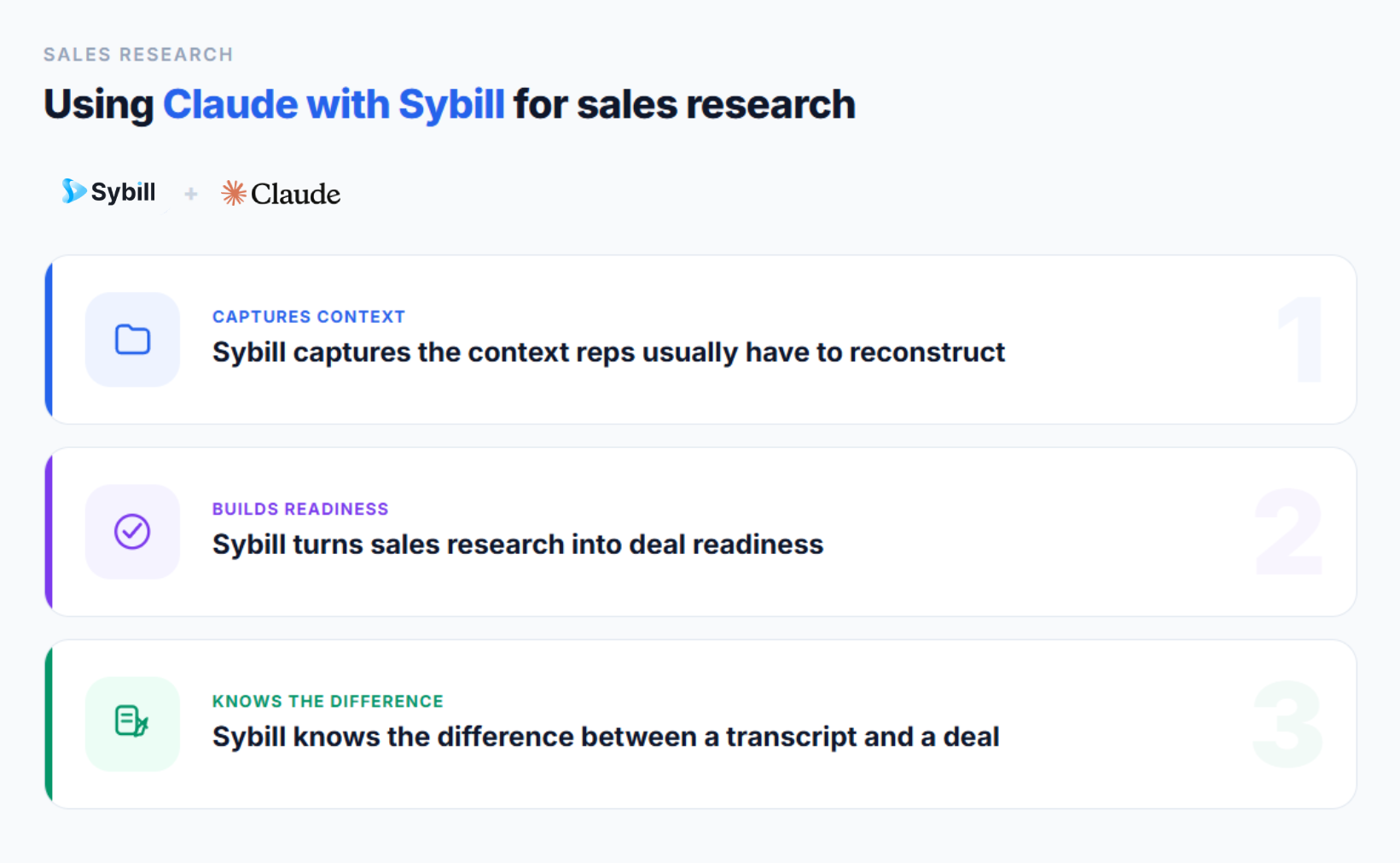
Reps should not have to replay calls, scan transcripts, search CRM notes, and piece together stakeholder history before every meeting.
Sybill captures and organizes the sales activity that matters:
That changes the research workflow.
Instead of asking, “What should I paste into Claude?” reps can ask, “What do I need to know before this call?”
That is a much better question.
Research is only useful if it changes how the rep sells.
A great company summary does not help if the rep still misses the buyer’s real concern. A beautiful account brief does not help if the follow-up email ignores the objection that stalled the deal. A clever discovery question does not help if the rep forgets that procurement already raised a blocker two weeks ago.
Sybill connects the dots between research, conversation, and execution.
It helps with meeting prep, call summaries, follow-up emails, CRM updates, deal inspection, qualification, competitive intelligence, and next steps. The value is not just “less admin,” although reps will happily take that. The value is that every interaction becomes part of a living sales memory.
That means the next call is not starting from scratch.
A transcript tells you what was said. A deal context layer helps you understand what it means.
For example, a buyer may say:
“We need to loop in finance.”
That could mean several things.
It could mean the budget is real and finance is the next normal step. It could mean the buyer has no authority. It could mean price is becoming a concern. It could mean the deal is moving forward. It could mean the deal is about to disappear into the procurement marshlands, never to be seen again.
The words alone are not enough. The context matters.
Who said it? When? Was finance mentioned before? Has budget been confirmed? Is the economic buyer engaged? Did similar deals stall at this point? What follow-up happened after the call?
That is where Sybill becomes more useful than a raw transcript summary. It helps reps understand the sales meaning of what happened.
The future is not “Claude or Sybill.” It is Claude with Sybill’s sales context.
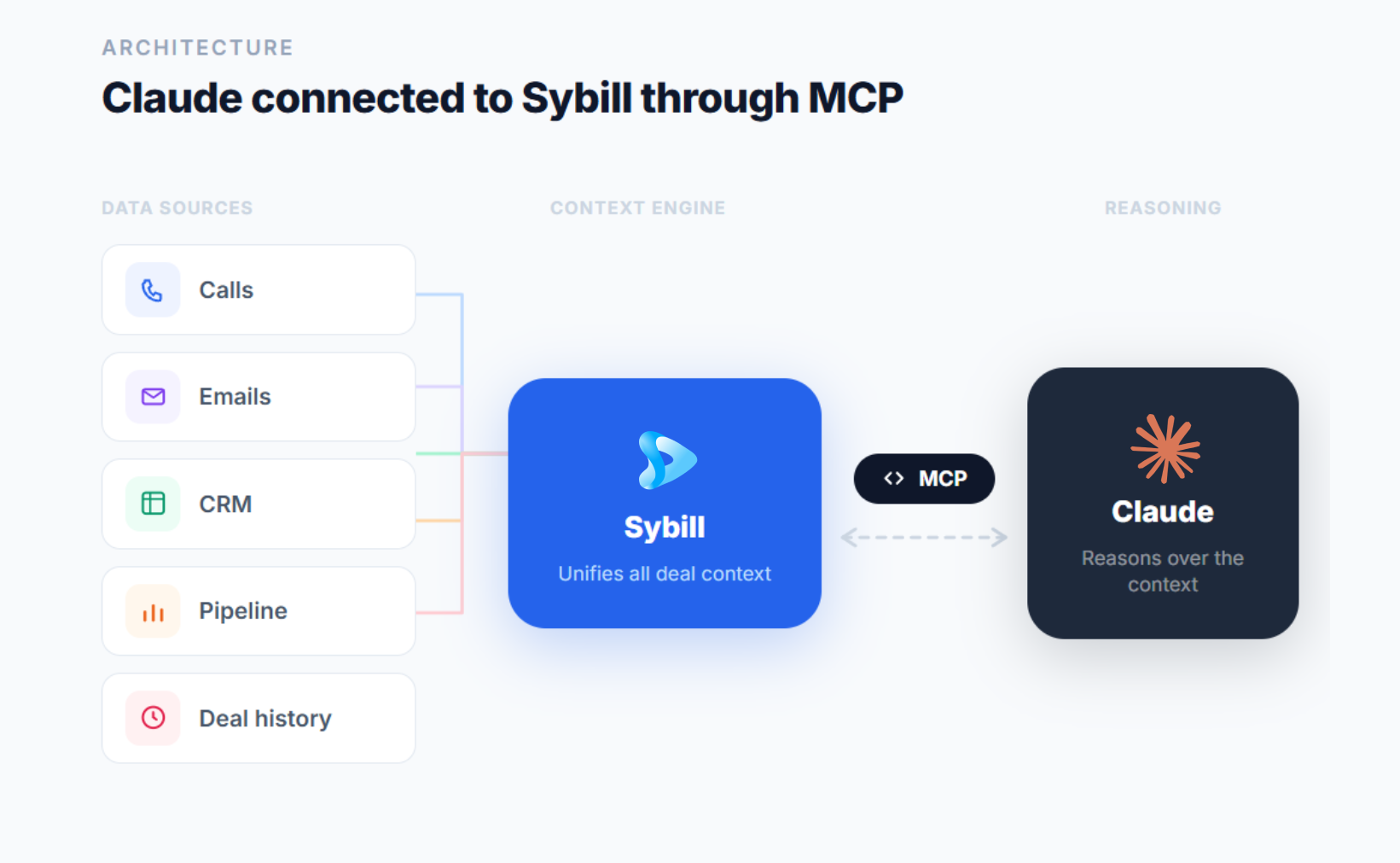
Sybill now has an official integration with Claude through MCP, or Model Context Protocol. In plain English, MCP allows AI assistants to connect with external systems and data sources. Sybill’s MCP server allows compatible AI clients, including Claude, to interact with Sybill data using natural language.
So instead of manually pasting call summaries, deal notes, emails, and CRM context into Claude, reps can ask Claude questions that draw from Sybill’s sales context.
That is the shift.
Once Claude can access Sybill’s sales context, reps can ask far more useful questions.
“Using Sybill context, analyze why the [Account] deal has stalled. Look at the last three calls, open objections, stakeholder engagement, email follow-up history, and next steps. Give me the top three risks and the next best action.”
This is much better than asking Claude for generic advice on stalled deals.
It is grounded in what happened.
“Using Sybill data, prepare me for tomorrow’s call with [Account]. Include what changed since the last call, which objections remain unresolved, who needs to be engaged, and what I should ask next.”
This gives reps a pre-call brief built from live deal memory, not just public company research.
“Using Sybill’s call history, identify every mention of [Competitor] in active deals. Summarize the common objections, buyer concerns, competitive traps, and winning talk tracks. Turn this into a battlecard for AEs.”
This is a much stronger battlecard workflow because it is based on actual buyer conversations, not just competitor homepage analysis.
“Using Sybill context, create a multi-threading plan for [Account]. Identify missing stakeholders, likely concerns by persona, and the best message for each person.”
This helps reps move beyond “we should involve more people” into a specific stakeholder strategy.
“Using the latest Sybill call summary and deal context, draft a follow-up email to [Buyer]. Reference their stated priorities, answer the open objection, and suggest a clear next step.”
Now the follow-up is not just polished. It is relevant.
“Using Sybill context, find closed-won and closed-lost deals similar to [Account]. What patterns should I pay attention to before the next call?”
This is where sales research becomes compounding intelligence. Every deal teaches the next one.
Claude can make sales research much better, but reps need to use it carefully.
Always ask Claude to distinguish between what is verified and what is inferred.
This is especially important in sales, where one confident but wrong assumption can turn into a painfully irrelevant pitch.
Use this instruction often:
“Separate facts, assumptions, and questions to validate.”
Claude can help rank hypotheses by confidence.
This gives reps a sense of where to lean in and where to stay curious.
A low-confidence hypothesis is not useless. It just belongs in discovery, not in your opening pitch.
AI can help you prepare. It cannot replace the buyer telling you what is actually happening.
Use Claude to walk into the call sharper. Then listen.
Revolutionary, yes. Still undefeated.
If your team uses MEDDPICC, SPICED, BANT, Challenger, Sandler, or a custom qualification framework, include it in the prompt.
For example:
“Analyze this deal using MEDDPICC. Identify what is known, unknown, weak, or risky across metrics, economic buyer, decision criteria, decision process, paper process, pain, champion, and competition.”
Claude becomes more useful when it thinks in your team’s operating system.
Every company has different rules for AI tools, data sharing, customer information, and security. Reps should follow their organization’s policies before pasting customer data, transcripts, emails, or CRM information into any AI assistant.
This is another reason connected, approved workflows matter.
The goal is not just to use AI. The goal is to use it responsibly inside the systems your team trusts.
Claude is excellent for sales research when reps use it with strong inputs and clear prompts.
It can help you understand companies, map personas, find trigger events, build account hypotheses, prepare discovery questions, draft outreach, and organize pre-call briefs. Used well, it makes reps faster and sharper.
But sales research for active deals needs more than public information.
It needs memory.
It needs the last call. The real objection. The quiet stakeholder. The email that never got answered. The competitor that keeps showing up. The next step that slipped. The deals that looked similar and then closed or died.
That is not generic research. That is revenue context.
Sybill gives sales teams that context by capturing and activating the data inside calls, emails, CRM, and pipeline activity. And when Sybill connects with Claude through MCP, reps can use Claude’s reasoning on top of Sybill’s sales memory.
Sales reps need more than just AI that sounds smart. They need AI that knows what happened, understands what matters, and helps reps make the next move.
Sybill’s that sales AI partner.

Yes. Claude can help sales reps research companies, understand personas, identify trigger events, prepare discovery questions, draft outreach, summarize notes, and create pre-call briefs. It works best when reps provide clear context about the account, buyer, product, sales stage, and goal.
The best way is to give Claude account research, persona context, CRM notes, prior call notes, and your goal for the meeting. Then ask for a concise pre-call brief with buyer priorities, account hypotheses, discovery questions, likely objections, and recommended next steps.
Claude does not automatically know your deal history, buyer conversations, CRM fields, stakeholder dynamics, objections, or email context unless that information is manually provided or connected through an approved integration. Without that context, Claude’s sales advice can become generic.
Claude is a general AI assistant that helps reason over information. Sybill is an AI sales assistant built for revenue workflows. It captures sales calls, emails, CRM updates, deal context, objections, follow-ups, and pipeline signals, then turns them into actionable sales intelligence.
Sybill’s Claude integration refers to connecting Sybill’s sales context with Claude through MCP, or Model Context Protocol. This allows compatible AI assistants like Claude to interact with Sybill data using natural language, so reps can ask questions about calls, deals, people, companies, emails, and pipeline context.
MCP is an open standard that helps AI applications connect to external systems, data sources, tools, and workflows. For sales teams, that means an AI assistant can become more useful when it can access approved sales context instead of relying only on manually pasted prompts.
Use Claude for broad research, reasoning, and drafting. Use Sybill when the work depends on sales context, such as past calls, buyer priorities, objections, CRM updates, deal risks, follow-ups, and pipeline patterns. With Sybill’s Claude integration, teams can use both together.
Yes. Claude can help sales reps research companies, understand personas, identify trigger events, prepare discovery questions, draft outreach, summarize notes, and create pre-call briefs. It works best when reps provide clear context about the account, buyer, product, sales stage, and goal.
The best way is to give Claude account research, persona context, CRM notes, prior call notes, and your goal for the meeting. Then ask for a concise pre-call brief with buyer priorities, account hypotheses, discovery questions, likely objections, and recommended next steps.
Claude does not automatically know your deal history, buyer conversations, CRM fields, stakeholder dynamics, objections, or email context unless that information is manually provided or connected through an approved integration. Without that context, Claude’s sales advice can become generic.








