
Find us at booth #83, join us for a harbor side happy hour, or catch Gorish’s talk.

Sept, 16-18 > Learn more

%20(1).avif)
Mamta Tainwala

May 25, 2026
.png)
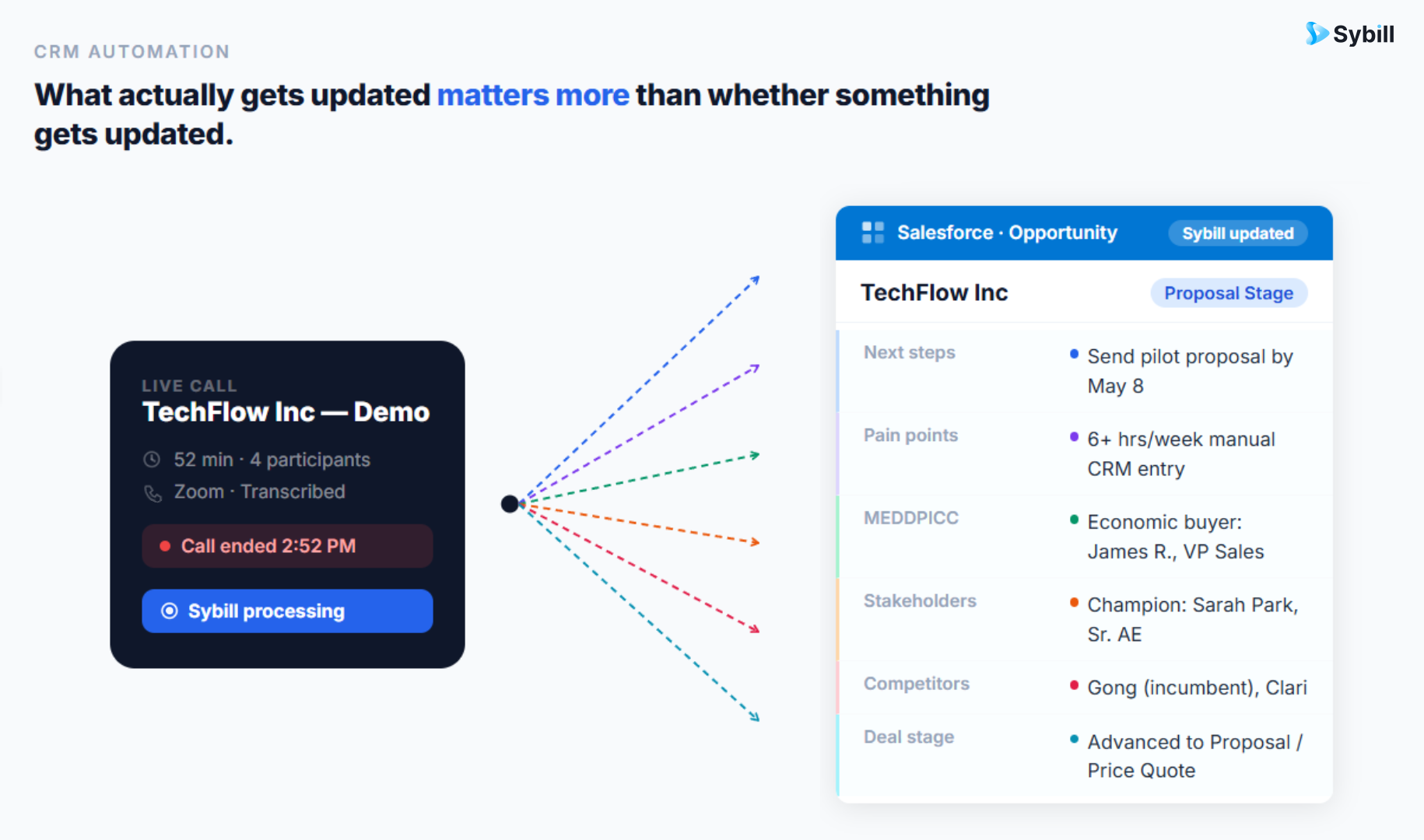
Several AI tools can automatically update Salesforce after sales calls in 2026, but they differ dramatically in what they actually write. Some push a block of summary text into a notes field. Others update structured opportunity fields like deal stage, next steps, MEDDPICC criteria, and stakeholder information directly. Sybill's CRM Autofill updates 30 or more Salesforce fields after every call and email interaction, including qualification frameworks, custom fields, pain points, objections, competitive mentions, and next steps, with entries that read like a human wrote them. Other tools that offer some level of Salesforce automation after calls include Gong, Clari Copilot, Avoma, Fireflies, Salesforce Einstein, and several newer entrants like Coworker AI and AskElephant.
The difference between these tools is not whether they "integrate with Salesforce." Nearly every sales tool in 2026 claims Salesforce integration. The difference is what happens to your Salesforce data after the call ends. A tool that pushes a paragraph into a generic notes field is not the same as a tool that writes structured data into the specific fields your pipeline reviews, forecast models, and deal workflows depend on.
This guide compares what each tool actually does to your Salesforce instance after a call, which fields it fills, how accurate the data is, and what remains manual even after the "automatic" update runs.
This is not just an annoyance. It is a structural revenue problem.
Sales reps spend an average of 28% of their workweek on administrative tasks according to Salesforce's own State of Sales report. CRM data entry is consistently cited as the single most time-consuming and least-valued activity. For a rep working 45 hours per week, that is roughly 12.6 hours lost to admin, with CRM updates accounting for a significant portion.
But time waste is only half the cost. The deeper problem is data quality. When reps update Salesforce from memory 2 hours after a call (or the next morning, or never), the data is incomplete, inaccurate, or missing entirely. Forrester research shows that CRM data decays at 2% per month, and that is with active maintenance. Without it, pipeline data becomes unreliable within weeks.
The downstream consequences are specific and expensive. Pipeline reviews become opinion sessions instead of evidence-based assessments because deal fields are empty or stale. Forecast accuracy degrades because models are working from self-reported data rather than verified conversation evidence. New reps inherit deals with minimal context because previous conversation details were never captured. Managers coach from gut feeling rather than call evidence because structured deal data does not exist.
The solution is not better discipline. Every sales leader who has tried the "just make reps update Salesforce" approach knows it fails. The solution is AI that writes structured Salesforce updates from actual conversation content, automatically, after every call, without requiring any rep behavior change.
Not all Salesforce automation is created equal. There are three distinct levels of what AI tools do after a call, and confusing them is how teams buy the wrong tool.
The tool records the call, generates a summary, and pushes that summary into a generic text field in Salesforce, typically an Activity or Task note. The summary appears on the contact or opportunity record as a block of text.
This is better than nothing. But it does not solve the data quality problem. Your qualification fields (MEDDPICC, BANT, or custom), deal stage, next steps, stakeholder fields, competitive intelligence fields, and custom properties all remain empty or stale. Pipeline reviews still require reps to self-report because the structured data managers need is not in the fields they filter and sort by.
Tools at this level: Fireflies, Otter.ai, Fathom (basic CRM sync), most general-purpose AI notetakers.
The tool records the call, generates a summary, and writes data into some structured Salesforce fields. Typically this covers a handful of standard fields like Next Steps, Call Outcome, and perhaps a summary field. Some tools update deal stage if they detect a stage change in the conversation.
This is meaningfully better than note pushing. Managers can see next steps and call outcomes in structured fields. But it still leaves the majority of deal-critical fields untouched. Qualification criteria, pain points, competitive mentions, stakeholder details, multi-threading evidence, and custom fields that your specific sales process depends on remain manual.
Tools at this level: Gong (pushes analytics and some deal data), Clari Copilot, Avoma (on higher plans).
The tool records the call, analyzes the conversation content, and writes structured data into 30 or more Salesforce fields, including standard and custom fields, qualification frameworks, stakeholder properties, pain points, objections, competitive mentions, next steps, and deal stage criteria. Updates consider not just the current call but the full conversation history across calls and emails for that deal. Entries are written in a human-readable style, not robotic summaries.
This is what actually solves the CRM data quality problem. Every field your pipeline reviews, forecasting models, and coaching workflows depend on is populated automatically from conversation evidence. Reps do zero manual CRM work. Managers get complete, current deal records.
Tools at this level: Sybill CRM Autofill.

Sybill's CRM Autofill is purpose-built for the problem of keeping Salesforce accurate without rep effort. It connects natively to Salesforce through standard OAuth, scans your instance to detect which fields you use, generates custom AI prompts per field, and pushes structured updates after every call and email interaction.
What it writes to Salesforce: MEDDPICC qualification fields (Metrics, Economic Buyer, Decision Criteria, Decision Process, Paper Process, Identify Pain, Champion, Competition). BANT fields (Budget, Authority, Need, Timeline). Custom qualification fields specific to your sales process. Standard opportunity fields including deal stage, next steps, close date, and amount. Pain points and objections as structured entries. Competitive mentions with context. Stakeholder information including names, roles, and engagement level. Call outcomes and key decisions. Follow-up commitments and action items.
How it handles accuracy: Sybill reads your past CRM entries to match your team's writing style, tone, and formatting preferences. Entries read like a human wrote them, not a generic AI summary. A "Test on CRM" feature lets you validate updates on a single deal before rolling out to the team. Confidence thresholds route low-confidence entries to a review queue rather than writing them directly. Every write is versioned with rollback capability.
What it does beyond Salesforce updates: Magic Summary generates structured call summaries covering outcomes, buyer signals, and action items. AI follow-up emails draft in the rep's tone within minutes. Pre-meeting briefs pull context from Salesforce and past interactions. Ask Sybill enables cross-deal querying in natural language. The deal workspace provides pipeline visibility based on conversation evidence.
Salesforce setup time: Approximately 15 minutes. Connect via OAuth, review auto-detected fields, approve field mapping, run a test call. No Salesforce admin required. No custom integration work.
Pricing: Business plan at $79 per user per month. No minimum seats. No annual contract.
Best for: Sales teams that want every call to produce complete, accurate Salesforce data without any rep behavior change. Teams running MEDDPICC, BANT, SPICED, or custom qualification frameworks. Organizations where CRM data quality directly impacts pipeline reviews, forecasting, and coaching.
Gong records and analyzes sales calls, surfaces coaching insights and deal analytics, and pushes some data to Salesforce. However, Gong was built primarily as an analytics and coaching platform, not a CRM automation tool.
What it writes to Salesforce: Call recordings and transcripts linked to Salesforce records. Deal analytics and risk signals visible in Gong's interface (some surfaced in Salesforce via the Gong widget). Activity data including call metadata and basic outcomes. Some structured field updates available through Gong's data export and Salesforce integration, but the depth and granularity of field-level autofill is significantly less than dedicated CRM automation tools.
What remains manual: MEDDPICC and custom qualification field updates are not auto-populated from conversation content at the depth Sybill provides. Reps still need to update many structured fields manually or through Gong's prompted workflows. Follow-up emails are not generated. Pre-meeting context gathering remains manual.
Salesforce setup time: Weeks to months depending on configuration complexity. Requires Salesforce admin involvement for integration, Smart Tracker configuration, and field mapping.
Pricing: $1,200 to $1,600 per user per year plus platform fees. Full pricing analysis here.
Best for: Enterprise sales organizations that prioritize conversation analytics, coaching dashboards, and leadership-level pipeline reporting over rep-level CRM automation. Teams that have dedicated RevOps resources to configure and maintain the integration.
Salesforce's own AI capabilities have expanded significantly. Einstein provides predictive lead scoring, opportunity health scoring, and AI-generated deal summaries. Agentforce adds autonomous agent capabilities that can manage pipeline updates, surface high-intent accounts, and recommend next steps.
What it writes to Salesforce: Einstein and Agentforce operate on data already inside Salesforce. They can update fields based on CRM activity patterns, score deals, and surface recommendations. Agentforce can manage pipeline updates across fields like stage and next steps, with a "suggestive mode" that lets reps review before writes execute.
Critical limitation: Einstein and Agentforce cannot capture what happens in sales meetings. They process data already in Salesforce but cannot transcribe, analyze, or extract information from Zoom, Teams, or Google Meet calls. If the conversation data never enters Salesforce in the first place (because reps did not log it), Einstein has nothing to work with. This is the fundamental gap: Salesforce's native AI optimizes existing data but does not solve the data capture problem at the source.
Salesforce setup time: Varies significantly by feature. Requires Salesforce admin expertise and appropriate Salesforce edition (Enterprise or above for most Einstein features).
Pricing: Included in higher Salesforce tiers. Starter $25 to Unlimited $350 to Agentforce Sales $550 per user per month. AI features are concentrated in premium tiers.
Best for: Organizations deeply committed to the Salesforce ecosystem that want native AI without third-party tools. Teams that already have strong CRM data quality and want optimization on top, not data capture at the source.
Fireflies is a general-purpose AI meeting assistant that transcribes calls, generates summaries, and pushes notes to Salesforce and 200-plus other tools.
What it writes to Salesforce: Call transcripts and AI-generated summaries pushed to contact or opportunity activity records. Structured notes including summary, topics discussed, action items, and key moments. Keyword and topic tracking data.
What remains manual: Fireflies pushes notes and activity records but does not autofill structured deal fields. MEDDPICC criteria, competitor fields, stakeholder properties, deal stage updates, and custom fields require manual entry. No follow-up email generation. No pre-meeting briefs. No cross-deal intelligence.
Salesforce setup time: Minutes. Native integration or Zapier connection.
Pricing: Pro at $10 per user per month. Business at $19 per user per month.
Best for: Budget-conscious teams that need basic call documentation in Salesforce without the cost of a full conversation intelligence platform. Teams where Salesforce note logging (not structured field updates) is the primary need.
Avoma combines meeting scheduling, recording, transcription, and conversation analytics. CRM integration pushes data to Salesforce on higher plans.
What it writes to Salesforce: Meeting summaries and notes synced to Salesforce records. Some structured data including topics discussed and call analytics. CRM field updates available on Business and Enterprise plans, though the depth of field-level autofill is less granular than Sybill, particularly around custom fields and complex qualification frameworks.
What remains manual: Deep qualification field autofill across MEDDPICC, BANT, and custom frameworks is not as comprehensive. No AI follow-up email drafting. No pre-meeting briefs. No cross-deal querying.
Salesforce setup time: One to two days.
Pricing: Business at $79 per user per month. Enterprise at $129 per user per month.
Best for: Teams that want meeting scheduling plus conversation intelligence plus moderate CRM automation in a single platform. Organizations that value Avoma's meeting lifecycle features alongside Salesforce integration.
Several newer tools specifically target the Salesforce auto-update problem. Coworker AI uses a semi-automated model where all CRM updates require rep confirmation before execution. The rep sees proposed changes, approves or edits, and then the data writes to Salesforce. AskElephant focuses on extracting next steps, objections, and deal details from calls and writing them to Opportunity and Activity records.
These tools solve a genuine problem but are narrow in scope. They handle the CRM write but do not provide the surrounding workflow: no Magic Summaries, no follow-up email drafting, no pre-meeting briefs, no cross-deal intelligence, no coaching insights. For teams whose only need is "automate the Salesforce update after calls," they may be sufficient. For teams that want the full post-call workflow automated, a platform like Sybill covers the CRM update plus everything else.
The evaluation criteria that matter most are not the ones that appear on feature comparison matrices. Here are the five questions that determine whether a tool actually solves your CRM data quality problem or just adds another integration to manage.
This is the single most important distinction. A tool that pushes a text summary into a Salesforce notes field has not solved the data quality problem. Your pipeline reviews, forecasting models, and deal workflows depend on structured fields, not text blocks. Ask specifically: which Salesforce fields does this tool write to? Can it populate custom fields? Does it support MEDDPICC, BANT, SPICED, or whatever qualification framework your team uses?
Sybill fills 30-plus fields including custom properties. Most other tools fill fewer than 10 structured fields, with the remainder going into notes.
CRM entries that sound robotic or generic erode rep trust and manager confidence. If the AI writes "Budget: Discussed" when your team's convention is to include the specific amount, approval process, and fiscal year, the entry is technically correct but practically useless.
Sybill reads your existing CRM entries and mirrors your team's style, tone, and level of detail. This is not a cosmetic feature. It is what determines whether reps trust the output enough to let the automation run without reviewing every entry.
A single call rarely contains all the information needed for a complete deal record. Budget was discussed in call one. Decision criteria emerged in call three. The champion was identified in an email thread between calls. A tool that only processes the latest call and overwrites previous data creates a fragmentary, inaccurate picture.
Sybill considers the full conversation history across all calls and emails for a deal when generating Salesforce updates. Each new interaction adds to and refines the existing record rather than replacing it.
Many deals include in-person meetings, phone calls without video, and email-only interactions. A tool that only updates Salesforce from Zoom and Teams recordings misses a significant portion of deal activity.
Sybill captures in-person meetings through its native mobile app and processes email interactions for CRM updates. This means Salesforce reflects all deal touchpoints, not just the ones that happened on a video call.
If setting up the integration requires custom Apex code, managed packages, Salesforce admin configuration, or weeks of field mapping, the tool is built for enterprise IT teams, not for a sales org that needs CRM accuracy to improve next week.
Sybill connects to Salesforce via standard OAuth in approximately 15 minutes. It auto-detects your fields, generates prompts, and starts writing after the first call. No Salesforce admin required. No custom configuration.
For teams ready to eliminate manual Salesforce updates, here is exactly what the setup and first-call experience looks like with Sybill.
Minutes 1-2: Connect Salesforce. Navigate to Sybill's integrations, authenticate through Salesforce's standard OAuth flow. No managed packages. No custom code. No Salesforce admin ticket.
Minutes 3-5: Review auto-detected fields. Sybill scans your Salesforce instance and identifies which fields you use: MEDDPICC criteria, BANT fields, custom qualification properties, standard opportunity fields, stakeholder fields, competitive intelligence fields. It suggests which fields to auto-update. You review and approve.
Minutes 6-10: Customize per-field prompts. This is optional but powerful. Want your Budget field to show the dollar amount with approval context? Want your Pain field written as bullets under 240 characters? Want your Champion field to include both name and title? Set those preferences per field.
Minutes 11-15: Run a test. Take a call or use an existing recording. Review the proposed Salesforce updates before they write. Verify that the fields populate correctly and the entries match your quality expectations. Approve the test, and the system is live.
From this point forward, every call and email interaction produces a complete Salesforce update within minutes. Reps do nothing. Managers see complete deal records in their next pipeline review. RevOps stops policing data hygiene because the data populates itself.
Connect Sybill to Salesforce in 15 minutes. Take your next call. Watch 30-plus fields populate with structured, accurate deal data before your next meeting starts. No Salesforce admin required. No implementation project. No annual contract.
Start free with Sybill and stop choosing between selling time and CRM accuracy.
Sybill's CRM Autofill provides the deepest Salesforce automation after sales calls in 2026, updating 30 or more structured fields including MEDDPICC qualification criteria, custom properties, stakeholder information, competitive mentions, pain points, next steps, and deal stage data. Other tools like Gong, Fireflies, and Avoma offer varying levels of Salesforce integration, but most push summaries into notes fields rather than writing structured data into the specific opportunity fields that pipeline reviews and forecasting models depend on.
Gong integrates with Salesforce and pushes call recordings, transcripts, and some deal analytics data. However, Gong was built as an analytics and coaching platform, not a CRM automation tool. The depth of structured field-level autofill, particularly for MEDDPICC, BANT, and custom qualification frameworks, is significantly less comprehensive than dedicated CRM automation tools like Sybill. Reps using Gong still need to manually update many structured Salesforce fields after calls.
Salesforce Einstein and Agentforce can update fields based on data already inside Salesforce, including activity patterns, scoring, and pipeline signals. However, they cannot capture what happens in sales meetings on Zoom, Teams, or Google Meet. If conversation data is not logged into Salesforce first (which is the core problem), Einstein has nothing to work with. You need an external tool like Sybill to capture conversations and write them into Salesforce, after which Einstein can optimize on top of that data.
The range varies dramatically. Basic AI notetakers (Fireflies, Otter) push text into 1 to 2 note fields. Conversation intelligence platforms (Gong, Avoma) update 5 to 10 structured fields on average. Sybill's CRM Autofill updates 30 or more structured Salesforce fields per call, including standard and custom properties, with entries styled to match your team's existing formatting conventions.
Not with Sybill. The integration connects through Salesforce's standard OAuth flow and takes approximately 15 minutes. Sybill auto-detects your fields, generates prompts, and starts writing after the first call. No managed packages, custom Apex code, or Salesforce admin involvement required. Other tools, particularly Gong and Clari, typically require Salesforce admin participation for integration, field mapping, and ongoing maintenance.
Sybill supports custom Salesforce fields natively. During setup, it scans your Salesforce instance and detects both standard and custom fields. You can add, remove, or modify which custom fields receive auto-updates at any time. This is critical for teams with customized qualification frameworks, industry-specific deal properties, or unique pipeline stages that do not map to Salesforce's default field set.
Sybill considers the full conversation history across all calls and emails for a deal when generating updates. Each new interaction refines the existing record rather than replacing it. If a budget amount was discussed in call one and a decision timeline was confirmed in call three, both data points persist and accumulate in the appropriate fields. Every write is versioned with rollback capability in case a correction is needed.
Accuracy depends on the tool and the field type. Sybill uses per-field custom prompts and learns from your team's existing CRM writing patterns to maximize accuracy. A confidence threshold system routes low-confidence entries to a review queue rather than writing them directly to Salesforce. Teams can validate updates on individual deals using the "Test on CRM" feature before enabling full automation. In production, Sybill reports a 99% field fill rate across supported fields.
Sybill's CRM Autofill provides the deepest Salesforce automation after sales calls in 2026, updating 30 or more structured fields including MEDDPICC qualification criteria, custom properties, stakeholder information, competitive mentions, pain points, next steps, and deal stage data. Other tools like Gong, Fireflies, and Avoma offer varying levels of Salesforce integration, but most push summaries into notes fields rather than writing structured data into the specific opportunity fields that pipeline reviews and forecasting models depend on.
Gong integrates with Salesforce and pushes call recordings, transcripts, and some deal analytics data. However, Gong was built as an analytics and coaching platform, not a CRM automation tool. The depth of structured field-level autofill, particularly for MEDDPICC, BANT, and custom qualification frameworks, is significantly less comprehensive than dedicated CRM automation tools like Sybill. Reps using Gong still need to manually update many structured Salesforce fields after calls.
Salesforce Einstein and Agentforce can update fields based on data already inside Salesforce, including activity patterns, scoring, and pipeline signals. However, they cannot capture what happens in sales meetings on Zoom, Teams, or Google Meet. If conversation data is not logged into Salesforce first (which is the core problem), Einstein has nothing to work with. You need an external tool like Sybill to capture conversations and write them into Salesforce, after which Einstein can optimize on top of that data.








