
Find us at booth #83, join us for a harbor side happy hour, or catch Gorish’s talk.

Sept, 16-18 > Learn more

%20(1).avif)
Mamta Tainwala

March 30, 2026
HubSpot has a free CRM. It is genuinely good. The onboarding is guided, the interface is clean, and most teams get up and running without any technical help. For early-stage companies moving off spreadsheets, it is often the right first step.
The problem shows up later.
Teams hit the free plan ceiling and discover that automation, sequences, and AI are locked behind a Professional plan at $100 per seat per month. A 15-person sales team goes from $0 to $18,000 per year in licenses overnight, without a proportional jump in capability. Contact-based pricing means your annual bill grows whether or not your team grows. Marketing automation, which most competitors bundle with CRM or sell as an affordable add-on, starts at $800 per month for HubSpot Marketing Hub Professional.
And for teams that primarily care about sales rather than inbound marketing, a persistent frustration surfaces: HubSpot is built around the marketing funnel first and the sales pipeline second. It is excellent at what it was designed for. It just was not designed for every team.
This is why HubSpot alternatives get evaluated so heavily. The people searching for them are not necessarily unhappy with HubSpot's features. They are unhappy with HubSpot's pricing model, frustrated with its customization ceiling, looking for something more focused on pure sales, or building on a Microsoft stack where a different integration story makes more sense.
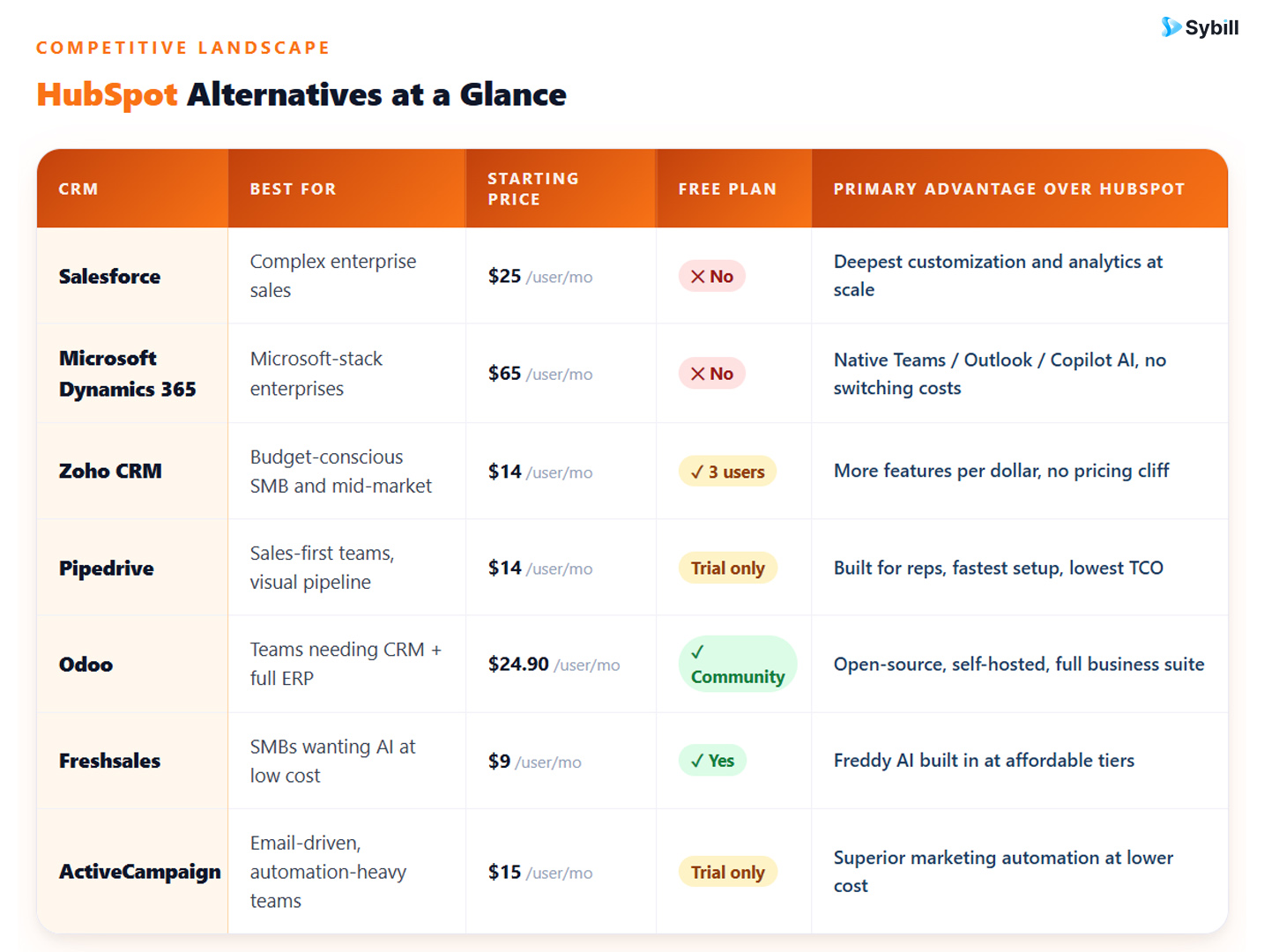
This guide covers the seven strongest HubSpot alternatives in 2026, what each one does better, where each falls short, and how to match the right platform to your actual situation.
Before getting into the alternatives, it helps to be specific about which HubSpot pain points are driving the search. Different frustrations point to different solutions.
The pricing jump is too steep. HubSpot's free-to-paid gap is significant. Starter at $20/seat/month is usable for basic contact management but lacks the automation and reporting that growing teams need. Professional at $100/seat/month is where the platform becomes genuinely useful for sales, but the cost increase is jarring. Teams that need Professional features but cannot justify the price point should look at Zoho CRM or Freshsales first.
Marketing features are not needed. HubSpot's identity is rooted in inbound marketing. If your team generates pipeline through outbound, referrals, or field sales rather than content and SEO, you are paying for a platform whose core identity does not match your motion. Pipedrive and Freshsales are built specifically for sales-first teams without the marketing overhead.
The customization ceiling is too low. HubSpot's object model and workflow architecture handles the needs of most mid-market teams well. For organizations with non-standard sales processes, complex approval hierarchies, or deeply specific data requirements, the platform hits its limits. Salesforce and Microsoft Dynamics 365 offer deeper customization at the cost of higher complexity and price.
The Microsoft stack is already in place. Teams running Teams, Outlook, and Microsoft 365 daily often find that keeping CRM inside that ecosystem, rather than managing a separate HubSpot relationship, reduces friction significantly. Microsoft Dynamics 365 with Copilot is the natural alternative here.
The business needs CRM plus operations. HubSpot covers sales, marketing, and service. It does not cover accounting, HR, inventory, or operations. Teams that want a single platform for their entire business rather than a best-in-class marketing-sales tool should look at Odoo or Zoho One.
Who should consider this: Teams that have outgrown HubSpot's customization ceiling and need a platform that can mirror the full complexity of an enterprise sales process without compromise.
HubSpot and Salesforce are direct competitors, and for many mid-market teams in the $100/seat/month range, they are genuinely comparable. The differentiation sharpens as organizations grow. Salesforce's custom objects, Apex development capabilities, AppExchange ecosystem with 7,000-plus applications, and Einstein AI at Enterprise and Unlimited tiers give enterprise revenue organizations a configurability ceiling that HubSpot does not match.
Salesforce also wins the analytics comparison at scale. Multi-territory reporting, AI-powered forecasting through Einstein, and cross-object dashboards that span sales, service, and marketing data in a single view are available in Salesforce at depths HubSpot does not reach, even at its Enterprise tier.
Salesforce's key advantages over HubSpot:
Where Salesforce falls short of HubSpot:
Bottom line: Salesforce is the right HubSpot alternative for teams whose primary frustration is customization depth rather than price. For teams whose frustration is price, it is not the answer. See the full Salesforce vs HubSpot comparison for a complete breakdown.
Who should consider this: Enterprises already running Teams, Outlook, Azure, and Microsoft 365 who want CRM embedded in the tools their reps already use rather than managed as a separate platform.
This is not a cost-motivated switch. Dynamics 365 Sales starts at $65/user/month, which is not cheaper than HubSpot Professional at $100/seat/month by a dramatic margin. The value proposition is entirely different: Copilot for Sales embedded in Outlook and Teams.
A rep using HubSpot still has to open HubSpot to update a deal, log a call, or check pipeline status. A rep using Dynamics 365 with Copilot can receive an opportunity summary in Outlook, generate a follow-up email from a Teams meeting summary, update a pipeline stage through a natural-language query, and get a pre-call brief without opening the CRM application at all. For organizations where low rep adoption is the core CRM problem, Dynamics 365 addresses the structural cause rather than adding more training.
The LinkedIn Sales Navigator integration deserves specific mention. Because Microsoft owns LinkedIn, Dynamics 365 can pull professional history, mutual connections, job changes, and intent signals directly into contact records without a paid third-party connector. For enterprise B2B teams where account-based selling drives most of the pipeline, this enrichment layer is natively available rather than an additional expense.
Dynamics 365's key advantages over HubSpot:
Where Dynamics 365 falls short of HubSpot:
Bottom line: Dynamics 365 is the right HubSpot alternative for organizations where the Microsoft ecosystem is the dominant technology choice and Copilot-embedded sales workflows would drive higher adoption than any alternative. For a full comparison, see Salesforce vs HubSpot vs Dynamics 365.
Who should consider this: Teams that hit HubSpot's pricing cliff and want a platform that delivers comparable, or in many areas stronger, functionality at a fraction of the cost.
Zoho CRM's Enterprise plan at $40/user/month includes Zia AI for lead scoring, deal closure predictions, anomaly detection, and email sentiment analysis. It includes Canvas for no-code interface customization. It includes Blueprint for visualizing and enforcing sales process stages. It includes CommandCenter for orchestrating multi-team customer journeys. It includes Territory Management for distributed sales organizations. And it includes native integration with 45-plus Zoho business applications for accounting, HR, marketing, and helpdesk.
HubSpot Professional at $100/seat/month gives you access to comparable sales automation, sequences, and reporting. Zoho Enterprise at $40/user/month gives you most of the same capabilities plus AI, process enforcement, and cross-functional business app integration, for 60% less.
The comparison that matters most for teams coming from HubSpot is at the $14/user/month Standard level. Zoho Standard is not as powerful as HubSpot Professional, but it covers the practical needs of small sales teams managing contacts, deals, and basic automation without requiring the kind of budget commitment that HubSpot's mid-tier demands.
Zoho CRM's key advantages over HubSpot:
Where Zoho CRM falls short of HubSpot:
Bottom line: Zoho CRM is the strongest HubSpot alternative for teams whose primary frustration is cost. For a complete tier-by-tier breakdown, see the Zoho CRM vs Salesforce comparison for context on how Zoho stacks up at each feature level.
Who should consider this: Teams whose pipeline is driven by outbound, field sales, or referrals rather than inbound marketing and who want the most rep-friendly CRM available at a predictable price.
HubSpot was built from the marketing funnel inward. The CRM was added to the platform after the marketing product was established, and that lineage shows in how the product is organized. The top navigation is structured around Hubs. Features are segmented between sales and marketing contexts. Reps who are not involved in inbound workflows regularly navigate past tools they do not use to find the ones they need.
Pipedrive was built by salespeople for salespeople. Every default view is oriented around deals, activities, and next actions. The Kanban pipeline is the home screen. There is no marketing module pulling attention away from the core task. Setup takes two to three days for most sales teams, and reps typically get productive without any formal training.
On total cost of ownership, Pipedrive's advantage over HubSpot is significant. A 10-person team on Pipedrive Professional pays approximately $4,800 per year in license fees. The same team on HubSpot Professional pays $18,000 per year, with a year-one implementation and onboarding fee on top of that. The feature gap at the $100/seat/month tier is real but frequently overstated for teams that primarily need deal management, activity tracking, and basic automation.
Pipedrive's key advantages over HubSpot:
Where Pipedrive falls short of HubSpot:
Bottom line: Pipedrive is the right HubSpot alternative for lean, outbound or referral-driven sales teams that want the most usable pipeline tool at the lowest total cost. For a full three-way comparison, see Salesforce vs HubSpot vs Pipedrive.
Who should consider this: Growing companies that currently manage CRM, accounting, inventory, and HR in separate tools and want a single, affordable platform that unifies them all.
HubSpot covers the customer-facing front end of a business exceptionally well. It does not cover operations, finance, HR, or inventory. Teams that outgrow HubSpot's scope typically face a choice: stay on HubSpot for CRM and add a separate ERP for everything else, or move to a platform that handles both.
Odoo makes the second option genuinely viable. Its CRM module includes a visual Kanban pipeline, AI-powered lead scoring, automated follow-ups, email marketing, and integration with the rest of the Odoo suite. A won deal can automatically trigger an invoice, a delivery order, a project, and an HR onboarding task without any integration work. The whole business runs on the same data model.
Odoo also offers something no other platform in this guide provides: a self-hosted option. Organizations with strict data residency requirements, on-premises mandates, or the technical resources to manage their own infrastructure can deploy Odoo on a VPS, dedicated server, Docker, or Kubernetes cluster with full control over their data. HubSpot is a SaaS-only platform with no self-hosting option.
Odoo's key advantages over HubSpot:
Where Odoo falls short of HubSpot:
Bottom line: Odoo is the right HubSpot alternative for companies that want to replace multiple tools with a single platform at a lower total spend. For a full breakdown of deployment and feature differences, see the Odoo vs Salesforce comparison for context on where open-source ERP-CRM platforms stand relative to pure-play CRM leaders.
Who should consider this: Small and mid-sized teams that want AI-powered deal intelligence and built-in calling at a price point well below HubSpot Professional.
Freshsales' Freddy AI assistant is the headline differentiator. Lead scoring, deal scoring, next-best-action recommendations, and contact enrichment are available at mid-tier pricing, which makes enterprise-style sales intelligence accessible to teams that would need to reach HubSpot Professional or higher to get comparable AI capabilities. For budget-sensitive teams that want AI to guide rep activity rather than just track it, Freshsales is often a more practical choice than HubSpot at a given spend level.
Freshsales also includes built-in phone and email natively. Calling, voicemail drop, call logging, and email tracking are part of the platform rather than integrations that need to be purchased and maintained separately. HubSpot includes calling at limited capacity on paid plans but prices the full functionality through the Sales Hub.
Freshsales' key advantages over HubSpot:
Where Freshsales falls short of HubSpot:
Bottom line: Freshsales is the right HubSpot alternative for teams whose primary frustration is paying $100/seat/month to access AI features they need but cannot afford at HubSpot's pricing. For the best CRM software for small businesses, Freshsales consistently lands in the top tier of recommendations for AI-aware teams on constrained budgets.
Who should consider this: Teams that generate most of their pipeline through email marketing and marketing automation and want more sophisticated automation logic than HubSpot Professional delivers, at a lower price.
ActiveCampaign is primarily a marketing automation platform with a built-in CRM, which is almost the inverse of HubSpot's origin story. Its automation builder is widely regarded as the most powerful in the mid-market category. Multi-step conditional logic, behavioral triggers, predictive sending, and lead scoring based on engagement patterns are available at pricing that starts at $15/user/month and scales to $145/month for the professional tier.
For teams where the core revenue motion is nurturing inbound leads through email sequences before they reach a sales rep, ActiveCampaign's automation depth frequently outperforms HubSpot at a comparable or lower price. The tradeoff is that the CRM capabilities are functional but not the platform's primary strength. Teams with complex pipeline management, forecasting, or sales analytics needs will find ActiveCampaign insufficient as a standalone CRM.
ActiveCampaign's key advantages over HubSpot:
Where ActiveCampaign falls short of HubSpot:
Bottom line: ActiveCampaign is the right HubSpot alternative for email-and-automation-led businesses that want marketing automation power without paying HubSpot's pricing for features they do not fully use. It is best evaluated alongside Freshsales or Zoho CRM if a more complete sales CRM is also needed.
Here is the honest truth no alternative vendor will put in their comparison page: every platform in this guide has the same fundamental limitation as HubSpot.
They are all recording systems. They store what reps choose to enter after the call. And what reps choose to enter is almost always incomplete, written from memory, and filed between the previous call ending and the next one starting.
The competitor name that came up in context. The stakeholder who was mentioned as a final approver. The budget signal that was phrased in a way that would have shaped the entire follow-up. The genuine timeline concern that the rep meant to log but forgot once they were three calls deep into the afternoon.
None of that makes it into Salesforce, Dynamics 365, Zoho CRM, Pipedrive, Odoo, Freshsales, ActiveCampaign, or HubSpot automatically. Because none of them were in the room.
This is why CRM data quality and hygiene consistently ranks as the top RevOps challenge regardless of which platform organizations choose. It is why switching CRMs frequently improves the interface experience without improving the underlying data problem. And it is why AI CRM use cases that capture conversation intelligence at the source are where the real pipeline accuracy improvements are being built, independent of platform choice.
The question for teams evaluating HubSpot alternatives is not just which platform has a better features-to-price ratio. It is also which platform you want underneath a conversation intelligence layer that finally makes your CRM data reflect what is actually happening in your deals.
Get started for free with Sybill and see what your pipeline data looks like when it comes from what was actually said, not from what was remembered.
Sybill integrates natively with HubSpot, Salesforce, Zoho CRM, and Microsoft Dynamics 365, and connects with Pipedrive and Odoo via Zapier. It works on top of any platform you choose, whether you stay on HubSpot or switch to one of the alternatives in this guide.
After every call and email, Sybill extracts what actually happened and writes it directly into your CRM fields. Pain points, objections, budget signals, decision-maker identification, MEDDPICC and BANT criteria, next steps, and competitor mentions: all populated automatically, field-specifically, in human-sounding language, without the rep touching the CRM.
CRM Autofill eliminates post-call admin regardless of which platform sits underneath it. Sybill auto-discovers your fields, including custom ones, and populates them from the actual conversation. AEs report saving four to six hours per week on CRM updates. That time goes back to selling.
Magic Summary delivers a structured call debrief within minutes of every call ending. Outcome, pain points, objections, next steps, and engagement signals: all structured and ready before the rep writes their first follow-up word. Sales call transcripts become action plans rather than archives.
Ask Sybill is a natural-language querying layer across all deals, calls, emails, and CRM data. Ask which accounts went quiet after the proposal stage. Ask which open deals have raised a legal review concern. Ask which reps close the most deals after a second stakeholder call. Structured answers in seconds, not after a report build. This is conversation intelligence software turning every sales meeting into searchable, structured deal intelligence without changing the CRM underneath.
Non-Verbal AI Analysis tracks engagement signals on video calls, identifying the difference between a stakeholder who is bought in and one who is passively present. For multi-threaded enterprise deals, this shapes the follow-up strategy before the follow-up email is written.
Pre-Meeting Briefs are auto-generated before every call, pulling from the full deal history and CRM context, so reps walk in prepared without 20 minutes of pre-call navigation.
AI Follow-Up Emails are one-click drafts in the rep's own voice, specific to the actual conversation just finished. Not generic templates. Emails that reference what was discussed, ready in seconds.
For sales managers, Sybill generates rep-level coaching briefs, deal health snapshots, and automated pipeline reviews. The AI agents for sales managers capability is especially valuable for MEDDPICC or BANT-driven teams where field completeness drives forecast confidence, whether the underlying CRM is HubSpot, Salesforce, Zoho, Pipedrive, or Dynamics 365.
This addresses the top challenges RevOps teams report on every platform: incomplete CRM data, unreliable forecasts, and too much admin. Sybill solves all three simultaneously by automating the data layer that every platform in this guide depends on but cannot collect on its own.
For teams evaluating the best AI sales tools to complement a CRM switch, Sybill is the one investment that pays off regardless of which platform you land on.
Get started for free with Sybill and connect it to your current or new CRM today.
What are the best HubSpot alternatives in 2026?
The seven strongest HubSpot alternatives in 2026 are Salesforce, Microsoft Dynamics 365, Zoho CRM, Pipedrive, Odoo, Freshsales, and ActiveCampaign. The right alternative depends on the specific frustration driving the switch. Teams leaving because of pricing should evaluate Zoho CRM or Freshsales first. Teams leaving because of customization limitations should evaluate Salesforce. Teams on the Microsoft stack should evaluate Dynamics 365. Teams primarily focused on sales without a marketing motion should evaluate Pipedrive. Teams that want CRM plus full business operations should evaluate Odoo.
Is Zoho CRM a good alternative to HubSpot?
Yes, and it is frequently the most practical one for cost-driven evaluations. Zoho CRM Enterprise at $40/user/month delivers AI through Zia, advanced automation through Blueprint and CommandCenter, no-code interface customization through Canvas, and native integration with 45-plus Zoho business applications. That compares to HubSpot Professional at $100/seat/month for broadly comparable CRM functionality. For teams whose primary HubSpot complaint is the pricing cliff between free or Starter and Professional, Zoho CRM is the strongest direct alternative.
Is Pipedrive a good alternative to HubSpot?
Yes, specifically for sales-first teams whose pipeline comes from outbound, referrals, or field activity rather than inbound marketing. Pipedrive's Kanban pipeline, two-to-three day setup time, high rep adoption rate, and predictable pricing make it a compelling switch for teams paying $100/seat/month for HubSpot Professional features they use only partially. The main gap is marketing automation, which Pipedrive does not include natively. Teams that need both sales CRM and email marketing automation will need to evaluate whether connecting Pipedrive with a dedicated marketing tool is simpler than staying on HubSpot.
What is the cheapest HubSpot alternative?
Freshsales offers the lowest paid pricing at $9/user/month for the Growth plan with core CRM features. Zoho CRM Standard starts at $14/user/month and includes more CRM-specific functionality than Freshsales' entry tier. Both platforms offer free plans for small teams. Pipedrive Essential starts at $14/user/month and is the strongest choice in the $14-to-$20/user/month range for sales-focused teams. Odoo Community is free for self-hosted deployments with technical resources to manage them.
Can you use Sybill with HubSpot alternatives?
Yes. Sybill integrates natively with HubSpot, Salesforce, Zoho CRM, and Microsoft Dynamics 365, and connects with Pipedrive and Odoo via Zapier. Whichever platform you switch to, Sybill continues to work on top of it, automatically populating CRM fields after every call and email with structured deal intelligence. The conversation layer that Sybill operates at is independent of which CRM sits underneath it. Reps save four to six hours per week on CRM updates regardless of the platform. Read more about how AI CRM tools improve data quality across every platform in this guide.
Is Microsoft Dynamics 365 a good HubSpot alternative?
For enterprises already running Microsoft 365, Teams, and Azure, yes. Dynamics 365 Sales with Copilot embedded in Outlook and Teams removes the application-switching friction that makes CRM adoption a persistent problem for many organizations. The pricing is comparable to HubSpot Professional for a well-equipped plan, but the total cost advantage for Microsoft-committed organizations comes from infrastructure overlap with existing Microsoft licensing rather than from a lower sticker price. For SMBs without existing Microsoft enterprise agreements, Dynamics 365 is likely overbuilt for current needs.
Why do companies leave HubSpot?
The most common reasons companies search for HubSpot alternatives are: the pricing jump from free or Starter to Professional ($100/seat/month) is too steep for the feature delta; the platform is perceived as marketing-first in a way that creates navigation friction for sales-only teams; customization depth hits limits for organizations with non-standard sales processes; contact-based pricing makes costs grow faster than team size; and organizations on the Microsoft stack find managing a separate HubSpot relationship less efficient than embedding CRM natively in the tools they already use. The right alternative depends entirely on which of these frustrations is primary.
Whichever CRM you switch to, the data quality problem follows unless you fix it at the source. Get started for free with Sybill and let any platform in this guide finally reflect what is actually happening in your deals.
The seven strongest HubSpot alternatives in 2026 are Salesforce, Microsoft Dynamics 365, Zoho CRM, Pipedrive, Odoo, Freshsales, and ActiveCampaign. The right alternative depends on the specific frustration driving the switch. Teams leaving because of pricing should evaluate Zoho CRM or Freshsales first. Teams leaving because of customization limitations should evaluate Salesforce. Teams on the Microsoft stack should evaluate Dynamics 365. Teams primarily focused on sales without a marketing motion should evaluate Pipedrive. Teams that want CRM plus full business operations should evaluate Odoo.
Yes, and it is frequently the most practical one for cost-driven evaluations. Zoho CRM Enterprise at $40/user/month delivers AI through Zia, advanced automation through Blueprint and CommandCenter, no-code interface customization through Canvas, and native integration with 45-plus Zoho business applications. That compares to HubSpot Professional at $100/seat/month for broadly comparable CRM functionality. For teams whose primary HubSpot complaint is the pricing cliff between free or Starter and Professional, Zoho CRM is the strongest direct alternative.
Yes, specifically for sales-first teams whose pipeline comes from outbound, referrals, or field activity rather than inbound marketing. Pipedrive's Kanban pipeline, two-to-three day setup time, high rep adoption rate, and predictable pricing make it a compelling switch for teams paying $100/seat/month for HubSpot Professional features they use only partially. The main gap is marketing automation, which Pipedrive does not include natively. Teams that need both sales CRM and email marketing automation will need to evaluate whether connecting Pipedrive with a dedicated marketing tool is simpler than staying on HubSpot.








