
Find us at booth #83, join us for a harbor side happy hour, or catch Gorish’s talk.

Sept, 16-18 > Learn more

%20(1).avif)
Mamta Tainwala

March 27, 2026
Here is a stat worth sitting with for a moment: 70% of sales reps believe their CRM helps them close more deals. But that same research consistently shows reps spending close to a third of their working week on manual data entry, admin tasks, and CRM updates that have nothing to do with actual selling.
That gap is not a coincidence. It is a design limitation that sits at the center of every CRM comparison worth having in 2026.
Salesforce, HubSpot, and Microsoft Dynamics 365 are three of the most evaluated enterprise CRM platforms in the market today. They are all powerful. They all have serious AI roadmaps. They all claim to solve the same problem. And they each take a completely different approach to doing it.
Salesforce bets on maximum flexibility through a customizable cloud platform and AppExchange ecosystem. HubSpot bets on accessibility through a unified, marketing-first interface that sales teams can adopt quickly. Dynamics 365 bets on native Microsoft ecosystem integration, combining CRM and ERP capabilities in a single platform that talks to Teams, Outlook, Power BI, and Azure without any stitching required.
Which is right for your team depends on where you are today, where you are going, and what you can afford along the way. This guide covers all of it.
Founded in 1999, Salesforce created the cloud CRM category and has held the top market share position ever since, controlling roughly 23.8% of the global CRM market. At its core, Salesforce Sales Cloud is a highly configurable opportunity management and pipeline tool. Layered on top are Einstein AI for predictive analytics, Agentforce for building custom AI agents, Slack for internal collaboration, Pardot for marketing automation, and an AppExchange marketplace of over 7,000 applications.
Salesforce's defining characteristic is that it can model almost any business process. Enterprise teams with complex, multi-stage revenue cycles, global territories, and multi-department data dependencies consistently cite Salesforce as the platform that scales with them. The tradeoff is real: meaningful Salesforce implementations require dedicated admins, often outside consultants, and a significant upfront investment in configuration and training before the platform delivers its advertised value.
Best for: Mid-market and enterprise organizations with complex, customized sales processes, dedicated technical resources, and budgets that support long implementation timelines.
HubSpot launched in 2006 as a marketing automation company before adding its CRM in 2014. Today it operates as a unified go-to-market platform through five modular "Hubs" covering sales, marketing, customer service, content management, and operations. The free CRM tier is genuinely useful for early-stage teams, and the paid plans scale up to serve mid-market and enterprise customers with increasingly sophisticated automation, AI, and analytics capabilities.
HubSpot's structural advantage is coherence. Sales and marketing data live in the same system, which means lead attribution, campaign performance, and deal progression all tell the same story without manual reconciliation across platforms. Its interface is among the most intuitive of any CRM in this size class, and its onboarding is guided well enough that most reps get productive within a day or two.
The limitation most enterprise teams hit with HubSpot is depth. Advanced customization, complex object modeling, and the kind of enterprise-grade configurability that Salesforce or Dynamics 365 offer are not available at comparable price points.
Best for: SMBs to mid-market teams prioritizing marketing-sales alignment, fast onboarding, and an accessible platform that does not require dedicated technical resources to operate.
Microsoft Dynamics 365 is not a single product. It is a modular suite of business applications spanning Sales, Customer Service, Marketing, Field Service, Finance, Operations, and more, all sitting on a common data model (the Microsoft Dataverse) and plugging natively into Microsoft 365, Teams, Outlook, SharePoint, Power BI, Azure, and the LinkedIn Sales Navigator.
For organizations already invested in the Microsoft ecosystem, this is the defining advantage. Teams that live in Outlook and Teams every day do not need to change their workflow to update CRM records. Copilot, Microsoft's embedded AI assistant, surfaces deal summaries, drafts follow-up emails, updates opportunity fields, and flags stalling deals from directly inside the apps sellers already use.
Dynamics 365 Sales starts at $65 per user per month for the Professional plan, stepping up to $105/user/month for Enterprise and $150/user/month for the Sales Premium tier, which includes Copilot AI and advanced pipeline intelligence. Compared to Salesforce, which starts nominally lower but scales to much higher costs once add-ons and support are factored in, Dynamics 365 often delivers a more predictable total cost of ownership at the enterprise tier, particularly for organizations that do not need to purchase additional Microsoft licenses they already own.
The limitation mirrors the other enterprise platforms: Dynamics 365 requires implementation expertise. Microsoft's architecture is flexible but not self-configuring, and most organizations rely on certified partners to deploy it properly.
Best for: Enterprise organizations already operating in the Microsoft ecosystem that want CRM, ERP, and AI in a unified platform without managing multiple vendor relationships.
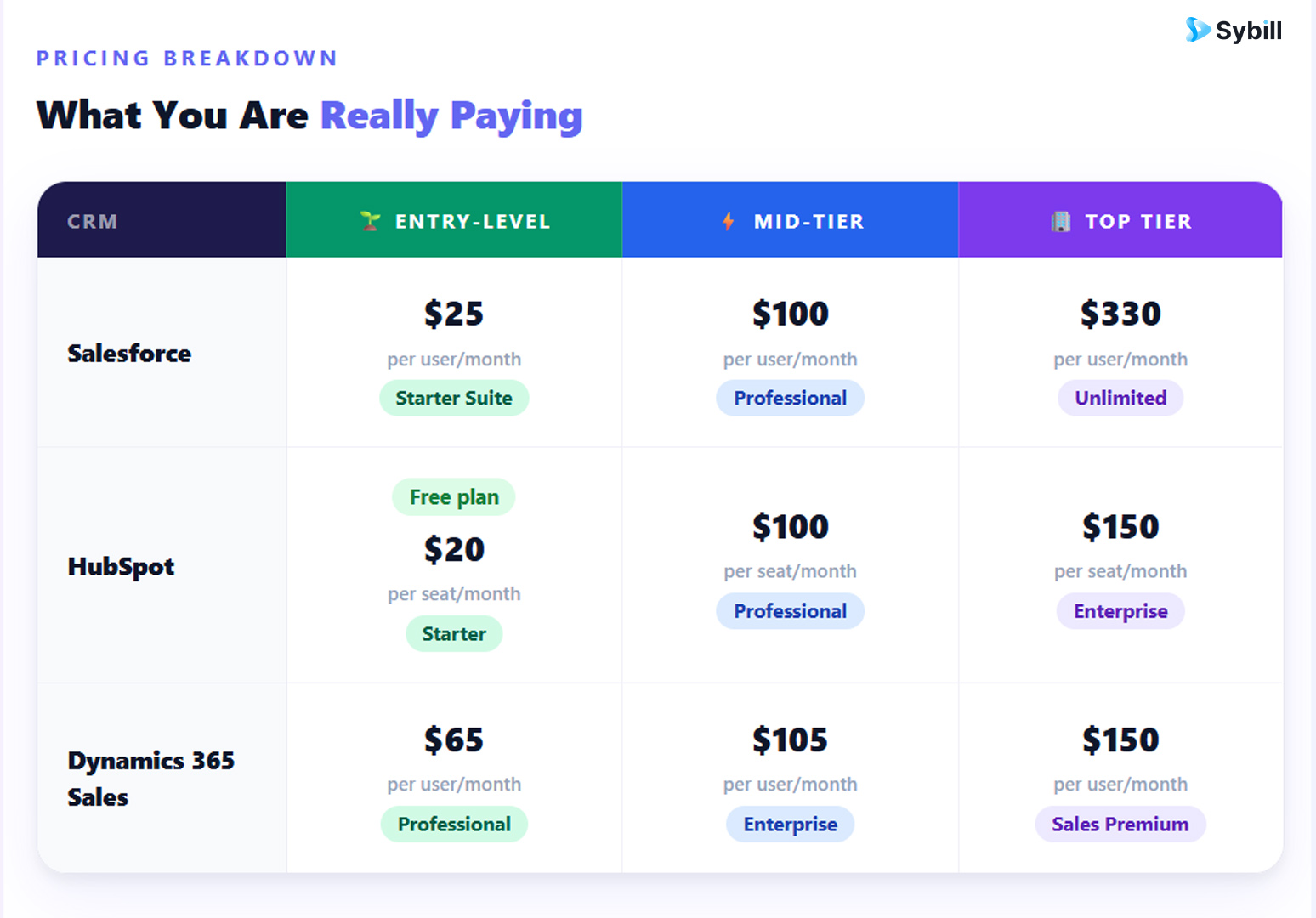
Salesforce has the lowest advertised entry point but tends to grow into the most expensive option once automation tools, AI features, and support tiers are added. Pardot for marketing automation alone starts at $1,250 per month as a separate add-on. Agentforce, Salesforce's AI agent platform, is gated behind Enterprise and Unlimited tiers.
Dynamics 365 starts higher per user but includes more in each tier. The Sales Premium plan at $150/user/month includes Copilot AI capabilities, advanced pipeline intelligence, and predictive scoring without requiring separate add-on purchases. For organizations already paying for Microsoft 365, there is also meaningful licensing overlap that reduces the effective per-user cost of Dynamics.
HubSpot's pricing is the most transparent at entry level. The free plan is genuinely useful. The step to Professional at $100/seat/month is steep, and enterprise-scale contact databases drive costs up further. For pure CRM capability per dollar at the mid-market tier, Dynamics 365 typically delivers more included functionality.
The real pricing conversation for all three is total cost of ownership. Salesforce implementations regularly run $37,000 or more in year one for a 10-person team once consulting, training, and add-ons are counted. Dynamics 365 implementations average $15,000 or more in professional services. HubSpot is the fastest and cheapest to deploy, but its ceiling for enterprise customization limits long-term scalability for complex organizations.
This category belongs to Dynamics 365, and the gap is significant for the right buyer.
Teams using Microsoft 365 effectively get a native CRM embedded inside their existing workflow. Copilot for Sales surfaces deal context directly inside Outlook, generates email drafts based on CRM history and customer behavior, updates opportunity records from Teams meeting summaries, and flags pipeline risks without requiring reps to open Dynamics at all. Sellers can ask Copilot natural language questions like "Show me all deals closing this quarter over $50,000" and get answers in seconds without pulling a report.
The LinkedIn Sales Navigator integration enriches contact and account records automatically, pulling in professional history, mutual connections, and engagement signals from LinkedIn without any manual entry. For enterprise B2B teams running account-based motions, this is a meaningful competitive intelligence advantage.
Salesforce does not have native Microsoft 365 integration at this depth. Using Salesforce alongside Outlook and Teams requires middleware, third-party plugins, or custom integrations that add cost and maintenance overhead. Salesforce's collaboration layer comes through its Slack acquisition, which introduces a separate tool into the workflow.
HubSpot integrates with Outlook and Gmail for email tracking and meeting scheduling but does not offer the same depth of native Microsoft 365 embedding. For teams that live in Teams and Outlook, HubSpot still requires switching contexts to access full CRM functionality.
If your organization runs on Microsoft, Dynamics 365 is a genuinely different value proposition compared to either alternative.
Salesforce's pipeline management is the most analytically rich of the three. Opportunity stages, forecast categories, AI-powered pipeline inspection through Einstein, and customizable probability calculations give revenue leaders an exceptionally detailed view of pipeline health. At Enterprise and Unlimited tiers, AI-generated summaries of stalled deals and recommended next actions reduce the manual work of pipeline review.
Dynamics 365 Sales delivers strong pipeline management with a modern interface that has improved meaningfully in recent releases. The Sales Accelerator feature organizes rep priorities by surfacing the highest-impact actions from a single workspace, while pipeline intelligence flags deals with weak engagement signals or missing qualification data. The interface is intuitive for Microsoft-familiar users and significantly less overwhelming than earlier versions of the platform.
HubSpot's deal board is clean and accessible. Drag-and-drop stage management, visual pipeline views, and deal health indicators are all well-executed. For organizations that do not require the deep analytics of Salesforce or Dynamics 365, HubSpot's pipeline view covers the practical needs of most sales teams with less configuration overhead.
A consistent challenge across all three platforms is that pipeline accuracy depends entirely on what data is inside them. CRM data quality and hygiene problems do not care which CRM logo is on the login screen. Deals that stalled after a call with no follow-up logged, stages updated by reps on Friday from memory, qualification fields left blank: these are universal failures, not platform-specific ones.
Salesforce's automation is the deepest available, covering workflow rules, approval processes, AI-driven next-best-action recommendations, and custom-built agents through the Agentforce platform. The depth is real. So is the configuration overhead. Most meaningful automation in Salesforce requires an admin or Apex developer to build and maintain it.
Dynamics 365 uses Power Automate for workflow automation, which connects across the entire Microsoft ecosystem and external systems via a visual, low-code builder. For teams with Power Platform experience, the automation possibilities are extensive and span far beyond CRM into finance, operations, and customer service. The tradeoff is that some complex flows require Power Platform licensing on top of Dynamics 365 Sales, which adds cost. However, basic automations including follow-up reminders, lead assignment, and stage-based email triggers work out of the box.
HubSpot's automation is the most accessible to build without technical expertise. Visual workflow builders, email sequences, lead scoring rules, and task automation all work through a drag-and-drop interface that most marketers and sales ops managers can configure independently. The deeper workflow capabilities are gated behind Professional and Enterprise plans, but the available features at each tier are clearly documented and predictably priced.
For teams evaluating CRM automation tools for small and mid-market teams, HubSpot typically wins on accessibility. For enterprise teams that need automation spanning CRM, ERP, finance, and operations in a single environment, Dynamics 365's Power Automate integration is the stronger foundation.
This is the most actively evolving category in the comparison, and all three platforms are investing heavily.
Microsoft Dynamics 365 Copilot is embedded across the entire Dynamics and Microsoft 365 suite. Within Sales, Copilot automatically generates meeting summaries from Teams calls, drafts follow-up emails in Outlook, updates opportunity fields without reps switching applications, surfaces deal risks through natural language queries, and runs an autonomous Sales Qualification Agent that researches and pre-qualifies leads before a rep gets involved. Microsoft reports that sellers can reduce time spent on administrative tasks by up to 40% using Copilot. Copilot AI features are included in the Sales Premium plan at $150/user/month, making the pricing more predictable than Salesforce's usage-based Agentforce model.
Salesforce Einstein and Agentforce are the most powerful AI capabilities available in any CRM, but they come with both a price premium and a configuration requirement. Einstein handles predictive lead scoring, opportunity health scoring, and next-best-action recommendations. Agentforce enables custom AI agents built to handle specific tasks like lead qualification, call coaching, and contract summarization. These agents are highly capable but require Enterprise or Unlimited plan access and meaningful setup work to deploy effectively.
HubSpot Breeze includes Breeze Copilot for in-context AI assistance across the platform, Breeze Agents for prospecting, content creation, and customer service automation, and Breeze Intelligence for buyer intent data and contact enrichment. The AI is more accessible across plan tiers than either competitor and does not require developer configuration to activate. For SMBs and growth-stage companies, Breeze delivers a genuinely useful AI experience out of the box. For enterprises that need deep predictive analytics and custom agent workflows, it does not reach the ceiling of Salesforce or Dynamics 365.
The important context for all three: CRM-native AI is only as powerful as the data feeding it. Call summaries, buyer signals, objection patterns, and engagement intent that live in the sales conversation itself never make it into any of these systems automatically. That is the gap where AI sales assistants operating at the conversation layer deliver the intelligence these platforms need to actually work.
HubSpot wins this category without much competition. Guided onboarding, a clean interface, well-organized navigation, and a gentle learning curve make HubSpot the easiest of the three to get running quickly. Most reps can get productive in a day or two without dedicated training. For organizations where rep adoption is the number-one risk in a CRM rollout, this matters more than any feature comparison.
Dynamics 365 has improved significantly in recent releases. The unified interface is more modern and accessible than earlier versions of the platform, and the Sales Hub consolidates deal management, activity tracking, and pipeline views into a clean workspace. For users already comfortable with Microsoft products, the navigation feels intuitive. For users without a Microsoft background, there is still a learning curve, and the sheer number of modules and configuration options can be disorienting at first.
Salesforce has the steepest learning curve of the three. The platform's flexibility means there is no single default experience. What a rep sees depends entirely on how the instance was configured, which training was provided, and how much the implementation team invested in building clean, role-appropriate views. A well-implemented Salesforce instance can be genuinely excellent to use. A poorly implemented one sends reps back to spreadsheets. Both outcomes are common.
Salesforce's reporting capabilities are the deepest available in a commercial CRM. Custom dashboards, AI-powered forecasting through Einstein, real-time pipeline snapshots, and granular cross-object reporting give leadership teams an exceptionally detailed view of revenue performance. For enterprise organizations where forecast accuracy is a board-level concern, Salesforce's analytics justify a meaningful portion of its cost premium.
Dynamics 365's analytics are powered natively by Power BI, which is the strongest reporting layer of the three when properly configured. Real-time sales dashboards, forecasting modules, sales velocity tracking, and relationship analytics through the Sales Premium plan deliver enterprise-grade insight. The advantage over Salesforce is that Power BI connects across the entire Microsoft ecosystem, not just CRM data, which means a single reporting environment can pull from finance, operations, and customer service alongside sales pipeline data.
HubSpot's reporting is clean and accessible. Custom report builders, marketing attribution dashboards, and revenue reporting are available at mid-tier plans and above. For mid-market teams that want data-informed decisions without a BI team to interpret the output, HubSpot's reporting covers practical needs well. It does not reach the analytical depth of Salesforce or the cross-platform integration of Power BI.
It is worth repeating: the quality of any CRM's reporting depends entirely on the completeness of the data feeding it. AI-driven sales forecasting built on conversation signals, buyer intent, and real-time engagement data is consistently more reliable than forecast models built on manually entered pipeline stages.
Salesforce's AppExchange has over 7,000 applications. For enterprise organizations with complex, multi-tool stacks, Salesforce almost certainly connects to every system in use. The breadth is unmatched, though a meaningful share of AppExchange integrations are paid, and complex integrations often require developer effort to configure and maintain.
Dynamics 365 integrates natively with the entire Microsoft product suite, which for organizations running Microsoft 365, Teams, SharePoint, Azure, and Power Platform means CRM data flows seamlessly across every department without custom middleware. For external integrations, Power Automate connects Dynamics to over 1,000 third-party applications through a visual low-code builder. The integration story for Microsoft-committed organizations is more cohesive than any other platform in this comparison.
HubSpot's App Marketplace has over 1,500 integrations, curated for quality and ease of installation. Most integrations connect natively without configuration overhead and work out of the box. For the tools most growth-stage B2B companies actually use, including Gmail, Google Ads, Slack, Zoom, Mailchimp, and LinkedIn, HubSpot covers the stack well. It is not as broad as Salesforce's AppExchange or as deep as Dynamics 365's Microsoft-native integration, but it is faster and easier to activate.
Salesforce's support scales with price tier. 24/7 support is exclusive to the Unlimited plan at $330/user/month. Standard support on lower plans has a two-day response window. For a platform as complex as Salesforce, this is a meaningful operational risk for teams without dedicated internal admins.
Dynamics 365 support comes through Microsoft's standard support structure, with tiered response times depending on the support plan purchased. Like Salesforce, meaningful enterprise support requires a higher-tier agreement. Microsoft's documentation and partner ecosystem are extensive, with certified implementation partners available globally for both initial setup and ongoing support.
HubSpot provides 24/7 email and chat support on paid plans, with phone support available at Professional and Enterprise tiers. The knowledge base and community forums are thorough and actively maintained. For most mid-market teams, HubSpot's support is fast, accessible, and sufficient.
Choose Salesforce if:
Choose HubSpot if:
Choose Dynamics 365 if:
Here is what Salesforce, HubSpot, and Dynamics 365 have in common: they are all recording systems. They store what your reps choose to enter. And in most organizations, what reps choose to enter is an incomplete, end-of-week summary written from memory that captures maybe 60% of what actually happened on the call.
The budget signal that came up offhand. The legal stakeholder who was mentioned twice but never logged. The competitor name dropped at the end of the call. The genuine hesitation about timeline that the rep interpreted as enthusiasm. None of that makes it into any of these three CRMs automatically, because none of them were in the room when it happened.
This is the gap at the center of the AI CRM use cases conversation that is accelerating in 2026. Conversation intelligence that captures what actually happened, extracts the signals that matter, and writes them directly into CRM fields is increasingly where the real data accuracy advantage is being built, regardless of which CRM platform you choose.
Get started for free with Sybill and see what your pipeline looks like when the data reflects reality.
Sybill integrates natively with Salesforce, HubSpot, and Microsoft Dynamics 365, which means it works alongside whichever platform you choose from this comparison. It is not a CRM replacement. It is the conversation intelligence and automation layer that closes the data gap every CRM leaves open.
After every call and email, Sybill's AI extracts the signals that actually matter for deal progression and writes them directly into your CRM fields: pain points, budget signals, decision-maker identity, objections raised, agreed next steps, MEDDPICC and BANT criteria, competitor mentions, and more. The entries are human-sounding and field-specific, not generic summaries dropped into a notes field.
CRM Autofill: Zero manual entry after calls. Sybill auto-discovers your CRM fields, including custom ones, and populates them with tailored, per-field AI outputs. Pipeline stages, close dates, opportunity health, qualification criteria: all updated from what was actually said. AEs on Sybill report saving four to six hours per week on CRM updates alone, which compounds across a team and a quarter into significant selling time recovered.
Magic Summary: Within minutes of every call ending, reps receive a structured output covering the call outcome, buyer pain points, objections, key takeaways, and engagement signals. Sales call transcripts that used to sit unread in a recording library become action plans delivered directly to the rep's inbox.
Ask Sybill: A natural-language querying interface across all deals, calls, emails, and CRM data. Sales managers running Dynamics 365 pipeline reviews can ask "Which enterprise deals have had no activity in two weeks?" and get answers in seconds. RevOps teams can query "Which accounts cited budget as an objection in Q1?" without pulling a report or digging through recordings. This is conversation intelligence software turning raw meeting data into searchable deal intelligence.
Non-Verbal AI Analysis: For video calls, Sybill analyzes engagement signals, including body language, attention levels, and stakeholder reactions, to identify who in a multi-person call is your champion and who is a silent detractor. For enterprise deals with complex buying committees, this behavioral intelligence shapes the entire follow-up and multithreading strategy.
Pre-Meeting Briefs: Auto-generated prep notes before every call, pulling from full deal history, previous call summaries, and CRM field context. Reps using Dynamics 365 or Salesforce walk into calls prepared without spending time navigating multiple records across multiple screens.
AI Follow-Up Emails: One-click drafts written in the rep's own tone, specific to what was discussed on the call. Not generic templates. Emails that reflect the actual conversation, finished in seconds.
For sales managers, Sybill generates rep-level coaching briefs, deal health snapshots, and automated pipeline reviews that give AI agents for sales managers a level of pipeline visibility that does not depend on reps updating fields correctly. For organizations running MEDDPICC or BANT qualification frameworks inside Salesforce or Dynamics 365, Sybill populates those specific fields after every call, enforcing completeness at the source rather than at the end-of-week nag.
This directly addresses the top complaints from RevOps teams operating all three platforms: incomplete CRM data, unreliable forecasts, and reps spending too much time on admin instead of selling. Sybill fixes all three simultaneously by automating the data layer that CRMs depend on but cannot collect themselves.
For teams evaluating the best AI sales tools to complement their CRM investment, Sybill works as a standalone product or layered alongside existing call recorders, handling the post-call execution work that most platforms still leave manual.
And for organizations that need sales forecasting accuracy they can actually defend in a board review, Sybill's deal summaries capture buyer sentiment, engagement data, and conversation signals that give leadership a genuinely honest view of which deals are real and which are wishful thinking.
Get started for free with Sybill and see what your pipeline data looks like when it comes from what actually happened, not from what reps remembered to write down on Friday afternoon.
What is the main difference between Salesforce, HubSpot, and Microsoft Dynamics 365?
Salesforce is the most customizable and analytically powerful CRM, built for enterprise teams with complex processes and dedicated technical resources. HubSpot is the most user-friendly option, particularly strong for marketing-led organizations that want sales and marketing running from a single platform. Dynamics 365 is the strongest choice for organizations already in the Microsoft ecosystem, offering native integration with Teams, Outlook, and Power BI alongside CRM and ERP capabilities in a single platform.
Is Microsoft Dynamics 365 better than Salesforce for enterprise teams?
It depends on your technology stack. For organizations already running Microsoft 365, Dynamics 365's native integration with Teams, Outlook, SharePoint, Power BI, and LinkedIn Sales Navigator delivers a more cohesive enterprise experience at a more predictable cost. For organizations that need the broadest third-party integration ecosystem, the deepest CRM customization, or marketing automation at scale through Pardot, Salesforce's capabilities remain unmatched. The choice comes down to ecosystem commitment more than raw feature comparison.
What does Microsoft Copilot do inside Dynamics 365?
Copilot is Microsoft's embedded AI assistant that runs across Dynamics 365 Sales, Teams, and Outlook simultaneously. It drafts follow-up emails in Outlook based on CRM and call history, generates meeting summaries from Teams calls, updates opportunity fields without reps switching applications, surfaces natural-language answers to deal questions, and runs autonomous agents that research and pre-qualify leads. Microsoft reports sellers can reduce administrative time by up to 40% with Copilot. Core Copilot features are included in the Dynamics 365 Sales Premium plan at $150/user/month.
Is HubSpot a realistic alternative to Dynamics 365 for enterprises?
For organizations without significant Microsoft stack investment, HubSpot can serve mid-market enterprise needs effectively, particularly for teams where marketing-sales alignment and fast onboarding are the primary priorities. However, HubSpot lacks Dynamics 365's ERP integration, native Microsoft 365 depth, and Power BI reporting breadth. For large, multi-department enterprises with complex operational data needs, Dynamics 365 or Salesforce are more suitable long-term foundations. Explore the best CRM software for small businesses for a comparison at earlier growth stages.
What are the hidden costs of Salesforce, HubSpot, and Dynamics 365?
Salesforce's hidden costs include professional implementation services, add-on products like Pardot (from $1,250/month) for marketing automation, usage-based Agentforce AI pricing, and tiered support contracts. HubSpot's hidden costs come from contact-based pricing that escalates as databases grow, and the jump to Professional ($100/seat/month) required to unlock most automation features. Dynamics 365's hidden costs include Microsoft partner implementation fees (averaging $15,000+), Power Platform licensing for advanced automation, and Copilot licensing beyond base features. Check out how AI CRM use cases reduce total cost of ownership by reducing the manual admin overhead that inflates effective cost-per-rep.
Does Sybill work with Microsoft Dynamics 365?
Yes. Sybill integrates natively with Microsoft Dynamics 365 and Salesforce, and also connects with HubSpot. After every call and email, Sybill populates your Dynamics 365 CRM fields automatically, including custom fields, qualification frameworks, opportunity stages, and next steps. It also generates AI call summaries, drafts follow-up emails, and provides cross-deal querying through Ask Sybill. Reps on Dynamics 365 teams save four to six hours per week on CRM updates and follow-up admin. Read more about CRM data hygiene and what it costs when data goes wrong.
Which CRM has the best AI in 2026?
Salesforce Agentforce is the most powerful and customizable AI engine available in a commercial CRM, but it is gated behind Enterprise and Unlimited plan tiers and requires significant configuration. Microsoft Dynamics 365 Copilot is the most deeply embedded AI in everyday seller workflows, working inside Outlook and Teams without requiring reps to open the CRM at all. HubSpot Breeze is the most accessible across plan tiers and easiest to activate without technical help. For teams who want AI that captures conversation intelligence at the source and writes it into any of these CRMs automatically, pairing your chosen platform with a conversation intelligence layer is where the compounding advantage sits.
Salesforce is the most customizable and analytically powerful CRM, built for enterprise teams with complex processes and dedicated technical resources. HubSpot is the most user-friendly option, particularly strong for marketing-led organizations that want sales and marketing running from a single platform. Dynamics 365 is the strongest choice for organizations already in the Microsoft ecosystem, offering native integration with Teams, Outlook, and Power BI alongside CRM and ERP capabilities in a single platform.
It depends on your technology stack. For organizations already running Microsoft 365, Dynamics 365's native integration with Teams, Outlook, SharePoint, Power BI, and LinkedIn Sales Navigator delivers a more cohesive enterprise experience at a more predictable cost. For organizations that need the broadest third-party integration ecosystem, the deepest CRM customization, or marketing automation at scale through Pardot, Salesforce's capabilities remain unmatched. The choice comes down to ecosystem commitment more than raw feature comparison.
Copilot is Microsoft's embedded AI assistant that runs across Dynamics 365 Sales, Teams, and Outlook simultaneously. It drafts follow-up emails in Outlook based on CRM and call history, generates meeting summaries from Teams calls, updates opportunity fields without reps switching applications, surfaces natural-language answers to deal questions, and runs autonomous agents that research and pre-qualify leads. Microsoft reports sellers can reduce administrative time by up to 40% with Copilot. Core Copilot features are included in the Dynamics 365 Sales Premium plan at $150/user/month.








