
Find us at booth #83, join us for a harbor side happy hour, or catch Gorish’s talk.

Sept, 16-18 > Learn more


Tamanna Mishra

June 24, 2026
%20(13).png)
A sales manager asks, “What changed in the deal since last week?” The rep says, “It’s in the transcript.”
Great. So is one joke in a six-season sitcom. That does not mean anyone wants to scrub through 46 minutes of buyer small talk, pricing hedges, half-finished objections, and “sorry, I was on mute” moments to find it.
Sales call transcripts were a huge upgrade from memory, scattered notes, and mystery CRM fields. They gave revenue teams a searchable record of what happened. But searchable does not mean effortless. It still puts the work on the rep, manager, RevOps team, or CS handoff owner to find the exact moment, interpret what it means, and decide what should happen next.
That is very 2015.
Modern sales teams do not want more text. They want answers. What changed? What did the buyer care about? What was promised? What risk showed up? Who needs follow-up? What should be updated in CRM? What should the rep do before the next call?
That is the real job. And it is why the conversation is moving from sales call transcripts to deal intelligence.
Transcripts are not useless. They are useful as a source of truth, especially when there is disagreement about what was said, what the buyer agreed to, or whether a next step was actually confirmed.
But a transcript is still a raw record. It is the warehouse, not the dashboard. The footage, not the game plan. The ingredients, not the dinner.
The problem is that most sales questions are not transcript questions. They are deal questions.
A transcript can tell you that the buyer said, “We probably need finance to look at this.” But the rep still has to interpret whether that means budget risk, procurement involvement, executive approval, or all three. A transcript can show that the buyer asked about security twice, but it will not automatically decide that InfoSec is now the biggest blocker. A transcript can capture a vague “let’s circle back next week,” but it may not clarify whether there is a real next step or just a polite exit ramp.
This is why a sales call summary is more useful than a raw transcript. A transcript tells you what was said. A strong summary tells you what mattered.
But even summaries have limits when the question is bigger than one call.
Nobody opens a transcript because they love transcripts. They open it because they are trying to answer something specific.
Usually, it is one of these:
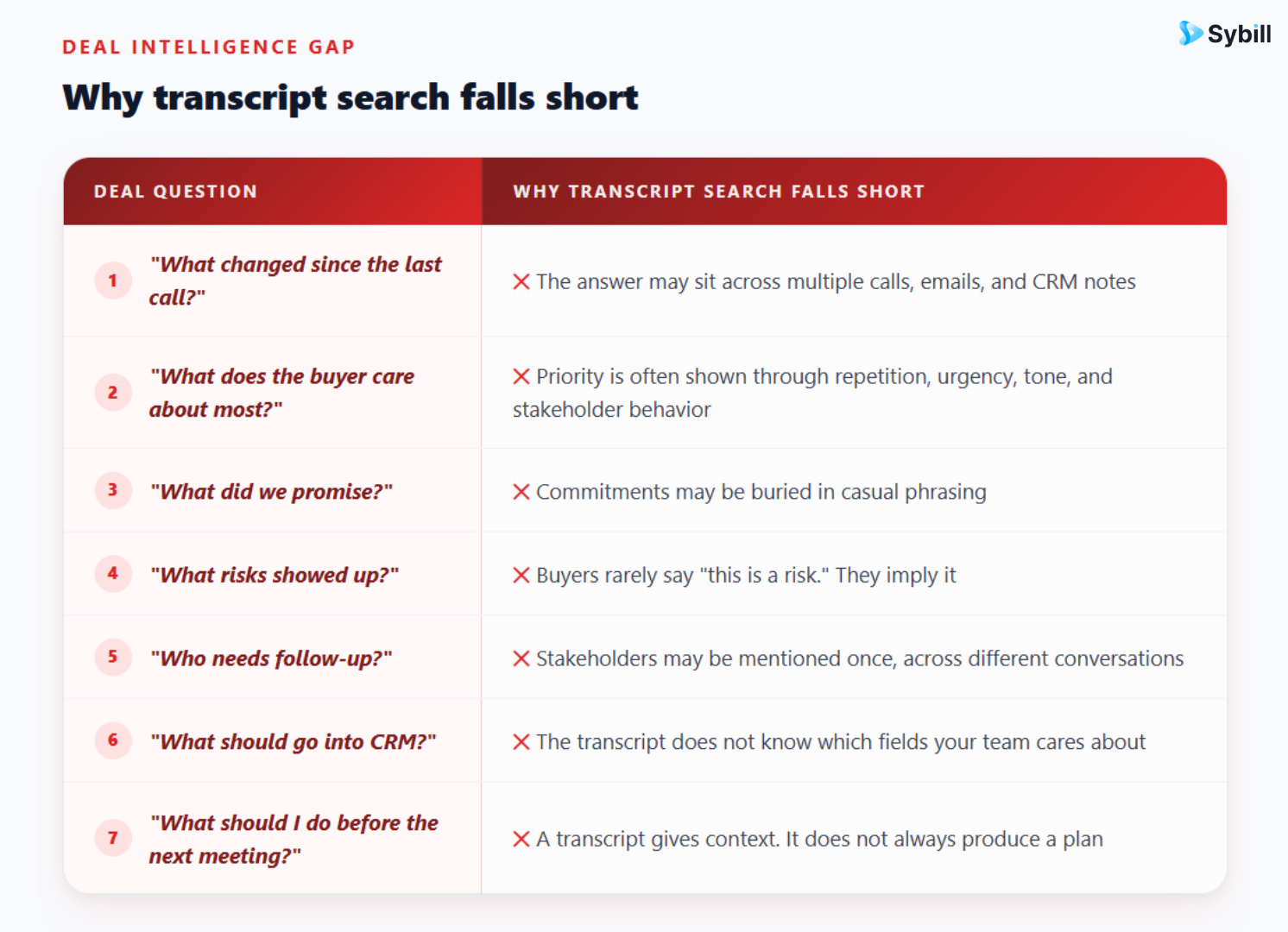
The better workflow is not “search the transcript.” It is “ask the deal.”
It is also where tools like Sybill start to matter because revenue teams need a system that understands the entire sales motion, not just the last recorded call. If your team is still reviewing calls manually, this related guide on call review in sales is a useful companion piece.
Here is the trap with transcripts: they make teams feel documented while leaving the actual thinking undone.
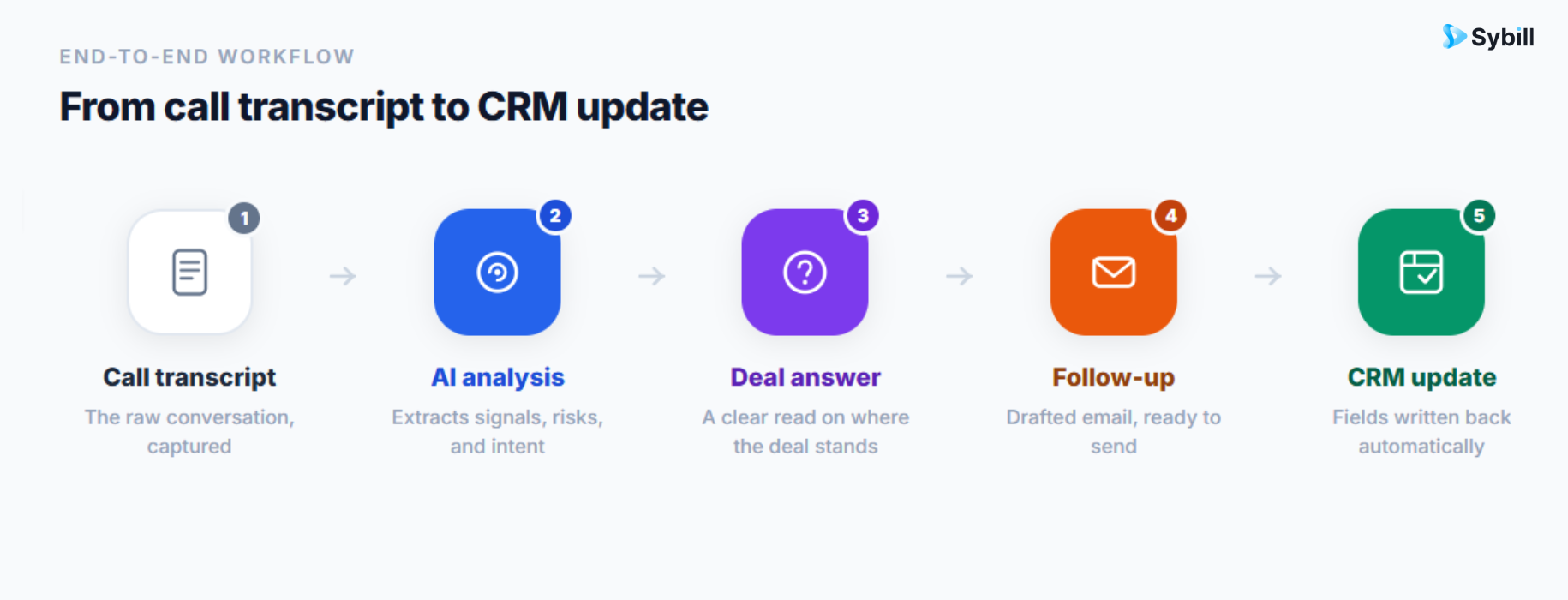
The manager still has to ask the rep what happened. The rep still has to search the call. RevOps still has to chase CRM hygiene. The handoff owner still has to piece together buyer context. The forecast still depends on a rep’s best interpretation of messy, fast-moving deal reality.
Sybill takes a different route. Instead of forcing reps and managers to dig through calls, it lets them ask questions in natural language across sales conversations and deal context. Want to know what the champion cares about most? Ask. Want to know what is blocking the deal? Ask. Want to know what was promised to procurement? Ask.
This is the bigger “Ask Sybill” story. It is the answer layer on top of calls, emails, deal notes, and CRM context. That means the transcript becomes input, not the destination.
For teams already thinking beyond notes, this is where conversation intelligence software starts to evolve into revenue execution.
AI should not simply compress a long transcript into a shorter transcript wearing a nicer jacket. A useful AI workflow should do five things.
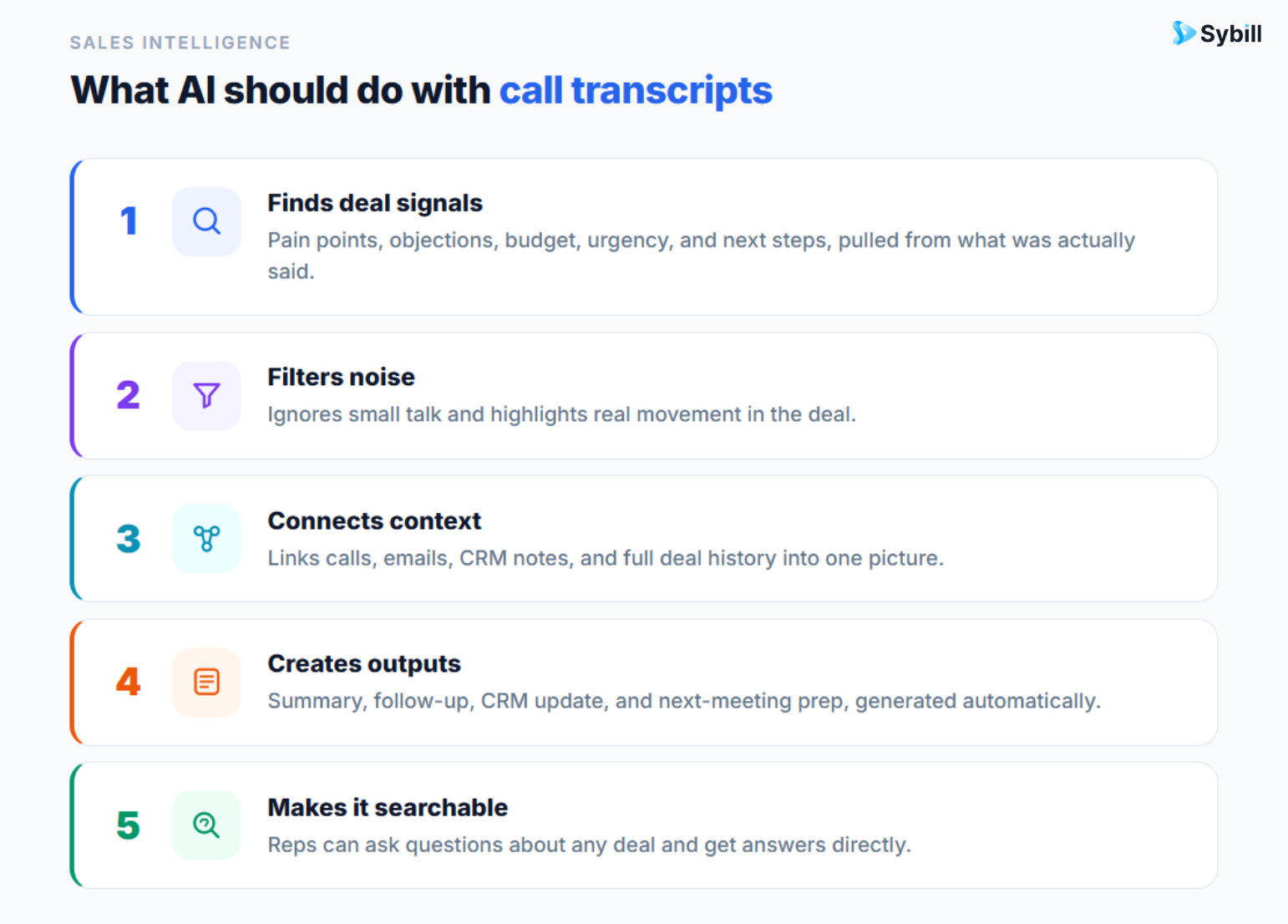
First, it should identify the real deal signals: pain points, objections, decision criteria, urgency, stakeholder involvement, budget concerns, competitive mentions, and next steps.
Second, it should separate noise from movement. “We need to check with finance” matters more than a five-minute sidebar about the weather. Unless finance controls the weather, in which case please run.
Third, it should connect the latest call to previous calls, emails, and CRM notes. A buyer saying “this is still a concern” only makes sense if the AI knows what “this” refers to.
Fourth, it should produce outputs reps can actually use: summaries, follow-up emails, CRM updates, next meeting prep, mutual action plans, and handoff notes.
Fifth, it should make the information queryable. Reps and managers should be able to ask, “Which deals mentioned security this week?” or “What did the economic buyer object to?” without becoming part-time transcript archaeologists.
This is the difference between passive documentation and active sales intelligence. If you want to go deeper into that distinction, Sybill’s guide on why sales call summaries are different from general summaries is a strong internal link here.
There are several ways teams try to solve this problem. Some are useful. Some are duct tape with a login screen.
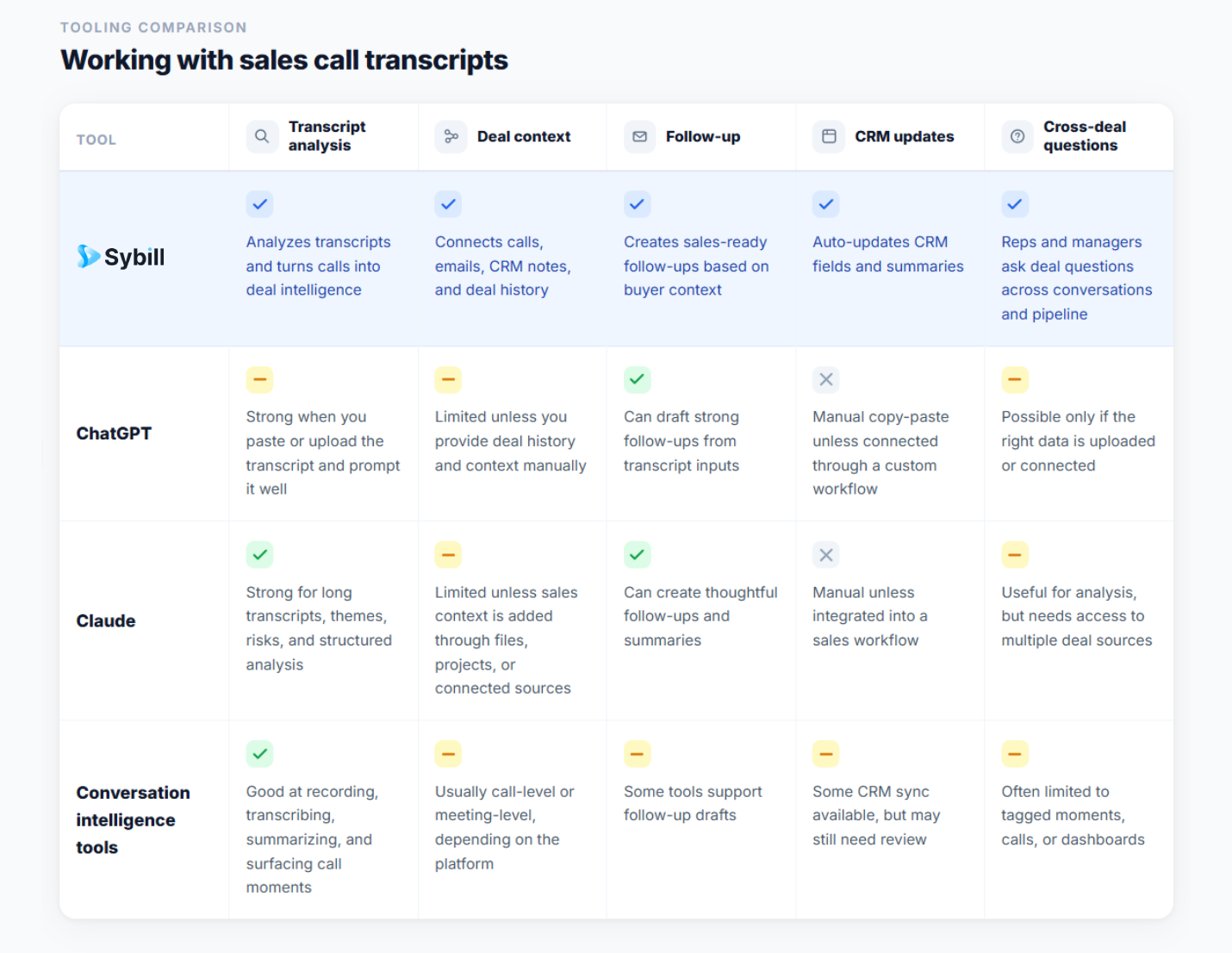
Sybill is built around a different assumption: sales teams do not need another place to store information. They need a way to act on it.
That is why Ask Sybill matters. Reps and managers can ask deal-level questions without manually combing through transcripts, CRM notes, or email trails.
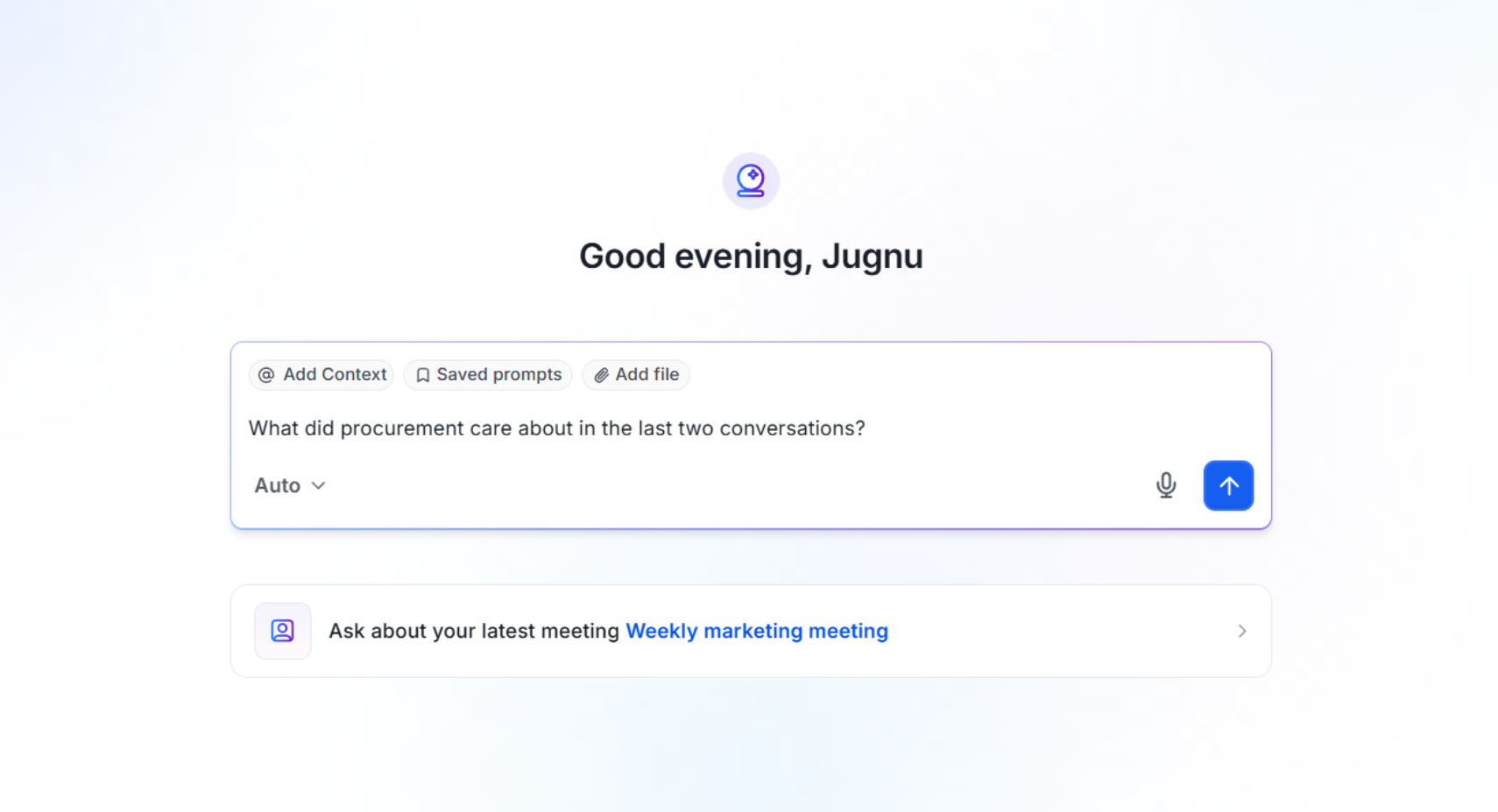
Instead of searching:
“procurement”
A rep can ask:
“What did procurement care about in the last two conversations?”
Instead of searching:
“budget”
A manager can ask:
“Which open deals mentioned budget concerns this week?”
Instead of reading three call summaries before a handoff, a CSM can ask:
“What did the customer buy, why did they buy it, and what risks should we know before onboarding?”
If you want a comparison guide, the Gong vs Otter.ai vs Sybill breakdown is useful because it frames the distinction clearly: recording and transcription are solved. Post-call execution is not.
ChatGPT can be genuinely helpful for one-off transcript analysis. Paste in a transcript and ask it to summarize the buyer’s priorities, extract objections, draft a follow-up, or identify possible risks. With the right prompt, it can turn a messy conversation into a cleaner recap.
For example, a rep could ask:
“Analyze this discovery call transcript. Extract the buyer’s top three priorities, unresolved objections, promised follow-ups, decision process, and recommended next step.”
That is useful. Especially for solo reps, founders, and teams without a dedicated sales AI tool.
But ChatGPT is only as good as the context you provide. It does not automatically know the deal history, previous objections, CRM stage, team qualification framework, buyer emails, or what your manager expects in the forecast. The rep still has to gather the material, paste or connect it, prompt it well, review the output, and update the workflow.
ChatGPT is powerful. But asking every rep to become a prompt engineer between calls is not a serious revenue operating model.
For deeper post-call automation, the better comparison is not “Can ChatGPT summarize?” It is “Can the tool turn that summary into CRM fields, follow-up, and deal movement?”
Also read: AI tools that automatically update Salesforce after sales calls
Claude is also strong for transcript-heavy work. It is good at processing long documents, finding themes, and turning sprawling notes into structured analysis. For complex calls with multiple stakeholders, Claude can help identify patterns, contradictions, objections, and open questions.
A useful Claude prompt might look like:
“Review this transcript and identify the buyer’s stated priorities, implied risks, stakeholder map, decision criteria, and any commitments made by our team. Separate confirmed facts from assumptions.”
That can produce solid analysis.
But again, Claude is a general AI assistant unless it is deeply connected to the sales workflow. It can analyze what you give it. It does not automatically know how your team uses MEDDICC, BANT, custom CRM fields, deal inspection questions, or stage exit criteria unless that context is supplied.
Claude can help reps think. Sybill helps reps execute.
That difference matters when the sales motion is busy, multi-threaded, and unforgiving. A rep should not have to remember whether the security concern came up in the second call, third email, or last-minute Slack recap. The answer should already be available.
For teams using qualification frameworks, this Sybill blog on how to auto-update MEDDICC and BANT fields in Salesforce is a useful next read.
Traditional conversation intelligence tools made sales calls easier to review. They record meetings, create transcripts, identify keywords, surface call moments, and help managers coach reps.
That is valuable. It is also not the full job anymore.
The issue is that many tools still keep users in review mode. You can search a call. You can click into a moment. You can inspect a clip. You can read a summary. But you may still need to decide what changed in the deal, write the follow-up, update the CRM, brief the manager, and prepare for the next call yourself.
That is better than raw recordings. It is not the same as sales execution.
The best modern tools reduce the work after the meeting, not just during the meeting. That includes automatic follow-ups, CRM updates, deal answers, coaching signals, and cross-deal intelligence. Sybill’s guide to the best conversation intelligence tools is a strong interlink for readers comparing the broader market.
After a discovery call, a rep does not need a transcript that says:
“Buyer mentioned onboarding delays at 18:42.”
They need:
“The buyer’s biggest pain is slow onboarding caused by manual handoffs between sales and implementation. They are evaluating tools that reduce admin work and improve visibility across teams. Main risk: they need buy-in from RevOps before moving forward. Follow up with a workflow diagram and ask for RevOps to join the next call.”
Before a forecast meeting, a manager does not need:
“Here are all mentions of pricing.”
They need:
“Three late-stage deals mentioned pricing pushback this week. Two framed it as procurement pressure, one as competitor comparison. The highest-risk deal is Acme because the economic buyer has not re-engaged since the pricing call.”
That is pipeline intelligence.
Before a renewal handoff, the CS team does not need every transcript. They need the story: what the customer wanted, what was promised, who cared, what risks remain, and what would make the account successful after close.
That is where AI-generated sales assets also become useful. For example, Sybill can help teams move from conversation data to buyer-facing plans.
Also read: AI mutual action plan from call transcripts
Sales managers already have enough dashboards to qualify as a NASA side quest.
What they do not have enough of is clean, current, evidence-backed deal context.
A manager wants to know:
Which deals are at risk?
Which reps are struggling with discovery?
Which competitors are showing up more often?
Which calls had weak next steps?
Which opportunities have no economic buyer?
Which deals have a gap between what the rep says and what the buyer actually said?
Transcripts technically contain some of those answers. But expecting managers to inspect every transcript is comedy with a quota attached.
AI should make call review more scalable. Instead of listening to full recordings or reading full transcripts, managers should scan structured insights, ask follow-up questions, and jump into evidence only when needed.
That is the difference between micromanagement and precision coaching. The manager is no longer asking, “What happened?” They are asking, “What does the evidence show, and what do we do next?”
Also read: AI agents for sales managers
There is one more problem with transcript analysis tools: even when the answer is good, it often stays in the wrong place.
A rep asks an AI tool for a summary. Great. Then what?
They still need to copy it into Salesforce. Or update MEDDICC fields. Or write the follow-up. Or notify the manager. Or prepare next steps. Or clean up the opportunity before the forecast call.
That is where the workflow breaks.
Sales teams do not just need AI that can answer questions. They need AI that can move answers into the systems where revenue work happens.
If the buyer says the decision criteria are “fast onboarding, CRM accuracy, and manager visibility,” that should not sit trapped in a chat window. It should update the opportunity. It should inform the follow-up. It should prep the next call. It should help the manager inspect the deal.
That is why Sybill’s CRM Autofill matters.
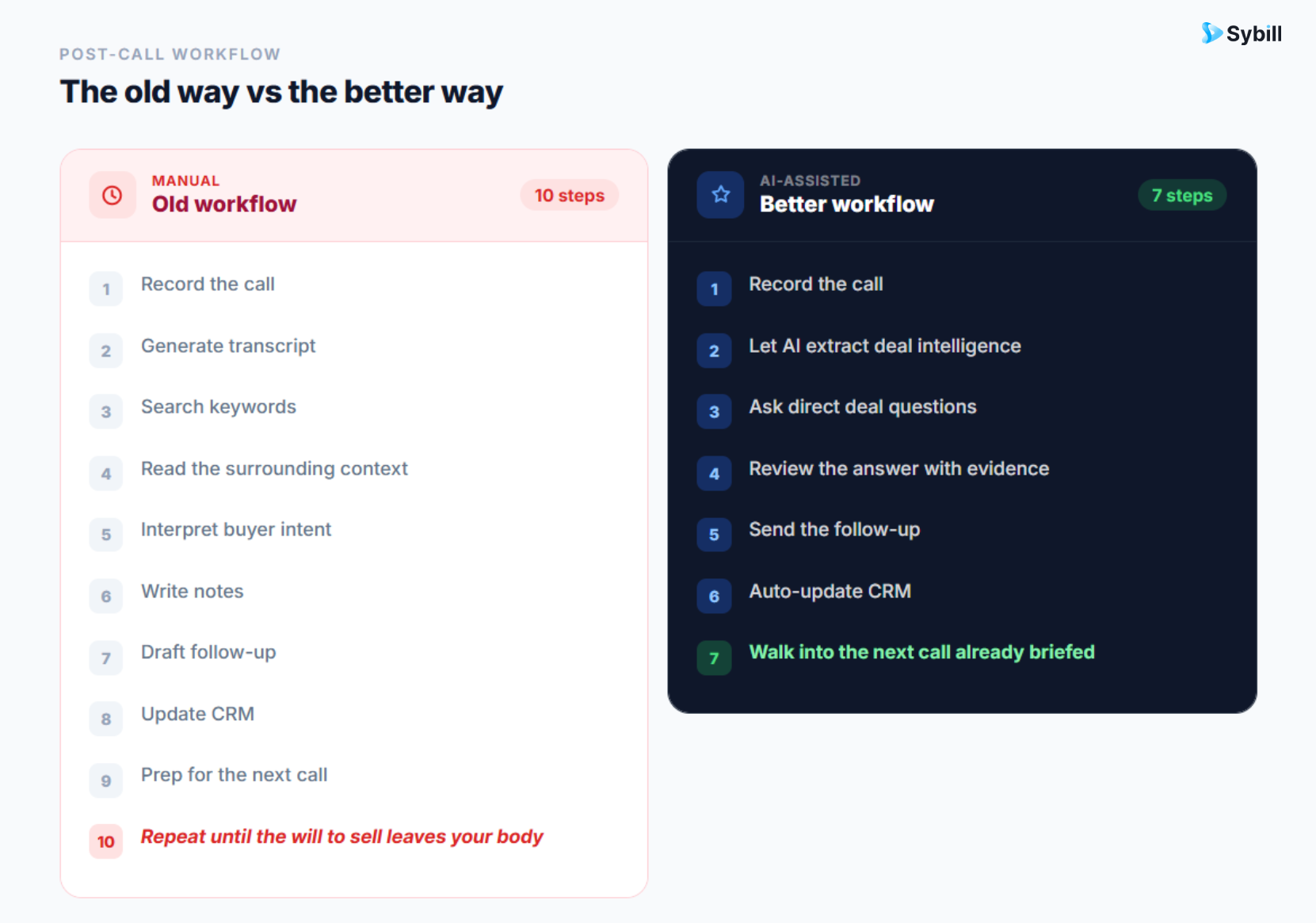
That is not a small improvement. That is the difference between sales teams documenting history and sales teams moving deals forward.
Transcripts are still useful as the evidence layer. But they should not be the interface. The interface should be questions and answers.
The real problem is making reps and managers do the work of turning that raw material into answers. That is slow, inconsistent, and frankly beneath people who are hired to sell, coach, forecast, and grow revenue.
Searchable transcripts were a step forward. But the next step is obvious: ask the deal and get the answer.
ChatGPT and Claude can help when you give them the right transcript and context. Conversation intelligence tools can help teams capture and review calls. But Sybill goes further by turning sales conversations into answers, follow-ups, CRM updates, and deal movement.
Because the goal was never to read more transcripts. The goal was to know what to do next.
Ask Sybill what changed in your deal, what the buyer cares about, and what needs to happen next before your next call.

Use AI to extract buyer priorities, pain points, objections, decision criteria, competitors, stakeholders, commitments, risks, and next steps from the transcript. For better results, connect the transcript to previous calls, emails, CRM notes, and deal stage context so the AI can answer deal questions, not just summarize one conversation.
Yes. ChatGPT can summarize sales call transcripts, identify objections, create action items, and draft follow-up emails when you provide the transcript and enough context. It is useful for one-off analysis, but it still requires reps to provide the source material, prompt it well, verify the output, and move the result into CRM or follow-up workflows.
Yes. Claude can analyze long transcripts, extract themes, identify risks, and organize messy conversation data into structured insights. It works well when reps provide the right context. But by default, it is not a sales-native execution layer that automatically connects call data to CRM fields, follow-ups, deal inspection, and pipeline questions.
A transcript is a word-for-word record of what was said on a call. A sales call summary is a structured recap of what mattered: buyer priorities, objections, decisions, risks, action items, and next steps. A transcript preserves the conversation. A summary helps the deal move forward. For more detail, read this guide on the essential sections of a sales call summary.
The best way is to use an AI sales assistant that analyzes calls, emails, CRM notes, and deal history together. Deal risks often appear indirectly. A buyer may mention legal review, budget timing, stakeholder confusion, or competitor evaluation without labeling it as a “risk.” AI can connect those signals and surface the issue before it derails the deal.
Sales managers should look for buyer urgency, decision criteria, stakeholder involvement, unresolved objections, pricing concerns, competitor mentions, next steps, and commitments made by either side. But ideally, managers should not have to manually inspect every transcript. They should use AI to surface the moments, risks, and coaching opportunities that matter.
Sybill helps reps and managers ask questions across sales conversations and deal context instead of digging through transcripts manually. Teams can ask what changed, what the buyer cares about, what was promised, what risks exist, and what needs follow-up. Sybill then connects those answers to summaries, follow-ups, CRM updates, and deal execution.
Use AI to extract buyer priorities, pain points, objections, decision criteria, competitors, stakeholders, commitments, risks, and next steps from the transcript. For better results, connect the transcript to previous calls, emails, CRM notes, and deal stage context so the AI can answer deal questions, not just summarize one conversation.
Yes. ChatGPT can summarize sales call transcripts, identify objections, create action items, and draft follow-up emails when you provide the transcript and enough context. It is useful for one-off analysis, but it still requires reps to provide the source material, prompt it well, verify the output, and move the result into CRM or follow-up workflows.
Yes. Claude can analyze long transcripts, extract themes, identify risks, and organize messy conversation data into structured insights. It works well when reps provide the right context. But by default, it is not a sales-native execution layer that automatically connects call data to CRM fields, follow-ups, deal inspection, and pipeline questions.








