
Find us at booth #83, join us for a harbor side happy hour, or catch Gorish’s talk.

Sept, 16-18 > Learn more

%20(1).avif)
Mamta Tainwala

August 21, 2026
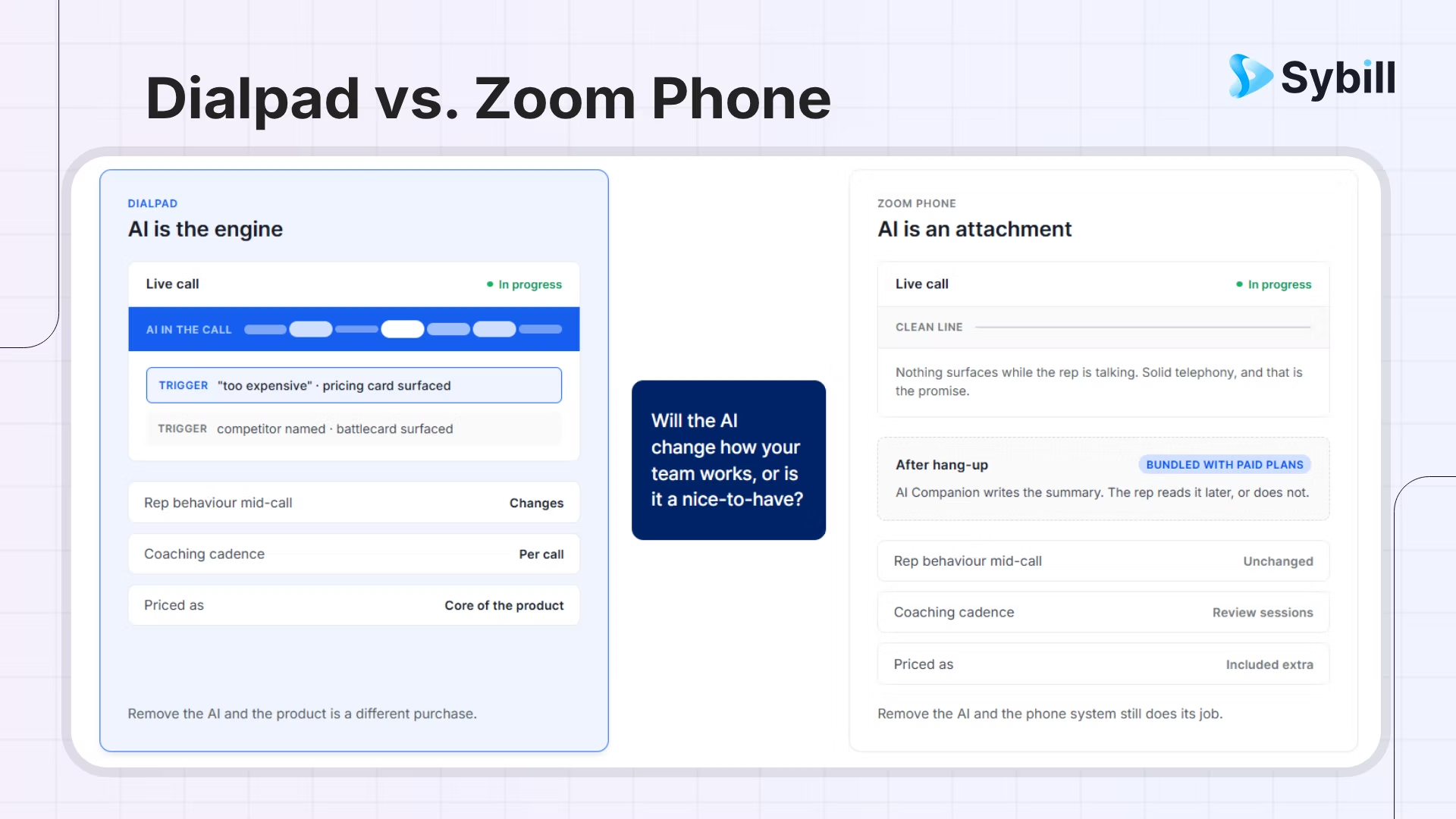
Dialpad and Zoom Phone are the modern-vs-modern matchup of the phone category: both cloud-native, both AI-forward, neither carrying legacy VoIP baggage. The split is where each puts its best work. Dialpad puts it in the live call: real-time transcription on screen as the conversation happens, coaching prompts that surface mid-call, and AI included by default at every tier, priced at a premium. Zoom Phone puts it in the path of least resistance: the app your team already meets on, a lighter entry cost, and AI Companion intelligence that skews post-call. The deciding question is refreshingly practical: will your team actually use live-call AI to change how they work, or is it a nice-to-have?
Answer that honestly and this comparison mostly resolves itself. Here is the full version anyway, including two add-on inversions that surprise buyers on both sides, from the usual seat: Sybill integrates with both platforms, sees both platforms' calls daily, and tilts for neither.
Yes, closely: both are cloud phone systems inside broader communications platforms, both softphone-first, both built for teams that would never buy a desk phone again. The difference is each product's center of gravity: Dialpad is a voice-intelligence company whose platform grew around the call, while Zoom is a meetings company whose phone grew around the ecosystem. Same category, different hearts.
That makes this pairing the philosophical opposite of the enterprise-versus-modern splits elsewhere in this series (see Dialpad vs RingCentral and RingCentral vs Zoom Phone) there is no incumbent here, no twenty-year telephony estate to weigh. Both platforms assume your team works in a browser, lives in apps, and expects software to be pleasant. The evaluation is correspondingly cleaner, and it concentrates almost entirely on two questions: where do you want the intelligence, and what does your team already run?
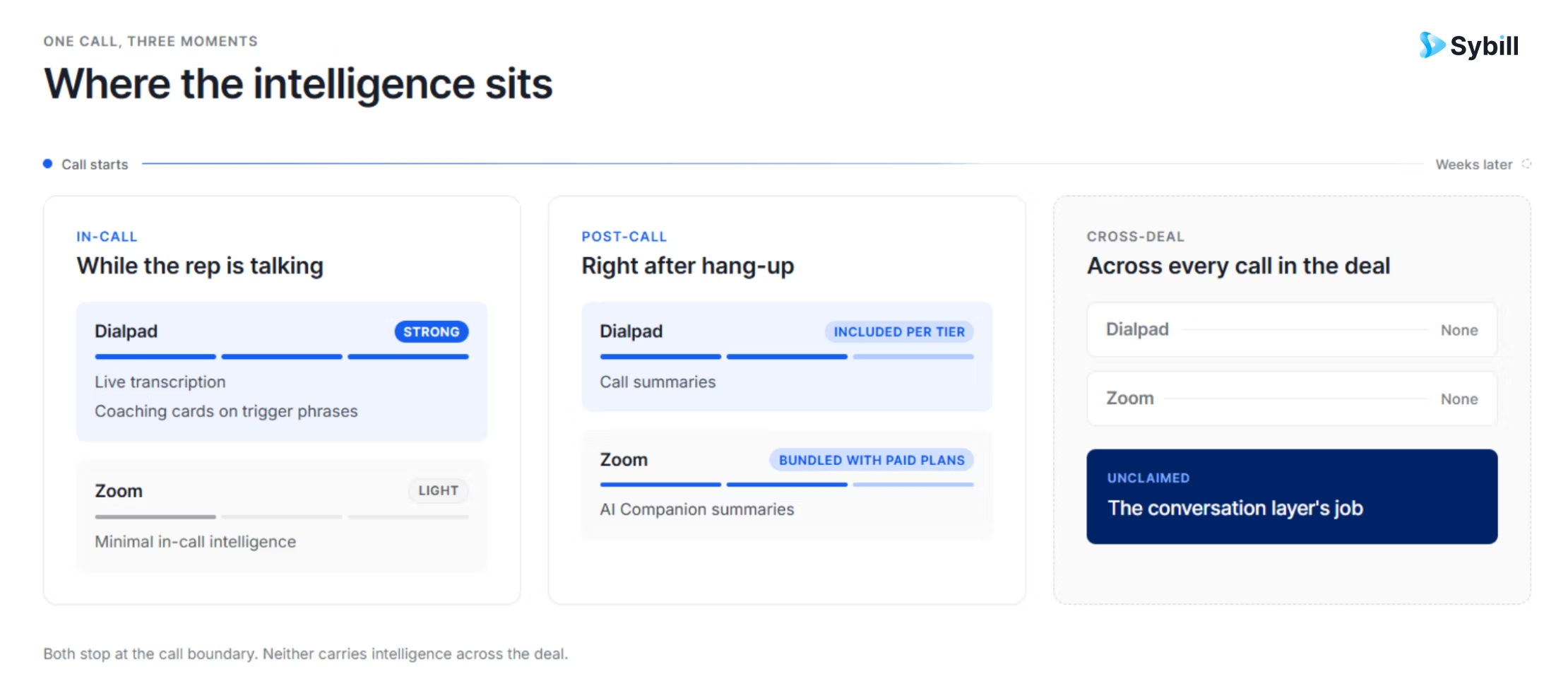
Dialpad owns the live call, and current comparisons agree it is not close: transcription renders on screen as the conversation happens, coaching cards surface when trigger phrases come up (a pricing objection, a competitor name), and summaries follow automatically, with the AI included by default at every tier rather than sold as an add-on. Zoom's AI Companion is genuinely strong and famously bundled with paid plans at no extra per-seat cost, but its center of mass is post-conversation: summaries, recaps, drafting. In-the-moment versus after-the-fact is the real AI difference here.
The buyer's translation, and it is the whole comparison in one paragraph: live-call AI is a behavior-change tool. A coaching card mid-call helps the rep who is currently stuck; a summary after the call helps the record. If your team is young, ramping, or objection-prone, the live layer is genuinely valuable, and it is the thing Dialpad's premium buys. If your team is seasoned and your need is clean records and recaps, Zoom's bundled post-call intelligence covers it at a lighter cost, and the premium buys behavior change nobody asked for. This is why "will they actually use it" beats every feature table: the same AI is worth a premium to one team and nothing to the next.
Series-standard boundary, unchanged: both platforms' AI is call-level. The cross-deal layer, what was said across every conversation on an account, written into CRM fields, follow-ups, and risk flags, is neither platform's job, and teams already running a conversation layer should weight this dimension accordingly.
Here is where the add-on inversions live, and they surprise buyers on both sides. Inversion one: call monitoring, barge, and whisper, the classic manager coaching trio, ship on all Zoom Phone plans, while on Dialpad they are gated behind its sales-center add-on or contact-center product, which is counterintuitive for the platform with the AI-coaching brand. Inversion two: Zoom Phone's deeper queue analytics and real-time monitoring KPIs require its own power-pack add-on, so neither platform's base plan carries everything a calling operation eventually wants. Map your actual coaching and monitoring workflow against current packaging before assuming the brand tells you where the features are.
Beyond the inversions, the fundamentals are solid on both: click-to-dial, CRM logging, local numbers, mobile parity. Dialpad's live layer supports the rep in the conversation; Zoom Phone's monitoring trio supports the manager listening in; and a coaching program can be built on either, differently. What neither base platform is: a volume-dialing machine. Genuinely volume-shaped SDR motions belong with the specialists in our dialer roundup, with the mode taxonomy in our dialer guide [LINK-WHEN-LIVE: /blogs/what-is-a-sales-dialer]. And the craft layer, timing and openers, still outweighs the logo.
One data point we report rather than endorse: aggregate review-platform ratings currently favor Zoom Phone between these two, with call-quality and support complaints recurring in Dialpad's reviews at a rate worth noticing. Review aggregates conflate audiences and eras, so treat this as a pilot-design input (test call quality on your actual networks, in week one) rather than a verdict. Both platforms run mature carrier infrastructure, and current head-to-heads rate real-world call quality close enough that your Wi-Fi matters more than the vendor.
Zoom Phone's decisive advantage is gravitational: if your team already meets on Zoom, the phone arrives with zero new apps, zero new logins, and an adoption curve that rounds to nothing, plus the customer-facing convenience of meetings and calls on one platform. Dialpad rolls out fast by any normal standard (days, not quarters) but it is a new app your team must adopt, and adoption is the tax its AI must repay. Cost posture: Zoom Phone enters lighter; Dialpad's premium is the AI-included-everywhere position. Both list prices are opening positions at any real seat count.
The rollout math deserves honesty because it decides more evaluations than any feature: a tool that is 15% better but requires new-app adoption loses to the incumbent ecosystem more often than vendors admit, and Zoom's installed base is the largest incumbent ecosystem in business communications. Dialpad wins these evaluations when the live-AI value is vivid enough to justify the switch, which is why its best buyers are teams with a named coaching problem, not teams shopping for a phone.
One fairness note on meetings, since the ecosystem argument can overstate itself: Dialpad has its own video meetings, so choosing it does not strand your team without conferencing. The asymmetry is gravitational, not functional: your customers' calendars already say Zoom, your team's muscle memory already says Zoom, and prying an organization off the meetings platform its buyers expect is a bigger project than any phone decision. Dialpad's realistic deployment for most teams is phone-and-intelligence alongside Zoom meetings, not instead of them, which works fine and is exactly the configuration where a channel-spanning conversation layer earns its keep.
If the pilot happens, spec it like the rest of this series: two weeks, both platforms, live call lists, and exit numbers rather than exit opinions: coaching cards acted on and transcripts opened (Dialpad's case), adoption friction and support tickets (Zoom Phone's case), call quality on your actual networks (both), and CRM logging completeness (both). The platform that survives the fortnight without nagging has answered the question. Know which team you are before the demos start; the engagement-layer coexistence check and the CRM logging floor-versus-ceiling question belong in the pilot either way, as does the recording consent configuration that comes with capturing calls on either platform.
Choose Dialpad if: you have a named, felt coaching problem (ramping reps, objection struggles, inconsistent talk tracks) that live-call AI would visibly address; you want intelligence included at every tier rather than assembled from add-ons; and your team will adopt a new app when the value is vivid. The shape: a revenue team buying behavior change, with a phone attached.
Choose Zoom Phone if: your team already lives in Zoom and adoption friction is the enemy; your intelligence needs are records and recaps rather than mid-call intervention; the manager coaching trio (monitor, barge, whisper) matters and you want it on the base plan; and the lighter cost posture funds something else. The shape: a Zoom-native team buying the path of least resistance, eyes open.
The tiebreaker is the title question, asked without vendor romance: will your team actually use live-call AI to change how they work? Pilot both for two weeks if the answer is genuinely unknown, and measure usage, not enthusiasm: coaching cards acted on, transcripts opened, summaries edited. Behavior data ends this debate faster than any comparison page.
On either phone, the conversations are the asset. Sybill captures every Dialpad and Zoom Phone call, and your Zoom meetings too, turning all of it into summaries, CRM updates, follow-ups, and deal intelligence, automatically. Get started for free with Sybill.
The series refrain, sharpened by this pair: both of these platforms will tell you what happened on a call. Neither is built to tell you what is happening to a deal. The buyer who softened on pricing in Tuesday's Zoom meeting, went quiet in Thursday's phone call, and stopped opening emails on Friday is invisible to call-level AI on either platform, because deal signals live across conversations, not inside one.
That cross-conversation layer is where Sybill sits, identically on both sides of this page: around 33 million sales conversations analyzed across the meeting and dialer platforms it connects to, every call becoming a summary, CRM fields that fill themselves, a follow-up in the rep's voice, captured commitments, and account-level intelligence (risk flags, queryable history, coaching signals) that spans channels the way deals actually do, with pre-meeting briefs assembling it all before the next touch. The full integration list covers both platforms, and the Zoom meetings besides.
Which lowers this decision's stakes the same way it did the others: pick the phone by team shape, and the intelligence travels with you if you ever change your mind.
For teams with a real coaching problem and the will to adopt, Dialpad's live-call AI is the sharper product and worth its premium; that is the specific job it does better than anyone in this series. For Zoom-native teams whose needs are solid calling and clean records, Zoom Phone is the right answer, the cheaper one, and the one your reps will use without being asked, and buying Dialpad's premium for AI nobody opens is the most common regret in this matchup. The title question settles it, and behavior data from a two-week pilot settles the title question.
Ask what your team will actually use. Then believe the answer.
Get started for free with Sybill or book a demo and make every call count on either one.
Dialpad is better for teams with a named coaching problem that live-call AI addresses: real-time transcription and mid-call prompts, included at every tier. Zoom Phone is better for Zoom-native teams wanting solid calling with zero adoption friction and bundled post-call summaries at a lighter cost. The deciding question: will your team actually use live-call AI?
Where the intelligence lives. Dialpad puts AI in the live call (on-screen transcription, coaching cards mid-conversation), built around voice intelligence. Zoom Phone puts its strength in ecosystem fit, calling inside the platform your team already meets on, with AI Companion intelligence that skews post-call.
Yes, and it is a surprise in this matchup: call monitoring, barge, and whisper ship on all Zoom Phone plans, while Dialpad gates that trio behind its sales-center or contact-center add-ons despite its AI-coaching brand. Deeper queue analytics on Zoom Phone require its own add-on. Verify current packaging on both.
Only if your team will use the live layer: coaching cards acted on, transcripts opened during calls, ramping reps visibly helped. For teams needing records and recaps rather than mid-call intervention, Zoom Phone's bundled intelligence covers the need at a lighter cost. Pilot both and measure usage, not enthusiasm.
Yes, Sybill integrates natively with both, and with Zoom meetings besides, capturing every conversation and turning it into summaries, CRM updates, follow-ups, and cross-deal intelligence automatically. The conversation layer works identically on either platform, so the phone decision can be made purely on team fit.
Dialpad is better for teams with a named coaching problem that live-call AI addresses: real-time transcription and mid-call prompts, included at every tier. Zoom Phone is better for Zoom-native teams wanting solid calling with zero adoption friction and bundled post-call summaries at a lighter cost. The deciding question: will your team actually use live-call AI?
Where the intelligence lives. Dialpad puts AI in the live call (on-screen transcription, coaching cards mid-conversation), built around voice intelligence. Zoom Phone puts its strength in ecosystem fit, calling inside the platform your team already meets on, with AI Companion intelligence that skews post-call.
Yes, and it is a surprise in this matchup: call monitoring, barge, and whisper ship on all Zoom Phone plans, while Dialpad gates that trio behind its sales-center or contact-center add-ons despite its AI-coaching brand. Deeper queue analytics on Zoom Phone require its own add-on. Verify current packaging on both.








