
Find us at booth #83, join us for a harbor side happy hour, or catch Gorish’s talk.

Sept, 16-18 > Learn more

%20(1).avif)
Mamta Tainwala

August 14, 2026
%20(69).png)
An enterprise AI sales assistant is software that acts on every customer conversation across a revenue organization: capturing calls and emails, writing the summaries and CRM records, drafting follow-ups, flagging deal risks, and making the whole history queryable, with the permissions, audit trails, and admin controls a company-wide deployment requires. The "enterprise" half is what separates it from a personal note-taker: one rep's tool needs to work for one inbox; an enterprise assistant needs to work identically for fifty reps, five managers, and the RevOps team, without showing anyone data they should not see.
What that means in practice differs sharply by seat, which is why this guide is organized by role. First, the definition and the capabilities every role shares.
Three requirements separate enterprise deployment from personal use: scale (the assistant must work consistently across every rep, manager, and team, each with different CRM permissions and workflows), security and compliance (SOC 2 Type II and GDPR posture are baseline for tools touching customer conversations, and procurement will ask), and governance (role-based access, audit trails, and admin controls, because what the assistant writes into the CRM affects the whole revenue organization).
Worth pausing on each, because this is where enterprise evaluations actually get won and lost:
Scale means consistency, not just seats. A personal assistant can be quirky; an enterprise one cannot, because its output becomes shared infrastructure. When fifty reps' calls all flow into the same pipeline views and forecast, the summaries, field formats, and risk flags have to be uniform enough that a manager can trust a deal record without knowing which rep's assistant wrote it.
Security is a gate, not a feature. Customer conversations are among the most sensitive data a company processes: pricing discussions, roadmap disclosures, competitive intel, occasionally regulated information. SOC 2 Type II and GDPR compliance are the baseline bar, verifiable through a vendor's trust center (here is Sybill's), and our guide to SOC 2 and GDPR in conversation intelligence covers what to actually check. The practical advice: run the security review in week one of evaluation, not week nine of procurement, because this is the gate that stalls enterprise rollouts when discovered late.
Governance is what makes managers trust it. Role-based permissions (a rep sees their deals, a manager sees the team's, RevOps sees the system), audit trails showing what the assistant wrote and when, and human review over anything outbound. The full breakdown lives in our guide to AI agent security and permissions, and the one-line test is simple: can you see exactly what it did, and could you have stopped it?
The simplest framing of the whole category: a personal AI note-taker handles your meeting. An enterprise AI sales assistant handles the connective tissue of a revenue organization, everything between the conversation and the outcome, for everyone at once.
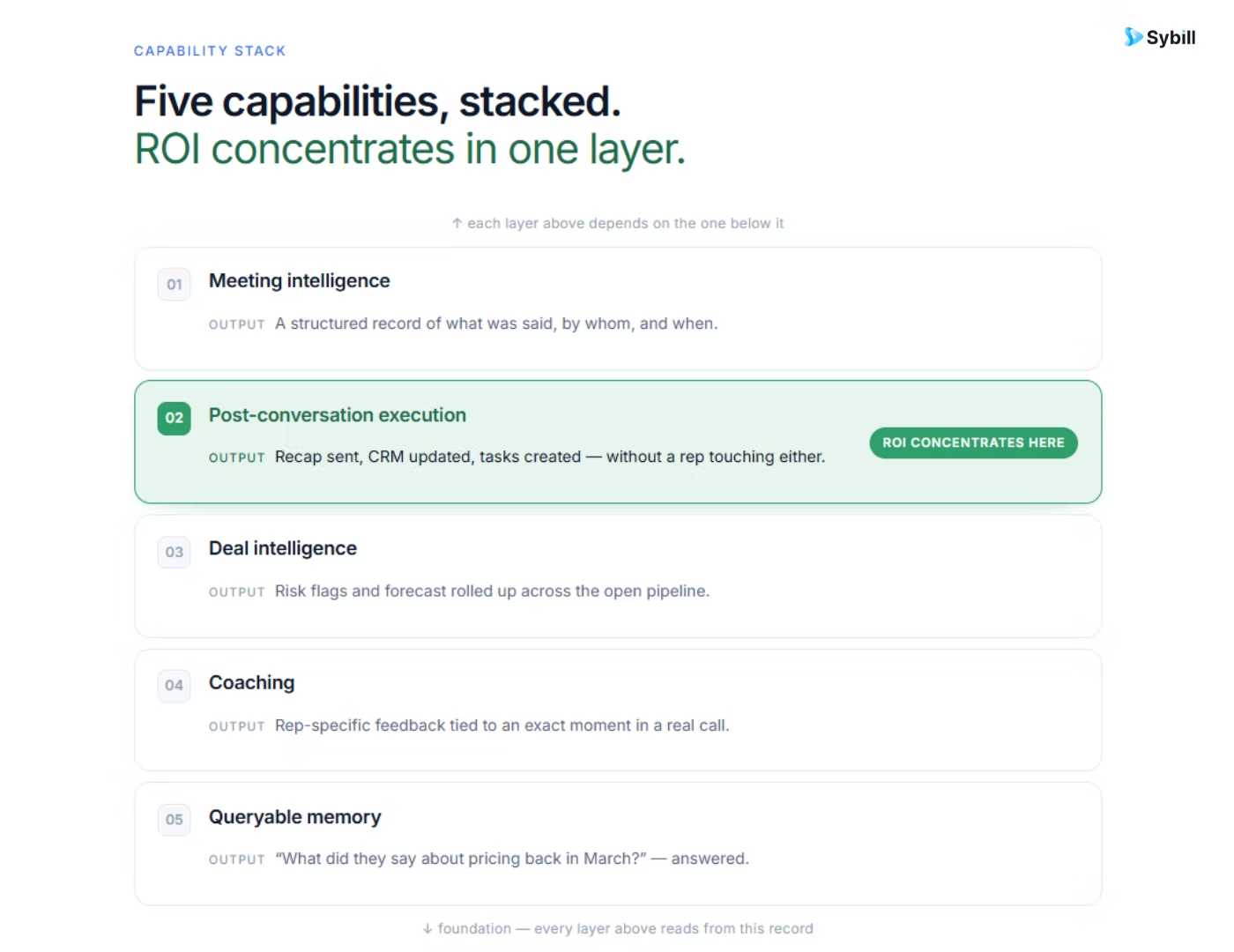
Five core capabilities, shared across every role: meeting intelligence (capturing and summarizing every customer conversation), post-conversation execution (CRM fields, follow-up drafts, and task capture happening automatically), deal intelligence (risk flags and pipeline signals grounded in what buyers said), coaching infrastructure (every call reviewable against what wins), and queryable memory (plain-English questions across the whole conversation history).
The working detail on each:
Meeting intelligence. Every call becomes a structured summary: pain points, objections, next steps, stakeholders, in a consistent format the whole team can rely on. One enterprise wrinkle worth knowing: how the assistant attends matters. Some tools send a visible bot into every meeting, which some buyers and some deal stages tolerate badly; bot-free capture options exist precisely because enterprise sellers asked.
Post-conversation execution. This is the capability that separates assistants from note-takers, and where the ROI concentrates: CRM fields fill themselves including qualification frameworks and custom fields, follow-up emails draft in the rep's own tone, and verbal commitments become tracked tasks. The record-keeping that consumed the hour after every call simply happens.
Deal intelligence. With every conversation captured, deal inspection runs on evidence: which deals lack a confirmed next step, where the economic buyer has gone quiet, which "committed" deals have no conversation trail supporting the stage. Sybill has analyzed around 33 million sales conversations, and the durable pattern is that deals signal their outcomes in conversation weeks before the CRM stage admits anything; enterprise assistants exist to read those signals at portfolio scale.
Coaching infrastructure. No manager reviews fifty reps' calls; the assistant reviews all of them, surfaces the coachable moments and performance patterns, and turns the team's best calls into a teachable library.
Queryable memory. Ask Sybill turns the conversation history into an answer engine: "What did Acme say about budget?" "Which deals mentioned a competitor this month?" "What objections are trending in enterprise segment discovery?" Institutional memory stops living in individual heads.
The capabilities are shared; the pain each role brings to them is not. Account executives come for the recovered selling hours, managers for evidence-based coaching and honest pipelines, leaders for forecasts they can defend, customer success for context that survives the handoff, and RevOps for data quality that no longer depends on nagging. Here is each seat, honestly, including where the tool alone will not save you.
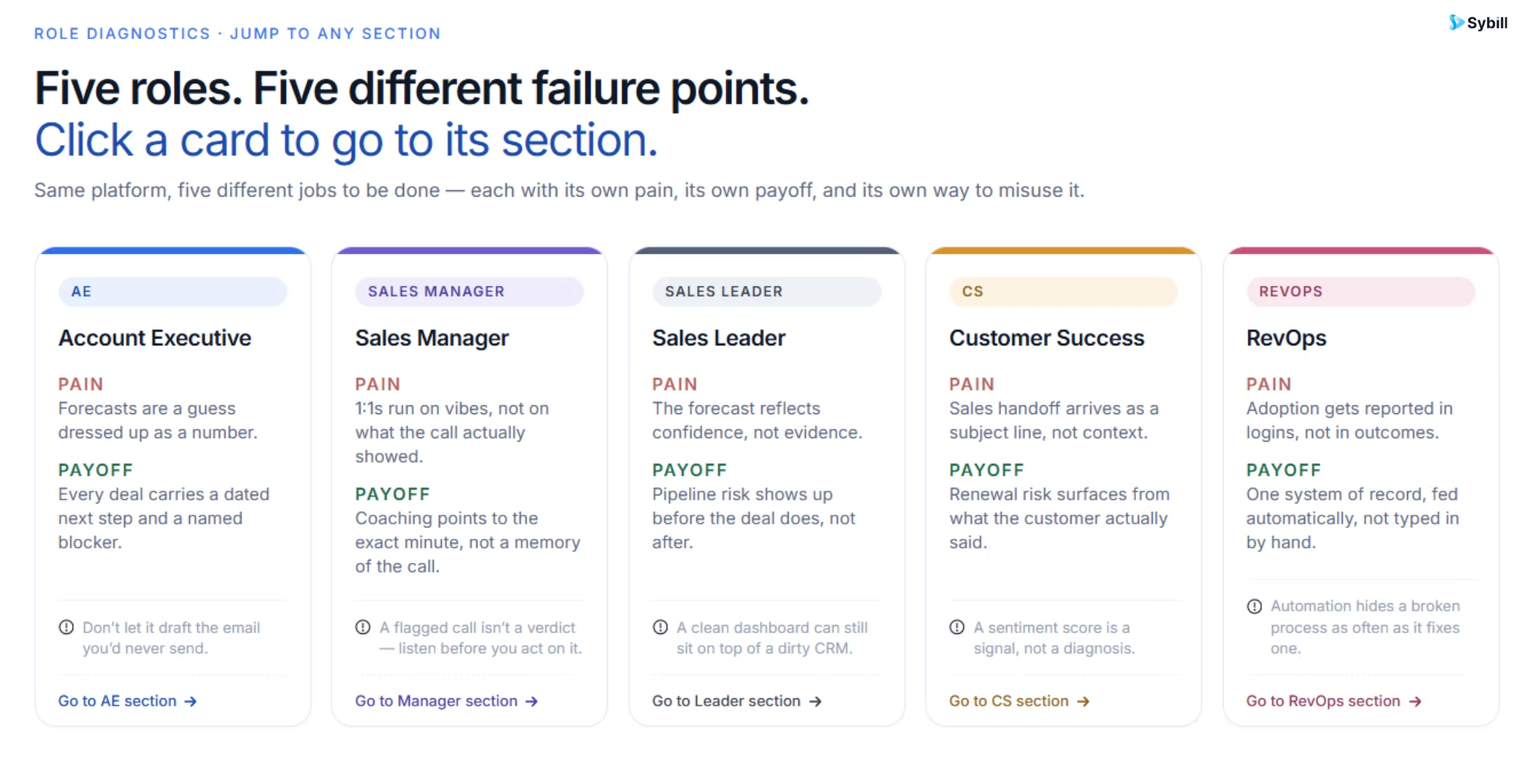
The pain: The hour after every call. Notes, CRM updates, follow-up drafting, and task tracking consume selling time and create the evening second shift that burns good reps out.
How it plays out: A rep finishes discovery, and the work product already exists: summary written, CRM updated, follow-up drafted in their voice and referencing what the buyer actually said, commitments captured as tasks. The rep reviews, sends, and walks into the next call with an AI-built brief instead of an inbox excavation. By Sybill's own numbers, that is up to 14 hours a week returned per account executive; run your own pilot math rather than taking any vendor's figure, ours included. The deeper playbook is in our AI agent for AEs guide and the roundup of tools high-performing AEs use to cut admin.
What to watch for: Tone. Follow-ups that sound like a robot wrote them get rewritten, and a tool that gets rewritten daily gets abandoned monthly. Evaluate on whether the drafts sound like your reps on their best day.
The pain: Managing on narration. Pipeline reviews run on what reps say happened, coaching runs on the two calls a manager had time to join, and the truth about deals lives in recordings nobody has hours to watch.
How it plays out: The Monday review starts from evidence: every deal's conversation record on screen, risk flags pre-built, and stage claims checkable against what the buyer actually said. Coaching gets specific because every call is reviewable and the patterns are surfaced rather than hunted. Our AI agents for sales managers guide covers the full workflow shift.
What to watch for: Surveillance perception. Rolled out as an inspection tool, it breeds resentment and gaming; rolled out as the thing that killed CRM nagging and made coaching useful, it gets embraced. The framing at launch decides which one you get.
The pain: Committing a number built on layers of optimism. Every forecast inherits every inflated stage and slipped close date beneath it, and by the time reality surfaces, the quarter is spent.
How it plays out: The forecast runs on conversation evidence rather than field folklore: sales leaders see which committed deals have engaged economic buyers and confirmed next steps versus which have a hopeful stage label, and variance shrinks because the inputs got honest. Deal reviews at the leadership level become interventions rather than interrogations.
What to watch for: The assistant makes the pipeline honest; it does not make the pipeline bigger. Leaders who deploy it expecting a coverage problem to disappear will be disappointed on schedule. It tells you the truth earlier, which is worth a great deal, and is not the same thing.
The pain: The handoff amnesia. Everything sales learned across a dozen calls (the promises, the priorities, the stakeholder map, the sensitivities) compresses into a two-line note, and the customer spends onboarding repeating themselves.
How it plays out: Customer success inherits the full conversation history: what was promised, what the buyer actually cares about, which stakeholder pushed for the deal and which one needs winning over. The sales-to-CS handoff stops being a summary of a summary, and renewal conversations start from the record rather than archaeology.
What to watch for: Access design. CS needs the account's sales history without inheriting every seller's full pipeline; this is exactly where the governance layer earns its keep.
The pain: Being the data police. Audits, hygiene sprints, and chasing reps for updates consume the function that was hired to design revenue systems.
How it plays out: Data quality gets fixed at the source: records populate from conversations, so RevOps inherits a CRM that is current by construction rather than by enforcement. The function's time shifts to what it was hired for: process design, reporting, and running a revenue engine on inputs it finally trusts.
What to watch for: Field mapping discipline at setup. An assistant writing into badly designed fields automates the mess faster. Clean the schema first, then connect the pipe.
One assistant, every revenue seat. Sybill captures every conversation and turns it into what each role needs: recovered hours for reps, evidence for managers, honest forecasts for leaders, and clean data for RevOps. Get started for free with Sybill.
Five questions separate a tool that gets adopted from expensive shelfware: which certifications apply to the plan you are actually buying (not the enterprise tier you are not), how deep the CRM integration really goes (custom fields and objects, not just contact sync), whether humans stay in the loop by default on outbound actions, what setup genuinely requires, and whether you can pilot on one team before committing the org.
The checklist, with the test behind each question:
1. Certifications, on your plan. SOC 2 Type II and GDPR are the baseline; verify them on the vendor's trust center and confirm they apply to the tier you are buying, since security features sometimes gate to enterprise plans. Ask where recordings are stored, how long, and who can access them.
2. Integration depth over integration count. "Works with your CRM" can mean logging a call activity, or it can mean populating your MEDDPICC custom fields with correctly formatted, human-sounding content. Test with your ten most-used fields, including the custom ones, before believing any integration page, and check the full integration surface against your actual stack.
3. Human in the loop by default. Follow-ups should draft, not auto-send; CRM writes should be reviewable and reversible. The trust that decides adoption is built in the first two weeks by an assistant that shows its work, and the deeper governance questions are covered in our security and permissions guide.
4. Setup measured in days, not quarters. Some tools work the day you connect them; others need weeks of workflow configuration. Neither is wrong, but a tool that needs a services engagement before value is a different purchase than its pricing page implies. Our breakdown of what AI agents actually cost covers the total-cost math.
5. Pilot small, measure honestly. One team, two weeks, live deals, and two numbers: admin minutes saved per call (survey the reps) and field completeness on active deals (query the CRM). A free plan makes this a zero-budget exercise, and adoption without nagging in week two is the pass signal that predicts everything else.
For comparing specific vendors once the checklist narrows the field, our AI sales assistant comparison and best AI sales assistants roundup do the tool-by-tool work.
Sybill is an enterprise AI sales assistant in the vertical sense: purpose-built for revenue teams, covering the conversation-to-outcome layer for every seat described above, with the security posture and governance controls enterprise deployment requires. What it deliberately is not: a horizontal enterprise assistant for HR, finance, support, and operations. If your requirement spans departments, that is a different category with different winners, and our AI platform selection guide maps it honestly.
That narrowness is the point, and it is worth stating why rather than apologizing for it. A horizontal assistant knows a little about every workflow; a vertical one is measured against a number someone owns. Everything in Sybill (the summary formats, the CRM field intelligence, the deal risk logic, the coaching analytics) exists because sales conversations are the input and revenue outcomes are the scoreboard. The general category of AI agents is broad; our lane inside it, mapped fully in AI agents for sales teams, is the part where deals are won and lost.
And the strategic context for buying anything in this category at all: most enterprise AI initiatives still fail on adoption, not capability, a pattern our enterprise AI adoption guide unpacks in full. The assistants that survive are the ones that remove work from day one, which is exactly the design bet described on every page above.
Here is the summary that survives contact with procurement: the AI in this category has gotten good enough that capability rarely decides the purchase anymore. What decides it is everything around the AI: whether the security review clears, whether the permissions model fits how your org actually works, whether reps trust the drafts enough to send them, and whether the whole thing removes steps from real workflows instead of adding a destination nobody visits twice.
Buy for the enterprise layer, pilot on one team's real deals, and measure hours and field completeness rather than enthusiasm. The category has matured enough that the winners are boring: they just do the work, every call, every day, for every seat.
Get started for free with Sybill or book a demo and run the pilot on your own numbers.
A note-taker captures and summarizes meetings for one person. An enterprise AI sales assistant acts on those conversations across a whole revenue organization: updating the CRM, drafting follow-ups, flagging deal risks, powering coaching, and answering questions across the history, with the permissions, audit trails, and admin controls a company-wide deployment requires.
SOC 2 Type II and GDPR compliance are the baseline for any tool processing customer conversations, verifiable through the vendor's trust center. Confirm the certifications apply to the specific plan you are buying, ask where recordings are stored and for how long, and run the security review at the start of evaluation rather than the end of procurement.
Vendor figures vary and should all be pilot-tested against your own workflow; Sybill's own claim is up to 14 hours per week per account executive. The honest math is yours to run: reps × weekly calls × post-call admin minutes gives the recoverable ceiling, and a two-week pilot with a before/after survey gives the real number.
No. They remove the record-keeping, drafting, and monitoring around conversations; the conversations, relationships, and judgment stay human. Teams that deploy well see reps spending more time selling and managers coaching on evidence, not headcount reductions, and deployments framed as replacement reliably fail on adoption.
Yes, and that is the defining trait of the enterprise tier: the same conversation layer produces role-specific value, recovered hours for reps, evidence-based coaching for managers, forecast-grade data for leaders, and source-level CRM hygiene for RevOps, governed by role-based permissions so each seat sees exactly what it should.
A note-taker captures and summarizes meetings for one person. An enterprise AI sales assistant acts on those conversations across a whole revenue organization: updating the CRM, drafting follow-ups, flagging deal risks, powering coaching, and answering questions across the history, with the permissions, audit trails, and admin controls a company-wide deployment requires.
SOC 2 Type II and GDPR compliance are the baseline for any tool processing customer conversations, verifiable through the vendor's trust center. Confirm the certifications apply to the specific plan you are buying, ask where recordings are stored and for how long, and run the security review at the start of evaluation rather than the end of procurement.
Vendor figures vary and should all be pilot-tested against your own workflow; Sybill's own claim is up to 14 hours per week per account executive. The honest math is yours to run: reps × weekly calls × post-call admin minutes gives the recoverable ceiling, and a two-week pilot with a before/after survey gives the real number.








