
Find us at booth #83, join us for a harbor side happy hour, or catch Gorish’s talk.

Sept, 16-18 > Learn more

%20(1).avif)
Mamta Tainwala

March 28, 2026
HubSpot is one of those platforms that inspires strong opinions. Some sales leaders swear by it. Others swear at it. And most fall somewhere in between: appreciating what it does well while quietly frustrated by what it doesn't.
With a G2 rating of 4.4/5 across nearly 12,000 reviews and over 228,000 customers worldwide, HubSpot has earned its place as one of the most popular CRM platforms on the market. But popular doesn't always mean right for your team, especially when the pricing jumps between tiers can turn a budget-friendly tool into a six-figure annual commitment faster than you'd expect.
This review is written specifically for sales teams. Not marketers, not service teams, not agency owners evaluating HubSpot CMS. If your job involves managing a pipeline, coaching reps, and hitting a number every quarter, this is the breakdown you need. We will cover what HubSpot genuinely does well, where it falls short, what it costs in 2026, and how to fill the gaps that even HubSpot's biggest fans acknowledge exist. If you're also comparing across the category, our best CRM tools roundup covers 10 platforms side by side.
Before we get into the details, here is a quick overview of what HubSpot offers for sales teams in 2026.
HubSpot Sales Hub is the CRM's sales-specific product. It sits on top of the free HubSpot CRM (which handles contacts, companies, deals, and basic reporting) and layers on tools for email sequences, meeting scheduling, pipeline management, call tracking, forecasting, and AI-powered insights.
Sales Hub comes in four tiers: Free, Starter ($20/seat/month), Professional ($100/seat/month), and Enterprise ($150/seat/month). Each tier unlocks progressively more automation, reporting, and AI capabilities, but the jumps between them are where most of the frustration lives.
HubSpot also operates a broader ecosystem of Hubs (Marketing, Service, Content, Data, Commerce) that all share the same underlying CRM database. This is one of its greatest strengths and, depending on your needs, one of its greatest sources of complexity.
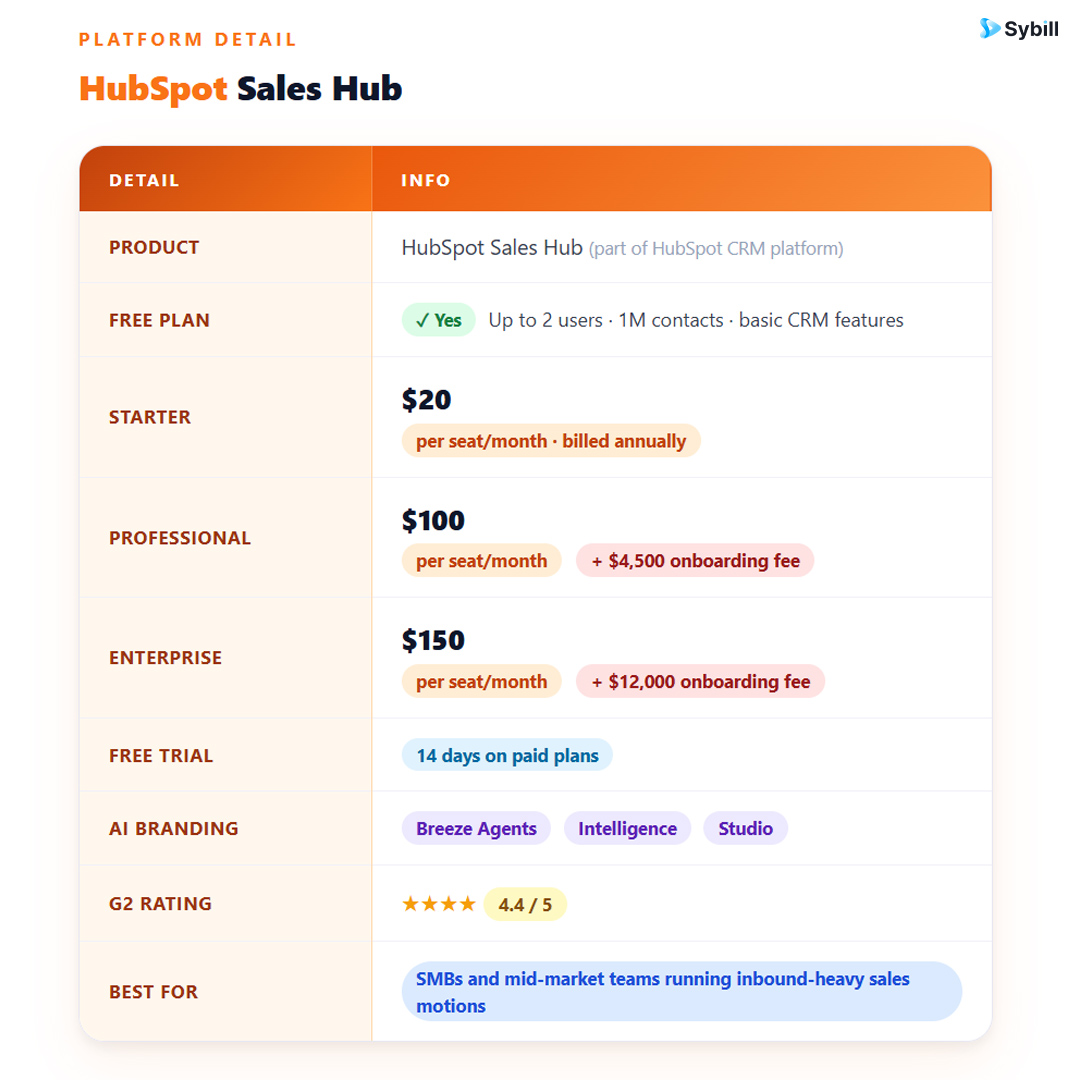
This is not a bait-and-switch free tier with a 14-day countdown. HubSpot's free CRM supports up to 1,000,000 contacts and 2 users with functional pipeline management, contact and company records, email tracking, meeting scheduling (one link), basic reporting, and even limited email marketing (2,000 sends/month with HubSpot branding).
For a startup or early-stage sales team that needs to graduate from spreadsheets, the free plan is a legitimate tool, not just a trial period. You can track deals, log activities, and manage a small pipeline without paying anything. That is rare in the CRM market, and it is one of the reasons HubSpot has such a massive user base. The strategy is clear: get teams started for free, then grow with them as their needs expand. But credit where it is due, the free tier delivers real value while you are on it.
Across thousands of user reviews, the most consistent praise HubSpot receives is for its interface. The learning curve is genuinely shallow compared to platforms like Salesforce, Zoho, or Dynamics 365. New reps can be productive in HubSpot within hours, not weeks.
The contact timeline (showing every email, call, page visit, form fill, and meeting in chronological order) is one of the best implementations in any CRM. Reps get a complete picture of a prospect's engagement without clicking through multiple tabs or running reports. Pipeline views are clean and drag-and-drop. Deal creation takes seconds. Activity logging is straightforward. For sales managers who have fought CRM adoption battles before, HubSpot's usability is a genuine competitive advantage. A CRM that reps actually open every day is worth more than a feature-rich system that collects dust.
If your company runs both sales and marketing through HubSpot, the alignment between the two is seamless in a way that most competitors require integrations and workarounds to achieve.
Marketing-qualified leads flow directly into sales pipelines with full context: which campaigns they engaged with, which content they downloaded, which emails they opened. Sales reps see exactly what brought a prospect to them, and marketing teams see exactly which leads convert into revenue. This closed-loop reporting is powerful for attribution, pipeline analysis, and making informed decisions about where to invest marketing spend.
For inbound-heavy sales teams, this is HubSpot's strongest selling point. The handoff from marketing to sales happens inside a single system with a shared data layer. No syncing issues. No "the lead came in but we lost the context" problems. No Zapier workarounds to move data between platforms. Teams looking to build an AI-automated sales funnel will find HubSpot's native marketing-to-sales handoff an excellent starting foundation.
HubSpot's Sequences feature (available on Professional and above) lets sales reps enroll contacts in automated email cadences with manual task steps like phone calls mixed in. Sequences pause when a contact replies, which makes them feel personal rather than spammy. For reps managing 50+ active conversations, sequences are a legitimate time-saver.
Workflows, the broader automation engine, go further. You can auto-rotate leads based on territory or rep capacity, trigger deal stage changes based on activity thresholds, send internal Slack notifications when deals hit certain milestones, and create custom branching logic for complex sales processes. The workflow builder is visual, drag-and-drop, and does not require code. It is not as flexible as Salesforce's Flow Builder, but for 90% of sales workflow automation needs, it gets the job done without needing an admin on payroll.
This is an underrated advantage. HubSpot Academy is one of the best free educational resources in B2B SaaS. The courses cover not just how to use HubSpot, but broader sales methodology, inbound selling, and revenue operations concepts. For sales teams investing in professional development, having a library of structured, certification-backed courses included with the platform is a genuine benefit.
The broader HubSpot community, including forums, partner agencies, user groups, and the massive content library on the HubSpot blog, also means that answers to almost any "how do I do X in HubSpot" question are a quick search away. This ecosystem effect reduces dependence on support tickets and makes self-service troubleshooting faster than on most competing platforms.
HubSpot's App Marketplace lists over 1,500 integrations. The ones that matter most for sales teams, like Gmail, Outlook, Slack, Zoom, Google Calendar, LinkedIn Sales Navigator, Salesforce (for migration), and major dialers, are well-maintained and functional. The Gmail and Outlook sidebar extensions, in particular, let reps view CRM data and log emails without switching tabs, which meaningfully reduces friction.
This is the most common complaint about HubSpot, and it is valid. The gap between Starter ($20/seat/month) and Professional ($100/seat/month) is massive, both in price and in the features that unlock. Most of the capabilities that make HubSpot genuinely useful for a growing sales team, like sequences, custom reporting, forecasting, A/B testing, and workflow automation, are gated behind Professional.
That means a 10-person sales team goes from $200/month on Starter to $1,000/month on Professional, plus a mandatory $4,500 one-time onboarding fee. Jump to Enterprise for advanced permissions, predictive lead scoring, and conversation intelligence? That is $1,500/month for the same team, plus a $12,000 onboarding fee.
And it gets worse as you scale. HubSpot's Marketing Hub prices increase based on marketing contact volume. If your contact database grows past your tier limit, HubSpot auto-upgrades your billing mid-contract with no grace period for cleanup. Multiple users across forums and review sites cite this as one of the most frustrating experiences with the platform.
The bottom line: HubSpot's entry price is competitive. Its growth price is not. Budget for where you will be in 18 months, not where you are today.
Here is HubSpot's dirty secret, and frankly, every CRM's dirty secret: reps do not reliably update their deals. They forget to log calls. They skip writing notes after meetings. They move deal stages late or not at all. They leave key fields like budget, timeline, decision-maker, and next steps blank.
HubSpot makes data entry easier than most CRMs, but "easier" is not the same as "done." The platform still relies on reps to manually input the most valuable information: what actually happened on a call, what the prospect said about their budget, who the real decision-maker is, and what the next steps are. This is precisely the information that makes pipeline data trustworthy and sales forecasts accurate.
This is where Sybill changes the equation. Sybill integrates directly with HubSpot and eliminates the manual data entry problem entirely. It joins your sales calls, generates AI-powered summaries of what was discussed, and automatically populates HubSpot fields like deal stage, MEDDPICC criteria, next steps, and key objections based on the actual conversation. Your reps do not need to remember to update HubSpot after a call. Sybill does it for them, accurately and immediately.
The result? Pipeline data that reflects reality, not rep memory. Forecasts that managers can actually trust. And reps who spend their time selling instead of typing notes into a CRM they resent.
HubSpot added Conversation Intelligence (CI) as part of its Sales Hub, allowing call recording, transcription, and keyword tracking. On paper, this sounds competitive with standalone CI tools. In practice, it is a surface-level implementation.
HubSpot's CI can tell you that a call happened, transcribe it, and flag when certain keywords were mentioned. But it does not generate structured, actionable summaries. It does not extract specific data points like budget figures, timeline commitments, or competitive mentions and map them to deal fields. It does not analyze buying signals or flag at-risk deals based on conversation patterns across your pipeline.
Sybill's conversation intelligence goes significantly deeper. Beyond transcription, Sybill generates structured call summaries organized by topic, captures action items and follow-ups, drafts personalized follow-up emails based on what was discussed, and analyzes conversation patterns across your entire pipeline to surface deals that need attention. It also writes the call notes your reps would never get around to writing, and pushes them directly into HubSpot.
If your team's success depends on understanding what actually happens in sales conversations (and if you are in B2B sales, it does), HubSpot's native CI is a starting point. Sybill is the complete solution.
HubSpot's free and Starter plans include basic dashboards and canned reports. They are fine for a small team tracking simple metrics like deals closed and revenue by rep. But the moment you need custom reports, cross-object reporting, attribution analysis, or deal velocity metrics, you are looking at Professional or Enterprise.
Even on Professional, some users find HubSpot's reporting less flexible than what Salesforce or even Zoho CRM offers at comparable tiers. Building complex custom reports can require workarounds, and reporting on data that originated outside HubSpot is a known limitation. If your sales leadership demands granular pipeline analytics, you may find yourself supplementing HubSpot's native reporting with external BI tools, which adds cost and complexity.
The free plan is great for getting started, but it has intentional friction points designed to push you toward paid tiers. You are limited to 2 users, HubSpot branding appears on all emails and forms, automation is minimal, you get only 1 deal pipeline, and reporting is basic.
More importantly, once your team starts building processes on HubSpot's free tier, the switching costs increase. Your contact data, email templates, pipeline configurations, and workflow history all live in HubSpot. By the time you outgrow the free plan (and most teams do within 6 to 12 months), migrating to a cheaper alternative feels more painful than just upgrading. HubSpot knows this.
This is not unique to HubSpot, most CRMs with free tiers operate similarly, but it is worth acknowledging. The free plan is a funnel, not a destination. Plan your budget accordingly.
HubSpot Professional and Enterprise plans require annual commitments. If you sign up in January and realize by March that HubSpot is not the right fit, you are locked in for the remaining 9 months. There is no pro-rated refund for mid-cycle cancellations on these tiers.
Additionally, if your marketing contact volume exceeds your plan limit, HubSpot auto-upgrades your billing tier immediately. Downgrades, however, only take effect at renewal. This asymmetry, where increases are instant but decreases are delayed, is a recurring frustration in user reviews. For fast-growing teams with unpredictable contact volume, this billing model requires careful monitoring to avoid surprise charges.
HubSpot's AI suite, branded as Breeze, includes AI email writing, content generation, conversation summaries, and AI-powered agents. These are promising additions, but most of the meaningful AI capabilities (predictive lead scoring, conversation intelligence, AI agents) are locked behind Professional or Enterprise tiers.
More fundamentally, HubSpot's AI is designed to assist within HubSpot's own workflows. It can draft an email or suggest a meeting time. What it cannot do is listen to your sales calls, understand the nuances of buyer conversations, extract structured deal intelligence, and autonomously update your CRM based on what was actually discussed. For teams evaluating how AI is reshaping sales workflows, this distinction matters.
This is the gap that Sybill fills. Sybill's AI does not just work within the CRM. It works at the point where the most valuable sales data is generated: the conversation itself. It captures what happens in meetings, interprets it, structures it, and pushes it into HubSpot, all without the rep lifting a finger. That is a fundamentally different (and more impactful) application of AI than what HubSpot offers natively.
Get started for free with Sybill and give your reps an AI sales assistant that keeps HubSpot accurate, automatically.
This is a smaller but persistent gripe. HubSpot's email templates and landing page designs feel dated compared to what you would expect from a platform of this caliber. The drag-and-drop editors work, but the default template library lacks the polish and variety that competitors like ActiveCampaign, Mailchimp, or even newer entrants offer.
For sales teams specifically, the email template builder for sequences is functional but basic. Personalization tokens work fine, but if your outbound emails need to look polished and on-brand with custom HTML or advanced formatting, you will quickly bump into the template editor's limitations.
You run an inbound-heavy sales motion. If your leads come from content, SEO, paid ads, and events, and your marketing team either already uses HubSpot or is willing to, the sales-marketing alignment is hard to beat. The closed-loop reporting alone can justify the investment.
Your team values ease of use over deep customization. If you have been burned by CRM implementations that took months and required a full-time admin, HubSpot's shallow learning curve and self-serve setup are genuinely appealing. A CRM your team actually uses beats a powerful system they avoid.
You are an SMB or mid-market company with 5 to 50 reps. This is HubSpot's sweet spot. Large enough to benefit from automation and reporting, small enough that the per-seat costs on Professional are manageable. Below 5 reps, the free or Starter tier may be sufficient. Above 50, the total cost of ownership starts competing with Salesforce territory.
You pair it with the right intelligence layer. HubSpot gives you a solid CRM foundation. Sybill gives you the AI intelligence that keeps it accurate and actionable. Together, they solve the two biggest problems in sales operations: where does the data live (HubSpot) and how does it stay current (Sybill).
You are primarily an outbound sales org. HubSpot's sequences are decent, but if your team relies on high-volume cold calling, multi-channel outbound, and aggressive prospecting workflows, dedicated tools like Close, Outreach, or Salesloft are purpose-built for that motion. HubSpot's outbound capabilities are a bolt-on, not the core.
You need enterprise-grade customization. Territory hierarchies, multi-currency support, complex approval workflows, advanced CPQ, and layered permission models are areas where Salesforce and Microsoft Dynamics still have a meaningful edge. HubSpot has made progress, but it was not designed from the ground up for 500-rep organizations with complex sales structures.
You are on a tight budget and need advanced features. If your team needs sequences, custom reporting, and forecasting but cannot afford $100/seat/month plus a $4,500 onboarding fee, platforms like Zoho CRM ($23/user/month for Professional) or Pipedrive ($39/user/month for Growth) offer more feature depth at lower price points.
If you have read this far, you have noticed a pattern in HubSpot's cons: the platform is only as good as the data your reps put into it. And reps, even disciplined ones, are inconsistent at best.
This is not a HubSpot-specific problem. It is a CRM-category problem. But it is especially relevant for HubSpot teams because the platform's strongest features (pipeline dashboards, deal forecasting, sales analytics, lead scoring) all depend on accurate, current deal data to function properly. Garbage in, garbage out.
Sybill solves this at the source. Here is how it works with HubSpot:
Automatic call summaries. Sybill joins every sales call (Zoom, Google Meet, Teams) and generates a structured summary within minutes. Key topics, objections raised, competitor mentions, budget discussions, timeline details, and agreed-upon next steps are all captured and organized. No more relying on what a rep remembers to type after a meeting.
Auto-populated CRM fields. Sybill does not just summarize calls. It maps extracted information directly to HubSpot deal properties. If a prospect mentions a $50K budget, Sybill updates the budget field. If they say they need to involve their VP of Engineering, Sybill logs the stakeholder. If a timeline shifts, Sybill updates the close date. It supports structured sales qualification frameworks like MEDDPICC and BANT natively. The CRM stays current without reps touching it.
AI-drafted follow-up emails. After every call, Sybill drafts a personalized follow-up email based on the conversation. Reps review, adjust if needed, and send. What used to take 10 to 15 minutes now takes under a minute, and the follow-up is more accurate and personalized than what most reps would write from memory.
Pipeline intelligence. Sybill analyzes conversation patterns across your entire pipeline to flag deals showing risk signals (like mentions of competitors, stalled timelines, or missing stakeholders) and highlight opportunities with strong buying signals. This gives managers visibility into what is actually happening in deals, not just what reps report in their weekly updates.
Zero behavior change required. This is the critical point. Sybill does not ask reps to learn a new tool or change their workflow. They do their calls as usual. Sybill handles the rest. That is why adoption is not a problem, because there is nothing to adopt. The AI works in the background, and HubSpot stays accurate automatically.
Get started for free with Sybill and see the difference when your CRM updates itself after every call.
Understanding HubSpot's true cost requires looking beyond the per-seat sticker price. Here is what sales teams actually pay at each tier.
Cost: $0
What you get: Up to 2 users, 1M contacts, 1 deal pipeline, basic contact and deal management, email tracking (200 notifications/month), 1 meeting scheduling link, limited reporting, live chat with HubSpot branding, basic mobile app.
What you don't get: Sequences, custom reporting, forecasting, workflow automation, multiple pipelines, conversation intelligence, or the ability to remove HubSpot branding.
Verdict: Genuinely useful for 1 to 2 person teams testing the waters. You will outgrow it, but it is a fair starting point.
Cost: $240/seat/year (billed annually) or $30/seat/month (billed monthly)
What unlocks: HubSpot branding removed, conversation routing, up to 2 deal pipelines, 1,000 custom properties, task queues, repeating tasks, simple automation, email templates (5,000), meeting scheduling (multiple links).
What is still missing: Sequences, custom reporting, forecasting, ABM tools, workflow automation, conversation intelligence.
Verdict: Good value for small teams that need more than free but are not ready for the Professional jump. The absence of sequences is the biggest limitation for active prospecting teams.
Cost: $1,200/seat/year + $4,500 one-time onboarding fee
What unlocks: Sequences (500 enrollments/user/month), custom reporting, sales forecasting, workflow automation (300 workflows), up to 15 deal pipelines, conversation intelligence (call recording and transcription), calculated properties, ABM tools, eSignatures.
What is still missing: Predictive lead scoring, recurring revenue tracking, advanced permissions, custom objects, sandbox accounts.
Verdict: This is the tier where HubSpot Sales Hub becomes a serious tool. For most mid-market teams, Professional is the minimum viable investment. The $4,500 onboarding fee stings, but the feature unlock is substantial.
Cost: $1,800/seat/year + $12,000 one-time onboarding fee
What unlocks: Predictive lead scoring, custom objects, advanced permissions, hierarchical teams, recurring revenue tracking, conversation intelligence enhancements, sandbox testing, admin notifications management.
Verdict: Justified for larger, complex sales organizations. But at this price point, you are in Salesforce territory, and the comparison becomes more competitive. Evaluate carefully whether Enterprise features are necessities or nice-to-haves for your team.
Yes, the core CRM is free with no time limit. You get contact management, deal tracking, email integration, and basic reporting for up to 2 users and 1,000,000 contacts. However, the free tier has significant limitations: minimal automation, HubSpot branding on all communications, only 1 deal pipeline, and basic reporting. Most growing sales teams need to upgrade within 6 to 12 months.
The gap between what the CRM collects and what reps actually enter. HubSpot provides excellent tools for organizing pipeline data, but it still depends on reps to manually update deals, log call notes, and fill in critical fields. This data entry burden leads to incomplete CRM records and unreliable forecasts. Tools like Sybill solve this by auto-populating HubSpot fields from actual sales conversations, removing the manual step entirely.
It depends on your team size, complexity, and budget. HubSpot wins on ease of use, onboarding speed, and marketing-sales alignment. Salesforce wins on customization depth, enterprise scalability, and reporting flexibility. For teams under 50 reps with straightforward sales processes, HubSpot is often the better choice. For larger, more complex organizations, Salesforce's flexibility is hard to match. Both platforms benefit from pairing with Sybill for automatic CRM updates and conversation intelligence.
Partially. HubSpot's Sequences feature (Professional+) supports automated email follow-ups with manual task steps, and the platform includes basic calling functionality. However, it lacks native power dialing, predictive dialing, and the depth of multi-channel outbound orchestration that platforms like Close, Outreach, or Salesloft provide. If outbound is your primary motion, HubSpot may not be sufficient as a standalone tool.
HubSpot's Breeze AI is useful for content generation and basic productivity tasks like drafting emails, summarizing notes, and powering chatbots. However, it does not offer autonomous CRM updating from conversations, structured deal intelligence extraction, or cross-pipeline analysis of conversation patterns. Dedicated AI sales assistants like Sybill operate at a deeper level, capturing insights from live conversations and syncing them to HubSpot automatically. Think of HubSpot's AI as a writing assistant. Think of Sybill as an AI sales analyst that keeps your entire pipeline honest.
Moderately. HubSpot makes it easy to export contacts and deal data, but migrating workflows, sequences, email templates, and custom properties requires planning. The bigger switching cost is often organizational: teams build processes, reports, and integrations around HubSpot that take time to replicate elsewhere. This is worth considering before committing, especially at Professional and Enterprise tiers with annual contracts.
HubSpot is a very good CRM with a very specific set of strengths: ease of use, marketing-sales alignment, a generous free tier, and solid automation at the Professional level and above. For inbound-driven SMBs and mid-market sales teams, it remains one of the best options in 2026.
But it is not without real weaknesses. Pricing escalation is steep. Advanced features are aggressively gated. And the foundational CRM problem, getting accurate data into the system consistently, remains unsolved by HubSpot alone.
That is where Sybill comes in. If HubSpot is your sales operating system, Sybill is the intelligence layer that makes it work the way it should: with complete data, accurate forecasts, and reps who spend their time selling instead of typing. For teams that want to understand how AI-powered coaching and deal intelligence can transform their HubSpot experience, Sybill is the missing piece.
Pick HubSpot for the CRM. Get started for free with Sybill for the intelligence.
Yes, the core CRM is free with no time limit. You get contact management, deal tracking, email integration, and basic reporting for up to 2 users and 1,000,000 contacts. However, the free tier has significant limitations: minimal automation, HubSpot branding on all communications, only 1 deal pipeline, and basic reporting. Most growing sales teams need to upgrade within 6 to 12 months.
The gap between what the CRM collects and what reps actually enter. HubSpot provides excellent tools for organizing pipeline data, but it still depends on reps to manually update deals, log call notes, and fill in critical fields. This data entry burden leads to incomplete CRM records and unreliable forecasts. Tools like Sybill solve this by auto-populating HubSpot fields from actual sales conversations, removing the manual step entirely.
It depends on your team size, complexity, and budget. HubSpot wins on ease of use, onboarding speed, and marketing-sales alignment. Salesforce wins on customization depth, enterprise scalability, and reporting flexibility. For teams under 50 reps with straightforward sales processes, HubSpot is often the better choice. For larger, more complex organizations, Salesforce's flexibility is hard to match. Both platforms benefit from pairing with Sybill for automatic CRM updates and conversation intelligence.








