Find us at booth #83, join us for a harbor side happy hour, or catch Gorish’s talk.

Sept, 16-18 > Learn more

%20(1).avif)
Mamta Tainwala

August 17, 2026

The 11 best AI assistants for productivity in 2026, by job: Sybill for sales and revenue work (post-call summaries, CRM autofill, follow-ups), ChatGPT for general writing and reasoning, Claude for long-document analysis, Gemini for Google Workspace, Microsoft 365 Copilot for Office-native work, Notion AI for workspace-integrated notes and tasks, Motion for auto-scheduling, Reclaim.ai for defending focus time, Otter.ai for meeting transcription, Superhuman for inbox speed, and Perplexity for cited research. The pattern across all eleven: the assistants that change your week are the ones that act on work, not the ones that only chat about it.
The problem with most lists in this category is that they rank twenty logos against each other as if a calendar tool and a chatbot compete. They do not. Each of these owns a different bottleneck in your day, so this guide is organized the way the decision actually works: find your bottleneck, then meet the tool that owns it.
An AI productivity assistant is software that acts on your workday rather than just answering questions: it drafts the reply, schedules the task, captures the meeting, updates the record, or protects the focus block, without you triggering every step. That action test is what separates this category from general chatbots, which are brilliant thinking partners but leave all the follow-through to you.
The category splits into seven jobs, and the split matters more than any ranking:
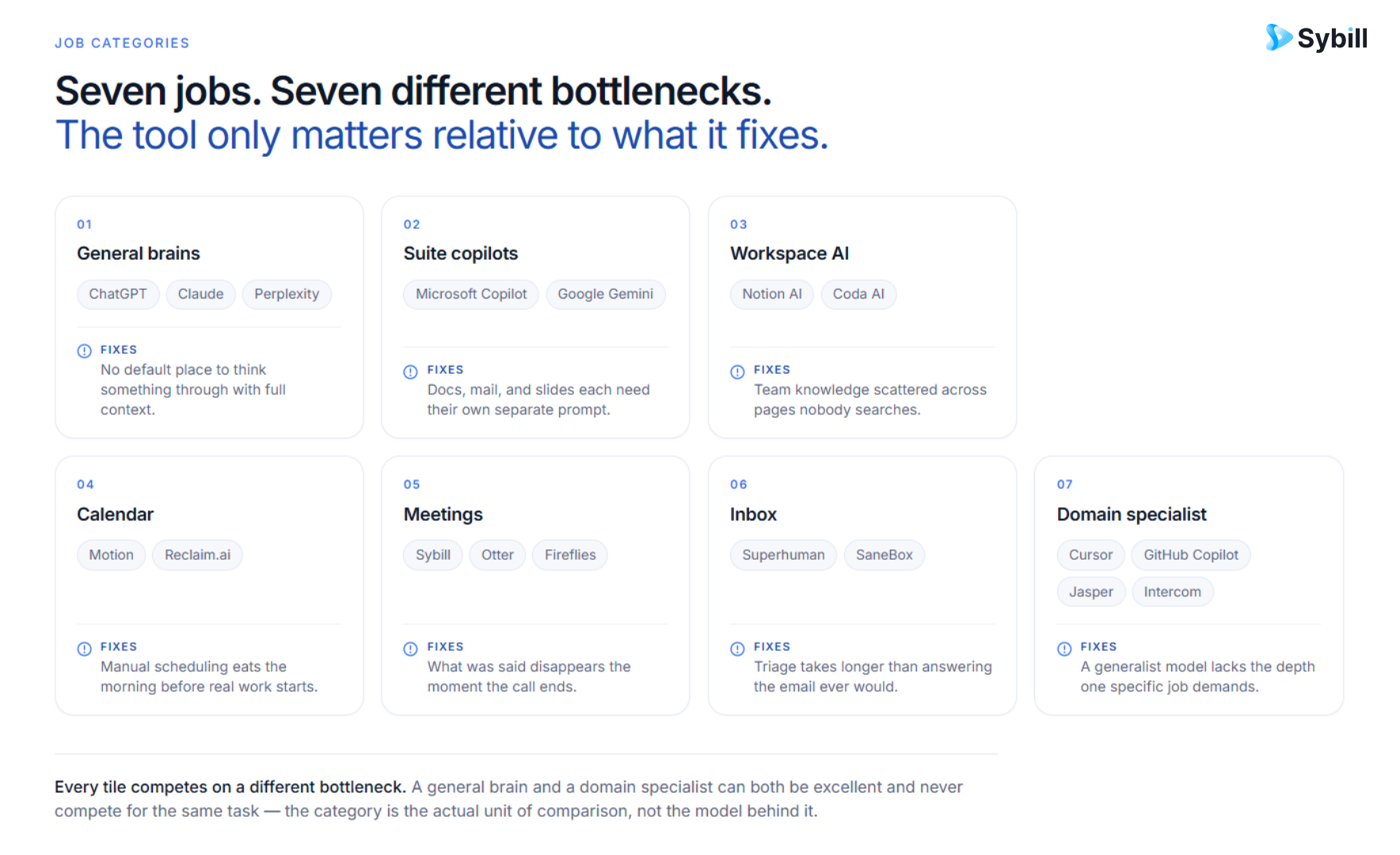
General brains (ChatGPT, Claude) think, write, and reason about anything. Suite copilots (Gemini, Microsoft 365 Copilot) do the same inside the ecosystem you already work in. Workspace AI (Notion AI) lives where your notes and tasks live. Calendar assistants (Motion, Reclaim.ai) manage time itself. Meeting assistants (Otter) capture what was said. Inbox assistants (Superhuman) clear the email mountain. And domain specialists (Sybill, for sales) own an entire workflow end to end, because a general tool that knows a little about your deals will always lose to a vertical one measured against your quota.
Most people need one from three or four of these categories, not one of everything. Build the small party, not the full Pokédex.
Four criteria, applied to every candidate: does it act or only generate (tools that complete workflows beat tools that produce text to paste), does the free tier or trial let you genuinely evaluate it, does it integrate with the systems a working professional already runs (calendar, inbox, CRM, docs), and does it survive week two (tools that need daily willpower to use were cut, however impressive the demo).
Exclusions worth naming, because a roundup is defined by what it leaves out: we cut the thin ChatGPT-wrapper task apps that add a subscription without adding capability, tools whose availability or roadmap looked shaky going into 2026, and meeting tools we cannot honestly recommend over the ones listed. And one disclosure up front: Sybill is our product. It leads the sales category because that is the category we build for; treat our claims about it exactly as skeptically as we have treated everyone else's, and pressure-test all eleven against your own workflow, ideally via the selection framework in our AI platform guide. Assistants are also one slice of a bigger field: our AI platforms roundup maps the full landscape, and the AI sales assistant comparison does the head-to-head work within our own category.
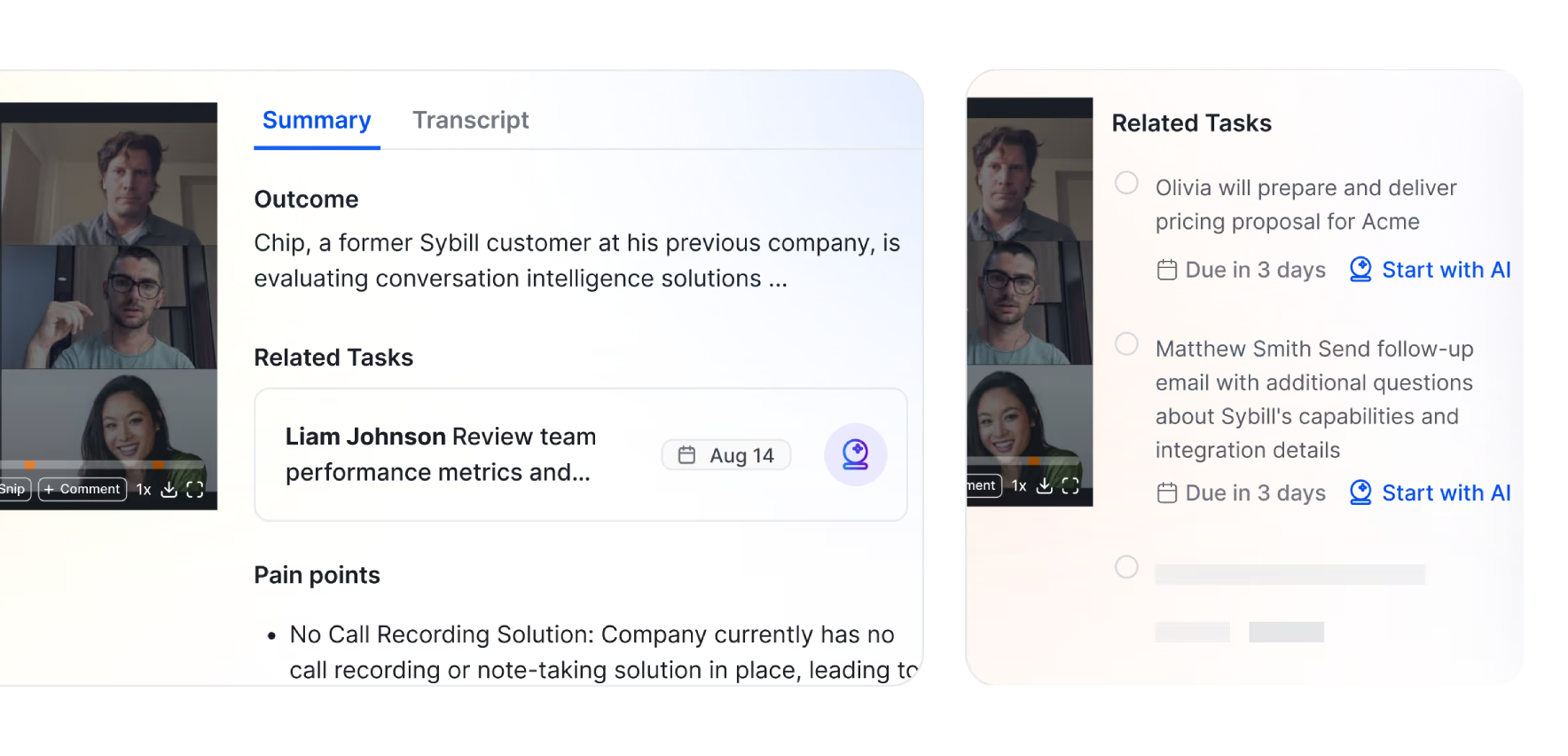
What it is: An AI sales assistant that captures every customer conversation and turns it into the work that follows: summaries, CRM fields filled automatically, follow-up emails drafted in your tone, and commitments tracked as tasks, with Ask Sybill answering questions across your whole deal history.
Best for: Anyone who sells. Reps living in back-to-back calls, managers who want deal records grounded in what buyers actually said, and RevOps teams tired of policing CRM hygiene.
Why it earns the specialist slot: Productivity for a seller is not a tidier to-do list; it is the hour after every call, where notes, CRM updates, and follow-ups either happen or quietly do not. Sybill removes that hour rather than speeding it up, which is the whole difference. It has analyzed around 33 million sales conversations, and the recurring pattern is that deal-deciding details are spoken once and lost unless something captures them. By Sybill's own numbers, that is up to 14 hours a week returned per AE; run your own pilot instead of trusting any vendor's figure, ours included.
What to watch for: It is deliberately narrow. If you do not run customer conversations, most of its value does not apply to you, and it will not manage your calendar or write your strategy doc. Pair it with a general brain, not instead of one.
Pricing posture: Free plan available; Pro at $30/seat; Business at $90/seat and Custom Enterprise pricing.
What it is: The default generalist: drafting, rewriting, brainstorming, analysis, code help, and file handling in one conversation, with the largest ecosystem of custom assistants and integrations around it.
Best for: The "anything" slot in your stack: the first draft, the explanation you did not want to Google a fifth time, the plan you need to pressure-test at 11 pm.
Worth knowing: The practical skill that separates users who rave from users who shrug is context: feed it your ugly draft and constraints instead of asking it to conjure from nothing, and keep an ongoing work thread so it holds your project context. Our comparison of AI chat apps covers how the field stacks up on exactly that.
What to watch for: It does not act inside your systems by default; the output is only as good as what you put in, and it will happily be confidently wrong when you are vague.
Pricing posture: Capable free tier; paid tiers per month.
What it is: The general assistant tuned for depth: very long context, strong structured reasoning, and a measured writing tone that suits contracts, policies, research, and anything where "careful" beats "fast."
Best for: The 200-tabs-of-context moments: digest this fifty-page document, reconcile these six messy inputs, find the risks in this agreement.
Worth knowing: The productive pattern many people land on is pairing: one general brain for fast drafts, Claude for the deep read and the second opinion. Feeding it whole project folders and asking "what is actually going on here" is its signature move.
What to watch for: Less multimodal and creative breadth than ChatGPT, and its caution can read as conservative when you want bold.
Pricing posture: Capable free tier; paid tiers per month.
What it is: Google's assistant woven through Gmail, Docs, Sheets, and Android: drafting in Docs, summarizing threads in Gmail, answering questions across your Drive, with a very large context window underneath.
Best for: Anyone whose work already lives in Google's suite and wants AI where the work is, with no new logins.
What to watch for: The value concentrates sharply inside Google's ecosystem; outside it, you are better served by a standalone brain. Depth also varies by app, so test it on your actual daily tasks before relying on it.
Pricing posture: Included features vary by Workspace plan; standalone tiers exist.
What it is: AI inside Word, Excel, PowerPoint, Outlook, and Teams: bullet ideas into deck drafts, plain-language analysis in Excel, meeting recaps in Teams, thread summaries in Outlook.
Best for: Companies already paying for Microsoft 365, where leaving Copilot unexplored is leaving licensed value on the table.
What to watch for: Requires the license, and output quality genuinely varies by app; treat it as a junior analyst whose first drafts you refine, not a finisher.
Pricing posture: Per-seat add-on to Microsoft 365.
What it is: AI built into the workspace many teams already plan in: summarize and restructure docs, turn meeting notes into task lists, query your own pages, and search across connected tools.
Best for: People whose thinking already lives in Notion and who want a second brain in the same building, not another destination.
What to watch for: Full AI access is gated to higher plans rather than a small add-on, and it is a thinking canvas, not a long-form content engine; pair it with a general brain for heavy writing. Our roundup of AI productivity planners covers the adjacent field.
Pricing posture: Free personal tier; AI features tied to paid plans.
What it is: A calendar-and-tasks app that slots your to-dos into open time by priority, deadline, and duration, then rebuilds the whole plan automatically every time a meeting lands on top of it.
Best for: People whose day gets rearranged constantly and who want the rearranging done for them instead of hand-dragging blocks every afternoon. (Sellers have a domain-specific version of this problem, which AI task prioritization handles differently.)
What to watch for: Real setup effort before it pays off (priorities, durations, work hours all need defining), and it does not touch your inbox; if email is where your day collapses, this is not the fix.
Pricing posture: Per seat, trial available, no free plan.
What it is: A calendar assistant that protects what meetings usually eat: focus blocks, recurring habits, and buffer time, flexing them around your schedule and re-finding slots when something encroaches.
Best for: Anyone whose "deep work" block has been overwritten three weeks running, and teams that want smart meeting scheduling without the back-and-forth.
What to watch for: The free tier caps the good parts quickly, so budget for a paid seat if week one convinces you. And no calendar tool fixes a culture that books over everything; it just makes the invasion visible.
Pricing posture: Free tier; paid per seat.
Sellers do not need an eleventh app. They need the hour after every call back. Sybill turns your conversations into summaries, CRM updates, and follow-ups automatically, so the selling day ends when the calls do. Get started for free with Sybill.
What it is: A meeting assistant that joins your calls and produces timestamped, searchable transcripts with summaries, plus chat you can query across your meeting history.
Best for: Anyone who needs a reliable record of general business meetings, where the win is finding the exact moment a decision was made without re-listening to an hour of audio.
What to watch for: Accuracy dips with background noise, crosstalk, and heavy accents, and transcription is the job description: it tells you what was said, and the follow-through stays yours. For sales conversations specifically, that gap is exactly why the specialist category above exists, and our roundups of meeting recorders and AI summarizers map the wider field.
Pricing posture: Free tier; paid per seat.
What it is: The fastest email interface in the category, keyboard-driven with AI drafting, thread summaries, and follow-up tracking layered on top, so a full inbox takes minutes instead of an hour.
Best for: People who live in email all day and whose bottleneck is genuinely volume and speed, not what happens after the email.
What to watch for: Built Gmail-first; Outlook users report a rougher ride. And speed is the product: if your problem is that replies need context from meetings and deals, an inbox tool alone will not know it. Our Gmail management tools guide covers the alternatives.
Pricing posture: Paid per month; tiers vary by features.
What it is: An AI research assistant that answers with sources attached: real-time web results, inline citations, follow-up threads that keep context, and a deep-research mode for genuinely thorough dives.
Best for: The ten-tabs-of-"read later" problem: sourcing stats, comparing options, and checking current facts, with links you can actually verify.
What to watch for: It is a research tool, not a writing or automation tool; the productive pattern is Perplexity for the evidence, then a general brain for the synthesis.
Pricing posture: Free tier; paid per month.
Choose Sybill if you sell, and the hour after every call (notes, CRM, follow-ups) is where your day leaks. Choose ChatGPT for the broadest general brain, or Claude when the job is long documents and careful reasoning. Choose Gemini or Microsoft 365 Copilot based on which suite you already live in, not on feature comparisons. Choose Notion AI if your thinking already lives in Notion. Choose Motion if calendar chaos is the bottleneck, Reclaim.ai if the specific casualty is your focus time. Choose Otter for a searchable record of general meetings. Choose Superhuman if email volume is the enemy. Choose Perplexity when the job is finding out, with receipts.
And the stack-building rule that beats every individual pick: name your three biggest daily pains first, then choose one tool per pain. One general brain, one specialist where it hurts most, one calendar or inbox fix if you need it. Use them daily for a month before adding anything, because the tool you actually open beats the perfect tool you forgot you subscribed to. Sellers assembling the full revenue-specific stack should start with our sales productivity tools guide and the tools high-performing AEs actually use.
The uncomfortable truth this category's marketing skips: the tools are no longer the constraint. Eleven excellent assistants are sitting behind free tiers and trials, and the difference between people drowning in 2026 and people done by six is mostly whether they picked one bottleneck, fixed it, and moved to the next.
Pick the bottleneck. The assistants are ready.
Get started for free with Sybill or book a demo if the bottleneck is the hour after your sales calls.
A chatbot answers when asked; a productivity assistant acts on your work: scheduling the task, drafting the reply, capturing the meeting, updating the record. ChatGPT and Claude are exceptional thinking partners, but the tools that change how your week runs are the ones wired into your calendar, inbox, meetings, or CRM.
Three to four, mapped to your real bottlenecks: one general brain, one specialist for your biggest pain (sales, calendar, inbox, or meetings), and optionally a suite copilot you already pay for. Collecting more than that produces tool sprawl, where managing the assistants becomes its own productivity problem.
For revenue work specifically, a sales-native assistant beats general tools because the bottleneck is domain-shaped: post-call summaries, CRM updates, follow-ups, and deal context. Sybill owns that lane end to end; general brains like ChatGPT complement it for strategy and drafting but cannot see your deals.
The established tools carry SOC 2 Type II and GDPR compliance, verifiable through each vendor's trust center, but certifications sometimes vary by plan tier, so confirm they apply to the one you are buying. Be deliberate about what you connect: an assistant only needs access to the systems it acts in.
Usually yes, and that is the right way to buy in this category: most tools here offer free tiers or trials sufficient for a two-week test on real work. The pass signal is behavioral, not emotional: if you are still using it in week two without reminding yourself to, it earned the seat.
A chatbot answers when asked; a productivity assistant acts on your work: scheduling the task, drafting the reply, capturing the meeting, updating the record. ChatGPT and Claude are exceptional thinking partners, but the tools that change how your week runs are the ones wired into your calendar, inbox, meetings, or CRM.
Three to four, mapped to your real bottlenecks: one general brain, one specialist for your biggest pain (sales, calendar, inbox, or meetings), and optionally a suite copilot you already pay for. Collecting more than that produces tool sprawl, where managing the assistants becomes its own productivity problem.
For revenue work specifically, a sales-native assistant beats general tools because the bottleneck is domain-shaped: post-call summaries, CRM updates, follow-ups, and deal context. Sybill owns that lane end to end; general brains like ChatGPT complement it for strategy and drafting but cannot see your deals.