Find us at booth #83, join us for a harbor side happy hour, or catch Gorish’s talk.

Sept, 16-18 > Learn more

%20(1).avif)
Mamta Tainwala

August 11, 2026
%20(67).png)
There are hundreds of products calling themselves AI platforms in 2026.
The label has become so broad that it is almost useless without another question:
What kind of work does the platform actually understand?
ChatGPT can help you analyze a spreadsheet, reason through a strategy problem, write code, or research a topic.
Cursor can work directly inside a software repository.
Perplexity can research the web and keep the sources attached to its answers.
Intercom can resolve customer-support questions using a company's knowledge and conversation history.
Sybill can understand what is happening across a B2B sales opportunity and help a seller or manager decide what to do next.
All of them are AI platforms.
They are not interchangeable.
That is why I did not rank these tools by asking which company has the "smartest AI."
I used a more practical test:
How much relevant context does the platform understand, how well does it reason over that context, and how much work can it complete afterward?
If you want the short version, these are my picks:
I work at Sybill, so I know Sybill much more deeply than every other product in this list.
I am not going to disguise that.
For Sybill, I can draw on first-hand product context and our experience building AI for revenue teams. For the other platforms, I used current public product information, official documentation, and pricing rather than pretending I personally stress-tested every product on this page.
If you are specifically researching sales software rather than the broader AI market, I would also read our comparison of the best AI sales tools in 2026 and our guide to the best revenue intelligence platforms.
Sybill currently offers Free, Pro at $30 per user per month, Business at $90 per user per month, and custom Enterprise pricing. The Business tier adds deal and organization context across calls, email, CRM, and Slack, plus CRM Autofill, API and MCP access, and Deal Workspace.
ChatGPT Plus is currently $20 per month, Claude Pro is $20 monthly or $200 annually, Cursor Pro is $20 monthly, GitHub Copilot Pro is $10 monthly, Zapier Professional starts at $19.99 monthly, Make Core starts at $9 monthly, Lindy Plus is $29.99 monthly, Jasper Pro is $69 monthly or $59 on annual billing, Intercom Essential is $29 per seat plus Fin usage, Synthesia Starter is $29 monthly, and ElevenLabs Starter is $6 monthly.
An AI platform is software that combines an AI model with enough context, tools, data, integrations, or workflows to support several related jobs rather than one isolated task.
A simple AI tool might remove the background from a photo.
An AI platform might understand what you want, retrieve information from other systems, reason over that information, create an output, and take the next action.
That means the category includes products that look nothing alike.
A general-purpose AI platform can work across many domains.
A vertical AI platform can go much deeper into one particular function.
An automation platform can connect AI reasoning to actions across applications.
A coding platform can understand the files, dependencies, and architecture surrounding a developer's request.
A support platform can understand the customer, ticket, company knowledge, and escalation workflow around a question.
The model is only one layer.
I increasingly think useful AI products are built from four layers:
Intelligence + context + judgment + execution
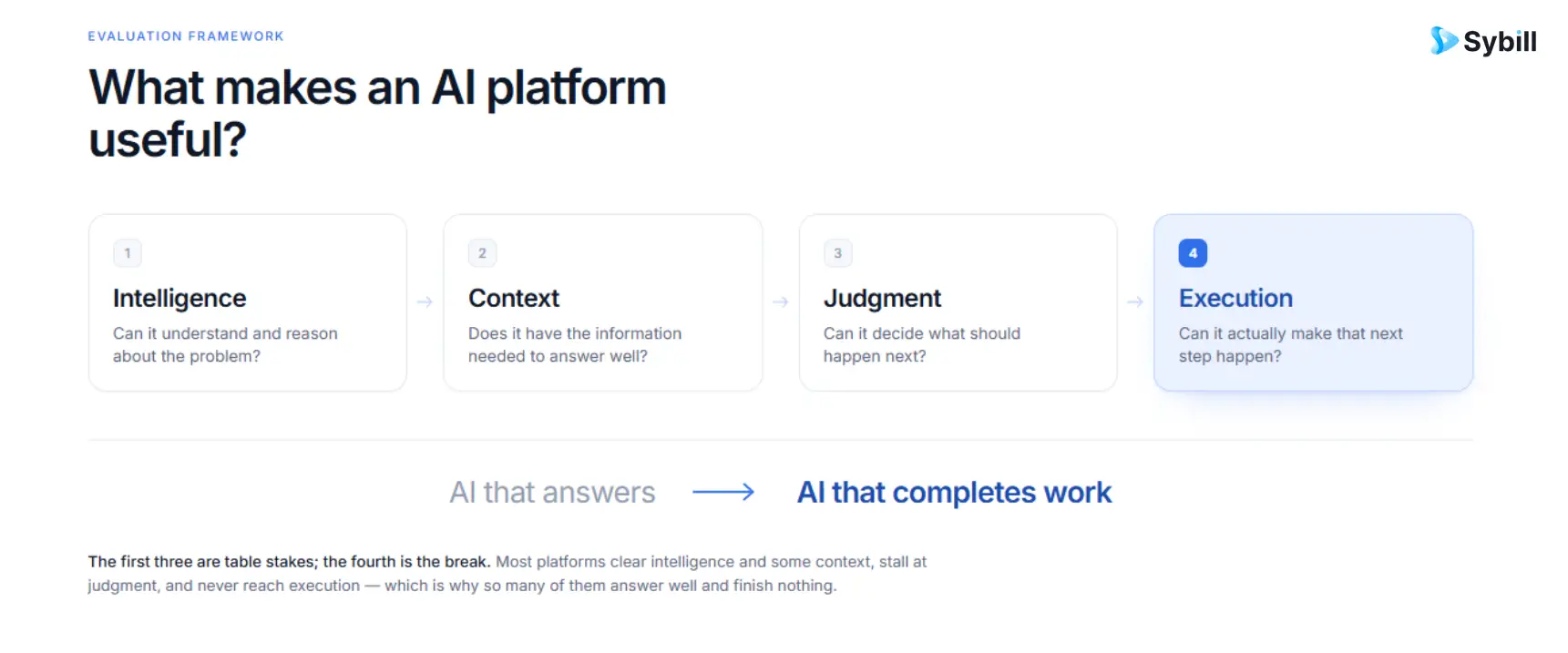
Persistent context becomes especially important when AI starts behaving like an agent rather than a one-off assistant. We explain the mechanics in How AI Agent Memory Works and our guide to what an AI agent actually is.
Before comparing products, it helps to separate the jobs they are trying to own.
Examples: ChatGPT, Claude
These platforms are designed to tackle an unusually wide range of intellectual work.
Use them when the task changes constantly and deep domain-specific workflow context is not always required.
Example: Perplexity
The primary job is finding, synthesizing, and tracing information.
Example: Sybill
The platform needs to understand buyers, deals, conversations, pipeline, CRM information, seller behavior, and historical outcomes.
If this is the category you are actually evaluating, our AI sales tools guide goes much deeper.
Examples: Cursor, GitHub Copilot
The critical context is the repository and software-development workflow.
Examples: Notion AI, Zapier, Make, Lindy
These platforms connect AI to internal knowledge or operational workflows.
Examples: Jasper, Intercom, Canva, Synthesia, ElevenLabs
The specialization might be marketing context, customer service, visual design, video, or speech.
That specialization matters because "Can this model generate text?" is no longer a meaningful differentiator.
The harder question is whether the product knows enough about the job to produce the right output and do something useful with it.
I used six questions.
Almost every SaaS product now has an AI feature.
That does not make every SaaS product a meaningful AI platform.
I looked for products where AI materially changes how the core work happens.
This is probably the most underrated question in AI software.
Does the system know only what you typed?
Can it also see your files?
Your knowledge base?
Your code?
Your customer's history?
Your CRM?
Previous decisions?
The history of a sales opportunity?
The less context users have to reconstruct manually, the more valuable the platform can become.
Generating an answer is useful.
Recognizing what needs to happen next is more difficult.
That is the judgment layer.
An AI telling a seller to update Salesforce still leaves the seller with work.
An AI preparing the correct CRM updates from the conversation has moved one step further.
The same principle applies to customer tickets, code, email, calendars, documents, campaigns, and workflows.
Context usually lives across several systems.
So integrations, APIs, MCP, permissions, and workflow placement matter.
AI pricing now comes in seats, credits, actions, outcomes, conversations, tokens, or generated minutes.
The pilot price is not always the useful number.
The more interesting question is what the system costs when people depend on it every day.
Best for: Account executives, sales managers, revenue leaders, and RevOps
Why it stands out: Sybill connects revenue context, judgment, and execution rather than treating each sales conversation as an isolated event.
Pricing: Free; Pro $30/user/month; Business $90/user/month; Enterprise custom
I am putting Sybill first because sales is a particularly good example of where generic AI runs into a context problem.
Consider a simple question:
"What should I do next on the Acme deal?"
A capable language model knows plenty about sales.
But it cannot answer that question particularly well unless it knows Acme.
It needs to know what the buyer said on the discovery call.
What changed during the demo.
Whether procurement has entered the conversation.
Which objections are unresolved.
Whether the economic buyer has ever actually engaged.
What the champion promised.
What your rep promised.
Whether the decision date moved.
Which competitor appeared.
What happened in the latest email exchange.
What the CRM says.
What similar opportunities looked like before they were won or lost.
This is the layer Sybill is designed to build.
Sybill creates a context graph across buyers, products, playbooks, deals, reps, and interactions. It retains selling patterns and feeds won, lost, and stalled outcomes back into the system so future recommendations can use what the organization has learned.
That context powers the judgment layer.
With Ask Sybill, a rep or manager can ask questions across sales conversations and deal information instead of manually assembling the evidence first. Ask Sybill can also be used for rep-level coaching and broader sales analysis.
For an individual opportunity, Deal Inspection helps surface changes, gaps, and deal questions using the information Sybill has accumulated.
Buyer Intelligence helps teams understand buyer needs and signals, while Competitor Intelligence can surface where competitors enter deals and what buyers are saying about them.
Then there is execution.
Sybill can generate Pre-Meeting Briefs using prior calls, emails, CRM context, meeting attendees, and outstanding actions.
It can create customizable Magic Summaries after calls, with summaries that adjust to meeting type and connect to downstream work.
It can draft Personalized Emails using actual call and email context.
CRM Autofill can map conversation information into CRM fields and update those fields after interactions.
AI Tasks moves beyond extracting action items by helping execute follow-up work and checking whether tasks may already have been completed from CRM, email, and calendar activity.
And Deal Workspace puts the ongoing opportunity, activity history, deal summary, next steps, and Ask Sybill in the same deal-level environment.
That is why I would not describe Sybill as simply an AI meeting notetaker.
A meeting is one source of evidence.
The more important object is the deal.
If you want the category distinction in more detail, read our guide to conversation intelligence software, our explanation of revenue intelligence, or our direct breakdown of revenue intelligence versus conversation intelligence.
Sybill is specialized.
If the job is writing software, use an AI coding platform.
If the job is generating visual assets, use a creative platform.
If your main task is open-ended web research, use a research platform.
Specialization is the point.
Sybill currently lists Free at $0, Pro at $30 per user per month, Business at $90 per user per month, and custom Enterprise pricing.
Best for: Reasoning, writing, research, data analysis, coding, files, and broad knowledge work
If I knew nothing about someone's job and could suggest only one AI platform to start exploring, ChatGPT would be an obvious candidate.
Its advantage is breadth.
The same workspace can move between writing, analysis, research, coding, images, files, planning, and problem solving.
ChatGPT also has memory, projects, search, deep research, data analysis, connected applications, and broader work capabilities depending on plan.
That makes it unusually useful for work that does not fit neatly inside one specialized category.
Breadth does not automatically create deep workflow context.
A general AI can write an excellent sales email.
That is different from already knowing which buyer needs an email, what the unresolved concern is, what your seller previously promised, and how the opportunity has changed.
The same distinction exists in other functions.
ChatGPT has a free plan. ChatGPT Plus is currently $20 per month. ChatGPT Business is $25 per user per month on monthly billing or $20 per user per month when billed annually in most countries.
Best for: Long documents, careful reasoning, writing, synthesis, and complex knowledge work
Claude is one of the first platforms I would consider when the work involves consuming a substantial amount of information before producing an answer.
Anthropic's current individual plans include memory, web search, file creation and code execution, connectors, remote MCP support, extended thinking, and connections to services such as Slack and Google Workspace. Paid Pro also includes Claude Code, Claude Cowork, Claude Design, Claude Science, Research, and unlimited projects.
That makes Claude increasingly useful beyond simple chat.
Claude is still general-purpose.
Specialized tasks improve when it can access the domain-specific systems and history required to make a good decision.
Claude has a free tier. Pro costs $20 per month or the equivalent of $17 per month on its $200 annual plan. Max starts at $100 per month.
Best for: Current research, source discovery, and evidence-backed exploration
Perplexity is the platform I would reach for when the core job is finding out rather than generating.
Its Pro experience includes richer citations, Research mode, file and photo uploads, model selection, and the ability to create files and applications from research work.
That makes it useful for:
competitor research, unfamiliar markets, sourcing statistics, vendor evaluation, industry research, and finding original sources worth reading.
Research and operational execution are different jobs.
A platform can help you discover what is happening without becoming the system that owns what should happen next.
Perplexity is free for core search. Perplexity Pro is currently $20 per month or $200 per year.
Best for: Developers who want AI operating directly inside the coding environment
Software development is one of the clearest examples of context changing AI quality.
A developer rarely needs only:
"Write a function."
They need:
"Make this change without breaking the rest of this codebase."
That requires repository-level understanding.
Cursor puts agents inside the development environment and currently supports frontier models, MCPs, skills, hooks, cloud agents, and agentic coding workflows on its paid individual plan.
Cursor is intentionally specialized around engineering.
If you do not build software, its context advantage is irrelevant.
Cursor has a free option. Pro starts at $20 per month.
Best for: Engineering organizations that want AI inside an existing GitHub workflow
GitHub Copilot has expanded far beyond inline autocomplete.
The current Pro plan includes cloud agent access, code review, unlimited code completion and next-edit suggestions, model selection, and access to third-party agents including Claude Code and Codex.
For teams already standardized on GitHub, that proximity can matter more than adding another independent tool.
An individual developer may still prefer a more AI-native editor experience.
The choice between Copilot and Cursor is partly about where you want the AI to live.
GitHub Copilot has a free tier. Individual Pro costs $10 per month, Pro+ costs $39, and Max costs $100.
Best for: Teams whose documents, projects, meetings, and internal knowledge already live in Notion
Notion benefits from a simple idea:
AI gets much more useful when it sits beside the information it needs.
Notion's Business offering currently includes Notion Agent, AI Meeting Notes, and Enterprise Search. Notion describes the agent as capable of completing complex multi-step tasks using context from Notion, connected applications, and the web.
That makes it less about "AI writing inside a document" and more about turning the workspace itself into usable context.
Its biggest context advantage depends on how much useful information lives in Notion and connected sources.
Notion has a free tier and paid Plus, Business, and Enterprise plans. Pricing varies by billing market and region. The Business tier is the plan where Notion currently positions its fuller agent and enterprise-search capabilities.
Best for: Connecting business applications and automating repeatable workflows
Zapier makes the most sense when your problem can be described like this:
"When this happens in one application, process the information and make something happen somewhere else."
Its Professional plan currently includes multi-step Zaps, premium applications, webhooks, AI fields, Tables, and Forms.
The underlying advantage is connectivity.
AI can then become another reasoning or generation step inside a larger deterministic workflow.
Very large workflows can become systems that require maintenance of their own.
The more business-critical the automation becomes, the more observability and ownership matter.
Zapier has a free tier. Professional currently starts at $19.99 per month.
Best for: Multi-step workflows where teams want fine-grained control over logic
Make occupies a similar category to Zapier, but its visual workflow model makes the mechanics of a complex automation more explicit.
Make currently supports more than 3,000 standard apps, routers and filters, configurable scenarios, APIs, and increasingly AI-oriented workflows.
That makes it particularly useful when a process has several branches and transformations.
Fine-grained control comes with a steeper learning curve.
There is a point where "no code" still requires someone who understands systems.
Make has a free tier with up to 1,000 credits per month. Core starts at $9 per month for the currently displayed 10,000-credit configuration.
Best for: Inbox, meetings, calendar, and assistant-style delegation
Lindy takes a more delegation-oriented approach to AI automation.
Its current Plus plan is positioned for everyday usage, while higher plans increase the amount of work the system can perform through larger credit allowances. Pro and Max scale to 15,000 and 35,000 credits per user per month respectively.
The useful product idea here is that an AI workflow does not always need to feel like a workflow builder.
For many users, "tell the assistant what to do" is a more natural interaction.
A broad assistant naturally has less specialized domain context than a platform designed around one function.
That does not make it worse.
It makes it useful for a different job.
Lindy Plus currently costs $29.99 per user per month. Pro costs $99.99 and Max costs $199.99.
Best for: Marketing teams that need AI to operate with brand and campaign context
AI-generated copy is no longer a sufficient reason to buy specialist marketing software.
ChatGPT and Claude can both write.
Jasper's differentiation is the marketing layer around generation.
Its current Pro offering includes an on-brand content platform and agents for core marketing workflows. Jasper positions Business above that for additional organizational requirements.
That is the important distinction.
The specialized platform is not valuable because the LLM suddenly knows how to write a headline.
It is valuable when the product can consistently apply the brand, knowledge, campaign context, governance, and workflow around that headline.
If your need is occasional writing rather than a repeatable marketing system, a general-purpose assistant may be enough.
Jasper Pro currently costs $69 per seat per month on monthly billing or $59 per month when billed annually. Business pricing is custom.
Best for: Customer-service organizations that want AI working inside support operations
Customer support is another function where context changes the quality of AI dramatically.
The system needs to understand:
the customer's question, knowledge base, support history, conversation state, ticket, policy, and escalation path.
Intercom combines Fin with the support environment around it. Its current Essential plan includes Messenger, shared inbox and ticketing, reports, and a public help center, with Fin priced by successful outcomes.
That lets AI participate in the support process rather than existing only as a generic question-answering interface.
The quality of any support AI still depends heavily on the knowledge and policies it can access.
Bad source material does not become good customer service because an LLM sits on top of it.
Intercom Essential currently starts at $29 per seat per month. Fin starts at $0.99 per outcome.
Best for: Presentations, marketing assets, social content, and everyday business design
Canva's advantage is not simply AI image generation.
The value is what happens after generation.
A business user can create something with AI, then continue editing layout, typography, imagery, templates, and brand assets inside the same environment.
Canva currently offers AI capabilities across both Free and paid plans, with larger allowances and broader capabilities as plans increase.
Specialist creative teams will still need deeper professional tools for many workflows.
Canva wins largely through accessibility and the breadth of work people can finish inside one environment.
Canva Free is available to anyone. Canva also offers paid Pro, Business, and Enterprise tiers, with pricing dependent on market and plan configuration.
Best for: Training, enablement, onboarding, explainers, and localized video
Traditional business video is expensive partly because every new version can require recording again.
Synthesia changes that workflow by letting teams turn scripts into presenter-style videos with AI avatars and then produce variations without returning to a camera.
Its current plans span Free, Starter, Creator, and Enterprise, with paid tiers increasing video and workspace capabilities.
This is not a replacement for every kind of filmmaking.
It is strongest when the video itself is structured, repeatable, and informational.
Synthesia Starter currently costs $29 per month. Creator costs $89 per month. Enterprise pricing is custom.
Best for: Text-to-speech, voice generation, dubbing, and conversational voice experiences
Voice deserves its own category.
ElevenLabs now spans text-to-speech, speech-to-text, voice design, music, voice cloning, dubbing, Studio, and agent-oriented voice capabilities across its product set.
That makes it useful both for content production and for developers building voice into products.
Voice economics matter at scale.
If audio or conversational agents become high-volume, evaluate the usage model rather than only the entry subscription price.
ElevenLabs offers Free at $0, Starter at $6 per month, Creator at $22, Pro at $99, and higher-volume business tiers.
You do not need to compare all 15 products feature by feature.
Start with the job.
A lot of AI software is still evaluated as though the prompt is the product.
I think that misses where the category is going.
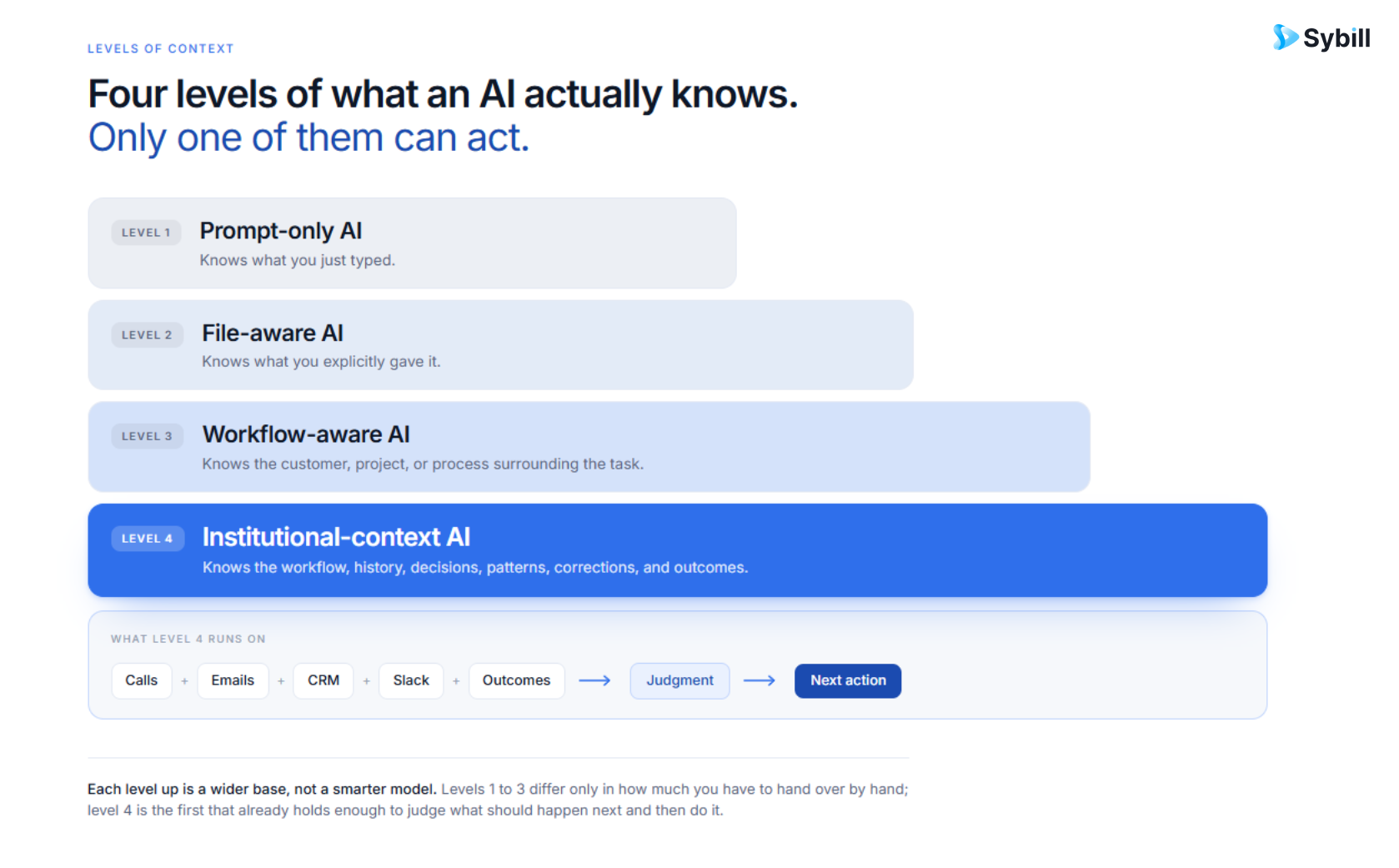
Imagine these four requests.
"Write a sales follow-up email."
"Write a sales follow-up email using this transcript."
"Write a sales follow-up using everything this buyer has told us in the past three months."
"Write the follow-up most likely to move this opportunity forward using the buyer's priorities, objections, stakeholder relationships, previous commitments, current CRM state, email activity, sales stage, and patterns from similar deals we previously won."
All four technically involve generative AI.
They are not remotely the same software problem.
The underlying model might even be identical.
What changed?
Context.
That same pattern appears across this list.
Cursor is more useful because it knows the repository.
Notion AI becomes more useful because it knows the workspace.
Jasper becomes more useful because it knows the brand.
Intercom becomes more useful because it knows the customer-support environment.
Sybill becomes more useful because it knows the buyer, deal, seller, and revenue history.
That is also why memory is becoming an important part of AI architecture.
A system with persistent memory does not need users to rebuild the world in every prompt.
Our guide to AI agent memory explains how this compounds over time.
I do not think most companies will eventually choose one AI platform.
That seems unlikely.
The more plausible future is a stack.
A general-purpose AI for broad intellectual work.
A research tool when current external information matters.
Specialized AI when domain context changes the quality of the decision.
Automation infrastructure connecting systems underneath.
For a salesperson, that could mean:
ChatGPT or Claude for open-ended thinking.
Perplexity for external account or industry research.
Sybill for understanding and executing an active sales opportunity.
For an engineer:
ChatGPT or Claude for broad reasoning.
Cursor or GitHub Copilot for the actual repository.
The capabilities overlap.
The context is different.
This is also why the rise of AI agents matters.
An agent that acts repeatedly needs memory, tools, goals, and permission boundaries rather than a single clever prompt. If you want a more practical sales-specific explanation, see our guide to AI agents for sales teams.
Sales already has plenty of software.
CRM.
Call recording.
Email.
Calendar.
Sales engagement.
Forecasting.
Enablement.
Analytics.
AI meeting assistants.
Yet reps and managers still spend a surprising amount of time reconstructing the deal themselves.
That is the underlying problem I think sales AI needs to solve.
The first generation of AI meeting software answered:
"What happened on this call?"
Conversation intelligence moves further by extracting buyer intent, objections, sentiment, next steps, and other structured signals from conversations.
Revenue intelligence widens the picture by connecting conversation evidence to other buyer interactions and pipeline activity.
AI sales forecasting can then use behavioral information from calls, emails, CRM activity, and buyer engagement rather than relying entirely on rep-entered stage and probability.
And agents can begin taking action against that information.
The more interesting questions become:
What is happening on this deal?
Why is it happening?
Which evidence supports that conclusion?
What are we missing?
Which opportunity needs attention first?
What should the rep do next?
What worked when we encountered this situation before?
Which part of the next step can software safely complete?
That is much closer to how Sybill is designed.
The current product is explicitly organized around three ideas:
Context: build a living memory of deals, objections, selling patterns, and outcomes.
Judgment: understand what is happening across deals, reps, and pipeline.
Execution: use that knowledge for follow-ups, CRM updates, meeting preparation, collateral, scheduling, handoffs, multi-threading, decks, talk tracks, and tasks.
That progression matters.
A transcript is data.
A summary is useful.
A deal memory is more powerful.
A system that can use that memory to identify what should happen and then help make it happen is a different category of product.
If you are trying to detect problems before a forecast review, our guide to spotting deal risk goes deeper into the signals.
If manager inspection is the bottleneck, see how to run a deal inspection.
If CRM data quality is the problem, see how Sybill CRM Autofill works and our deeper guide to AI-powered CRM Autofill.
If the team needs better preparation before buyer calls, see AI Pre-Meeting Briefs.
If sellers keep losing track of promised next steps, see AI Tasks.
If you want to understand what competitors are saying inside real deals, see Competitor Intelligence.
And if you want a single place to see the history and current state of an opportunity, see Deal Workspace.
An AI platform is software that combines artificial intelligence with context, data, tools, integrations, or workflows so users can perform a broader set of related tasks than they could with one narrow AI feature.
There is no universal best AI platform. For B2B sales and revenue execution, Sybill is purpose-built around persistent deal context, intelligence, and execution. For general knowledge work, ChatGPT is a strong starting point. Claude is particularly useful for long-context reasoning and documents. Perplexity is built around research. Cursor and GitHub Copilot are specialized for software development. Zapier and Make are strong for automation. Intercom is specialized for customer support.
For B2B sales, Sybill is designed around calls, emails, CRM information, Slack, buyers, deals, and accumulated sales context.
That context powers Ask Sybill, Deal Inspection, Buyer Intelligence, Competitor Intelligence, CRM Autofill, Pre-Meeting Briefs, AI Tasks, and Deal Workspace.
For a broader vendor comparison, see our guide to the best AI sales tools.
Yes.
ChatGPT now combines conversational AI with search, memory, files, coding, data analysis, projects, deep research, connected applications, images, voice, and other work capabilities depending on the plan.
An AI tool usually solves a narrower problem.
An AI platform generally combines several capabilities with context, data, integrations, or workflows.
There is no universally agreed boundary between the two.
Several products on this list currently have free tiers, including Sybill, ChatGPT, Claude, Perplexity, Cursor, GitHub Copilot, Notion, Zapier, Make, Canva, Synthesia, and ElevenLabs. The capabilities and usage limits differ substantially between free plans.
Sometimes AI can consolidate parts of an existing software stack.
But businesses still need systems that own important records, permissions, and workflows.
A more likely pattern is that AI becomes capable of reasoning and acting across those systems.
The most useful AI platforms can become better as they accumulate relevant context.
That context might be:
a codebase, brand, workspace, customer history, company knowledge, workflow history, user preference, or sales outcome.
For sales specifically, this is why AI agent memory and institutional revenue context matter. An AI that understands what happened before does not have to start from zero on every interaction.
An AI platform is software that combines artificial intelligence with context, data, tools, integrations, or workflows so users can perform a broader set of related tasks than they could with one narrow AI feature.
There is no universal best AI platform. For B2B sales and revenue execution, Sybill is purpose-built around persistent deal context, intelligence, and execution. For general knowledge work, ChatGPT is a strong starting point. Claude is particularly useful for long-context reasoning and documents. Perplexity is built around research. Cursor and GitHub Copilot are specialized for software development. Zapier and Make are strong for automation. Intercom is specialized for customer support.
For B2B sales, Sybill is designed around calls, emails, CRM information, Slack, buyers, deals, and accumulated sales context. That context powers Ask Sybill, Deal Inspection, Buyer Intelligence, Competitor Intelligence, CRM Autofill, Pre-Meeting Briefs, AI Tasks, and Deal Workspace. For a broader vendor comparison, see our guide to the best AI sales tools.