
Find us at booth #83, join us for a harbor side happy hour, or catch Gorish’s talk.

Sept, 16-18 > Learn more

%20(1).avif)
Mamta Tainwala

September 21, 2026
.avif)
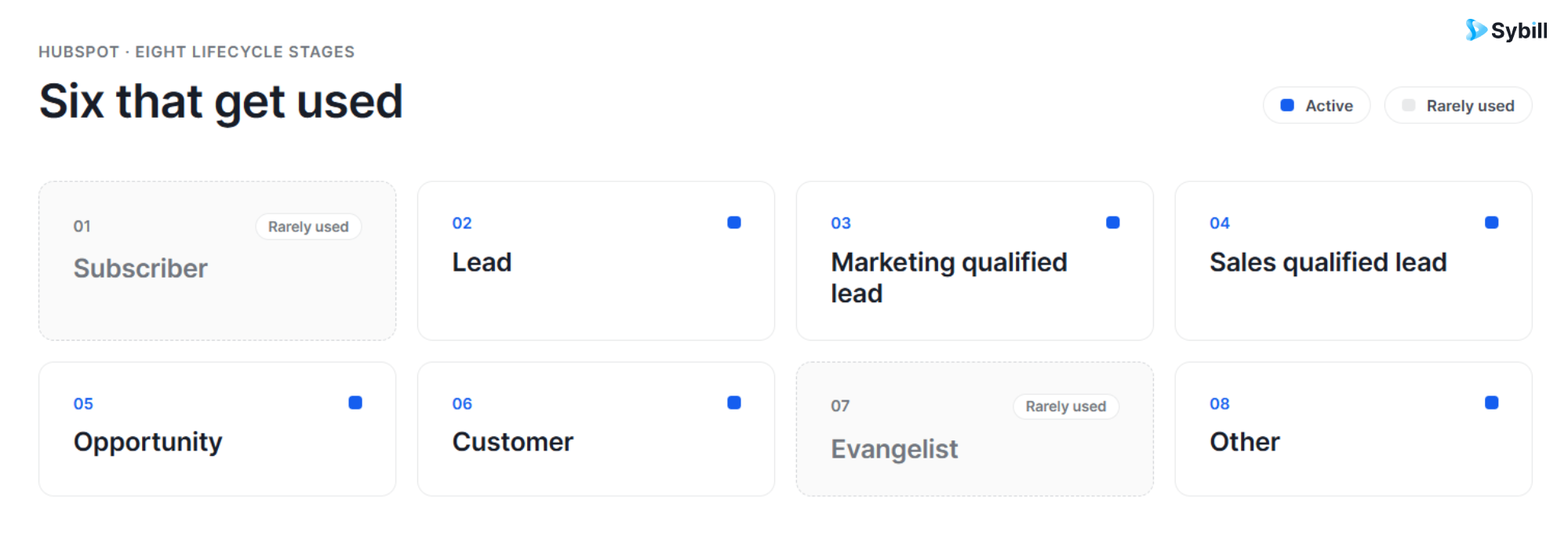
HubSpot lifecycle stages are a default property on contact and company records that describe where a person or account sits in your overall relationship, from first touch to loyal customer. HubSpot ships eight defaults: Subscriber, Lead, Marketing Qualified Lead, Sales Qualified Lead, Opportunity, Customer, Evangelist, and Other. You can rename, reorder, or add custom stages.
That shared property is the entire point. Without lifecycle stages, every team measures the funnel with its own ruler: marketing claims 800 leads, sales says it got 200, finance counts 50 customers, and nobody is lying because everybody is using a different definition. The lifecycle stage property, documented in HubSpot's knowledge base, forces one definition of MQL, one definition of customer, across every dashboard in the portal.
It is the least glamorous property in HubSpot and arguably the most load-bearing. This guide covers what each stage means, how updates happen, how to customize the list, how lifecycle stages differ from deal stages, and the configuration mistakes that make dashboards lie.
The defaults, in order: Subscriber (opted in to hear from you), Lead (converted or engaged), MQL (marketing-vetted), SQL (sales-accepted), Opportunity (associated with an active deal), Customer (at least one closed-won deal), Evangelist (active advocate), and Other (anyone outside the funnel, like partners and vendors). Most companies actively use about six of the eight.
Here is what each one means in practice, and who owns the transition into it.
1. Subscriber. Someone who opted in to hear from you, usually a blog or newsletter signup. They know you exist; that is the whole relationship so far. Owned by marketing.
2. Lead. A contact who has shown interest beyond subscribing, typically by converting on a form or engaging with content. Still early, still marketing's to nurture with the plays in our B2B lead scoring guide.
3. Marketing Qualified Lead (MQL). A lead marketing has vetted against agreed criteria. This is the stage where definitions matter most, because a loose MQL definition is how sales inherits a pile of "leads" who downloaded one checklist in 2024.
4. Sales Qualified Lead (SQL). A contact sales has accepted as worth active pursuit, usually after qualification against a framework like BANT or MEDDPICC. The marketing-to-sales handoff lives at this transition, which is why both teams agree on definitions in writing.
5. Opportunity. A contact associated with an active deal. In well-configured portals, this stage sets automatically when a deal is created and associated with the record.
6. Customer. A contact or company with at least one closed-won deal. This transition should be automatic when the deal closes. Should be. We will get to that.
7. Evangelist. A customer who actively advocates: referrals, reviews, case studies. Most companies barely use this stage, which is a small tragedy, because evangelists are the cheapest pipeline you will ever generate. The sales-to-customer-success handoff is where this stage gets fed.
8. Other. The junk drawer: partners, vendors, competitors, job applicants, your CEO's college roommate. Necessary, and best kept out of funnel reports.
Lifecycle stage lives on contacts and companies and describes the relationship: lead, MQL, customer. Deal stage lives on the deal record and describes one specific opportunity's progress through your pipeline: discovery, proposal, closed won. Lead status is a secondary contact property for working states inside a stage: new, attempting, connected, unqualified.
This is the confusion that launched a thousand messy portals, so let us be adults for a second and keep three properties that sound alike in three separate lanes.
A single contact can be associated with multiple deals over the years, each with its own deal stage, while the contact holds exactly one lifecycle stage across the whole arc. We wrote the full pipeline-side guide in HubSpot deal stages explained; consider this post its sister. And if the funnel-versus-pipeline distinction itself is fuzzy on your team, start with sales funnel vs sales pipeline.
The mental model that sticks: lifecycle stage answers "who is this person to us?", deal stage answers "how is this specific deal going?", and lead status answers "what is the rep doing about it right now?" Three questions, three properties. Collapse them into one and your reporting collapses with them.
Four ways: automatic defaults for newly created or synced records, association-based updates (a new deal moves the contact to Opportunity; a closed-won deal moves contact and company to Customer), workflows that set the stage when criteria are met, and manual edits. Automatic updates only move stages forward, never backward.
That forward-only rule deserves its own paragraph, because it surprises every new admin exactly once. Subscriber to Opportunity, yes. Customer back to Lead, no. If a record genuinely needs to move backward, say a churned customer re-entering nurture, you handle it deliberately: manually, or by clearing the property in a workflow before setting the earlier stage.
In settings you can also define a default lifecycle stage for records synced from each connected app, which keeps imports from your integration stack from landing as unclassified mystery contacts. Workflows remain the workhorse for MQL and SQL logic: score crosses a threshold, stage updates, routing fires. Our roundup of HubSpot sales workflow examples includes several lifecycle-driven builds, and the wider HubSpot automation tools guide covers the tooling around them.
Manual updates are the fourth path, and the most dangerous as a primary method, because humans update CRMs with the enthusiasm of people filing taxes.
Go to Settings, then Objects, then Contacts, then the Lifecycle Stage tab. From there you can rename defaults, drag stages into a new order, or add custom stages. HubSpot automatically generates date entered, date exited, and time in stage properties for every stage you create, so conversion reporting works with zero extra setup.
The defaults rarely match a real business out of the box, and since HubSpot opened up customization there is no reason to force fit. Popular additions we see in revenue teams: Product Qualified Lead for PLG motions, Churned Customer so former customers stop polluting the Customer count, and a Retention Risk or Renewal stage for CS-heavy businesses.
Two rules for customizing well. First, name stages after observable states, not moods: "Technical Scoping" beats "Evaluating." Second, add a stage only if a team will act differently because a record is in it. A stage with no owner and no play attached is decorative, and decorative properties rot.
The big five: closed-won deals that never flip the contact to Customer, no written MQL and SQL definitions, reps using lifecycle stage as a daily working list instead of lead status, re-engagement flows that assume stages can regress automatically, and stages that nobody updates at all. Each one quietly corrupts funnel reporting.
Taking them in turn:
1. The closed-won sync break. The deal says won, the contact still says SQL, and your customer marketing emails a "customer" a cold sequence. This is one of the most common breaks found in portal audits, and the association-based automation setting or a one-step workflow fixes it.
2. No written definitions. If marketing and sales have not agreed in writing on what qualifies a record for MQL and SQL, the property is measuring opinions. Never let one team unilaterally change a definition the other depends on. Our lead qualification guide and these lead qualification questions are useful raw material for that document.
3. Lifecycle stage as a to-do list. Reps who bounce contacts between stages to track daily activity are doing lead status's job with the wrong property, and destroying your conversion timestamps in the process.
4. Ignoring the forward-only rule. Building a win-back motion that assumes automatic backward movement. It will not happen. Plan the workflow deliberately.
5. Trusting stages nobody feeds. The quietest failure of all. A lifecycle stage is a claim about reality, only as current as the last person or workflow that touched it. Which brings us to the part most guides skip.
Every meaningful stage transition is justified by something a buyer said on a call: budget confirmed, authority identified, deal agreed. In most portals that evidence dies in the rep's memory, and the stage update waits on admin work. Feeding call data into HubSpot automatically makes lifecycle automation fire on evidence instead of recollection.
Ask the uncomfortable question about your own portal: when a lead became sales qualified last week, where did the qualification actually happen? On a call. A rep asked about budget, authority, need, and timeline. The prospect answered. Then the rep drove to the next meeting, and the evidence evaporated. No rewind button. What survived was a two-line note and a stage change that depends entirely on someone remembering Friday admin, which is exactly why CRM notes matter and why most portals fail the data hygiene test.
This is where the post-conversation layer earns its keep. Sybill, built on around 33 million sales calls analyzed per Sybill's own data, joins the call, captures what was actually said and how it landed, and pushes structured updates into HubSpot on its own: qualification evidence into MEDDPICC and BANT fields, summaries onto the record, and custom properties autofilled after every discovery call. Your lifecycle workflows then fire on fields that reflect what the buyer said, not what the rep recalled at 6 PM on Friday. Setup runs through the native Sybill HubSpot integration in minutes.
The result is a funnel report you can defend in a board meeting, because every transition traces back to something that actually happened. Pair it with the email automation and sequences already keyed to your stages, and lifecycle stages stop being a hygiene chore and become what they were designed to be: a live map of your revenue.
Lifecycle stages are the spine of HubSpot reporting. Define all eight, automate the transitions, and keep deal stages and lead status in their own lanes. Every stage needs an owner and a written definition, or it is decoration.
But configuration only gets you a well-organized guess. Stages are claims, and claims need evidence. That evidence is in your sales conversations right now, either flowing into HubSpot automatically or dying in a rep's memory by Friday.
Set up your stages right. Then Get started for free with Sybill, and give them something true to say.
What are the default lifecycle stages in HubSpot? Eight stages: Subscriber, Lead, Marketing Qualified Lead, Sales Qualified Lead, Opportunity, Customer, Evangelist, and Other. All are customizable: you can rename them, reorder them, or add your own custom stages from the Lifecycle Stage tab in your contact object settings.
What is the difference between a lifecycle stage and a deal stage? Lifecycle stage is a contact and company property describing the overall relationship, such as lead, MQL, or customer. Deal stage is a deal property describing one opportunity's progress through your pipeline, such as discovery, proposal, or closed won. A contact has one lifecycle stage but can hold many deals.
Can lifecycle stages move backward in HubSpot? Not automatically. HubSpot's automatic updates only move stages forward. To move a record backward, update it manually or use a workflow that clears the lifecycle stage property before setting the earlier stage.
Can I create custom lifecycle stages in HubSpot? Yes. Go to Settings, then Objects, then Contacts, then the Lifecycle Stage tab, and click to add a stage. HubSpot automatically generates date entered, date exited, and time in stage properties for every custom stage, so funnel reporting extends to it immediately.
Who should own each lifecycle stage transition? Marketing typically owns Subscriber through MQL, sales owns SQL through Customer, and customer success or marketing owns Evangelist. The critical rule: both teams agree on stage definitions in writing, and neither changes a definition the other depends on unilaterally.
How do lifecycle stages update automatically? Three built-in ways: default stages for newly created or synced records, association-based updates such as moving a contact to Customer when a deal closes won, and workflows. Conversation intelligence tools like Sybill add a fourth by autofilling the underlying HubSpot properties directly from sales calls.
What is lead status in HubSpot? Lead status is a secondary contact property that tracks working states inside a lifecycle stage, usually within SQL: new, attempting to contact, connected, open, or unqualified. It is the rep's play-by-play, while lifecycle stage is the season record. Use both; never merge them.
Eight stages: Subscriber, Lead, Marketing Qualified Lead, Sales Qualified Lead, Opportunity, Customer, Evangelist, and Other. All are customizable: you can rename them, reorder them, or add your own custom stages from the Lifecycle Stage tab in your contact object settings.
Lifecycle stage is a contact and company property describing the overall relationship, such as lead, MQL, or customer. Deal stage is a deal property describing one opportunity's progress through your pipeline, such as discovery, proposal, or closed won. A contact has one lifecycle stage but can hold many deals.
Not automatically. HubSpot's automatic updates only move stages forward. To move a record backward, update it manually or use a workflow that clears the lifecycle stage property before setting the earlier stage.








